


Instagram Scheduler vs Planner: Quick Answer
Instagram schedulers automate when your posts publish. Upload content, set the time, and posts go live automatically even when you're offline.
Instagram planners help you organize what to post. They provide visual calendars, content libraries, and strategic planning tools to map out your content strategy.
Most successful Instagram accounts use both - planners for strategy, schedulers for automation.
Understanding Instagram Post Schedulers
An Instagram post scheduler is a tool that publishes your content automatically at predetermined times. You don't need to be online, remember to post, or interrupt your day.
How Instagram Schedulers Work
The process is straightforward:
- Upload your photo, video, or carousel
- Write your caption and add hashtags
- Select publish date and time
- The scheduler posts automatically
Your content goes live at exactly the right moment, whether you're sleeping, in meetings, or on vacation.
Key Features of Instagram Schedulers
Automatic Publishing
Posts go live without any action from you. Set it and forget it.
Time Zone Support
Schedule posts for different time zones if you have international audiences.
Multi-Platform Posting
Most schedulers support Instagram, Facebook, TikTok, LinkedIn and more from one dashboard.
Bulk Scheduling
Upload and schedule multiple posts at once instead of one at a time.
First Comment Scheduling
Some tools let you schedule the first comment separately, perfect for hashtags.
Post Previews See exactly how your post will look before it goes live.
Who Needs an Instagram Scheduler
Schedulers solve specific problems:
- Busy entrepreneurs who can't post during optimal engagement times
- Content creators managing multiple platforms
- Social media managers handling several client accounts
- Small business owners without time for daily manual posting
- International brands posting across different time zones
 PostPlanify
All your social media in one simple dashboard
Schedule posts, track analytics, and reply to comments/DMs without switching tabs.

Engagement
+18%
Views
52.8k
If you struggle with posting consistency or optimal timing, you need a scheduler.
Understanding Instagram Post Planners
An Instagram post planner helps you organize, visualize, and strategize your content before scheduling anything. It's your command center for content strategy.
How Instagram Planners Work
Planners focus on the big picture:
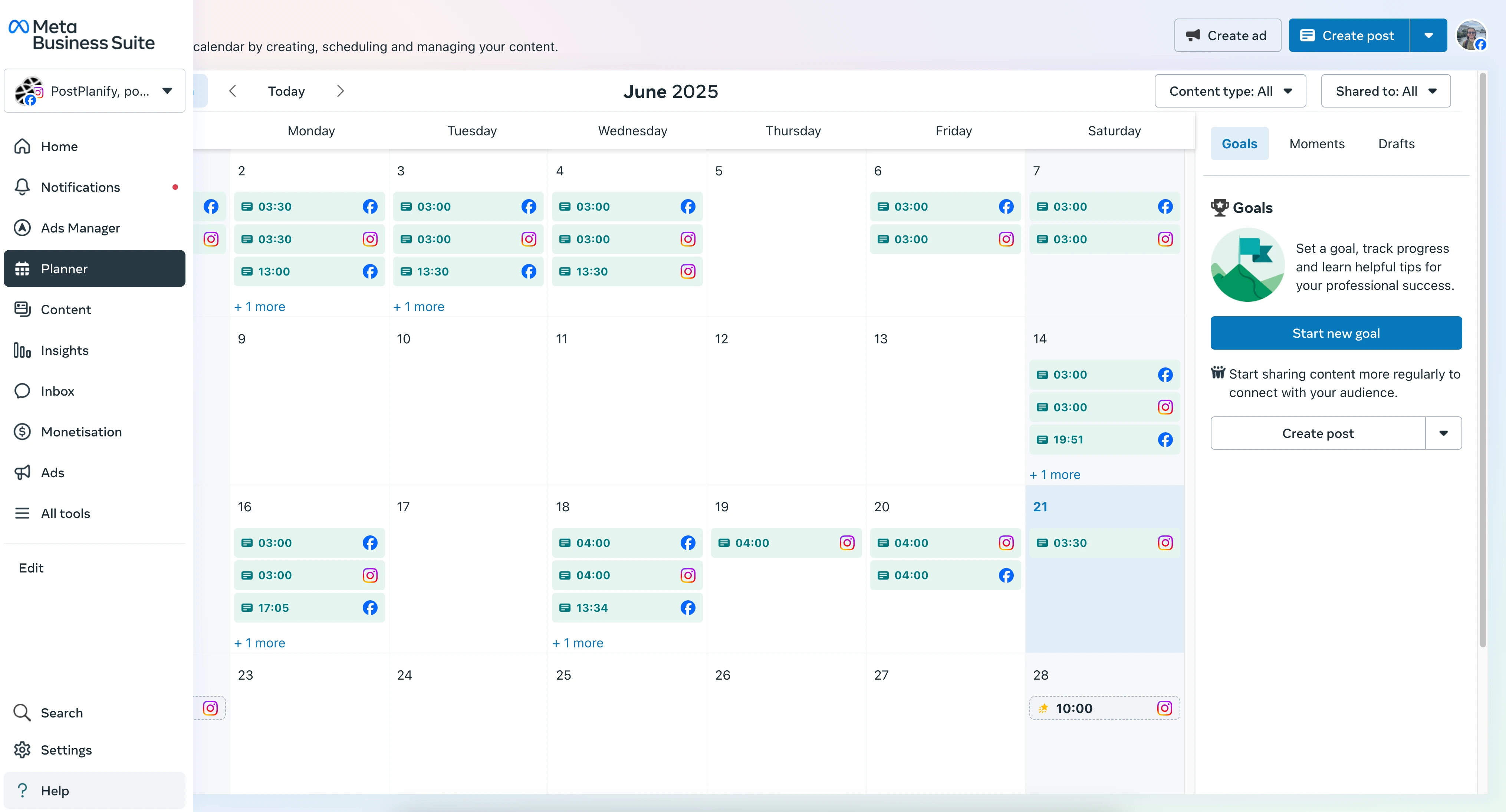
Content Calendar View
See all upcoming posts in calendar format to spot gaps and maintain balance.
Visual Feed Preview
Preview how posts will look together on your grid before publishing.
Content Categorization
Organize posts by type (educational, promotional, entertaining) to maintain variety.
Campaign Planning
Map out product launches, seasonal campaigns, or content series across weeks.
Team Collaboration
Share content plans with team members or clients for approval.
What Makes Planners Different
Planners answer strategic questions schedulers can't:
- Am I posting too many promotional posts this week?
- Does my feed aesthetic flow well?
- Have I covered all important topics this month?
- Is there enough variety in my content types?
- When should I post about the upcoming sale?
Who Needs an Instagram Planner
Planners are essential for:
- Brands maintaining consistent visual identity
- Agencies coordinating content across multiple clients
- Creators building cohesive content themes
- Businesses planning seasonal campaigns
- Teams collaborating on content strategy
If you struggle with knowing what to post or maintaining content consistency, you need a planner.
Instagram Scheduler vs Planner: Key Differences
| Feature | Instagram Scheduler | Instagram Planner |
|---|---|---|
| Primary Purpose | Automate publishing | Organize strategy |
| Main Function | Posts content automatically | Visualizes content calendar |
| Time Saved | Daily posting tasks | Weekly planning sessions |
| Best For | Execution & consistency | Strategy & organization |
| Key Benefit | Never miss posting times | Never run out of ideas |
| Solves | "When should I post?" | "What should I post?" |
| Typical Users | Busy creators, businesses | Brands, agencies, teams |
The Strategy vs Execution Difference
Planners = Strategy
- Decide what to post
- When to post it
- How posts work together
- Content balance and themes
Schedulers = Execution
- Publish at optimal times
- Automate the posting process
- Handle multiple platforms
- Free up your time
Think of it this way: Planners are your roadmap. Schedulers are your autopilot.
Where They Overlap
Modern tools often combine both features:
PostPlanify, for example, provides:
- Visual content calendar (planner feature)
- Automatic publishing (scheduler feature)
- Drag-and-drop organization (planner feature)
- Bulk scheduling (scheduler feature)
- Feed preview (planner feature)
- Multi-platform support (scheduler feature)
This integration eliminates the need for separate tools.
Benefits of Using an Instagram Scheduler
1. Post During Peak Engagement Times
Your audience might be most active at 7 AM or 9 PM. Schedulers let you hit these windows consistently without being online.
Check your Instagram Insights for when followers are active, then schedule all posts for those exact times.
2. Maintain Posting Consistency
Algorithms favor accounts that post regularly. Schedulers make consistency effortless:
- Never forget to post
- Maintain your posting frequency
- Build trust through reliability
- Stay visible in followers' feeds
3. Batch Create Content Efficiently
Instead of creating content daily:
- Dedicate one day to creating 7-14 posts
- Schedule everything at once
- Free up the rest of your week
- Reduce daily decision fatigue
This is called content batching and it's a massive time-saver.
4. Manage Multiple Accounts Seamlessly
If you manage several Instagram accounts (personal brand, business, clients):
- Schedule content for all accounts from one dashboard
- Switch between accounts instantly
- Maintain different posting schedules
- Never confuse which content goes where
5. Cross-Platform Posting
Post to Instagram while simultaneously scheduling:
One piece of content reaches multiple platforms with minimal extra effort.
6. Better Work-Life Balance
Stop interrupting your day to post on Instagram:
- Enjoy vacations without posting stress
- Focus on deep work without social media interruptions
- Spend evenings with family, not on your phone
- Sleep peacefully knowing posts are handled
Benefits of Using an Instagram Planner
1. Visualize Your Content Strategy
See your entire month at a glance:
- Spot content gaps before they happen
- Ensure variety in post types
- Maintain visual aesthetic flow
- Balance promotional and value content
2. Plan Campaigns Strategically
Product launches, sales, and campaigns require coordination:
- Build anticipation with teaser posts
- Space promotional content appropriately
- Coordinate with email and other marketing
- Track what's publishing when
3. Maintain Content Balance
Avoid posting three promotional posts in a row or all educational content one week:
- Mix educational, entertaining, and promotional
- Vary between Reels, carousels, and single images
- Ensure diverse topics and themes
- Keep audience engaged with variety
4. Collaborate With Teams
Share your content plan:
- Get client approval before scheduling
- Assign content creation to team members
- Track who's responsible for what
- Avoid duplicate efforts
5. Never Run Out of Ideas
With a planner, you can:
- Store content ideas when inspiration strikes
- Create content themes and series
- Repurpose high-performing content
- Plan seasonal content months ahead
6. Improve Content Quality
When you're not scrambling daily for content:
- More time to create quality visuals
- Better caption writing
- Thoughtful hashtag strategy
- Strategic call-to-actions
Planning ahead always improves quality compared to last-minute posting.
Should You Use a Scheduler, Planner, or Both?
Use ONLY a Scheduler If:
- You already know what to post
- Your content is straightforward (like quotes or tips)
- You post similar content regularly
- Your main goal is consistency
- You're a solo creator with a simple strategy
A scheduler gives you autopilot for execution.
Use ONLY a Planner If:
- You have time to post manually
- You're just getting started
- You want to perfect your strategy first
- You work with a team on content approval
- Visual cohesion is your top priority
A planner helps build your strategy foundation.
Use BOTH When:
- Managing a business Instagram account
- Handling multiple social platforms
- Working with a team or clients
- Building a personal brand seriously
- Creating diverse content types
- Posting 4+ times weekly
The combination delivers maximum efficiency.
Most successful Instagram accounts use both. Planning creates the strategy. Scheduling executes it automatically.
How to Choose the Right Tool
Features to Look For
In a Scheduler:
- Reliable auto-posting
- Mobile and desktop access
- Multi-platform support
- Bulk upload capabilities
- Timezone management
- Post analytics
In a Planner:
- Visual calendar view
- Drag-and-drop interface
- Feed preview feature
- Content categorization
- Team collaboration tools
- Idea storage
In Combined Tools:
- Everything above
- Seamless workflow between planning and scheduling
- Content library
- Template saving
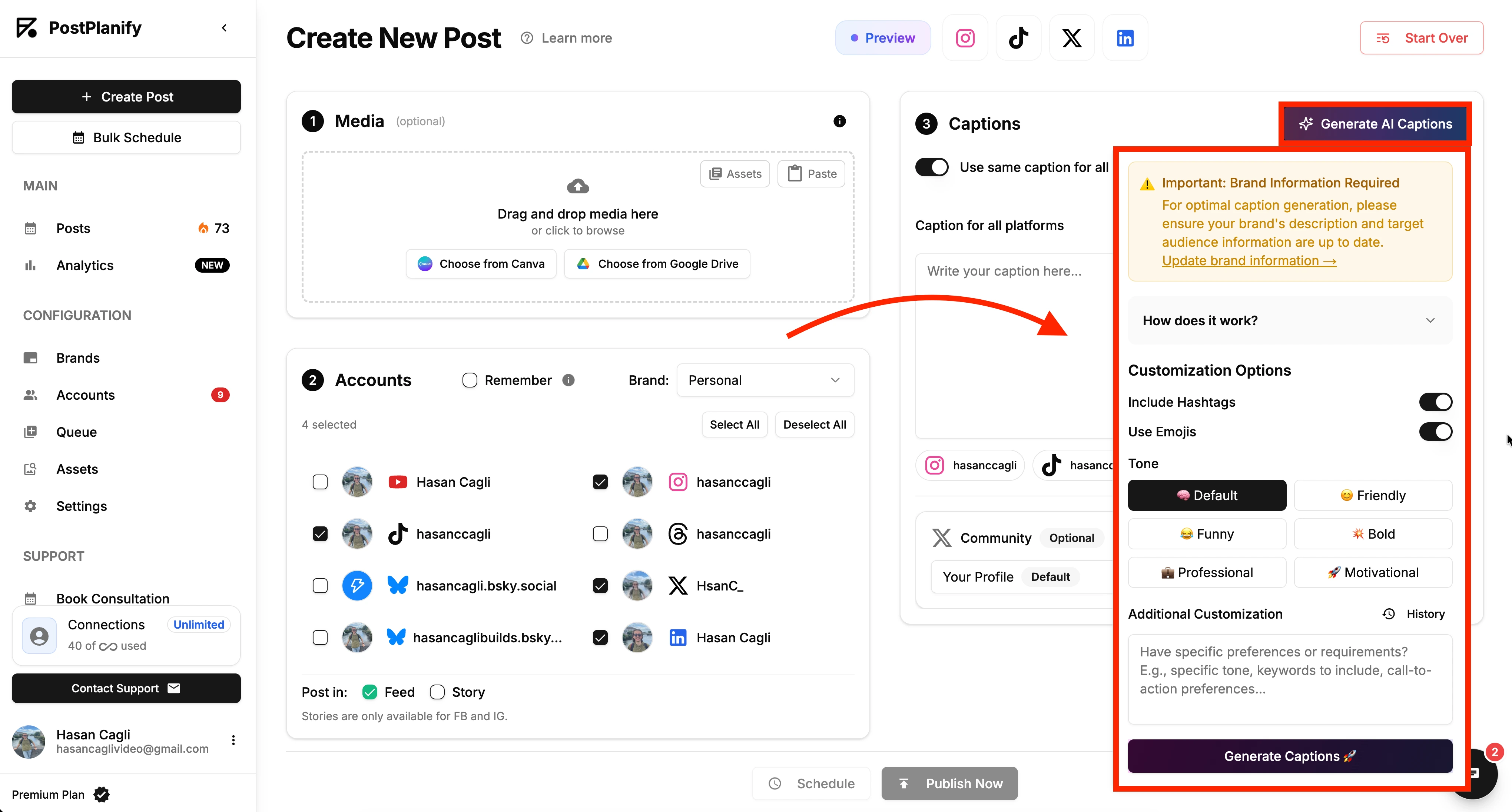
- AI caption generation
- Canva integration
Popular Instagram Scheduling and Planning Tools
PostPlanify (Scheduler + Planner)
- All-in-one solution
- Supports 9 platforms
- AI assistant and Canva + Google Drive integration
- 7-day free trial
- Starts at $29/month
Later (Strong Planner, Basic Scheduler)
- Great visual planning
- Feed preview
- Limited free plan
- Higher pricing for scheduling
Buffer (Scheduler Focus)
- Simple scheduling
- Basic planning features
- Limited platform support
- Clean interface
Hootsuite (Enterprise)
- Robust features
- Complex interface
- Higher pricing
- Better for agencies
For most creators and small businesses, an all-in-one tool like PostPlanify's Instagram scheduler eliminates the need for multiple subscriptions.
Getting Started: Your Action Plan
Week 1: Plan Your Content
- Review last month's top-performing posts
- Brainstorm 30 content ideas
- Create content themes (Monday tips, Friday features, etc.)
- Map ideas to a calendar
- Identify gaps and fill them
Week 2: Batch Create
- Design all graphics in one session
- Write all captions together
- Research and save hashtag sets
- Take/edit all photos needed
- Record any videos
Week 3: Schedule Everything
- Choose your scheduler/planner tool
- Upload all content
- Add captions and hashtags
- Schedule for optimal times
- Review calendar for balance
Week 4+: Monitor and Optimize
- Check analytics weekly
- Note top-performing content
- Adjust posting times based on data
- Refine content strategy
- Batch create next month's content
After the initial setup, you'll spend just 2-3 hours weekly on Instagram content instead of daily manual posting.
Advanced Strategies for Schedulers and Planners
Create Content Themes
Organize your content by recurring themes:
Monday Motivation: Inspirational quotes or success stories
Tutorial Tuesday: How-to content and tips
Wednesday Wins: Customer testimonials or results
Throwback Thursday: Company history or archives
Feature Friday: Product highlights or team spotlights
Themes make planning easier and give followers predictable value.
Use Content Buckets
Divide your content into categories:
- 40% Educational
- 30% Entertaining
- 20% Promotional
- 10% Personal
Check your planner monthly to ensure you're hitting these ratios.
Schedule First Comments Separately
Instead of cramming hashtags into captions:
- Write a clean, engaging caption
- Schedule hashtags as the first comment
- Keeps your main caption readable
- Still gets hashtag benefits
Repurpose High-Performers
When a post performs exceptionally well:
- Schedule it again 3-6 months later
- Reformat it (post → carousel → Reel)
- Share it to Stories
- Cross-post to other platforms
Your planner helps you track which content deserves repurposing.
Coordinate with Other Marketing
Use your planner to align Instagram with:
- Email newsletter topics
- Blog post releases
- YouTube video launches
- Podcast episodes
- Product launches
Integrated marketing amplifies impact.
Common Mistakes to Avoid
Over-Scheduling Without Spontaneity
If 100% of your content is scheduled weeks ahead, you lose authenticity and can't respond to trends.
Leave room for:
- Trending topics and challenges
- Real-time updates
- Behind-the-scenes moments
- Story responses
Aim for 70% scheduled, 30% spontaneous.
Scheduling Without Analytics
Don't guess when to post. Use Instagram Insights:
- When are followers most active?
- Which posts get highest engagement?
- What times drive most profile visits?
- Which content types perform best?
Schedule based on data, not assumptions.
Planning Too Far Ahead
Don't schedule posts 6 months out. Things change:
- Trends shift
- Products update
- Your brand evolves
- Current events happen
Plan 2-4 weeks ahead maximum, except for truly evergreen content.
Forgetting to Engage
Scheduling posts doesn't mean you can ignore Instagram:
- Reply to comments quickly
- Engage with other accounts
- Check DMs daily
- Monitor performance
Automation handles posting. You still handle relationships.
Using Only One Platform Feature
Instagram offers multiple content formats:
- Feed posts
- Stories
- Reels
- Carousels
Don't just schedule feed posts. Learn how to schedule Instagram Reels and Stories too for maximum reach.
Instagram Scheduler vs Planner: Real User Scenarios
Scenario 1: Solo Creator
Sarah runs a fitness coaching business:
Before: Posted randomly whenever she remembered, missing her most engaged morning audience.
With Scheduler: Batch creates workout videos and tips on Sundays, schedules posts for 6 AM all week when her audience is most active.
Result: 40% increase in engagement, more consistent client inquiries.
Best tool: Simple scheduler with basic planning features.
Scenario 2: E-commerce Brand
Local boutique with seasonal products:
Before: Struggled to coordinate Instagram with sales, often posted product photos after sales ended.
With Planner + Scheduler: Plans seasonal campaigns monthly, coordinates product posts with email marketing and website sales.
Result: Better sales coordination, improved brand consistency, higher conversion from Instagram.
Best tool: Combined planner/scheduler with campaign features.
Scenario 3: Social Media Agency
Agency managing 15 client accounts:
Before: Constant back-and-forth with clients, missed posting deadlines, no content approval process.
With Planner + Scheduler: Visual planning for client approval, bulk scheduling after approval, calendar view of all clients.
Result: Streamlined workflow, happier clients, ability to take on more accounts.
Best tool: Enterprise planner/scheduler with team collaboration.
Measuring Success: Analytics to Track
Scheduler Performance Metrics
Posting Consistency: Are you hitting your target frequency?
Optimal Timing: Are scheduled posts reaching more people than manual posts?
Time Saved: How many hours weekly does scheduling save?
Cross-Platform Reach: How many platforms are you maintaining effortlessly?
Planner Performance Metrics
Content Balance: Are you maintaining your target content mix?
Campaign Success: Are planned campaigns performing better than reactive posts?
Team Efficiency: Is collaboration smoother with shared planning?
Content Quality: Are planned posts getting better engagement than rushed ones?
Overall Instagram Growth
Track these metrics monthly:
- Follower growth rate
- Average engagement rate (use our Instagram Engagement Calculator)
- Profile visits from posts
- Website clicks
- DM inquiries
If numbers improve after implementing a scheduler/planner, you've made the right choice.
FAQ: Instagram Scheduler vs Planner
What's the main difference between an Instagram scheduler and planner?
A scheduler automates when posts publish - you set the time and content goes live automatically. A planner helps organize what to post and visualize your content calendar before scheduling. Most successful accounts use both.
Can I use Instagram's built-in scheduling features?
Yes, Meta Business Suite offers basic scheduling for Instagram. However, it's limited compared to dedicated tools - no bulk scheduling, clunky interface, and limited preview capabilities.
Do schedulers and planners work for Instagram Reels?
Many modern schedulers support Reels scheduling. PostPlanify lets you schedule Instagram Reels just like regular posts. Check if your tool supports Reels before committing.
How far in advance should I schedule Instagram posts?
Schedule 1-2 weeks ahead for most content. This provides consistency without over-planning. For seasonal campaigns, you can plan further, but schedule closer to publish date for flexibility.
Will scheduled posts get less engagement?
No. Instagram doesn't penalize scheduled posts. Engagement depends on content quality, posting time, and consistency - all of which schedulers help improve.
Can I schedule carousel posts and Stories?
Yes, many schedulers support Instagram carousel posts and Stories. PostPlanify handles all Instagram content types from one dashboard.
Is it better to plan content weekly or monthly?
Most creators find weekly batch creation with monthly strategic planning works best. Plan themes monthly, create content weekly, and schedule as you go.
What's the best free Instagram scheduler?
Most "free" schedulers have significant limitations. PostPlanify offers a 7-day free trial with full feature access, letting you test everything before committing to a paid plan.
Should small businesses use schedulers and planners?
Absolutely. Small business owners have limited time. Schedulers and planners help maintain professional Instagram presence without daily manual effort, freeing time for core business activities.
Can I schedule posts to multiple Instagram accounts?
Yes, most scheduling tools support multiple account management. This is essential for agencies, businesses with multiple brands, or creators managing personal and professional accounts.
Final Thoughts: Choosing Your Instagram Workflow
The "scheduler vs planner" question isn't really about choosing one over the other. It's about understanding what each tool does and how they work together.
You need a scheduler if consistency and timing are your biggest challenges.
You need a planner if strategy and organization are your pain points.
You need both if you're serious about Instagram growth and want to work smarter, not harder.
The good news? You don't need separate tools anymore. Combined platforms like PostPlanify give you planning, scheduling, and execution in one seamless workflow.
Stop choosing between strategy and efficiency. Get both.
Ready to Transform Your Instagram Workflow?
PostPlanify combines visual planning, automatic scheduling, AI captions, and multi-platform support in one powerful tool.
What you get:
- Plan content visually with drag-and-drop calendar
- Schedule posts, Reels, Stories, and carousels
- Generate captions with AI assistance
- Import designs from Canva
- Post to 9 platforms from one dashboard
- Preview exactly how posts will look
- Track analytics and optimize timing
Questions about which features you need? Email me directly at [email protected]
PostPlanifyAll your social media in one simple dashboard
Schedule posts, track analytics, and reply to comments/DMs without switching tabs.
Engagement
+18%
Views
52.8k
About the Author

Hasan Cagli
Founder of PostPlanify, a content and social media scheduling platform. He focuses on building systems that help businesses, agencies, and teams plan, publish, and manage content and social media more efficiently across platforms.


