
CoSchedule is a marketing suite and social media management platform that helps marketing teams plan campaigns, schedule content, and coordinate publishing across channels. Its main features include marketing calendars, social media scheduling, project management, team collaboration, and campaign planning to streamline marketing workflows at scale.
But is CoSchedule really worth the price - or should you save your money?
Today, we'll break down the full CoSchedule pricing structure and show you exactly what features you get in each plan, so you can decide whether it's the right tool for your content strategy.
CoSchedule Pricing at a Glance (2026)
| Plan | Price | Social Profiles |
|---|---|---|
| Free Calendar | $0/month | 1 profile |
| Social Calendar | $19/user/month | 3 profiles |
| Agency Calendar | $59/user/month | 10 profiles |
| Marketing Suite | Custom pricing | Unlimited |
Pricing is per user per month (annual). Additional profiles cost extra on lower tiers.
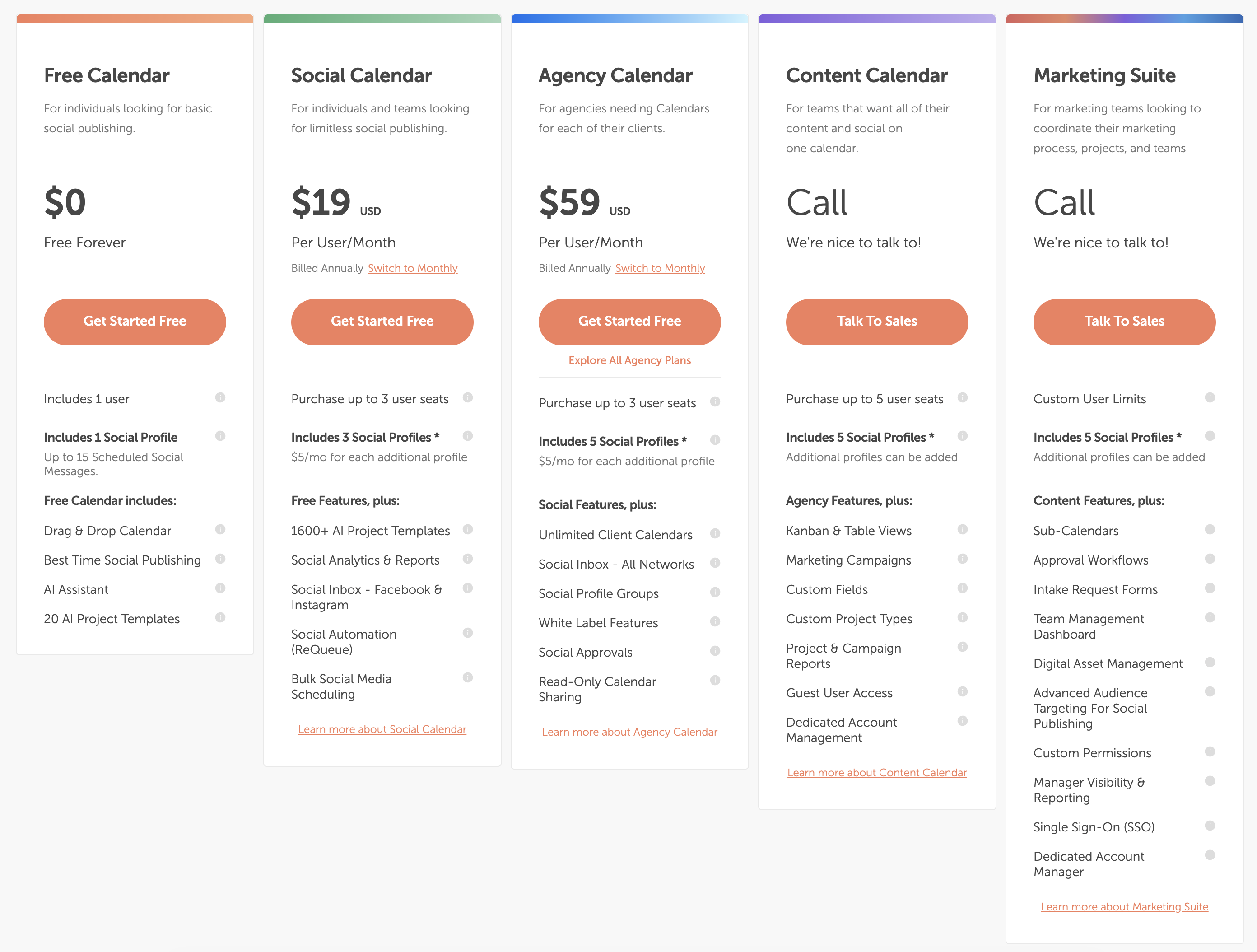
Source: https://coschedule.com/pricing
CoSchedule Social Media Scheduling Pricing Plans
Here's a detailed breakdown to help you understand CoSchedule's pricing and choose the best fit for your workflow.
Each CoSchedule plan includes different combinations of marketing and social media management features, ranging from basic social publishing to comprehensive marketing suite capabilities.
The main difference between CoSchedule plans comes down to number of social profiles, team members, marketing features, and enterprise-level capabilities.
1. Free Calendar
The Free Calendar plan costs $0 per month and is free forever.
What's included:
- 1 user
- 1 social profile (up to 15 scheduled messages)
- Drag & drop calendar
- Best time social publishing
- AI assistant
- 20 AI project templates
- Basic scheduling features
Best for: individuals looking for basic social publishing to test the platform.
2. Social Calendar
The Social Calendar plan costs $19 per month per user when billed annually.
What's included:
- Up to 3 user seats
- 3 social profiles (additional profiles $5/month each)
- 1,600+ AI project templates
- Social analytics & reports
- Social inbox (Facebook & Instagram)
- Social automation (ReQueue)
- Bulk social media scheduling
- Drag & drop calendar
- Best time social publishing
- AI assistant
- Customer support
Best for: individuals and small teams looking for social media scheduling without marketing campaign features.
3. Agency Calendar
The Agency Calendar plan costs $59 per month per user when billed annually.
What's included:
- Up to 3 user seats
- 5 social profiles (additional profiles $5/month each)
- Unlimited client calendars
- Social inbox - all networks
- Social profile groups
- White label features
- Social approvals
- Read-only calendar sharing
- All Social Calendar features
- Customer support
Best for: agencies needing separate calendars for each client with white label capabilities.
4. Content Calendar
The Content Calendar plan has custom pricing (call for quote).
What's included:
- Up to 5 user seats
- 5 social profiles (additional profiles can be added)
- Kanban & table views
- Marketing campaigns
- Custom fields
- Custom project types
- Project & campaign reports
- Guest user access
- Dedicated account management
- All Agency Calendar features
- Customer support
Best for: teams that want content planning and social media combined on one calendar.
5. Marketing Suite
The Marketing Suite plan has custom pricing (call for quote).
What's included:
- Custom user limits
- 5 social profiles (additional profiles can be added)
- Sub-calendars
- Approval workflows
- Intake request forms
- Team management dashboard
- Digital asset management
- Advanced audience targeting
- Custom permissions
- Manager visibility & reporting
- Single Sign-On (SSO)
- Dedicated account manager
- All Content Calendar features
- Customer support
Best for: marketing teams looking to coordinate their entire marketing process, projects, and teams.
Important Pricing Notes
X/Twitter Profile Limitation: CoSchedule's Social Calendar plan does NOT include X/Twitter profiles. According to their documentation, X/Twitter profiles are only available on the Agency Calendar and higher plans. This is a significant limitation for users who need X/Twitter scheduling on the base social plan.
Per-User Pricing: All CoSchedule plans are priced per user per month. This means if you have 3 team members on the Social Calendar plan, you're paying $57/month ($19 × 3 users) when billed annually, not including additional profile costs.
Profile Limits: Even the paid plans have strict profile limits. The Social Calendar includes only 3 profiles, and each additional profile costs $5/month. For agencies managing multiple clients, these costs add up quickly.
Is CoSchedule Pricing Worth It?
If you look through all of CoSchedule's pricing plans, you'll notice that there's an option for individuals, small teams, agencies, and enterprise marketing teams. On the surface, the structure seems flexible and comprehensive.
However, when you dig into CoSchedule reviews online, a few things consistently come up.
Many users mention that CoSchedule becomes expensive very quickly because of per-user pricing and profile limits. For example, if you have 3 team members on the Social Calendar plan managing 5 social profiles (just 2 more than included), you're paying $57/month for users + $10/month for profiles = $67/month - and that's still only 5 profiles without X/Twitter support.
Others point out that the platform is built as a comprehensive marketing suite, which means it includes many features that solo creators and small teams simply don't need. If you're only looking for social media scheduling, you're paying for campaign management, project tracking, and team coordination features you may never use.
Additionally, the lack of X/Twitter profiles on the base Social Calendar plan is a major limitation that surprises many users who assume all major platforms are included in a $19/month social scheduling tool.
Many creators and agencies compare CoSchedule to newer scheduling tools with unlimited profiles, all platforms included, simpler interfaces, and more straightforward flat-rate pricing - often at a lower total cost without the complexity.
In other words, while CoSchedule offers robust features for large marketing teams, there are social media scheduling platforms that provide unlimited accounts, all platform support including X/Twitter, cleaner workflows, and more predictable pricing - making them more cost-effective for creators and growing teams.
Pros and Cons of CoSchedule
Pros of CoSchedule:
-
Comprehensive marketing suite: CoSchedule combines social scheduling with marketing campaign planning, project management, and team coordination - useful for large marketing teams managing complex workflows.
-
Free plan available: CoSchedule offers a free forever plan that lets individuals test basic social publishing features before upgrading.
-
Agency-focused features: The Agency Calendar includes unlimited client calendars, white label features, and client approval workflows - helpful for agencies managing multiple brands.
-
Advanced planning tools: Higher-tier plans include Kanban views, custom fields, campaign tracking, and project management features for comprehensive marketing coordination.
-
AI-powered templates: CoSchedule includes AI project templates and assistance to help teams plan and execute marketing campaigns faster.
Cons of CoSchedule:
-
No X/Twitter on Social Calendar plan: This is a major limitation. The base social scheduling plan at $19/user/month doesn't include X/Twitter profiles, forcing users to upgrade to Agency Calendar or higher for full platform support.
-
Per-user pricing gets expensive: CoSchedule charges per user per month, which means a small team of 3 people pays 3× the listed price. Combined with per-profile fees, costs increase significantly.
-
Profile limits on all plans: Even paid plans cap social profiles at 3-5, with additional profiles costing $5/month each. For teams managing multiple brands, this becomes expensive fast.
-
Designed for large marketing teams: The interface and feature set are built for enterprise marketing departments. Solo creators and small teams often find it overcomplicated for simple social scheduling.
-
Better alternatives with simpler pricing: Competitors like PostPlanify offer unlimited profiles, all platforms including X/Twitter, and flat-rate pricing without per-user or per-profile fees - making them more affordable and straightforward.
The Better CoSchedule Alternative for Social Media Scheduling
Want a simpler way to schedule posts across all platforms including X/Twitter, with unlimited profiles and no complicated marketing suite features you don't need?
PostPlanify is the CoSchedule alternative you're looking for.

PostPlanify pricing starts at $79/month billed yearly ($99/month monthly) with flat plans — all 10 platforms including X/Twitter, no per-user or per-profile fees. Here's how each plan breaks down:
- Growth ($99/mo or $79/mo billed yearly): 15 social accounts, 5 workspaces, 3 team members, unlimited posts, vision-powered AI assistant with 200 AI images/mo, full analytics across all 10 platforms, social inbox (Instagram, Facebook, LinkedIn, Google Business, YouTube), bulk scheduling, link in bio, Canva & Google Drive, API + MCP access
- Premium ($199/mo or $159/mo billed yearly) — Most Popular: 30 social accounts, 15 workspaces, 6 team members, 400 AI images/mo, approval workflows, advanced analytics, PDF reports, shared calendar, roles & permissions
- Scale ($299/mo or $239/mo billed yearly): 100 social accounts, 50 workspaces, 12 team members, 800 AI images/mo, white-label PDF reports, priority human support, dedicated onboarding & migration
- Enterprise (custom pricing, demo-only): Unlimited social accounts/workspaces/team members, unlimited AI images, 1:1 onboarding call, priority feature requests, private WhatsApp support
CoSchedule vs PostPlanify: Side-by-Side Comparison
| Feature | CoSchedule (Social Calendar) | PostPlanify (Growth) |
|---|---|---|
| Price | $19/user/mo (annual) | $99/mo (or $79/mo billed yearly, flat) |
| Social accounts | 3 (extra profiles $5/mo each) | 15 |
| Workspaces | — | 5 |
| Team members | Up to 3 (each pays $19/mo) | 3 (Growth), 6 (Premium), 12 (Scale), unlimited (Enterprise) |
| Platforms supported | No X/Twitter on Social Calendar | 10 (X included) |
| Analytics | Social analytics & reports | Full, all 10 platforms |
| Social inbox | Facebook & Instagram only | ✅ (Instagram, Facebook, LinkedIn, Google Business, YouTube) |
| AI assistant | ✅ (AI project templates) | Vision-powered AI assistant |
| AI image generation | ❌ | ✅ (200/400/800/Unlimited per month) |
| Approval workflows | Agency Calendar+ ($59/user/mo) | Premium+ ($199/mo or $159/mo billed yearly) |
| White-label reports | Agency Calendar+ ($59/user/mo) | Scale+ ($299/mo or $239/mo billed yearly) |
| Canva integration | ❌ | ✅ |
| Google Drive import | ❌ | ✅ |
| Best time to post | ✅ | ✅ |
| Link in bio | ❌ | ✅ |
| Bulk scheduling | ✅ | ✅ |
All plans include a 7-day free trial backed by a 14-day money-back guarantee. Where a 3-person team on CoSchedule's Social Calendar pays $57/mo for just 3 profiles (without X/Twitter), PostPlanify's Growth plan gives 3 team members 15 accounts across all 10 platforms for $99/mo (or $79/mo billed yearly).

Related Guides
- Best CoSchedule Alternatives for Social Media Scheduling
- Social Media Content Calendar Examples
- Social Media Marketing Strategy for Small Business
- Social Media Analytics for Business
FAQ on CoSchedule Pricing
Does CoSchedule offer a free plan?
Yes, CoSchedule offers a Free Calendar plan that includes 1 user and 1 social profile with up to 15 scheduled messages. It's free forever and useful for individuals testing basic social publishing.
Does CoSchedule offer a free trial?
Yes. CoSchedule provides free trials on paid plans, allowing users to test scheduling, marketing calendar, and collaboration features before subscribing.
Is CoSchedule good?
Yes, CoSchedule is well-regarded for its comprehensive marketing suite and campaign planning features. However, many users find it expensive due to per-user pricing and profile limits, and overly complex for teams who only need social media scheduling without full marketing project management.
What is CoSchedule used for?
CoSchedule is used to plan marketing campaigns, schedule social media posts, coordinate team projects, manage content calendars, and organize marketing workflows. It's designed as a comprehensive marketing suite rather than just a social scheduling tool.
Does CoSchedule support X/Twitter?
Yes, but NOT on the Social Calendar plan. X/Twitter profiles are only available on Agency Calendar and higher-tier plans. This is a significant limitation for users who need X/Twitter scheduling on the base social plan.
How much does CoSchedule cost for agencies?
For agencies, the Agency Calendar starts at $59 per user per month (billed annually) and includes 5 social profiles with unlimited client calendars. Additional profiles cost $5/month each. For a 3-person agency team, that's $177/month minimum before adding extra profiles.
Can I add more social profiles to my CoSchedule plan?
Yes, but it costs an extra $5 per month per profile on all plans. The Social Calendar includes 3 profiles, and Agency Calendar includes 5 profiles. Additional profiles beyond these limits incur monthly fees.
Is CoSchedule cheaper than other social media schedulers?
Not for most use cases. CoSchedule's per-user and per-profile pricing can make it more expensive than flat-rate alternatives, especially for teams managing multiple brands. Tools like PostPlanify offer flat-rate pricing starting at $79/month billed yearly ($99/month monthly) with plans up to $299/month on Scale (or custom Enterprise pricing), compared to CoSchedule's tiered per-user pricing structure.










