
Before choosing a social media scheduler, it's crucial to look at genuine user feedback. In this article, we break down CoSchedule reviews to assess usability, reliability, and whether CoSchedule still holds its place as a leading marketing tool in 2026.
If you're debating whether to stick with CoSchedule or explore alternatives, this overview will help.
CoSchedule Overview
CoSchedule is a marketing suite and social media management platform that combines content calendars, project management, and social scheduling. It positions itself as a comprehensive solution for marketing teams to coordinate campaigns, plan content, and manage publishing workflows.
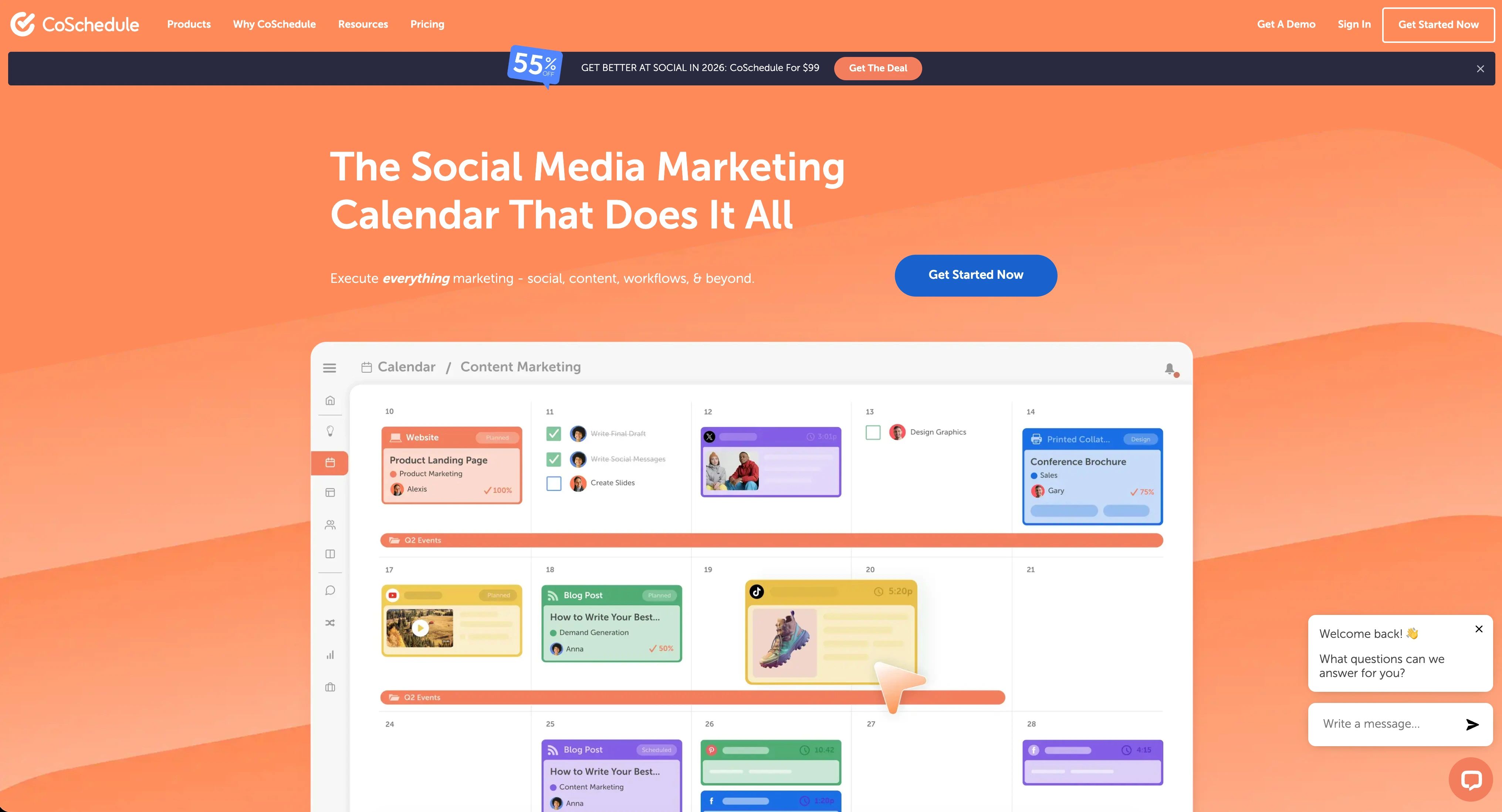
Highlighted features include:
- Marketing calendar and content planning
- Social media scheduling across major platforms
- Project management and team collaboration
- AI-powered project templates
- Campaign planning and tracking
- Analytics and reporting
- Approval workflows (higher plans)
Despite CoSchedule's comprehensive feature set, user reviews reveal important insights into customer support, pricing concerns, and feature limitations.
User Reviews and Ratings
On Trustpilot
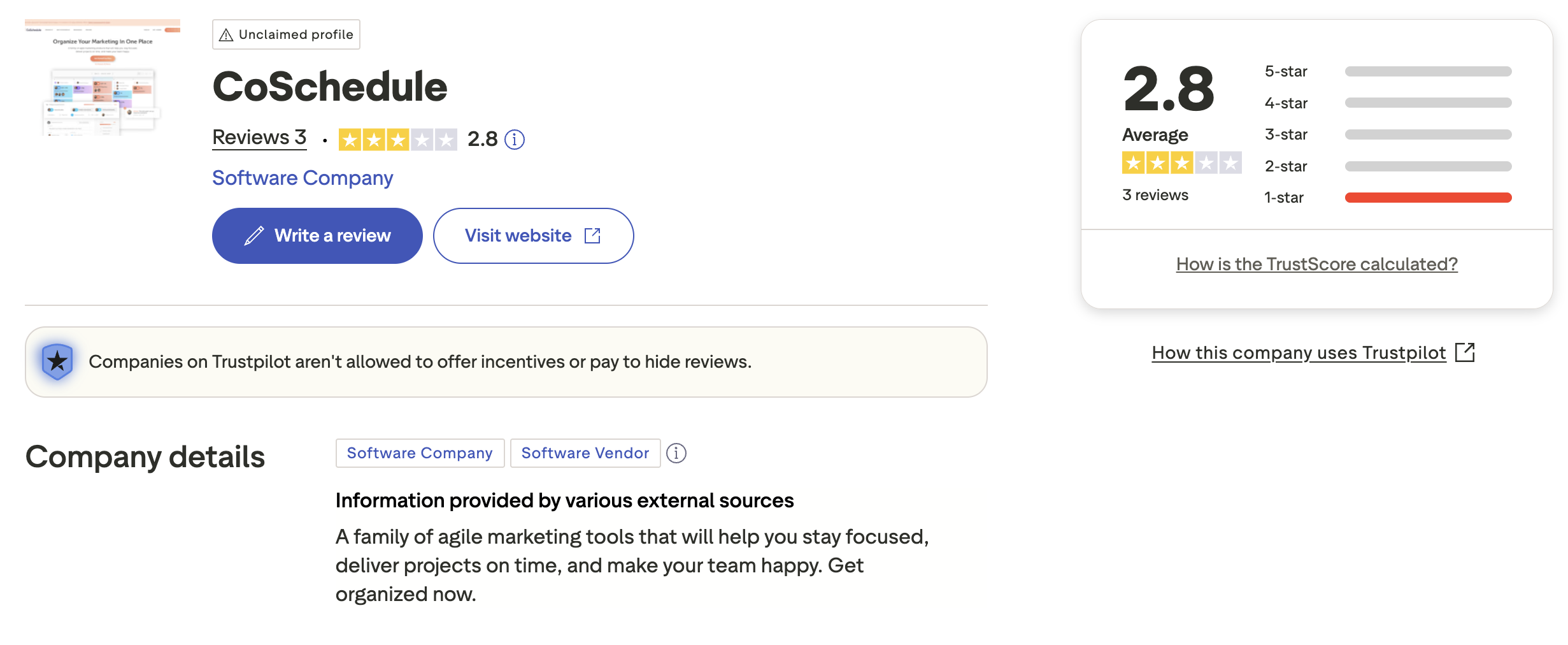
A closer look at the reviews on Trustpilot shows that CoSchedule holds a low rating of 2.8 out of 5, based on only 3 reviews. The limited number of reviews and the distribution shows significant concerns, with a notably high proportion of 1-star reviews.
The profile is unclaimed, which means CoSchedule has not officially verified or managed their Trustpilot presence. This can be a red flag for users looking for responsive customer engagement.
While the sample size is small, the available reviews highlight concerns about the platform and customer experience.
Rating: 2.8/5 (3 reviews)
Pros
- Marketing calendar functionality
Cons
- Limited reviews make it difficult to assess
- Unclaimed profile suggests lack of engagement
- Mix of very positive and very negative feedback
(credit: Trustpilot)
On G2
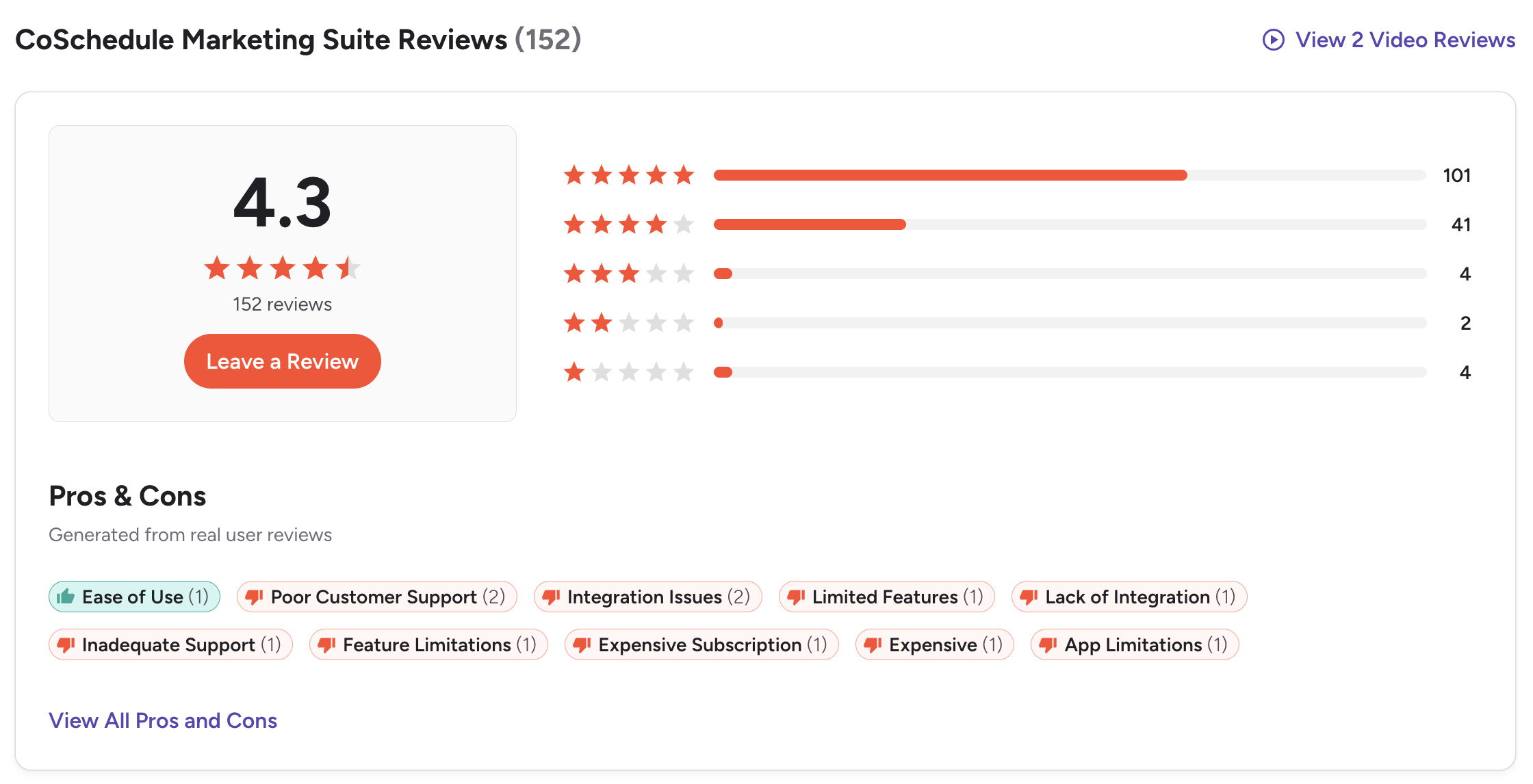
On G2, CoSchedule Marketing Suite has a much more substantial rating of 4.3 out of 5, based on 152 reviews. The majority of reviews are positive, with 101 five-star ratings and 41 four-star ratings.
Users frequently praise CoSchedule for ease of use in managing marketing calendars and organizing campaigns. However, the platform receives consistent criticism across several key areas.
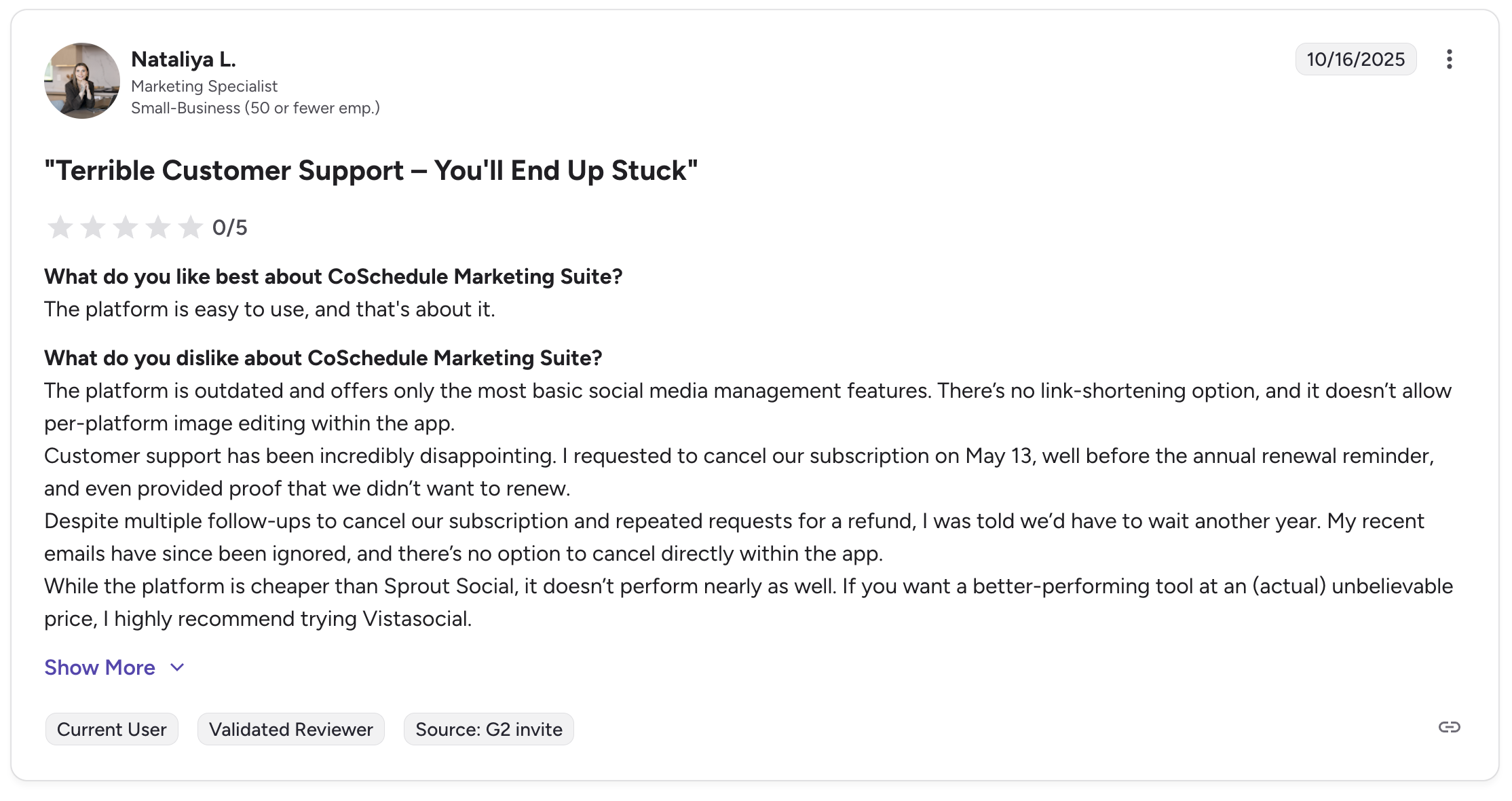
A critical review from a Marketing Specialist at a small business (October 2025) titled "Terrible Customer Support – You'll End Up Stuck" gave it 0/5 stars and highlighted severe customer service issues:
What users like:
- Easy to use platform
- Marketing calendar organization
What users dislike:
- Outdated platform with only basic social media features
- No link-shortening option or in-app image editing
- Terrible customer support that's incredibly disappointing
- Subscription cancellation issues - requests ignored for months
- No option to cancel directly within the app
- Multiple follow-ups and repeated refund requests are ignored
- Recent emails have been ignored with no response
The reviewer specifically noted: "Customer support has been incredibly disappointing. I requested to cancel our subscription on May 13, well before the annual renewal reminder, and even provided proof that we didn't want to renew. Despite multiple follow-ups to cancel our subscription and repeated requests for a refund, I was told we'd have to wait another year."
Common complaint tags include: Poor Customer Support (2), Integration Issues (2), Limited Features (1), Lack of Integration (1), Inadequate Support (1), Feature Limitations (1), Expensive Subscription (1), Expensive (1), and App Limitations (1).
Rating: 4.3/5 (152 reviews)
Pros
- Ease of use for marketing calendars
- Content planning organization
Cons
- Terrible customer support
- Subscription cancellation extremely difficult
- Outdated platform with basic features only
- No link-shortening or image editing
- Integration issues
- Expensive for what it offers (see our CoSchedule pricing breakdown)
- Limited social media features
- Poor responsiveness to customer requests
(credit: G2)
What Reddit Users Say About CoSchedule
CoSchedule appears in Reddit marketing and blogging subreddits with moderate frequency. The discussions paint a picture of a tool that excels at one thing — the marketing calendar — but struggles to justify its pricing for everything else.
Theme 1: The marketing calendar is genuinely well-built. Reddit users who advocate for CoSchedule almost always lead with the calendar. It is described as "a powerhouse for those who are serious about content marketing," with a drag-and-drop view that consolidates blog posts, social campaigns, and email sends. The ReQueue feature — which automatically recycles evergreen content — is frequently cited as a unique strength that saves time on content promotion.
Theme 2: Pricing feels like nickel-and-diming. This is the most common criticism on Reddit. Users report that the features that actually solve coordination problems are locked behind higher-tier plans. Twitter/X profiles are billed separately from all plans — a surprise cost that most users do not anticipate during signup. Reddit users on G2 have echoed this, noting that key features that should be standard get pushed into pricier tiers.
Theme 3: It is overkill for simple social scheduling. Reddit users who only need to schedule social media posts consistently recommend against CoSchedule, noting that cheaper tools handle scheduling just as well without the marketing suite complexity. CoSchedule is positioned as a marketing operations platform, and users who buy it purely for social scheduling report feeling like they are paying for features they never use.
Theme 4: Customer support and cancellation stories are alarming. Multiple Reddit and forum users share stories of cancellation requests being ignored, refund processes dragging on for months, and no option to cancel directly within the app. These stories align closely with the G2 zero-star review cited above and create a pattern that prospective buyers should take seriously.
Theme 5: The learning curve is steeper than expected. Reddit users describe a 2-3 week onboarding period before reaching full productivity. The feature organization is described as scattered, and navigation is not always intuitive — particularly for team members who are not the primary account administrator.
Feature-by-Feature User Feedback
Scheduling: CoSchedule's social scheduling is functional but described as lagging behind dedicated social media tools. Users report unreliable posting and occasional scheduling failures. The lack of link shortening and the separate billing for X/Twitter profiles are frequently cited frustrations. The ReQueue feature for evergreen content recycling, however, is a genuine differentiator that users praise.
Analytics: Capterra reviewers describe CoSchedule's analytics as lacking, noting that other social media management tools provide more in-depth statistics. The reporting does not offer actionable improvement suggestions. Users who need social media performance data tend to supplement CoSchedule with a separate analytics tool.
Pricing: CoSchedule's free Social Calendar plan provides basic scheduling, but features like team collaboration, approval workflows, and advanced calendar functionality require the paid Marketing Calendar or Marketing Suite tiers. Users on Capterra describe the pricing as "steep for what is provided" and note that there is no affordable middle ground for users who need more than the free tier but less than the full suite.
Support: This is CoSchedule's most consistent pain point across all review platforms. The G2 zero-star review detailing months of ignored cancellation requests is not an outlier — multiple users on Capterra and Trustpilot describe similar experiences. CoSchedule's support is available Monday through Friday via email and live chat, but users report that live chat is not always staffed and email responses can be slow.
Ease of Use: The initial setup and daily calendar use receive positive marks — Capterra users describe the interface as "extremely simple" for content planning. However, the complexity increases significantly when using the full Marketing Suite, and new users report that the many options feel overwhelming at first.
Review Authenticity
While CoSchedule maintains a decent G2 rating, the severe customer support complaints and subscription cancellation issues are concerning. The fact that multiple users report being unable to cancel subscriptions, having requests ignored for months, and receiving no responses to emails raises serious red flags about customer service quality.
The unclaimed Trustpilot profile and limited reviews there suggest CoSchedule may not be actively monitoring or responding to customer feedback on all platforms.
Rating divergence analysis: The 1.5-point gap between G2 (4.3/5) and Trustpilot (2.8/5) is significant, though the Trustpilot score is based on only 3 reviews and is not statistically meaningful. The G2 score of 4.3 from 152 reviews is the most reliable data point. Notably, G2's score is pulled up by 101 five-star reviews and 41 four-star reviews, but the negative reviews that do exist are severe — including a zero-star rating focused entirely on customer support failures.
Volume and trends: CoSchedule's 152 G2 reviews represent a moderate sample. Compared to tools like Buffer (1,100+ reviews) or Hootsuite (4,800+ reviews), the review volume is relatively low, which may indicate a smaller active user base or less community engagement. Capterra reviews are also limited, reinforcing this pattern.
Concerning patterns: The most notable signal is the consistency of cancellation complaints across unrelated platforms. When users on G2, Trustpilot, and community forums all report similar cancellation difficulties, the pattern is harder to dismiss as isolated incidents. CoSchedule's refund policy — no prorated refunds on annual plans after 14 days — compounds this issue.
Who CoSchedule Works Best For (Based on Reviews)
Users who are typically satisfied:
- In-house marketing teams that need a centralized calendar to coordinate blog posts, social campaigns, and email sends across team members
- Content marketers who use the ReQueue feature to automatically recycle evergreen content
- Teams already invested in the marketing suite who use project management, task assignments, and campaign tracking together
- Solo bloggers who use the free Social Calendar plan for basic scheduling without needing advanced features
Users who tend to leave:
- Social media managers who need a dedicated, full-featured social scheduling tool — CoSchedule's social capabilities lag behind purpose-built schedulers
- Budget-conscious users who find the pricing structure rigid, with key features gated behind expensive tiers
- Anyone managing X/Twitter profiles who does not want to pay separately for that platform
- Users who have experienced cancellation or refund difficulties — the pattern of ignored requests is a serious concern
- Teams that need deep social media analytics or reporting — CoSchedule's analytics are described as basic compared to competitors
- Users who need fast, reliable customer support — multiple reviewers describe slow response times and unresolved tickets
Before choosing a social media scheduler...
Consider the following tips:
- Check multiple review platforms to ensure consistent user feedback.
- Look at the timing of reviews - sudden bursts of positive reviews can be a red flag.
- Research what people are saying on forums like Reddit for more unbiased opinions.
- Pay close attention to customer support complaints, especially regarding cancellations.
- Ask fellow business owners about their experiences with the service.
Ultimately, the best scheduler is the one that will give your social team a massive leg up and make the whole posting process a lot easier - with responsive support when you need it.
CoSchedule is an option for marketing suite functionality, but you can definitely find a better social media scheduler at a better price without the customer support issues.
You might want to consider PostPlanify - an ideal solution for creators, marketing teams, agencies, and brands who want to streamline their social media workflow without the marketing suite complexity or customer support nightmares.

Starting at $79/month billed yearly ($99/month monthly), PostPlanify uses flat pricing — all 10 platforms including X/Twitter, no per-user or per-profile fees. Here's what each plan includes:
- Growth ($99/mo or $79/mo billed yearly): 15 social accounts, 5 workspaces, 3 team members, unlimited posts, vision-powered AI assistant with 200 AI images/mo, full analytics across all 10 platforms, social inbox (Instagram, Facebook, LinkedIn, Google Business, YouTube), bulk scheduling, link in bio, Canva & Google Drive, API + MCP access
- Premium ($199/mo or $159/mo billed yearly) — Most Popular: 30 social accounts, 15 workspaces, 6 team members, 400 AI images/mo, approval workflows, advanced analytics, PDF reports, shared calendar, roles & permissions
- Scale ($299/mo or $239/mo billed yearly): 100 social accounts, 50 workspaces, 12 team members, 800 AI images/mo, white-label PDF reports, priority human support, dedicated onboarding & migration
- Enterprise (custom pricing, demo-only): Unlimited social accounts/workspaces/team members, unlimited AI images, 1:1 onboarding call, priority feature requests, private WhatsApp support
Where a 3-person team on CoSchedule pays $57/mo for 3 profiles without X/Twitter, PostPlanify's Growth plan gives 3 team members 15 accounts across all 10 platforms for $99/mo (or $79/mo billed yearly).
Start your 7-day free trial today.










