
Loomly is a social media management platform that helps creators, brands, and teams plan content, schedule posts, manage approvals, and track analytics across multiple social channels. Its main features include a visual content calendar, approval workflows, post ideas, analytics, and integrations with tools like Canva and Google Drive.
But is Loomly really worth the price, or should you save your money?
Today, we'll break down the full Loomly pricing structure and show you exactly what features you get in each plan, so you can decide whether it's the right tool for your content strategy.
Loomly Pricing at a Glance (2026)
| Plan | Price | Social Accounts | Users |
|---|---|---|---|
| Starter | $65/month | 12 accounts | 3 users |
| Beyond | $332/month | 60 accounts | Unlimited |
| Enterprise | Custom | 61+ accounts | Unlimited |
Loomly no longer offers a free plan. Paid plans start at $65/mo, with a 15-day free trial. Annual billing offers ~25% discount. Prices shown are for monthly billing.
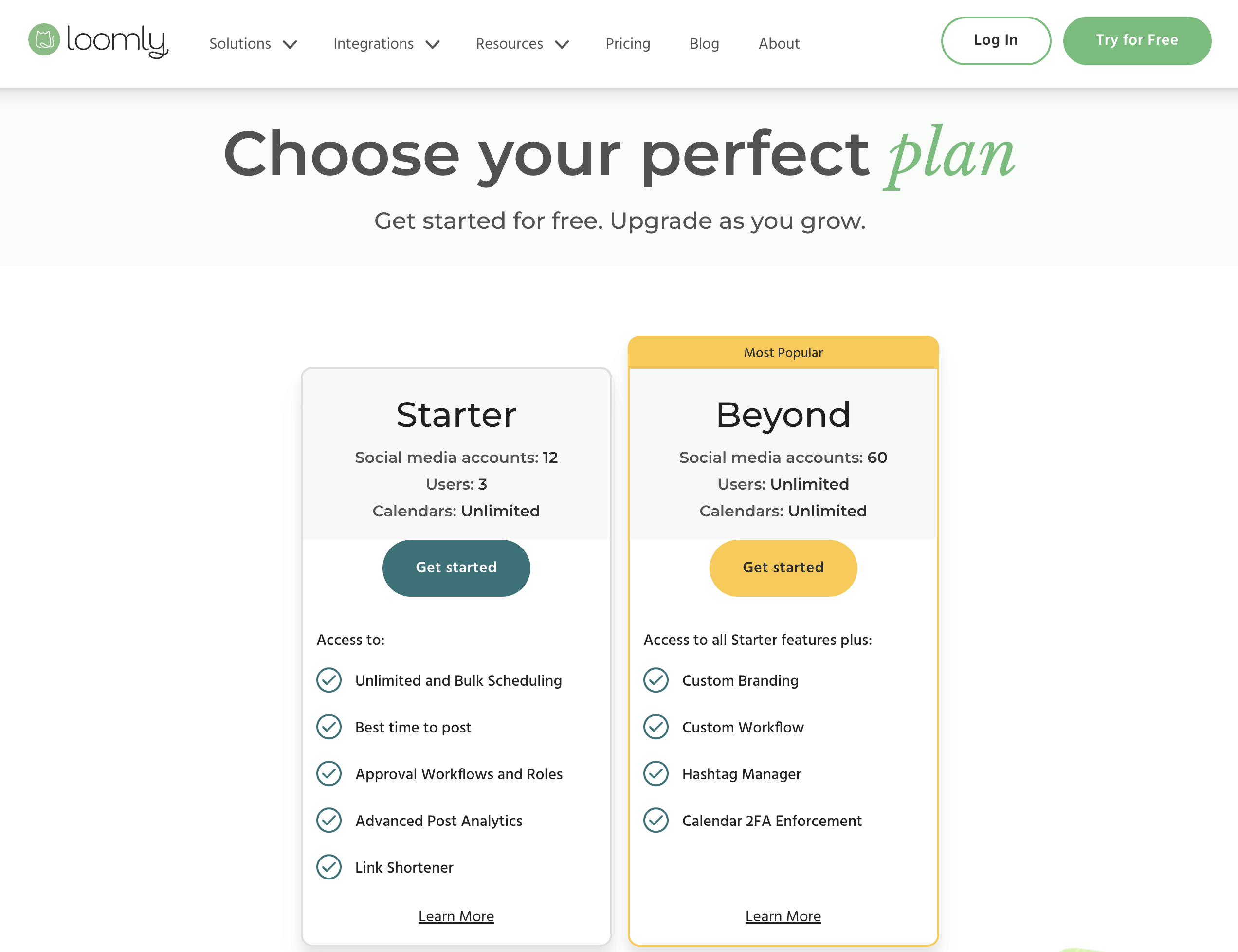
Source: loomly.com/pricing
How Much Does Loomly Actually Cost? (Cost Calculator)
Loomly's pricing depends on which tier you need. Unlike per-user or per-channel tools, Loomly bundles users and accounts into fixed tiers, but the gap between tiers is enormous.
| What You Need | Loomly Plan | Monthly Cost | Annual Cost |
|---|---|---|---|
| 3 users, 12 accounts, unlimited posts | Starter | $65/mo | $49/mo |
| 4+ users OR 13+ accounts | Beyond | $332/mo | $249/mo |
| 61+ accounts, dedicated support | Enterprise | Custom | Custom |
The pricing cliff is the main issue. If you need just 1 more user than Starter allows (4 instead of 3) or 1 more account (13 instead of 12), your cost jumps from $65/mo to $332/mo, a 410% increase with no middle option.
Annual billing saves ~25%. The Starter plan drops from $65 to ~$49/mo and Beyond drops from $332 to ~$249/mo when paid yearly.
Loomly Feature Comparison by Plan
| Feature | Starter ($65/mo) | Beyond ($332/mo) | Enterprise (Custom) |
|---|---|---|---|
| Social accounts | 12 | 60 | 61+ |
| Users | 3 | Unlimited | Unlimited |
| Scheduled posts | Unlimited | Unlimited | Unlimited |
| Bulk scheduling | Yes | Yes | Yes |
| Approval workflows | Yes | Yes | Yes |
| AI caption suggestions | Yes | Yes | Yes |
| Advanced analytics | Yes | Yes | Yes |
| Link shortener | Yes | Yes | Yes |
| Recurring posts | Yes | Yes | Yes |
| Engagement tools | Yes | Yes | Yes |
| Hashtag manager | Yes | Yes | Yes |
| Export reports | Yes | Yes | Yes |
| Custom branding | No | Yes | Yes |
| Custom workflows/roles | No | Yes | Yes |
| Slack/Teams integration | No | Yes | Yes |
| Scheduled reports | No | Yes | Yes |
| Calendar 2FA | No | Yes | Yes |
| Dedicated account manager | No | No | Yes |
Key limitation: The jump from Starter to Beyond, from "basic" to custom branding and unlimited users, costs an extra $267/month with no in-between tier.
Loomly Social Media Scheduling Pricing Plans
Here's a detailed breakdown to help you understand Loomly's pricing and choose the best fit for your workflow.
Each Loomly paid plan includes core social media management features like:
- Unlimited scheduling and bulk scheduling
- Direct publishing to 9 social platforms
- AI caption suggestions
- Approval workflows and roles
- Advanced post analytics
- Link shortener with analytics
- Post previews and media editor
- Canva, Unsplash, and Giphy integrations
- iOS and Android mobile apps
- Zapier integration
The main difference between Loomly plans comes down to number of social accounts, users, branding options, and advanced workflow customization.
1. Starter Plan
The Starter plan costs $65 per month (or approximately $49/month billed annually) and includes 12 social media accounts and 3 users.
What's included:
- Unlimited scheduling and bulk scheduling
- 12 social media accounts
- 3 users
- Unlimited calendars
- Best time to post suggestions
- Approval workflows and roles
- Advanced post analytics
- Link shortener and link shortener analytics
- AI caption suggestions
- Hashtag manager
- Post previews and media editor
- Slideshow creator
- Media storage
- Recurring posts
- Engagement tools (replying, saved replies, conversation assignment)
- Canva, Unsplash, Giphy, and Google Drive integrations
- Export reports
- iOS and Android mobile apps
- Zapier integration
Best for: small teams and creators managing up to 12 social accounts who need scheduling, analytics, and approval workflows.
2. Beyond Plan
The Beyond plan costs $332 per month (or approximately $249/month billed annually) and includes 60 social media accounts and unlimited users.
What's included (all Starter features plus):
- 60 social media accounts
- Unlimited users
- Custom branding (branded subdomain, custom favicon, custom logo)
- Custom workflows and custom roles
- Hashtag manager
- Calendar 2FA enforcement
- Scheduled and automated reports
- Slack and Microsoft Teams integration
Best for: agencies and larger teams managing many client accounts who need custom branding, unlimited users, and advanced workflow customization.
3. Enterprise Plan
The Enterprise plan requires a custom quote and is designed for organizations managing 61+ social media accounts.
What's included (all Beyond features plus):
- 61+ social media accounts
- Dedicated account manager
- Priority support
- Friendly pricing at scale
- Custom workflows and analytics
Best for: large organizations and enterprise agencies with extensive social media operations.
Is Loomly Pricing Worth It?
If you look through all of Loomly's pricing plans, you'll notice that there's a plan for solo creators, small teams, and agencies. On the surface, the two-tier paid structure seems simple and straightforward.
However, when you dig into Loomly reviews online, a few things consistently come up.
The most common criticism is the $267/month pricing gap between Starter and Beyond. If your team outgrows the Starter plan's 3-user or 12-account limit, the only option is jumping to $332/month, there is no mid-tier plan. This forces many growing teams to either stay constrained on Starter or make a massive jump in cost.
Many users also mention that while Loomly's approval workflows and content calendar are strong, its AI capabilities are limited compared to newer tools. Loomly provides caption suggestions and post ideas, but it does not include full AI content generation or AI image generation.
With no free plan anymore, the lowest entry point is the $65/month Starter tier, so there's no permanent free option to fall back on. Creators and agencies often compare Loomly to newer scheduling tools with more flexible pricing, stronger AI features, and no abrupt pricing cliffs.
In other words, while Loomly is well-designed and feature-rich, there are social media scheduling platforms that offer more predictable pricing, better AI tools, and smoother scaling, often at a lower cost.
Loomly Pricing: What to Watch Out For
Before committing to Loomly, be aware of these common pitfalls:
- The $267/month pricing cliff is unavoidable: There is no mid-tier plan between Starter ($65/mo, 3 users, 12 accounts) and Beyond ($332/mo, unlimited users, 60 accounts). If you need 4 users or 13 accounts, you pay $332/mo, over 5x more than Starter. Most competitors offer 3-4 pricing tiers to avoid this.
- There's no free plan, only a 15-day trial: Loomly removed its free tier, so the lowest entry point is the Starter plan at $65/month. You can test everything during the 15-day free trial (no credit card required), but unlike Buffer or Metricool, there's no permanent free plan to fall back on.
- No social inbox on any plan: Loomly offers "engagement tools" (replying, saved replies, conversation assignment) but does not have a unified social inbox for managing DMs and comments across platforms in one view. If inbox management is important, you'll need a separate tool.
- No Bluesky, and X/Twitter is no longer listed: Loomly's integrations page covers 9 channels, Threads included, but Bluesky has never been added and X/Twitter no longer appears among the supported networks. If your audience is on either, Loomly won't cover them.
- Annual billing locks you in at a discount but no refunds: The ~25% annual discount is significant ($49 vs $65 on Starter), but Loomly doesn't offer prorated refunds if you cancel mid-year. Make sure you've tested thoroughly during the 15-day trial before committing annually.
Pros and Cons of Loomly
Pros of Loomly:
- Clean content calendar and visual workflow: Loomly is widely praised for its intuitive content calendar that makes planning and organizing posts across multiple platforms easy and visual.
- Built-in approval workflows on all paid plans: Unlike many competitors that lock approvals behind expensive tiers, Loomly includes approval workflows and roles starting from the $65/month Starter plan.
- Wide platform support (9 channels): Loomly supports Facebook, Instagram, LinkedIn, Pinterest, TikTok, YouTube, Snapchat, Threads, and Google Business Profile, covering most major social networks.
- Useful integrations: Loomly integrates with Canva, Google Drive, Unsplash, Giphy, and Zapier, making it easy to pull in media and connect to other tools in your workflow.
- Post ideas and content inspiration: Loomly provides post idea suggestions based on trending topics, holidays, and events, helping creators overcome content blocks and stay consistent.
Cons of Loomly:
- Massive pricing gap between Starter and Beyond: The $267/month jump from Starter ($65/month) to Beyond ($332/month) is Loomly's biggest weakness. Growing teams that need more than 3 users or 12 accounts are forced into a dramatically higher tier with no middle option.
- Limited AI capabilities: Loomly offers basic AI caption suggestions but lacks full AI content generation and AI image generation. Competitors with GPT-powered writing and image tools offer significantly more AI value.
- No free plan: Loomly removed its free tier, so the cheapest way in is the $65/month Starter plan. Competitors like Buffer and Metricool still offer permanent free plans for testing.
- No Bluesky, and no X/Twitter: Loomly supports 9 channels including Threads, but Bluesky is missing and X/Twitter is no longer listed on its integrations page, so teams posting to either need a second tool.
- Beyond plan is expensive for what it adds: The Beyond plan's main additions over Starter are custom branding, custom workflows, Slack/Teams integration, and scheduled reports. For many teams, paying $332/month for these extras feels steep compared to what competitors offer at similar price points.
The Better Loomly Alternative for Agencies
Loomly's problem for agencies is the cliff. Starter is $65/month for 12 social accounts, which is about three local business clients at four accounts each. The fourth client takes you past 12, and the only plan above Starter is Beyond at $332/month. There is nothing in between.
PostPlanify is built for agencies serving local businesses. Each client gets their own workspace, the per-workspace rate steps down as you add clients, and there is no cliff to fall off.

Pricing starts at $39/month for your first client workspace, or $31/month billed yearly:
| Client workspaces | Growth | Premium | Scale |
|---|---|---|---|
| 1 | $39/mo | $59/mo | $79/mo |
| 3 | $97/mo | $157/mo | $197/mo |
| 5 | $155/mo | $255/mo | $315/mo |
| 10 | $250/mo | $400/mo | $560/mo |
| Social accounts per workspace | 4 | 6 | 8 |
Every plan includes unlimited team members and unlimited posts. Here is what each adds:
- Growth ($39/mo first workspace): unlimited users and posts, analytics across all 10 platforms, social inbox, approval workflows, shared calendar, roles and permissions, bulk scheduling, media library with Canva and Google Drive, and link in bio
- Premium ($59/mo first workspace): everything in Growth, plus advanced analytics, branded client reports, scheduled report delivery, team comments and mentions, AI brand voice, AI knowledge base, and full API and MCP access
- Scale ($79/mo first workspace): everything in Premium, plus a white-label dashboard, white-label client emails and reports, dedicated 1:1 onboarding, migration help and priority human support
What Growing Past 12 Accounts Costs
This is the comparison that matters if you are adding clients:
| Clients (4 accounts each) | Accounts needed | Loomly | PostPlanify Growth |
|---|---|---|---|
| 3 | 12 | $65/mo, at the Starter cap | $97/mo |
| 4 | 16 | $332/mo, Beyond required | $126/mo |
| 5 | 20 | $332/mo | $155/mo |
| 10 | 40 | $332/mo | $250/mo |
Loomly jumps 5 times in price for the fourth client, then stays flat until 60 accounts. PostPlanify steps up by $126 minus $97 for that same client.
Loomly vs PostPlanify: Side-by-Side Comparison
| Feature | Loomly (Starter) | PostPlanify (Growth) |
|---|---|---|
| Price | $65/mo, $49 billed annually | $39/mo first workspace, $97/mo for 3 |
| Next tier up | $332/mo, a 5x jump | $126/mo for a fourth client |
| Social accounts | 12 | 4 per workspace, 12 across 3 clients |
| Team members | 3, unlimited only on Beyond | Unlimited on every plan |
| Client approvers | Counted against the 3 seats | Free, never billed as seats |
| Approval workflows | Yes | Included from Growth |
| Social inbox | Limited | Instagram, Facebook, LinkedIn, Google Business, YouTube |
| Analytics | Limited, a common complaint | Full, all 10 platforms |
| Client reports | Beyond | Premium and above |
| White labeling | Beyond, custom branding | Scale |
| Free plan | None, trial only | None, 7-day trial |
Being straight about it: Loomly's post builder is genuinely good. The guided workflow that walks you through copy, hashtags and previews per network is something reviewers consistently praise, and PostPlanify does not replicate it.
The structure is the problem rather than the product. Three seats and 12 accounts covers a small agency exactly until it grows, and then the next step is $332/month whether you need 13 accounts or 60. An agency that adds its fourth client pays five times more on Loomly, and $126 in total here.
All plans include a 7-day free trial backed by a 14-day money-back guarantee.

Related Guides
- Best Loomly Alternatives for Social Media Management
- Loomly Reviews: What Users Actually Say
- Best Social Media Management Platform in 2026
- Best Social Media Management Tools for Teams
- Best Social Media Tools with Approval Workflows
- Best Free Social Media Management Tools
- Social Media Scheduling Tools Compared
- How to Automate Social Media Posts
- How to Create a Social Media Content Calendar
FAQ on Loomly Pricing
Is Loomly free?
No. Loomly no longer offers a free plan. It provides a 15-day free trial on its paid plans (no credit card required), with pricing starting at $65/month for the Starter plan. For unlimited scheduling, approval workflows, analytics, and team features, you'll need a paid plan.
Does Loomly offer a free trial?
Yes. Loomly provides a 15-day free trial on all paid plans with no credit card required. This lets you test unlimited scheduling, approval workflows, analytics, and all other paid features before committing.
How much does Loomly cost per month?
Loomly's paid plans cost $65/month (Starter) and $332/month (Beyond) when billed monthly. Annual billing offers approximately 25% savings, bringing prices to around $49/month and $249/month respectively. Enterprise pricing requires a custom quote.
Why is there a $267 gap between Loomly plans?
Loomly restructured its pricing in 2025, replacing four tiers with two main paid plans. This created a large gap between Starter (3 users, 12 accounts) and Beyond (unlimited users, 60 accounts) with no mid-tier option. Teams that outgrow Starter must jump directly to the $332/month Beyond plan.
Is Loomly good for agencies?
Loomly can work for agencies, but the pricing structure makes it challenging. The Starter plan at $65/month only supports 3 users and 12 accounts. Agencies managing more than a few clients need the Beyond plan at $332/month. Alternatives like PostPlanify offer 30 accounts and 6 team members at $199/month on the Premium plan, scale up to 100 accounts and 12 team members for $299/month, and custom Enterprise pricing for larger needs.
Does Loomly have AI features?
Loomly includes basic AI caption suggestions and post idea generation on paid plans. However, it does not offer full AI content generation or AI image generation. If AI-powered content creation is important to your workflow, tools like PostPlanify include both AI caption generation and AI image generation.
What social media platforms does Loomly support?
Loomly's integrations page lists 9 channels: Facebook, Instagram, LinkedIn, Pinterest, TikTok, YouTube, Snapchat, Threads, and Google Business Profile. Bluesky is not supported, and X/Twitter is no longer listed among them.
Does Loomly offer a nonprofit discount?
Yes. Loomly offers a 50% lifetime discount for verified nonprofit organizations. You need to provide proper nonprofit documentation to qualify.
Can I export data from Loomly?
Yes. Loomly allows you to export reports and analytics data on all paid plans. Scheduled and automated report exports are available on the Beyond plan and above.
Is PostPlanify cheaper than Loomly?
It depends where you sit against Loomly's 12-account cap. At three clients, PostPlanify Growth is $97/month against Loomly Starter at $65. Past 12 accounts Loomly requires Beyond at $332/month, while PostPlanify continues stepping down per workspace, so five clients is $155/month and ten is $250/month.










