
Before choosing a social media scheduler, it's crucial to look at genuine user feedback. In this article, we break down Loomly reviews to assess usability, reliability, and whether Loomly is the right scheduling tool for your workflow in 2026.
If you're debating whether to stick with Loomly or explore alternatives, this overview will help.
Loomly Overview
Loomly is a social media management platform focused on content planning, scheduling, and team collaboration. It positions itself as a "stress-free" way to create, schedule, and collaborate on social media content with your team or clients.

Highlighted features include:
- Post scheduling and content calendar
- Approval workflows for teams and clients
- Post ideas and optimization tips
- Audience targeting for paid campaigns
- Support for 15+ social platforms
Despite Loomly's popularity, user reviews reveal important insights into performance, pricing, and feature limitations.
User Reviews and Ratings
On Trustpilot
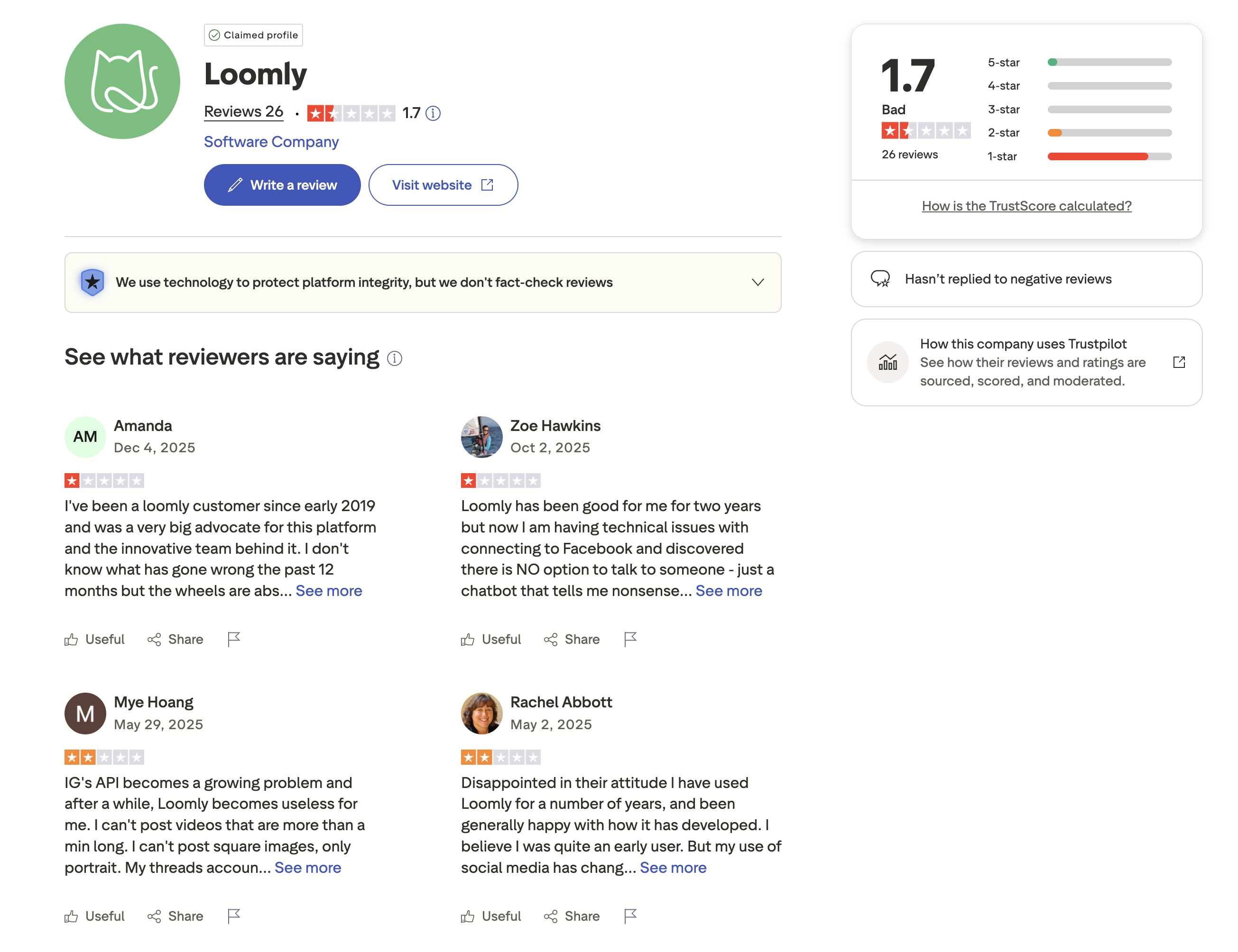
A closer look at the reviews on Trustpilot shows that Loomly holds a low rating of 1.7 out of 5, based on 26 reviews. The majority of reviews are 1-star, with users reporting issues with technical problems, poor customer support, and platform instability.
Multiple reviewers mention that they were long-time advocates of Loomly but experienced a decline in quality over the past year. Users report problems with connecting to Facebook, Instagram API limitations preventing video and image uploads, and being unable to reach a human support agent, only receiving chatbot responses.
One reviewer (a customer since 2019) noted that "the wheels are abs[olutely falling off]," while another mentioned "there is NO option to talk to someone - just a chatbot that tells me nonsense." Other users report being disappointed with Loomly's attitude toward long-time customers.
Rating: 1.7/5 (26 reviews)
Pros
- Good for content planning and collaboration
- Useful scheduling features when they work
Cons
- Very poor customer support (chatbot only, no human agents)
- Technical issues with Facebook and Instagram connections
- Instagram API limitations (video length, image format restrictions)
- Platform quality declining according to long-time users
- Hasn't replied to negative reviews
(credit: Trustpilot)
On G2
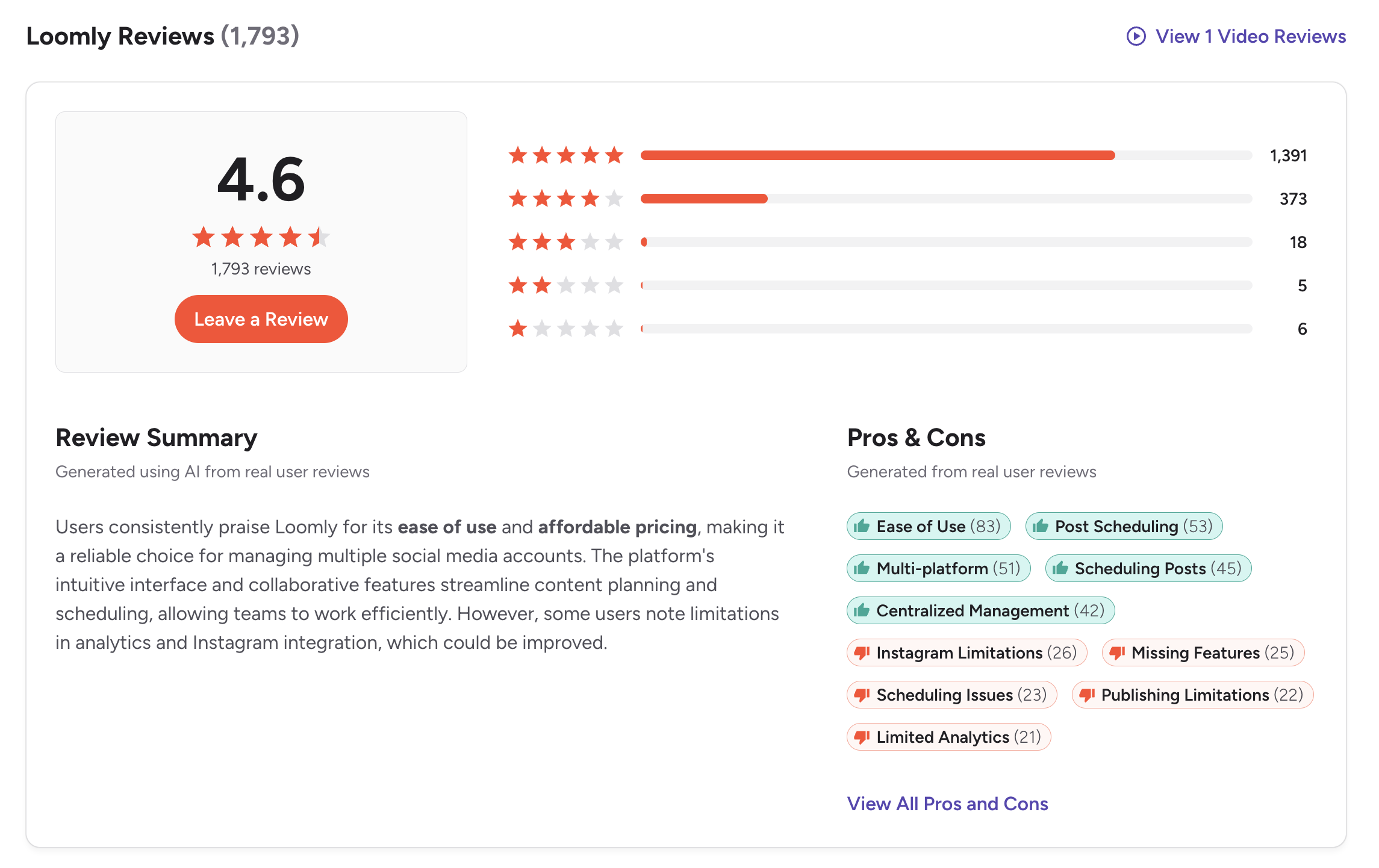
On G2, Loomly has a significantly higher rating of 4.6 out of 5, based on 1,793 reviews. Users frequently praise Loomly for its ease of use, affordable pricing, and intuitive interface for managing multiple social media accounts.
The G2 review summary highlights that "users consistently praise Loomly for its ease of use and affordable pricing, making it a reliable choice for managing multiple social media accounts." The platform's collaborative features are noted as a strength for team workflows.
However, reviewers also highlight certain limitations. The most commonly mentioned cons include Instagram limitations (26 mentions), missing features (25 mentions), scheduling issues (23 mentions), publishing limitations (22 mentions), and limited analytics (21 mentions).
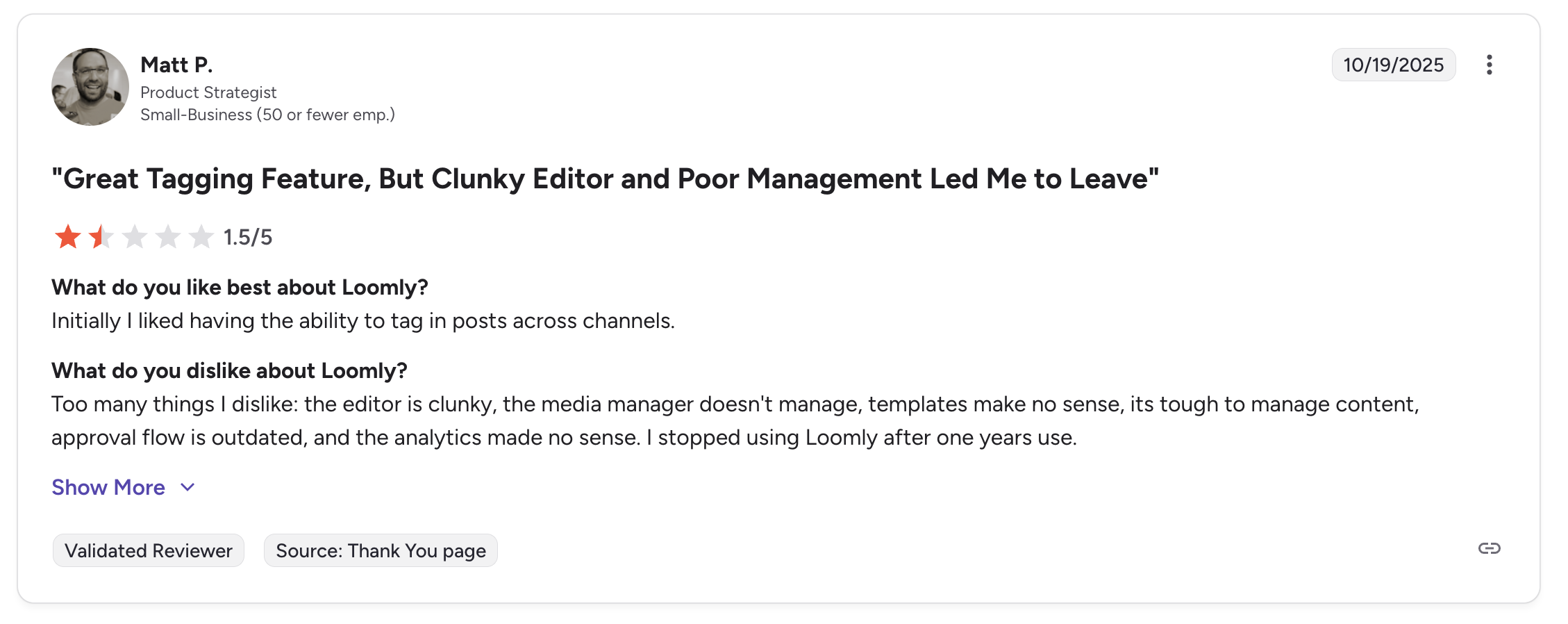
A featured review titled "Great Tagging Feature, But Clunky Editor and Poor Management Led Me to Leave" gave Loomly 1.5/5, noting: "Too many things I dislike: the editor is clunky, the media manager doesn't manage, templates make no sense, its tough to manage content, approval flow is outdated, and the analytics made no sense."
Rating: 4.6/5 (1,793 reviews)
Pros
- Ease of use (83 mentions)
- Post scheduling (53 mentions)
- Multi-platform support (51 mentions)
- Centralized management (42 mentions)
Cons
- Instagram limitations (26 mentions)
- Missing features (25 mentions)
- Scheduling issues (23 mentions)
- Publishing limitations (22 mentions)
- Limited analytics (21 mentions)
(credit: G2)
What Reddit Users Say About Loomly
Loomly generates significant discussion on Reddit, particularly in r/SocialMediaMarketing, r/marketing, and r/socialmedia. The conversation shifted sharply in 2025 following Loomly's pricing overhaul. Here are the key themes:
-
The 2025 pricing backlash dominates discussions. The most prominent Reddit thread about Loomly is in r/SocialMediaMarketing, titled "Any loomly alternatives after recent hike?" This thread filled quickly with frustrated users reporting price increases of 600-900% on renewals. Loomly eliminated its Standard ($80/month) and Advanced ($175/month) plans, leaving a $267 gap between Starter ($65/month) and Beyond ($332/month). Users describe this as a "bait and switch" that forced them to either downgrade features or pay dramatically more.
-
Previously praised, now questioned. Before the pricing changes, Reddit users frequently recommended Loomly as a solid mid-tier tool for teams that needed approval workflows and content calendars. Post-2025, the sentiment has reversed, many former advocates now describe it as overpriced relative to alternatives. The contrast between older recommendation threads (2022-2024) and newer complaint threads (2025-2026) is stark.
-
Instagram problems are a recurring frustration. Multiple Reddit users report that Loomly's Instagram publishing is unreliable, some claim they have to manually publish half their scheduled Instagram posts. Specific complaints include inability to post videos longer than one minute, restrictions on image formats (no square images, only portrait), and frequent disconnections requiring re-authentication. Users note that other tools have found workarounds for these API limitations that Loomly has not.
-
Customer support is nearly non-existent. Reddit users consistently report that Loomly does not offer phone, email, or live chat support. The only option is a chatbot, which multiple users describe as unhelpful. One user wrote that Loomly is "impossible to contact," and others report being unable to resolve billing disputes or technical issues because no human agent is available.
-
The approval workflow is still valued. Despite the complaints, Reddit users who remain on Loomly consistently cite the approval workflow and content calendar as genuine strengths. Teams and agencies that rely on multi-step approval processes acknowledge that Loomly handles this well, even if other aspects of the platform have deteriorated.
Feature-by-Feature User Feedback
- Scheduling: Loomly's scheduling receives mixed feedback. The content calendar and post planning interface are praised as intuitive, with features like post ideas and optimization tips adding value to the creation process. However, users report reliability issues, scheduled posts occasionally fail to publish, particularly on Instagram. G2 reviewers mention "scheduling issues" 23 times and "publishing limitations" 22 times. A specific UX bug causes the calendar Month view to ignore preset posting schedule times, defaulting to 3:00 PM instead of the user's configured time.
- Analytics: Limited analytics are one of Loomly's most cited weaknesses, with 21 mentions on G2's con tags. Users describe the analytics as basic, sufficient for seeing post-level metrics but lacking actionable insights like best time to post, audience demographics, or cross-platform performance comparisons. A featured G2 review specifically called out that "the analytics made no sense." Users who need analytics for client reporting consistently flag this as a dealbreaker.
- Pricing: This has become Loomly's most controversial area since the 2025 restructuring. The elimination of mid-tier plans created a cliff between Starter ($65/month) and Beyond ($332/month) with no middle option. Small businesses and freelancers who previously used the Standard plan at $80/month were forced to either accept reduced features on Starter or pay over 4x more for Beyond. Trustpilot reviewers report renewal increases of nearly 1,000%. The pricing is now considered one of the least competitive in the category for what the platform offers.
- Support: Loomly's customer support is consistently rated as poor across both Trustpilot and community forums. The platform does not offer phone, email, or help desk support, only a chatbot. Users report that the chatbot provides generic responses and cannot escalate to human agents. On Trustpilot, Loomly has not replied to negative reviews, in contrast to competitors like Publer (100% response rate) and Sendible (active responses within 24 hours). Long-time customers report feeling abandoned after years of loyalty.
- Ease of Use: Despite complaints in other areas, ease of use remains a genuine strength. G2 reviewers mention "ease of use" 83 times as a pro, the highest of any category. The interface is clean and well-organized for content planning, and the collaborative features (approval workflows, comment threads, content suggestions) are appreciated by teams. However, some users report slow loading times, image quality compression, and frequent account logouts that detract from the overall experience.
Review Authenticity
The contrast between the very low Trustpilot rating (1.7/5) and the high G2 score (4.6/5) is notable. Trustpilot reviews tend to come from frustrated users with unresolved support issues, while G2 captures a broader range of users who value the day-to-day scheduling features. The recurring theme across both platforms is that Loomly's analytics are limited and Instagram integration causes problems, important factors to consider before committing.
- Rating divergence analysis: The 2.9-point gap between Trustpilot (1.7) and G2 (4.6) is one of the largest divergences in the social media scheduling category. This split is partially explained by the different review populations, Trustpilot attracts consumers and small businesses who hit support walls, while G2 captures a broader B2B audience that values the scheduling workflow. However, the timing of Trustpilot reviews is also significant: many of the 1-star reviews arrived after the 2025 pricing changes, suggesting the low score reflects a specific event (the pricing overhaul and support failures) rather than a long-term pattern of poor quality. The G2 score of 4.6 is based on 1,793 reviews, a large and credible sample, but the trend line matters: recent G2 reviews are noticeably more critical than older ones, with increasing mentions of pricing concerns and feature stagnation.
- Volume and trends: Loomly's 1,793 G2 reviews provide strong statistical confidence, but the 26 Trustpilot reviews are too few to draw firm conclusions from the raw score alone. What matters more is the qualitative consistency of complaints, pricing, Instagram issues, and support failures appear on both platforms and in Reddit discussions, suggesting these are genuine systemic issues rather than isolated incidents.
Who Loomly Works Best For (Based on Reviews)
Users who are typically satisfied:
- Small to mid-size teams that rely on approval workflows and structured content collaboration
- Marketing departments that primarily schedule content to Facebook, LinkedIn, and X (where Instagram issues are less relevant)
- Organizations that value post idea generation and content optimization tips as part of their workflow
- Users on the Starter plan ($65/month) who need basic scheduling for up to 10 social accounts
Users who should consider alternatives:
- Small businesses and freelancers who previously used the Standard or Advanced plans (the pricing restructuring has removed mid-tier options)
- Instagram-heavy marketers (publishing reliability issues are well-documented and persistent)
- Users who need responsive customer support for troubleshooting or billing issues
- Teams that need strong analytics or client reporting capabilities
- Agencies managing many accounts (the jump to $332/month for Beyond is steep compared to alternatives with similar features)
Before choosing a social media scheduler...
Consider the following tips:
- Check multiple review platforms to ensure consistent user feedback.
- Look at the timing of reviews, sudden bursts of positive reviews can be a red flag.
- Research what people are saying on forums like Reddit for more unbiased opinions.
- Ask fellow business owners about their experiences with the service.
Ultimately, the best scheduler is the one that will give your social team a massive leg up and make the whole posting process a lot easier.
Loomly is a decent option for social media scheduling, but the recurring complaints about analytics, Instagram issues, and customer support suggest there are better alternatives at comparable price points.
PostPlanify is built for agencies serving local businesses. Each client gets their own workspace with its own calendar, approvals, inbox and reporting, and team members and client approvers are never billed as seats.

Pricing starts at $39/month for your first client workspace, or $31/month billed yearly, and the per-workspace rate falls as you add clients:
| Client workspaces | Growth | Premium | Scale |
|---|---|---|---|
| 1 | $39/mo | $59/mo | $79/mo |
| 3 | $97/mo | $157/mo | $197/mo |
| 5 | $155/mo | $255/mo | $315/mo |
| 10 | $250/mo | $400/mo | $560/mo |
| Social accounts per workspace | 4 | 6 | 8 |
Each plan answers a theme from the reviews above:
- Growth ($39/mo first workspace) removes the cliff reviewers complain about. There is no 12-account cap and no 5x jump to the next tier, plus unlimited users and posts, full analytics on all 10 platforms where Loomly's are a common complaint, a social inbox, approval workflows, shared calendar, roles and permissions, bulk scheduling and a media library.
- Premium ($59/mo first workspace) covers client reporting: advanced analytics, branded client reports that schedule themselves, team comments and mentions, AI brand voice and knowledge base, plus full API and MCP access.
- Scale ($79/mo first workspace) puts the platform under your agency's brand with a white-label dashboard, white-label client emails and reports, dedicated onboarding, migration help and priority human support.
Credit where it is due: Loomly's guided post builder, which walks you through copy, hashtags and per-network previews, is genuinely good and reviewers say so consistently. PostPlanify does not replicate it.
The complaints are structural. Starter covers three clients and then stops, and the next plan is $332/month whether you need 13 accounts or 60. An agency adding its fourth client pays five times more on Loomly, against $126/month in total here.
Start your 7-day free trial today.










