
SocialPilot is a social media management platform that helps agencies, brands, and marketing teams schedule posts, manage multiple accounts, and analyze performance across social channels. Its main features include bulk scheduling, team collaboration, client management, and analytics to streamline social media workflows at scale.
But is SocialPilot really worth the price - or should you save your money?
Today, we'll break down the full SocialPilot pricing structure and show you exactly what features you get in each plan, so you can decide whether it's the right tool for your content strategy.
Quick answer: SocialPilot pricing ranges from $30/month (Essentials, 7 accounts) to $200/month (Ultimate, 50 accounts), with a custom Enterprise tier. Annual billing saves 15% across all plans. Every plan charges $4/month per extra account beyond the included limit.
SocialPilot Pricing at a Glance (2026)
| Plan | Monthly Price | Annual Price | Social Accounts | Users |
|---|---|---|---|---|
| Essentials | $30/month | $25.50/month | 7 accounts | 1 |
| Standard | $50/month | $42.50/month | 15 accounts | 3 |
| Premium | $100/month | $85/month | 25 accounts | 6 |
| Ultimate | $200/month | $170/month | 50 accounts | Unlimited |
| Enterprise | Custom | Custom | Custom | Unlimited |
Annual billing saves 15%. Extra accounts cost $4/month each. White label reports on Premium and above.
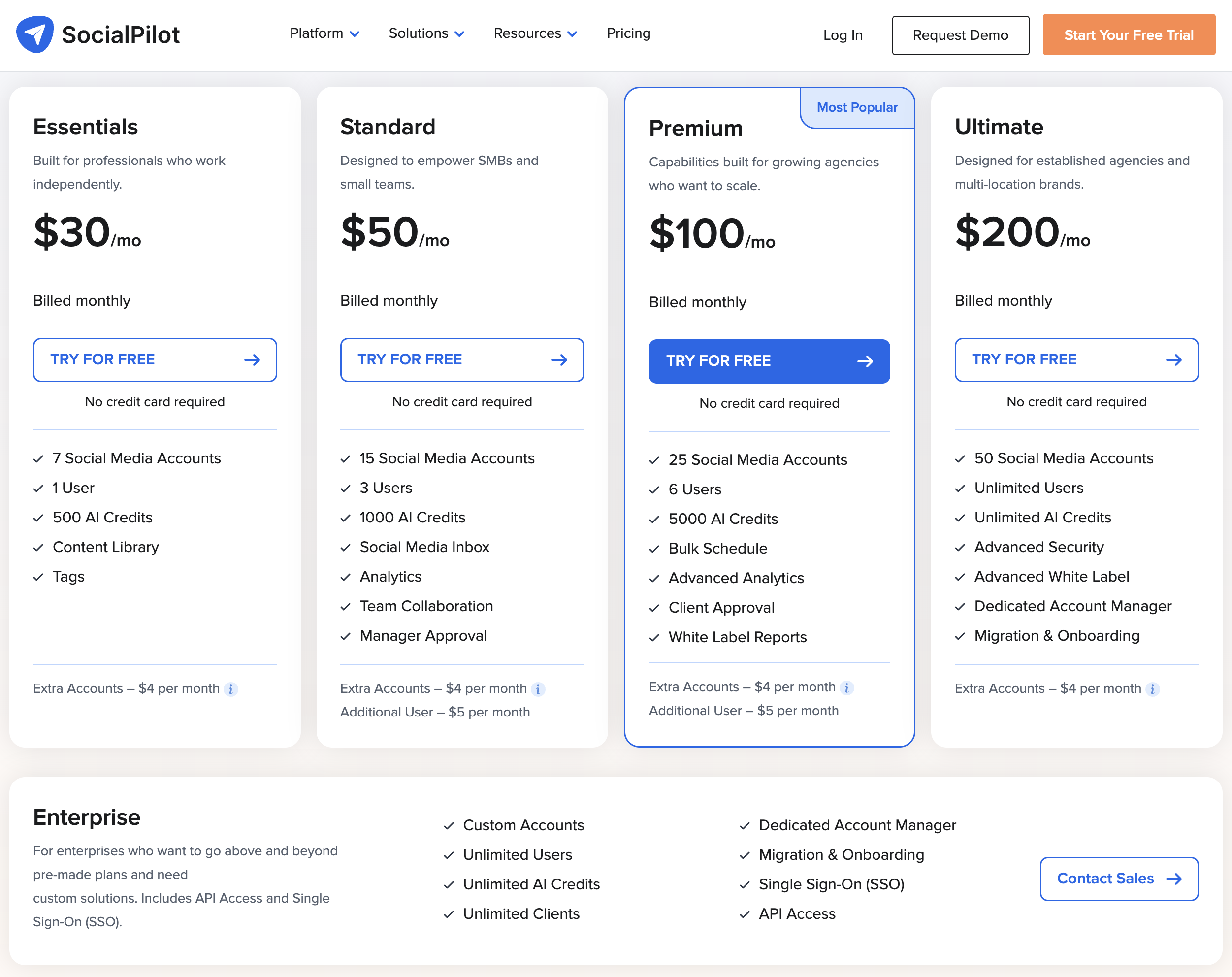
Source: https://www.socialpilot.co/plans
SocialPilot Social Media Scheduling Pricing Plans
Here's a detailed breakdown to help you understand SocialPilot's pricing and choose the best fit for your workflow.
Each SocialPilot plan includes core social media management features like:
- Social media scheduling across major platforms
- AI content generation credits
- Content library for organizing assets
- Analytics and reporting
- Team collaboration tools
- Bulk scheduling capabilities
- Customer support
The main difference between SocialPilot plans comes down to number of social accounts, team members, AI credits, and advanced features like white label reports and client approval workflows.
1. Essentials Plan
The Essentials plan costs $30 per month when billed monthly, or $25.50 per month when billed annually (15% savings).
What's included:
- 7 social media accounts
- 1 user
- 500 AI credits
- Content library
- Tags for organization
- Basic scheduling features
- Customer support
Extra costs:
- Extra accounts: $4 per month per account
- Additional users: Not available on this plan
Best for: solo professionals and freelancers managing a small number of accounts.
2. Standard Plan
The Standard plan costs $50 per month when billed monthly, or $42.50 per month when billed annually (15% savings).
What's included:
- 15 social media accounts
- 3 users
- 1,000 AI credits
- Social media inbox
- Analytics
- Team collaboration
- Manager approval
- Content library
- Tags
- Customer support
Extra costs:
- Extra accounts: $4 per month per account
- Additional users: $5 per month per user
Best for: small businesses and teams managing multiple social accounts with collaboration needs.
3. Premium Plan (Most Popular)
The Premium plan costs $100 per month when billed monthly, or $85 per month when billed annually (15% savings).
What's included:
- 25 social media accounts
- 6 users
- 5,000 AI credits
- Bulk schedule
- Advanced analytics
- Client approval
- White label reports
- Social media inbox
- Team collaboration
- Content library
- Tags
- Customer support
Extra costs:
- Extra accounts: $4 per month per account
- Additional users: $5 per month per user
Best for: growing agencies who need client management features and advanced reporting.
4. Ultimate Plan
The Ultimate plan costs $200 per month when billed monthly, or $170 per month when billed annually (15% savings).
What's included:
- 50 social media accounts
- Unlimited users
- Unlimited AI credits
- Advanced security
- Advanced white label
- Dedicated account manager
- Migration and onboarding
- Bulk schedule
- Advanced analytics
- Client approval
- White label reports
- Social media inbox
- Team collaboration
- Content library
- Tags
- Customer support
Extra costs:
- Extra accounts: $4 per month per account
Best for: established agencies and multi-location brands managing large numbers of accounts with advanced security and support needs.
5. Enterprise Plan
The Enterprise plan offers custom pricing based on your needs.
What's included:
- Custom number of accounts
- Unlimited users
- Unlimited AI credits
- Unlimited clients
- Dedicated account manager
- Migration and onboarding
- Single Sign-On (SSO)
- API access
- All Premium and Ultimate features
- Custom solutions
- Priority support
Best for: large enterprises requiring custom integrations, API access, and tailored solutions.
Is SocialPilot Pricing Worth It?
If you look through all of SocialPilot's pricing plans, you'll notice that there's an option for freelancers, small teams, growing agencies, and large enterprises. On the surface, the structure seems comprehensive and scalable.
However, when you dig into SocialPilot reviews online — including feedback on G2 (4.5 stars) and Capterra (4.4 stars) — a few things consistently come up.
Many users mention that SocialPilot becomes expensive very quickly because of account limits. For example, the Premium plan at $100/month only includes 25 social accounts - and if you need more, you're paying an additional $4 per account per month. For agencies managing multiple clients with several profiles each, these costs add up fast.
Others point out that the interface can feel overwhelming and complicated, especially for solo creators or small teams who don't need all the enterprise-level features. The dashboard is designed for large teams, which can make simple scheduling tasks feel more complex than necessary.
Additionally, some users compare SocialPilot to newer scheduling tools with unlimited account connections, simpler interfaces, and more predictable flat-rate pricing - often at a similar or lower cost without the account-based restrictions.
In other words, while SocialPilot offers robust features for agencies, there are social media scheduling platforms that provide unlimited accounts, cleaner workflows, and more straightforward pricing - making them more cost-effective for growing teams.
Pros and Cons of SocialPilot
Pros of SocialPilot:
-
Comprehensive feature set for agencies: SocialPilot includes client management, white label reports, approval workflows, and bulk scheduling - making it attractive for agencies managing multiple clients.
-
Free trial available: SocialPilot offers a 14-day free trial on all plans, allowing users to test the platform before committing to a paid subscription.
-
Multi-platform scheduling: Users can schedule posts across major platforms including Instagram, Facebook, LinkedIn, Pinterest, X/Twitter, TikTok, and more from one dashboard.
-
AI-powered content assistance: SocialPilot includes AI credits for generating post ideas and content suggestions to speed up the creation process.
-
Team collaboration features: Paid plans include multiple user accounts, manager approval, client approval workflows, and team collaboration tools useful for agencies.
Cons of SocialPilot:
-
Account limits make it expensive as you scale: This is the most common complaint. Even the Premium plan at $100/month caps you at 25 accounts, and each additional account costs $4/month. For agencies managing multiple clients, costs increase significantly.
-
Complicated dashboard not ideal for solo creators: Many users find the interface overwhelming and designed more for large teams than individual creators or small businesses who want simple, fast scheduling.
-
Extra costs for additional users: Unlike some competitors, SocialPilot charges $5/month per additional user on Standard and Premium plans, which adds up for growing teams.
-
Limited flexibility on lower-tier plans: The Essentials plan only allows 1 user with no option to add team members, making it unsuitable for even small teams just starting out.
-
Better alternatives with unlimited accounts: Competitors like PostPlanify offer unlimited social accounts at flat pricing, eliminating the concern about hitting account caps or paying extra fees as you grow.
How SocialPilot Compares to Other Tools
Before committing to SocialPilot, it's worth seeing how its pricing stacks up against other popular social media management platforms.
| Feature | SocialPilot (Premium) | Hootsuite (Standard) | Buffer (Team) | PostPlanify (Premium) |
|---|---|---|---|---|
| Monthly Price | $100/mo | $249/user/mo | $12/channel/mo | $99/mo |
| Social Accounts | 25 | 10 | Pay per channel | 25 |
| Users | 6 | 1 (per-user pricing) | Unlimited | 5 |
| AI Credits | 5,000 | Included | Limited | Unlimited |
| Social Inbox | Yes | Yes | Yes | Yes |
| White Label Reports | Yes | No | No | Yes |
| Approval Workflows | Yes | Advanced plan only | Yes | Yes |
| Extra Account Cost | $4/mo each | Upgrade plan | $6/channel/mo | Flat pricing |
For a deeper dive, check out these head-to-head comparisons:
- SocialPilot vs Buffer
- SocialPilot vs Hootsuite
- SocialPilot vs Sprout Social
- SocialPilot vs Later
- SocialPilot vs Loomly
- SocialPilot vs Metricool
- SocialPilot vs SocialBee
- SocialPilot vs Sendible
The Better SocialPilot Alternative for Social Media Scheduling
Want a simpler way to schedule posts, generate captions, and manage your social accounts without complicated dashboards or per-account fees?
PostPlanify is the SocialPilot alternative you're looking for.

PostPlanify pricing starts at $79/month billed yearly ($99/month monthly) with flat plans — no per-account fees. Here's how each plan breaks down:
- Growth ($99/mo or $79/mo billed yearly): 15 social accounts, 5 workspaces, 3 team members, unlimited posts, vision-powered AI assistant with 200 AI images/mo, full analytics across all 10 platforms, social inbox (Instagram, Facebook, LinkedIn, Google Business, YouTube), bulk scheduling, link in bio, Canva & Google Drive, API + MCP access
- Premium ($199/mo or $159/mo billed yearly) — Most Popular: 30 social accounts, 15 workspaces, 6 team members, 400 AI images/mo, approval workflows, advanced analytics, PDF reports, shared calendar, roles & permissions
- Scale ($299/mo or $239/mo billed yearly): 100 social accounts, 50 workspaces, 12 team members, 800 AI images/mo, white-label PDF reports, priority human support, dedicated onboarding & migration
- Enterprise (custom pricing, demo-only): Unlimited social accounts/workspaces/team members, unlimited AI images, 1:1 onboarding call, priority feature requests, private WhatsApp support
All plans include a 7-day free trial backed by a 14-day money-back guarantee. Where SocialPilot's Premium plan costs $100/mo for 25 accounts with $4/account extra, PostPlanify's Premium plan covers 30 accounts with approval workflows for $199/mo flat (or $159/mo billed yearly), and Scale covers 100 accounts with white-label PDF reports at $299/mo (or $239/mo billed yearly).

Related Guides
- Best SocialPilot Alternatives for Social Media Scheduling
- SocialPilot Reviews: What Users Really Think
- SocialPilot vs Buffer: Full Comparison
- SocialPilot vs Hootsuite: Which Is Better?
- Best Social Media Management Tools for Agencies
- Best Social Media Management Tools for Teams
- How to Automate Social Media Posts
- Social Media Scheduling Tools Worth Trying
- How to Send White-Label Social Media Reports to Clients
- Social Media Analytics and Reporting Guide
- Best Apps to Post to All Social Media at Once
FAQ on SocialPilot Pricing
Does SocialPilot offer a free plan?
No, SocialPilot does not offer a free plan. However, they provide a 14-day free trial on all paid plans so you can test the features before subscribing.
Does SocialPilot offer a free trial?
Yes. SocialPilot provides a 14-day free trial on all paid plans, allowing users to test scheduling, analytics, team collaboration, and other features before upgrading.
Does SocialPilot offer an annual billing discount?
Yes. SocialPilot offers a 15% discount when you choose annual billing. For example, the Premium plan drops from $100/month to $85/month (billed as $1,020/year), and the Essentials plan goes from $30/month to $25.50/month (billed as $306/year).
How does SocialPilot pricing compare to Hootsuite?
SocialPilot is significantly cheaper than Hootsuite. SocialPilot's Premium plan costs $100/month for 25 accounts and 6 users, while Hootsuite's Standard plan starts at $249/user/month for just 10 accounts. Hootsuite also charges per user, making it even more expensive for teams. See our full SocialPilot vs Hootsuite comparison for details.
How does SocialPilot pricing compare to Buffer?
Buffer uses per-channel pricing starting at $6/month per channel, while SocialPilot bundles accounts into plans starting at $30/month for 7 accounts. For managing more than 5 channels, SocialPilot often works out cheaper — but Buffer offers a free plan for up to 3 channels. See our SocialPilot vs Buffer comparison for a full breakdown.
Is SocialPilot good?
Yes, SocialPilot is well-regarded for its comprehensive agency features, bulk scheduling, and client management tools. It holds a 4.5-star rating on G2 and a 4.4-star rating on Capterra. However, many users find it expensive due to account limits and complicated for those who don't need enterprise-level features.
What is SocialPilot used for?
SocialPilot is used to schedule social media posts, manage multiple client accounts, collaborate with teams, generate AI content, analyze performance, and create white label reports for agencies and brands.
How much does SocialPilot cost for agencies?
For agencies, the Premium plan at $100/month includes 25 accounts and 6 users. The Ultimate plan at $200/month includes 50 accounts and unlimited users. Additional accounts cost $4/month each, which can increase costs significantly for agencies managing many clients.
Does SocialPilot charge per user?
Yes. On the Standard and Premium plans, additional users cost $5/month each beyond the included seats (3 users on Standard, 6 on Premium). The Ultimate and Enterprise plans include unlimited users at no extra per-user cost.
Can I add more social accounts to my SocialPilot plan?
Yes, but it costs an extra $4 per month per account on all plans. This can make SocialPilot expensive if you need to manage more accounts than your plan includes.
What happens if I exceed my SocialPilot account limit?
You'll need to purchase additional account slots at $4/month each, or upgrade to a higher plan. For example, if you're on the Premium plan (25 accounts) and need 35, you'd pay an extra $40/month on top of your plan price — or you could upgrade to Ultimate for $200/month which includes 50 accounts.
Can I downgrade my SocialPilot plan?
Yes, you can downgrade your SocialPilot plan at any time. The change takes effect at the start of your next billing cycle. Keep in mind that downgrading may reduce your account limits and available features.










