
Before choosing a social media scheduler, it's crucial to look at genuine user feedback. In this article, we break down SocialPilot reviews to assess usability, reliability, and whether SocialPilot still holds its place as a leading scheduling tool in 2026.
If you're debating whether to stick with SocialPilot or explore alternatives, this overview will help.
SocialPilot Overview
SocialPilot is a social media management platform designed primarily for agencies and marketing teams, offering post scheduling, bulk scheduling, client management, and analytics. It positions itself as an affordable solution for managing multiple social accounts and clients.

Highlighted features include:
- Post scheduling and bulk scheduling
- Client management with white label reports
- Team collaboration and approval workflows
- Social media inbox for engagement
- Analytics and reporting
- AI content generation
Despite SocialPilot's popularity among agencies, user reviews reveal important insights into performance, interface complexity, and account limitations.
User Reviews and Ratings
On Trustpilot
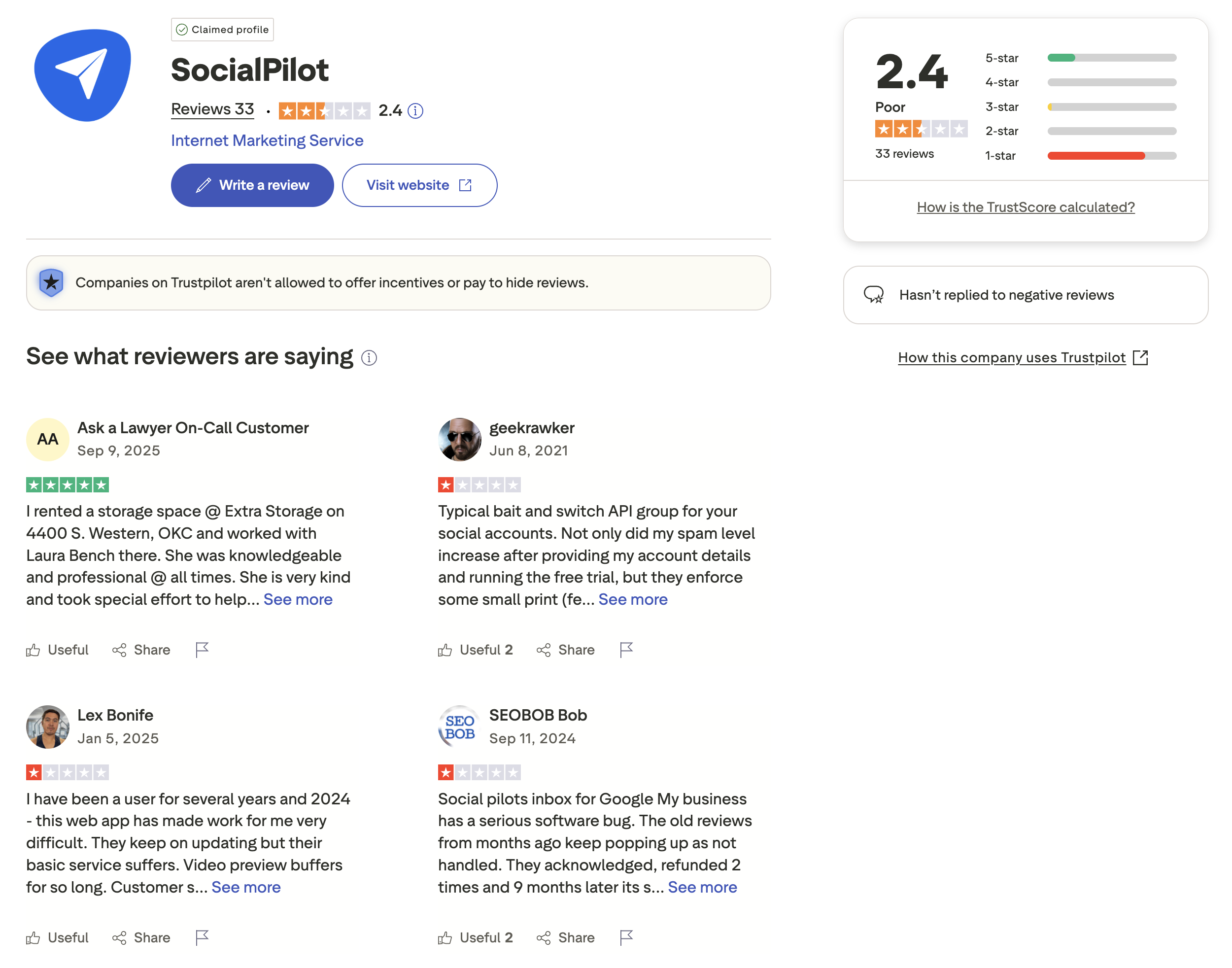
A closer look at the reviews on Trustpilot shows that SocialPilot holds a low rating of 2.4 out of 5, based on 33 reviews. The distribution shows significant polarization - while some users give 5-star ratings, there's a concerning number of 1-star reviews.
Multiple reviewers mention issues with customer service responsiveness, software bugs affecting video previews and posting, and concerns about account management practices. Some users report frustration with the free trial process and billing issues.
The Trustpilot page notes that SocialPilot "hasn't replied to negative reviews," which raises concerns about customer support responsiveness for users experiencing problems.
Rating: 2.4/5 (33 reviews)
Pros
- Works well when functioning properly
- Helpful for organizing content
Cons
- Poor customer support responsiveness
- Software bugs and glitches
- Video preview issues
- Billing and account management concerns
- Company doesn't respond to negative reviews
(credit: Trustpilot)
On G2
On G2, SocialPilot has a significantly higher rating of 4.5 out of 5, based on 841 reviews. The majority of reviews are positive, with 611 five-star ratings and 191 four-star ratings.
Users frequently praise SocialPilot for ease of use, post scheduling capabilities, posting efficiency, and centralized management. The platform is recognized for its scheduling features and consolidating multiple social accounts in one dashboard.
However, reviewers also highlight certain limitations. A featured review from an IT Manager in Financial Services (December 2024) titled "Effortless Social Management and Powerful Scheduling" gave it 4.5/5 stars. While praising the robust time-saving features and clean scheduling solution, the reviewer noted critical drawbacks:
What users like:
- Saves time managing multiple social sites in one dashboard
- Clean and manageable content scheduling
- Role assigning and approval process
- Connected with creative solutions for content collaboration
What users dislike:
- Lacks deep social media functionalities like sentiment analysis
- Interface is cluttered and less updated
- Faces glitches when loading large posts
Common complaint tags include: Missing Features (14), Social Media Limitations (11), Linking Issues (11), Posting Issues (7), and Instagram Limitations (7).
Rating: 4.5/5 (841 reviews)
Pros
- Ease of use
- Efficient post scheduling
- Centralized account management
- Team collaboration features
Cons
- Missing advanced features
- Cluttered interface
- Platform limitations (especially Instagram)
- Loading issues with large posts
- Limited deep social analytics
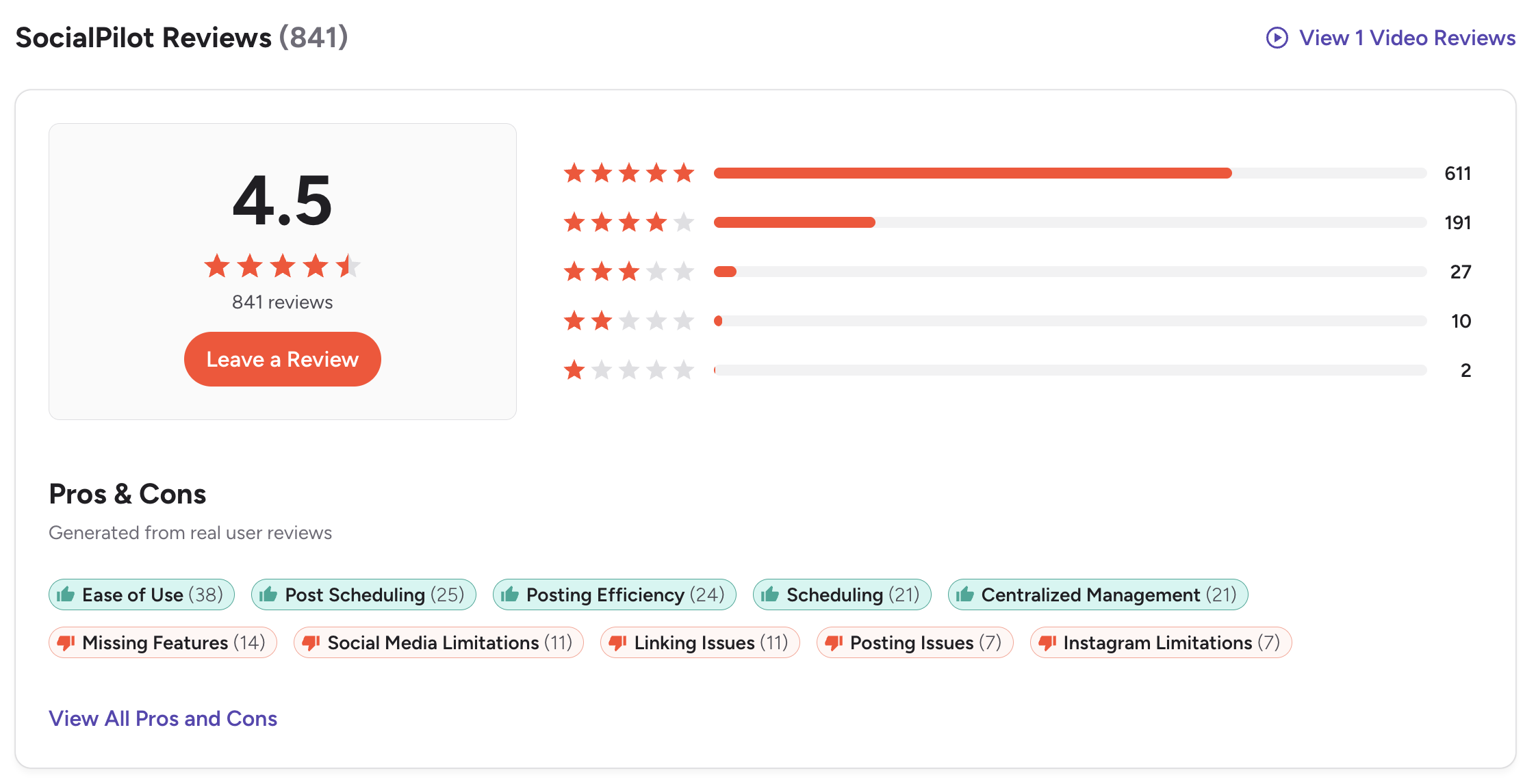
(credit: G2)

What Reddit Users Say About SocialPilot
Beyond formal review platforms, Reddit threads and community forums offer unfiltered feedback from real SocialPilot users. An analysis of multiple Reddit threads in social media marketing subreddits reveals several recurring themes:
Theme 1: Strong value compared to bigger competitors. Reddit users frequently compare SocialPilot favorably against Hootsuite and Buffer on price-to-feature ratio. Multiple commenters describe it as offering comparable scheduling and publishing capabilities at a fraction of the cost, making it a popular recommendation in "what tool should I use?" threads.
Theme 2: Bulk scheduling is a standout feature — when it works. Agency owners and freelancers on Reddit praise the bulk scheduling and CSV upload features for managing high-volume posting. However, some users report that bulk scheduling occasionally fails silently — posts don't go live, and there is no queue alert or notification to flag the failure. This creates a trust issue for users who rely on set-and-forget workflows.
Theme 3: Analytics are described as basic. Reddit users managing data-driven campaigns consistently note that SocialPilot's reporting is surface-level compared to dedicated analytics tools. Advanced analytics are locked behind the Premium tier ($100/month), which some users feel is too steep for what amounts to slightly better charts.
Theme 4: Customer support is polarizing. Some Reddit users describe SocialPilot's support as responsive and helpful, particularly praising live chat. Others report slow email responses and difficulty getting refunds. One long-time user noted on a community forum that in 2024, "this web app has made work for me very difficult. They keep on updating but their basic service suffers."
Theme 5: Missing features frustrate power users. Reddit threads surface repeated requests for features like bulk commenting, Reel scheduling improvements, and better Instagram integration. One user noted: "Despite my repeated requests for a basic feature — the ability to comment in bulk — they've failed to deliver."
Overall, the Reddit sentiment toward SocialPilot skews positive for small businesses and freelancers who need affordable multi-account scheduling. The tone shifts negative when users describe scaling their operations and hitting the platform's feature and reliability ceiling.
Feature-by-Feature User Feedback
Scheduling: SocialPilot's core scheduling engine receives consistent praise across review platforms. Users highlight the content calendar, queue management, and bulk CSV upload as time-savers. The main criticism is reliability — occasional silent failures in bulk scheduling and inconsistent post notifications that cause missed publishing windows.
Analytics: The most common cross-platform complaint. Users on G2, Capterra, and Reddit describe reports as basic, with limited customization. The reporting does not provide actionable suggestions on how to improve performance. Advanced analytics require the Premium plan at $100/month, which some users consider poor value relative to dedicated analytics tools.
Pricing: SocialPilot positions itself as an affordable option, and users generally agree — particularly compared to Hootsuite or Sprout Social. However, Capterra reviewers note that pricing packages are rigid, and users who fall between tiers are forced into the more expensive plan. The per-account fees on higher plans ($4/account extra on Premium) also add up for agencies managing many clients.
Support: G2 reviewers rate support positively, often mentioning helpful live chat agents. Trustpilot tells a different story: 73% of reviews are 1-star, with complaints centered on refund friction and unresponsive email support. SocialPilot has not replied to negative Trustpilot reviews, reinforcing the perception that the company monitors some channels more closely than others.
Ease of Use: Users across all platforms agree that the initial setup and daily scheduling workflow are straightforward. The dashboard gets cluttered when managing many accounts, and the interface is described as "less updated" by G2 reviewers. New users report a lack of onboarding resources, which slows the learning curve.
Review Authenticity
The contrast between the low Trustpilot rating (2.4/5) and the high G2 score (4.5/5) shows that user experiences with SocialPilot vary significantly. While many appreciate its scheduling capabilities and agency features, others report recurring technical issues, customer support problems, and interface complexity that makes simple tasks more difficult than necessary.
The lack of responses to negative reviews on Trustpilot is notable and may be a concern for users who value responsive customer support.
Rating divergence analysis: The 2.1-point gap between G2 (4.5) and Trustpilot (2.4) is one of the widest among social media management tools. G2 reviews come from verified business users and tend to evaluate product functionality — scheduling, publishing, team features — where SocialPilot performs well. Trustpilot reviews skew toward billing, refund, and support experiences, where SocialPilot has clear weaknesses. Capterra sits in between at approximately 4.5/5 from 550+ reviews, aligning more closely with G2.
Volume and trends: G2's 841 reviews provide the most statistically significant sample. The majority of reviews are recent (2023-2025), suggesting an active user base. Trustpilot's 33 reviews carry less statistical weight, but the consistent themes — billing friction, refund refusals, and no company responses — should not be dismissed.
Incentivization signals: There are no obvious signs of incentivized reviews on G2 or Capterra. The distribution on G2 (611 five-star, 191 four-star, with a tail of lower ratings) follows a natural pattern for a product with genuine strengths and known limitations.
Who SocialPilot Works Best For (Based on Reviews)
Users who are typically satisfied:
- Small to mid-size agencies managing 10-50 social accounts who need affordable multi-client scheduling
- Freelance social media managers who value bulk scheduling and CSV upload for high-volume content
- Teams that primarily need scheduling and publishing, with basic reporting as a secondary need
- Budget-conscious users switching from more expensive tools like Hootsuite or Sprout Social
Users who tend to leave:
- Data-driven marketers who need deep analytics, sentiment analysis, or custom reporting without paying for the Premium tier
- Users who rely on Instagram-heavy workflows — Instagram limitations and Reel scheduling gaps are recurring pain points
- Anyone who has experienced a billing or refund issue — Trustpilot reviews suggest these situations rarely resolve smoothly
- Power users who need advanced features like bulk commenting, link shortening, or in-app image editing
- Teams that need guaranteed post delivery — the silent scheduling failures reported by some users are a deal-breaker for high-stakes content calendars
Before choosing a social media scheduler...
Consider the following tips:
- Check multiple review platforms to ensure consistent user feedback.
- Look at the timing of reviews - sudden bursts of positive reviews can be a red flag.
- Research what people are saying on forums like Reddit for more unbiased opinions.
- Ask fellow business owners about their experiences with the service.
Ultimately, the best scheduler is the one that will give your social team a massive leg up and make the whole posting process a lot easier.
SocialPilot is a good option for social media scheduling, but you can definitely find a better social media scheduler at the same price range.
You might want to consider PostPlanify - an ideal solution for creators, marketing teams, agencies, and brands who want to streamline their content workflow and publish faster across all social platforms without account limits or complicated interfaces.

Starting at $79/month billed yearly ($99/month monthly), PostPlanify uses flat pricing — no per-account fees. Here's what each plan includes:
- Growth ($99/mo or $79/mo billed yearly): 15 social accounts, 5 workspaces, 3 team members, unlimited posts, vision-powered AI assistant with 200 AI images/mo, full analytics across all 10 platforms, social inbox (Instagram, Facebook, LinkedIn, Google Business, YouTube), bulk scheduling, link in bio, Canva & Google Drive, API + MCP access
- Premium ($199/mo or $159/mo billed yearly) — Most Popular: 30 social accounts, 15 workspaces, 6 team members, 400 AI images/mo, approval workflows, advanced analytics, PDF reports, shared calendar, roles & permissions
- Scale ($299/mo or $239/mo billed yearly): 100 social accounts, 50 workspaces, 12 team members, 800 AI images/mo, white-label PDF reports, priority human support, dedicated onboarding & migration
- Enterprise (custom pricing, demo-only): Unlimited social accounts/workspaces/team members, unlimited AI images, 1:1 onboarding call, priority feature requests, private WhatsApp support
Where SocialPilot's Premium costs $100/mo for 25 accounts with $4/account extra, PostPlanify's Premium plan covers 30 accounts with approval workflows for $199/mo flat (or $159/mo billed yearly), and Scale covers 100 accounts with white-label PDF reports at $299/mo. For a full breakdown of SocialPilot's pricing, see our SocialPilot pricing guide.
Start your 7-day free trial today.










