
Tailwind is a social media scheduling tool built primarily for Pinterest, Instagram, and Facebook. It is known for its SmartSchedule, Ghostwriter AI, Tailwind Create design templates, and Tailwind Communities for collaborative content sharing. Many Pinterest-focused creators and e-commerce sellers use Tailwind to grow their visual content presence.
But is Tailwind really worth the price, or should you save your money?
Today, we'll break down the full Tailwind pricing structure and show you exactly what features you get in each plan, so you can decide whether it's the right tool for your content strategy.
Tailwind Pricing at a Glance (2026)
| Plan | Monthly Price | Accounts | Posts/Month | Users |
|---|---|---|---|---|
| Free Forever | $0/month | 1 per platform (3 total) | 5 | 1 |
| Pro | $29.99/month | 1 per platform (3 total) | 150 | 1 |
| Advanced | $54.99/month | 2 per platform (6 total) | 300 | 2 |
| Max | $99.99/month | 3 per platform (9 total) | Unlimited | 5 |
Annual billing saves up to 50%.
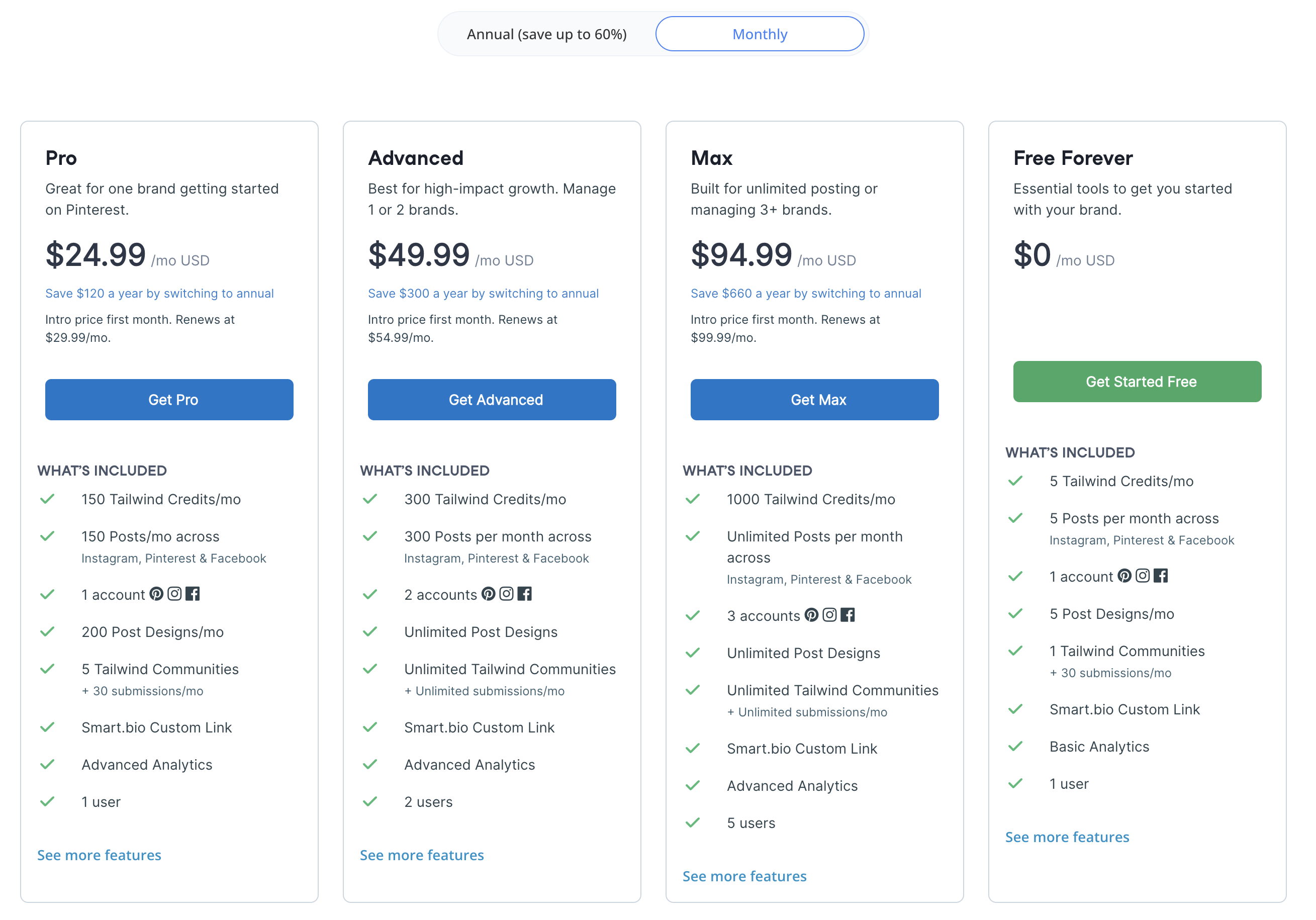
Source: https://www.tailwindapp.com/pricing
Tailwind Social Media Scheduling Pricing Plans
Here's a detailed breakdown to help you understand Tailwind's pricing and choose the best fit for your workflow.
Each Tailwind plan includes core social media management features like:
- SmartSchedule for data-driven optimal posting times
- Publishing to Pinterest, Instagram, and Facebook
- Canva integration for design imports
- Smart.bio link-in-bio landing page
- Photo and video support with bulk uploads
- Browser extensions for quick Pin creation
The main difference between Tailwind plans comes down to the number of posts allowed per month, AI credits, social accounts, design limits, and access to AI tools like Ghostwriter.
1. Free Forever Plan
The Free plan costs $0/month permanently and allows you to connect 1 account per platform (3 total: 1 Pinterest, 1 Instagram, 1 Facebook).
What's included:
- 5 posts per month across all platforms
- 5 Tailwind AI Credits per month
- 5 post designs per month (Tailwind Create)
- 1 Tailwind Community with 30 submissions per month
- Smart.bio custom link
- SmartSchedule
- Basic analytics
- 1 user
Best for: hobby creators testing Pinterest scheduling before committing to a paid plan.
2. Pro Plan
The Pro plan costs $29.99/month. Annual billing is $17.99/month (saving $144/year). It includes 1 account per platform (3 total).
What's included:
- 150 posts per month across all platforms
- 150 Tailwind AI Credits per month
- 200 post designs per month (Tailwind Create)
- 5 Tailwind Communities with 30 submissions per month
- Smart.bio custom link
- SmartSchedule and SmartPin
- Advanced analytics
- 1 user
- E-commerce integrations (Shopify, WooCommerce, Squarespace, WordPress)
Best for: solo creators getting started with Pinterest scheduling who need more posts and AI tools.
3. Advanced Plan
The Advanced plan costs $54.99/month. Annual billing is $29.99/month (saving $300/year). It includes 2 accounts per platform (6 total).
What's included (all Pro features plus):
- 300 posts per month across all platforms
- 300 Tailwind AI Credits per month
- Unlimited post designs (Tailwind Create)
- Unlimited Tailwind Communities with unlimited submissions
- Ghostwriter AI (copywriting assistant)
- Made for You (instant Pin creation)
- 2 users
Best for: creators managing 1-2 brands who need higher posting volume, Ghostwriter AI, and unlimited designs.
4. Max Plan
The Max plan costs $99.99/month. Annual billing is $49.99/month (saving $600/year). It includes 3 accounts per platform (9 total).
What's included (all Advanced features plus):
- Unlimited posts per month
- 1,000 Tailwind AI Credits per month
- 3 accounts per platform (9 total: 3 Pinterest, 3 Instagram, 3 Facebook)
- 5 users
- Complete access to all tools
- Priority support
Best for: agencies and multi-brand creators who need unlimited posting, the most AI credits, and up to 9 social accounts.
Is Tailwind Pricing Worth It?
If you look through all of Tailwind's pricing plans, you'll notice a tiered system focused on posting volume and AI credits. On the surface, the free plan and Pinterest-specific tools make it attractive for visual content creators.
However, when you dig into Tailwind reviews from real users, a few things consistently come up.
The most significant limitation is that Tailwind only supports 3 platforms: Pinterest, Instagram, and Facebook. If you publish on TikTok, X/Twitter, YouTube, LinkedIn, Threads, or Bluesky, Tailwind cannot help you, you need a second scheduling tool entirely.
Many users also mention that the monthly post limits are restrictive on lower plans. The Pro plan caps you at 150 posts per month, and the Advanced plan at 300 posts per month. Only the Max plan at $99.99/month offers unlimited posting. Creators posting multiple times daily can hit these limits quickly.
Others point out that the account limits are restrictive for multi-brand users. Even the Max plan caps you at 9 accounts (3 per platform). Creators and agencies often compare Tailwind to broader scheduling tools that support more platforms and more accounts without these caps.
In other words, while Tailwind is excellent for Pinterest-specific workflows, there are social media scheduling platforms that support more platforms, offer unlimited posting at lower prices, and include AI image generation, often at a lower cost.
Tailwind Annual vs Monthly: Which Saves More?
Tailwind offers significant discounts on annual billing, but the savings vary by plan. Here's the exact math:
| Plan | Monthly Billing | Annual Billing | Annual Cost | You Save |
|---|---|---|---|---|
| Pro | $29.99/mo | $17.99/mo | $215.88/yr | $144/yr (40%) |
| Advanced | $54.99/mo | $29.99/mo | $359.88/yr | $300/yr (45%) |
| Max | $99.99/mo | $49.99/mo | $599.88/yr | $600/yr (50%) |
The catch: Annual billing requires upfront payment for the full year. If you cancel mid-year, Tailwind does not offer prorated refunds, you keep access until the billing period ends but don't get money back.
Bottom line: If you're confident Tailwind is the right tool, annual billing saves 40-50%. But if you're testing or unsure, start with monthly billing and switch to annual after you've confirmed it fits your workflow. Tailwind also offers a free plan with no time limit, so you can test the core features before paying anything.
Tailwind Hidden Costs and What to Watch Out For
Beyond the listed plan prices, there are costs and limitations that aren't immediately obvious:
- Account limits are per-total, not per-platform: The account limits (1/2/3 per platform) add up but are still restrictive for agencies managing many brands. The Max plan's 9 total accounts is the ceiling, there's no way to add more without a second subscription.
- X/Twitter is not supported at all: Tailwind does not support X/Twitter publishing, not as a built-in feature, not as a paid add-on, not in any form. If you post on X/Twitter, you need a completely separate tool. This is a significant limitation since nearly every other scheduling platform includes X/Twitter by default.
- AI credits run out quickly at scale: The Pro plan includes 150 AI credits/month. Each Ghostwriter caption generation, SmartPin suggestion, or Made for You design costs credits. If you use AI features daily, 150 credits can be exhausted within the first two weeks. Once depleted, AI tools are unavailable until the next billing cycle, there's no option to purchase additional credits.
- Tailwind Create designs are capped on lower plans: The Free plan allows 5 designs/month, and the Pro plan allows 200. Only Advanced and Max offer unlimited designs. If you rely on Tailwind Create for producing Pinterest pins, the Pro cap may not be sufficient for high-volume pinners.
- No refund policy on annual plans: Tailwind does not offer prorated refunds for annual subscriptions. If you cancel after 3 months of a 12-month plan, you retain access for the remaining 9 months but receive no refund. This makes annual commitment riskier if you're not certain about the tool.
- Community submissions have monthly limits: Tailwind Communities (collaborative content sharing groups) cap submissions at 30/month on Free and Pro plans. Only Advanced and Max offer unlimited submissions. For creators relying on Communities for Pinterest growth, this limit can be restrictive.
Pros and Cons of Tailwind
Pros of Tailwind:
- Best-in-class Pinterest tools: Tailwind is Pinterest's longest-standing developer partner (since 2012) and offers SmartSchedule, SmartPin, board lists, and Communities that are unmatched by any other scheduling tool for Pinterest growth.
- Tailwind Create design tool: Tailwind Create generates on-brand visual designs from templates, making it easy for creators to produce professional-looking pins and social posts without design skills.
- Free Forever plan available: Tailwind offers a permanent free plan with 5 posts per month, making it accessible for creators to test the platform with no credit card required and no time limit.
- Ghostwriter AI for copywriting: The Ghostwriter AI tool generates Pinterest pin titles, descriptions, social captions, email subject lines, and hashtag suggestions, helpful for creators who need quick copy.
- E-commerce integrations: Tailwind integrates with Shopify, WooCommerce, Squarespace, and WordPress, making it valuable for e-commerce sellers who rely on Pinterest for product marketing.
Cons of Tailwind:
- Only supports 3 platforms (Pinterest, Instagram, Facebook): Tailwind does not support TikTok, X/Twitter, YouTube, LinkedIn, Threads, Bluesky, or any other platform. Creators publishing on multiple networks need a separate tool for everything else.
- Monthly post limits on most plans: The Pro plan limits you to 150 posts/month, the Advanced plan to 300 posts/month. Only the Max plan at $99.99/month offers unlimited posting. Competitors like PostPlanify offer scheduling across 10 platforms starting at $79/month billed yearly ($99/month monthly) with unlimited posts.
- Maximum 9 social accounts on the highest plan: Even the Max plan caps you at 9 accounts (3 per platform). For agencies managing multiple brands, this limit requires additional tools. PostPlanify offers 25 accounts at $99/month on the Premium plan.
- No X/Twitter, TikTok, YouTube, or LinkedIn support: Tailwind only supports 3 platforms. There is no add-on or workaround to publish to X/Twitter, TikTok, YouTube, LinkedIn, Threads, or Bluesky, you need a separate tool entirely.
- No approval workflows or team features beyond 5 users: Tailwind does not offer approval workflows, and the Max plan limits teams to 5 users. For agencies needing structured content review and larger team access, these limitations are significant.
The Better Tailwind Alternative for Agencies
Tailwind is a Pinterest and Instagram visual tool, and it is a good one. The problem for an agency serving local businesses is coverage: Tailwind publishes to Instagram, Pinterest and Facebook only. There is no LinkedIn, no TikTok, no X, no YouTube and no Google Business Profile, which is usually the single most valuable listing a local business has.
The account ceiling compounds it. Even the $99.99 Max plan caps you at 3 accounts, so a fourth client has nowhere to go.
PostPlanify is built for agencies serving local businesses. Each client gets their own workspace across 10 platforms including Google Business Profile, and team members and client approvers are never billed as seats.

Pricing starts at $39/month for your first client workspace, or $31/month billed yearly:
| Client workspaces | Growth | Premium | Scale |
|---|---|---|---|
| 1 | $39/mo | $59/mo | $79/mo |
| 3 | $97/mo | $157/mo | $197/mo |
| 5 | $155/mo | $255/mo | $315/mo |
| 10 | $250/mo | $400/mo | $560/mo |
| Social accounts per workspace | 4 | 6 | 8 |
Every plan includes unlimited team members and unlimited posts. Here is what each adds:
- Growth ($39/mo first workspace): unlimited users and posts, analytics across all 10 platforms, social inbox, approval workflows, shared calendar, roles and permissions, bulk scheduling, media library with Canva and Google Drive, and link in bio
- Premium ($59/mo first workspace): everything in Growth, plus advanced analytics, branded client reports, scheduled report delivery, team comments and mentions, AI brand voice, AI knowledge base, and full API and MCP access
- Scale ($79/mo first workspace): everything in Premium, plus a white-label dashboard, white-label client emails and reports, dedicated 1:1 onboarding, migration help and priority human support
Tailwind vs PostPlanify: Side-by-Side Comparison
| Feature | Tailwind (Max, $99.99) | PostPlanify (Growth) |
|---|---|---|
| Price | $99.99/mo | $39/mo first workspace, $97/mo for 3 |
| Platforms | 3: Instagram, Pinterest, Facebook | 10, including Google Business Profile, LinkedIn, TikTok, X and YouTube |
| Social accounts | 3, the ceiling on every plan | 4 per workspace, 12 across 3 clients |
| Posts per month | Unlimited on Max, 150 on Pro, 300 on Advanced | Unlimited on every plan |
| Users | 5 on Max, 1 on Pro, 2 on Advanced | Unlimited on every plan |
| Client approvers | Counted against the user cap | Free, never billed as seats |
| Client workspaces | Not a concept | One per client, up to 100 |
| Approval workflows | Not offered | Included from Growth |
| Social inbox | Not offered | Instagram, Facebook, LinkedIn, Google Business, YouTube |
| Client reports | Not offered | Premium and above |
| White labeling | Not offered | Scale |
| Pinterest depth | Best in class, Communities, SmartSchedule, Smart.bio | Standard Pinterest scheduling |
| Free plan | Yes, 5 posts per month | No, 7-day trial |
Being straight about it: if Pinterest is the point, Tailwind wins and it is not close. Tailwind Communities, SmartSchedule, Pin design and its Pinterest analytics are the deepest in the market, and PostPlanify does not try to match them. There is also a genuine free plan.
It is not an agency platform though, and does not claim to be. Three platforms, three accounts, five users and no approvals, inbox or client reporting at any price. For an agency running local businesses that need Google Business Profile and LinkedIn alongside Instagram, the coverage gap is the deciding factor before price enters the conversation.
All plans include a 7-day free trial backed by a 14-day money-back guarantee.

Related Guides
- Best Tailwind Alternatives for Social Media Scheduling
- Tailwind Reviews: What Real Users Say
- Best Time to Post on Social Media
- Best Times to Post on Pinterest
- How to Automate Social Media Posts
- Instagram Post Scheduler Tools
- Best Social Media Management Platform
- Social Media Scheduling Tools Guide
- Best Free Social Media Management Tools
FAQ on Tailwind Pricing
How much does Tailwind cost per month?
Tailwind's monthly prices are $29.99/month (Pro), $54.99/month (Advanced), and $99.99/month (Max). Annual billing reduces these to $17.99, $29.99, and $49.99 per month respectively, saving 40-50%. A Free Forever plan is also available with 5 posts/month.
Does Tailwind have a free plan?
Yes. Tailwind offers a Free Forever plan with 1 account per platform (3 total), 5 posts per month, 5 AI credits, 5 post designs, and basic analytics. No credit card required and no time limit.
Does Tailwind support TikTok, X/Twitter, or LinkedIn?
No. Tailwind only supports Pinterest, Instagram, and Facebook for publishing. If you need to schedule content on TikTok, X/Twitter, YouTube, LinkedIn, Threads, or Bluesky, you need a different scheduling tool like PostPlanify.
Does Tailwind have post limits?
Yes. The Free plan allows 5 posts/month, the Pro plan 150 posts/month, and the Advanced plan 300 posts/month. Only the Max plan at $99.99/month offers unlimited posting.
What are Tailwind Credits?
Tailwind Credits power AI features like SmartPin, Ghostwriter, and Made for You. Each AI generation costs credits from your monthly allotment. If you run out, AI tools pause until the next billing cycle. Limits are: Free (5), Pro (150), Advanced (300), Max (1,000).
Is Tailwind good for Pinterest?
Yes. Tailwind is the best scheduling tool specifically for Pinterest, with SmartSchedule, SmartPin, board management, Pinterest-optimized analytics, keyword tools, and Tailwind Communities for collaborative growth. If Pinterest is your only platform, Tailwind is a strong choice.
Does Tailwind offer a nonprofit discount?
Yes. Tailwind offers a 50% discount on all plans for verified nonprofit organizations, educational institutions, and charities. Contact Tailwind support with proof of nonprofit status to apply.
Can I add more social accounts to Tailwind?
No. Tailwind does not offer add-ons for extra accounts. You must upgrade to a higher plan tier to get more accounts: Pro (3 accounts), Advanced (6 accounts), Max (9 accounts). There is no option for unlimited accounts.
Is PostPlanify cheaper than Tailwind?
At a single Pinterest-focused brand, Tailwind Pro at $29.99 is close to PostPlanify's $39/month and its free plan is cheaper still. The comparison changes for agencies: Tailwind caps at 3 accounts and 3 platforms on every plan, so three local business clients needing Google Business Profile or LinkedIn cannot be served at any Tailwind price, while $97/month here covers 12 accounts across 10 platforms.
Why do Tailwind prices increase after the first month?
Tailwind's standard monthly prices are $29.99 (Pro), $54.99 (Advanced), and $99.99 (Max). Annual billing locks in lower rates at $17.99/$29.99/$49.99 per month respectively.
Does Tailwind offer refunds?
No. Tailwind does not offer prorated refunds on any plan. If you cancel a monthly subscription, you retain access until the end of the current billing period. If you cancel an annual subscription, you keep access for the remainder of the year but receive no partial refund. This applies to all plans including Max. Always start with monthly billing if you're unsure about committing.
Can I downgrade my Tailwind plan?
Yes. You can downgrade your Tailwind plan at any time through your account settings. The downgrade takes effect at the start of your next billing cycle, you keep your current plan's features until then. When you downgrade, any content scheduled beyond your new plan's post limit will remain in the queue but won't publish until you either upgrade again or manually remove excess posts to stay within limits.
Does Tailwind offer a student or education discount?
Tailwind offers a 50% discount for verified nonprofit organizations, educational institutions, and charities. Students enrolled at qualifying institutions may be eligible through their school's account. Contact Tailwind support with proof of educational or nonprofit status to apply. There is no separate student discount for individual learners outside of an institutional account.










