
Before choosing a social media scheduler, it's crucial to look at genuine user feedback. In this article, we break down Tailwind reviews to assess usability, reliability, and whether Tailwind is the right scheduling tool for your workflow in 2026.
If you're debating whether to stick with Tailwind or explore alternatives, this overview will help.
Tailwind Ratings at a Glance
| Platform | Rating | Total Reviews | Verdict |
|---|---|---|---|
| G2 | 4.3 / 5 | 141 reviews | Strong for scheduling and ease of use |
| Trustpilot | 3.5 / 5 | 302 reviews | Polarized, Pinterest fans vs. billing complaints |
| Capterra | 4.4 / 5 | 12 reviews | Positive sentiment from verified users |
Bottom line: Tailwind is the best Pinterest scheduling tool available, but it only supports 3 platforms (Pinterest, Instagram, Facebook). If you publish on TikTok, X, YouTube, LinkedIn, Threads, or Bluesky, you will need a second tool. Read on for the full breakdown.
Tailwind Overview
Tailwind is a social media scheduling tool built primarily for Pinterest, Instagram, and Facebook. It is known for its SmartSchedule, Ghostwriter AI, Tailwind Create design templates, and Tailwind Communities for collaborative content sharing. Many Pinterest-focused creators and e-commerce sellers use Tailwind to grow their visual content presence.

Highlighted features include:
- SmartSchedule for data-driven optimal posting times
- Tailwind Create for design templates
- Ghostwriter AI for copywriting
- Tailwind Communities for collaborative growth
- Pinterest, Instagram, and Facebook support
Despite Tailwind's dominance in the Pinterest scheduling space, user reviews reveal important insights into platform limitations, pricing, and the overall experience.
User Reviews and Ratings
On Trustpilot
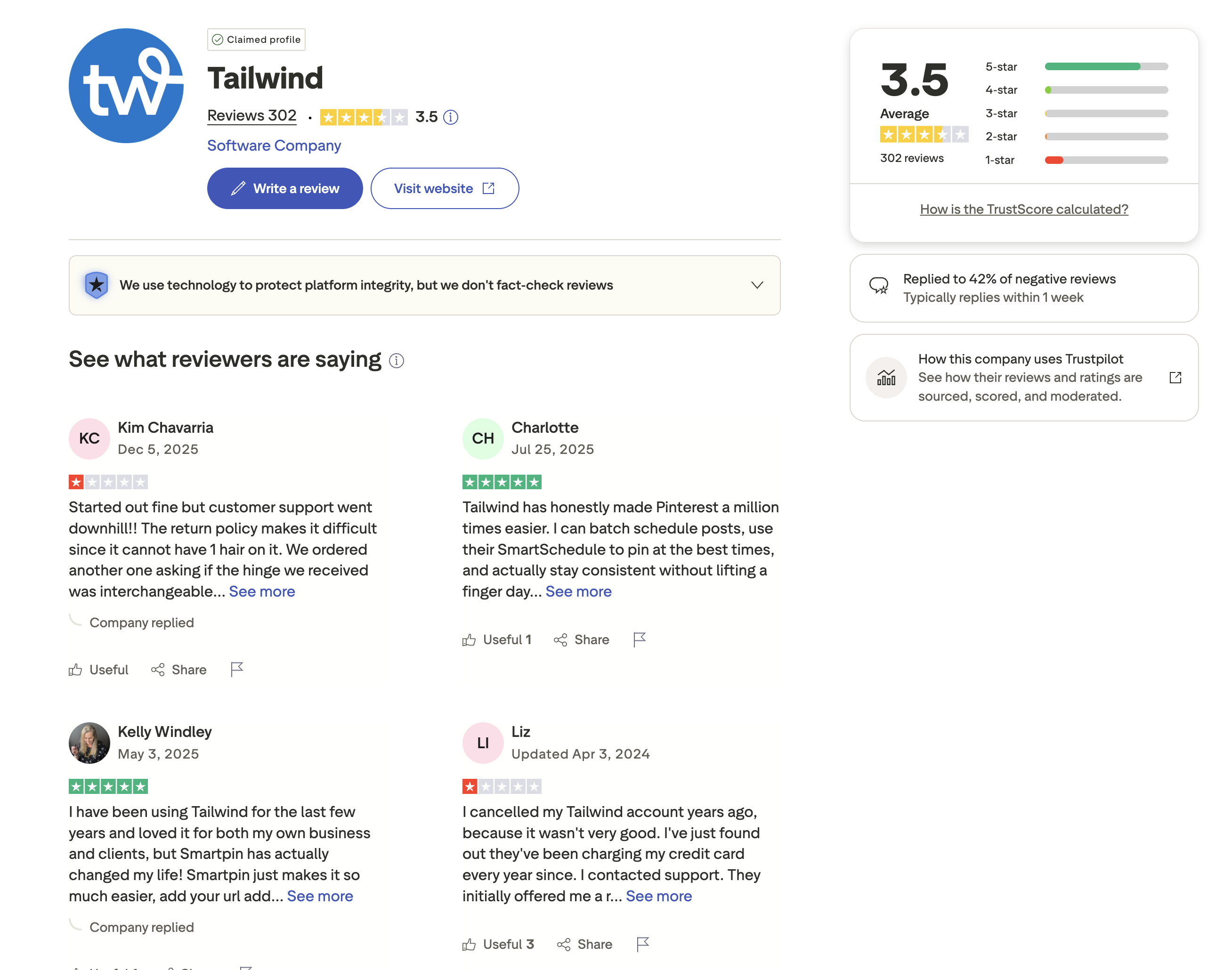
On Trustpilot, Tailwind holds a rating of 3.5 out of 5, based on 302 reviews. The review distribution is polarized, a large portion of reviews are 5-star from satisfied Pinterest users, but there is also a significant number of 1-star and 2-star reviews.
Positive reviewers praise Tailwind's Pinterest capabilities. One user said: "Tailwind has honestly made Pinterest a million times easier. I can batch schedule posts, use their SmartSchedule to pin at the best times, and actually stay consistent without lifting a finger." Another long-time user noted: "Smartpin has actually changed my life! Smartpin just makes it so much easier."
However, negative experiences are also common. One reviewer complained that "customer support went downhill!! The return policy makes it difficult." Another user reported that after cancelling their account years ago, they discovered Tailwind had been "charging my credit card every year since", a serious billing concern.
Tailwind has replied to only 42% of negative reviews, typically within 1 week, notably slower than some competitors who respond within 24 hours.
Rating: 3.5/5 (302 reviews)
Pros
- Excellent Pinterest scheduling with SmartSchedule
- SmartPin simplifies content planning
- Batch scheduling saves significant time
Cons
- Customer support quality has declined
- Reports of continued billing after cancellation
- Slow response to negative reviews (42%, within 1 week)
- Only supports 3 platforms (Pinterest, Instagram, Facebook)
(credit: Trustpilot)
On G2
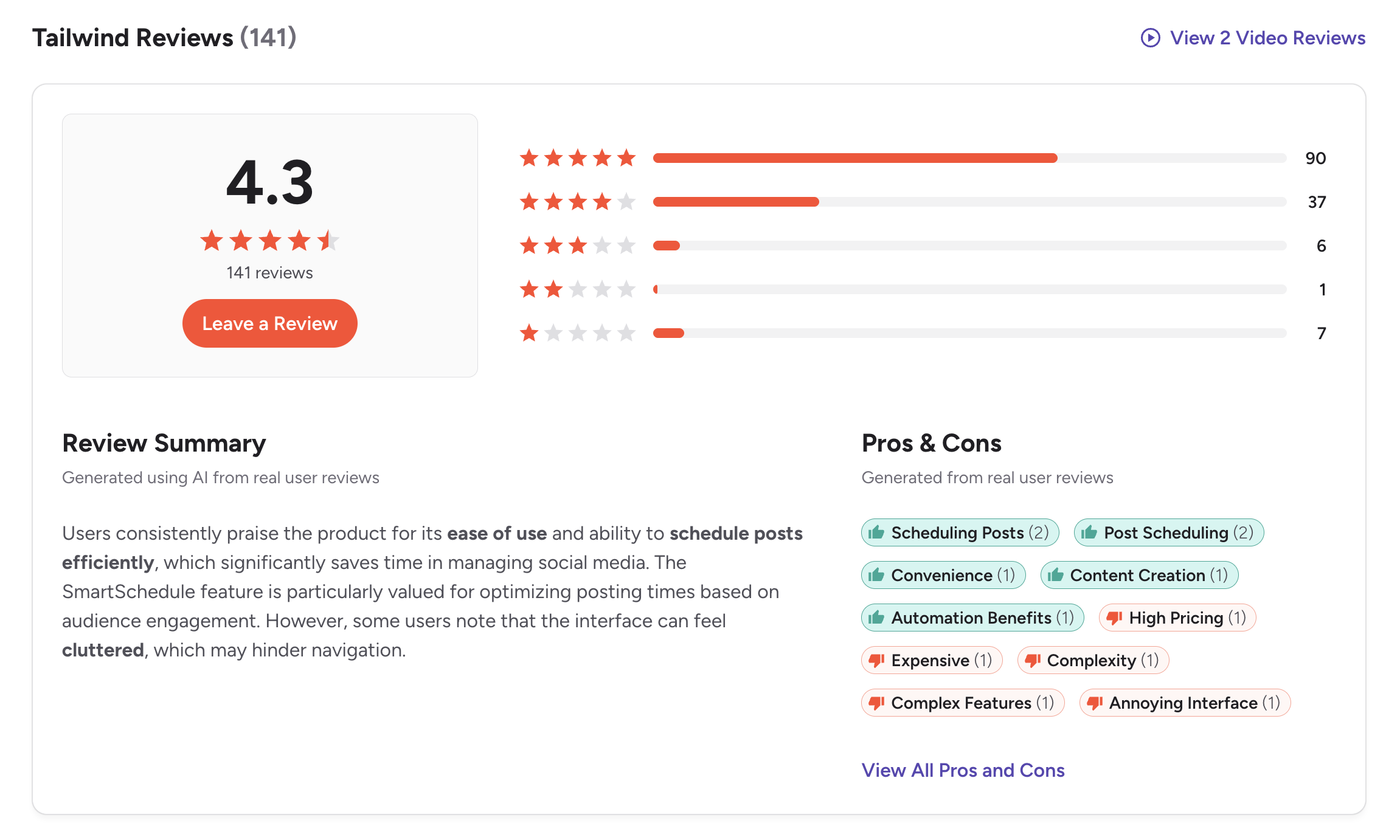
On G2, Tailwind has a rating of 4.3 out of 5, based on 141 reviews. Users consistently praise the product for its ease of use and ability to schedule posts efficiently, with the SmartSchedule feature particularly valued for optimizing posting times based on audience engagement.
The G2 review summary notes: "Users consistently praise the product for its ease of use and ability to schedule posts efficiently, which significantly saves time in managing social media. The SmartSchedule feature is particularly valued for optimizing posting times based on audience engagement. However, some users note that the interface can feel cluttered, which may hinder navigation."
The most commonly mentioned pros include scheduling posts (2 mentions), post scheduling (2 mentions), convenience (1), content creation (1), and automation benefits (1). The relatively low mention counts reflect the smaller review base on G2.
The cons are more telling: high pricing (1 mention), expensive (1), complexity (1), complex features (1), and annoying interface (1). Users find value in Tailwind but note the interface can be overwhelming.
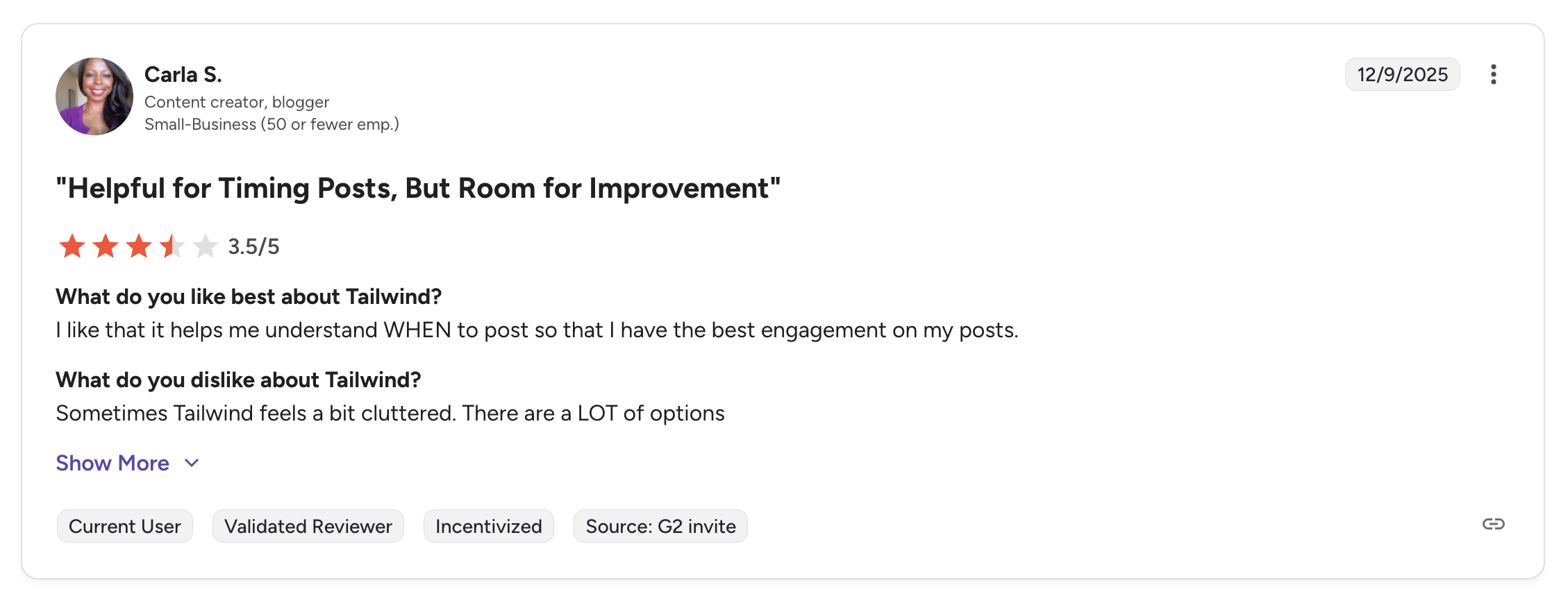
A featured review titled "Helpful for Timing Posts, But Room for Improvement" gave Tailwind 3.5/5, noting: "I like that it helps me understand WHEN to post so that I have the best engagement on my posts." But the reviewer also stated: "Sometimes Tailwind feels a bit cluttered. There are a LOT of options."
Rating: 4.3/5 (141 reviews)
Pros
- Scheduling posts and SmartSchedule timing
- Post scheduling efficiency
- Content creation tools
- Automation benefits
Cons
- High pricing / expensive
- Interface can feel cluttered
- Complex features
- Limited to 3 platforms
(credit: G2)
On Capterra
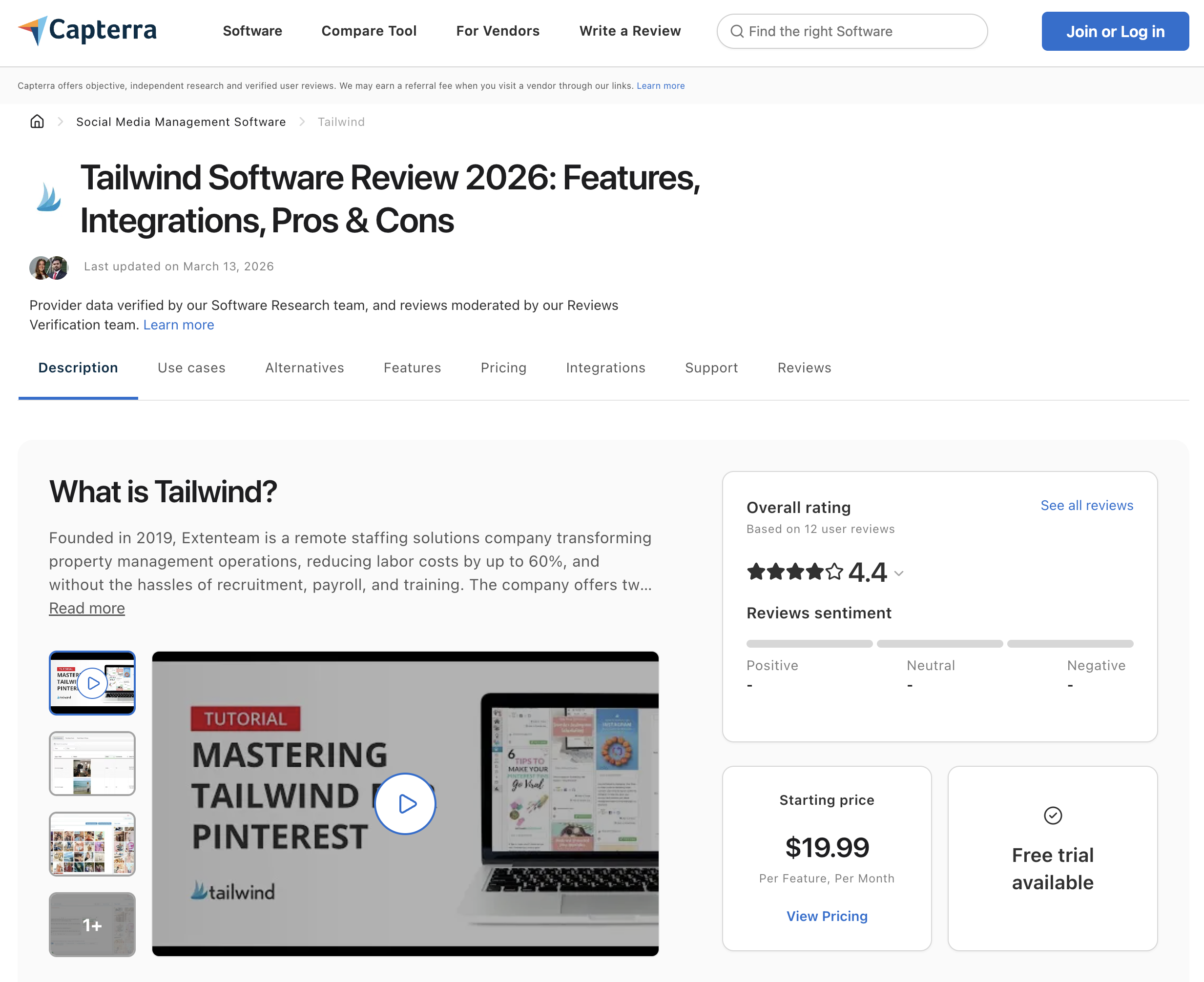
On Capterra, Tailwind holds an overall rating of 4.4 out of 5, based on 12 user reviews. The review sentiment skews positive, and provider data is verified by Capterra's Software Research team.
Capterra categorizes Tailwind under Social Media Management Software and notes a starting price of $19.99 per feature per month, with a free trial available. Reviewers highlight Tailwind's strength in Pinterest scheduling and content planning, consistent with feedback on G2 and Trustpilot.
Rating: 4.4/5 (12 reviews)
Pros
- Highest overall rating across all three review platforms (4.4/5)
- Positive review sentiment from verified users
- Free trial available for evaluation
Cons
- Small review sample size (12 reviews)
- Pricing listed as per-feature, which can add up
- Limited to Pinterest-centric workflows
(credit: Capterra)
What Community Users Say About Tailwind
Beyond formal review platforms, community discussions on forums and blogs reveal consistent themes about Tailwind:
The positive consensus:
- Pinterest bloggers and e-commerce sellers frequently describe Tailwind as "essential" for Pinterest growth. Users report being able to schedule several weeks of pins in under 30 minutes, then not having to think about Pinterest at all while Tailwind handles auto-posting in the background.
- SmartSchedule and Communities (formerly Tribes) are the two features most praised in community discussions. One blogger reported that after three months of using Tailwind's schedule to share posts on autopilot, their subscriber list grew from 0 to 643.
- The general community verdict: if Pinterest is your primary platform, Tailwind is worth the investment.
The recurring complaints:
- The Auto Post feature does not work for multi-image posts on Instagram, requiring manual publishing, a common frustration for Instagram-focused users.
- The dashboard can be slow to load, especially when handling high-resolution images or large content batches, a pain point during batch-scheduling sessions.
- Tailwind's pin designer tool is reported to be unreliable, with users recommending creating pins in Canva or another design tool instead.
- The pricing keeps climbing, and features don't extend well beyond Pinterest, making it a harder sell for multi-platform marketers.
Community discussions consistently reinforce the same pattern seen in formal reviews: Tailwind excels at Pinterest but falls short as a general-purpose social media scheduler.
What Reddit Users Say About Tailwind
Tailwind is frequently discussed on Reddit, particularly in Pinterest marketing, blogging, and e-commerce subreddits. The Reddit feedback is more polarized than formal review platforms, with strong advocates and vocal critics:
Theme 1: Pinterest users describe it as essential, with caveats. Reddit users who run Pinterest-driven blogs or e-commerce stores consistently recommend Tailwind for batch scheduling and SmartSchedule. Users report scheduling several weeks of pins in under 30 minutes and seeing measurable traffic increases. However, many add a caveat: Tailwind's value depends heavily on Pinterest's algorithm, and as Pinterest traffic has declined for some niches, Tailwind's ROI has come into question.
Theme 2: Pinterest algorithm changes have eroded results. A growing number of Reddit users report that Pinterest traffic is declining despite consistent pinning through Tailwind. Some describe "dropping Tailwind in droves" as impressions tank. The concern is not with Tailwind's functionality but with whether heavy automation through any scheduling tool is now penalized by Pinterest's algorithm, a debate that remains unresolved in the community.
Theme 3: Billing and cancellation complaints are a recurring thread. Reddit users share stories of being charged annual renewal fees without adequate notice, with renewal warnings buried at the bottom of achievement-summary emails rather than sent as dedicated billing notifications. Multiple users describe discovering charges on credit cards they thought were no longer connected to active accounts. These complaints mirror the Trustpilot and Better Business Bureau patterns.
Theme 4: The pin designer tool is unreliable. Reddit users consistently recommend using Canva or another design tool instead of Tailwind Create. The built-in design tool is described as error-prone, with users reporting that designs fail to save or render correctly approximately 90% of the time in some cases.
Theme 5: Not worth it for new bloggers. Reddit users with established Pinterest presences recommend Tailwind, but those advising new bloggers frequently suggest waiting. The consensus is that Tailwind is a waste of money if your blog has minimal content or zero income, since Pinterest marketing is described as a marathon requiring 1-2 years of consistent effort before peak results.
Feature-by-Feature User Feedback
- Scheduling: Tailwind's core strength. SmartSchedule receives near-universal praise for finding optimal posting times based on audience engagement data. Batch scheduling is described as a major time-saver, and users report very few failed posts over years of use. The main limitation is platform scope, scheduling only covers Pinterest, Instagram, and Facebook, with no support for TikTok, YouTube, LinkedIn, X, Threads, or Bluesky.
- Analytics: Tailwind provides Pinterest analytics including pin performance, board insights, and engagement trends. Users describe the analytics as useful for Pinterest optimization but limited in scope. There is no cross-platform analytics view, and users managing multiple platforms need a separate analytics tool. The SmartSchedule timing recommendations are powered by analytics data and are considered one of Tailwind's most valuable features.
- Pricing: Tailwind's pricing draws mixed reactions. The Pro plan starts at $24.99/month (introductory) with a 20-post/day cap. Users who use Tailwind exclusively for Pinterest describe the annual pricing as reasonable (under $150/year). Critics note that the pricing "keeps climbing" while features do not extend beyond Pinterest in meaningful ways. The Max plan at $94.99/month is considered expensive for a 3-platform tool. Capterra lists pricing as "per feature per month," which can make the total cost unclear upfront.
- Support: Tailwind's support receives mediocre marks. The 42% response rate to negative Trustpilot reviews (within approximately 1 week) is below industry standards. BBB complaints document cases where support denied refunds for auto-renewals and cited credit card company restrictions on refunding charges over 120 days old. Long-term users describe a decline in support quality over time. Tailwind is not BBB accredited.
- Ease of Use: Initial impressions are positive, the scheduling workflow is described as intuitive once learned. However, G2 and community users consistently note that the interface feels cluttered, with "a LOT of options" that can overwhelm new users. Capterra reviewers mention a learning curve, though most describe the platform as user-friendly once they move past the initial setup period.
Review Authenticity
The ratings across all three platforms tell a consistent story:
| Platform | Rating | Sentiment |
|---|---|---|
| G2 | 4.3/5 | Positive, but notes cluttered interface |
| Trustpilot | 3.5/5 | Polarized, billing complaints drag score down |
| Capterra | 4.4/5 | Positive sentiment, small sample |
- What the data shows: Tailwind's G2 and Capterra scores (4.3-4.4) suggest genuine satisfaction from its core audience, Pinterest creators and e-commerce sellers. The lower Trustpilot score (3.5) is dragged down by billing complaints and cancellation difficulties, not product quality.
The cluttered interface theme appears across G2 and community discussions. Multiple users describe "a LOT of options" and navigation that can overwhelm beginners. This is a consistent signal worth noting.
The billing concerns on Trustpilot are the most serious red flag. Reports of continued charges after cancellation and a 42% negative review response rate suggest Tailwind's support team may be understaffed or slow to address account management issues.
- Rating divergence analysis: The 0.9-point gap between Capterra (4.4) and Trustpilot (3.5) is moderate. Unlike tools where G2 and Trustpilot diverge by 2+ points, Tailwind's spread is narrower, suggesting more consistent sentiment. The polarization on Trustpilot is the key pattern: the 302 reviews split between enthusiastic Pinterest users (5 stars) and frustrated billing complainants (1 star), with relatively few reviews in between.
- Volume and trends: Trustpilot's 302 reviews make it the largest sample across all three platforms, giving those billing complaints statistical weight. G2's 141 reviews and Capterra's 12 reviews are smaller but skew more product-focused. The G2 review mention counts are low (1-2 mentions per pro/con tag), reflecting a niche user base rather than a mass-market tool.
- BBB complaints: Tailwind is listed on the Better Business Bureau with documented complaints about auto-renewal charges and refund denials. The company is not BBB accredited. BBB records show that Tailwind has stated it cannot refund charges over 120 days old due to credit card company restrictions, though it did refund at least one historical charge in full. The presence of BBB complaints reinforces the billing pattern seen on Trustpilot.
- Overall verdict: If Pinterest is your primary growth channel, Tailwind delivers real value through SmartSchedule, Communities, and batch scheduling. If you need to manage content across more than 3 platforms, Tailwind's limitation to Pinterest, Instagram, and Facebook means you will either need a second tool or a multi-platform alternative.
Who Tailwind Works Best For (Based on Reviews)
Users who are typically satisfied:
- Pinterest-focused bloggers and e-commerce sellers who use SmartSchedule and Communities to drive organic traffic
- Users with established content libraries who benefit from batch scheduling and evergreen content recycling
- Visual content creators who only publish on Pinterest, Instagram, and Facebook
- Solo operators who value set-and-forget scheduling and do not need team collaboration features
Users who tend to leave:
- Multi-platform marketers who need TikTok, YouTube, LinkedIn, X, Threads, or Bluesky support, Tailwind's 3-platform limit forces a second subscription
- Users whose Pinterest traffic has declined due to algorithm changes, Tailwind cannot solve platform-level traffic drops
- Anyone who has experienced billing surprises, the auto-renewal practices and refund difficulties documented on Trustpilot and BBB are a consistent exit trigger
- Teams that need approval workflows, roles and permissions, or a social inbox, Tailwind offers none of these
- New bloggers with minimal content, community consensus is that Tailwind does not deliver ROI until a site has meaningful content volume
- Users who rely on the built-in pin designer, the tool is described as unreliable compared to external design apps
Who Should Use Tailwind
Tailwind is a strong fit if:
- Pinterest is your primary traffic or sales channel, SmartSchedule, SmartPin, board management, and Tailwind Communities are purpose-built for Pinterest growth
- You're a blogger or e-commerce seller relying on Pinterest for organic traffic and product discovery
- You need design templates, Tailwind Create generates visual content for Pinterest, Instagram, and Facebook without needing a separate design tool
- You only publish on Pinterest, Instagram, and Facebook, Tailwind covers all three with scheduling, analytics, and auto-posting
Who Should NOT Use Tailwind
Tailwind is likely not the right fit if:
- You publish on more than 3 platforms, Tailwind does not support TikTok, X/Twitter, YouTube, LinkedIn, Threads, or Bluesky
- You need a social inbox, Tailwind has no unified inbox for managing comments, DMs, or mentions across platforms
- You need approval workflows, Tailwind offers no built-in approval or team review process
- You manage a team, Tailwind's Max plan caps at 5 users, with no roles or permissions
- You need unlimited posts on a budget, lower-tier plans cap posts at 20 to 300 per month, with unlimited only on the Max plan ($94.99/mo)
If any of these apply, consider reviewing Tailwind alternatives or exploring a multi-platform scheduler that covers more ground.
Compare Tailwind with Other Tools
See how Tailwind stacks up in head-to-head comparisons:
- Buffer vs Tailwind
- Later vs Tailwind
- Hootsuite vs Tailwind
- SocialBee vs Tailwind
- Metricool vs Tailwind
- Sendible vs Tailwind
- Loomly vs Tailwind
- SocialPilot vs Tailwind
- Publer vs Tailwind
- Sprout Social vs Tailwind
- Planable vs Tailwind
- Agorapulse vs Tailwind
- CoSchedule vs Tailwind
Browse all comparisons on our comparison hub.
Before choosing a social media scheduler...
Consider the following tips:
- Check multiple review platforms to ensure consistent user feedback.
- Look at the timing of reviews, sudden bursts of positive reviews can be a red flag.
- Research what people are saying on forums like Reddit for more unbiased opinions.
- Ask fellow business owners about their experiences with the service.
Ultimately, the best scheduler is the one that will give your social team a massive leg up and make the whole posting process a lot easier.
Tailwind is the best tool specifically for Pinterest scheduling, but its limitation to just 3 platforms (Pinterest, Instagram, Facebook) and monthly post caps on lower plans mean most creators need a second tool for everything else.
PostPlanify is built for agencies serving local businesses. It publishes to 10 platforms including Google Business Profile, LinkedIn, TikTok, X and YouTube, gives each client their own workspace, and never bills team members or client approvers as seats.

Pricing starts at $39/month for your first client workspace, or $31/month billed yearly, and the rate falls as you add clients:
| Client workspaces | Growth | Premium | Scale |
|---|---|---|---|
| 1 | $39/mo | $59/mo | $79/mo |
| 3 | $97/mo | $157/mo | $197/mo |
| 5 | $155/mo | $255/mo | $315/mo |
| 10 | $250/mo | $400/mo | $560/mo |
| Social accounts per workspace | 4 | 6 | 8 |
Each plan covers something the reviews say Tailwind does not do at all:
- Growth ($39/mo first workspace) adds the three things reviewers repeatedly note as missing: approval workflows, a social inbox across Instagram, Facebook, LinkedIn, Google Business and YouTube, and roles and permissions. Plus unlimited users and posts, full analytics on all 10 platforms, shared calendar, bulk scheduling and a media library.
- Premium ($59/mo first workspace) adds client reporting: advanced analytics, branded client reports that schedule themselves, team comments and mentions, AI brand voice and knowledge base, plus full API and MCP access.
- Scale ($79/mo first workspace) puts the platform under your agency's brand with a white-label dashboard, white-label client emails and reports, dedicated onboarding, migration help and priority human support.
Credit where it is due: for Pinterest, Tailwind is the best tool available and PostPlanify does not pretend to compete. Tailwind Communities, SmartSchedule, Pin design and its Pinterest analytics have no equivalent here, and Tailwind has a real free plan.
The reviews are equally clear on the limits. Three platforms, a 3-account ceiling even on the $99.99 Max plan, five users at most, and no inbox or approvals at any price. An agency whose local business clients need Google Business Profile alongside Instagram cannot use Tailwind as its main platform, whatever it costs. Three of those clients here is $97/month with 12 accounts across all 10 platforms.
Start your 7-day free trial today.
FAQ on Tailwind Reviews
Is Tailwind worth it in 2026?
Tailwind is worth it if Pinterest is your primary platform. SmartSchedule, SmartPin, and Tailwind Communities deliver real value for Pinterest growth, and users consistently report significant time savings with batch scheduling. However, if you publish on more than Pinterest, Instagram, and Facebook, you will need a second scheduling tool, which means paying for two subscriptions. For multi-platform scheduling, a tool like PostPlanify covers 10 platforms starting at $79/mo billed yearly ($99/mo monthly).
Is Tailwind good for Instagram?
Tailwind supports Instagram scheduling, but with limitations. The Auto Post feature does not work for multi-image carousel posts, requiring manual publishing. Community discussions suggest Tailwind's Instagram features are secondary to its Pinterest tools. If Instagram is your primary platform, tools like Later or Buffer may be a better fit.
Does Tailwind have a social inbox?
No. Tailwind does not offer a social inbox or unified messaging feature. You cannot manage comments, DMs, or mentions from within Tailwind. If social inbox is important to your workflow, consider alternatives that include inbox management like PostPlanify, Hootsuite, or Sendible.
Can Tailwind post to TikTok, YouTube, or LinkedIn?
No. Tailwind only supports 3 platforms: Pinterest, Instagram, and Facebook. It does not support TikTok, YouTube, LinkedIn, X/Twitter, Threads, or Bluesky. This is the most commonly cited limitation in user reviews across all platforms.
Does Tailwind have approval workflows?
No. Tailwind does not offer built-in approval workflows, team review processes, or roles and permissions. Teams that require content approval before publishing will need a tool with collaboration features, such as PostPlanify, Planable, or Loomly.
How much does Tailwind cost?
Tailwind offers 4 plans: Free (20 posts/mo), Pro ($24.99/mo intro, then $29.99/mo), Advanced ($49.99/mo intro, then $54.99/mo), and Max ($94.99/mo intro, then $99.99/mo). All paid plans have post caps except Max. See our full Tailwind pricing breakdown for a detailed comparison of features per plan.
Is Tailwind better than Buffer or Later?
It depends on your primary platform. Tailwind is the strongest choice specifically for Pinterest scheduling. Buffer supports 11 platforms and is better for simplicity and multi-platform publishing. Later supports 8 platforms and is stronger for Instagram visual planning. See our Buffer vs Tailwind and Later vs Tailwind comparisons for detailed breakdowns.
Are Tailwind reviews trustworthy?
Tailwind's reviews across G2 (4.3/5), Trustpilot (3.5/5), and Capterra (4.4/5) show a consistent pattern: strong satisfaction from Pinterest users, with complaints focused on billing practices, interface complexity, and the 3-platform limitation. The polarized Trustpilot scores are worth noting, many 5-star reviews come from Pinterest creators, while 1-star reviews cite billing issues. We recommend checking all three platforms before making a decision.
Related Guides
- Tailwind Pricing Breakdown
- Best Tailwind Alternatives in 2026
- PostPlanify vs Tailwind
- Social Media Scheduling Tools Compared
- Best Social Media Management Platform in 2026
- Social Media Analytics for Business
- Best Free Social Media Management Tools
- Best Social Media Tools for Creators
- Best Social Media Tools for E-Commerce










