
Sprout Social or Buffer — two very different approaches to social media management. Sprout Social is a full-featured enterprise platform with deep analytics and customer care tools. Buffer is a lightweight scheduling tool built for simplicity and affordability. This Sprout Social vs Buffer 2026 comparison helps you decide which social media management platform is right for your workflow and budget.
This is a practical guide to choosing between Sprout Social or Buffer. We skip the marketing fluff and focus on what you'll actually experience: real costs at your team size, features available on each plan tier, and patterns from thousands of user reviews. Looking at other options? Browse all social media scheduling alternatives.
This comparison draws on 6,922 verified user reviews across G2 and Trustpilot for both platforms, combined with hands-on feature and pricing analysis as of February 2026.
Sprout Social vs Buffer at a Glance
Here's a quick side-by-side overview before we dive deeper:
| Category | Sprout Social | Buffer |
|---|---|---|
| Starting Price | $199/mo per seat | $6/mo per channel |
| Free Plan | No (30-day trial) | Yes (3 channels, 10 posts each) |
| Platforms Supported | 8+ | 11 |
| Unlimited Scheduling | Yes (all plans) | Yes (paid plans) |
| AI Tools | AI Assist | AI Assistant (captions) |
| AI Image Generation | No | No |
| Team Collaboration | All plans | Team plan ($12/mo/channel) |
| Approval Workflows | Advanced plan ($399/seat) | Team plan |
| Social Inbox | Smart Inbox (all plans) | Basic (Community Inbox) |
| Social Listening | Yes (add-on) | No |
| Competitor Benchmarking | Yes (Professional+) | No |
| Analytics | Group to Custom reports | Basic to Advanced |
| G2 Rating | 4.4/5 (5,731 reviews) | 4.3/5 (1,023 reviews) |
| Trustpilot Rating | 2.2/5 (75 reviews) | 2.1/5 (93 reviews) |
| Best For | Enterprises, customer care teams | Solo creators, small teams |
Sprout Social Overview

Sprout Social is an enterprise-focused social media management platform known for its deep analytics, customer care workflows, and polished interface. It combines publishing, engagement, analytics, and listening into a unified platform.
Sprout Social supports 8+ platforms: Instagram, Facebook, LinkedIn, X/Twitter, TikTok, YouTube, Pinterest, and Threads.
Key features:
- Smart Inbox with sentiment analysis
- AI Assist for text and reply generation
- Advanced analytics with custom reports
- Competitor and paid insights (Professional+)
- Team productivity and customer care reports
- Review management
- API and helpdesk integrations (Advanced+)
Sprout Social targets enterprises and customer care teams that need deep reporting, sentiment tools, and the ability to manage multiple accounts with structured collaboration. See what users say about Sprout Social on G2 and Trustpilot.
Buffer Overview

Buffer is one of the oldest social media scheduling tools, launched in 2010. It focuses on simplicity — a clean interface for scheduling posts, managing a basic content calendar, and viewing analytics.
Buffer supports 11 platforms: Instagram, Facebook, LinkedIn, Pinterest, X/Twitter, TikTok, YouTube, Google Business Profile, Threads, Bluesky, and Mastodon.
Key features:
- Post scheduling with queue management
- AI Assistant for generating captions and post ideas
- Hashtag manager and first comment scheduling
- Basic community inbox
- Start Page (link-in-bio builder)
- Content calendar
Buffer is popular among solo creators and freelancers who want a no-frills scheduling experience across many platforms. See what users say about Buffer on G2 and Trustpilot.
Pricing Comparison
The pricing gap between Sprout Social and Buffer is among the largest in the social media management space.
Sprout Social Pricing
Sprout Social uses per-seat pricing in USD. We break this down further in our Sprout Social pricing guide.
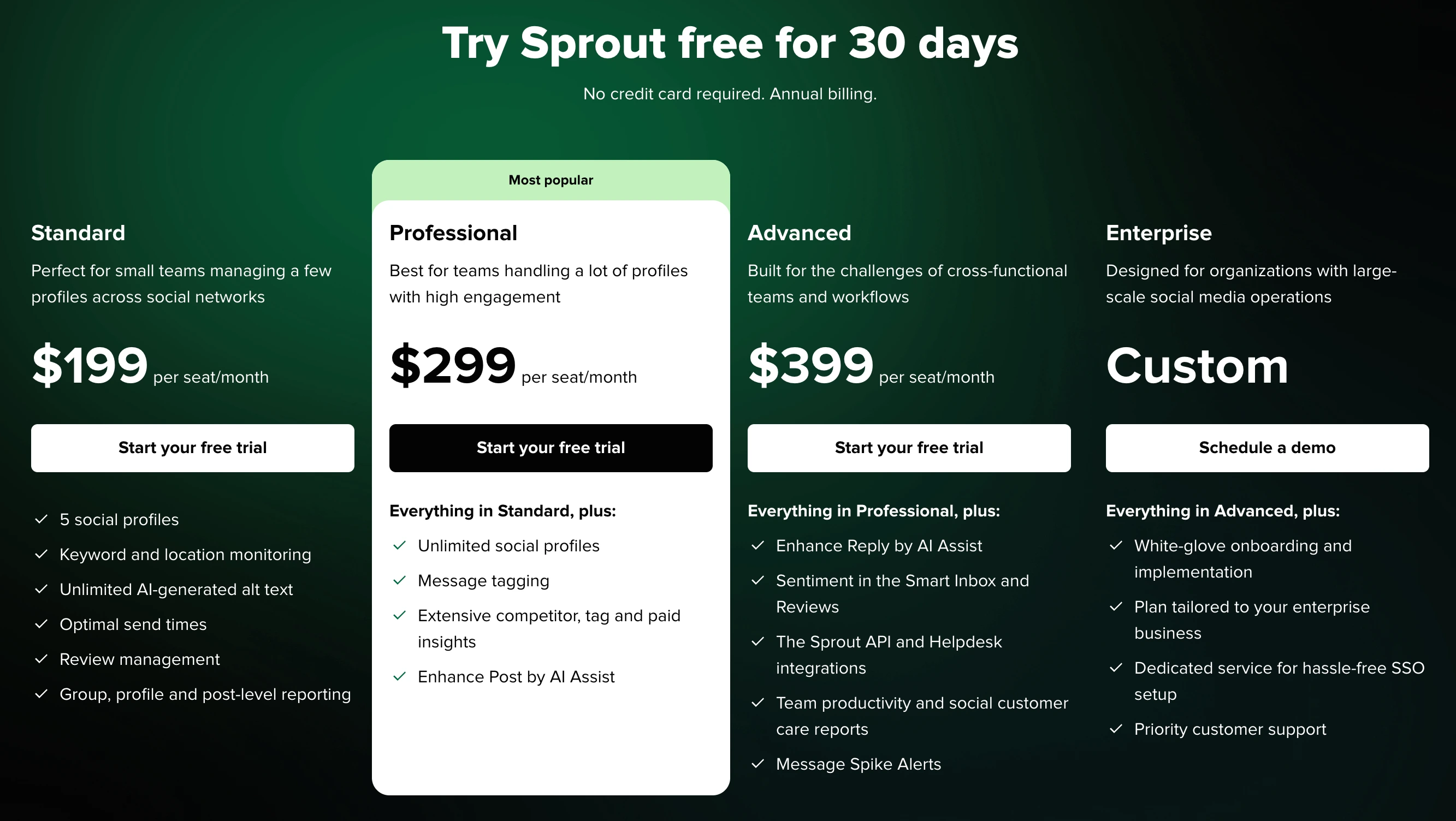
| Plan | Price | Social Profiles | Key Features |
|---|---|---|---|
| Standard | $199/mo per seat | 5 | Keyword monitoring, AI text, review management |
| Professional | $299/mo per seat | Unlimited | Message tagging, competitor insights, paid insights |
| Advanced | $399/mo per seat | Unlimited | Sentiment analysis, API, helpdesk integrations, spike alerts |
| Enterprise | Custom | Unlimited | White-glove onboarding, SSO, priority support |
Example costs:
- 1 seat on Standard = $199/month
- 3 seats on Professional = $897/month
- 5 seats on Advanced = $1,995/month
Buffer Pricing
Buffer uses per-channel pricing. Each social account you connect adds to your monthly cost. We break this down further in our Buffer pricing guide.
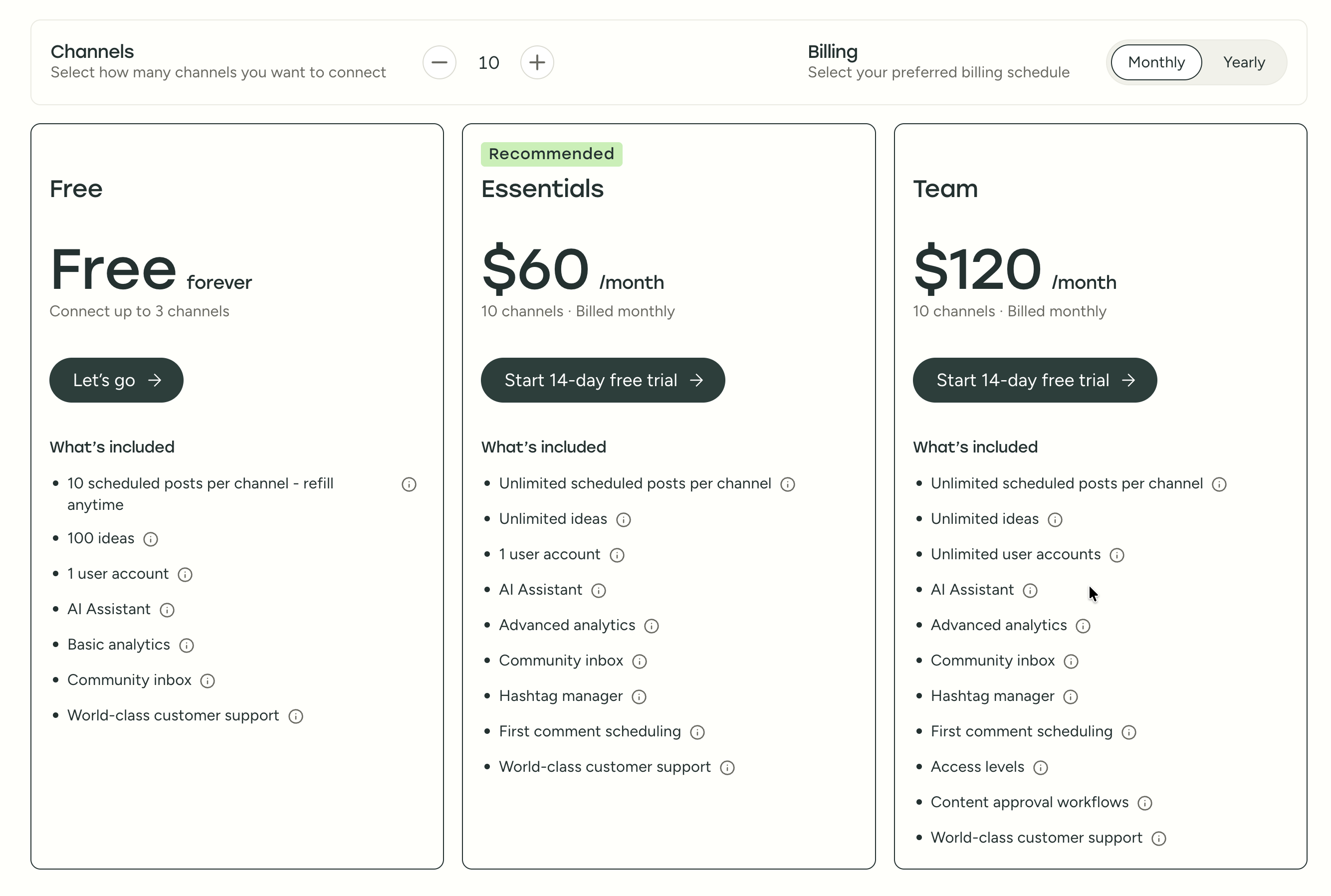
| Plan | Price | Channels | Users | Key Features |
|---|---|---|---|---|
| Free | $0/mo | 3 | 1 | 10 posts/channel, basic analytics |
| Essentials | $6/mo per channel | Unlimited | 1 | Unlimited posts, advanced analytics, hashtag manager |
| Team | $12/mo per channel | Unlimited | Unlimited | Approval workflows, permissions, team collaboration |
Example costs:
- 5 channels on Essentials = $30/month
- 10 channels on Team = $120/month
- 25 channels on Team = $300/month
What You'll Actually Pay
Real-world pricing depends on your team size and account count. Here are three common scenarios:
Scenario 1 — Solo creator, 5 social accounts:
- Sprout Social: $199/month (Standard, 1 seat, 5 profiles)
- Buffer: $30/month (Essentials, 5 channels) or $0/month (Free, 3 channels)
- PostPlanify: $29/month (Starter, 5 accounts) or $49/month (Growth, 10 accounts)
Scenario 2 — Small team of 3, managing 10 accounts:
- Sprout Social: $597/month (Standard, 3 seats) — and Standard caps at 5 profiles, so you'd need Professional at $897/month
- Buffer: $120/month (Team, 10 channels)
- PostPlanify: $49/month (Growth, 10 accounts, unlimited team members)
Scenario 3 — Agency with 5 team members, 20 accounts:
- Sprout Social: $1,495/month (Professional, 5 seats) or $1,995/month (Advanced)
- Buffer: $240/month (Team, 20 channels)
- PostPlanify: $99/month (Premium, 25 accounts, 5 team members, approval workflows)
Price Verdict
Buffer is massively cheaper. A solo creator pays $0-$6/month on Buffer vs $199/month on Sprout Social. A small team managing 10 accounts pays $120/month on Buffer's Team plan vs $199+/month per seat on Sprout Social.
Even at scale, Buffer's most expensive setup (25 channels on Team at $300/month) costs less than two Sprout Social Standard seats ($398/month). The pricing only makes sense for Sprout Social if you genuinely need enterprise-grade analytics, customer care workflows, or sentiment analysis.
 PostPlanify
Manage All Your Social Accounts Without the Chaos
Schedule posts, track performance, and collaborate with your team.


Feature Comparison
Scheduling & Publishing
| Feature | Sprout Social | Buffer |
|---|---|---|
| Unlimited scheduling | Yes (all plans) | Yes (paid plans) |
| Bulk scheduling | No | CSV import |
| Best time to post | Yes (Optimal Send Times) | No |
| First comment scheduling | No | Yes (Essentials+) |
| Content calendar | Yes | Yes |
| Post queue management | Yes | Yes |
| Draft saving | Yes | Yes |
Winner: Tie. Sprout Social has Optimal Send Times, which uses historical engagement data to suggest the best posting windows for your audience. Buffer counters with first comment scheduling and CSV bulk import, which are more useful for Instagram hashtag strategies and high-volume content workflows. Both handle core scheduling well for day-to-day use.
AI Tools
| Feature | Sprout Social | Buffer |
|---|---|---|
| AI caption generation | Yes (AI Assist) | Yes (AI Assistant) |
| AI image generation | No | No |
| AI reply suggestions | Yes (Advanced - Enhance Reply) | No |
| AI post enhancement | Yes (Enhance Post) | Yes |
Winner: Sprout Social. AI Assist includes reply enhancement on the Advanced plan ($399/seat), which is genuinely useful for customer care teams handling high message volumes. However, neither platform offers AI image generation, and both AI caption tools are limited to text-only — a gap that tools like PostPlanify fill with vision-powered AI and seven image generation models.
Analytics & Reporting
| Feature | Sprout Social | Buffer |
|---|---|---|
| Basic analytics | All plans | All plans |
| Custom reports | Advanced only | No |
| Competitor benchmarking | Professional+ | No |
| Paid ad insights | Professional+ | No |
| Customer care reports | Advanced | No |
| Team productivity reports | Advanced | No |
| Export reports | Advanced only | Yes |
Winner: Sprout Social. The analytics gap here is significant — Sprout Social offers paid ad insights, customer care metrics, team productivity tracking, and competitor benchmarking that Buffer simply does not have. But context matters: these features require the $299-$399/seat plans, and Buffer's basic analytics (post performance, engagement rates, audience growth) are sufficient for creators and small teams that do not need enterprise-level reporting depth.
Team Collaboration
| Feature | Sprout Social | Buffer |
|---|---|---|
| Multiple users | All plans | Team plan |
| Approval workflows | Advanced plan | Team plan |
| User permissions | Professional+ | Team plan |
| Message tagging | Professional+ | No |
| DM assignment | Yes | No |
Winner: Sprout Social. Message tagging, DM assignment, and more granular permissions give Sprout Social a clear edge for structured team workflows. However, Buffer covers the basics (approvals, permissions) at $12/channel/month vs $199+/seat on Sprout Social — and neither platform offers unlimited team members without significant cost. This is an area where flat-priced alternatives with no per-seat fees can save teams hundreds per month.
Social Inbox & Engagement
| Feature | Sprout Social | Buffer |
|---|---|---|
| Unified inbox | Yes (Smart Inbox) | Basic (Community Inbox) |
| Social listening | Yes (add-on) | No |
| Sentiment analysis | Yes (Advanced) | No |
| Review management | Yes (all plans) | No |
| Message spike alerts | Yes (Advanced) | No |
Winner: Sprout Social. This is Sprout Social's core strength and the primary reason enterprise teams pay the premium. Smart Inbox with sentiment analysis, review management, and spike alerts creates a complete customer care workflow that Buffer does not attempt to match. Buffer's Community Inbox handles basic comment replies but lacks the depth needed for teams managing high-volume customer interactions.
Platform Support
| Platform | Sprout Social | Buffer |
|---|---|---|
| Yes | Yes | |
| Yes | Yes | |
| X/Twitter | Yes | Yes |
| Yes | Yes | |
| TikTok | Yes | Yes |
| YouTube | Yes | Yes |
| Yes | Yes | |
| Threads | Yes | Yes |
| Bluesky | No | Yes |
| Mastodon | No | Yes |
| Google Business | No | Yes |
Winner: Buffer. Buffer supports 11 platforms vs Sprout Social's 8+, including Bluesky, Mastodon, and Google Business Profile. For teams that need to post to decentralized or niche platforms, Buffer's wider network coverage is a meaningful advantage that Sprout Social has not yet matched.
What Real Users Say
Sprout Social Reviews
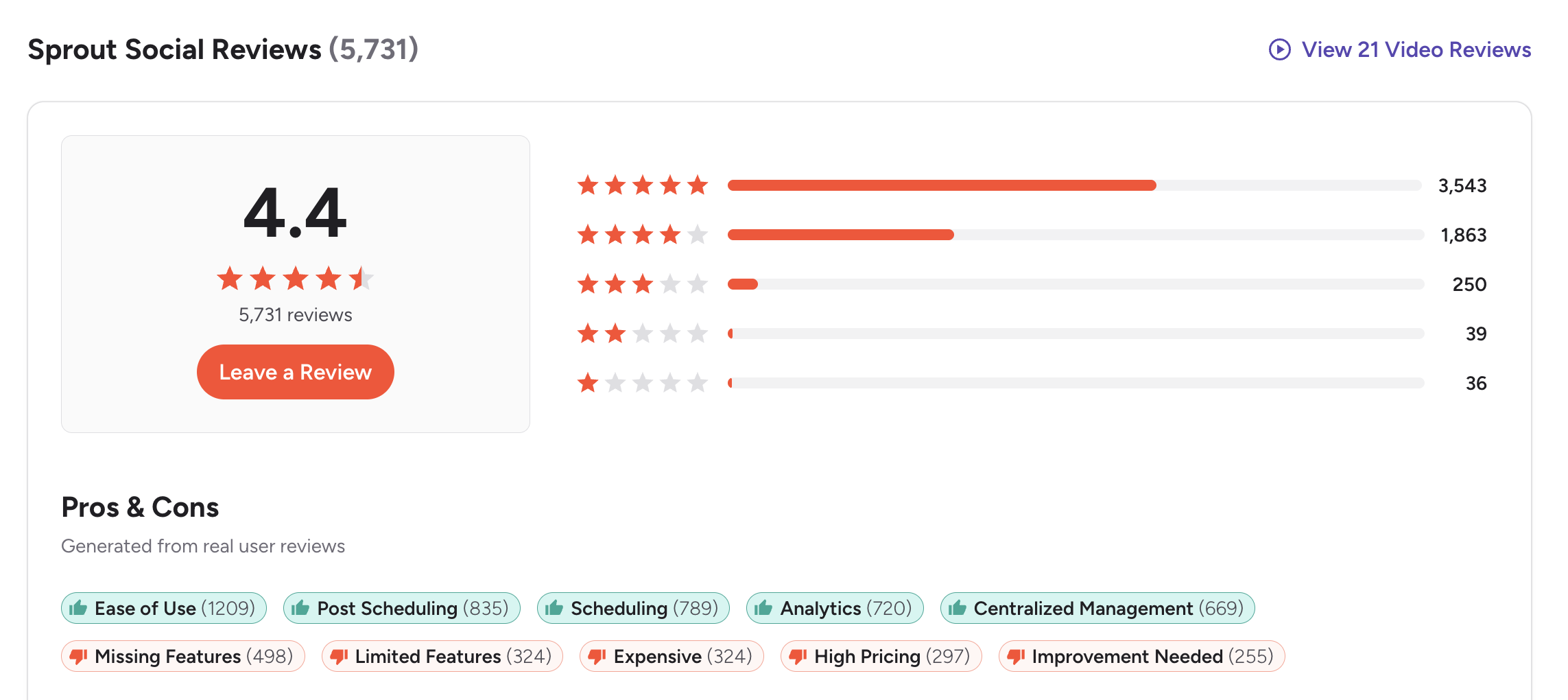
G2: 4.4/5 (5,731 reviews) — Users consistently praise ease of use (1,209 mentions), post scheduling (835 mentions), and analytics capabilities (720 mentions). The most common positive theme is that Sprout Social delivers a polished, reliable experience for teams already committed to the platform. Top complaints include missing features on lower plans (498 mentions), expensive pricing (324 mentions), and the sense that key reporting capabilities are locked behind costly upgrades.
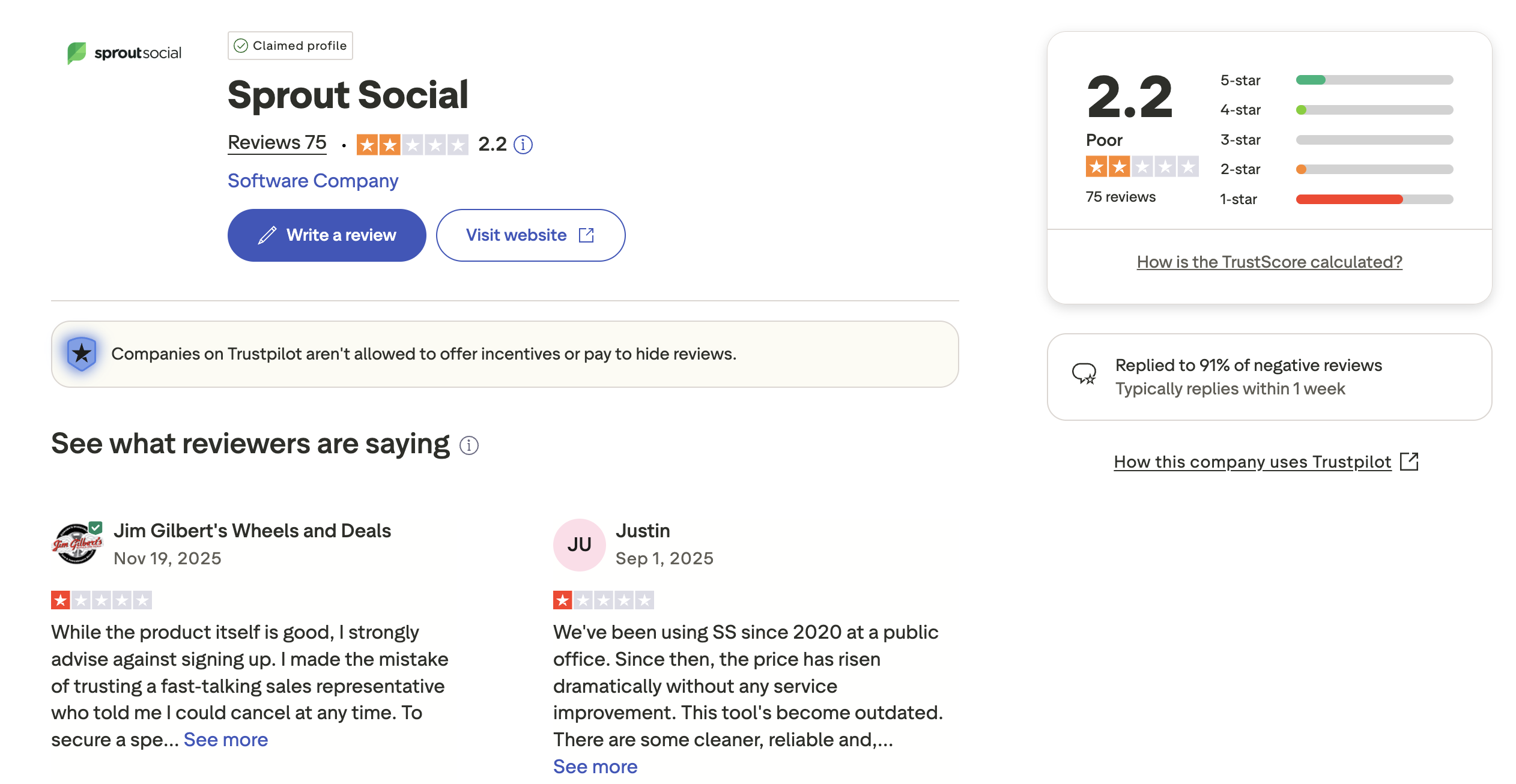
Trustpilot: 2.2/5 (75 reviews) — The Trustpilot picture is markedly different. Reviewers cite unexpected price increases, difficulty canceling contracts, and sales pressure that does not match the trial experience. One recurring theme is users being promised flexible cancellation only to face contract limitations. Another common complaint is that prices increased dramatically over time without meaningful feature improvements.
Buffer Reviews
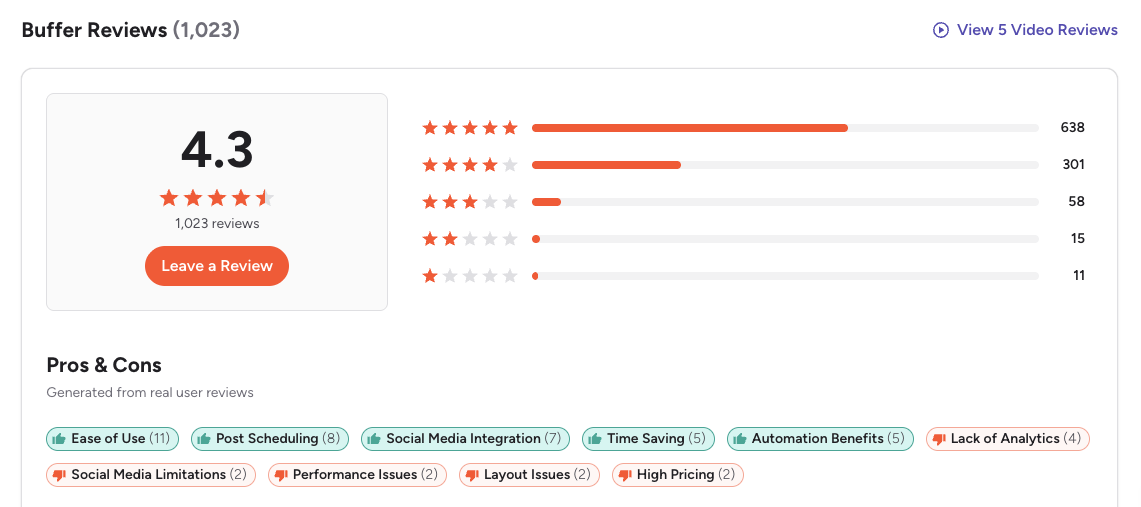
G2: 4.3/5 (1,023 reviews) — Users praise Buffer's clean interface, ease of use, and efficient scheduling. The platform is frequently described as the simplest tool to get started with for solo creators and freelancers. Common complaints include limited analytics that do not scale with growing teams, rising costs as you connect more channels, and a UI that some reviewers feel has not evolved enough over the years.
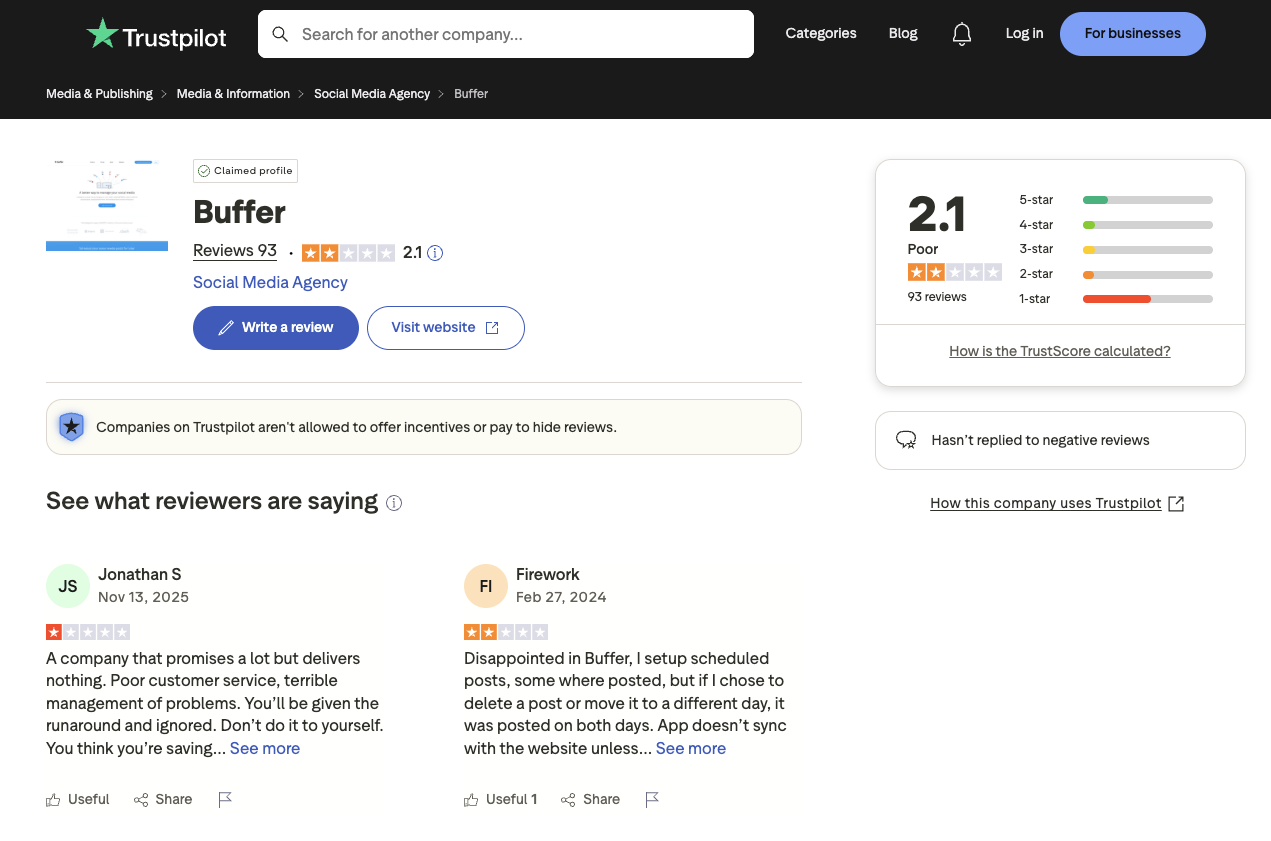
Trustpilot: 2.1/5 (93 reviews) — Lower rating driven by complaints about customer support responsiveness, scheduling glitches where posts fail to publish, and sync issues with social platforms. Several reviewers mention paying for features that did not work reliably, which is a different frustration profile than Sprout Social's contract-focused complaints.
Review Verdict
Sprout Social edges ahead on G2 (4.4 vs 4.3) with a much larger review base (5,731 vs 1,023). On Trustpilot, both score poorly — Sprout Social at 2.2/5 and Buffer at 2.1/5. The Trustpilot scores suggest customer support and billing issues are common across both platforms, though the nature of complaints differs: Sprout Social reviews focus on contract rigidity and aggressive pricing, while Buffer reviews center on reliability and support quality. Review counts are as of February 2026 and are updated periodically.
Combined review count across both platforms: 6,922 verified reviews on G2 and Trustpilot.
PostPlanifyManage All Your Social Accounts Without the Chaos
Schedule posts, track performance, and collaborate with your team.
Who Should Use Sprout Social?
Sprout Social makes the most sense for teams where customer engagement and enterprise reporting are not just nice-to-haves but core operational requirements. If your social media function doubles as a customer care channel — handling DMs, reviews, sentiment tracking, and escalation workflows — Sprout Social's tooling is purpose-built for that reality in ways that simpler schedulers are not.
If Sprout Social is on your shortlist, check out our best alternatives to Sprout Social for other options. Also compare Sprout Social with Hootsuite, Later, Metricool, Publer, and Loomly. Is Sprout Social worth it over Buffer for growing teams? If customer care and enterprise analytics are your top priorities, Sprout Social justifies its premium pricing.
Sprout Social is the better choice if you:
- Run a customer care team that needs sentiment analysis and care reports
- Need review management built into the platform
- Want paid ad insights alongside organic analytics
- Need team productivity reporting and message spike alerts
- Have the budget for $199-$399+/month per seat
- Need enterprise features like SSO, API, and helpdesk integrations
- Want in-depth social media analytics for business decision-making
Who Should Use Buffer?
Buffer's appeal is straightforward: it does scheduling well, it does it simply, and it costs a fraction of enterprise alternatives. For creators and small teams who measure success by consistent publishing rather than inbox management or sentiment tracking, Buffer removes the complexity that gets in the way of actually posting content.
If Buffer sounds right but you want to explore options, check out our best alternatives to Buffer. You can also see how Buffer compares to Hootsuite, Later, Metricool, Publer, and Loomly. Is Buffer good enough for small teams that do not need enterprise features? For most creators and freelancers, Buffer covers the essentials at a fraction of Sprout Social's cost.
Buffer is the better choice if you:
- Are a solo creator or freelancer on a budget
- Need a simple, clean interface without a learning curve
- Want to schedule posts across 11 platforms including Bluesky and Mastodon
- Don't need social listening, advanced analytics, or a full social inbox
- Prefer per-channel pricing that starts at $6/month (or free)
- Need first comment scheduling for Instagram engagement
- Want an easy way to manage multiple social media accounts affordably
Final Verdict: Sprout Social vs Buffer in 2026
Choosing between Sprout Social and Buffer comes down to whether you need enterprise customer care tools or a simple, affordable scheduling solution.
Sprout Social wins on: analytics depth, Smart Inbox with sentiment analysis, customer care workflows, review management, competitor benchmarking, and team productivity reporting.
Buffer wins on: pricing, platform coverage (11 vs 8+), ease of use, first comment scheduling, and simplicity for solo creators and small teams.
The gap neither fills: There is a significant middle ground that both platforms miss. Sprout Social is too expensive for teams that need more than basic scheduling but do not require enterprise customer care. Buffer is too limited for teams that want AI image generation, deep analytics across all platforms, approval workflows without per-channel cost scaling, or a social inbox with AI-assisted replies. Teams in this middle ground — growing brands, lean agencies, multi-person content teams — often find themselves overpaying on Sprout Social for features they do not use or outgrowing Buffer before they can justify the jump to enterprise pricing.
The bottom line: Buffer is the right pick for solo creators and small teams that need straightforward scheduling without breaking the bank. Sprout Social justifies its cost only for enterprise teams that rely on customer care workflows and advanced reporting. If you are somewhere in between, explore other social media management alternatives.
Neither Sprout Social Nor Buffer? Try PostPlanify
Sprout Social is built for enterprise customer care. Buffer is built for solo simplicity. If you're somewhere in between — a growing team that needs AI tools, collaboration features, and multi-platform scheduling — you're overpaying on Sprout or missing features on Buffer. PostPlanify is built for exactly that middle ground, starting at $29/month.

| Feature | Sprout Social | Buffer | PostPlanify |
|---|---|---|---|
| Starting Price | $199/mo/seat | $6/mo/channel | $29/mo flat |
| Social Accounts | 5 (Standard) | Scales per channel | 5 (Starter) to Unlimited (Enterprise) |
| Analytics | Group to Custom reports | Basic to Advanced | All 10 platforms, best time to post |
| Social Inbox | Smart Inbox (all plans) | Basic (Community Inbox) | AI-assisted replies (Growth+) |
| AI Assistant | AI Assist (text only) | AI Assistant (captions) | Vision-powered, 7 image gen models |
| AI Image Generation | No | No | Yes (7 models) |
| Team Collaboration | All plans (per-seat) | Team plan ($12/ch) | 5 members (Premium), unlimited (Enterprise) |
| Approval Workflows | $399/mo/seat | $12/mo/channel | $99/mo (Team) |
| Content Calendar | Yes | Yes | Yes, with drag-and-drop |
| White-Label PDF Reports | No | No | Yes (Premium+ $99/mo) |
| Link in Bio | No | Start Page | Yes (8 themes) |
| Media Library | Yes | Yes | Canva + Google Drive |
| First Comment Scheduling | No | Yes | Yes (Growth+) |
| Platforms Supported | 8+ | 11 | 10 |
| Best Time to Post | Yes (Optimal Send Times) | No | Yes (Growth+) |
PostPlanify Pricing
| Plan | Price | Social Accounts | Key Features |
|---|---|---|---|
| Starter | $29/mo | 5 | 200 posts/mo, AI assistant, content calendar, media library |
| Growth | $49/mo | 10 | Unlimited scheduled posts, analytics (10 platforms), social inbox, best time to post, 1st comments & threads, bulk scheduling |
| Premium | $99/mo | 25 | White-label PDF reports, multi-approver workflows, 5 team members, shared calendars, roles & permissions |
| Enterprise | Custom | Custom | Unlimited team members, custom accounts, 1:1 onboarding, priority support |
All plans include a 7-day free trial. See all plans on the PostPlanify pricing page.
PostPlanify starts at $29/month for 5 accounts with 200 posts/mo and AI tools included. The Growth plan ($49/month) adds unlimited scheduled posts, analytics across all 10 platforms, a social inbox with AI-assisted replies, best time to post suggestions, 1st comments & threads, and bulk scheduling. The Premium plan at $99/month adds white-label PDF reports, multi-approver workflows, 5 team members, shared calendars, and roles & permissions. The Enterprise plan (custom pricing) unlocks custom accounts, unlimited team members, and 1:1 onboarding — features that cost $399+/month per seat on Sprout Social.
See what PostPlanify can do — start free

Making the Switch
Switching from Sprout Social or Buffer to another platform is simpler than most teams expect. Social media management tools do not lock in your content or accounts — your social profiles, followers, and post history stay on each platform regardless of which scheduler you use.
From Sprout Social: Reconnect your social accounts to the new platform, reconfigure team permissions and approval workflows, and export any saved reports you need for reference. Plan for a 1-2 week overlap period so your team can adjust to the new inbox and reporting layout before canceling. The biggest adjustment is usually moving from Smart Inbox workflows to a different engagement tool.
From Buffer: The transition is even simpler since Buffer's feature set is lighter. Reconnect your channels, migrate any queued posts, and set up your new content calendar. Most teams complete the switch in a single session. If you use Buffer's Start Page, you will need to recreate your link-in-bio page on the new platform.
What to watch for: Cancel before your next billing cycle on either platform to avoid unexpected charges. Sprout Social in particular has been flagged in Trustpilot reviews for contract rigidity, so review your cancellation terms carefully. Both platforms allow you to export your data before leaving.
PostPlanifyManage All Your Social Accounts Without the Chaos
Schedule posts, track performance, and collaborate with your team.
Related Guides
- Best Sprout Social Alternatives
- Best Buffer Alternatives
- Sprout Social Pricing Breakdown
- Buffer Pricing Breakdown
- Sprout Social Reviews
- Buffer Reviews
- Best Social Media Management Platform
- Social Media Scheduling Tools
- PostPlanify Pricing
- How to Measure Social Media ROI
- Social Media Analytics and Reporting
- Social Media Content Calendar Examples
- Content Batching Guide
FAQ
Is Buffer cheaper than Sprout Social?
Yes, significantly. Buffer starts at $0/month with a free plan that includes 3 channels and 10 posts each, while paid plans begin at just $6/month per channel. Sprout Social starts at $199/month per seat with no free plan available. For most solo creators and small teams, Buffer costs 10-30x less than Sprout Social. Even a 10-channel Buffer Team plan at $120/month is cheaper than a single Sprout Social Standard seat. For more affordable options, see our list of social media scheduling tools.
Does Sprout Social have a free plan?
No. Sprout Social does not offer a free plan and instead provides a 30-day free trial on its Standard plan, which costs $199/month per seat after the trial ends. Buffer, by contrast, has a genuinely free plan with 3 channels and 10 posts per channel that you can use indefinitely. If you need more than Buffer's free tier without the enterprise price tag, PostPlanify offers a 7-day free trial with access to AI tools and unlimited scheduling.
Which has better analytics — Sprout Social or Buffer?
Sprout Social has significantly deeper analytics and reporting capabilities, including custom reports, paid ad insights, customer care metrics, team productivity tracking, and competitor benchmarking. Buffer's analytics cover basic engagement metrics and post performance, which is sufficient for creators and small teams. However, Sprout Social's best analytics features require the Professional ($299/seat) or Advanced ($399/seat) plans, making them expensive for smaller operations.
Can I switch from Sprout Social to Buffer?
Yes, switching is straightforward. You can reconnect your social accounts to Buffer and begin scheduling posts immediately. The main trade-off is losing the Smart Inbox, sentiment analysis, review management, and advanced reporting capabilities. In return, you will gain wider platform support (11 platforms vs 8+), a simpler interface, first comment scheduling, and dramatically lower monthly costs. Most users complete the migration within a few hours.
Which supports more social media platforms?
Buffer supports 11 platforms including Bluesky, Mastodon, and Google Business Profile, which Sprout Social does not cover. Sprout Social supports 8+ platforms covering all the major networks like Instagram, Facebook, LinkedIn, X/Twitter, TikTok, YouTube, Pinterest, and Threads. If you need to manage multiple social media accounts across niche platforms, Buffer offers wider coverage.
Is Sprout Social worth it for small businesses?
For most small businesses, Sprout Social is too expensive. At $199/month per seat, even a single-user setup exceeds most small business social media budgets. The cost jumps to $299-$399 per seat for features like competitor benchmarking and approval workflows. Buffer or PostPlanify offer much better value for small teams that need scheduling, analytics, and collaboration without enterprise pricing. See our guide on social media management software for small business for more options.
Does Buffer have a social inbox?
Buffer has a basic Community Inbox that allows you to view and respond to comments across connected platforms, but it is limited compared to Sprout Social's Smart Inbox. Sprout Social's inbox includes sentiment analysis, message spike alerts, review management, and DM assignment across team members. If inbox management and customer engagement are core needs for your team, Sprout Social has a significant edge in this area.
Which is easier to use — Sprout Social or Buffer?
Buffer is widely considered easier to use with its clean, minimal interface and almost no learning curve. You can sign up and start scheduling posts within minutes. Sprout Social has a polished interface but a steeper learning curve due to its broader feature set, including inbox management, analytics dashboards, and team workflows. For teams that want simplicity without sacrificing core features, Buffer is the more approachable option. Learn how to create a social media content calendar to get the most out of either tool.
Is Sprout Social or Buffer better for Instagram?
Both platforms support Instagram scheduling, Stories, and Reels. Buffer stands out with first comment scheduling, which is valuable for hashtag strategies and Instagram engagement. Sprout Social offers deeper Instagram analytics, competitor benchmarking, and a unified inbox for managing Instagram DMs and comments. For creators focused on Instagram growth, Buffer covers the essentials at a lower cost. Learn more about how to schedule Instagram posts effectively.
What is the best alternative to both Sprout Social and Buffer?
If neither Sprout Social nor Buffer fits your needs, PostPlanify is a strong alternative that combines scheduling, AI caption and image generation, analytics across 10 platforms, social inbox with AI-assisted replies, and team collaboration at a flat $29-99/month with no per-seat fees. Unlike Sprout Social's per-seat or Buffer's per-channel pricing, PostPlanify does not increase your bill as you add team members. Browse our full list of social media management alternatives to compare all options side by side.
Sprout Social vs Buffer for small business?
For small businesses, Buffer is almost always the better choice. Its free plan and $6/month per-channel pricing make it accessible to any budget, while Sprout Social's $199/month per-seat starting price is prohibitive. Buffer covers scheduling, basic analytics, and team collaboration on the Team plan at $12/month per channel. If you need more features without enterprise costs, check our guide on social media management software for small business for additional recommendations.







