
Before choosing a social media scheduler, it's crucial to look at genuine user feedback. In this article, we break down Buffer reviews to assess usability, reliability, and whether Buffer still holds its place as a leading scheduling tool in 2026.
If you're debating whether to stick with Buffer or explore alternatives, this overview will help.
Buffer Overview
Buffer is one of the oldest and most recognized social media tools, offering post scheduling, a simple calendar, and basic analytics. It positions itself as a clean, beginner-friendly way to manage multiple social channels.

Highlighted features include:
- Post scheduling and queue management
- Basic to advanced analytics (depending on plan)
- AI assistant for rewriting content
- Hashtag manager and first comment scheduling
- Team collaboration on higher plans
Despite Buffer's popularity, user reviews reveal important insights into performance, pricing, and workflow limitations.
User Reviews and Ratings
On Trustpilot
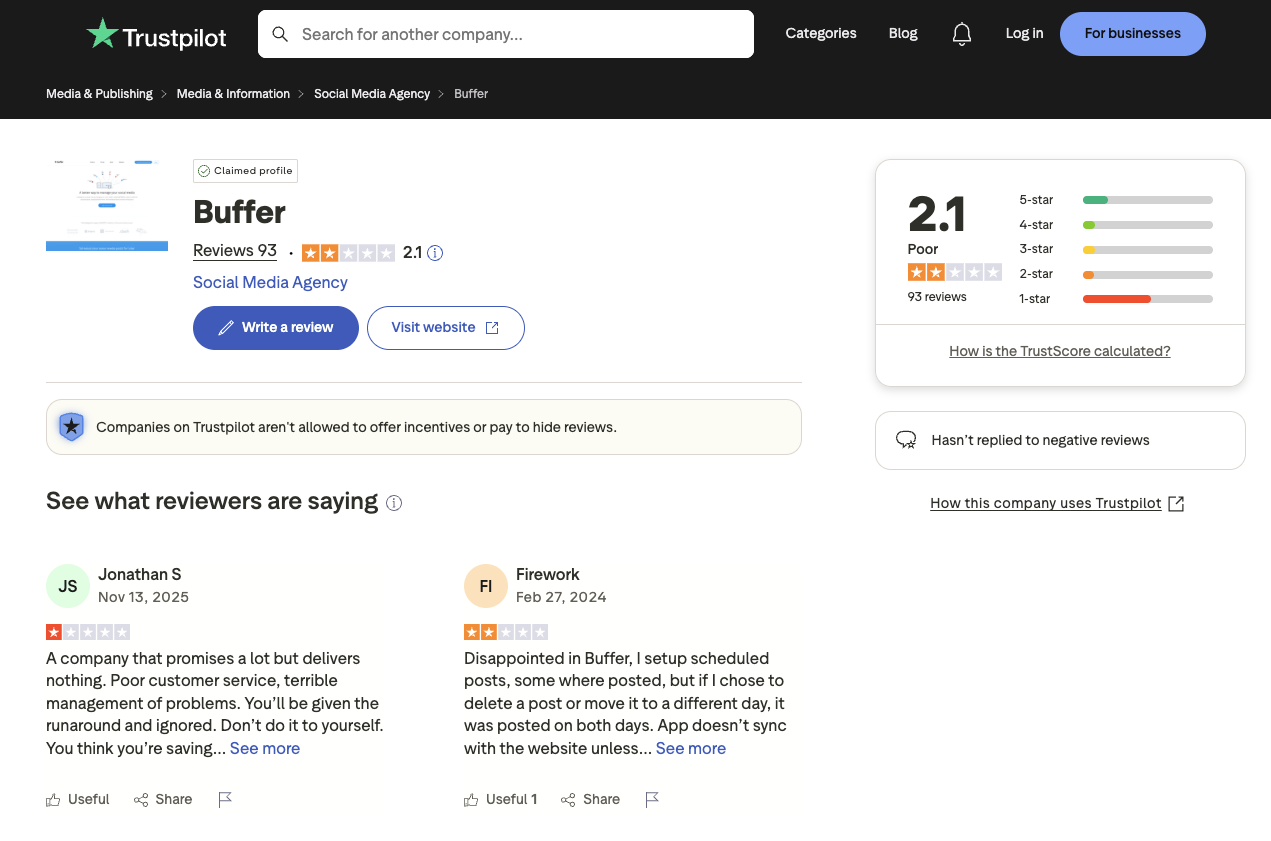
A closer look at the reviews on Trustpilot shows that Buffer holds a low rating of 2.1 out of 5, based on 93 reviews. Many users report issues with customer service, unresolved technical problems, and inconsistent publishing behavior.
Multiple reviewers mention that support does not respond in a timely manner, scheduled posts fail or duplicate, and the platform often does not sync correctly with connected social accounts. This raises concerns for users who rely on Buffer for consistent scheduling.
Rating: 2.1/5 (93 reviews)
Pros
- Simple interface
- Easy to set up schedules
Cons
- Poor customer support
- Scheduling glitches
- Posts not publishing or duplicating
- Sync issues with social platforms
(credit: Trustpilot)
On G2
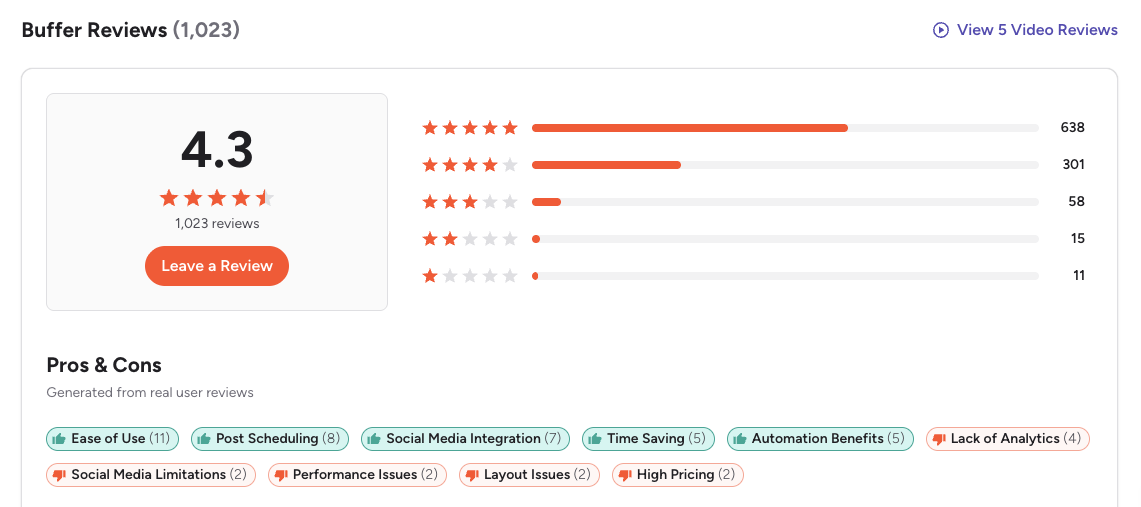
On G2, Buffer has a significantly higher rating of 4.3 out of 5, based on 1,023 reviews. Users frequently praise Buffer for its clean interface, simple scheduling calendar, and time-saving workflow.
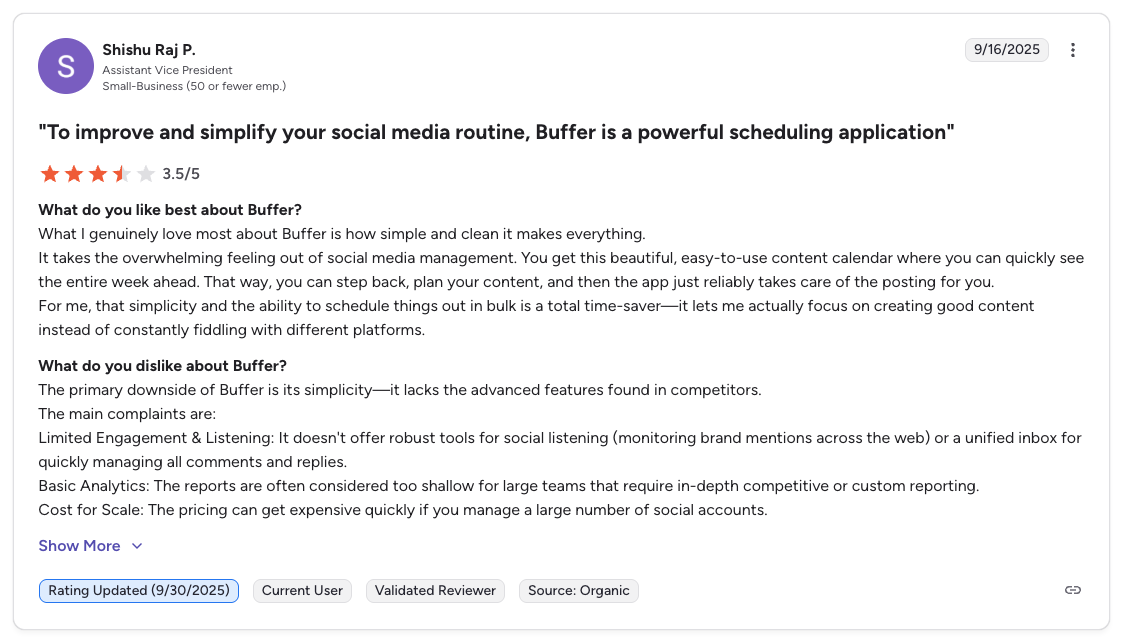
However, reviewers also highlight certain limitations such as restricted analytics, lack of listening tools, and rising costs when managing multiple social accounts.
A featured review mentions that while Buffer is powerful for simplifying social management, its simplicity becomes a drawback due to missing advanced features found in other platforms.
Rating: 4.3/5 (1,023 reviews)
Pros
- Ease of use
- Efficient bulk scheduling
- Clean and intuitive layout
Cons
- Limited engagement and listening capabilities
- Basic analytics
- Pricing increases quickly as accounts scale
- Outdated UI compared to competitors
(credit: G2)
What Reddit Users Say About Buffer
Buffer is frequently discussed across Reddit in subreddits like r/socialmedia, r/marketing, r/smallbusiness, and r/Entrepreneur. The community sentiment reflects both genuine appreciation and growing frustration as the tool has evolved.
- Simplicity is the most praised quality. Reddit users consistently describe Buffer as the easiest social media scheduler to learn and use. Many share how they can set up accounts and start scheduling within minutes, making it a popular first recommendation for people asking "what tool should I start with?" in r/socialmedia threads.
- Analytics limitations are a recurring complaint. Multiple Reddit discussions highlight that Buffer's reporting features feel bare-bones compared to competitors like Hootsuite or Sprout Social. Users who need to demonstrate ROI or generate client-facing reports frequently describe outgrowing Buffer's analytics capabilities.
- Pricing debates surface regularly. Some users appreciate the free tier for managing up to three channels. However, others argue that unlocking advanced features, particularly analytics, engagement tools and team collaboration, requires too steep an investment for small businesses or solo entrepreneurs. The per-channel pricing model means costs escalate quickly as users add accounts.
- Scheduling reliability concerns appear in recent threads. While older Reddit discussions praised Buffer's dependability, more recent threads from 2024-2025 include reports of posts failing to publish, duplicating, or requiring constant manual verification. Users describe having to check back after scheduled publish times to confirm posts actually went live.
- Buffer is frequently compared to alternatives. In "what should I use instead of Buffer?" threads, Reddit users most commonly recommend SocialBee for content recycling, Publer as a budget-friendly replacement, Later for Instagram-focused workflows, and Metricool for users who need stronger analytics.
Feature-by-Feature User Feedback
Drawing from G2, Trustpilot, Capterra, and community discussions, here is how Buffer performs across key feature categories:
- Scheduling Reliability: Buffer's core scheduling engine is generally dependable for text and image posts. However, a notable subset of users, particularly on Trustpilot and in recent community discussions, report posts failing to publish, duplicating, or requiring social account reconnections. These issues appear to be intermittent rather than systemic, but they erode trust for users who rely on hands-off scheduling.
- Analytics & Reporting: Analytics is consistently identified as Buffer's weakest area. The free and lower-tier plans offer only basic post performance metrics. Even on paid plans, users describe the reporting as functional but shallow: adequate for tracking likes and reach but insufficient for cross-platform comparisons, audience demographics, or client-ready reports. Users who need deeper data frequently cite this as their reason for switching to competitors.
- Pricing & Value: Buffer's free tier is genuinely useful for individuals managing one to three channels with basic scheduling needs. The paid tiers, however, draw criticism for scaling costs per channel. Users managing ten or more accounts report that Buffer's pricing becomes comparable to or exceeds tools that offer more features at the same price point. The removal of some previously free features in recent years has also generated negative sentiment.
- Customer Support: Support quality is a polarizing topic. G2 reviewers who interact with Buffer's team generally describe them as helpful and responsive. Trustpilot reviews tell a different story, with multiple users describing unanswered emails, slow response times, and difficulty resolving billing or technical issues. The discrepancy may reflect differences in plan tier and the nature of issues being reported.
- Ease of Use: This is Buffer's strongest category across all review platforms. The clean, intuitive interface consistently earns praise from beginners and experienced marketers alike. The post composer, content calendar, and queue management are described as straightforward and well-designed. Users rarely report confusion about how to accomplish basic tasks.
Review Authenticity
The contrast between Buffer's 2.1 Trustpilot rating and its 4.3 G2 score reveals a meaningful split in user experiences that deserves careful interpretation.
- Why the ratings diverge. G2 reviews predominantly come from marketing professionals and social media managers who evaluate Buffer based on daily scheduling workflows. These users interact with the tool's core strengths, simplicity, clean interface and reliable queue management, and rate accordingly. Trustpilot attracts a broader audience, including users who encountered technical issues, billing problems, or support failures. The lower barrier to leaving a Trustpilot review also means frustrated users are more likely to post there than on a platform like G2, which requires more detailed feedback.
- What the review volume means. Buffer's 1,023 G2 reviews provide a solid sample size for evaluating professional-use satisfaction. The 93 Trustpilot reviews represent a much smaller sample, which means individual negative experiences have an outsized impact on the overall score. However, the consistency of complaints around scheduling failures and support responsiveness suggests these are real patterns rather than outliers.
- Rating trends over time. Buffer's G2 rating has held steady in the 4.2-4.4 range over the past several years, indicating that its core user base remains satisfied with the product direction. On Trustpilot, negative reviews have increased in proportion during 2024-2025, with many referencing changes to the free plan, rising costs, and reduced feature availability on lower tiers.
- Patterns in negative reviews. Unlike tools where billing disputes dominate Trustpilot complaints, Buffer's negative reviews split roughly evenly between technical issues (scheduling failures, sync problems, lost drafts) and service concerns (slow support, unresolved tickets). This suggests both product reliability and support infrastructure need attention.
Who Buffer Works Best For (Based on Reviews)
Users who are happiest with Buffer:
- Solo creators and freelancers managing one to five social accounts who value a clean, simple scheduling interface above all else
- Small businesses new to social media management that need an intuitive tool with a minimal learning curve
- Users who primarily publish text and image-based content on a consistent schedule and do not need advanced analytics
- Marketing professionals who want a lightweight scheduling layer on top of other analytics and engagement tools they already use
Users who should consider alternatives:
- Agencies and teams managing ten or more accounts who need advanced analytics, client reporting, and cross-platform insights without per-channel pricing escalation
- Users who require highly reliable, hands-off scheduling, particularly for time-sensitive content where a failed post has real consequences
- Teams that need built-in social inbox, listening, or engagement features rather than just outbound scheduling
- Organizations that prioritize responsive customer support for technical issues and account troubleshooting
Compare Buffer with Other Tools
See how Buffer stacks up in head-to-head comparisons: Buffer vs Hootsuite, Buffer vs Later, Buffer vs Metricool, Buffer vs Publer, and Sprout Social vs Buffer. Browse all comparisons on our comparison hub.
Before choosing a social media scheduler...
Consider the following tips:
- Check multiple review platforms to ensure consistent user feedback.
- Look at the timing of reviews, since sudden bursts of positive reviews can be a red flag.
- Research what people are saying on forums like Reddit for more unbiased opinions.
- Ask fellow business owners about their experiences with the service.
Ultimately, the best scheduler is the one that will give your social team a massive leg up and make the whole posting process a lot easier.
Buffer is a solid scheduler for individuals, but agencies managing client accounts can find a better fit at the same price.
If the recurring themes in those reviews sound familiar, per-channel costs climbing as you add clients, no dedicated client workspaces, and analytics too thin for client reporting, they are all symptoms of the same thing: Buffer prices and organizes around channels, not clients.
PostPlanify is built the other way round, for agencies running social media for local business clients. Each client gets their own workspace with its own calendar, approvals, inbox and reporting, and you pay per workspace rather than per channel or per seat.

Pricing starts at $39/month for your first client workspace, or $31/month billed yearly, and the per-workspace rate falls as you add clients:
| Client workspaces | Growth | Premium | Scale |
|---|---|---|---|
| 1 | $39/mo | $99/mo | $199/mo |
| 3 | $97/mo | $99/mo | $199/mo |
| 5 | $155/mo | $177/mo | $199/mo |
| 10 | $250/mo | $322/mo | $394/mo |
| Social accounts per workspace | 4 | 6 | 8 |
Every plan includes unlimited team members, so clients and approvers never appear on your bill. Each plan addresses one of the complaints above directly:
- Growth ($39/mo first workspace) covers the reliability and organization gaps: unlimited posts, analytics across all 10 platforms, a social inbox spanning Instagram, Facebook, LinkedIn, Google Business and YouTube, approval workflows on the entry plan rather than the top one, shared calendar, roles and permissions, bulk scheduling and a media library.
- Premium ($99/mo first workspace) answers the analytics complaint: advanced breakdowns, branded client reports you can schedule to send themselves, team comments and mentions, AI brand voice and knowledge base, plus full API and MCP access.
- Scale ($199/mo first workspace) puts the platform under your agency's brand with a white-label dashboard, white-label client emails and reports, dedicated onboarding, migration help and priority human support.
Where Buffer's Team plan charges $144/month for the 12 channels a three-client agency typically needs, the same setup on PostPlanify is $97/month across three client workspaces with 12 connected accounts, unlimited seats and approvals included.
Start your 7-day free trial today.










