
Buffer pricing is per channel: a Free plan covers up to 3 channels, Essentials costs $6 per channel per month, and Team costs $12 per channel per month, or $5 and $10 per channel when billed yearly. Every connected social account counts as one channel, Team is the only plan with more than one user, and nonprofits get 50% off paid plans.
Buffer is a social media management platform that helps creators, brands, and teams schedule posts, plan content, and analyze performance across multiple channels. Its main features include post scheduling, analytics, collaboration tools, and an AI assistant.
Below, we break down the full Buffer pricing structure, what each plan includes, and what you actually pay at 3 to 25 channels, so you can decide whether it's worth the price or whether a different pricing model fits you better.
Buffer Pricing at a Glance (2026)
| Plan | Price | Channels |
|---|---|---|
| Free | $0/month | 3 channels |
| Essentials | $6/channel/month | Unlimited |
| Team | $12/channel/month | Unlimited |
Pricing scales by number of channels connected. Source: buffer.com/pricing
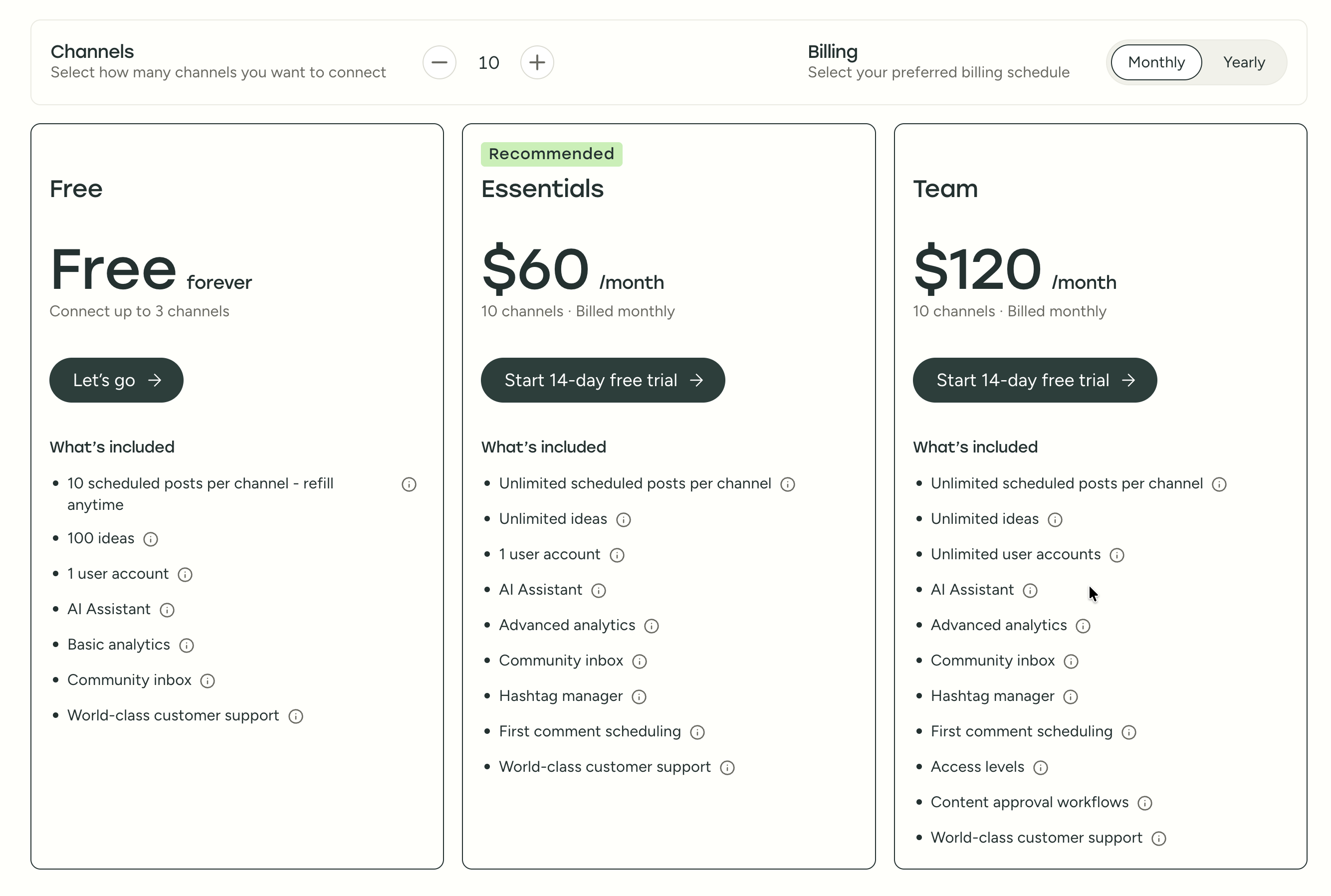
How Much Does Buffer Actually Cost? (Cost Calculator)
Buffer's per-channel pricing means your total cost depends entirely on how many social accounts you connect. Here's what you'll actually pay at common channel counts:
| Channels | Free | Essentials (monthly) | Essentials (annual) | Team (monthly) | Team (annual) |
|---|---|---|---|---|---|
| 3 | $0 | $18/mo | $15/mo | $36/mo | $30/mo |
| 5 | n/a | $30/mo | $25/mo | $60/mo | $50/mo |
| 10 | n/a | $60/mo | $50/mo | $120/mo | $100/mo |
| 15 | n/a | $90/mo | $75/mo | $180/mo | $150/mo |
| 25 | n/a | $150/mo | $125/mo | $300/mo | $250/mo |
Buffer charges less per channel once you go above 10 channels, but it doesn't publish the reduced rate, so treat the 15 and 25 channel rows as the most you would pay.
Annual billing saves ~17%. Buffer offers a discount when you pay yearly, roughly $1/channel/month on Essentials and $2/channel/month on Team. For 10 channels on the Essentials plan, that's $50/mo (annual) vs $60/mo (monthly), saving you $120/year.
The key detail most people miss: Buffer counts each platform connection as a separate channel. If you manage one brand across Instagram, Facebook, LinkedIn, X, and TikTok, that's 5 channels, not 1. Two brands across those same platforms = 10 channels. Agencies managing 5 clients across 3 platforms each = 15 channels = up to $90 to $180/month depending on the plan.
Buffer Feature Comparison by Plan
Not sure which Buffer plan you need? This table shows exactly which features are included at each tier:
| Feature | Free | Essentials ($6/ch/mo) | Team ($12/ch/mo) |
|---|---|---|---|
| Channels | 3 max | Unlimited | Unlimited |
| Scheduled posts | 10 per channel | Unlimited (5,000 fair-use cap) | Unlimited (5,000 fair-use cap) |
| Users | 1 | 1 | Unlimited |
| AI Assistant | 100 ideas | Unlimited | Unlimited |
| Analytics | Basic (30 days) | Advanced (full history) | Advanced (full history) |
| Community inbox | Yes | Yes | Yes |
| Hashtag manager | No | Yes | Yes |
| First comment | No | Yes | Yes |
| Custom export reports | No | Yes | Yes |
| Branded reports | No | No | Yes |
| Approval workflows | No | No | Yes |
| Access levels & permissions | No | No | Yes |
| Draft collaboration | No | No | Yes |
| Platforms supported | Instagram, Facebook, LinkedIn, X, Pinterest, TikTok, Threads, Mastodon, Bluesky, YouTube, Google Business | Same | Same |
Key limitation: Buffer does not offer a social inbox for X (Twitter) or TikTok: the community inbox only covers Instagram, Facebook, and LinkedIn. There are no social listening tools on any plan.
Buffer Social Media Scheduling Pricing Plans
Here's a detailed breakdown to help you understand Buffer's pricing and choose the best fit for your workflow.
Each Buffer plan includes core social media management features like:
- Unlimited scheduled posts (Essentials and Team plans)
- AI Assistant for post ideas and rewriting
- Community inbox
- Basic or advanced analytics (depending on plan)
- Hashtag management
- First comment scheduling
- World-class customer support
The main difference between Buffer plans comes down to number of channels, analytics depth, and team collaboration features.
1. Free Plan
The Free plan costs $0/month and allows you to connect up to 3 channels.
What's included:
- 10 scheduled posts per channel (refills anytime)
- 100 AI-generated ideas
- 1 user account
- AI Assistant
- Basic analytics
- Community inbox
- Customer support
Best for: hobby creators or people testing scheduling tools.
2. Essentials Plan
The Essentials plan starts at $6 per month per channel, which means 10 channels = $60/month when billed monthly.
What's included:
- Unlimited scheduled posts per channel
- Unlimited AI ideas
- 1 user account
- AI Assistant
- Advanced analytics
- Community inbox
- Hashtag manager
- First comment scheduling
- Customer support
Best for: creators and small businesses needing more scheduling + analytics.
3. Team Plan
The Team plan starts at $12 per month per channel, which means 10 channels = $120/month when billed monthly.
What's included:
- Unlimited scheduled posts per channel
- Unlimited AI ideas
- Unlimited user accounts
- AI Assistant
- Advanced analytics
- Community inbox
- Hashtag manager
- First comment scheduling
- Access levels & permissions
- Content approval workflows
- Customer support
Best for: teams that need collaboration and approval systems.
Is Buffer Pricing Worth It?
If you look through all of Buffer's pricing plans, you'll notice that there's an option for individual creators, small teams, and growing agencies. On the surface, the structure seems flexible and straightforward.
However, when you dig into Buffer reviews online, a few things consistently come up.
Many users mention that Buffer becomes expensive very quickly, because the pricing is based on channels, not brands or users. This means the more accounts you manage, especially if you handle multiple clients, the higher your bill climbs each month.
Others point out that some important features feel limited for the price, such as analytics depth, collaboration workflows, and AI-powered automation. Creators and agencies often compare Buffer to newer scheduling tools with stronger automation, deeper insights, and more modern workflows.
In other words, while Buffer is reliable and easy to use, there are social media scheduling platforms that offer more advanced features, smoother workflows, and more predictable pricing, often at a similar or lower cost.
Buffer Pricing: What to Watch Out For
Before committing to a Buffer plan, be aware of these common pricing pitfalls that catch users off guard:
- Per-channel pricing compounds fast with multiple brands: If you manage 3 clients with 5 platforms each, that's 15 channels. On the Team plan, you're paying up to $180/month, more than many all-in-one tools that charge flat rates regardless of channel count.
- You can't mix plans across channels: All channels on your account must be on the same plan. You can't put some channels on Essentials and others on Team, it's all or nothing. If even one channel needs approval workflows, your entire account must be on the Team plan.
- Adding channels mid-cycle is prorated, but removing them isn't always instant: If you disconnect a channel, the billing adjustment may not take effect until the next billing cycle depending on your plan type and timing.
- The Free plan has a hard cap of 10 posts per channel: This limit refills, meaning once your 10 posts publish, you can schedule 10 more, but you can never have more than 10 queued at once per channel. For any serious scheduling workflow, this is limiting.
- Start Page counts as a channel: Buffer's link-in-bio Start Page is billed as a channel on every plan, so turning it on adds $6 or $12 a month on paid plans and uses one of the 3 free channels on the Free plan.
- "Unlimited" posts have a cap: Essentials and Team advertise unlimited scheduled posts, but Buffer applies a fair-use cap of 5,000 scheduled posts per channel.
- No team features below the Team plan: The Essentials plan is strictly single-user. If you need even one additional team member or any form of content approval, you must upgrade to Team ($12/channel/month), doubling your per-channel cost.
Compare Buffer Pricing with Competitors
See how Buffer's pricing compares in detailed head-to-head breakdowns: Buffer vs Hootsuite, Buffer vs Later, Buffer vs Metricool, Buffer vs Publer, and Sprout Social vs Buffer. Browse all comparisons on our comparison hub.
Pros and Cons of Buffer
Pros of Buffer:
- Beginner-friendly interface: Buffer is widely praised for its clean and intuitive design, making it easy for creators and small teams to schedule posts and manage social accounts without complexity.
- Flexible pricing, including a Free plan: Buffer offers a free tier for up to 3 channels, which is helpful for individuals testing social media scheduling tools before upgrading.
- Reliable multi-platform scheduling: Users can plan and publish posts across major platforms like Instagram, Facebook, LinkedIn, Pinterest, and X, all from one dashboard.
- AI-powered content ideas: Buffer includes AI tools to help users generate post ideas, rewrite captions, and speed up content creation.
- Team features available on higher plans: Paid plans include collaboration tools such as multiple user accounts, approval workflows, and access-level permissions, useful for growing teams.
Cons of Buffer:
- Per-channel pricing becomes expensive fast: Buffer charges based on the number of connected channels. This is one of the most common complaints, especially from agencies or users managing multiple brands, because costs increase sharply as you add more accounts.
- Limited analytics on lower plans: Advanced reporting and deeper insights are locked behind paid plans, and even then, some users feel the analytics are basic compared to more comprehensive social media tools.
- Not ideal for managing many clients: Agencies often highlight organizational limitations and lack of dedicated client workspaces, making multi-brand management harder than expected.
- No advanced social inbox or listening tools: Buffer offers a basic community inbox, but it lacks deeper engagement tools and social listening features that some competitors provide.
- Feature limitations for video-first workflows: Users posting mostly videos (Reels, TikTok, shorts) may find Buffer's tools limited compared to platforms built with video-heavy publishing in mind.
The Better Buffer Alternative for Agencies
Buffer charges per channel. If you run social media for local business clients, that model works against you from day one: a single restaurant on Instagram, Facebook, Google Business and TikTok is four channels before you have signed your second client.
PostPlanify is built for agencies serving local businesses. Each client gets their own workspace, and you pay per workspace rather than per channel or per seat.

Pricing starts at $39/month for your first client workspace, or $31/month billed yearly. The rate per workspace drops as you take on more clients, so the tenth client costs less than the first:
| Client workspaces | Growth | Premium | Scale |
|---|---|---|---|
| 1 | $39/mo | $99/mo | $199/mo |
| 3 | $97/mo | $99/mo | $199/mo |
| 5 | $155/mo | $177/mo | $199/mo |
| 10 | $250/mo | $322/mo | $394/mo |
| Social accounts per workspace | 4 | 6 | 8 |
Unlimited team members on every plan. Your whole team, your clients and their approvers cost nothing extra, on any tier. Up to 100 client workspaces.
What each plan includes
- Growth ($39/mo first workspace): unlimited users, unlimited posts, analytics across all 10 platforms, social inbox, approval workflows, shared calendar, roles and permissions, bulk scheduling, media library with Canva and Google Drive, and link in bio
- Premium ($99/mo first workspace): everything in Growth, plus advanced analytics, branded client reports, scheduled report delivery, team comments and mentions, AI brand voice, AI knowledge base, and full API and MCP access
- Scale ($199/mo first workspace): everything in Premium, plus a white-label dashboard, white-label client emails and reports, no "Powered by" branding, dedicated 1:1 onboarding, migration help, and priority human support
Buffer vs PostPlanify: Side-by-Side Comparison
An agency running three local business clients needs roughly 12 connected accounts. Here is what that costs on each tool:
| Feature | Buffer (Team, 12 channels) | PostPlanify (Growth, 3 workspaces) |
|---|---|---|
| Price | Up to $144/mo | $97/mo |
| Social accounts | 12 | 12 |
| Client workspaces | None, all channels share one account | 3 |
| Team members | Unlimited, Team plan only | Unlimited on every plan |
| Client approvers | Counted as users | Free, never billed as seats |
| Approval workflows | Team plan only | Every plan, from Growth |
| Analytics | Advanced | Full on Growth, advanced on Premium |
| Social inbox | Instagram, Facebook, LinkedIn | Instagram, Facebook, LinkedIn, Google Business, YouTube |
| Platforms supported | 11 | 10 |
| API and MCP access | Every Buffer plan | Premium and Scale |
| White-label reports | No | Scale |
| Canva and Google Drive | No | Yes |
| Link in bio | Start Page | Yes |
| Mobile app | Yes | Coming soon |
The structural difference matters more than the monthly figure. Buffer prices the platforms a client is on, so a local business that wants Google Business Profile and TikTok added costs you more every month. PostPlanify prices the client, so adding platforms inside a workspace changes nothing, and your eleventh client costs less than your first.
All plans include a 7-day free trial with a 14-day money-back guarantee.

Related Guides
- Best Buffer Alternatives for Social Media Scheduling
- Buffer Reviews: What Users Actually Say
- Buffer vs PostPlanify: Which Scheduler Is Best?
- Best Social Media Management Platform (2026)
- Best Free Social Media Management Tools
- Social Media Scheduling Tools Compared
- Best Social Media Management Tools for Teams
- Best Social Media Management Tools for Creators
- Instagram Post Scheduler Tools to Save Time
- How to Create a Social Media Content Calendar
- Social Media Tools With No Per-Seat Fees
FAQ on Buffer Pricing
Is Buffer free?
Yes, Buffer is still free. Its Free plan lets you connect up to 3 channels with 10 scheduled posts per channel and one user, with no time limit. For unlimited scheduling, advanced analytics, and team features, you need a paid plan.
Does Buffer offer a free trial?
Yes. Buffer provides a 14-day free trial on all paid plans, so users can test scheduling, analytics, and collaboration features before upgrading.
Is Buffer good?
Yes, Buffer is well-regarded for its clean interface, reliable scheduling, and ease of use. It's especially popular among creators and small teams. However, some users find the per-channel pricing expensive as they scale.
What is Buffer used for?
Buffer is used to plan, schedule, and publish social media posts across multiple platforms. It also provides analytics, AI-generated post ideas, team collaboration tools, and a community inbox for managing comments and messages.
How much does Buffer cost for 10 channels?
On the Essentials plan, 10 channels costs $60/month (monthly billing) or $50/month (annual billing). On the Team plan, 10 channels costs $120/month (monthly) or $100/month (annual). See the full cost calculator above for more channel counts.
Is Buffer pricing per channel or per user?
Buffer charges per channel, not per user. Each social media account you connect counts as one channel. If you connect one brand's Instagram, Facebook, LinkedIn, X, and TikTok, that's 5 channels. The Team plan includes unlimited users at no extra cost, but the Essentials plan is limited to 1 user regardless of how many channels you have.
Does Buffer offer annual billing discounts?
Yes. Buffer offers approximately 17% off when you pay annually. The Essentials plan drops from $6/channel/month to roughly $5/channel/month, and the Team plan drops from $12/channel/month to roughly $10/channel/month. For 10 channels on the Essentials plan, annual billing saves about $120 per year. Buffer markets this as "save 2 months" (its FAQ says 20%), which works out to about 17%.
Does Buffer offer a nonprofit discount?
Yes. Buffer gives nonprofits and charities 50% off its paid plans, which works out to about $3 per channel per month on Essentials and $6 on Team at monthly rates. See buffer.com/pricing for eligibility details.
Is Buffer cheaper than Hootsuite?
Yes, significantly. Buffer's Essentials plan starts at $6/channel/month, while Hootsuite's cheapest plan starts at $99/user/month. For a solo creator or small team managing a few channels, Buffer is far more affordable. However, Hootsuite includes more advanced features like social listening, ad management, and enterprise analytics. For a detailed comparison, see Buffer vs Hootsuite.
What happens when I cancel Buffer?
When you cancel a Buffer paid plan, you're downgraded to the Free plan at the end of your current billing cycle. You'll keep access to 3 channels with 10 scheduled posts per channel. Any channels beyond 3 are locked, and you'll lose access to advanced analytics, approval workflows, and team features. Your previously published posts and analytics history remain accessible on the Free plan.
Can I use Buffer for free forever?
Yes. Buffer's Free plan has no time limit, you can use it indefinitely with up to 3 channels and 10 scheduled posts per channel. However, the Free plan doesn't include advanced analytics, hashtag management, first comment scheduling, or team collaboration. Most serious users outgrow the Free plan quickly and either upgrade to Essentials or switch to a tool with a more generous free tier or flat-rate pricing.










