
Sprout Social pricing starts at $79 per seat per month on the Essentials plan (billed yearly, $99 billed monthly) and runs through Standard at $199, Professional at $299, and Advanced at $399 per seat per month, with Enterprise custom-priced. Every plan is charged per seat, there is no free plan, and the free trial lasts 30 days with no credit card required.
Sprout Social is one of the most well-known enterprise-level social media management platforms used by larger teams, agencies, and organizations. It offers publishing tools, AI-powered engagement, analytics, reporting, customer care workflows, and collaboration features.
Below, we break down the full Sprout Social pricing structure, what each plan includes, and what a team actually pays, so you can decide whether it's worth the price or whether you're paying for more than you need.
Sprout Social Pricing at a Glance (2026)
| Plan | Billed yearly | Billed monthly | Social Profiles |
|---|---|---|---|
| Essentials | $79/seat/month | $99/seat/month | 5 profiles |
| Standard | $199/seat/month | $249/seat/month | 5 profiles |
| Professional (Most popular) | $299/seat/month | $399/seat/month | Unlimited |
| Advanced | $399/seat/month | $499/seat/month | Unlimited |
| Enterprise | Custom pricing | Custom pricing | Unlimited |
Pricing is per seat per month. Costs increase with each team member. Sources: sproutsocial.com/pricing and Sprout Social's social media management cost guide for monthly rates.
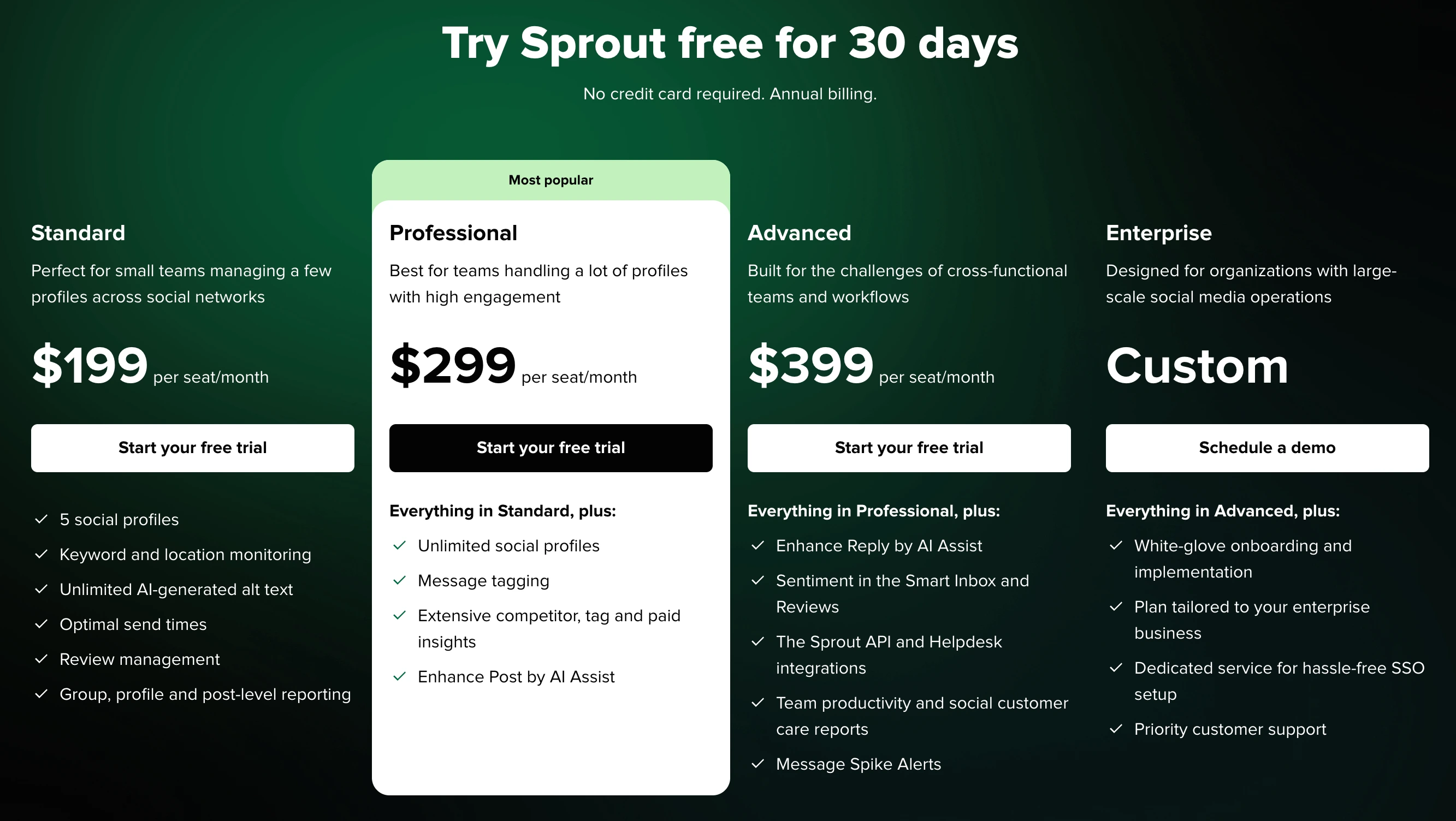
How Much Does Sprout Social Actually Cost? (Cost Calculator)
Sprout Social's per-seat pricing means your total cost scales directly with team size. Here's what you'll actually pay:
| Team Size | Essentials | Standard | Professional | Advanced |
|---|---|---|---|---|
| 1 seat | $79/mo | $199/mo | $299/mo | $399/mo |
| 2 seats | $158/mo | $398/mo | $598/mo | $798/mo |
| 3 seats | $237/mo | $597/mo | $897/mo | $1,197/mo |
| 5 seats | $395/mo | $995/mo | $1,495/mo | $1,995/mo |
| 10 seats | $790/mo | $1,990/mo | $2,990/mo | $3,990/mo |
These are annual billing prices. Billed monthly, each seat costs $99 (Essentials), $249 (Standard), $399 (Professional), or $499 (Advanced), which is 25% to 33% more than paying yearly.
The key detail most people miss: The Standard plan only includes 5 social profiles. If you manage more than 5 accounts, you must upgrade to Professional ($299/seat/mo) for unlimited profiles, a 50% price jump per seat just for more connections.
Sprout Social Feature Comparison by Plan
| Feature | Standard ($199/seat) | Professional ($299/seat) | Advanced ($399/seat) | Enterprise (Custom) |
|---|---|---|---|---|
| Social profiles | 5 | Unlimited | Unlimited | Unlimited |
| Publishing & scheduling | Yes | Yes | Yes | Yes |
| Smart Inbox | Yes | Yes | Yes + Sentiment | Yes + Sentiment |
| Approval workflows | Not listed | Multi-step, multiple approvers | + External approvals | + External approvals |
| Social monitoring | Keyword + location | Keyword + location | Advanced | Advanced |
| AI-generated text | Unlimited | Unlimited | Unlimited | Unlimited |
| Optimal send times | Yes | Yes | Yes | Yes |
| Review management | Yes | Yes | Yes | Yes |
| Reporting | Group, profile, post-level | + Competitor, tag, paid insights | + Team productivity, customer care | Custom |
| Message tagging | No | Yes | Yes | Yes |
| Enhanced Post by AI | No | Yes | Yes | Yes |
| Enhance Reply by AI | No | No | Yes | Yes |
| Sentiment analysis | No | No | Yes | Yes |
| API access | No | No | Yes | Yes |
| Helpdesk integrations | No | No | Yes | Yes |
| Message Spike Alerts | No | No | Yes | Yes |
| SSO | No | No | No | Yes |
| White-glove onboarding | No | No | No | Yes |
This table starts at Standard because Essentials is a publishing-only tier: 5 profiles, optimal send times, profile and post-level reporting, and Trellis AI, without the shared inbox, keyword monitoring, or review management.
Key limitation: Approval workflows, competitor reporting, paid ad insights, and message tagging are locked behind Professional ($299/seat), and approvals by people outside your team (like clients) need Advanced ($399/seat). Sentiment analysis, API access, and helpdesk integrations require Advanced ($399/seat). For a team of 3 needing competitor insights, that's $897/month minimum.
Sprout Social Pricing Plans
Sprout Social's pricing is charged per seat/month, which means the cost increases based on how many users your team has. Each tier adds engagement, analytics, and collaboration features, but the deeper features only unlock at higher plans.
Every plan includes:
- Publishing & scheduling tools
- Analytics & reporting (depth varies)
- Trellis AI
From Standard up, plans also include:
- Engagement inbox
- Keyword and location monitoring
- Review management
The real differences between plans come down to AI capabilities, reporting depth, team workflows, API access, and enterprise-level support.
1. Essentials Plan
The Essentials plan costs $79 per seat/month billed yearly, or $99 billed monthly.
What's included:
- Manage 5 social profiles
- Publishing and content calendar
- Optimal send times
- Profile and post-level reporting
- Trellis AI
Best for: a solo marketer who only needs to publish to a few profiles. There is no shared inbox, monitoring, or approval workflow at this tier.
2. Standard Plan
The Standard plan costs $199 per seat/month billed yearly, or $249 billed monthly.
What's included:
- Manage 5 social profiles
- Keyword & location monitoring
- Unlimited AI-generated text
- Optimal send times
- Review management
- Group, profile, and post-level reporting
Best for: small teams who manage only a few accounts and need essential publishing and monitoring.
3. Professional Plan (Most Popular)
The Professional plan costs $299 per seat/month billed yearly, or $399 billed monthly.
It includes everything in Standard, plus:
- Unlimited social profiles
- Message tagging
- Competitor, tag, and paid insights
- Enhanced Post by AI Assist
- Custom approval workflows with multiple approvers and steps
Best for: teams with many profiles, higher workload, or deeper reporting needs.
4. Advanced Plan
The Advanced plan costs $399 per seat/month billed yearly, or $499 billed monthly.
Includes everything in Professional, plus:
- Enhance Reply by AI Assist
- Sentiment in Smart Inbox & Reviews
- Sprout API & Helpdesk integrations
- Team productivity & customer care reports
- Message Spike Alerts
- External approvals (reviewers outside your team)
Best for: cross-functional teams that need automation, advanced reporting, sentiment analysis, and integrations.
5. Enterprise Plan
The Enterprise plan offers Custom pricing and requires scheduling a demo.
Includes everything in Advanced, plus:
- White-glove onboarding
- Custom plan built for your organization
- Dedicated service for SSO setup
- Priority customer support
Best for: large organizations with complex workflows and high-volume operations.
Is Sprout Social Pricing Worth It?
Sprout Social is powerful, but it's also one of the most expensive scheduling and engagement platforms on the market because of its per-seat pricing model.
Even for a small team of three people:
- Standard (3 seats) = $597/month
- Professional (3 seats) = $897/month
- Advanced (3 seats) = $1,197/month
This quickly puts it outside the range of creators, small teams, or agencies managing many clients. Considering other powerful Sprout Social alternatives, it's a good idea to check out the pricing and features of other tools before making a decision.
While Sprout Social offers excellent analytics, collaboration, reporting, and customer care features, many users, as reflected in Sprout Social reviews, find the platform:
- Too expensive as they add more seats
- Too complex for simple publishing workflows
- Overpowered if they only need scheduling + captions + previews
For efficient posting, visual previews, AI workflows, Canva integration, and multi-brand scheduling, there are simpler platforms better suited for creators, brands, and lean teams.
Sprout Social Pricing: What to Watch Out For
Before committing to Sprout Social, be aware of these common pricing pitfalls:
- Per-seat pricing makes teams extremely expensive: A 5-person marketing team on the Professional plan pays $1,495/month, nearly $18,000/year. On Advanced, that's $1,995/month. Most mid-size teams find this prohibitively expensive compared to flat-rate tools.
- The Standard plan only includes 5 social profiles: If you manage more than 5 social accounts (very common for agencies or multi-brand businesses), you're forced to upgrade to Professional at $299/seat/mo, a 50% increase per seat just for more connections.
- Competitor reporting requires Professional ($299/seat): If you need to benchmark against competitors or view paid ad insights, you must be on the Professional plan. These features are table stakes at many competing tools but locked behind the second-highest tier at Sprout Social.
- Sentiment analysis and API access require Advanced ($399/seat): If you want AI-powered sentiment detection in your inbox, helpdesk integrations (Zendesk, Salesforce), or API access for custom workflows, you need the Advanced plan at $399/seat/mo.
- Add-ons for listening and premium analytics cost extra: Even on Advanced, Sprout Social's full listening suite (powered by their acquisition of Talkwalker) and premium analytics are separate paid add-ons, not included in the base price. The actual cost for a fully-featured enterprise setup can be significantly higher than the listed per-seat price.
Compare Sprout Social Pricing with Competitors
See how Sprout Social's pricing compares in detailed head-to-head breakdowns: Hootsuite vs Sprout Social, Sprout Social vs Buffer, Sprout Social vs Later, Sprout Social vs Metricool, and Sprout Social vs Publer. Browse all comparisons on our comparison hub.
Pros and Cons of Sprout Social
Pros of Sprout Social:
-
Strong enterprise features:
Advanced reporting, customer care tools, sentiment analysis, and support workflows. -
Unlimited profiles on Professional+ plans:
Useful for large-scale social operations. -
AI Assist included across plans:
Enhances writing and engagement. -
Robust collaboration tools:
Ideal for cross-functional teams. -
Deep integrations & API (Advanced+):
Great for organizations needing custom pipelines or analytics dashboards.
Cons of Sprout Social:
-
Extremely expensive per seat:
Costs scale aggressively as team size grows. -
Enterprise-focused:
Often too complex for creators or small teams. -
Key reporting insights locked behind higher plans:
Competitor, paid insights, sentiment, and advanced analytics require upgrades. -
High barrier to entry:
Essentials starts at $79 per seat, but the shared inbox starts at $199 per seat and approvals at $299, so a small team that needs both pays enterprise-level pricing. -
No transparent pricing for Enterprise:
Requires sales calls.
The Better Sprout Social Alternative for Agencies
Sprout Social charges per seat, and the seats are expensive. For an agency running social media for local business clients, that is the wrong unit twice over: your team grows to serve more clients, and the approval workflows agencies rely on start at $299 per seat, with client approvals only on the $399 Advanced plan.
PostPlanify is built for agencies serving local businesses. Each client gets their own workspace, and team members and client approvers are never billed as seats, on any plan.

Pricing starts at $39/month for your first client workspace, or $31/month billed yearly, and the per-workspace rate drops as you add clients:
| Client workspaces | Growth | Premium | Scale |
|---|---|---|---|
| 1 | $39/mo | $99/mo | $199/mo |
| 3 | $97/mo | $99/mo | $199/mo |
| 5 | $155/mo | $177/mo | $199/mo |
| 10 | $250/mo | $322/mo | $394/mo |
| Social accounts per workspace | 4 | 6 | 8 |
Every plan includes unlimited team members and unlimited posts. Here is what each adds:
- Growth ($39/mo first workspace): unlimited users and posts, analytics across all 10 platforms, social inbox, approval workflows, shared calendar, roles and permissions, bulk scheduling, media library with Canva and Google Drive, and link in bio
- Premium ($99/mo first workspace): everything in Growth, plus advanced analytics, branded client reports, scheduled report delivery, team comments and mentions, AI brand voice, AI knowledge base, and full API and MCP access
- Scale ($199/mo first workspace): everything in Premium, plus a white-label dashboard, white-label client emails and reports, dedicated 1:1 onboarding, migration help and priority human support
Sprout Social vs PostPlanify: Side-by-Side Comparison
| Feature | Sprout Social (Standard) | PostPlanify (Growth) |
|---|---|---|
| Price | $199 per seat per month | $39/mo first workspace, $97/mo for 3 |
| Billing unit | Seats | Client workspaces |
| Cost for a 3-person team | $597/mo | $97/mo, seats not counted |
| Social profiles | 5 on Standard | 4 per workspace, 12 across 3 clients |
| Team members | Each one is another $199 | Unlimited on every plan |
| Client approvers | External approvals need Advanced ($399 per seat) | Free, never billed as seats |
| Client workspaces | Not a concept | One per client, up to 100 |
| Approval workflows | Professional ($299 per seat); client approvals on Advanced ($399) | Included from Growth |
| Competitor reporting | Professional, $299 per seat | Not offered |
| Sentiment analysis | Advanced, $399 per seat | Not offered |
| API access | Advanced, $399 per seat | Premium and above |
| Social listening | Paid add-on | Not offered |
| White-label reports | Enterprise | Scale |
| Analytics | Deep, with paid tiers for the best parts | Full, all 10 platforms |
Being straight about it: Sprout Social is a genuinely deeper platform. Social listening, sentiment analysis, competitor reporting and enterprise-grade governance are real capabilities PostPlanify does not offer, and a large brand team with budget gets value from them.
The mismatch is the pricing model against agency work. A three-person agency on Sprout Standard pays $597/month and still only gets 5 social profiles, which is one and a half local business clients. It also has no approval workflow at all: approvals start on Professional, and letting the client approve their own posts needs Advanced at $399 per seat, or $1,197/month for the same three people. The same three-person agency on PostPlanify runs three client workspaces for $97/month with 12 accounts, unlimited seats, and approvals included from the entry plan.
All plans include a 7-day free trial backed by a 14-day money-back guarantee.

Related Guides
- Best Sprout Social Alternatives
- Sprout Social Reviews: What Users Actually Say
- Best Social Media Management Platform in 2026
- Best Social Media Management Tools for Teams
- Best Social Media Management Tools for Agencies
- Best Social Media Tools with Approval Workflows
- Social Media Analytics for Business
- Social Media Scheduling Tools Compared
- Best Free Social Media Management Tools
- How to Create a Social Media Report
- Social Media Tools With No Per-Seat Fees
FAQ on Sprout Social Pricing
Is Sprout Social free?
No. Sprout Social has no free plan, only a 30-day free trial with no credit card required. After that, the cheapest plan is Essentials at $79 per seat per month billed yearly.
Does Sprout Social offer a free trial?
Yes, all plans include a 30-day free trial with no credit card required.
Is Sprout Social good?
Yes. Sprout Social is a top-tier platform for enterprises, customer care teams, and brands needing advanced analytics and sentiment tools.
What is Sprout Social used for?
Sprout Social is used for scheduling posts, managing engagement, supporting social customer care operations, analyzing performance, and handling collaboration workflows across teams.
How much does Sprout Social cost per year?
On annual billing, Sprout Social costs $948 per seat per year on Essentials ($79/seat/month), $2,388 on Standard ($199), $3,588 on Professional ($299), and $4,788 on Advanced ($399). For a 3-person team on Professional, the first plan with approval workflows, that's $10,764 per year. Paying monthly costs $99, $249, $399, or $499 per seat instead.
Is Sprout Social worth it for small businesses?
For most small businesses, Sprout Social is significantly overpriced. The Standard plan at $199/seat/mo only includes 5 social profiles and lacks competitor reporting, sentiment analysis, and message tagging. Alternatives like PostPlanify offer scheduling, analytics, social inbox, approvals and unlimited team members from $39/mo per client workspace, billed per client rather than per seat. Sprout Social makes more sense for enterprise teams needing advanced customer care workflows, helpdesk integrations, and compliance features.
Is Sprout Social cheaper than Hootsuite?
At entry, yes: Sprout Social Essentials is $79 per seat per month billed yearly, while Hootsuite Standard is $99 per user per month, though Hootsuite Standard covers 10 social accounts to Sprout's 5. Higher up, Hootsuite is cheaper: Hootsuite Professional is $199 per user against Sprout Professional at $299 per seat, and both Advanced plans cost $399. Both charge per seat and both need Enterprise for custom pricing. See our Hootsuite vs Sprout Social comparison for the full breakdown.
Does Sprout Social have a free plan?
No. Sprout Social does not offer a permanent free tier. The only way to use it without paying is through the 30-day free trial (no credit card required). After the trial, the minimum cost is $79 per seat per month on Essentials billed yearly ($99 billed monthly). For free alternatives, see our guide on best free social media management tools.
Why is Sprout Social so expensive?
Sprout Social positions itself as an enterprise social media management and customer care platform. Its pricing reflects features designed for large organizations: AI-powered sentiment analysis, helpdesk integrations (Zendesk, Salesforce, HubSpot), employee advocacy, social listening (via Talkwalker), and compliance tools. If you don't need enterprise-grade customer care workflows, you're paying for capabilities you'll never use.
How many social profiles does Sprout Social support?
The Standard plan includes only 5 social profiles. Professional, Advanced, and Enterprise plans include unlimited profiles. If you manage more than 5 accounts (common for agencies or multi-brand businesses), you need at least the Professional plan at $299/seat/month. By contrast, PostPlanify includes 4 social accounts per client workspace from $39/mo, with no per-seat fees.
How much does Sprout Social social listening cost?
Sprout Social doesn't publish a price for listening. It's a paid add-on available on Standard and above, and you get a quote through a demo with Sprout's sales team. Standard and higher plans include basic keyword and location monitoring, but full social listening costs extra on top of your per-seat price.
Does Sprout Social offer nonprofit pricing?
Yes, but it doesn't publish the discount. Sprout Social offers special pricing on its Professional and Advanced plans for eligible nonprofits, and you request it through Sprout's nonprofit pricing page. Ask for the written rate for your seat count before you commit.
What happens when I cancel Sprout Social?
When you cancel, you retain access until the end of your current billing period. After that, you lose access to all features including scheduling, inbox, analytics, and reports. Sprout Social does not offer prorated refunds. Export any reports, analytics data, or scheduled content before your subscription ends.










