
Vista Social is an all-in-one social media management platform built for agencies and enterprises. It supports 15+ platforms (including review sites), and offers scheduling, analytics, DM automations, review management, social listening, and a unified social inbox. It is rated 4.8/5 on G2 and ranked #1 Easiest to Use software in 2026.
But is Vista Social the right fit for your team's size and budget?
Today, we'll break down the full Vista Social pricing structure and show you exactly what features you get in each plan, so you can decide whether it matches your workflow.
Vista Social Pricing at a Glance (2026)
| Plan | Monthly Price | Yearly (per month) | Social Profiles | Users | AI Credits |
|---|---|---|---|---|---|
| Professional | $99/month | $79/month | 15 | 2 | 1,000 |
| Advanced | $199/month | $159/month | 30 | 3 | 2,000 |
| Scale | $449/month | $359/month | 70 | 4 | 3,500 |
| Enterprise | Custom | Custom | Unlimited | Unlimited | Unlimited |
Annual billing saves 20%. All plans include a 14-day free trial with no credit card required.
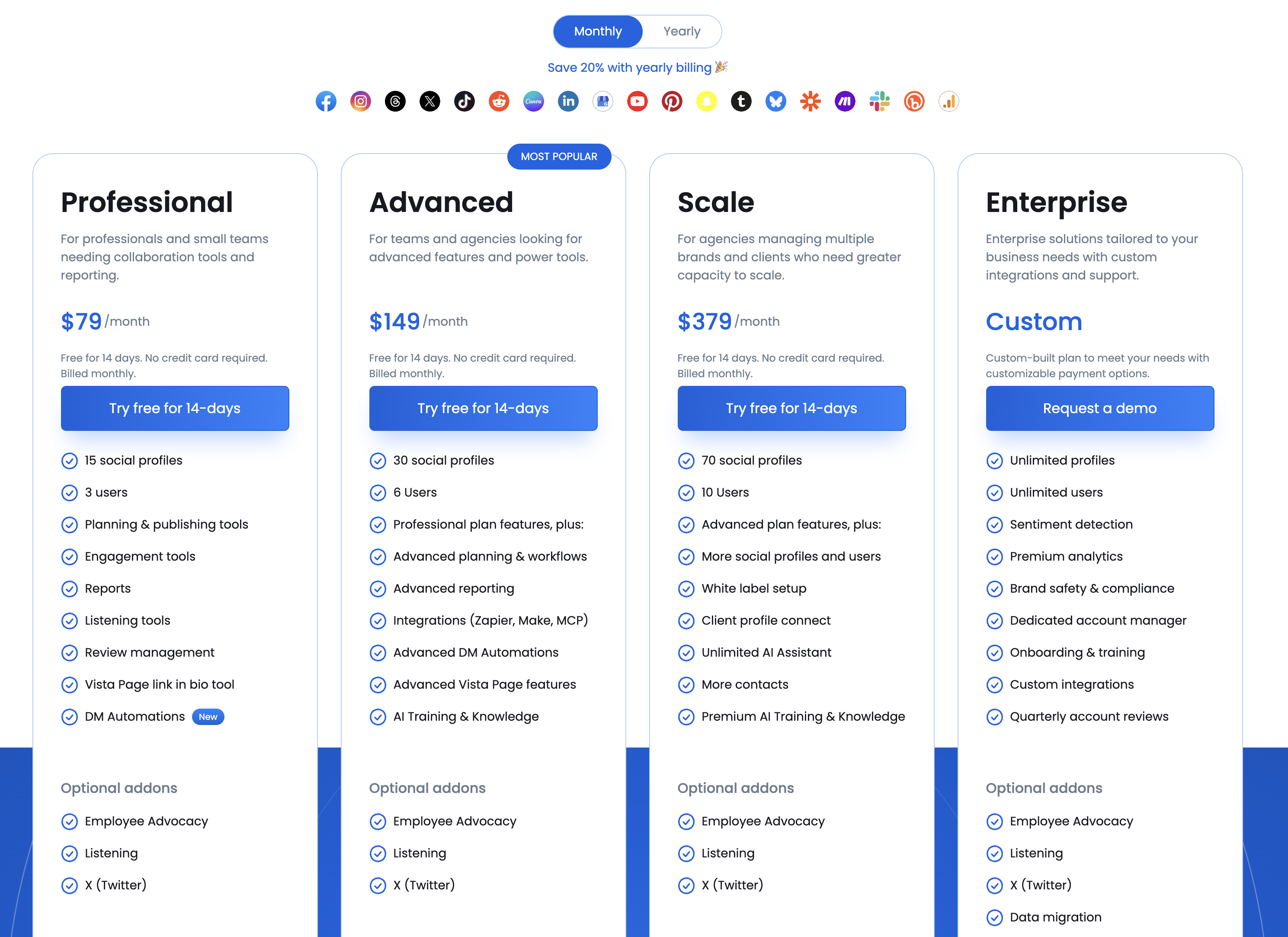
Source: https://vistasocial.com/pricing
Vista Social Pricing Plans Explained
Here's a detailed breakdown to help you understand Vista Social's pricing and choose the best fit for your workflow.
All Vista Social plans include core features like:
- Post scheduling and content calendar
- Multi-platform publishing
- Engagement tools and social inbox
- Reports and analytics
- Review management
- Vista Page (Link in Bio)
- DM Automations
- Listening tools (basic mention monitoring)
- 14-day free trial
The main differences between plans come down to number of profiles, users, AI credits, and access to advanced features like white-label setup, advanced workflows, and integrations.
Important: Optional Addons
Vista Social lists several features as optional paid addons on all plans:
- X (Twitter): Not included in any plan. Available as a $29/month paid addon.
- Social Listening (advanced): $75/month addon for keyword tracking across the web, social media, blogs, and news.
- Employee Advocacy: $199/month addon for 25 employees (3 employees included free on standard plans).
1. Professional Plan
The Professional plan costs $99/month ($79/month billed yearly) and includes 15 social profiles with 2 users.
What's included:
- 15 social profiles
- 2 users
- 500 AI credits
- Planning and publishing tools
- Engagement tools and social inbox
- Reports
- Listening tools (basic)
- Review management
- Vista Page (Link in Bio)
- DM Automations
- Email support
Best for: small teams and professionals who need scheduling, engagement, and basic analytics across multiple social profiles.
2. Advanced Plan (Most Popular)
The Advanced plan costs $199/month ($159/month billed yearly) and includes 30 social profiles with 3 users.
What's included (Professional features plus):
- 30 social profiles
- 3 users
- 1,000 AI credits
- Advanced planning and workflows
- Advanced reporting
- Integrations (Zapier, Make, MCP)
- Advanced DM Automations
- Advanced Vista Page features
- AI Training and Knowledge
- Chat and email support
Best for: growing agencies and teams that need advanced workflows, deeper reporting, and third-party integrations.
3. Scale Plan
The Scale plan costs $449/month ($359/month billed yearly) and includes 70 social profiles with 4 users.
What's included (Advanced features plus):
- 70 social profiles
- 4 users
- Unlimited AI Assistant
- White label setup
- Client profile connect
- More contacts
- Premium AI Training and Knowledge
Best for: large agencies managing multiple brands and clients who need white-label setup, unlimited AI, and dedicated client management.
4. Enterprise Plan
The Enterprise plan has custom pricing with unlimited profiles and users.
What's included:
- Unlimited social profiles
- Unlimited users
- Sentiment detection
- Premium analytics
- Brand safety and compliance
- Dedicated account manager
- Onboarding and training
- Custom integrations
- Quarterly account reviews
Best for: enterprise organizations with complex needs, compliance requirements, and dedicated support needs.
The Hidden Costs of Vista Social
Vista Social's listed prices cover the base platform, but several features add to the total cost:
X (Twitter) addon: Not included in any plan. At $29/month it is an additional recurring cost for any team that manages X alongside other platforms.
Social Listening addon ($75/mo): Basic mention monitoring is included, but advanced keyword tracking, competitor monitoring, and web-wide listening requires a $75/month addon.
Employee Advocacy addon ($199/mo): For teams that want branded employee posting, the addon starts at $199/month for 25 employees. Only 3 employees are included free.
AI credit limits: The Professional plan includes 500 AI credits and the Advanced plan includes 1,000. Unlimited AI requires the Scale plan at $449/month. Teams that use AI captions frequently may find the credit limits restrictive.
Is Vista Social Pricing Worth It?
Vista Social is a feature-rich platform with strong reviews. The 4.8/5 G2 rating and #1 Easiest to Use badge reflect genuine user satisfaction.
However, the pricing is built for agencies and enterprises, not for creators or small teams.
The $99/mo entry point is higher than most competitors for the core scheduling and publishing features. The real value of Vista Social comes from the enterprise add-ons: DM automations, review management, social listening, and employee advocacy. If your team uses these features, Vista Social delivers strong value.
If you primarily need scheduling, AI content creation, post previews, and team collaboration, the enterprise features may add complexity and cost that your team does not need. Teams in this situation often compare Vista Social to focused scheduling tools that cover the publishing workflow without the enterprise overhead.
Pros and Cons of Vista Social
Pros of Vista Social:
- Comprehensive all-in-one platform: Vista Social covers scheduling, analytics, DM automations, review management, social listening, employee advocacy, and a unified inbox. Few tools match this breadth.
- Broad platform support: With 12 social platforms (including Reddit, Snapchat, and Tumblr) plus 5 review sites, Vista Social supports more channels than most competitors.
- AI-powered DM automations: The DM automation feature supports keyword-triggered replies, comment-to-DM flows, and lead data collection across Instagram, Facebook, and TikTok. This is a standout feature.
- Strong user satisfaction: Rated 4.8/5 on G2 with over 1,000 reviews, and ranked #1 Easiest to Use and Top 5 Fastest Growing in 2026. Users praise the interface and real-time inbox.
- Multi-step approval workflows: Teams can create named workflow steps and assign specific members or clients to approve at each stage, with external approval links.
Cons of Vista Social:
- X (Twitter) requires a paid addon: X is not included in any plan. Teams that manage X alongside other platforms face an undisclosed additional cost.
- AI credits are limited on most plans: 500 credits on Professional and 1,000 on Advanced. Unlimited AI is only available on Scale at $449/mo. This limits regular AI caption usage on the lower plans.
- No native AI image generation: Vista Social relies on Canva's Magic Media for text-to-image, which requires a Canva account and provides only 50 lifetime credits on Canva Free. Practical use needs Canva Pro ($13/mo extra).
- Enterprise pricing for small teams: The $99/mo starting price includes features like DM automations and review management that smaller teams may not use, making it less ideal for creators and small businesses focused on scheduling.
- Bulk scheduling limited to CSV upload: Bulk scheduling requires uploading a CSV file or importing from RSS feeds. There is no visual bulk scheduling interface for uploading media and customizing posts individually.
The Better Vista Social Alternative for Agencies
Vista Social gives you plenty of social profiles and almost no people. Professional at $99 includes 2 users, Advanced at $199 includes 3, and Scale at $449 includes 4. For an agency, where a coordinator, a designer and a client approver are three seats before anyone has scheduled anything, that ceiling arrives fast.
Two more costs sit outside the plan price. X is a paid add-on on every tier, including Enterprise, and so are Listening and Employee Advocacy. White label setup and client profile connect both require Scale at $449.
PostPlanify is built for agencies serving local businesses. Team members and client approvers are never billed as seats on any plan, and X is included.

Pricing starts at $39/month for your first client workspace, or $31/month billed yearly:
| Client workspaces | Growth | Premium | Scale |
|---|---|---|---|
| 1 | $39/mo | $49/mo | $59/mo |
| 3 | $97/mo | $127/mo | $157/mo |
| 5 | $155/mo | $205/mo | $255/mo |
| 10 | $250/mo | $350/mo | $450/mo |
| Social accounts per workspace | 4 | 6 | 8 |
Every plan includes unlimited team members and unlimited posts. Here is what each adds:
- Growth ($39/mo first workspace): unlimited users and posts, analytics across all 10 platforms including X, social inbox, approval workflows, shared calendar, roles and permissions, bulk scheduling, media library with Canva and Google Drive, and link in bio
- Premium ($49/mo first workspace): everything in Growth, plus advanced analytics, branded client reports, scheduled report delivery, team comments and mentions, AI brand voice, AI knowledge base, and full API and MCP access
- Scale ($59/mo first workspace): everything in Premium, plus a white-label dashboard, white-label client emails and reports, dedicated 1:1 onboarding, migration help and priority human support
What the Seat Caps Mean in Practice
| Your team | Vista Social plan needed | Vista Social | PostPlanify Growth, 3 clients |
|---|---|---|---|
| 2 people | Professional | $99/mo | $97/mo |
| 3 people | Advanced | $199/mo | $97/mo |
| 4 people | Scale | $449/mo | $97/mo |
| 5+ people | Enterprise, contact sales | Custom | $97/mo |
On Vista Social the price is set by how many people you employ. On PostPlanify it is set by how many clients you serve, and the fifth teammate costs nothing.
Vista Social vs PostPlanify: Side-by-Side Comparison
| Feature | Vista Social (Professional, $99) | PostPlanify (Growth) |
|---|---|---|
| Price | $99/mo, $79 billed yearly | $39/mo first workspace, $97/mo for 3 |
| Team members | 2, then a tier upgrade | Unlimited on every plan |
| Client approvers | Counted against the 2 seats | Free, never billed as seats |
| Social profiles | 15 | 4 per workspace, 12 across 3 clients |
| X/Twitter | Paid add-on on every plan | Included on every plan |
| Listening | Paid add-on | Not offered |
| White labeling | Scale, $449/mo | Scale |
| Client profile connect | Scale, $449/mo | Included from Growth |
| Approval workflows | Advanced workflows on Advanced, $199 | Included from Growth |
| MCP access | Ask Vista and MCP on Professional | Premium and above |
| Free trial | 14 days, no card | 7 days |
Being straight about it: Vista Social has real strengths. Listening and review management across Google and Yelp, DM automations, and Ask Vista with MCP on the entry plan are genuine capabilities, and 15 social profiles for $99 is more raw capacity than our Growth plan gives at three workspaces. Its 14-day no-card trial beats ours too.
The seat model is what breaks for agencies. A four-person team pays $449/month on Vista Social regardless of client count, and X still costs extra on top. The same four people running three local business clients here is $97/month, with X included and no per-seat charge at any headcount.
All plans include a 7-day free trial backed by a 14-day money-back guarantee.

Related Guides
- Best Vista Social Alternatives
- How to Automate Social Media Posts
- Social Media Content Calendar Examples
- Social Media Marketing Strategy for Small Business
FAQ on Vista Social Pricing
Does Vista Social have a free plan?
No. Vista Social does not offer a free plan. All plans start with a 14-day free trial with no credit card required.
Does Vista Social offer a free trial?
Yes. Vista Social provides a 14-day free trial on all plans with no credit card required. PostPlanify offers a 7-day free trial with full access to all features.
How much does Vista Social cost for teams?
The Professional plan at $99/mo includes 2 users. The Advanced plan at $199/mo includes 3 users. The Scale plan at $449/mo includes 4 users. Additional user costs depend on the plan.
Is Vista Social good for agencies?
Yes. Vista Social is well-suited for large agencies that need DM automations, review management across multiple platforms, white-label reporting, social listening, and employee advocacy. The Scale plan ($449/mo) is designed for multi-brand agency workflows.
Does Vista Social include X (Twitter)?
No. X (Twitter) is a paid addon on all Vista Social plans. The addon price is not publicly listed on their pricing page.










