
Before choosing a social media scheduler, it's crucial to look at genuine user feedback. In this article, we break down Vista Social reviews to assess its features, usability, and whether Vista Social is the right fit for your team in 2026.
If you're considering Vista Social or exploring alternatives, this overview will help.
Vista Social Overview
Vista Social is an all-in-one social media management platform designed for brands and agencies. It positions itself as "a simply better social media management platform" and supports 15+ channels including social platforms and review sites. It is ranked #1 Easiest to Use software on G2 in 2026 and is one of the Top 5 Fastest Growing Products.

Highlighted features include:
- Post scheduling and content calendar across 12+ social platforms
- AI-powered caption generation (credit-based)
- DM automations for Instagram, Facebook, and TikTok
- Review management across 6 review platforms
- Unified social inbox with sentiment analysis
- Vista Page (Link in Bio)
- Multi-step approval workflows
- Social listening and employee advocacy (paid addons)
Vista Social has built a strong reputation, but user reviews reveal important details about pricing, AI limitations, and which teams benefit most.
User Reviews and Ratings
On G2
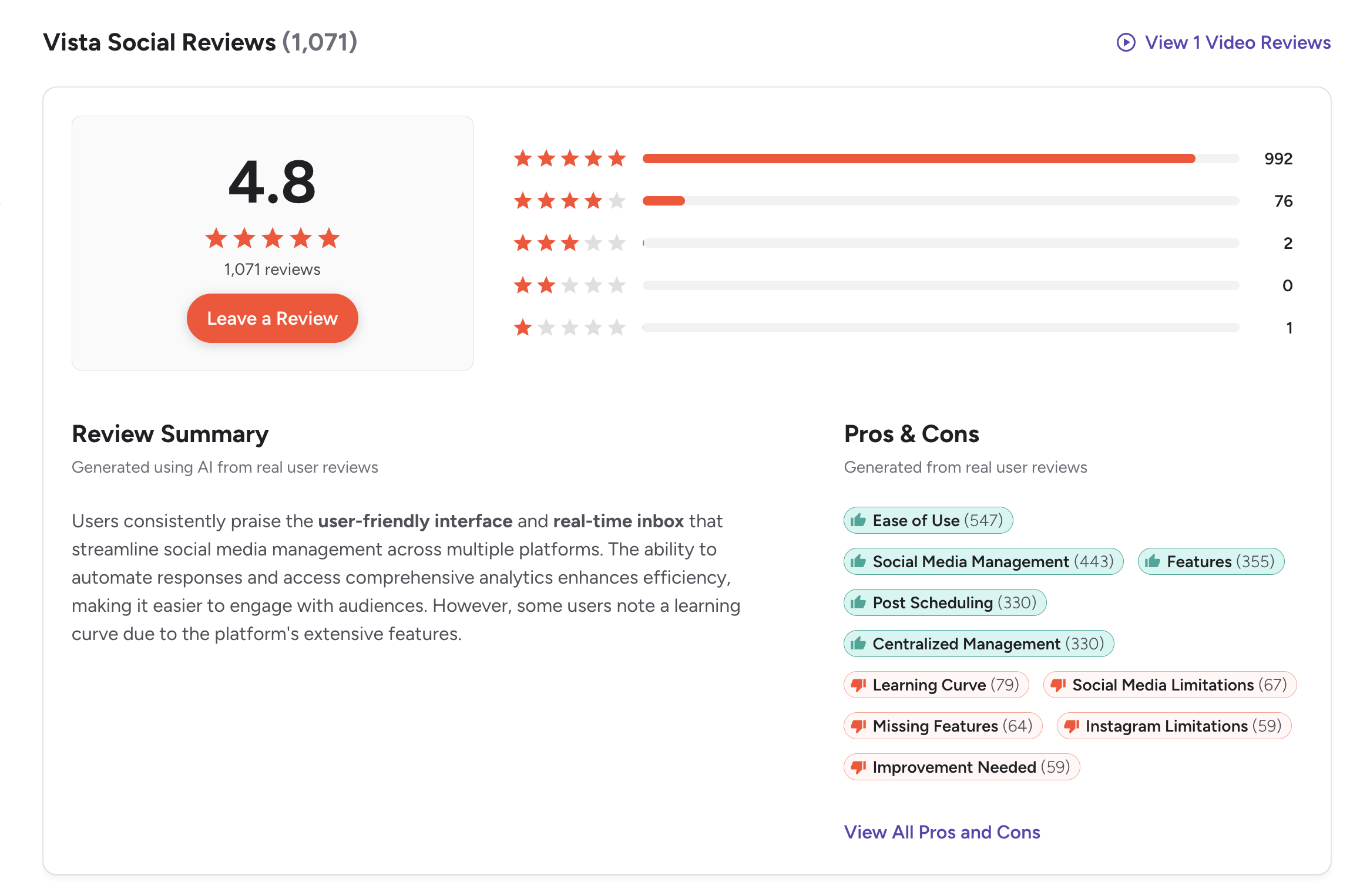
On G2, Vista Social has an exceptional rating of 4.8 out of 5, based on 1,071 reviews. This is one of the highest ratings in the social media management category. Users consistently praise the user-friendly interface and real-time inbox that streamline social media management across multiple platforms.
The review summary notes that the ability to automate responses and access comprehensive analytics enhances efficiency, making it easier to engage with audiences. However, some users note a learning curve due to the platform's extensive feature set.
Rating: 4.8/5 (1,071 reviews)
Pros
- Ease of Use (547 mentions)
- Social Media Management (443 mentions)
- Features (355 mentions)
- Post Scheduling (330 mentions)
- Centralized Management (330 mentions)
Cons
- Learning Curve (79 mentions)
- Social Media Limitations (67 mentions)
- Missing Features (64 mentions)
- Instagram Limitations (59 mentions)
- Improvement Needed (59 mentions)
(credit: G2)
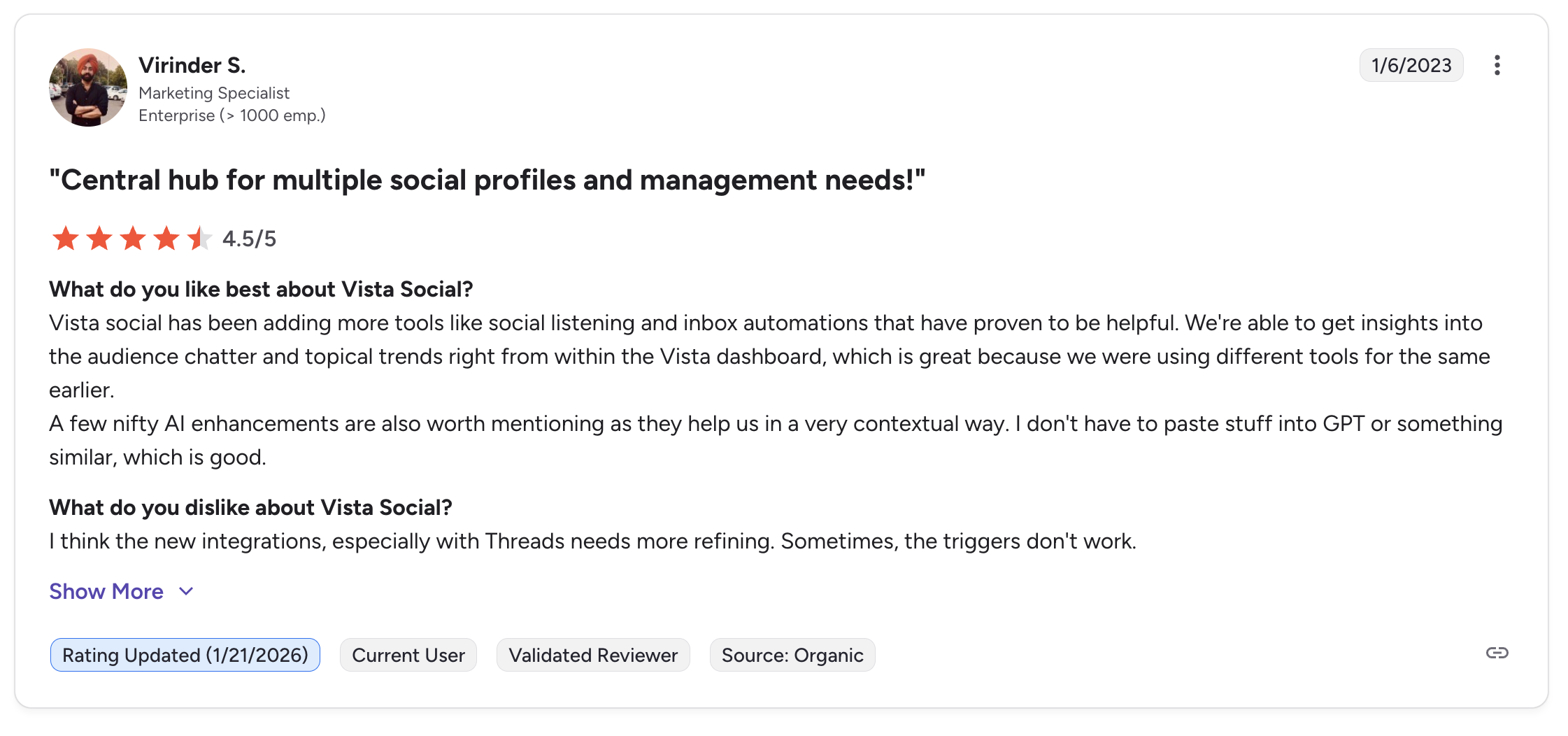
A featured review titled "Central hub for multiple social profiles and management needs!" from a Marketing Specialist at an enterprise company highlights that Vista Social has been adding tools like social listening and inbox automations, and that the AI enhancements help in a contextual way without needing to use external tools like GPT. The reviewer notes that newer integrations, especially with Threads, need more refining and that triggers sometimes don't work.
On Trustpilot
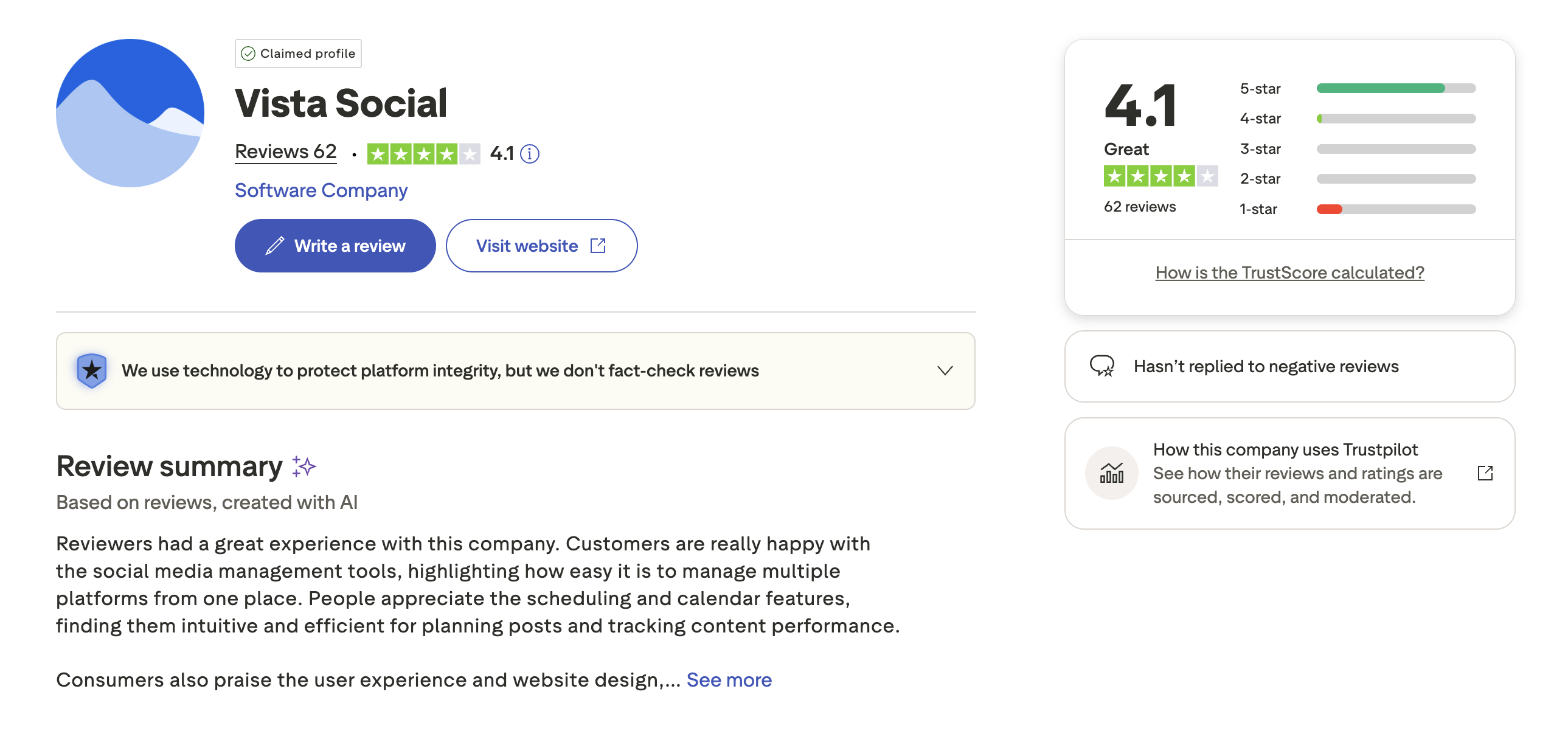
On Trustpilot, Vista Social has a rating of 4.1 out of 5, based on 62 reviews with a "Great" TrustScore. The profile is claimed, and Vista Social has not replied to negative reviews.
The review summary indicates that customers are happy with the social media management tools, highlighting how easy it is to manage multiple platforms from one place. People appreciate the scheduling and calendar features, finding them intuitive and efficient for planning posts and tracking content performance.
Rating: 4.1/5 (62 reviews)
Pros
- Easy to manage multiple platforms
- Intuitive scheduling and calendar
- Good user experience and website design
- Efficient content performance tracking
Cons
- Some users report issues with newer integrations
- Learning curve for the full feature set
- Has not replied to negative reviews
(credit: Trustpilot)
What Reddit and Community Users Say About Vista Social
Beyond formal review platforms, community discussions on Reddit (r/socialmedia, r/marketing, r/digitalmarketing) and forums like Cloudron and DEV Community reveal recurring themes about Vista Social. Here are the most common talking points based on real community feedback.
- Strong value compared to Hootsuite and Sprout Social. Users switching from more expensive tools frequently describe Vista Social as offering comparable functionality at a fraction of the cost. Multiple threads mention it as a top recommendation when someone asks for a Hootsuite alternative, with users noting the social listening feature alone, typically locked behind enterprise-tier pricing on other platforms, is available at a much lower price point.
- The unified inbox is a standout. Community users who manage multiple brands or client accounts praise the centralized inbox for consolidating DMs, comments, and mentions. Several users note it saves hours of daily manual work switching between native apps. Sentiment analysis inside the inbox is called out as a bonus, though some note it is only available on higher-tier plans.
- Feature density creates a learning curve. A consistent theme across community posts is that Vista Social packs so many tools into one platform that new users can feel overwhelmed. The DM automation builder, review management dashboard, and social listening module each have their own workflows to learn. Users who stick with it past the first week tend to become advocates, but the initial onboarding period is steeper than simpler tools like Buffer or Later.
- Mobile app lags behind the desktop experience. Reddit users and independent reviewers both flag the mobile app as clunky relative to the polished desktop interface. Users report that certain features, like the image editor and advanced scheduling options, are either missing or difficult to navigate on mobile. This is a common pain point for social media managers who need to post or respond on the go.
- X (Twitter) addon pricing frustrates some users. Several community discussions express frustration that X/Twitter support is not included in the base plans and requires an additional fee. Users who manage multiple platforms expect all major channels to be included, and the addon model feels like an upsell to some.
Feature-by-Feature User Feedback
- Scheduling: Users consistently rate scheduling as one of Vista Social's strongest areas. The visual content calendar, drag-and-drop rescheduling, and multi-platform preview are praised across Capterra (4.9/5 from 342 reviews) and G2. During independent testing with over 800 posts scheduled across 12 profiles, posting failures were rare, matching or exceeding reliability rates experienced with Hootsuite and Buffer. A small number of users report occasional delays in publishing, particularly with Instagram carousel posts and Threads.
- Analytics: The reporting suite is frequently praised for being detailed yet accessible. Users highlight the competitor analysis reports and the ability to generate white-label reports without third-party tools. However, some users note that the most granular analytics, like sentiment breakdowns and advanced audience demographics, are gated behind the Pro and Enterprise tiers. Capterra reviewers mention that the AI-generated report summaries occasionally suggest irrelevant hashtags.
- Pricing: Community sentiment on pricing is split. Users coming from Hootsuite or Sprout Social view Vista Social as affordable. Users coming from free or low-cost tools like Buffer's free tier find the $39/month starting price steep for basic needs. The requirement to pay extra for X/Twitter and social listening addons is a recurring point of criticism. The jump from Standard ($39/mo) to Professional ($79/mo) to Advanced ($149/mo) also draws comments about mid-tier plans feeling expensive for growing teams.
- Support: Vista Social's customer support is generally well-regarded. Users report getting helpful responses within minutes to a few hours via email tickets. The Customer Success team operates Monday through Friday, 8am to 6pm Eastern. G2 reviewers frequently cite support quality as a reason for high ratings. One notable gap: there is no live chat support, and Vista Social has not replied to negative reviews on Trustpilot, which some users interpret as a lack of engagement on that platform.
- Ease of Use: With 547 "Ease of Use" mentions on G2, the most-mentioned pro, Vista Social clearly resonates with users who value intuitive design. Capterra reviewers describe the setup as non-tech-savvy-friendly with helpful tutorials. The main caveat is the sheer breadth of features: users managing only scheduling and basic analytics may find the DM automations, review management, and social listening modules add unnecessary visual clutter to their dashboard.
Review Authenticity
Vista Social has consistently strong reviews across both G2 (4.8/5 from 1,071 reviews) and Trustpilot (4.1/5 from 62 reviews). The high G2 volume with 992 five-star reviews out of 1,071 reflects genuine user satisfaction. The G2 badges (#1 Easiest to Use, Top 5 Fastest Growing) align with the review data. The Trustpilot score is solid for a smaller sample size.
- Rating divergence analysis: The 0.7-point gap between G2 (4.8) and Trustpilot (4.1) is notable but explainable. G2 reviews come from verified software users who are actively evaluating the tool for professional use, which skews toward users who have adopted the platform and found value. Trustpilot attracts a broader mix of users, including those who may have tried and abandoned the tool during a free trial. Vista Social also has a 4.9/5 on Capterra from 342 reviews, which further supports the high G2 rating rather than the lower Trustpilot number.
- Volume and trends: The 1,071 G2 reviews represent strong volume for a tool founded in 2022. Review growth has been steady rather than showing suspicious spikes, which supports authenticity. The 62 Trustpilot reviews are a relatively small sample, enough to indicate some real frustrations but not enough to draw broad conclusions. The fact that Vista Social has not responded to negative Trustpilot reviews is a minor concern from a transparency standpoint, though it does not necessarily indicate review manipulation.
- Overall assessment: Vista Social's reviews paint a picture of a well-built platform with genuine user satisfaction. The main critiques, a learning curve due to feature density, limitations with newer integrations like Threads, and addon pricing for X/Twitter, are consistent across all platforms, which reinforces their credibility.
Who Vista Social Works Best For (Based on Reviews)
Users who are happy with Vista Social:
- Agencies managing 5-15+ client accounts who need scheduling, inbox, analytics, and reporting in one platform
- Teams switching from Hootsuite or Sprout Social who want similar functionality at a lower price
- Social media managers who value DM automation and review management across multiple platforms
- Brands that need social listening without paying enterprise-tier pricing
Users who may want to look elsewhere:
- Solo creators or small businesses who only need basic scheduling and find the feature density overwhelming
- Teams that rely heavily on X/Twitter and do not want to pay for it as an addon
- Users who need strong mobile app functionality for on-the-go posting and engagement
- Budget-conscious users who find the $39/month starting price too high for their needs
- Teams that need extensive third-party integrations beyond Zapier
Compare Vista Social with Other Tools
See how Vista Social compares in a detailed head-to-head breakdown: PostPlanify vs Vista Social. Browse all comparisons on our alternatives hub.
Before choosing a social media scheduler...
Consider the following tips:
- Think about which features you actually use daily. Vista Social's enterprise features (DM automations, review management, social listening) are powerful but add complexity.
- Check if X (Twitter) support is included or costs extra. Vista Social charges for it as an addon.
- Compare AI credit limits. Vista Social limits AI usage to 500-1,000 credits on most plans. Check our Vista Social pricing breakdown for the full cost picture.
- Consider your team size and growth. Vista Social's per-plan user limits (3/6/10) may require upgrading as your team grows.
- Test the platform during the free trial to evaluate whether you need the full feature set or a more focused tool.
Ultimately, the best scheduler is the one that matches your team's size, workflow, and feature needs.
Vista Social is one of the most comprehensive social media management platforms available, but teams that need a focused content creation and publishing workflow may find a better fit elsewhere.
PostPlanify is built for agencies serving local businesses. Each client gets their own workspace, X is included on every plan rather than sold as an add-on, and team members and client approvers are never billed as seats.

Pricing starts at $39/month for your first client workspace, or $31/month billed yearly, and the rate falls as you add clients:
| Client workspaces | Growth | Premium | Scale |
|---|---|---|---|
| 1 | $39/mo | $49/mo | $59/mo |
| 3 | $97/mo | $127/mo | $157/mo |
| 5 | $155/mo | $205/mo | $255/mo |
| 10 | $250/mo | $350/mo | $450/mo |
| Social accounts per workspace | 4 | 6 | 8 |
Each plan answers a theme from the reviews above:
- Growth ($39/mo first workspace) removes the two frictions reviewers name most, the X add-on and the seat ceiling: X is included, users are unlimited, and so are posts. Plus analytics on all 10 platforms, a social inbox, approval workflows, shared calendar, roles and permissions, bulk scheduling and a media library.
- Premium ($49/mo first workspace): advanced analytics, branded client reports that schedule themselves, team comments and mentions, AI brand voice and knowledge base, plus full API and MCP access.
- Scale ($59/mo first workspace): a white-label dashboard, white-label client emails and reports, dedicated onboarding, migration help and priority human support.
Credit where it is due: reviewers rate Vista Social's unified inbox and reporting highly, and they are right. Listening and review management across Google and Yelp, DM automations and Ask Vista with MCP on the entry plan are real capabilities, and 15 social profiles for $99 is more raw capacity than our Growth plan offers at three workspaces. Its 14-day no-card trial is longer than ours.
The complaints in those same reviews are the ones that matter to agencies. The X add-on frustration comes up repeatedly, and the seat caps are steep: 2 users on $99, 3 on $199 and 4 on $449. A four-person agency pays $449/month on Vista Social whatever its client count, against $97/month here for three clients with unlimited seats and X included.
Start your 7-day free trial today.










