


You've finished editing your video, the thumbnail is perfect, and the description is keyword-optimized. You hit "Publish" and... nothing. The views trickle in, but the explosive start you hoped for never happens. Why? It's a common problem: your great content was uploaded at the wrong time, completely missing your audience's peak activity window.
The best time to upload a YouTube video is between 2 PM and 5 PM EST on weekdays (especially Wednesday and Thursday), publishing 1-2 hours before your audience's peak activity window so YouTube can index and distribute your content right as viewers come online.
The problem isn't your content; it's your timing. Uploading a video when your viewers are offline means it gets buried. By the time they log on, it's already lost to newer content. This weak start signals to the YouTube algorithm that your video isn't engaging, killing its potential before it ever has a chance.
This guide will walk you through the exact steps to find your channel's unique "prime time" and build a consistent schedule that gets your videos seen. (For the cadence side — how many videos per week actually pays off — see how often to post on social media.)
Your Quick Guide to YouTube's Prime Time Slots

Before diving into your channel's specific data, it helps to have a baseline. Industry-wide data gives us a powerful starting point by revealing general viewer behavior patterns. The goal is to aim for the afternoon and early evening on weekdays, which captures audiences as they wind down from work or school. If you are looking for patterns across all platforms, our guide on the best time to post on social media provides a broader perspective.
General YouTube Upload Time Recommendations (EST)
This table provides a solid starting point based on aggregated industry data. Use these time slots as the foundation for your first tests before refining your schedule with your own analytics.
| Day of the Week | Primary Time Slot (EST) | Secondary Time Slot (EST) | Reasoning |
|---|---|---|---|
| Monday | 2 PM - 4 PM | 6 PM - 8 PM | Catches the end-of-workday crowd and early evening browsers. |
| Tuesday | 2 PM - 4 PM | 6 PM - 8 PM | Similar to Monday, captures viewers looking for a post-work distraction. |
| Wednesday | 3 PM - 5 PM | 7 PM - 9 PM | Often a peak engagement day as the week's momentum builds. |
| Thursday | 3 PM - 5 PM | 7 PM - 9 PM | Another high-traffic day, viewers are actively seeking content before the weekend. |
| Friday | 12 PM - 3 PM | 6 PM - 8 PM | Earlier afternoon can perform well as people wind down for the weekend. |
| Saturday | 9 AM - 11 AM | 12 PM - 2 PM | Catches the morning scrollers and people relaxing during their midday break. |
| Sunday | 9 AM - 11 AM | 3 PM - 5 PM | Another strong weekend morning slot, plus an evening window for pre-week viewers. |
Remember, these times are just a launchpad. The real magic happens when you start layering your own channel's data on top of these general guidelines. While YouTube is its own unique beast, understanding broader social media scheduling tools can help you keep your entire publishing workflow consistent across platforms.
Why This General Advice Works (And Its Limits)
On a typical Tuesday, Wednesday, or Thursday afternoon, your potential viewers are often looking for a mental break. They're scrolling for entertainment or trying to learn something new. As the day shifts into early evening, you get another wave of viewers—the post-work and post-school crowd settling in for the night. Publishing your video right as these waves are cresting is crucial.
The goal is to launch your video when the maximum number of your potential viewers are online and ready to watch. This initial surge of activity signals to the YouTube algorithm that your content is engaging and worth promoting further. Upload timing is one piece of a larger YouTube SEO strategy — it affects the critical first-hour data that shapes long-term distribution.
This general advice is really just your baseline for testing. If you want to dig deeper into broader viewing patterns, this resource on When Is the Best Time to Upload a YouTube Video? offers some great context. The next step is all about digging into your own YouTube Analytics to see when your specific viewers are most active. That's where you'll find the true sweet spot for your channel.
 PostPlanify
All your social media in one simple dashboard
Schedule posts, track analytics, and reply to comments/DMs without switching tabs.

Engagement
+18%
Views
52.8k
Why the First Few Hours After Uploading Are Critical

Hitting ‘publish’ on a new video isn't the finish line. It's the starting gun. The first 2 to 8 hours of a video's life are make-or-break for its long-term success. During this window, YouTube’s algorithm is watching closely, focusing on how your most loyal viewers—your subscribers—are reacting to your new content.
This isn’t just about the raw view count. The algorithm is hunting for specific early signals that tell it whether your video is worth recommending to a wider, non-subscribed audience.
The Metrics That Matter Immediately
In those first few hours, the algorithm zeroes in on a few key metrics to gauge a video's quality.
- Click-Through Rate (CTR): This is a huge one. How many of your subscribers who saw the video thumbnail in their feed actually clicked to watch it? A high initial CTR from your core audience is a massive vote of confidence.
- Audience Retention: How long are people actually watching? If viewers leave in the first 30 seconds, that's a red flag. But if they're watching most of the video, the algorithm takes that as a very strong positive signal.
- Initial Velocity: This is about momentum. How quickly is your video racking up views, likes, comments, and shares right after it goes live? A fast, explosive start tells the algorithm that something special is happening.
Think about it this way. Imagine you upload two identical videos. One goes live at 3 AM when your target audience is asleep. It limps along with a handful of views and no interaction. The other goes live at 3 PM, right as your audience is getting home. It gets an immediate surge of views, likes, and comments. Which video do you think the algorithm is going to favor?
The Snowball Effect of Early Engagement
This initial performance kickstarts a feedback loop. When a video launches into a crowd of active, engaged viewers, it gets an immediate signal boost. The algorithm sees this positive activity and starts recommending your video to a much broader audience on their homepage, in "Suggested Videos," and in other browse features. Tracking these signals over time is where social media analytics and reporting become invaluable for long-term channel growth.
This is why understanding the direct link between timing and algorithmic favor is so important. You can even get a feel for how you're doing by plugging your numbers into a YouTube engagement calculator to benchmark your metrics.
Of course, to nail this crucial window, you also need a fast and smooth upload process. You can't afford technical delays eating into your prime time. To make sure your content is live the second your audience is waiting, it's worth looking into strategies to optimize videos for faster upload.
How to Find Your Peak Hours in YouTube Analytics
Generic advice is a great starting point, but the most powerful data for timing your uploads is already inside your own YouTube Studio. This is where you graduate from industry averages to making smart, data-driven decisions for your community. Your own analytics cut through the noise, accounting for your audience's unique time zones and specific viewing habits. If you want a deep dive into reading platform data, our analytics features overview explains how to turn raw numbers into actionable publishing decisions.
A Step-by-Step Guide to the Audience Report
To find this information, you’re looking for the "When your viewers are on YouTube" report. It’s a simple, color-coded chart that shows you exactly when your community is most active on the platform.
Here’s a step-by-step guide to find it:
- Log in to YouTube Studio.
- Click on Analytics from the menu on the left.
- Select the Audience tab along the top.
- Scroll down until you see the chart titled "When your viewers are on YouTube."
This chart pulls data from the last 28 days. The darker the purple bars, the more of your viewers are online at that specific time.
Here's what that report looks like in action: The goal is simple: find the clusters of dark purple. These blocks represent your channel's prime time—the hours when publishing will give your new video the strongest possible launch.
How to Interpret the Data Correctly
At first glance, the chart seems straightforward. Dark purple means more viewers. Yes, but a few common slip-ups can lead you to the wrong conclusions.
- Check Your Time Zone: The report defaults to your local time, based on your computer or Google account settings. This is a crucial detail, especially if your audience is mostly in a different part of the world. Always cross-reference this with the "Top Geographies" report (in the same Audience tab) to understand where your viewers actually live.
- Look for Blocks, Not Spots: Don't just obsess over the single darkest purple square. Instead, look for blocks of 2-3 consecutive hours where activity is consistently high. This gives you a much more reliable window to schedule your uploads, rather than trying to nail one precise minute.
Interestingly, this data-driven approach often lines up with broader industry findings. For example, some analyses show that Wednesday is a standout day, with engagement peaking between 9 AM and 4 PM EST. You can discover more insights from recent 2026 trends on DesignRush to see how your personal data stacks up.
Turning Analytics into an Actionable Schedule
Once you've identified those peak windows, the next step is to use them consistently. Instead of manually uploading and hoping for the best, you can build a reliable publishing schedule.
This is where planning tools are a game-changer. A scheduler lets you upload your video whenever it's finished and then set it to go live during that perfect, data-backed time slot. Using a content calendar lets you map out your entire month of uploads at a glance, removing the stress of last-minute publishing and ensuring every video gets the best possible start.
How to Run a Smart Experiment to Test Your Upload Times
Your analytics gave you a hypothesis of when your audience is online, but now it's time to prove it. Simply switching to a new time and hoping for the best isn't a strategy—it's a guess. To be certain you've found the best upload window, you need to run a simple, controlled experiment. This process takes the guesswork out of the equation and gives you hard data to back up your decisions.
The key is to create a testing calendar and dedicate your next few videos to different, specific time slots while keeping your content style consistent. That way, you can isolate the impact of timing on your video's performance. Knowing how to create a social media content calendar makes this testing process far more structured and repeatable.
Step 1: Set Up Your Testing Calendar
The goal here is to compare apples to apples. If you mix a high-effort documentary with a quick Q&A video in the same test, your results will be skewed by the content itself, not the timing.
For this to work, you need to pick four upcoming videos that are similar in format, topic, and expected audience reaction. Consistency is everything. Having videos produced ahead of time is a massive advantage. We have a whole guide on content batching that can help you build a backlog of videos so you’re always ready to test.
Here's what a simple, four-week testing calendar might look like:
Sample 4-Week YouTube Upload Testing Calendar
| Week | Video Topic | Upload Day & Time (EST) | Key Metric to Track (First 24h) |
|---|---|---|---|
| 1 | "10 Beginner Photography Tips" | Wednesday @ 4 PM | Views in first 24 hours |
| 2 | "Editing Your First Portrait" | Wednesday @ 7 PM | Audience Retention |
| 3 | "Best Budget Lenses for 2024" | Friday @ 3 PM | Click-Through Rate (CTR) |
| 4 | "Low-Light Photo Mistakes" | Sunday @ 10 AM | Subscriber Gain |
This structure lets you test your current best guess (Week 1), a later evening slot (Week 2), a different but popular day (Week 3), and an off-peak weekend morning (Week 4). After a month, you'll have a much clearer picture of what works.
Step 2: Focus on the Right Metrics
While it's tempting to just look at total views after a week, what you're really measuring is early momentum. The YouTube algorithm pays close attention to how a video performs right after it goes live.
For this experiment, you should zero in on two key performance indicators (KPIs) within the first 24 hours:
- Views in the first 24 hours: This is your number one success metric. It directly reflects how many of your active subscribers saw the video and clicked on it right away.
- Audience Retention in the first 24 hours: This tells you if the viewers who showed up early actually stuck around. High initial retention sends a powerful signal to YouTube that your content is valuable.
This is the exact data you're pulling from your YouTube Analytics to inform which times you should be testing.
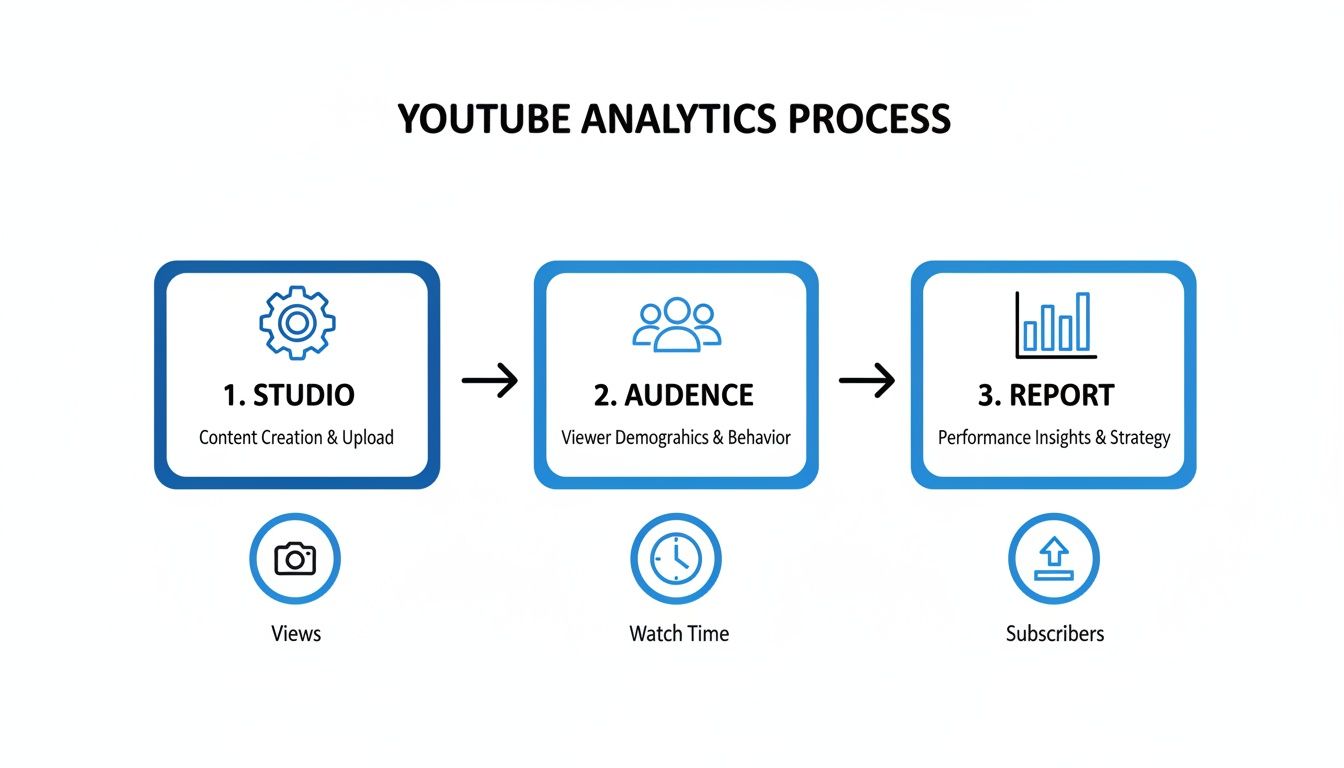
This process helps you pinpoint those peak activity hours that will form the basis of your whole testing schedule.
After your four-week test, one time slot should emerge as the clear winner for that initial burst of engagement. This isn't a "set it and forget it" solution, though. Plan on repeating this experiment every quarter, or anytime you notice a big shift in your channel's growth or audience.
Once you find your winning time, consistency becomes the priority. Using a YouTube scheduler ensures your videos go live at that perfect moment, every single time, without you having to be chained to your computer. If you are comparing tools, our roundup of the best YouTube scheduling tools breaks down the top options for automating your upload schedule. If you also post on other platforms, learning how to schedule social media posts across channels can save even more time.
PostPlanifyAll your social media in one simple dashboard
Schedule posts, track analytics, and reply to comments/DMs without switching tabs.
Engagement
+18%
Views
52.8k
How to Automate Your Schedule for Consistent Results
You’ve analyzed your data, run your tests, and finally found that golden hour when your audience is most likely to watch. The final step is hitting that window, every single time. Consistency is a huge signal to your audience and the YouTube algorithm. When you show up reliably, viewers learn when to expect your content, and the algorithm learns when to promote it.
Trying to manually upload a video at the perfect moment is a recipe for stress and missed opportunities. A sudden Wi-Fi outage, a corrupted file, or a hectic day can easily derail your plans. This is where automation isn’t just a convenience—it’s a critical tool for growth. Creators who manage multiple social media accounts especially benefit from a centralized scheduling system.
Why Manual Uploads Are a Problem
Manually uploading means you're tethered to your computer, waiting for the clock to strike the right minute to hit "Publish." That approach is fragile and doesn't scale. Miss just one upload, and you risk breaking the rhythm you’ve built with your viewers.
Scheduling your videos in advance removes all that pressure and uncertainty. You guarantee your content goes live exactly when your viewers are most active, keeping them and the algorithm happy.
Think of your channel like a prime-time TV show. It doesn't just air whenever the director feels ready; it’s locked into a specific time slot to capture the biggest audience possible. Your channel deserves that same level of professional reliability.
Building a Reliable Publishing System
The solution is to separate your creative process from your publishing logistics. As soon as a video is edited, rendered, and has its title, description, and thumbnail ready, it should be scheduled immediately.
This is exactly what tools like PostPlanify are built for. Instead of juggling files and setting last-minute reminders, you can map out your entire content calendar weeks or even months ahead of time. You just upload the finished video, pick your peak publishing time, and you’re done.
This system is about more than just convenience; it's about strategy:
- It Builds Audience Trust: Viewers start to anticipate your content at a certain time, turning casual watchers into a loyal community.
- It Feeds the Algorithm: Publishing consistently during peak engagement hours gives the algorithm a steady diet of positive signals.
- It Frees Up Your Headspace: Once a video is scheduled, you can focus on creating the next great video, not worrying about upload logistics.
Using a dedicated YouTube scheduler transforms you from a reactive content creator into a strategic publisher. For social media management for creators, it’s a methodical approach that ensures every video gets the best possible launch, fueling sustainable, long-term growth.
Troubleshooting and FAQs
Here are answers to some common questions that arise when fine-tuning a YouTube schedule.
Does uploading a video as Unlisted or Private affect anything?
No, not at all. You can upload a video and keep it private or unlisted for as long as you want without any impact on its future performance. The algorithm's clock only starts ticking the second you switch the video to "Public."
This is actually a best practice. Uploading your video hours or days ahead of time gives it plenty of time to fully process in all resolutions (like 4K), ensuring it looks crisp for those first crucial viewers.
Should I post an hour before my peak time?
This is a smart strategy used by many experienced creators. Publishing your videos 30 to 60 minutes before your analytics show peak traffic gives YouTube’s systems a little lead time to index your video and start distributing it.
By the time the bulk of your audience logs on, your video is already sitting in their subscription feeds and primed for recommendation, giving it the best shot at gaining that initial momentum.
What if my audience is split across different time zones?
This is a common issue for growing channels. If your "Top Geographies" report shows a major split—say, half your viewers are in North America and the other half are in Europe—you have a couple of options:
- Prioritize the Larger Audience: Focus on the larger audience segment and post during their peak time. It's better to capture 60% of your audience perfectly than to miss 100% of them by choosing a mediocre time.
- Find the Overlap: Look for a time that works reasonably well for both. For a US/UK split, publishing in the late afternoon EST often works well. It catches UK viewers in their evening prime time and hits the after-work crowd in the US.
A common mistake is trying to please everyone and ending up with a time that’s perfect for no one. It’s usually far more effective to dominate one key time zone. Running a social media audit can help you understand exactly where your viewers are located and how they engage.
How often should I re-check my best upload time?
Your audience isn't static. As your channel grows, you'll attract new demographics with different viewing habits. Because of this, you can't just "set it and forget it."
It's a good practice to check your "When your viewers are on YouTube" report at least once a quarter. If you notice a big shift in your viewership or a dip in performance, it's time to run new timing experiments to see if your old schedule still holds up.
YouTube Shorts vs Long-Form: Different Upload Timing
YouTube Shorts and long-form videos have fundamentally different audience behaviors, which means they need different upload strategies.
| Factor | Long-Form Videos (8+ min) | YouTube Shorts (under 3 min) |
|---|---|---|
| Best upload time | 2–5 PM EST weekdays | 7–9 AM or 12–2 PM EST weekdays |
| Best days | Wednesday–Friday | Monday–Friday |
| Why | Viewers settle in for longer content in the evening; publishing before the prime 6–9 PM viewing block gives YouTube indexing time | Shorts are consumed in quick-scroll sessions during commutes and lunch breaks — similar to TikTok and Reels |
| Weekend strategy | Saturday 9–11 AM (morning leisure viewing) | Saturday–Sunday 10 AM–1 PM (casual scrolling) |
| Processing buffer | Upload 1–2 hours before peak (4K takes time) | Upload 30 min before peak (shorter processing) |
Why the difference matters: Long-form videos need viewers with time to watch. Shorts need viewers who are killing time. Publishing a 15-minute tutorial at 8 AM means your audience is commuting — they'll skip it. Publishing a 30-second Short at 8 AM means your audience is scrolling on the train — perfect timing.
For a detailed guide on scheduling Shorts specifically, see our guide on how to schedule YouTube Shorts.
Best Upload Times by Content Niche
Your niche determines your audience's daily routine, which directly affects when they're available to watch. A student audience has different peak hours than working professionals or stay-at-home parents.
| Niche | Best Upload Time (EST) | Best Days | Why |
|---|---|---|---|
| Gaming | 4–6 PM, 8–10 PM | Fri–Sun | After-school hours + late-night gaming sessions |
| Education / How-To | 2–4 PM | Tue–Thu | After-school/work learning sessions |
| Tech Reviews | 3–5 PM | Wed–Fri | Mid-week decision-making, pre-purchase research |
| Fitness / Health | 5–7 AM, 5–7 PM | Mon–Wed | Pre-workout morning motivation + post-work gym crowd |
| Business / Finance | 8–10 AM, 2–4 PM | Tue–Thu | Morning news consumption + afternoon deep-dives |
| Cooking / Food | 11 AM–1 PM, 4–6 PM | Tue–Sat | Lunch inspiration + dinner planning windows |
| Beauty / Fashion | 12–2 PM, 7–9 PM | Wed–Sat | Midday browsing + evening "get ready with me" content |
| Entertainment / Comedy | 5–8 PM | Thu–Sat | Evening relaxation when viewers want to unwind |
| Music | 12–2 PM, 8–10 PM | Fri–Sun | Lunch breaks + evening listening sessions |
| Family / Parenting | 10 AM–12 PM, 8–10 PM | Mon–Wed | Mid-morning when kids are at school + evening after bedtime |
How to use this table: Find your niche, cross-reference with the general day-by-day table above and your own YouTube Analytics heatmap. Where the data overlaps is your highest-probability upload time.
How Upload Time Affects Your Ad Revenue (CPM by Hour)
If you're monetized through the YouTube Partner Program, when you upload doesn't just affect views — it affects how much each view earns.
YouTube ad rates (CPM) fluctuate throughout the day based on advertiser demand. More advertisers compete for ad slots during high-traffic hours, driving CPM up. Publishing during these windows means your video's initial surge of views happens when ad rates are highest.
| Time Window (EST) | Relative CPM | Why |
|---|---|---|
| 6 AM – 9 AM | Medium | Morning commute — decent mobile ad demand |
| 9 AM – 12 PM | Medium-High | Business hours — B2B advertisers active |
| 12 PM – 3 PM | High | Lunch breaks — retail and e-commerce ads peak |
| 3 PM – 6 PM | Highest | Pre-evening — maximum advertiser competition across all categories |
| 6 PM – 9 PM | High | Prime viewing — strong demand but some budget exhaustion |
| 9 PM – 12 AM | Medium | Late evening — lower competition, reduced rates |
| 12 AM – 6 AM | Low | Overnight — minimal advertiser demand |
The takeaway: The 3–6 PM EST window isn't just the best time for views — it's also when your views are worth the most in ad revenue. A video that gets 10,000 views during the 3–6 PM window can earn 20–40% more than the same 10,000 views spread across overnight hours.
This is another reason to publish 1–2 hours before your audience's evening peak: your initial view surge coincides with peak CPM hours, maximizing both reach and revenue. For a full breakdown of YouTube earnings by niche and country, see our guide on how much YouTube pays for 1,000 views.
PostPlanifyAll your social media in one simple dashboard
Schedule posts, track analytics, and reply to comments/DMs without switching tabs.
Engagement
+18%
Views
52.8k
Frequently Asked Questions
Does it matter what day of the week I upload to YouTube?
Yes, the day of the week significantly affects initial views. Wednesday and Thursday consistently show the highest engagement, with mid-week uploads earning up to 20% more views in the first 24 hours compared to Monday or weekend uploads, based on aggregated creator data.
Should I upload YouTube videos at the exact peak time?
No, upload 30-60 minutes before your peak audience activity window. This gives YouTube time to process, index, and begin distributing your video so it appears in subscription feeds and recommendations right as your viewers come online.
How long does it take YouTube to process a video after uploading?
Processing time depends on video length, resolution, and file size. A typical 10-minute 1080p video takes 15-30 minutes, while 4K content can take over an hour. Upload well in advance of your scheduled publish time to ensure full resolution is available at launch.
Can I schedule YouTube Shorts at a specific time?
Yes, you can schedule YouTube Shorts through YouTube Studio or a third-party YouTube scheduler. Set the visibility to "Scheduled," pick your date and time, and the Short publishes automatically, giving you the same timing control you have with long-form videos. Before scheduling, use the free YouTube Shorts safe zone checker to verify that your text and key visuals won't be covered by platform UI elements.
Does uploading frequency affect when I should post?
Yes, if you upload multiple times per week, stagger your publish times across different peak windows to avoid cannibalizing your own audience. For example, a Tuesday 3 PM upload paired with a Saturday 10 AM upload captures both weekday and weekend viewing habits.
Will changing my upload time hurt my channel performance?
A temporary dip is possible when you shift your schedule, as subscribers may not expect content at the new time. Run a controlled four-week test with similar content before committing to a permanent change, and give the algorithm at least two weeks to adjust.
How does time zone affect YouTube upload strategy for global audiences?
YouTube displays the "When your viewers are on YouTube" chart in your local time, but your audience may span multiple regions. Check the Top Geographies report in YouTube Analytics and prioritize the time zone where at least 50-60% of your viewers are located for scheduling decisions.
Your YouTube Timing Checklist
- Start with General Times: Use industry-standard times (mid-afternoon weekdays, weekend mornings) as your initial baseline.
- Analyze Your Data: Dive into YouTube Studio > Analytics > Audience to find the "When your viewers are on YouTube" report.
- Identify Your Prime Time: Look for 2-3 hour blocks of dark purple, indicating peak viewer activity.
- Run a Controlled Test: Schedule 4-5 similar videos at different times and track views and audience retention in the first 24 hours.
- Automate Your Schedule: Once you've found your winning time, use a scheduler to publish consistently.
- Review Quarterly: Re-check your analytics every few months to adapt to your growing audience.
Finding your channel's prime time is a huge win, but consistency is what locks in that growth. With PostPlanify, you can automate your entire publishing schedule. No more last-minute uploads or missed opportunities—just every video going live at its most impactful moment.
Start your free 7-day trial of PostPlanify and schedule your YouTube content at the perfect time, every time.
Related Reading
YouTube guides:
- How to Schedule YouTube Shorts
- Best YouTube Scheduling Tools
- How Much Does YouTube Pay for 1,000 Views?
- When Does YouTube Start Paying You?
- How to See Your YouTube Subscribers
- How to Clip a YouTube Video
- Does YouTube Automation Work?
- How to Recover Your YouTube Account
Cross-platform timing & scheduling:
PostPlanifyAll your social media in one simple dashboard
Schedule posts, track analytics, and reply to comments/DMs without switching tabs.
Engagement
+18%
Views
52.8k
About the Author

Hasan Cagli
Founder of PostPlanify, a content and social media scheduling platform. He focuses on building systems that help businesses, agencies, and teams plan, publish, and manage content and social media more efficiently across platforms.


