


Key Takeaways: A content calendar, social inbox, and analytics are the three must-haves for any small business. Expect to pay $29-$99/mo depending on accounts and team size. Use the ROI formula (hours saved x hourly rate) to justify the investment before you buy.
This guide draws on hands-on testing of 15+ social media management platforms, analysis of 20,000+ user reviews on G2 and Trustpilot, and real-world pricing data collected in March 2026.
Trying to run your small business's social media by jumping between Instagram, Facebook, and TikTok is like running a kitchen during the dinner rush with orders scribbled on loose sticky notes. It's inefficient, stressful, and things are bound to get missed. A good social media management tool acts as your central command center, organizing all that chaos so you can finally be strategic, not just reactive.
This guide is for people who are actively looking for solutions to specific problems like content scheduling, missed messages, and inconsistent posting. We'll focus on practical, step-by-step solutions, not theory.
Why Manual Social Media Management Isn't Working
If you're handling social media yourself, you know the daily scramble. You post on Instagram, then hop over to Facebook to answer a comment, only to realize you forgot to upload today's video to TikTok. That constant context-switching isn't just tiring; it's actively hurting your business.
This manual juggling act creates a few core problems that slowly chip away at your brand's potential—and your own sanity.
Problem 1: Your Branding is Inconsistent Across Platforms
Why it happens: When you create content "on the fly" for each platform, your tone of voice, visual style, and even your key messages can start to drift. One day your Instagram feels casual and fun, but your LinkedIn post sounds overly corporate. This inconsistency confuses your audience and weakens your brand identity.
Real-world scenarios:
- You use a different filter or font on an Instagram Story than you do on a Facebook post.
- Your response time to comments on Facebook is 10 minutes, but on X, it takes you a full day.
- The call-to-action in your TikTok video is "Link in Bio," but on your Facebook post, it's "Shop Now."
Actionable Fix:
- Use a central content calendar: Plan your posts for all platforms in one place. This allows you to see your entire week or month at a glance, ensuring a cohesive message. If you need help setting one up, check out our guide on how to create a social media content calendar.
- Create content in batches: Dedicate a specific time block to create all your graphics, videos, and captions for the week. This keeps your creative style consistent. Our content batching guide walks through the full process.
- Use a unified inbox: Manage all comments and messages from one dashboard. This ensures your response tone and speed are consistent everywhere.
Problem 2: You're Missing Important Messages and Sales Opportunities
Why it happens: Critical notifications get lost in the noise. A direct message on Facebook or a crucial comment on an Instagram ad can easily get buried under a flood of likes and mentions. Each missed notification is a potential lost sale or a damaged customer relationship.
Common causes:
- API Limitations: Some platforms, like Instagram, have limits on how many notifications are shown in the native app, especially for high-volume accounts.
- Multiple Inboxes: Juggling DMs on Instagram, messages on your Facebook Page, and mentions on X makes it almost impossible to keep track of every conversation. Our guide on managing multiple social media accounts covers strategies for staying organized.
- No Triage System: Without a way to flag important messages (like a sales inquiry or a support request), they get treated with the same urgency as a simple emoji reaction.
Actionable Fix:
- Implement a Unified Social Inbox: This is a non-negotiable. A tool like PostPlanify pulls all messages, comments, and mentions from all your connected accounts into a single, manageable feed. Learn more about social media community management best practices.
- Set up keyword alerts (if available): Some tools allow you to monitor for specific keywords like "price," "help," or "broken," automatically flagging these messages for your immediate attention.
- Assign conversations: If you have a small team, assign messages to the right person directly from the inbox to ensure a fast, accurate response.
Problem 3: You're Experiencing Burnout from the Constant Grind
Why it happens: The mental load of tracking multiple conversations, post schedules, and performance metrics across different apps is immense. This reactive, "always-on" approach is a fast track to creative exhaustion and burnout.
Symptoms of social media burnout:
- You find yourself posting randomly just to "get something out there."
- You dread opening your social media apps to check notifications.
- Your content ideas start to feel stale and repetitive.
Actionable Fix:
- Schedule everything in advance: This is the single biggest cure for social media burnout. Dedicate a few hours once a week to plan and schedule all your content. This moves your workflow from reactive to proactive.
- Automate reporting: Use a tool that automatically generates simple, easy-to-read performance reports. This saves you from manually digging through the native analytics of each platform. See our social media analytics and reporting guide for what to track.
- Use AI for inspiration: When you hit a creative wall, use an AI caption generator to get ideas. It can help you overcome writer's block and save significant mental energy.
The demand for a better way is exploding for a reason. The global market for social media management software for small business was valued at over USD 5.2 billion in 2025 and is projected to reach nearly USD 19.6 billion by 2033, according to industry research from Grand View Research. This growth isn't coming from huge corporations; it's driven by small teams who need unified tools to compete.
A tool like PostPlanify solves these specific problems by pulling your entire workflow into one place. To start fixing the burnout problem today, our guide on how to automate your social media posts is a great place to start.
 PostPlanify
All your social media in one simple dashboard
Schedule posts, track analytics, and reply to comments/DMs without switching tabs.

Engagement
+18%
Views
52.8k
The Must-Have Features That Solve Your Biggest Problems
When you're trying to pick social media management software, it's easy to get bogged down by flashy features you'll probably never touch. The real secret is to zero in on the core tools that solve your biggest headaches: saving time, staying consistent, and figuring out what's actually working.
This diagram nails the common pitfalls of trying to manage everything manually. A good software tool acts as your central command center, helping you sidestep these exact problems.
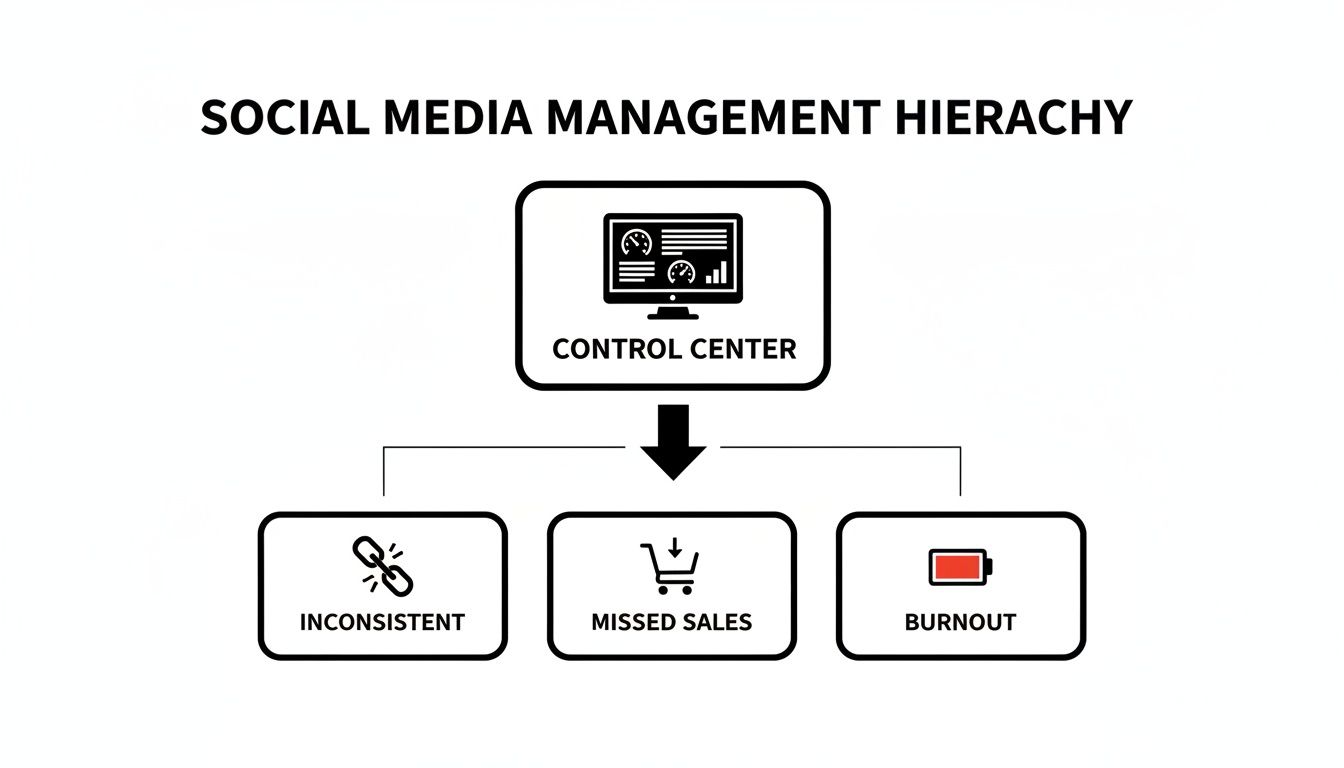
Without a central hub, you end up with inconsistent posting that hurts brand trust, you miss out on sales because messages get buried, and you eventually burn out from trying to juggle it all.
Essential vs. Advanced Software Features for Small Businesses
Before diving deeper, it's helpful to see the difference between what you absolutely need to get started versus the features that are great to have but aren't deal-breakers for a small team.
| Feature Category | Must-Have for Small Business | Advanced (Nice-to-Have) | The Problem It Solves |
|---|---|---|---|
| Content Publishing | Content Scheduling Calendar | AI Caption Generation, First Comment Scheduling | Saves hours of time and prevents burnout by allowing you to plan and automate posts in advance. |
| Community Management | Unified Social Inbox | Automated Rules, Keyword Monitoring | Stops you from missing important messages and sales opportunities by consolidating all conversations. |
| Performance Tracking | Basic Analytics & Reporting | Competitor Analysis, In-Depth Trend Reports | Removes the guesswork by showing you which content is actually working and what your audience loves. |
| Team & Workflow | Multi-User Access (2-3 seats) | Approval Workflows, Custom Roles & Permissions | Enables collaboration if you're not a solo act, without creating confusion over who posts what. |
Focus on mastering the "must-have" column first. Once you have a solid workflow, you can explore the advanced features to level up your strategy.
The Content Scheduling Calendar: Your Solution to Inconsistent Posting
At its heart, any good social media management software for small business is built around scheduling. This is the single biggest feature that gives you your time back. No more scrambling to post something in real-time every single day.
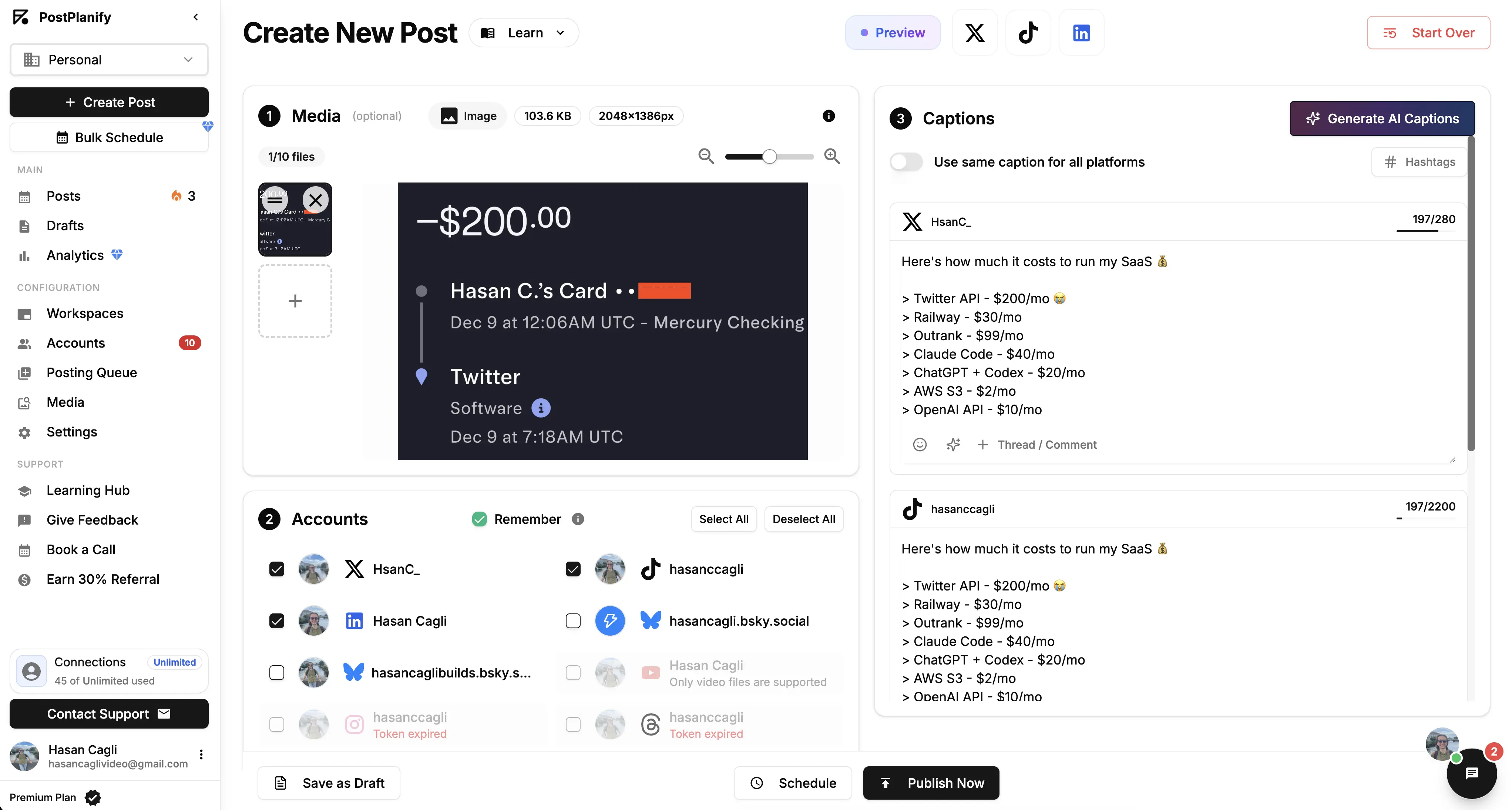
Instead, you can block off a couple of hours once a week to plan, create, and schedule everything in advance. You can check out a wide variety of powerful social media scheduling tools to get a feel for what's out there.
Real-World Example: A Local Bakery Picture a local baker. Her mornings are for kneading dough, not crafting Instagram posts. With a content calendar, she can knock out the entire week's content on a quiet Monday afternoon.
- Tuesday: A gorgeous, high-res photo of a fresh croissant hits the feed.
- Wednesday: A quick behind-the-scenes video of her decorating a wedding cake.
- Thursday: An Instagram Stories poll asking followers to vote on next week's special.
This simple workflow keeps her bakery top-of-mind every single day, freeing her up to focus on what she does best: baking.
Real-World Example: A Fitness Coach A personal trainer manages Instagram, TikTok, and YouTube. Without a scheduling tool, she'd spend 30+ minutes per day just posting. With bulk scheduling, she records a week's worth of workout tip videos on Sunday, schedules them across all three platforms in one session, and spends the rest of the week actually training clients. She also uses best time to post on Instagram data to make sure her content goes live when her audience is most active.
Real-World Example: A Local Plumber A plumbing company uses scheduling to post "quick fix" tips on Facebook and Google Business Profile three times a week. Each post includes a "Call us for bigger jobs" CTA. After two months of consistent posting, their inbound calls increase by 15% — all without spending a single dollar on ads.
The Unified Social Inbox: Your Solution to Missed Messages
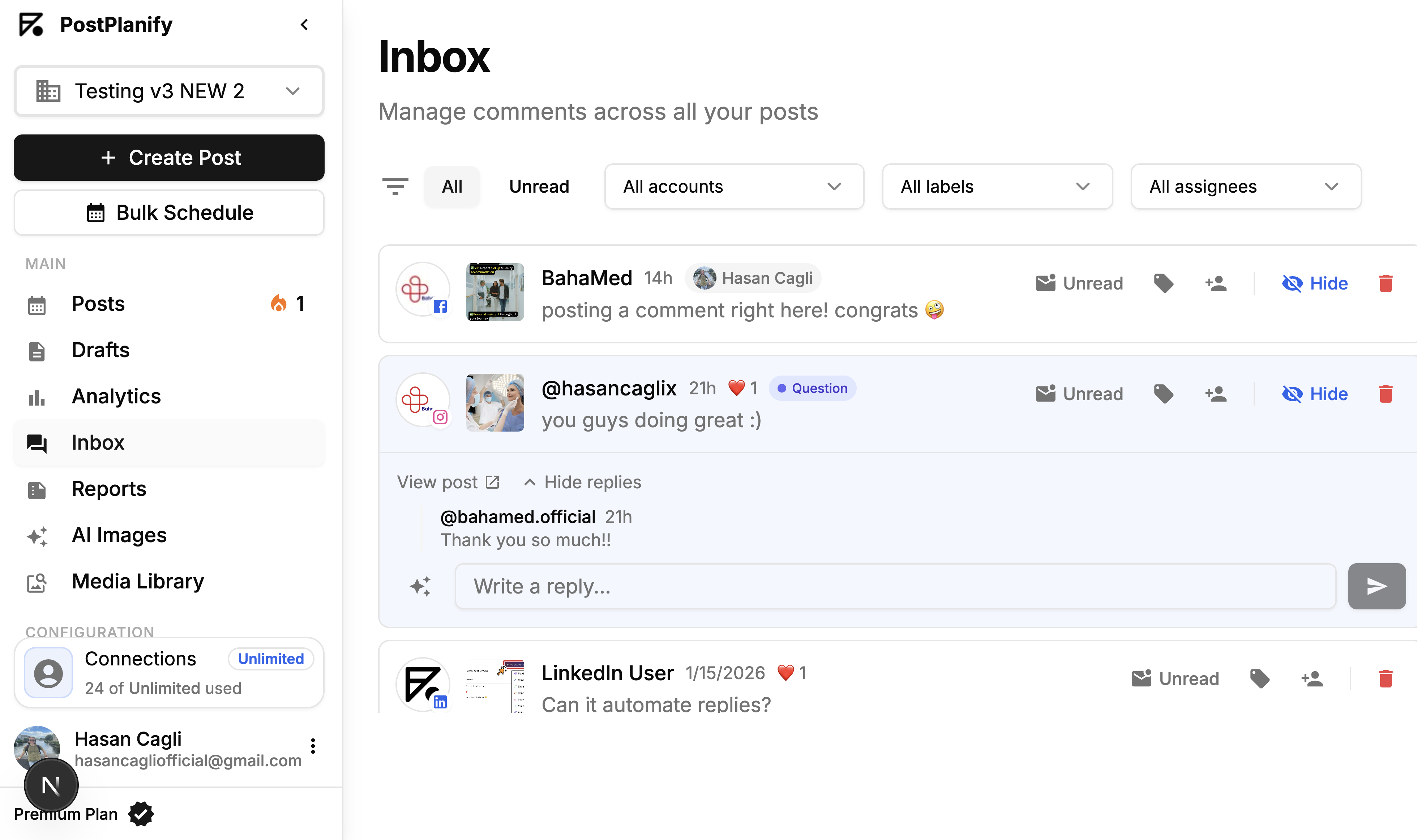
If your scheduling calendar is your offense, the unified inbox is your defense. It pulls every single comment, direct message, and mention from all your platforms—Facebook, Instagram, X, TikTok—into one clean, manageable feed.

This is what stops those critical customer questions and sales inquiries from falling through the cracks.
Limitations and things to know:
- Permissions: You must have an Admin or Editor role on a Facebook Page to manage its messages. For Instagram, you need a Business or Creator account.
- API Delays: Occasionally, there might be a slight delay (a few minutes) for a message to appear in the inbox due to API syncing between the platform and the tool. This is normal.
- Platform Specifics: TikTok message integration is newer and can sometimes be less robust than Meta's (Facebook/Instagram). Always check that a tool fully supports the platforms you rely on most.
Forget logging in and out of five different apps just to check your notifications. Everything is in one spot. You can reply directly, and if you have a small team, you can even assign conversations to someone else.
Basic Analytics and Reporting: Your Solution to Guesswork
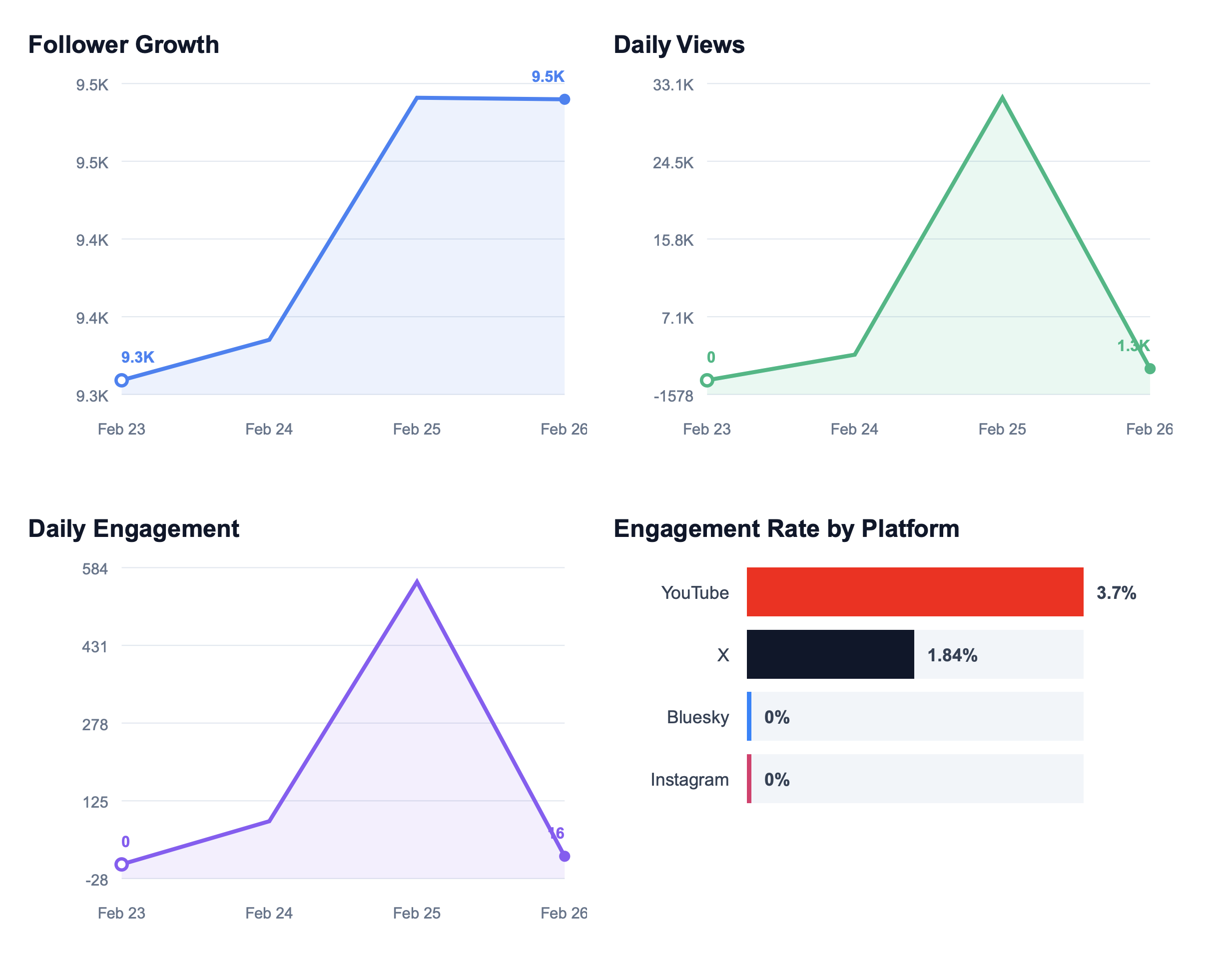
You don't need a PhD in data science to understand your social media. A great tool serves up simple, easy-to-read analytics that answer the only questions that really matter:
- Which posts are getting the most likes and comments? This tells you exactly what content your audience loves, so you can make more of it.
- How is my follower count growing over time? This shows if your strategy is actually bringing new people into your orbit.
- When are the best times to post? Most tools analyze your past performance and suggest the optimal times to post for each platform, taking the guesswork out of it.
These core insights are all you need to stop throwing content at the wall and start making smart, data-backed decisions. If you see that your short video clips on Instagram Reels are crushing your static images, you know exactly where to put your creative energy next month. Tools like PostPlanify build these essential analytics right into your dashboard on the Growth plan ($99/mo monthly or $79/mo billed yearly), so tracking what matters is simple and intuitive.
For a deeper dive, check out our guide on social media analytics for business.
PostPlanifyAll your social media in one simple dashboard
Schedule posts, track analytics, and reply to comments/DMs without switching tabs.
Engagement
+18%
Views
52.8k
How Popular Tools Compare for Small Businesses
Before committing to any platform, it helps to see how the major players stack up side by side. Here's a snapshot based on our hands-on testing and review analysis:
| Tool | Starting Price | Social Accounts | Analytics | Social Inbox | AI Captions | Best For |
|---|---|---|---|---|---|---|
| PostPlanify | $99/mo monthly / $79/mo billed yearly (Growth) | 15-Custom | Growth+ | Growth+ | All public plans | Teams wanting analytics + inbox in one tool |
| Buffer | Free (3 channels) | 3-Unlimited | Paid plans | No | No | Solo creators on a tight budget |
| Hootsuite | $249/user/mo | 10+ | All paid plans | All paid plans | Yes (OwlyWriter AI) | Enterprises with large budgets |
| Later | $25/mo (Starter) | 1 social set | Paid plans | No | Yes | Instagram-first visual brands |
| Sprout Social | $199/seat/mo | 5+ | All plans | All plans | Yes | Large teams needing deep reporting |
| Metricool | Free (1 brand) | 1-50+ | All plans | No | Yes | Data-driven solopreneurs |
Key takeaway: Enterprise tools like Hootsuite ($249/user/mo) and Sprout Social ($199/seat/mo) offer deep feature sets but are priced for large organizations. Buffer's free plan is great for getting started but lacks analytics and a social inbox. PostPlanify sits in a sweet spot for growing businesses — analytics, social inbox, AI assistant, 15 accounts, 5 workspaces, and 3 team members are included on the Growth plan at $99/mo monthly or $79/mo billed yearly, with no per-seat fees inside the plan limit.
For detailed head-to-head breakdowns, explore our comparison guides: Buffer vs. Hootsuite, Buffer vs. Later, Hootsuite vs. Sprout Social, or browse all PostPlanify alternatives.
Use Advanced Features to Turn Up Your Growth
Once you've got the hang of scheduling posts and replying to comments, the real magic happens. This is where the advanced features in your social media software become your secret weapon for growth, separating the accounts that just exist from the ones that truly connect and convert.
Instead of just saving time, you'll start making smarter, data-backed decisions that actually move the needle for your business.

Go Deeper with In-Depth Analytics

Basic analytics show you what happened. Advanced analytics tell you why it happened and what you should do about it. It's less like a report card and more like a treasure map pointing you toward your best content.
Instead of just seeing that a post did well, these deeper insights reveal hidden patterns. You might discover that your Instagram Reels get the most views on Tuesday evenings between 7 PM and 9 PM. That's not a guess—it's a solid piece of data you can use to tweak your entire schedule for maximum impact.
A good tool will help you track:
- Best Times to Post: Based on when your specific audience is actually online and active, not some generic industry benchmark. PostPlanify's best time to post feature (Growth plan, $99/mo monthly or $79/mo billed yearly) analyzes your past performance data to recommend optimal posting windows for each platform.
- Content Type Performance: A crystal-clear breakdown of whether your audience clicks with carousels, single images, videos, or quick text updates.
- Follower Growth & Demographics: See who's following you and where they came from so you can create content that really speaks to them.
For small teams, these features mean you don't need a dedicated data analyst. You can also dig deeper into how to use social media analytics for your business or review our social media analytics and reporting guide.
Beat Writer's Block with AI Assistance
The problem: Staring at a blank text box, trying to come up with a fresh, engaging caption for the tenth time this week. This is a huge time-sink and a major cause of creative burnout.
The solution: An AI-powered caption generator. These tools aren't here to replace your voice; they're here to amplify it.
How to use it effectively:
- Give it a clear prompt: Don't just say "coffee post." Instead, try "Write 3 Instagram caption ideas for a new cozy coffee blend with notes of caramel and cinnamon, aimed at people working from home."
- Select the best option: The AI will generate several variations. Pick the one that feels closest to your brand's voice.
- Edit and personalize: Tweak the chosen caption. Add your own emojis, ask a relevant question, and include your specific call-to-action.
PostPlanify includes a vision-powered AI assistant on all public plans, starting with Growth at $99/mo monthly or $79/mo billed yearly, that generates captions, suggests hashtags, and can even analyze images to create contextually relevant copy. For more caption strategies, check out our social media caption generator guide.
This isn't just a neat trick; it's part of a massive shift. Small businesses are increasingly turning to social media management software for small business to keep up. In fact, market forecasts predict a massive USD 54.98 billion growth at a 24.9% CAGR from 2024 to 2029, driven by the need for real-time engagement and smarter strategies.
Save Hours with Bulk Scheduling and Integrations
The problem: You're planning a multi-day campaign, like a Black Friday promotion or a new product launch, which requires dozens of posts across multiple platforms. Scheduling each one individually is tedious and prone to error.
The solution: Bulk scheduling. This feature lets you plan out an entire campaign in a simple spreadsheet (CSV file) and upload it all in one click. PostPlanify offers bulk scheduling on its Growth plan ($99/mo monthly or $79/mo billed yearly) and above.
How it works:
- Download the template: Your tool will provide a template spreadsheet with columns for date, time, caption, and image/video URL.
- Fill it out: Plan your entire campaign in the spreadsheet. This is a great way to get a bird's-eye view of your messaging.
- Upload: Upload the completed file to the platform, and it will automatically populate your content calendar with all the scheduled posts.
Another massive time-saver is seamless integrations with tools you already love, like Canva or Google Drive. You can design a graphic in Canva and push it directly to your scheduling calendar without ever having to download or re-upload a single file.
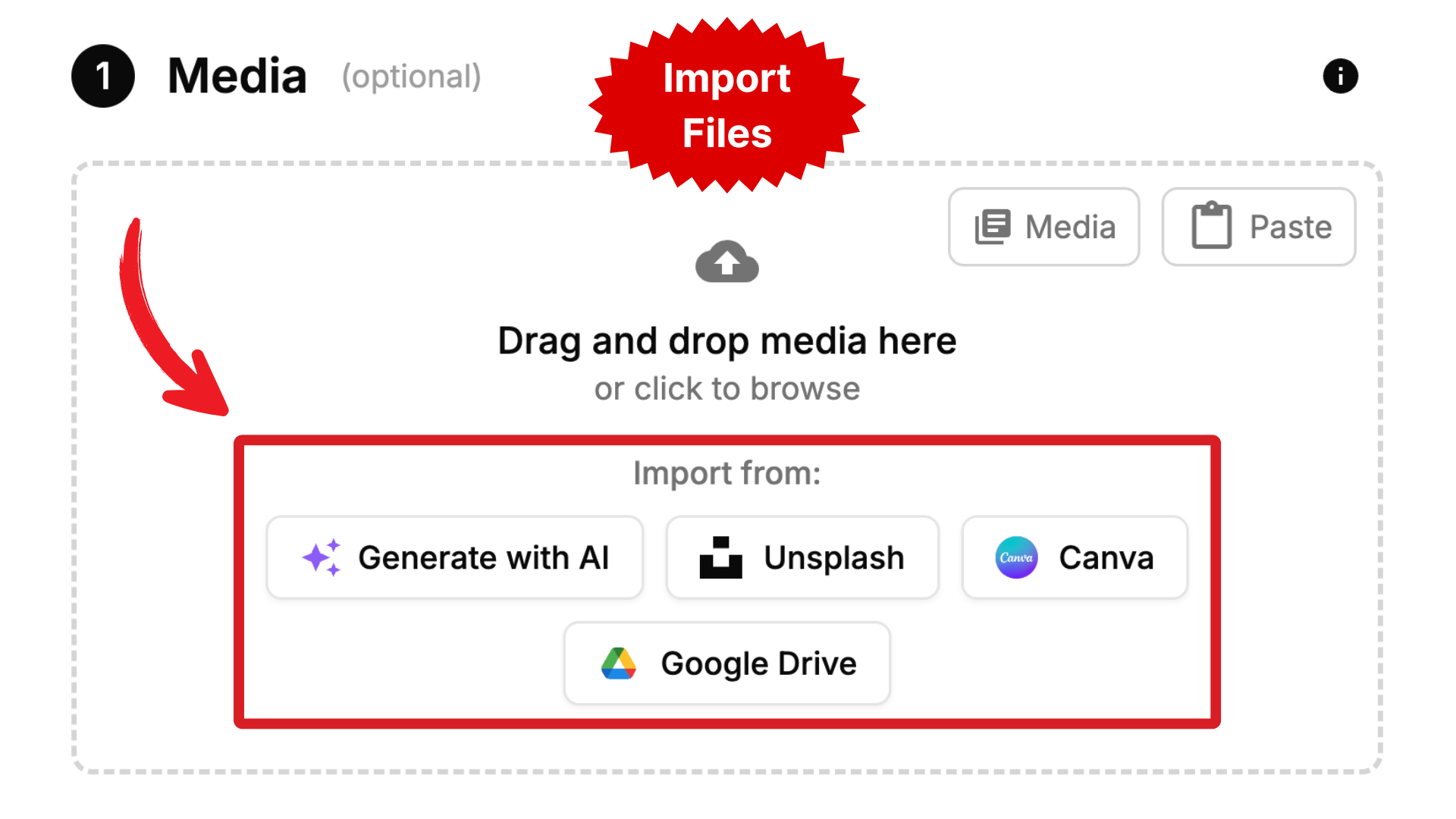
PostPlanify includes both Canva and Google Drive integrations on all plans. It keeps your whole workflow smooth, simple, and incredibly efficient. For more tips, explore our guide on content repurposing strategies.
How to Calculate the Real ROI of Your Software
Watch our walkthrough on calculating the real ROI of social media management software:
When you're looking at social media software, it's easy to get stuck on the monthly price. But a smart investment isn't just about the cost—it's about the return. To really justify the expense, you need to understand the true, tangible value it brings back to your business.
We're talking about real dollars and cents, measured in saved time and better results. It's not as complicated as it sounds.
Step 1: Calculate Your Time Savings
Your time is your most valuable asset. A good social media management tool directly buys that time back for you. First, honestly estimate how many hours you spend each week on manual social media tasks:
- Logging in and out of different apps to post.
- Re-uploading the same media multiple times.
- Writing captions on the fly every day.
- Checking DMs and comments across multiple apps.
- Manually compiling performance data.
The Time-Saved Formula: (Hours Saved Per Week) x 4.33 (avg. weeks in a month) x (Your Hourly Rate) = Monthly Value of Time Saved
Example Calculation: Let's say you save 5 hours a week, and you value your time at $50/hour.
(5 hours) x 4.33 x ($50) = $216.50 per month in reclaimed time.
Suddenly, a tool that costs $29 or $49 a month isn't just paying for itself. It's generating a positive return from time savings alone. For a deeper dive, check out our guide on how to measure social media ROI.
Step 2: Quantify the Impact of Consistency and Engagement
While time savings are easy math, the value from better performance is just as important. Showing up on social media consistently builds trust and keeps your brand top-of-mind. Over time, that directly translates into more leads and more sales.
You can't always draw a perfect line from a single post to a specific sale, but you can estimate the financial impact. Ask yourself:
- Increased Lead Generation: If a more consistent presence brings in just two extra qualified leads a month, what's the potential value of landing one of them? For a service business, this could be hundreds or thousands of dollars.
- Improved Conversion Rates: If you use the unified inbox to answer a sales question within minutes instead of hours, what's the value of that one sale you didn't lose?
- Higher Customer Lifetime Value: A strong, engaged community creates loyal fans. If better engagement leads to just one extra repeat purchase per month, what is that worth?
When you pair the hard numbers from your time savings with the very real value of better performance, you get the full picture of your ROI. This is how a platform like PostPlanify, which is built for efficiency, quickly becomes a profitable part of your toolkit. For more strategies on improving engagement, see our guide on how to improve social media engagement.
PostPlanify Plans at a Glance
PostPlanify supports 10 platforms — Instagram, Facebook, X, LinkedIn, TikTok, YouTube, Pinterest, Threads, Bluesky, and Google Business — with flat-rate pricing and no per-seat fees on any plan. Here's how the plans break down:
- Growth ($99/mo monthly or $79/mo billed yearly): 15 social accounts, 5 workspaces, 3 team members, unlimited scheduled posts, analytics across all 10 platforms, social inbox, AI assistant, Canva & Google Drive integrations, link in bio, best time to post suggestions, first comments, and bulk scheduling. Built for growing businesses that need more than basic scheduling.
- Premium ($199/mo monthly or $159/mo billed yearly): 30 social accounts, 15 workspaces, 6 team members, reports, shared calendar, approval workflows, and roles & permissions. Built for agencies and collaborative teams.
- Scale ($299/mo monthly or $239/mo billed yearly): 100 social accounts, 50 workspaces, 12 team members, white-label PDF reports, priority human support, and dedicated onboarding. Built for established agencies and multi-brand teams.
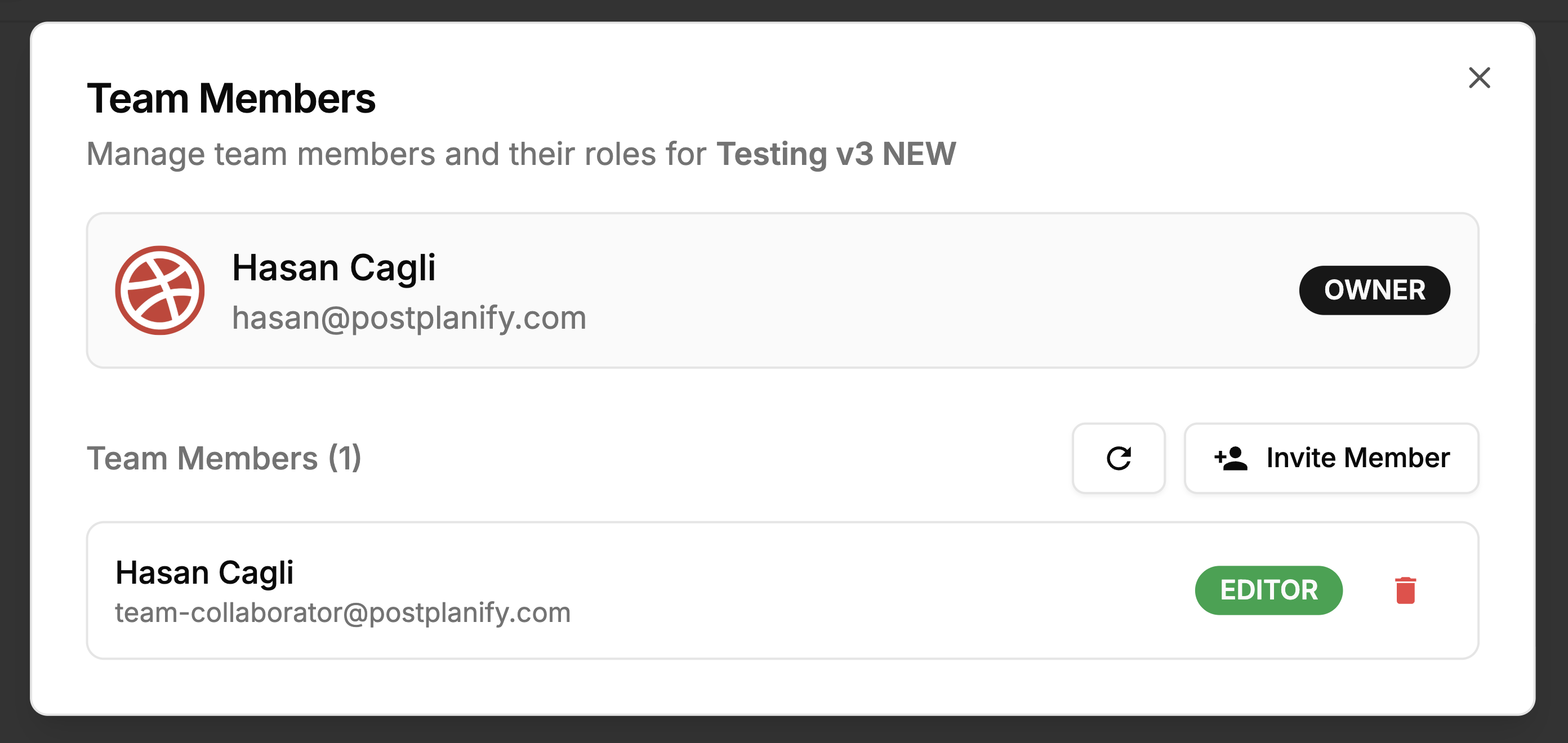
- Enterprise (custom pricing): Custom social accounts, unlimited workspaces, unlimited team members, unlimited AI images, 1:1 onboarding call, priority feature requests, and private WhatsApp support. For brands managing at scale.
All public plans include a 7-day free trial and 14-day money-back guarantee. See full plan details on the PostPlanify pricing page.
PostPlanifyAll your social media in one simple dashboard
Schedule posts, track analytics, and reply to comments/DMs without switching tabs.
Engagement
+18%
Views
52.8k
A Step-by-Step Checklist for Choosing the Right Tool
Alright, let's cut through the noise. Picking the right social media management software doesn't have to be a massive headache. Follow this simple, repeatable process, and you'll make a confident choice without getting overwhelmed.

Step 1: Pinpoint Your Must-Have Features
Before you even look at a pricing page, make two columns: "Must-Haves" and "Nice-to-Haves." Your must-haves are the non-negotiables that solve your biggest daily frustrations.
- Must-Haves: A clear content scheduling calendar, a unified inbox for DMs and comments, and basic performance analytics.
- Nice-to-Haves: An AI caption generator, bulk scheduling from a spreadsheet, competitor analysis reports, or super-detailed reporting.
This list is your North Star. It stops you from getting distracted by shiny features you won't use and makes sure you only pay for what you actually need right now.
Step 2: Set a Realistic Budget
Your budget shouldn't be a random figure. It should be based on the actual value the tool brings to your business in saved time and potential growth (your ROI calculation).
A good rule of thumb for a small business is to aim for a plan that costs less than 25% of the monthly value you calculated. If you figure you'll get back $200 a month in reclaimed time, a tool priced around $50/month is a fantastic investment.
Step 3: Research and Shortlist Your Top Contenders
Now you're ready to start window shopping. Your goal is to find three to five potential tools. As you browse their websites, look for clarity and transparency.
- Does the website clearly list which features are in each pricing tier?
- Are the supported platforms (Instagram, TikTok, LinkedIn, etc.) easy to find?
- Do they offer a free trial so you can test before committing?
This is also the perfect time to check out reviews on sites like G2 or Capterra, but be strategic. Filter the reviews to only see feedback from businesses that are a similar size to yours. You can also explore expert comparisons of various PostPlanify alternatives or read our breakdown of the best social media management platform to see how different platforms really stack up.
Step 4: Strategically Test the Free Trial
A free trial isn't for wandering around. It's for testing your real, day-to-day workflow. Go in with a plan.
- Connect Your Primary Accounts: Just link the one or two social media profiles that matter most.
- Schedule Five Real Posts: Don't use "test" content. Schedule five actual posts you would have published anyway. Note how easy or difficult the process is.
- Use the Unified Inbox: Find a real comment or DM and reply to it from the tool's inbox. Is it faster than switching between apps?
- Check the Analytics: Look at the performance data for a post you published a few days ago. Can you understand it at a glance?
- Test One Key "Nice-to-Have": If an AI caption writer was on your list, generate one.
The whole point of a trial is to answer one question: "Does this tool make my core tasks faster and easier?" If the answer isn't a clear "yes" after a couple of days, it's not the right fit.
Step 5: Assess the User Interface and Support
This is critical. If the dashboard feels cluttered or you can't find the scheduling button without watching a tutorial, that's a major red flag. A well-designed tool should feel intuitive.
Pro-Tip: During your trial, send a simple question to the customer support team. Ask something like, "How do I add a first comment to an Instagram post?" Their response time and the clarity of their answer will tell you everything you need to know about their support.
This is more important than ever. The social media management industry, valued at USD 29.93 billion in 2025, is expected to grow to USD 171.62 billion by 2033, according to Fortune Business Insights. With so many options flooding the market, genuinely helpful support is a huge differentiator.
Frequently Asked Questions
What is the best social media management tool for small business?
The best tool depends on your specific needs, but for most small businesses, look for a platform that combines scheduling, a social inbox, analytics, and AI assistance in one place without per-seat pricing. PostPlanify supports 10 platforms and includes all of these features starting at $99/mo monthly or $79/mo billed yearly on Growth for 15 social accounts. Buffer is a strong option for solo creators who only need basic scheduling (free for 3 channels), while Hootsuite and Sprout Social are built for enterprise teams with larger budgets ($199-$249/user/mo). For detailed comparisons, see our guide on the best social media management platform.
How much should a small business expect to pay?
Most small businesses should budget somewhere between $29 to $100 per month. This range usually covers everything from a solo creator to a small team juggling a few different brands.
- Budget Plans ($0-$60/month): Good for one-person shows that only need basic scheduling. Buffer and similar per-channel tools fit here, but usually limit analytics, inbox, team workflows, or account count.
- Growth Plans ($79-$199/month): Built for growing businesses and teams that need analytics, inbox, AI, and team workflows. PostPlanify Growth starts at $99/month or $79/month billed yearly for 15 accounts, and Premium starts at $199/month or $159/month billed yearly for 30 accounts, 6 team members, reports, and approval workflows.
- Agency Plans ($239+/month): Built for agencies and multi-brand teams. PostPlanify Scale at $299/month or $239/month billed yearly includes 100 social accounts, 50 workspaces, 12 team members, and white-label PDF reports.
Warning: Don't just look at the sticker price. Some "cheaper" plans have very low limits on the number of posts you can schedule or offer analytics that are too basic to be useful. Always weigh the cost against the features and the time it will save you. Check the PostPlanify pricing page for full plan details.
Is social media management software worth it?
Yes, for most businesses it pays for itself quickly. Using the ROI formula in this guide: if you save just 5 hours per week and value your time at $50/hour, that's $216.50/month in reclaimed time. A plan at $29-$49/month gives you a positive return from time savings alone — before factoring in better engagement, fewer missed messages, and more consistent posting. The real cost is not using one: missed sales inquiries, inconsistent branding, and creative burnout.
Can I manage all my social media in one place?
Yes. Most modern management tools connect to all major platforms through official APIs. PostPlanify, for example, connects to Instagram, Facebook, X, LinkedIn, TikTok, YouTube, Pinterest, Threads, Bluesky, and Google Business — a total of 10 platforms — and lets you schedule posts, monitor your inbox, and track analytics from a single dashboard. For strategies on juggling multiple accounts, read our guide on managing multiple social media accounts.
Is it difficult to set up and learn a new tool?
No, it shouldn't be. Most modern social media management software for small business is designed for people who aren't tech wizards. You can usually get fully set up in under an hour.
The process is typically:
- Create your account.
- Connect your social profiles: The tool will guide you through connecting your accounts using a secure, official process (API). You never share your passwords directly with the tool.
- Schedule your first post: A good tool should make this intuitive within minutes of logging in.
If you get lost in the dashboard or can't perform a basic task without a help article, it's a sign the tool may be too complex for your needs.
Will using a third-party tool hurt my reach on Instagram or Facebook?
This is a persistent myth. The short answer is no, using a legitimate, platform-approved tool will not hurt your reach.
Why it's safe:
- Official APIs: Reputable tools like PostPlanify use the approved, by-the-book API (Application Programming Interface) to publish content on your behalf.
- Content Quality is King: The algorithms prioritize high-quality, engaging content. They do not penalize content based on whether it was published natively or through an approved third-party tool.
- Consistency Can Improve Reach: Using a tool to post consistently at optimal times can actually boost your reach and engagement compared to posting randomly.
The only time you risk penalties is when using sketchy, unauthorized "bot" services that violate a platform's terms of service. These are not legitimate social media management tools.
I can't schedule Instagram Stories with stickers. Is the tool broken?
No, the tool isn't broken. This is a common limitation set by Instagram's API.
The problem: For now, the official Instagram API does not allow third-party tools to directly schedule and auto-publish Stories that contain interactive elements like polls, quizzes, question boxes, or music stickers.
The workaround: Most tools use a "notification scheduling" or "push notification" system. Here's how it works:
- You create the Story (video or image) in the management tool and schedule it.
- At the scheduled time, you receive a push notification on your phone.
- You tap the notification, which opens the Instagram app with your media pre-loaded.
- You can then add your stickers manually and tap "Publish."
While not fully automated, it's still much faster than creating the Story from scratch in the moment. For a deep dive into Story scheduling, read our guide on how to schedule Instagram Stories.
Final Checklist Before You Decide
- Problem Solved: Does this tool solve my top 1-2 biggest social media problems (e.g., saving time, catching all DMs)?
- Workflow Fit: Did the free trial feel intuitive? Can I see myself using this every week without frustration?
- Budget Aligned: Does the price fit within the ROI I calculated? Am I paying for features I won't use?
- Support Confidence: Do I feel confident that if I have a problem, the support team will be there to help me quickly?
Related Reading
- Best Social Media Management Platform (2026)
- Social Media Marketing Strategy for Small Business
- Social Media Ideas for Small Business
- How to Plan Social Media Content
- Social Media Best Practices
- How to Build a Social Media Presence
- Social Media Scheduling Tools
- Top 7 Social Media Scheduling Hacks for Small Businesses
Ready to stop the social media scramble and get your time back? PostPlanify gives you analytics, a social inbox, AI-powered captions, and team collaboration tools — all in one platform across 10 social networks. Start your 7-day free trial today and see how much time you can save.
PostPlanifyAll your social media in one simple dashboard
Schedule posts, track analytics, and reply to comments/DMs without switching tabs.
Engagement
+18%
Views
52.8k
About the Author

Hasan Cagli
Founder of PostPlanify, a content and social media scheduling platform. He focuses on building systems that help businesses, agencies, and teams plan, publish, and manage content and social media more efficiently across platforms.


