
Choosing between Buffer or Hootsuite is one of the most common decisions in social media management. Both are well-known, but they serve very different users at very different price points. This Buffer vs Hootsuite 2026 comparison breaks down everything you need to make the right call.
We compared current published pricing, tested both platforms, and analyzed 7,600+ user reviews across G2 and Trustpilot to give you an unbiased breakdown.
If you're short on time, jump to our pricing comparison or feature tables. For the full picture, read on — we cover real costs at different team sizes, features you'll actually use, and what thousands of users report. Exploring beyond these two? See all social media scheduling alternatives.
Buffer vs Hootsuite at a Glance
Here's a quick side-by-side overview before we dive deeper:
| Category | Buffer | Hootsuite |
|---|---|---|
| Starting Price | $6/mo per channel | $249/mo per user |
| Free Plan | Yes (3 channels) | No (30-day trial) |
| Platforms Supported | 11 | 8+ |
| Unlimited Scheduling | Yes (paid plans) | Yes (all plans) |
| AI Tools | AI Assistant (captions) | OwlyWriter AI (captions + images) |
| AI Image Generation | No | No |
| Bulk Scheduling | CSV import | Up to 350 posts (Advanced) |
| Team Collaboration | Team plan ($12/mo/channel) | Advanced plan ($499/mo/user) |
| Approval Workflows | Team plan only | Advanced plan only |
| Social Inbox | Basic (Community Inbox) | Full unified inbox |
| Social Listening | No | Yes (Advanced+) |
| Analytics | Basic to Advanced | Standard to Custom reports |
| G2 Rating | 4.3/5 (1,023 reviews) | 4.3/5 (6,615 reviews) |
| Trustpilot Rating | 2.1/5 (93 reviews) | 1.8/5 (511 reviews) |
| Best For | Solo creators, small teams | Enterprises, large agencies |
Buffer Overview

Buffer is one of the oldest social media scheduling tools, launched in 2010. It focuses on simplicity — a clean interface for scheduling posts, managing a basic content calendar, and viewing analytics.
Buffer supports 11 platforms: Instagram, Facebook, LinkedIn, Pinterest, X/Twitter, TikTok, YouTube, Google Business Profile, Threads, Bluesky, and Mastodon.
Key features:
- Post scheduling with queue management
- AI Assistant for generating captions and post ideas
- Hashtag manager and first comment scheduling
- Basic community inbox
- Start Page (link-in-bio builder)
- Content calendar
Buffer is popular among solo creators and freelancers who want a no-frills scheduling experience without a steep learning curve. For a deeper look, see what users say about Buffer on G2 and Trustpilot.
Hootsuite Overview

Hootsuite is an enterprise-grade social media management platform, founded in 2008. It offers a much broader feature set including scheduling, a unified social inbox, analytics, social listening, team collaboration, and paid ad management.
Hootsuite supports 8+ platforms: Instagram, Facebook, LinkedIn, X/Twitter, TikTok, YouTube, Pinterest, and Threads.
Key features:
- Unified inbox for messages, comments, and DMs
- OwlyWriter AI for caption and image generation
- Social listening and brand monitoring
- Advanced analytics with custom reports
- Team approval workflows and DM assignment
- Employee advocacy tools (Amplify)
- Competitor benchmarking
Hootsuite is positioned for larger teams, agencies, and enterprise organizations that need to manage multiple social media accounts with social listening, advanced reporting, and structured team workflows. Read real user reviews of Hootsuite from G2 and Trustpilot.
Pricing Comparison
Pricing is where Buffer and Hootsuite diverge most. They use completely different pricing models.
Buffer Pricing
Buffer uses per-channel pricing. Each social account you connect adds to your monthly cost. We break this down further in our Buffer pricing guide.
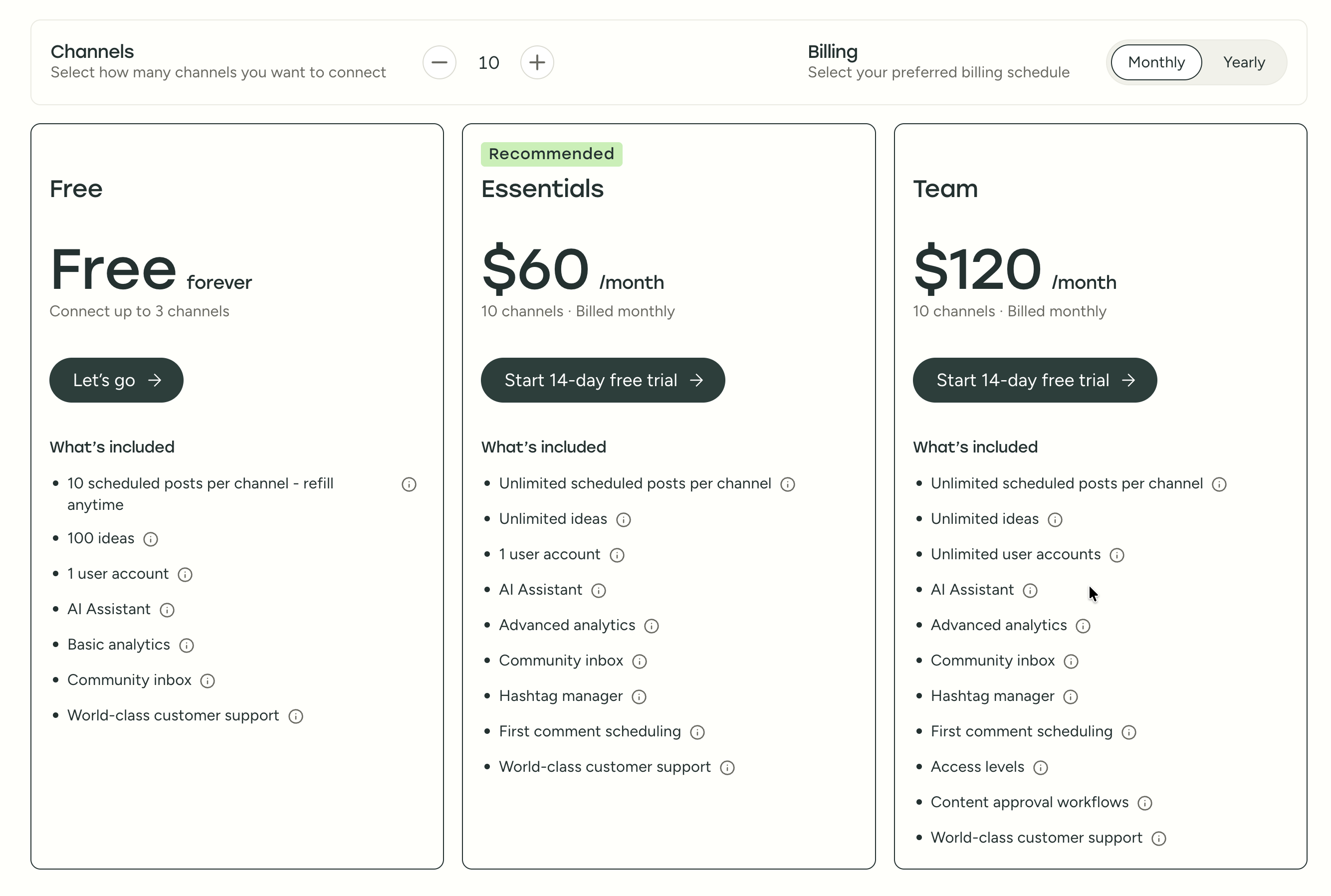
| Plan | Price | Channels | Users | Key Features |
|---|---|---|---|---|
| Free | $0/mo | 3 | 1 | 10 posts/channel, basic analytics |
| Essentials | $6/mo per channel | Unlimited | 1 | Unlimited posts, advanced analytics, hashtag manager |
| Team | $12/mo per channel | Unlimited | Unlimited | Approval workflows, permissions, team collaboration |
Example costs:
- 5 channels on Essentials = $30/month
- 10 channels on Team = $120/month
- 25 channels on Team = $300/month
Hootsuite Pricing
Hootsuite uses per-user pricing with much higher base costs. See the full Hootsuite pricing breakdown for details.
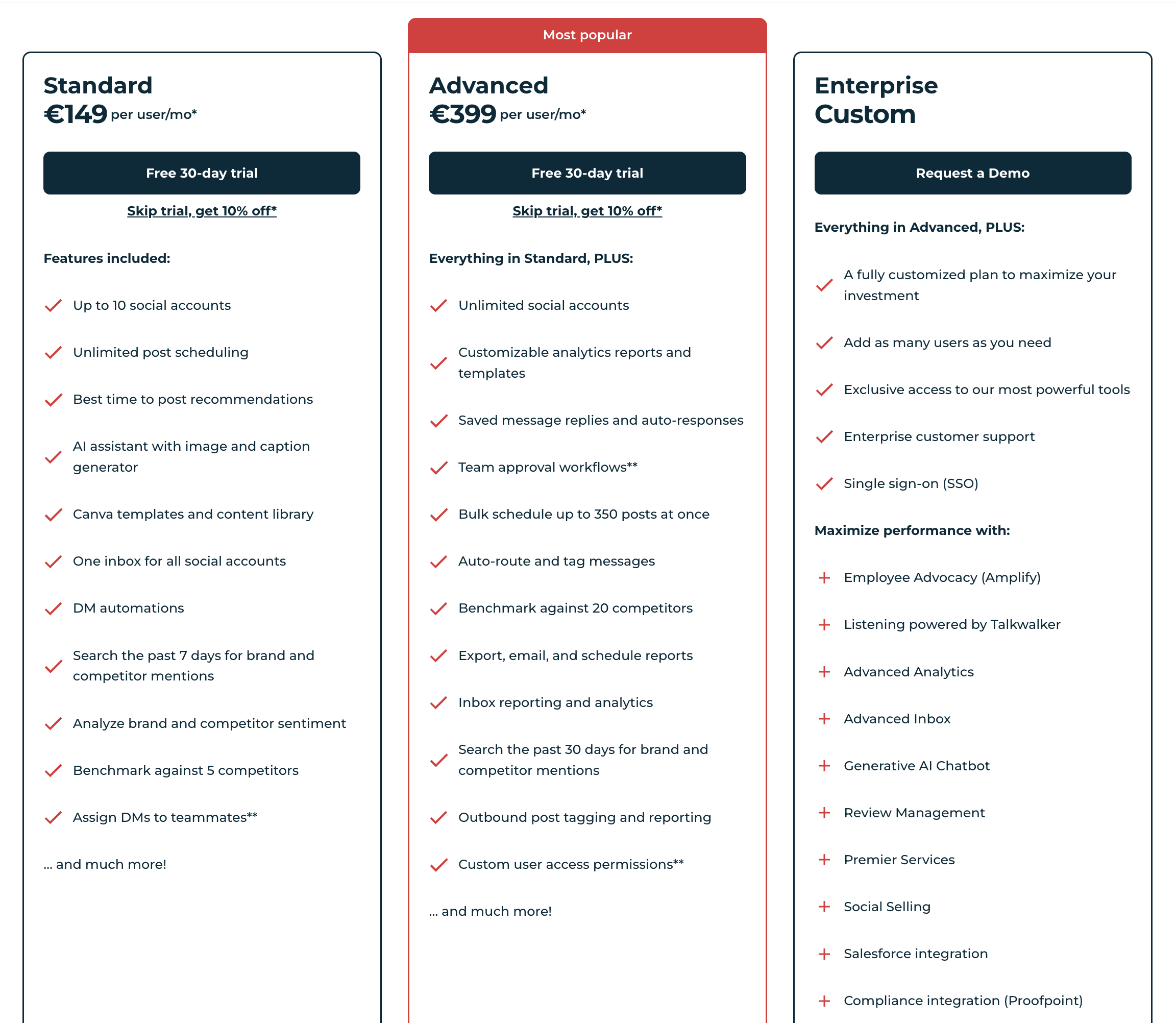
| Plan | Price | Accounts | Key Features |
|---|---|---|---|
| Standard | $249/mo per user | 10 | Scheduling, basic analytics, 7-day monitoring |
| Advanced | $499/mo per user | 50 | Custom reports, approval workflows, 30-day monitoring, bulk scheduling |
| Enterprise | Custom | Custom | SSO, unlimited users, dedicated support |
Example costs:
- 1 user on Standard = $249/month
- 3 users on Advanced = $1,497/month
- 5 users on Standard = $1,245/month
What You'll Actually Pay: Real-World Scenarios
The per-channel vs per-user pricing models make direct comparisons tricky. Here's what each tool actually costs for common team setups:
Solo creator managing 5 social accounts:
- Buffer Essentials: 5 × $6 = $30/month
- Hootsuite Standard: 1 × $249 = $249/month
- Buffer is 8× cheaper for this use case.
Small team (3 people) managing 10 accounts with approval workflows:
- Buffer Team: 10 × $12 = $120/month (unlimited users included)
- Hootsuite Advanced: 3 × $499 = $1,497/month (approval workflows require Advanced)
- Buffer is 12× cheaper, though you lose social listening and custom reports.
Agency (5 people) managing 25 client accounts:
- Buffer Team: 25 × $12 = $300/month
- Hootsuite Standard: 5 × $249 = $1,245/month (but limited to 10 accounts per user)
- Hootsuite Advanced: 5 × $499 = $2,495/month (for 50 accounts + advanced features)
- At this scale, Hootsuite costs 4–8× more than Buffer. The gap widens further if you need more than 50 accounts on Hootsuite, which requires Enterprise (custom pricing).
Price Verdict
Buffer is significantly cheaper across every scenario. The gap is smallest for solo users (still 8× cheaper) and largest for teams that need collaboration features. Hootsuite's pricing only makes sense for large organizations that specifically need enterprise-level social listening, compliance tools, and Salesforce integrations — and have the budget to match.
 PostPlanify
Manage All Your Social Accounts Without the Chaos
Schedule posts, track performance, and collaborate with your team.


Feature Comparison
Scheduling & Publishing
Both tools offer unlimited post scheduling on paid plans. The main differences:
| Feature | Buffer | Hootsuite |
|---|---|---|
| Unlimited scheduling | Yes (paid plans) | Yes (all plans) |
| Bulk scheduling | CSV import | Up to 350 posts (Advanced) |
| Best time to post | No | Yes |
| First comment scheduling | Yes (Essentials+) | No |
| Content calendar | Yes | Yes |
| Post queue management | Yes | Yes |
| Draft saving | Yes | Yes |
Winner: Tie. For day-to-day scheduling, both platforms handle the core workflow well. Buffer's edge is first comment scheduling — useful for Instagram hashtag strategies where you want to keep captions clean. Hootsuite's edge is best time to post recommendations and bulk scheduling up to 350 posts at once (Advanced plan only), which matters more for agencies publishing at high volume. If you primarily schedule 1–5 posts per day across a few accounts, you won't notice a meaningful difference.
AI Tools
| Feature | Buffer | Hootsuite |
|---|---|---|
| AI caption generation | Yes (AI Assistant) | Yes (OwlyWriter AI) |
| AI image generation | No | No |
| AI post ideas | Yes (100 free, unlimited paid) | Yes |
| AI content rewriting | Yes | Yes |
Winner: Tie. Both tools generate captions and post ideas, and both handle rewriting. Buffer's AI Assistant is straightforward — paste your draft, get suggestions. Hootsuite's OwlyWriter AI works similarly but is more tightly integrated into the composer. Neither platform offers AI image generation, so if you need to create visuals from text prompts, you'll need a separate tool like Canva's AI features or a platform that includes it natively.
Analytics & Reporting
| Feature | Buffer | Hootsuite |
|---|---|---|
| Basic analytics | All plans | All plans |
| Advanced analytics | Essentials+ | Standard+ |
| Custom reports | No | Advanced only |
| Competitor benchmarking | No | Yes (5-20 competitors) |
| Export reports | Yes | Advanced only |
| Scheduled reports | No | Advanced only |
Winner: Hootsuite — but only if you're on the Advanced plan ($499/mo/user). That's where you get custom report templates, competitor benchmarking against up to 20 competitors, scheduled report delivery, and exportable analytics. On the Standard plan ($249/mo), Hootsuite's analytics are decent but not dramatically better than Buffer's Essentials plan. Buffer covers post performance, engagement rates, and audience growth — enough for most creators and small teams who need to know what's working without building custom dashboards.
Team Collaboration
| Feature | Buffer | Hootsuite |
|---|---|---|
| Multiple users | Team plan | All paid plans |
| Approval workflows | Team plan | Advanced plan |
| User permissions | Team plan | Advanced plan |
| DM assignment | No | Yes |
| Saved replies | No | Advanced plan |
Winner: Hootsuite for advanced team features — DM assignment lets you route incoming messages to specific team members, and saved replies speed up responses to common questions. But these features require the Advanced plan at $499/month per user. Buffer's Team plan ($12/channel/month) covers the fundamentals: multiple users, approval workflows, and role-based permissions. For teams that primarily need "create → review → approve → publish" workflows, Buffer handles it. For teams that also need to coordinate on customer replies and DMs, Hootsuite's inbox routing is a real advantage.
Social Inbox & Engagement
| Feature | Buffer | Hootsuite |
|---|---|---|
| Unified inbox | Basic (Community Inbox) | Full unified inbox |
| Social listening | No | Yes (Advanced+) |
| Sentiment analysis | No | Yes |
| Brand monitoring | No | Yes (7-30 day lookback) |
| Auto-responses | No | Advanced plan |
Winner: Hootsuite. This is Hootsuite's clearest advantage over Buffer. The unified inbox pulls in comments, DMs, and mentions from all connected platforms into one stream — and on the Advanced plan, you get auto-responses, message tagging, and inbox analytics. Social listening (powered by Talkwalker on Enterprise) lets you track brand mentions, competitor activity, and sentiment across the web, not just on your own profiles. Buffer's Community Inbox is limited to basic comment viewing and replying. If engagement management is a core part of your workflow — not just publishing — this is where Hootsuite pulls ahead significantly.
Platform Support
| Platform | Buffer | Hootsuite |
|---|---|---|
| Yes | Yes | |
| Yes | Yes | |
| X/Twitter | Yes | Yes |
| Yes | Yes | |
| TikTok | Yes | Yes |
| YouTube | Yes | Yes |
| Yes | Yes | |
| Threads | Yes | Yes |
| Bluesky | Yes | No |
| Mastodon | Yes | No |
| Google Business | Yes | No |
Winner: Buffer — supports 11 platforms vs Hootsuite's 8+. The key difference is emerging and niche platforms: Buffer supports Bluesky, Mastodon, and Google Business Profile, which Hootsuite does not. If you're active on decentralized social networks or need to manage a Google Business listing alongside your social accounts, Buffer is the only option here. For the major platforms (Instagram, Facebook, X, LinkedIn, TikTok, YouTube, Pinterest, Threads), both tools have full support.
What Real Users Say
Buffer Reviews
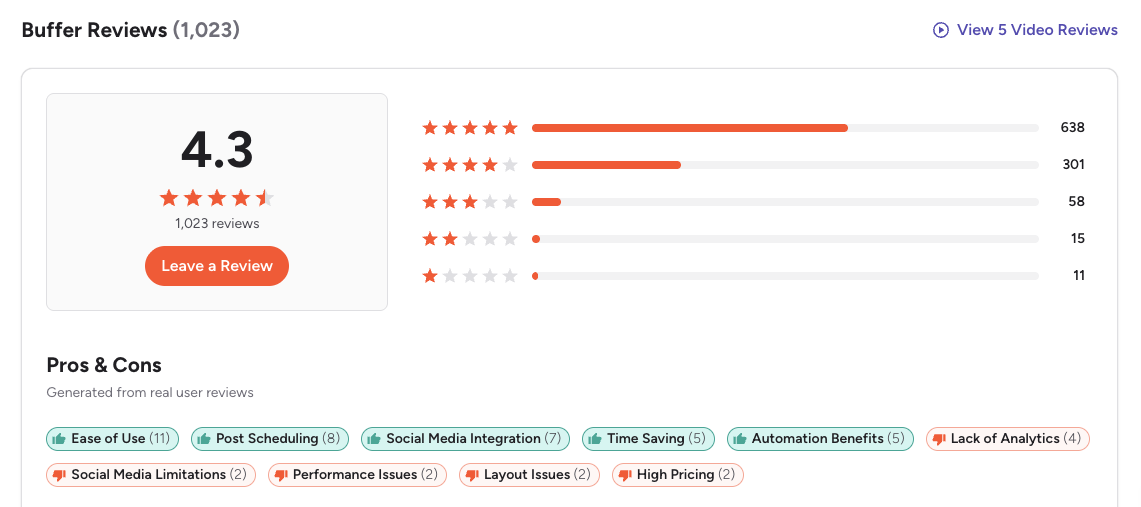
G2: 4.3/5 (1,023 reviews) — Users consistently praise Buffer for being the easiest scheduling tool to learn. The most common positive themes are the clean interface, simple queue-based workflow, and reliable publishing. On the negative side, G2 reviewers frequently mention that analytics feel basic compared to competitors, the per-channel pricing adds up quickly for agencies, and the UI hasn't evolved much in recent years.
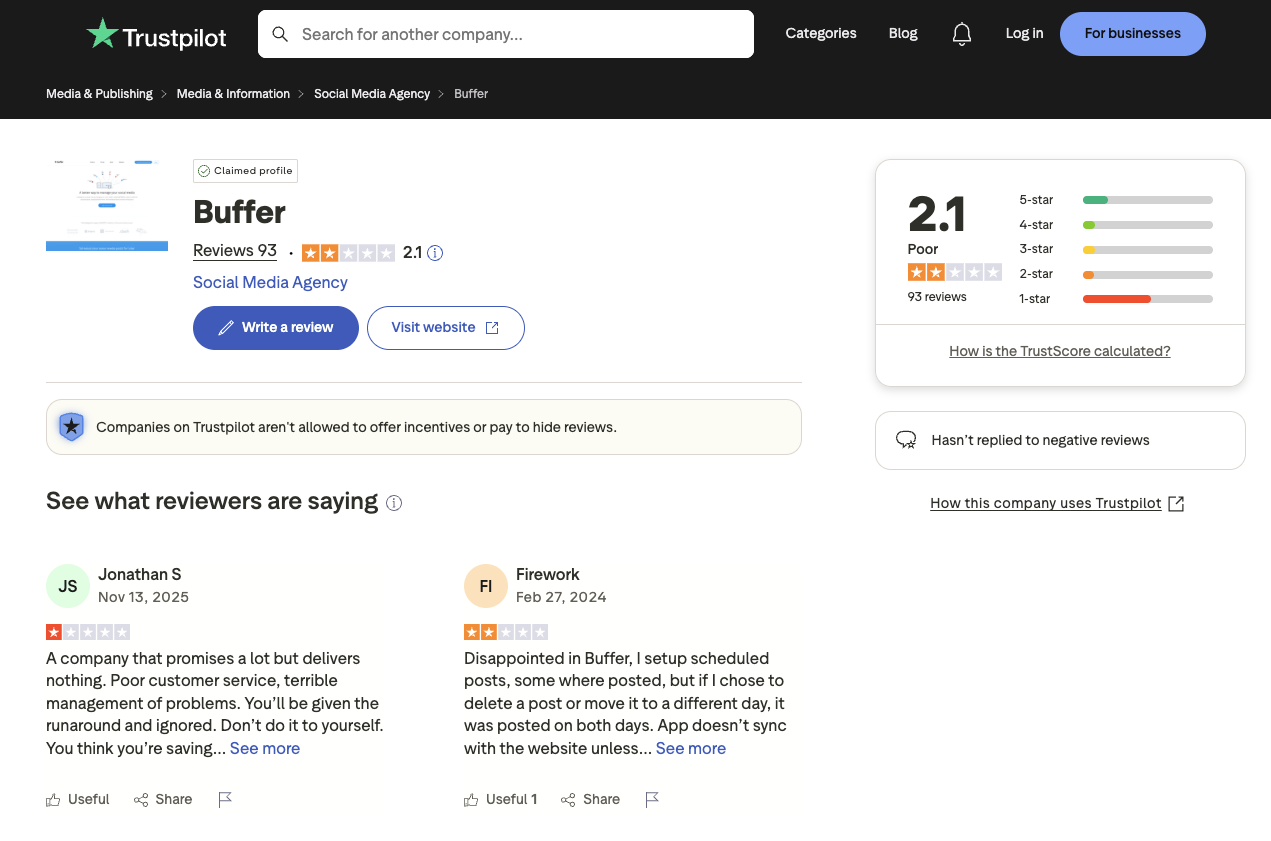
Trustpilot: 2.1/5 (93 reviews) — A notably lower rating, driven by complaints about customer support response times, scheduled posts failing to publish or duplicating, and sync issues with connected social accounts. Several reviewers describe situations where posts silently failed without notification, which is a significant concern for users who rely on set-and-forget scheduling.
Hootsuite Reviews
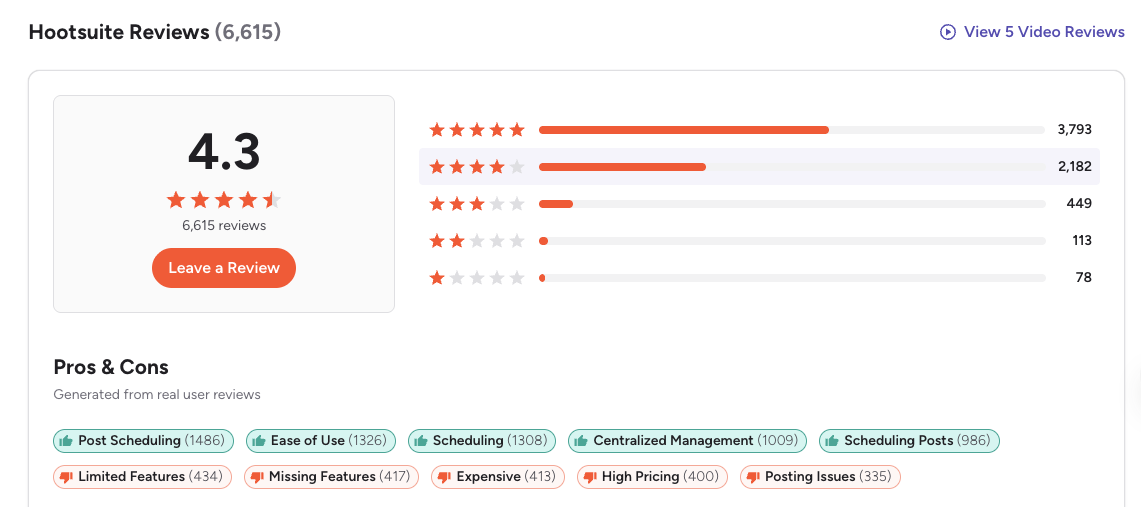
G2: 4.3/5 (6,615 reviews) — With over 6x more reviews than Buffer, Hootsuite's G2 rating carries significant weight. Users praise the centralized dashboard for managing multiple accounts, the scheduling tools, and the breadth of features available. The most common complaints on G2 are the high price relative to features used, key capabilities locked behind the Advanced plan, occasional posting failures, and customer support that can be slow to resolve issues. One featured review rated Hootsuite 0.5/5, stating there's "really not much I can do with Hootsuite except metrics."
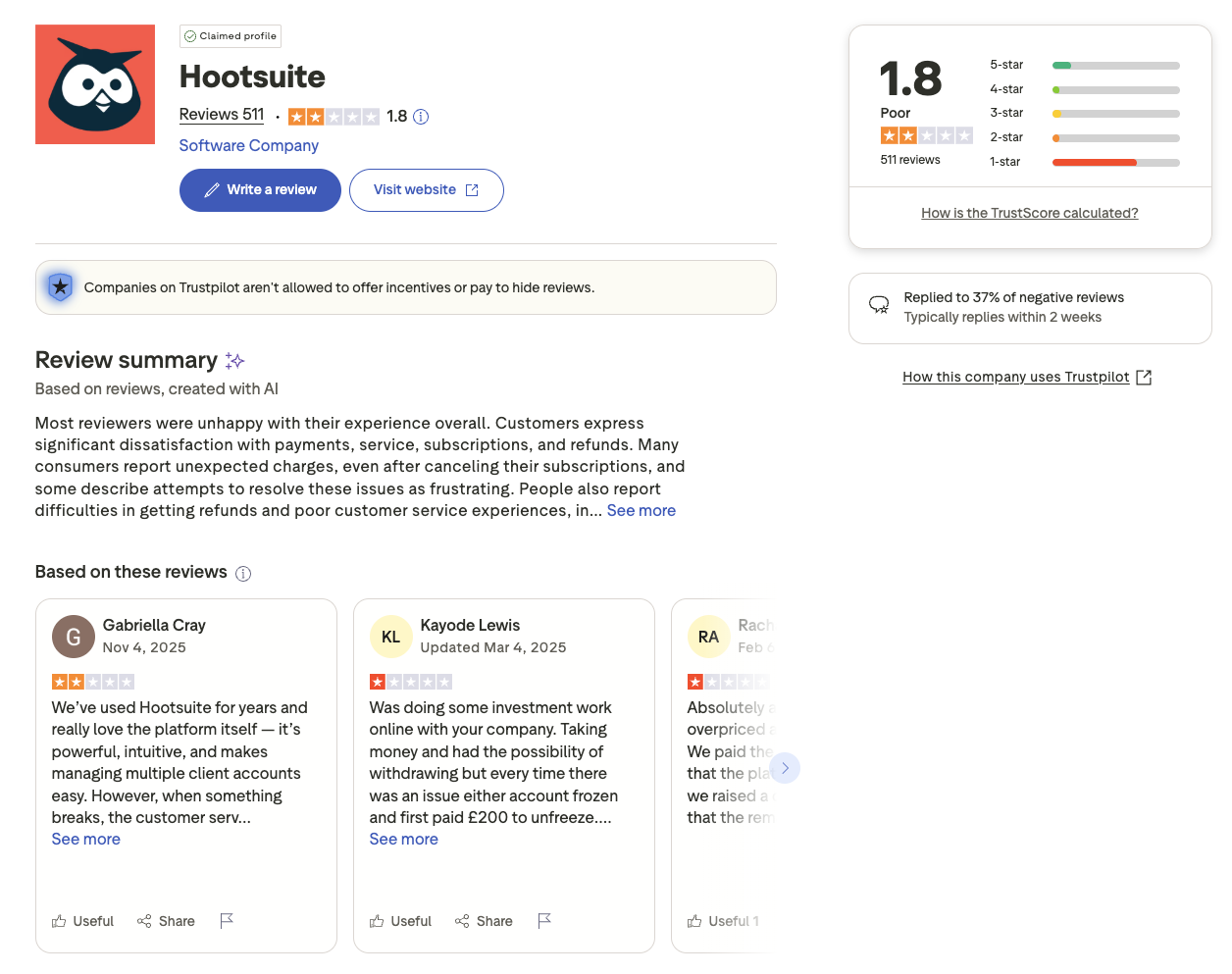
Trustpilot: 1.8/5 (511 reviews) — The lowest rating of any major social media tool on Trustpilot. Recurring themes include unexpected billing charges after cancellation, difficulty getting refunds, long customer support response times, and account freezes. Multiple reviewers describe frustrating cancellation experiences where charges continued after they believed they had cancelled. Trustpilot's AI-generated review summary specifically flags customer dissatisfaction with billing practices and service reliability.
Review Verdict
Both tools share an identical G2 rating (4.3/5), but Hootsuite's much larger review base (6,615 vs 1,023) gives it more statistical weight. On Trustpilot, both score poorly — Buffer at 2.1/5 and Hootsuite at 1.8/5 — suggesting customer support and billing transparency are industry-wide pain points, not issues unique to one platform.
The pattern across both tools is consistent: users who primarily need scheduling are generally satisfied, while users who expect enterprise-level support or run into billing issues have the worst experiences. If reliable customer support is a priority for your team, it's worth testing both tools during their trial periods and contacting support with a test question before committing.
Review counts are as of February 2026 and are updated periodically. For deeper analysis, see our full Buffer reviews and Hootsuite reviews breakdowns.
PostPlanifyManage All Your Social Accounts Without the Chaos
Schedule posts, track performance, and collaborate with your team.
Who Should Use Buffer?
If Buffer sounds right for you but you want to explore other options first, check out our best alternatives to Buffer. You can also see how Buffer stacks up against Later, Metricool, Publer, SocialBee, Agorapulse, Loomly, SocialPilot, and Sendible.
Is Buffer better than Hootsuite for small business? In most cases, yes. Buffer's strength is that it does the core job — scheduling posts and tracking basic performance — without burying you in features you don't use. You can sign up, connect your accounts, and have your first week of posts scheduled within 15 minutes.
Buffer is the better choice if you:
- Are a solo creator or freelancer who needs reliable scheduling without complexity
- Need a simple, clean interface — you want to schedule and move on, not learn a new platform
- Want to schedule posts across 11 platforms including Bluesky and Mastodon
- Don't need social listening, advanced analytics, or a full social inbox
- Prefer per-channel pricing that starts low ($6/mo) and scales predictably
- Want to automate social media posts without a steep learning curve
Who Should Use Hootsuite?
If Hootsuite is on your shortlist, you may also want to see our top alternatives to Hootsuite before committing. Also compare Hootsuite with Sprout Social, Later, Metricool, Agorapulse, SocialBee, Loomly, and SocialPilot.
Hootsuite makes sense when your social media operation has outgrown simple scheduling. If your team needs to monitor what people say about your brand, coordinate responses to customer messages, and report on performance with custom dashboards, Hootsuite's feature set is built for that complexity — though it comes at a significant cost.
Hootsuite is the better choice if you:
- Are an enterprise or large agency with dedicated social media teams
- Need a unified social inbox with DM assignment and auto-responses across platforms
- Require social listening and brand monitoring to track mentions and sentiment beyond your own profiles
- Want competitor benchmarking (5–20 competitors) and custom social media analytics reports
- Have the budget for $249–$499+/month per user and can justify the spend with enterprise-scale results
- Need Salesforce integration, SSO, or compliance tools (Proofpoint) for organizational requirements
Final Verdict: Buffer vs Hootsuite in 2026
So, should you choose Buffer or Hootsuite? It comes down to what you actually need your social media tool to do beyond scheduling.
Buffer wins on: ease of use, platform coverage (11 vs 8+), and keeping things simple. It's the better tool for creators and small teams who want to schedule content, check basic analytics, and move on with their day. The per-channel pricing starts low, and you won't pay for features you don't use.
Hootsuite wins on: social listening, unified inbox management, competitor benchmarking, custom reporting, and structured team workflows. It's a genuinely powerful platform for organizations that need to monitor brand reputation, coordinate customer responses across teams, and report to stakeholders with custom dashboards. The trade-off is significant cost ($249–$499+/month per user) and complexity.
The gap between them is really about what happens after you publish. Both tools schedule posts reliably. But if your workflow ends at publishing, Buffer is all you need. If your workflow includes monitoring mentions, routing customer messages to teammates, benchmarking against competitors, and building custom reports, Hootsuite covers that — at enterprise pricing.
The bottom line: Buffer is the right choice for creators, freelancers, and small teams focused on content publishing. Hootsuite is the right choice for enterprise teams that need social listening and compliance tools. And if you need the depth — analytics across platforms, a social inbox, AI tools, team collaboration — without enterprise complexity or per-seat pricing, there are strong social media scheduling alternatives worth considering.
What If You Need Both Simplicity and Power?
Buffer keeps things simple but lacks depth. Hootsuite has the depth but locks it behind enterprise pricing. PostPlanify brings both together — a clean, modern interface with analytics across 10 platforms, a social inbox with AI-powered replies, AI image generation, and team collaboration with approval workflows.

| Feature | Buffer | Hootsuite | PostPlanify |
|---|---|---|---|
| Analytics | Basic–Advanced | Standard–Custom | 10 platforms, historical trends, best time to post |
| Social Inbox | Basic (Community Inbox) | Full unified inbox | AI-powered replies, labels, team assignment |
| AI Tools | AI captions | OwlyWriter AI | Vision-powered captions + AI image generation (7 models) |
| Team Collaboration | Team plan ($12/ch) | Advanced ($499/user) | 5 members (Premium), multi-approver workflows |
| White-Label Reports | No | Advanced only | Branded PDF reports with shareable links |
| Best Time to Post | No | Yes | Yes (data-driven heatmap) |
| First Comment & Threads | Yes | No | Yes (Growth+) |
| Content Calendar | Yes | Yes | Drag-and-drop, bulk scheduling, platform previews |
| Link in Bio | Start Page | No | 8 themes, click analytics, all plans |
| Media Library | No | Content library | Canva + Google Drive + Unsplash integration |
| Platforms Supported | 11 | 8+ | 10 |
| Approval Workflows | Team plan ($12/ch) | Advanced ($499/user) | Premium ($99/mo) |
| Unlimited Accounts | Scales per channel | $499/mo/user | Enterprise (custom pricing) |
| Starting Price | $6/mo/channel | $249/mo/user | $29/mo (Starter) |
PostPlanify starts at $29/month (Starter, 5 accounts) with 200 posts/month and AI-powered captions and image generation included. The Growth plan ($49/month, 10 accounts) adds analytics across 10 platforms, social inbox with AI replies, best time to post, 1st comments & threads, bulk scheduling, and unlimited scheduled posts. The Premium plan ($99/month, 25 accounts) includes white-label PDF reports, multi-approver workflows, 5 team members, shared calendars, and roles & permissions. The Enterprise plan (custom pricing) unlocks custom accounts and unlimited team members. See all plans on the PostPlanify pricing page.
Try PostPlanify free for 7 days

Related Guides
- Best Buffer Alternatives
- Best Hootsuite Alternatives
- Buffer Pricing Breakdown
- Hootsuite Pricing Breakdown
- Buffer Reviews: G2 vs Trustpilot
- Hootsuite Reviews: G2 vs Trustpilot
- Best Social Media Management Platform
- Social Media Scheduling Tools: The Complete Guide
- Best Time to Post on Social Media
- How to Automate Social Media Posts
- Social Media Analytics and Reporting
FAQ
Is Buffer cheaper than Hootsuite?
Yes, significantly. Buffer starts at $6/month per channel and includes a free plan with 3 channels. Hootsuite starts at $249/month per user with no free plan — only a 30-day trial. For a solo creator managing 5 accounts, Buffer costs $30/month while Hootsuite costs $249/month. Even at the team level, Buffer's Team plan at $12/channel is a fraction of Hootsuite's Advanced plan at $499/user. See our full Buffer pricing breakdown and Hootsuite pricing breakdown for detailed comparisons.
Does Hootsuite have a free plan?
No. Hootsuite discontinued its free plan and now offers only a 30-day free trial on paid plans. Once the trial ends, you must subscribe to the Standard plan at $249/month per user to continue using the platform. Buffer still offers a permanent free plan with 3 channels and 10 scheduled posts per channel, making it the better option if you need a no-cost starting point.
Which has better analytics — Buffer or Hootsuite?
Hootsuite has more advanced analytics overall, including custom reports, competitor benchmarking against 5-20 competitors, and scheduled report delivery. However, these features are locked behind the Advanced plan at $499/month per user. Buffer offers basic to advanced social media analytics on paid plans starting at $6/month, which covers post performance, engagement metrics, and audience growth — sufficient for most creators and small businesses that don't need enterprise-level reporting.
Can I switch from Hootsuite to Buffer?
Yes. You can export your scheduled content from Hootsuite, then reconnect your social accounts to Buffer and use its CSV import feature for bulk scheduling. The transition typically takes less than an hour. The main thing you'll lose is Hootsuite-specific features like social listening and the unified inbox — but if you weren't using those, the switch is straightforward.
Which supports more social media platforms?
Buffer supports 11 platforms: Instagram, Facebook, LinkedIn, Pinterest, X/Twitter, TikTok, YouTube, Google Business Profile, Threads, Bluesky, and Mastodon. Hootsuite supports 8+ platforms but lacks Bluesky, Mastodon, and Google Business Profile. If you need to post across niche or emerging platforms, Buffer has the wider coverage.
Is Hootsuite worth it for small businesses?
For most small businesses, Hootsuite is not worth the cost. At $249/month per user for the Standard plan, even a single-user setup exceeds most small business social media marketing budgets. The features that justify Hootsuite's price — social listening, advanced reporting, compliance tools — are enterprise needs. Tools like PostPlanify cover scheduling, analytics across 10 platforms, social inbox, and team collaboration without the enterprise complexity or per-user pricing.
Does Buffer have social listening?
No. Buffer does not offer social listening, brand monitoring, or sentiment analysis. If social listening is critical to your workflow, Hootsuite includes it on the Advanced plan ($499/month per user), or you can pair a dedicated listening tool like Mention or Brandwatch with a scheduler that covers your other needs. Many teams find that a social inbox for managing comments and replies, combined with a scheduling tool, covers their day-to-day engagement needs without full-scale listening.
Which is easier to use — Buffer or Hootsuite?
Buffer is widely considered the easier tool. Its clean, minimal interface requires almost no learning curve — you can connect accounts and start scheduling within minutes. Hootsuite has a steeper learning curve due to its broader feature set, stream-based dashboard layout, and more complex navigation. Users on G2 frequently cite Hootsuite's interface as "cluttered" or "overwhelming," especially for new users who don't need its enterprise features.
Is Buffer or Hootsuite better for Instagram?
For most Instagram users, Buffer is the better choice. It supports Instagram post scheduling, Reels, Stories, carousels, and first comment scheduling for hashtags — all starting at $6/month. Hootsuite also supports Instagram scheduling but lacks first comment scheduling and costs $249/month minimum. If you need Instagram-specific social listening or competitor benchmarking, Hootsuite's Advanced plan adds that — but for pure scheduling and publishing, Buffer delivers more value.
What is the best alternative to both Buffer and Hootsuite?
If neither Buffer's per-channel pricing nor Hootsuite's per-user pricing works for you, consider platforms built differently. PostPlanify offers analytics across 10 platforms, a social inbox with AI-powered replies, AI image generation, and unlimited team members — all without per-channel or per-user fees. Other popular alternatives include Later for visual-first Instagram planning, SocialBee for content categorization, and Metricool for analytics-focused users. See our full list of social media scheduling alternatives for more options.
Which is better for agencies managing multiple clients?
Neither is ideal. Buffer's per-channel pricing gets expensive fast when you manage 20+ accounts across multiple clients, and it lacks dedicated client workspaces. Hootsuite handles multi-client setups better with its Advanced plan, but at $499/month per user, costs scale quickly as your team grows. Agencies should also consider platforms like PostPlanify that offer multi-brand workspaces, approval workflows, white-label PDF reports, and unlimited team members without per-seat fees.
Can I use Buffer and Hootsuite together?
Technically yes, but it's not recommended. Running both tools on the same social accounts can cause duplicate posts, scheduling conflicts, and analytics discrepancies. Most users are better off choosing one platform that fits their needs. If you want Buffer's simplicity for scheduling and Hootsuite's social listening, a more practical approach is to pair Buffer (or a similar scheduler) with a standalone listening tool.







