
Buffer or Later — which social media scheduling tool is the better fit for your workflow? Both are popular among creators, freelancers, and small teams. Both focus on simplicity over enterprise features — but they take different approaches to pricing, platform support, and content planning.
We compared current published pricing, tested both platforms, and analyzed 1,400+ user reviews across G2 and Trustpilot to give you an unbiased breakdown.
This Buffer vs Later 2026 comparison helps you decide based on your actual workflow — not marketing promises. We compare real pricing at different scales, the features that matter for daily use, and verified ratings from G2 and Trustpilot. Want to see the full lineup? Browse all social media management alternatives.
Buffer vs Later at a Glance
Here's a quick side-by-side overview before we dive deeper:
| Category | Buffer | Later |
|---|---|---|
| Starting Price | $6/mo per channel | $25/mo (1 Social Set) |
| Free Plan | Yes (3 channels) | No (14-day trial) |
| Platforms Supported | 11 | 8 |
| Unlimited Scheduling | Yes (paid plans) | Scale plan only |
| AI Tools | AI Assistant (captions) | AI content tools (credit-based) |
| AI Image Generation | No | No |
| Link in Bio | Yes (Start Page) | Yes |
| Team Collaboration | Team plan ($12/mo/channel) | Growth plan ($50/mo) |
| Approval Workflows | Team plan only | Growth plan |
| Social Inbox | Basic (Community Inbox) | Growth plan |
| Analytics | Basic to Advanced | 3 months to 2 years |
| G2 Rating | 4.3/5 (1,023 reviews) | 4.5/5 (347 reviews) |
| Trustpilot Rating | 2.1/5 (93 reviews) | 1.3/5 (329 reviews) |
| Best For | Multi-platform creators | Visual-first Instagram/TikTok creators |
Buffer Overview

Buffer is one of the oldest social media scheduling tools, launched in 2010. It focuses on simplicity — a clean interface for scheduling posts, managing a basic content calendar, and viewing analytics.
Buffer supports 11 platforms: Instagram, Facebook, LinkedIn, Pinterest, X/Twitter, TikTok, YouTube, Google Business Profile, Threads, Bluesky, and Mastodon.
Key features:
- Post scheduling with queue management
- AI Assistant for generating captions and post ideas
- Hashtag manager and first comment scheduling
- Basic community inbox
- Start Page (link-in-bio builder)
- Content calendar
Buffer is popular among solo creators and freelancers who want to manage multiple social media accounts with a no-frills scheduling experience across many platforms. For a deeper look, see what users say about Buffer on G2 and Trustpilot.
Later Overview

Later is a visual-first social media platform built around content planning and scheduling. Originally focused on Instagram, it has expanded to support multiple platforms while keeping its visual calendar at the core.
Later supports 8 platforms: Instagram, Facebook, LinkedIn, Pinterest, X/Twitter, TikTok, YouTube, and Threads.
Key features:
- Visual content calendar and media library
- AI content tools with monthly credit system
- Link in Bio page
- Social inbox (Growth+)
- UGC collection (Growth+)
- Smart Scheduling with Future Trends
- Competitive benchmarking (Scale)
Later targets creators and brands that prioritize visual content planning and want to automate social media posts, especially on Instagram and TikTok. Read real user reviews of Later from G2 and Trustpilot.
Pricing Comparison
Buffer and Later use different pricing models — Buffer charges per channel, Later charges per Social Set (a bundle of profiles across platforms).
Buffer Pricing
Buffer uses per-channel pricing. Each social account you connect adds to your monthly cost. We break this down further in our Buffer pricing guide.
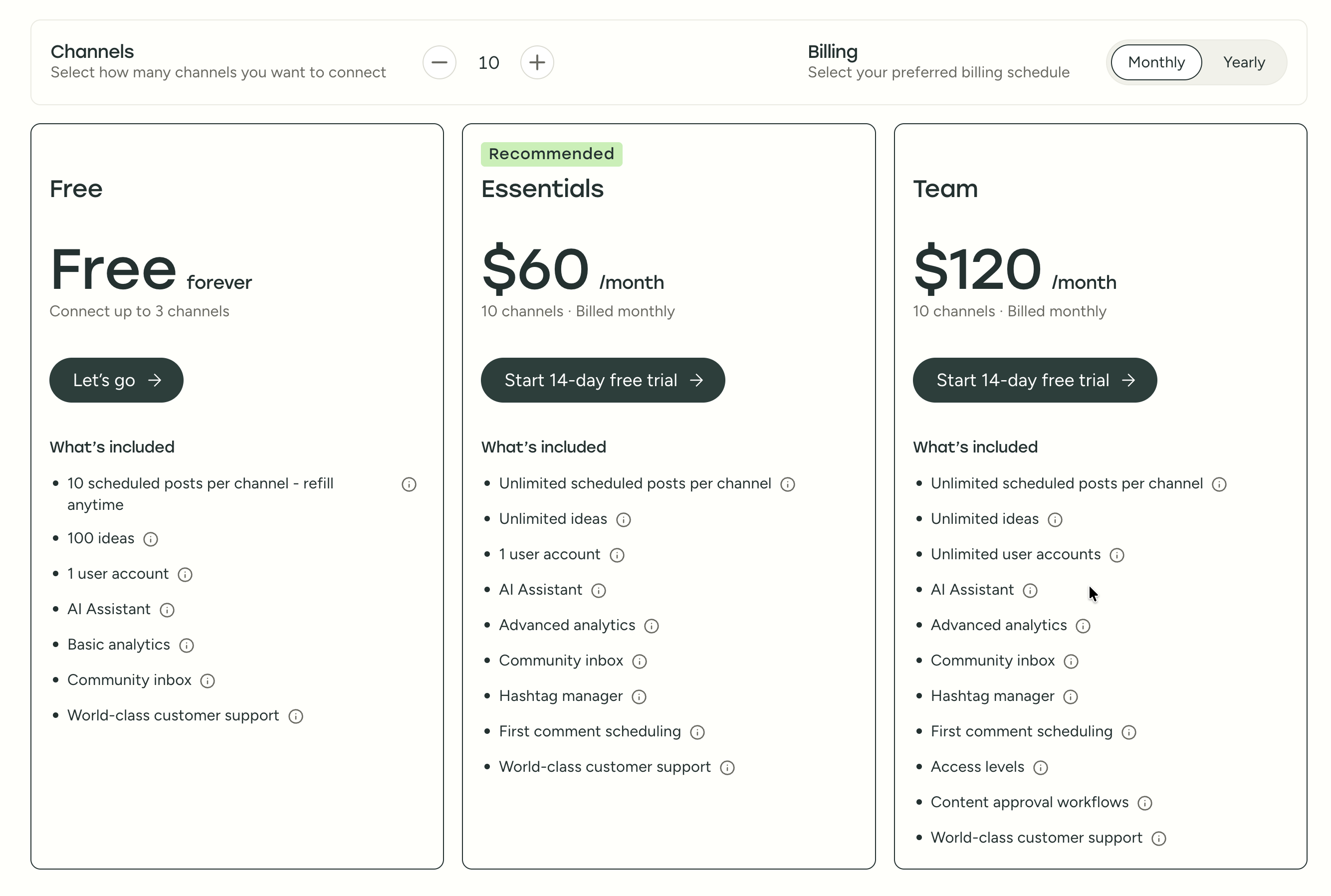
| Plan | Price | Channels | Users | Key Features |
|---|---|---|---|---|
| Free | $0/mo | 3 | 1 | 10 posts/channel, basic analytics |
| Essentials | $6/mo per channel | Unlimited | 1 | Unlimited posts, advanced analytics, hashtag manager |
| Team | $12/mo per channel | Unlimited | Unlimited | Approval workflows, permissions, team collaboration |
Example costs:
- 5 channels on Essentials = $30/month
- 10 channels on Team = $120/month
Later Pricing
Later uses Social Set pricing — each set bundles one profile per platform. See the full Later pricing breakdown for details.
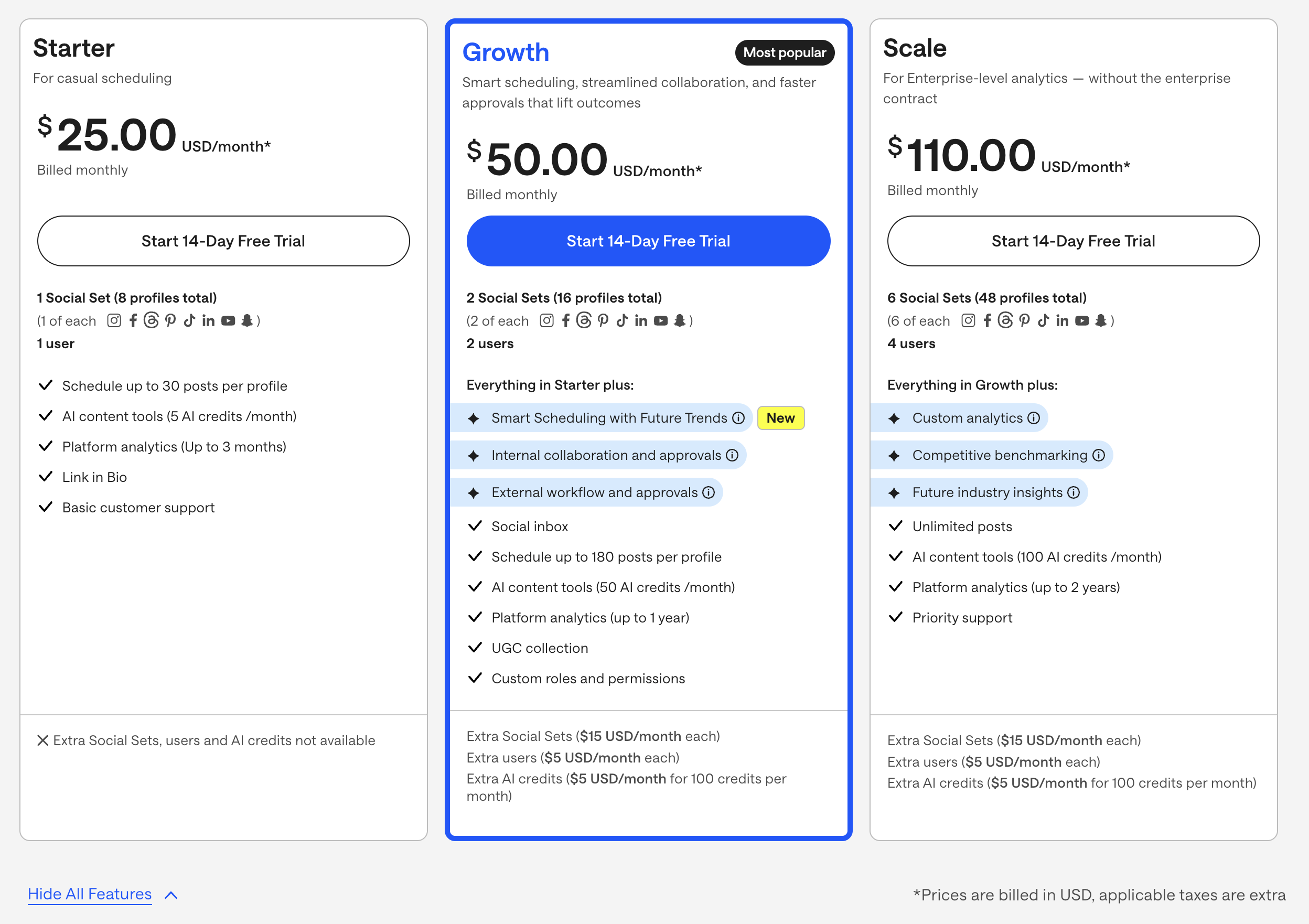
| Plan | Price | Social Sets | Users | Key Features |
|---|---|---|---|---|
| Starter | $25/mo | 1 (8 profiles) | 1 | 30 posts/profile, 5 AI credits, 3-month analytics |
| Growth | $50/mo | 2 (16 profiles) | 2 | 180 posts/profile, 50 AI credits, approvals, inbox |
| Scale | $110/mo | 6 (48 profiles) | 4 | Unlimited posts, 100 AI credits, custom analytics |
Example costs:
- 1 Social Set on Starter = $25/month
- 2 Social Sets on Growth = $50/month
- Extra Social Sets = $15/month each
What You'll Actually Pay: Real-World Scenarios
The per-channel vs per-Social-Set pricing models make direct comparisons tricky. Here's what each tool actually costs for common setups:
Solo creator managing 5 social accounts:
- Buffer Essentials: 5 × $6 = $30/month
- Later Starter: $25/month (but limited to 1 Social Set of 8 profiles, 30 posts/profile, and no inbox or approvals)
- Later is $5 cheaper, but with significantly tighter limits — no social inbox, no approvals, and only 5 AI credits.
Small team (2 people) managing 10 accounts with approvals:
- Buffer Team: 10 × $12 = $120/month (unlimited users included)
- Later Growth: $50 + extra Social Set ($15) = $65/month (but capped at 180 posts/profile and 50 AI credits)
- Later is cheaper here, but the post limit and credit system may force you to upgrade to Scale ($110/month) as you grow.
Agency managing 20 accounts across 4 brands:
- Buffer Team: 20 × $12 = $240/month
- Later Scale: $110 + extra Social Sets to cover 20 accounts = approximately $140–$170/month (depending on how profiles map to Social Sets)
- Later's add-on pricing makes the exact cost hard to predict — each extra Social Set is $15/month and each extra user is $5/month, so the final bill depends on your specific setup.
Price Verdict
Buffer is simpler to budget for thanks to straightforward per-channel pricing. Later can be cheaper in some scenarios but harder to predict once you factor in extra Social Sets, users, and AI credits.
The real trade-off isn't just price — it's what's included. Later's Growth plan ($50/month) bundles social inbox, approvals, and UGC collection, which require Buffer's more expensive Team plan ($12/channel). But Later limits your posts to 180/profile and AI to 50 credits, while Buffer gives you unlimited scheduling and unlimited AI on all paid plans.
 PostPlanify
Manage All Your Social Accounts Without the Chaos
Schedule posts, track performance, and collaborate with your team.


Feature Comparison
Scheduling & Publishing
| Feature | Buffer | Later |
|---|---|---|
| Unlimited scheduling | Yes (paid plans) | Scale plan only |
| Post limits | None (paid) | 30-180 per profile |
| Best time to post | No | Yes (Smart Scheduling) |
| First comment scheduling | Yes (Essentials+) | No |
| Content calendar | Yes | Yes (visual) |
| Bulk scheduling | CSV import | No |
| Draft saving | Yes | Yes |
Winner: Buffer — unlimited scheduling on all paid plans with no per-profile post limits. This matters more than it sounds: Later restricts posts to 30 per profile on Starter and 180 on Growth, which means an active creator posting twice daily across 5 platforms would hit Later's Starter limit in under a week. Unlimited scheduling only comes on Later's Scale plan at $110/month. Buffer also offers first comment scheduling (useful for Instagram hashtag strategies), while Later has Smart Scheduling with trend-based timing suggestions — a genuine advantage for creators who want data-driven posting times.
AI Tools
| Feature | Buffer | Later |
|---|---|---|
| AI caption generation | Yes (AI Assistant) | Yes (credit-based) |
| AI image generation | No | No |
| AI post ideas | Yes (unlimited on paid) | Limited by credits |
| AI credits system | No (unlimited) | 5-100 credits/month |
Winner: Buffer — unlimited AI usage on all paid plans without a credit system. Later caps AI at 5 credits on Starter, 50 on Growth, and 100 on Scale, with extra credits costing $5/month per 100. In practice, if you generate 2–3 AI captions per post and publish 5 posts a week, you'd burn through Later's Starter credits in a single day. Buffer's unlimited approach removes that friction entirely. Neither platform offers AI image generation, so if you need to generate visuals from text prompts, you'll need a separate tool or a platform that includes it natively.
Analytics & Reporting
| Feature | Buffer | Later |
|---|---|---|
| Basic analytics | All plans | All plans |
| Analytics history | Advanced | 3 months to 2 years |
| Custom analytics | No | Scale only |
| Competitor benchmarking | No | Scale only |
| Export reports | Yes | Scale only |
Winner: Later — but only on the Scale plan ($110/month). That's where you get custom analytics, competitive benchmarking, and up to 2 years of data history. On the Growth plan ($50/month), Later offers 1 year of analytics history, which is already more than Buffer provides. Buffer's analytics cover post performance, engagement rates, and audience growth on cheaper plans — enough if you just need to know what's working. But if historical trend analysis and competitor tracking are important to your strategy, Later has a clear edge at the higher tier.
Team Collaboration
| Feature | Buffer | Later |
|---|---|---|
| Multiple users | Team plan | Growth+ (2-4 users) |
| Approval workflows | Team plan | Growth plan |
| Custom roles | Team plan | Growth plan |
| External approvals | No | Growth plan |
Winner: Later — the Growth plan ($50/month) includes both internal and external approval workflows, custom roles, and permissions. The external approval feature is particularly useful for agencies: you can send content to clients for approval without giving them full platform access. Buffer covers internal approvals and role-based permissions on its Team plan ($12/channel), but doesn't have external approval links. For teams that only need internal "create → review → approve → publish" workflows, Buffer handles it. For teams that need client sign-off, Later has the advantage.
Content & Creative Tools
| Feature | Buffer | Later |
|---|---|---|
| Link in Bio | Yes (Start Page) | Yes |
| Media library | Basic | Yes (visual-first) |
| UGC collection | No | Growth+ |
| Canva integration | No | No |
| Google Drive import | No | No |
Winner: Later — the visual media library with drag-and-drop organization, UGC collection (Growth+), and Instagram grid preview make Later the stronger tool for creators who plan content around images and video. Buffer's Start Page covers link-in-bio and its content library is functional, but it wasn't designed for visual-first planning the way Later was. If your workflow starts with visuals (photos, graphics, Reels) and you build captions around them, Later feels more natural. If you start with text and add images later, both tools work equally well.
Platform Support
| Platform | Buffer | Later |
|---|---|---|
| Yes | Yes | |
| Yes | Yes | |
| X/Twitter | Yes | Yes |
| Yes | Yes | |
| TikTok | Yes | Yes |
| YouTube | Yes | Yes |
| Yes | Yes | |
| Threads | Yes | Yes |
| Bluesky | Yes | No |
| Mastodon | Yes | No |
| Google Business | Yes | No |
Winner: Buffer — supports 11 platforms vs Later's 8. The key difference is emerging and niche platforms: Buffer supports Bluesky, Mastodon, and Google Business Profile, which Later does not. If you're active on decentralized social networks or need to manage a Google Business listing alongside your social accounts, Buffer is the only option. For the major platforms (Instagram, Facebook, X, LinkedIn, TikTok, YouTube, Pinterest, Threads), both tools have full support.
What Real Users Say
Buffer Reviews
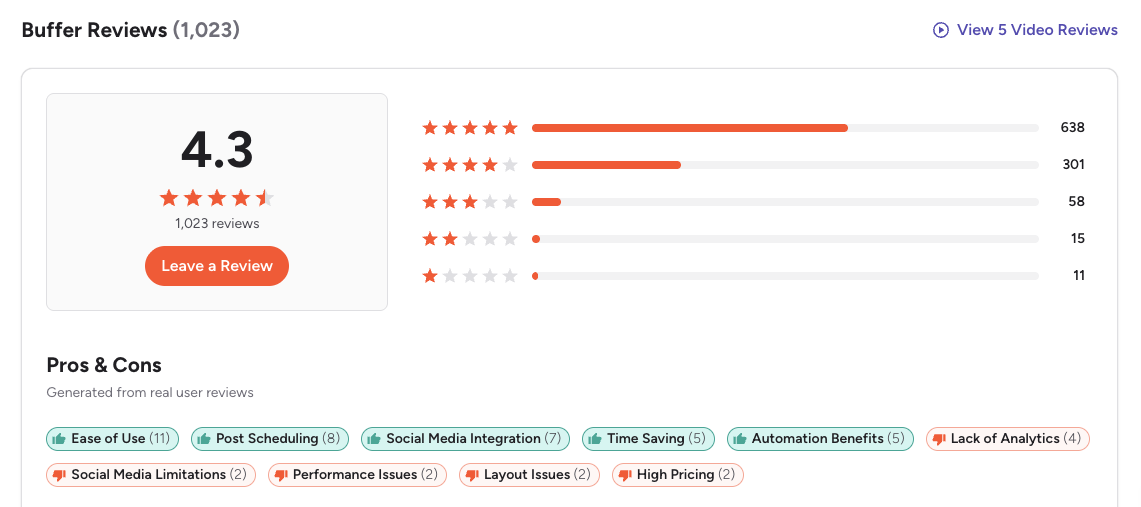
G2: 4.3/5 (1,023 reviews) — Users consistently praise Buffer for being the easiest scheduling tool to learn. The most common positive themes are the clean interface, simple queue-based workflow, and reliable publishing. On the negative side, G2 reviewers frequently mention that analytics feel basic compared to competitors, the per-channel pricing adds up quickly for agencies, and the UI hasn't evolved much in recent years.
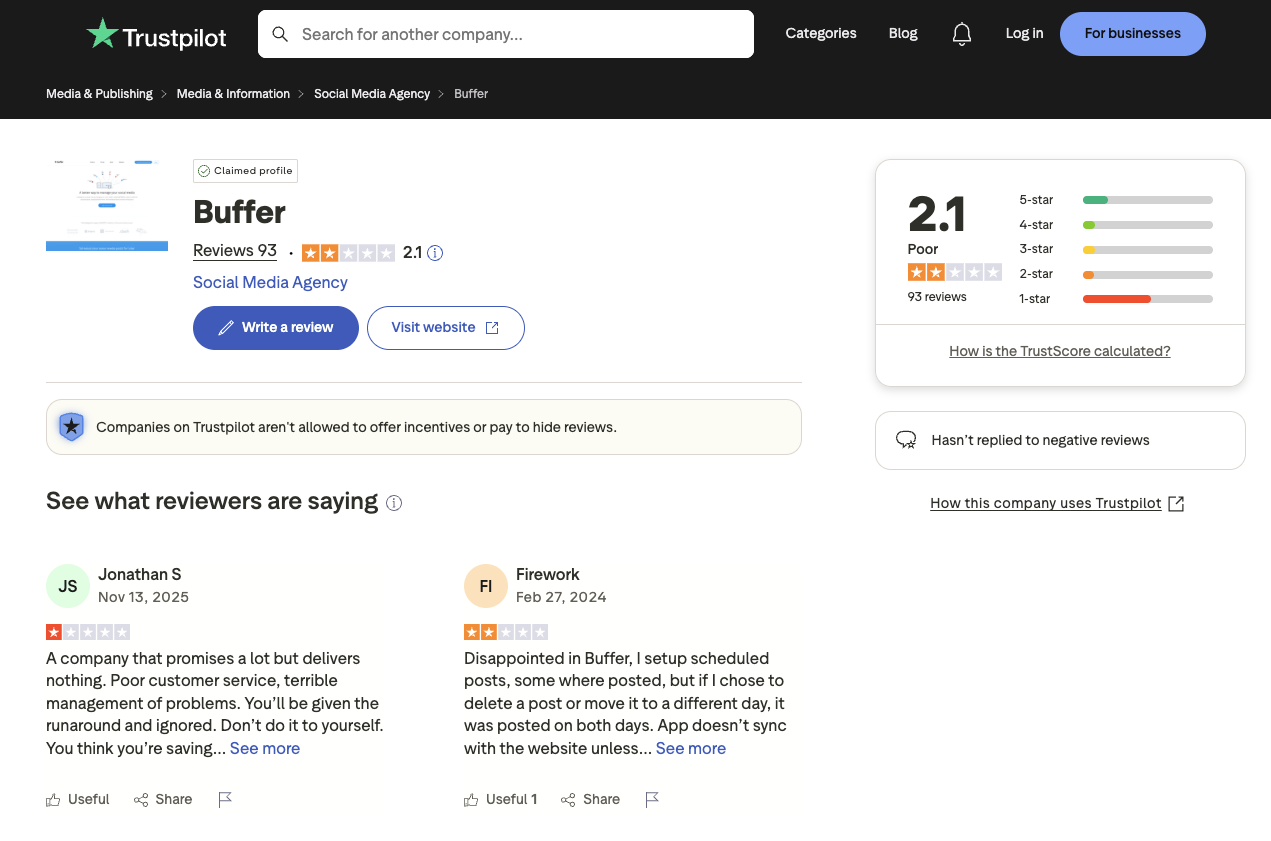
Trustpilot: 2.1/5 (93 reviews) — A notably lower rating, driven by complaints about customer support response times, scheduled posts failing to publish or duplicating, and sync issues with connected social accounts.
Later Reviews
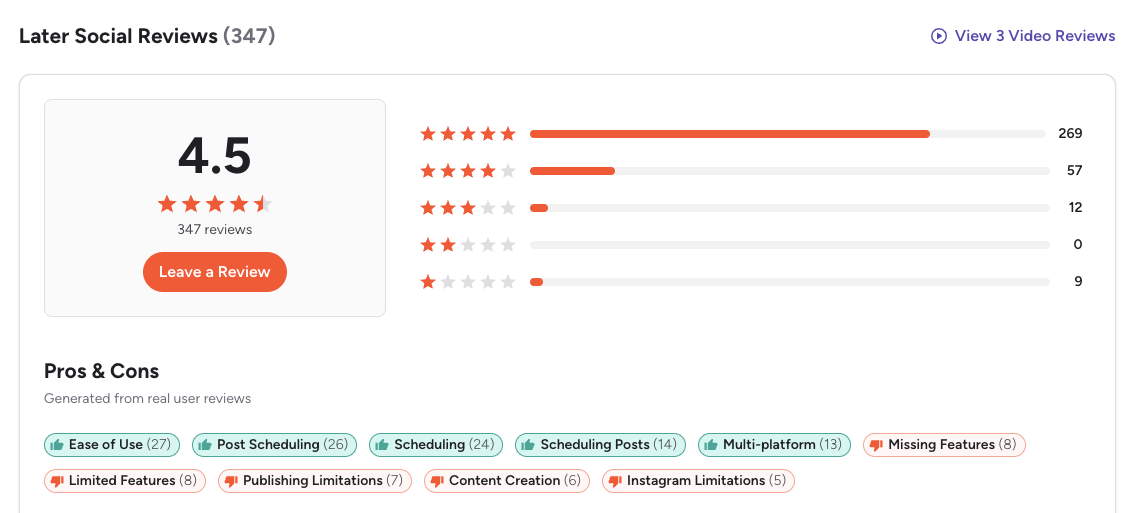
G2: 4.5/5 (347 reviews) — Later scores slightly higher than Buffer on G2, though with far fewer reviews. Users appreciate the visual calendar, image management, and smooth scheduling experience. A featured review gave Later 4/5, praising scheduling and media tagging but noting that Starter analytics are too basic for deeper insights. Common complaints include limited features on lower plans, Instagram-specific publishing restrictions, and post limits that feel tight for active creators.
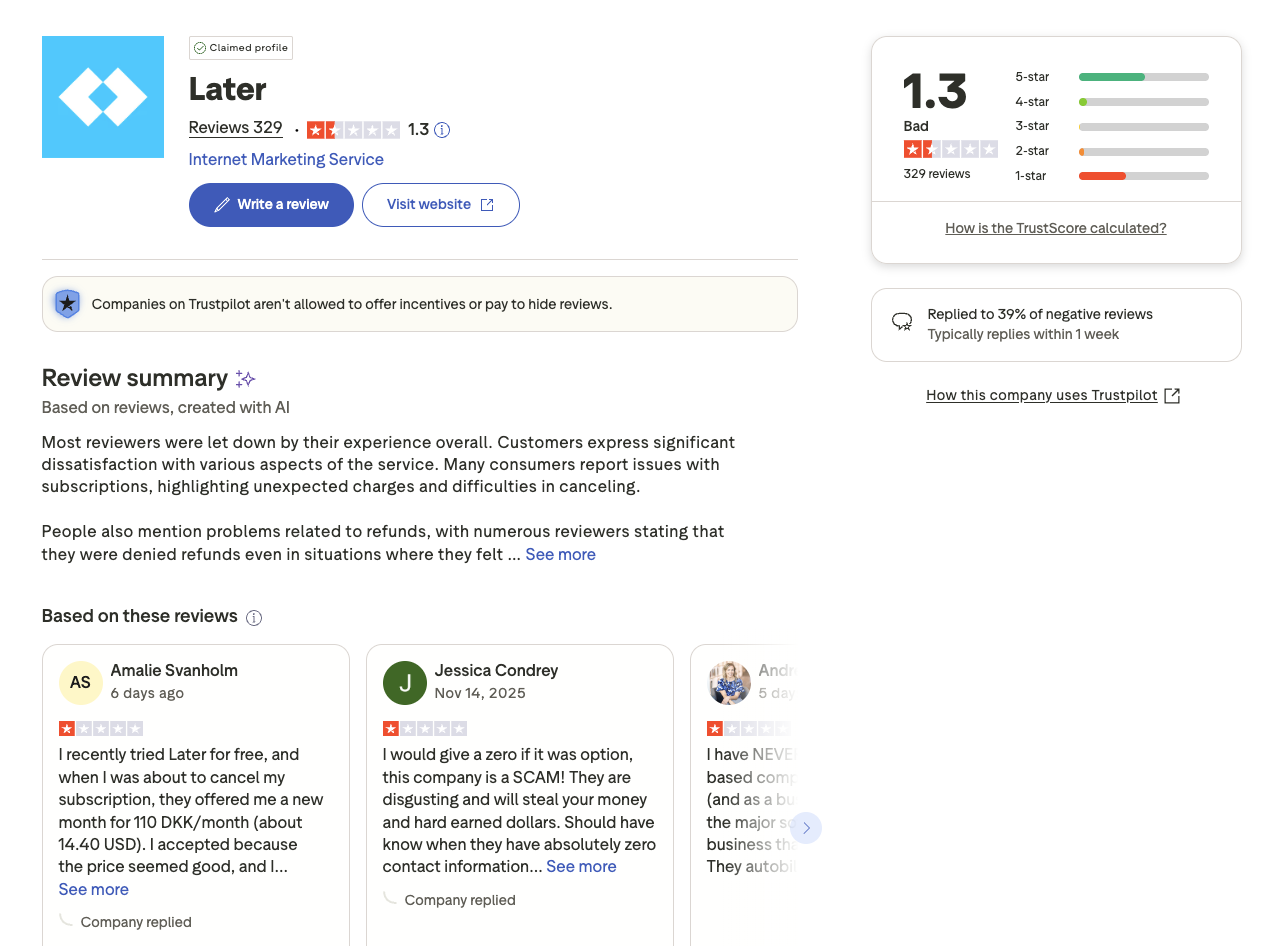
Trustpilot: 1.3/5 (329 reviews) — This is one of the lowest Trustpilot ratings among major social media tools. Recurring themes include unexpected subscription renewal charges, a difficult cancellation process, and denied refund requests. Multiple reviewers describe being charged after they believed they had cancelled. The volume of billing-related complaints (329 reviews, almost all negative) is a significant red flag for potential users.
Review Verdict
Later scores higher on G2 (4.5 vs 4.3), but with far fewer reviews (347 vs 1,023), making Buffer's rating more statistically reliable. On Trustpilot, Later scores significantly worse than Buffer (1.3/5 vs 2.1/5) — billing and cancellation issues are Later's biggest pain point, with nearly 4× the negative Trustpilot reviews as Buffer despite being a smaller platform.
The pattern is clear: users who stick to basic scheduling are generally satisfied with both tools, but Later's billing practices generate far more complaints. If you're considering Later, test thoroughly during the 14-day trial and document your cancellation process.
Review counts are as of February 2026 and are updated periodically. For deeper analysis, see our full Buffer reviews and Later reviews breakdowns.
PostPlanifyManage All Your Social Accounts Without the Chaos
Schedule posts, track performance, and collaborate with your team.
Who Should Use Buffer?
Is Buffer better than Later for multi-platform creators? It depends on your priorities. If Buffer sounds right but you want to explore other options first, check out our best alternatives to Buffer. You can also see how Buffer compares to Hootsuite, Metricool, Publer, Sprout Social, SocialBee, and Agorapulse.
Buffer's strength is reliability without limits — unlimited scheduling, unlimited AI usage, and predictable per-channel pricing. You won't hit a credit wall or a post cap mid-month.
Buffer is the better choice if you:
- Are a solo creator or freelancer who needs reliable scheduling without complexity
- Need to schedule across 11 platforms including Bluesky and Mastodon
- Want unlimited AI usage without a credit system or monthly caps
- Prefer per-channel pricing that starts at $6/month (or free) and scales predictably
- Need unlimited scheduling on all paid plans without per-profile post limits
- Want straightforward social media analytics without paying for premium tiers
Who Should Use Later?
Is Later better than Buffer for Instagram and TikTok creators? It depends on how visual your workflow is. If Later is on your shortlist, you may also want to see our top alternatives to Later before committing. Also compare Later with Metricool, Hootsuite, Publer, Sprout Social, SocialBee, and Agorapulse.
Later was built for visual content planning from the ground up. If your workflow starts with images and videos and you want to preview exactly how your Instagram grid will look before publishing, Later's visual approach is genuinely useful — it's not just a feature checkbox, it's how the entire tool is designed.
Later is the better choice if you:
- Are a visual-first creator focused on Instagram and TikTok
- Need a visual content calendar with drag-and-drop media library and Instagram grid preview
- Want UGC collection tools built into your scheduling workflow
- Need external approval workflows for sending content to clients for sign-off
- Prefer Smart Scheduling with trend-based timing suggestions and Future Trends data
Final Verdict: Buffer vs Later in 2026
So, should you choose Buffer or Later? It comes down to how you plan content and where you publish.
Buffer wins on: platform coverage (11 vs 8), unlimited scheduling and AI on all paid plans, predictable per-channel pricing, and a free plan to start with. It's the better tool for creators who publish across many platforms and want zero limits on scheduling or AI usage.
Later wins on: visual content planning, media library with drag-and-drop organization, UGC collection, external approval workflows for client sign-off, Smart Scheduling with trend data, and competitive benchmarking on the Scale plan. It's the better tool for creators whose workflow revolves around images and video, especially on Instagram and TikTok.
The gap between them comes down to workflow style. Buffer treats scheduling as a task to complete efficiently — create post, pick time, publish. Later treats scheduling as part of a visual planning process — organize your media, preview your grid, plan your aesthetic. Neither approach is wrong; it depends on how you work.
The bottom line: If you publish across many platforms and want unlimited scheduling without caps, Buffer is the simpler choice. If Instagram and TikTok are your primary platforms and visual planning matters to you, Later justifies the premium. And if you're outgrowing both — if you need analytics across platforms, a social inbox, AI image generation, or team collaboration without per-channel or credit-based pricing — there are social media scheduling alternatives worth exploring.
What If You Need More Than Either Offers?
Buffer keeps things simple but lacks depth in analytics, inbox, and AI. Later adds visual planning and UGC but limits posts, AI credits, and charges for every add-on. PostPlanify combines the ease of use both tools are known for with the depth neither provides — analytics across 10 platforms, a social inbox with AI-powered replies, AI image generation, and team collaboration with unlimited members.

| Feature | Buffer | Later | PostPlanify |
|---|---|---|---|
| Analytics | Basic–Advanced | 3 months–2 years | 10 platforms, historical trends, best time to post |
| Social Inbox | Basic (Community Inbox) | Growth+ (basic) | AI-powered replies, labels, team assignment |
| AI Tools | AI captions (unlimited) | AI captions (credit-based) | Vision-powered captions + AI image generation (7 models) |
| Team Collaboration | Team plan ($12/ch) | Growth ($50/mo) | Unlimited members, multi-approver workflows |
| White-Label Reports | No | No | Branded PDF reports with shareable links |
| Best Time to Post | No | Yes (Smart Scheduling) | Yes (data-driven heatmap) |
| First Comment & Threads | Yes | No | Yes (Growth+) |
| Content Calendar | Yes | Yes (visual) | Drag-and-drop, bulk scheduling, platform previews |
| Link in Bio | Start Page | Yes | 8 themes, click analytics, all plans |
| Media Library | Basic | Yes (visual-first) | Canva + Google Drive + Unsplash integration |
| Platforms Supported | 11 | 8 | 10 |
| Approval Workflows | Team plan ($12/ch) | Growth ($50/mo) | Premium plan ($99/mo) |
| Unlimited Accounts | Scales per channel | Scales per Social Set | Enterprise (custom pricing) |
| Starting Price | $6/mo/channel | $25/mo | $29/mo (Starter) |
PostPlanify starts at $29/month (Starter, 5 accounts) with 200 posts/month and AI-powered captions and image generation included. The Growth plan ($49/month, 10 accounts) adds analytics across 10 platforms, social inbox with AI replies, best time to post, 1st comments & threads, bulk scheduling, and unlimited scheduled posts. The Premium plan ($99/month, 25 accounts) includes white-label PDF reports, multi-approver workflows, 5 team members, shared calendars, and roles & permissions. The Enterprise plan (custom pricing) unlocks custom accounts and unlimited team members. See all plans on the PostPlanify pricing page.
Try PostPlanify free for 7 days

Related Guides
- Best Buffer Alternatives
- Best Later Alternatives
- Buffer Pricing Breakdown
- Later Pricing Breakdown
- Buffer Reviews: G2 vs Trustpilot
- Later Reviews: G2 vs Trustpilot
- Best Social Media Management Platforms
- Social Media Scheduling Tools: The Complete Guide
- How to Schedule Instagram Posts
- How to Automate Social Media Posts
- Social Media Analytics and Reporting
FAQ
Is Buffer cheaper than Later?
Yes. Buffer offers a free plan with 3 channels and paid plans starting at $6/month per channel. Later starts at $25/month with no free plan. For most solo creators, Buffer is significantly more affordable.
Does Later have a free plan?
No. Later discontinued its free plan and now offers a 14-day free trial on paid plans starting at $25/month. Buffer still offers a free plan with 3 channels and 10 posts per channel, making it a better starting point if you want to test social media scheduling without any commitment or credit card.
Which has better analytics — Buffer or Later?
Later's Scale plan ($110/month) offers custom analytics, competitive benchmarking, and up to 2 years of data history. Buffer's analytics are simpler but available on cheaper plans. For deep analytics, Later wins — but at a higher price.
Can I switch from Later to Buffer?
Yes. You can reconnect your social accounts to Buffer and start scheduling. Buffer supports CSV import for bulk scheduling, making migration easier for large content libraries. The main differences you'll notice are Buffer's wider platform support (11 vs 8), simpler per-channel pricing, and unlimited AI usage on paid plans. Plan for a short overlap period to rebuild your content calendar.
Which supports more social media platforms?
Buffer supports 11 platforms including Bluesky, Mastodon, and Google Business Profile. Later supports 8 platforms and does not cover those three. If you need to manage multiple social media accounts across niche or emerging platforms, Buffer has significantly wider coverage.
Is Later worth it for small businesses?
Later can work for small businesses focused on visual content, but the post limits on Starter (30/profile) and Growth (180/profile) plans can be restrictive. Add-on costs for extra Social Sets, users, and AI credits add up quickly. Tools like PostPlanify offer analytics across 10 platforms, a social inbox, and team collaboration without post limits or credit-based restrictions.
Does Buffer have a visual content planner?
Buffer has a content calendar but it's not as visual-first as Later's media library and drag-and-drop planner. Later lets you preview your Instagram grid layout before publishing and organize assets visually. If visual content planning is your top priority, Later has the edge. For tips on building an effective calendar, see our guide on how to create a social media content calendar.
Which is easier to use — Buffer or Later?
Both are considered easy to use compared to enterprise tools like Hootsuite or Sprout Social. Buffer has a cleaner, more minimal interface that works well for quick post scheduling. Later is more visual and media-focused, which suits creators who plan content around images and video. The choice depends on your workflow preference and whether you prioritize simplicity or visual planning.
Is Buffer or Later better for Instagram?
Later was originally built for Instagram and still excels at visual Instagram planning with grid preview, media library, and hashtag suggestions. Buffer supports Instagram scheduling with first comment scheduling on Essentials plans, which Later does not offer. For Instagram-heavy workflows with visual planning needs, Later has the edge. For multi-platform creators who also post to Instagram, Buffer is more versatile. See our guide on how to schedule Instagram posts for more tips.
What is the best alternative to both Buffer and Later?
If neither Buffer nor Later fits your needs, consider platforms built differently. PostPlanify offers analytics across 10 platforms, a social inbox with AI-powered replies, AI image generation, and unlimited team members — all without per-channel fees or credit-based caps. Other options include Hootsuite for enterprise social listening, Metricool for analytics-focused workflows, and SocialBee for content categorization. Browse all social media management alternatives to compare.
Buffer vs Later for small business — which is better?
For small businesses, Buffer generally offers better value thanks to its free plan, per-channel pricing starting at $6/month, and broader platform support. Later can work well for small businesses focused on Instagram and TikTok but gets expensive with add-on costs for extra Social Sets and AI credits. For more recommendations tailored to smaller teams, see our guide to social media management software for small business.







