
Later is a visual-first social media management platform that helps creators, brands, and agencies plan content, schedule posts, and track performance across multiple channels. It also includes tools for AI content generation and a Link in Bio page to drive clicks from social profiles.
But is Later really worth the price - or should you save your money?
Today, we'll break down the full Later pricing structure and show you exactly what you get in each plan, so you can decide whether it's the right tool for your content strategy.
Later Pricing at a Glance (2026)
| Plan | Monthly Price | Social Sets | Profiles | Users | Post Limit |
|---|---|---|---|---|---|
| Starter | $25/mo | 1 social set | 8 profiles | 1 user | 30 posts/profile |
| Growth (Most Popular) | $50/mo | 2 social sets | 16 profiles | 2 users | 180 posts/profile |
| Scale | $110/mo | 6 social sets | 48 profiles | 4 users | Unlimited |
Each social set bundles one profile per supported platform. Prices billed monthly in USD; applicable taxes extra. Annual billing saves approximately 17%.
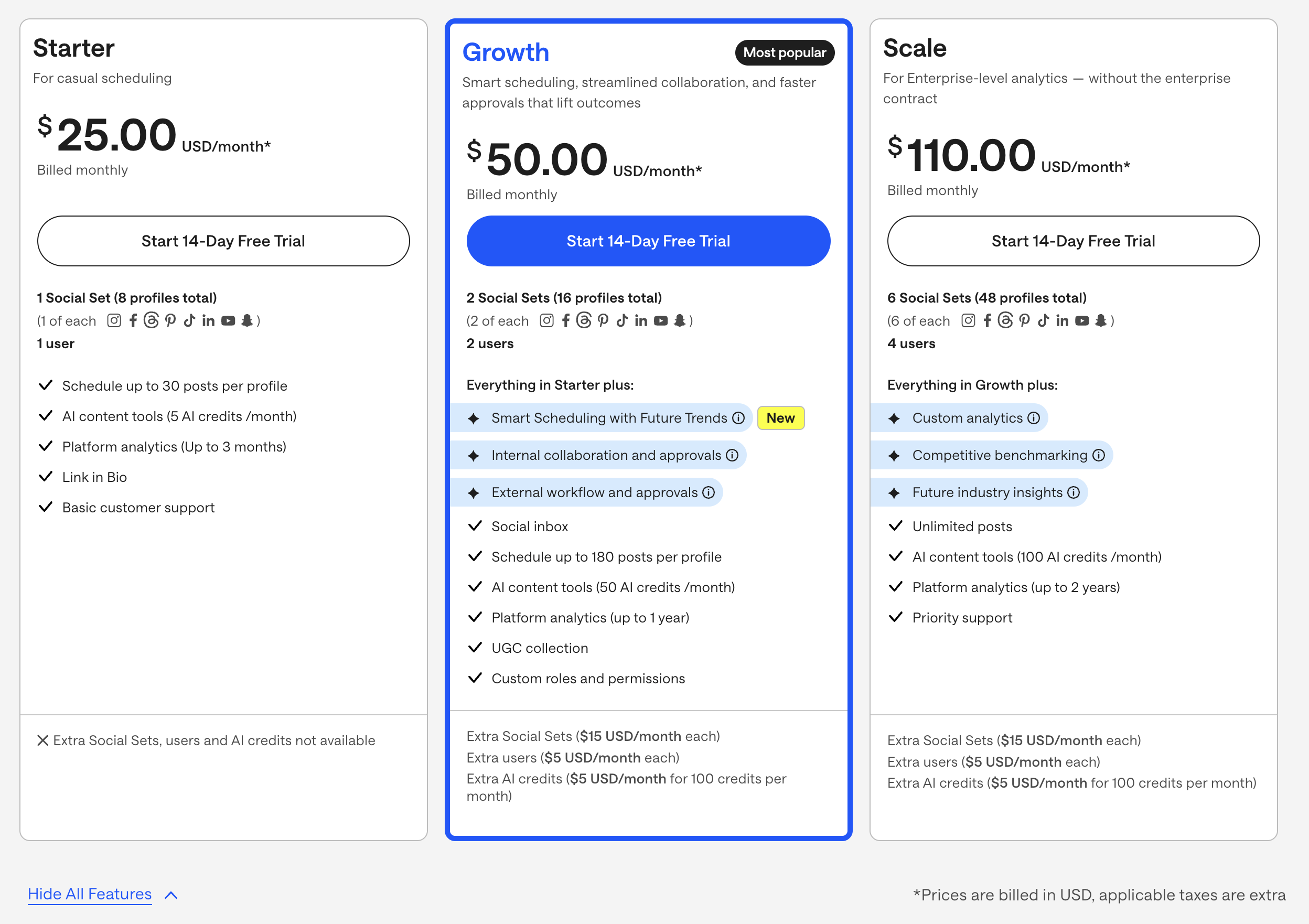
Source: Later Official Pricing Page
Later Social Media Scheduling Pricing Plans
Here's a detailed breakdown to help you understand Later's pricing and choose the best fit for your workflow.
Each paid Later plan includes core social media management features like:
- Social sets that bundle profiles from multiple platforms
- Post scheduling and a visual content calendar
- AI content tools with monthly AI credits
- Platform analytics with different lookback windows
- Link in Bio page
- Access for a set number of users
- Customer support
The main differences between plans come down to the number of social sets, users, posting limits, analytics depth, AI credits, and access to advanced analytics and benchmarking.
1. Starter Plan
The Starter plan costs $25.00 USD/month*, billed monthly.
What's included:
- 1 Social Set (8 profiles total)
(1 of each supported platform in the set) - 1 user
Features:
- Schedule up to 30 posts per profile
- AI content tools (5 AI credits /month)
- Platform analytics (up to 3 months)
- Link in Bio
- Basic customer support
Extra add-ons are not available on this plan (no extra Social Sets, users, or AI credits).
Best for: solo creators who post occasionally and want a simple way to schedule content and use basic AI tools.
2. Growth Plan
The Growth plan costs $50.00 USD/month*, billed monthly.
This plan is marked as the Most popular.
What's included:
- 2 Social Sets (16 profiles total)
(2 of each supported platform in the set) - 2 users
Everything in Starter, plus:
- Smart Scheduling with Future Trends (New)
- Internal collaboration and approvals
- External workflow and approvals
Additional features:
- Social inbox
- Schedule up to 180 posts per profile
- AI content tools (50 AI credits /month)
- Platform analytics (up to 1 year)
- UGC collection
- Custom roles and permissions
Add-ons:
- Extra Social Sets ($15 USD/month each)
- Extra users ($5 USD/month each)
- Extra AI credits ($5 USD/month for 100 credits per month)
Best for: growing brands and small teams that need more posts, more profiles, a social inbox, and better collaboration.
3. Scale Plan
The Scale plan costs $110.00 USD/month*, billed monthly.
What's included:
- 6 Social Sets (48 profiles total)
(6 of each supported platform in the set) - 4 users
Everything in Growth, plus:
- Custom analytics
- Competitive benchmarking
- Future industry insights
Additional features:
- Unlimited posts
- AI content tools (100 AI credits /month)
- Platform analytics (up to 2 years)
- Priority support
Add-ons:
- Extra Social Sets ($15 USD/month each)
- Extra users ($5 USD/month each)
- Extra AI credits ($5 USD/month for 100 credits per month)
Best for: teams and agencies that manage many profiles, need deeper analytics and benchmarking, and want higher limits with priority support.
*Prices are billed in USD, applicable taxes are extra.
Later Plans Compared Side by Side
| Feature | Starter ($25/mo) | Growth ($50/mo) | Scale ($110/mo) |
|---|---|---|---|
| Social Sets | 1 (8 profiles) | 2 (16 profiles) | 6 (48 profiles) |
| Users | 1 | 2 | 4 |
| Posts per profile | 30 | 180 | Unlimited |
| AI credits/month | 5 | 50 | 100 |
| Analytics lookback | 3 months | 1 year | 2 years |
| Link in Bio | Yes | Yes | Yes |
| Social inbox | No | Yes | Yes |
| Smart Scheduling with Future Trends | No | Yes | Yes |
| Collaboration & approvals | No | Yes | Yes |
| UGC collection | No | Yes | Yes |
| Custom roles & permissions | No | Yes | Yes |
| Custom analytics | No | No | Yes |
| Competitive benchmarking | No | No | Yes |
| Future industry insights | No | No | Yes |
| Priority support | No | No | Yes |
| Add-ons available | No | Yes | Yes |
Later Add-on Pricing
Later's Growth and Scale plans allow you to purchase add-ons to extend your limits. The Starter plan does not support any add-ons.
| Add-on | Price | Available On |
|---|---|---|
| Extra Social Set | $15/mo each | Growth, Scale |
| Extra user | $5/mo each | Growth, Scale |
| Extra AI credits | $5/mo per 100 credits | Growth, Scale |
These add-on costs are important to factor in. For example, if you're on the Growth plan ($50/mo) and need 2 extra Social Sets and 2 extra users, your actual monthly cost becomes $90/mo, close to the Scale plan's $110/mo. At that point, upgrading to Scale may be more cost-effective.
Later Annual vs Monthly Pricing
Later offers an annual billing option that saves approximately 17% compared to monthly billing. If you're confident Later is the right fit, annual billing reduces your effective monthly cost:
| Plan | Monthly Billing | Annual Billing (est.) | Annual Savings |
|---|---|---|---|
| Starter | $25/mo | ~$21/mo | ~$48/year |
| Growth | $50/mo | ~$42/mo | ~$96/year |
| Scale | $110/mo | ~$91/mo | ~$228/year |
Annual prices are estimates based on the 17% discount. Check Later's pricing page for exact annual rates.
Which Later Plan Should You Choose?
Choosing the right Later plan depends on how many platforms you manage, how often you post, and whether you need collaboration features.
Choose Starter ($25/mo) if:
- You're a solo creator managing one brand
- You post 30 times or fewer per profile per month
- You don't need a social inbox, approvals, or team collaboration
- You want basic scheduling with a Link in Bio page
Choose Growth ($50/mo) if:
- You manage 2 brands or need profiles across more platforms
- You post frequently (up to 180 posts per profile)
- You need a social inbox to manage comments and DMs
- You work with a collaborator and need approval workflows
- You want deeper analytics with up to 1 year of data
Choose Scale ($110/mo) if:
- You're an agency or team managing 6+ brands
- You need unlimited posts with no caps
- You want competitive benchmarking and custom analytics
- You need 2 years of analytics data for reporting
- You need priority support for faster issue resolution
Consider an alternative if:
- You need more than 6 social sets or 4 users without paying for add-ons
- You manage platforms Later doesn't support well
- You want predictable per-client pricing without per-set or per-user add-on fees
- You need white-label reporting or advanced team roles
Is Later Pricing Worth It?
If you look at Later's pricing plans, you'll see clear options for solo creators (Starter), growing teams (Growth), and agencies or larger teams (Scale). On paper, the structure is straightforward and ties pricing to the number of social sets, users, and analytics depth.
However, when you read user reviews and comparisons online, a few common themes appear.
Many users highlight that Later's add-ons can quickly increase the monthly bill. Extra Social Sets, additional users, and extra AI credits are all charged separately. This means that once you start managing multiple brands or need more collaboration, the cost climbs beyond the base plan price.
Others point out that while Later is intuitive and visual, it focuses mainly on scheduling and content planning. Teams that need advanced automation, deeper multi-platform analytics, or sophisticated approval workflows sometimes find Later limiting compared to more robust social media management tools.
In other words, Later is a solid option for visual planning and straightforward scheduling, but there are social media scheduling platforms that offer more predictable pricing and stronger workflows for agencies and fast-growing teams - often at a similar or lower total cost once add-ons are considered.
Compare Later Pricing with Competitors
See how Later stacks up in head-to-head comparisons:
- Buffer vs Later
- Hootsuite vs Later
- Sprout Social vs Later
- Later vs Metricool
- Later vs SocialBee
- Later vs Sendible
- Later vs Loomly
- Later vs SocialPilot
- Later vs Publer
- Later vs Tailwind
- Later vs Agorapulse
- Later vs CoSchedule
- Later vs Planable
- Later vs Iconosquare
- Later vs Vista Social
- Later vs Zoho Social
Browse all comparisons on our comparison hub.
Pros and Cons of Later
Pros of Later:
-
Visual, beginner-friendly interface:
Later's scheduling calendar and media library are designed to be visual and easy to use, which is helpful for creators and small teams. -
Flexible Social Set structure:
Social Sets let you manage multiple profiles in bundles, making it easier to keep different brands or channels organized. -
Built-in Link in Bio:
Every plan includes a Link in Bio page, helping you drive traffic from Instagram and TikTok to websites, shops, or landing pages. -
AI content tools with credits:
Later includes AI tools for content generation, giving you a set number of AI credits each month on paid plans. -
Scale plan with deeper analytics and benchmarking:
The Scale plan offers custom analytics, competitive benchmarking, and future industry insights, along with longer analytics windows.
Cons of Later:
-
Add-ons make scaling more expensive:
Extra Social Sets, additional users, and extra AI credits all cost extra each month, which can add up quickly as your team or client list grows. -
Starter plan has tight limits:
The Starter plan is limited to one Social Set, one user, 30 posts per profile, and only 5 AI credits per month, which is fine for occasional posting but restrictive once you become more active. -
Growth and Scale can be pricey for small teams:
At $50 and $110 per month respectively, Later's higher plans are a significant investment for smaller teams, especially when you factor in add-ons. -
Focused more on scheduling than advanced automation:
Later is strong at scheduling and planning, but lacks some of the more advanced automation and workflow features available in more comprehensive tools. -
No plan tailored specifically for large agencies:
Scale increases limits and analytics, but agencies managing many brands may still find the Social Set and add-on model less flexible than alternatives.
The Better Later Alternative for Agencies
Later prices by social set, caps posts per profile and charges for extra seats. For an agency running social media for local business clients, all three limits bite at once: a new restaurant client is another social set, their approver is another user, and a busy month can hit the post cap.
PostPlanify is built for agencies serving local businesses. Each client gets their own workspace, posts are unlimited, and team members and client approvers are never billed.

Pricing starts at $39/month for your first client workspace, or $31/month billed yearly, and the per-workspace rate drops as you add clients:
| Client workspaces | Growth | Premium | Scale |
|---|---|---|---|
| 1 | $39/mo | $99/mo | $199/mo |
| 3 | $97/mo | $99/mo | $199/mo |
| 5 | $155/mo | $177/mo | $199/mo |
| 10 | $250/mo | $322/mo | $394/mo |
| Social accounts per workspace | 4 | 6 | 8 |
Every plan includes unlimited team members and unlimited posts. Here is what each adds:
- Growth ($39/mo first workspace): unlimited users and posts, analytics across all 10 platforms including X, social inbox, approval workflows, shared calendar, roles and permissions, bulk scheduling, media library with Canva and Google Drive, and link in bio
- Premium ($99/mo first workspace): everything in Growth, plus advanced analytics, branded client reports, scheduled report delivery, team comments and mentions, AI brand voice, AI knowledge base, and full API and MCP access
- Scale ($199/mo first workspace): everything in Premium, plus a white-label dashboard, white-label client emails and reports, dedicated 1:1 onboarding, migration help and priority human support
Later vs PostPlanify: Side-by-Side Comparison
| Feature | Later (Growth) | PostPlanify (Growth) |
|---|---|---|
| Price | $50/mo | $39/mo first workspace, $97/mo for 3 |
| Billing unit | Social sets | Client workspaces |
| Included capacity | 2 social sets, 16 profiles | 4 accounts per workspace |
| Post limit | 180 per profile per month | Unlimited |
| Team members | 2 included, $5/mo each after | Unlimited on every plan |
| Client approvers | Counted as users | Free, never billed as seats |
| Extra capacity | $15/mo per social set | Next workspace costs less than the last |
| Platforms supported | 8, no X | 10, including X |
| Approval workflows | Advanced plan only | Included from Growth |
| Analytics | 1-year history | Full, all 10 platforms |
| Social inbox | Growth and above | Instagram, Facebook, LinkedIn, Google Business, YouTube |
| AI captions | 30 credits/mo, $5 per 100 after | Included |
| Canva and Google Drive | No | Yes |
| White-label reports | No | Scale |
| Mobile app | Yes | Coming soon |
Being straight about it: Later is cheaper to start. At one or two brands with light posting, $50/mo is hard to beat, and PostPlanify does not try to. The gap closes as soon as you grow. Add three social sets and two users to Later's Growth plan and you are at $95/mo against a 180-post ceiling and no approval workflow, while five client workspaces on PostPlanify is $155/mo with 20 accounts, unlimited posts, unlimited seats and approvals included.
All plans include a 7-day free trial backed by a 14-day money-back guarantee.

Related Guides
- Later Reviews from Real Users
- Best Later Alternatives in 2026
- PostPlanify vs Later
- Instagram Post Scheduler Tools Worth Trying
- Social Media Scheduling Tools Compared
- Best Social Media Management Platform in 2026
- How to Create a Social Media Content Calendar
- Best Free Social Media Management Tools
- Best Social Media Tools for Creators
- Social Media Tools With No Per-Seat Fees
FAQ on Later Pricing
Is Later free?
Later offers a limited free plan that includes basic scheduling and a Link in Bio page. However, the free plan is heavily restricted: to access AI tools, social inbox, analytics beyond 3 months, and collaboration features, you'll need a paid plan starting at $25/mo.
Does Later offer a free trial?
Yes. Later provides a 14-day free trial on all paid plans (Starter, Growth, and Scale), so you can test scheduling, analytics, AI content tools, and collaboration features before committing.
How much does Later cost per month?
Later's paid plans cost $25/mo (Starter), $50/mo (Growth), and $110/mo (Scale) when billed monthly. Annual billing saves approximately 17%. Add-ons for extra Social Sets ($15/mo each), users ($5/mo each), and AI credits ($5/mo per 100) can increase the total cost on Growth and Scale plans.
Is Later worth it for small businesses?
Later is a good fit for small businesses that focus on visual platforms like Instagram and TikTok and need straightforward scheduling with a Link in Bio. However, if you manage more than 2 brands or need features like white-label reports, advanced team roles, or more than 8 platforms, you may outgrow Later quickly. The add-on costs can also make Later more expensive than alternatives that include these features in their base price.
Does Later support TikTok?
Yes. Later supports TikTok scheduling as part of its Social Set structure. Each social set includes one TikTok profile along with profiles on other supported platforms. Later also supports Instagram, Facebook, Pinterest, LinkedIn, YouTube, Threads, and Snapchat. It does not support X/Twitter.
What happens after the Later free trial ends?
After the 14-day free trial ends, you'll be billed for the plan you selected unless you cancel before the trial period is over. Later does not automatically downgrade you to the free plan, so you will be charged the full monthly or annual rate for the plan you chose.
Is Later cheaper than Hootsuite?
Yes, significantly. Later's most expensive plan (Scale) costs $110/mo, while Hootsuite's Standard plan starts at $249/user/mo. However, Later has tighter limits on social sets and users, and add-ons can increase the cost. For a detailed breakdown, see Hootsuite vs Later.
Can I cancel Later anytime?
Yes. Later allows cancellation at any time. If you're on a monthly plan, your access continues until the end of your current billing cycle. If you're on an annual plan, you will not receive a prorated refund for the remaining months. Check Later's terms for the latest cancellation policy.










