
Finding the right social media scheduler starts with looking at honest user experiences. In this article, we break down Later reviews to understand how it performs for creators and brands in real-world use cases.
If you're evaluating Later or exploring alternatives, this review overview will guide your decision.
Later Overview
Later is a visual-first social media tool built originally for Instagram. It offers a strong media library, drag-and-drop content calendar, and basic scheduling tools across multiple platforms.

Popular features include:
- Visual planner and media calendar
- Drag-and-drop scheduling
- Link-in-bio landing pages
- User-generated content tools
- Basic analytics
- TikTok, IG, X, Pinterest, Facebook support
Later is especially favored by visual creators, but reviews reveal important details about limitations, posting flexibility, and pricing.
User Reviews and Ratings
On G2
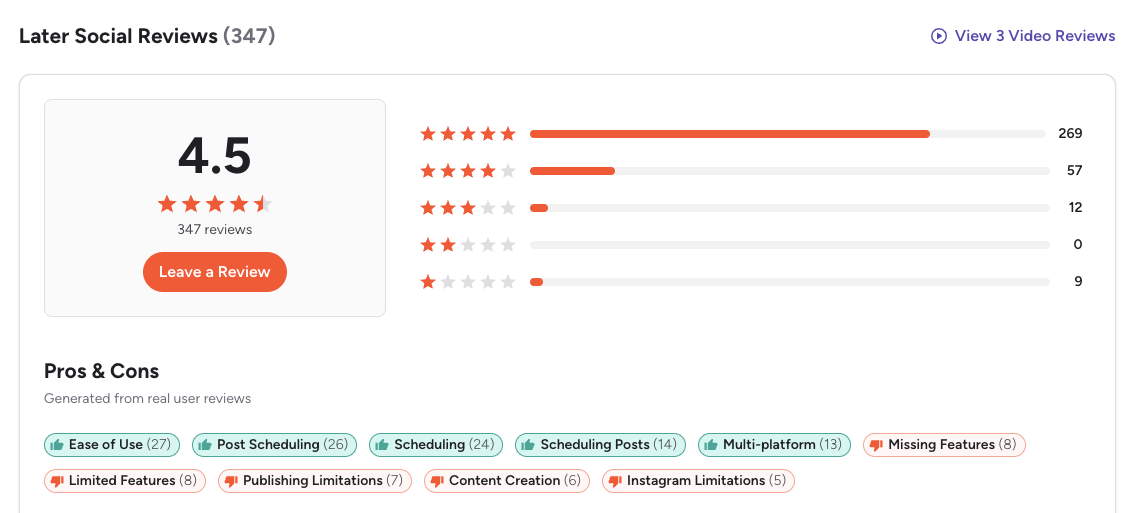
A closer look at the reviews on G2 shows that Later holds a strong rating of 4.5 out of 5, based on 347 reviews. Many users praise the platform for its ease of use, simple scheduling tools, and helpful image management features.
Reviewers highlight that Later makes scheduling across platforms easy and that tagging and organizing media files is convenient. However, several users also mention limitations in analytics and missing features, especially on lower-tier plans.
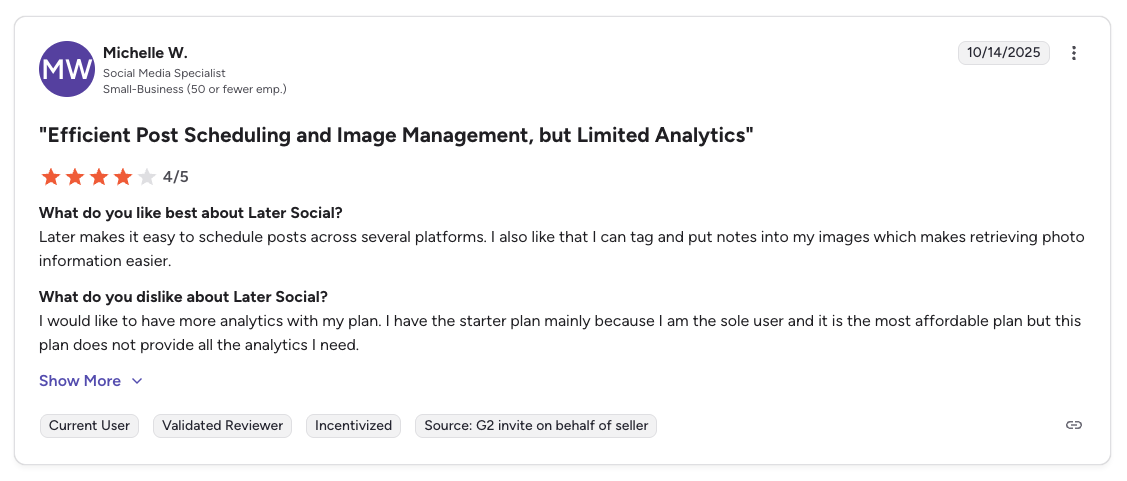
A featured review gives Later 4/5, noting that while scheduling and image organization work efficiently, the analytics included in the starter plan are not sufficient for deeper insights.
Rating: 4.5/5 (347 reviews)
Pros
- Easy to use
- Smooth post scheduling
- Helpful image management
- Good multi-platform support
Cons
- Limited analytics
- Missing features on lower-priced plans
- Some publishing limitations
- Instagram-specific limitations reported by users
(credit: G2)
On Trustpilot
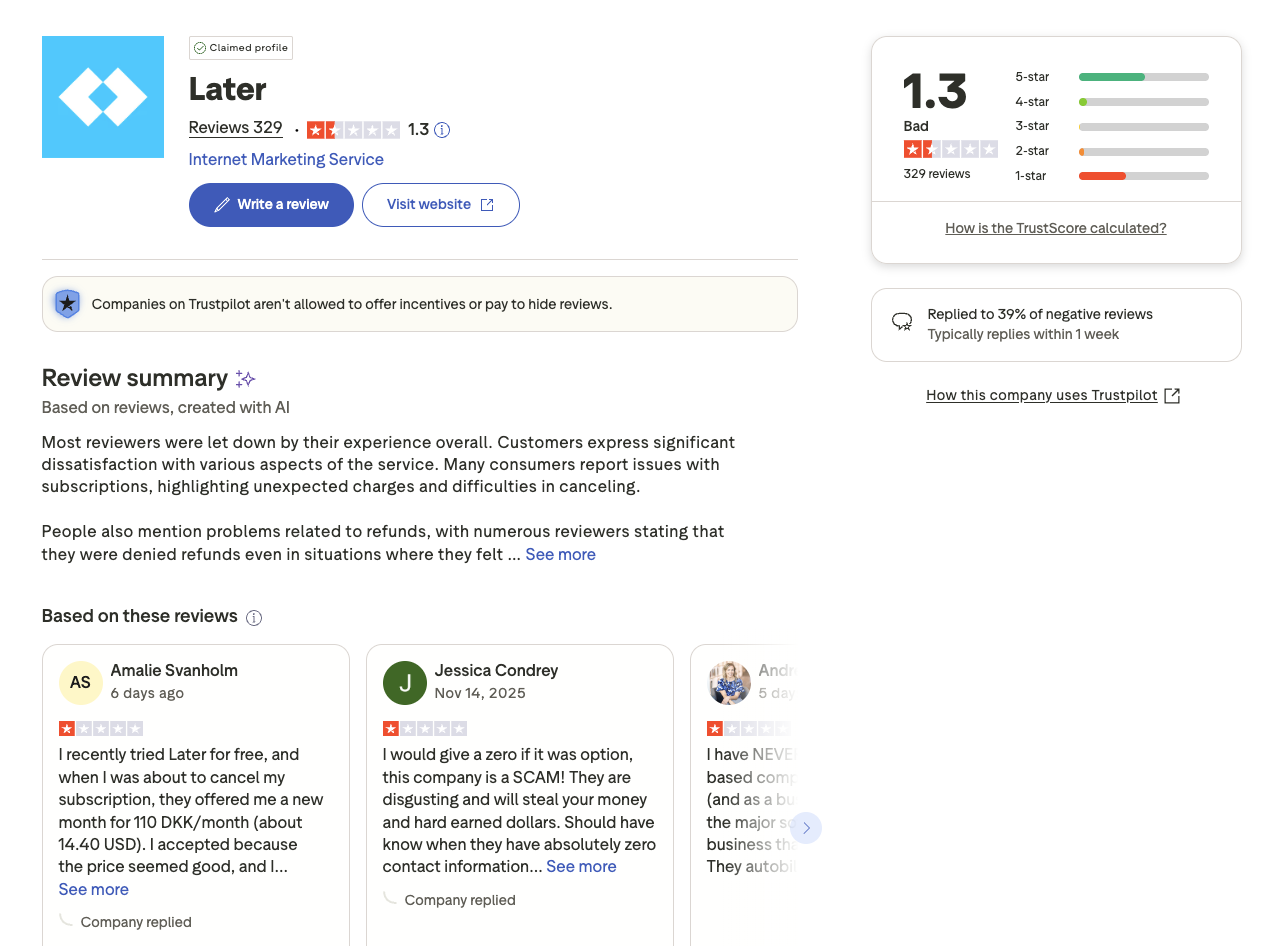
On Trustpilot, Later shows a significantly lower rating of 1.3 out of 5, based on 329 reviews. Many reviewers express dissatisfaction with billing issues, unexpected subscription charges, and difficulties canceling accounts. Several users report being denied refunds even in situations where they believed they were eligible.
The review summary mentions widespread complaints about customer service responsiveness, refund processes, and subscription renewals.
Rating: 1.3/5 (329 reviews)
Pros
- Some users found the initial setup easy
- Basic scheduling was helpful for new users
Cons
- Unexpected billing or renewal charges
- Difficult cancellation process
- Refund issues repeatedly mentioned
- Negative experiences with customer support
(credit: Trustpilot)
What Reddit Users Say About Later
Later appears regularly in Reddit discussions across r/socialmedia, r/InstagramMarketing, r/marketing, and r/smallbusiness. As a tool originally built for Instagram, it attracts a specific user base, and the community sentiment reflects that focus.
- Instagram-first users are the most positive. Reddit users who primarily manage Instagram accounts frequently recommend Later for its visual content calendar, drag-and-drop scheduling, and Linkin.bio feature. The ability to preview an Instagram grid before publishing is cited as a standout feature that competitors lack.
- Pricing frustration has intensified in recent years. Multiple Reddit threads describe Later's pricing as initially attractive but deceptive in practice. Users report that the base plan appears affordable, but post limits, extra social sets, additional user seats, and add-on features push the real cost well above the advertised starting price. Several users describe feeling "nickel-and-dimed" as their needs grow.
- The removal of Twitter/X features generated significant backlash. In 2025, Later removed Twitter/X scheduling and analytics from the platform. Reddit users who had paid for annual plans that included these features expressed frustration, describing it as losing access to services they had already paid for without adequate notice or compensation.
- Team collaboration is seen as a weakness. Discussions in r/marketing and r/socialmedia frequently note that Later lacks robust team collaboration tools. Agency owners and marketing managers describe it as a solo-creator tool that does not scale well when multiple people need to contribute, review, or approve content.
- Mobile app feedback is mixed. Some Reddit users praise the mobile experience for quick scheduling on the go. Others describe the interface as cluttered on desktop, with small icons and buttons that make managing carousels and multi-image posts tedious.
Feature-by-Feature User Feedback
Drawing from G2, Trustpilot, Capterra, and community discussions, here is how Later performs across key feature categories:
- Scheduling Reliability: Later's scheduling generally works well for standard Instagram posts. However, users report issues with more complex content types: Stories, Reels, and carousel posts can freeze, fail, or lose formatting during the publishing process. Some users also note that social media platform connections expire frequently, requiring manual reconnection before scheduled posts will publish.
- Analytics & Reporting: Analytics is available on paid plans but is described as basic by most reviewers. Users on the starter plan find the analytics insufficient for any meaningful performance tracking. Even on higher tiers, the reporting lacks the depth needed for client-facing presentations or cross-platform comparison. The best-time-to-post suggestion feature, however, receives consistently positive feedback for its accuracy.
- Pricing & Value: Later's pricing is one of the most contentious topics in its reviews. The entry-level plan looks competitive on paper, but users frequently discover that essential features, additional social sets, team members, and advanced analytics, require expensive upgrades. Several Trustpilot reviewers describe being auto-enrolled into the most expensive plan after trial periods without explicitly selecting it. Costs can easily exceed $100/month for features that competitors include at lower price points.
- Customer Support: Customer support is Later's lowest-rated category across all platforms. Trustpilot reviews consistently describe slow or nonexistent responses to billing disputes, refund requests, and technical issues. Some users report waiting weeks for a reply. G2 reviews are somewhat more positive, but even satisfied users rarely cite support as a strength.
- Ease of Use: The visual-first interface earns consistent praise from users who primarily manage Instagram and Pinterest content. The drag-and-drop calendar and media library are intuitive for visual workflows. However, the desktop interface has drawn criticism for feeling cluttered, particularly when managing content across multiple platforms simultaneously.
Review Authenticity
The gap between Later's 4.5 G2 rating and its 1.3 Trustpilot score is among the widest in the social media management category, and understanding why is important for prospective users.
- Why the ratings diverge. G2 reviewers tend to be active users who evaluate Later based on its scheduling and visual planning capabilities, areas where the tool genuinely excels. These users are typically Instagram-focused creators or small marketing teams who use Later within its strengths. Trustpilot reviewers, by contrast, skew toward users who encountered billing issues, cancellation difficulties, or unexpected charges. Many Trustpilot reviews come from users who signed up for a trial and had a negative financial experience, sometimes without deeply using the product's core features.
- What the review volume means. Later's 347 G2 reviews represent a moderate sample size, enough to identify consistent patterns but smaller than established competitors like Hootsuite (6,600+) or Sprout Social (5,700+). The 329 Trustpilot reviews are nearly equal in volume, and the fact that this many users felt compelled to leave negative feedback on a consumer review site is a significant signal. With over 80% of Trustpilot reviews at 1 star, billing and cancellation issues are clearly systemic.
- Rating trends and notable events. Later's Trustpilot rating has declined noticeably since 2024, driven by two key events: pricing restructures that increased costs while restricting features on lower tiers, and the removal of Twitter/X scheduling in 2025 that affected users mid-subscription. Negative review volume spiked around both events, with users describing these changes as breaking their trust in the platform.
- Patterns in negative reviews. The overwhelming majority of Trustpilot complaints focus on three areas: unexpected charges after trial periods or renewals, difficulty canceling subscriptions, and denied refund requests, even in cases where users report being charged for features that were subsequently removed. Product functionality complaints are secondary, appearing more often on G2 and in community forums.
Who Later Works Best For (Based on Reviews)
Users who are happiest with Later:
- Solo Instagram creators and influencers who need a visual content calendar with grid preview and drag-and-drop scheduling
- Small brands focused primarily on Instagram and Pinterest that benefit from the Linkin.bio feature and visual-first workflow
- Users who value the best-time-to-post suggestions and want a simple, visual way to plan their content calendar
- Content creators who manage one or two social profiles and do not need team collaboration or advanced reporting
Users who should consider alternatives:
- Agencies and teams that require collaboration features, approval workflows, or multi-user access without steep per-seat costs
- Businesses managing content across many platforms (especially those that rely on Twitter/X) who need a tool with broad, stable platform coverage
- Users who prioritize responsive customer support and transparent billing practices, particularly for subscription management and refunds
- Marketing professionals who need detailed analytics, cross-platform reporting, or client-facing performance dashboards
Compare Later with Other Tools
See how Later stacks up in head-to-head comparisons: Buffer vs Later, Hootsuite vs Later, Later vs Metricool, Sprout Social vs Later, and Later vs Publer. Browse all comparisons on our comparison hub.
Before choosing a social media scheduler...
Consider the following tips:
- Check multiple review platforms to ensure consistent user feedback.
- Look at the timing of reviews, since sudden bursts of positive reviews can be a red flag.
- Research what people are saying on forums like Reddit for more unbiased opinions.
- Ask fellow business owners about their experiences with the service.
Ultimately, the best scheduler is the one that will give your social team a massive leg up and make the whole posting process a lot easier.
Later is a good option for social media scheduling, but you can definitely find a better social media scheduler at the same price range. For a full breakdown of what each tier costs, see our Later pricing guide.
The themes above trace back to one design choice: Later is built around social sets and per-profile limits, not around clients. That works for a creator with one brand. It works against an agency the moment a second local business signs.
PostPlanify is built for agencies serving local businesses. Each client gets their own workspace with its own calendar, approvals, inbox and reporting, posts are unlimited, and team members and client approvers are never billed as seats.

Pricing starts at $39/month for your first client workspace, or $31/month billed yearly, and the per-workspace rate falls as you add clients:
| Client workspaces | Growth | Premium | Scale |
|---|---|---|---|
| 1 | $39/mo | $99/mo | $199/mo |
| 3 | $97/mo | $99/mo | $199/mo |
| 5 | $155/mo | $177/mo | $199/mo |
| 10 | $250/mo | $322/mo | $394/mo |
| Social accounts per workspace | 4 | 6 | 8 |
Each plan answers a different complaint from the reviews above:
- Growth ($39/mo first workspace) removes the limits people run into: unlimited posts and unlimited users, analytics across all 10 platforms including X, a social inbox spanning Instagram, Facebook, LinkedIn, Google Business and YouTube, approval workflows from the entry plan, shared calendar, roles and permissions, bulk scheduling and a media library.
- Premium ($99/mo first workspace) answers the reporting gap: advanced analytics, branded client reports that schedule themselves, team comments and mentions, AI brand voice and knowledge base, plus full API and MCP access.
- Scale ($199/mo first workspace) puts the platform under your agency's brand with a white-label dashboard, white-label client emails and reports, dedicated onboarding, migration help and priority human support.
To be fair to Later: at one brand with light posting it is the cheaper option, and PostPlanify does not pretend otherwise. The difference shows at agency scale. Later's Growth plan is $50/mo for two social sets, two users and 180 posts per profile, with $15 per extra set and $5 per extra user on top. Five client workspaces on PostPlanify is $155/mo with 20 accounts, unlimited posts, unlimited seats and approvals included.
Start your 7-day free trial today.










