
Buffer or Metricool — which is the right social media management tool for you? Buffer focuses on simple scheduling and clean UX, while Metricool leans into analytics, competitor tracking, and reporting. Both are popular among creators and small teams — but for different reasons. This Buffer vs Metricool 2026 comparison breaks down the differences so you can pick the best fit for your workflow.
We compared current published pricing, tested both platforms, and analyzed 1,700+ user reviews across G2 and Trustpilot to give you an unbiased breakdown.
What actually matters when choosing between these two? Cost at your scale, the depth of analytics you need, and whether you want simplicity or data-driven insights. We cover all of that below with real pricing tables and verified user reviews. Still shopping around? Browse all social media scheduling alternatives.
Buffer vs Metricool at a Glance
Here's a quick side-by-side overview before we dive deeper:
| Category | Buffer | Metricool |
|---|---|---|
| Starting Price | $6/mo per channel | $0/mo (free plan) |
| Free Plan | Yes (3 channels, 10 posts each) | Yes (1 brand, 50 posts/mo) |
| Platforms Supported | 11 | 9+ |
| Unlimited Scheduling | Yes (paid plans) | Yes (Starter+, Fair Use) |
| AI Tools | AI Assistant (captions) | AI social media assistant |
| AI Image Generation | No | No |
| Competitor Analysis | No | Yes (5-100 competitors) |
| Team Collaboration | Team plan ($12/mo/channel) | Advanced plan ($54/mo) |
| Approval Workflows | Team plan only | Advanced plan only |
| Analytics | Basic to Advanced | 3 months to Unlimited history |
| Canva Integration | No | Yes (Starter+) |
| G2 Rating | 4.3/5 (1,023 reviews) | 4.5/5 (83 reviews) |
| Trustpilot Rating | 2.1/5 (93 reviews) | 4.2/5 (519 reviews) |
| Best For | Creators who want simple scheduling | Analytics-driven teams and agencies |
Buffer Overview

Buffer is one of the oldest social media scheduling tools, launched in 2010. It focuses on simplicity — a clean interface for scheduling posts, managing a basic content calendar, and viewing analytics.
Buffer supports 11 platforms: Instagram, Facebook, LinkedIn, Pinterest, X/Twitter, TikTok, YouTube, Google Business Profile, Threads, Bluesky, and Mastodon.
Key features:
- Post scheduling with queue management
- AI Assistant for generating captions and post ideas
- Hashtag manager and first comment scheduling
- Basic community inbox
- Start Page (link-in-bio builder)
- Content calendar
Buffer is popular among solo creators and freelancers who want a no-frills scheduling experience across many platforms. For a deeper look, see what users say about Buffer on G2 and Trustpilot.
Metricool Overview
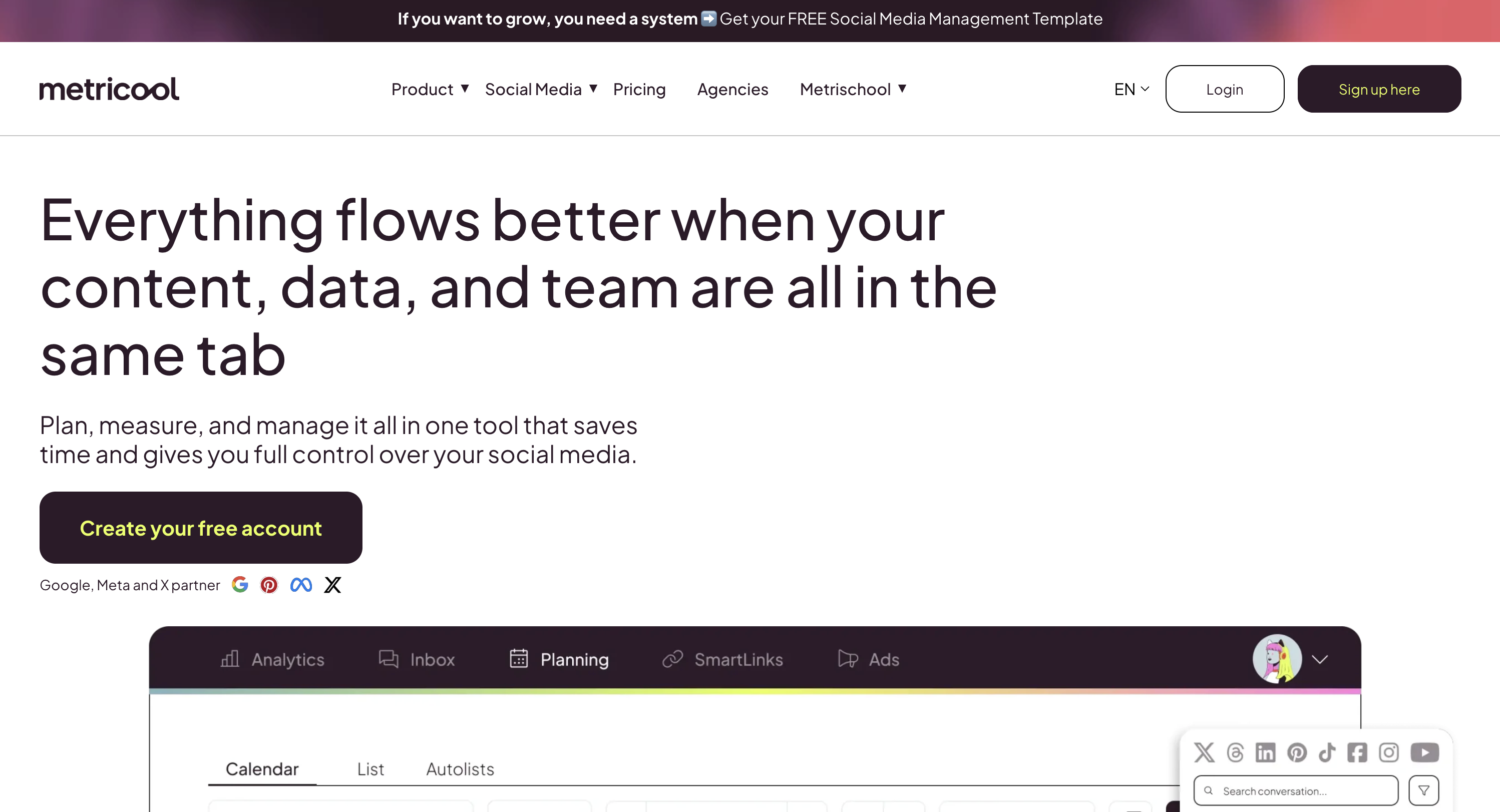
Metricool is a social media analytics and scheduling platform built around data. It combines publishing tools with deep competitor analysis, reporting, and a link-in-bio builder — making it a strong choice for data-driven teams and agencies.
Metricool supports 9+ platforms: Instagram, Facebook, LinkedIn, X/Twitter, TikTok, YouTube, Pinterest, Threads, Google Business Profile, and Twitch.
Key features:
- Competitor analysis (5-100 profiles)
- Customizable PDF and PPT reports
- AI social media assistant
- Link-in-bio builder (multiple profiles)
- Google Drive and Canva integration
- Unlimited analytics history (Starter+)
- Looker Studio connector and API (Advanced)
Metricool targets agencies and analytics-focused teams that need to manage multiple social media accounts, deep reporting, competitor tracking, and brand-based pricing. Read real user reviews of Metricool from G2 and Trustpilot.
Pricing Comparison
Buffer and Metricool use completely different pricing models — Buffer charges per channel, Metricool charges per brand.
Buffer Pricing
Buffer uses per-channel pricing. Each social account you connect adds to your monthly cost. We break this down further in our Buffer pricing guide.
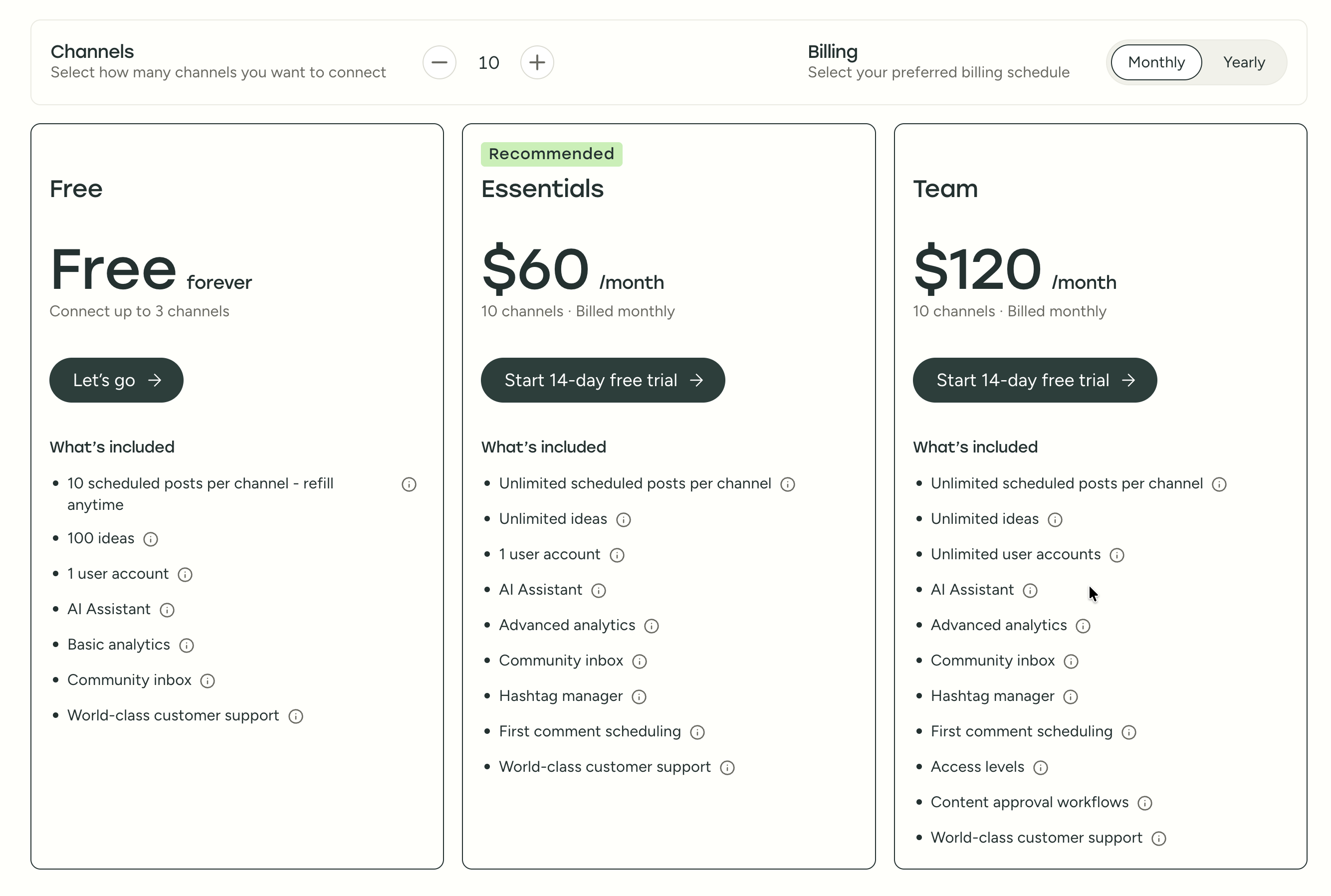
| Plan | Price | Channels | Users | Key Features |
|---|---|---|---|---|
| Free | $0/mo | 3 | 1 | 10 posts/channel, basic analytics |
| Essentials | $6/mo per channel | Unlimited | 1 | Unlimited posts, advanced analytics, hashtag manager |
| Team | $12/mo per channel | Unlimited | Unlimited | Approval workflows, permissions, team collaboration |
Example costs:
- 5 channels on Essentials = $30/month
- 10 channels on Team = $120/month
Metricool Pricing
Metricool uses per-brand pricing that scales with the number of brands you manage. See the full Metricool pricing breakdown for details.

| Plan | Price | Brands | Key Features |
|---|---|---|---|
| Free | $0/mo | 1 | 50 posts/mo, 5 competitors, 3-month analytics |
| Starter | From $22/mo | Up to 10 | Unlimited posts, 100 competitors, PDF/PPT reports, Canva |
| Advanced | From $54/mo | Up to 50 | Team management, approvals, API, Looker Studio |
| Custom | Custom | Unlimited | White label, dedicated manager |
Example costs:
- 5 brands on Starter = $22/month
- 10 brands on Starter = $38/month
- 15 brands on Advanced = $54/month
- 50 brands on Advanced = $172/month
What You'll Actually Pay: Real-World Scenarios
Buffer charges per channel, Metricool charges per brand — but a "brand" on Metricool can include multiple social accounts for one client. Here's how real costs compare:
Solo creator managing 5 social accounts (1 brand):
- Buffer Essentials: 5 × $6 = $30/month
- Metricool Starter: $22/month (up to 5 brands, so 1 brand is well within limits)
- Metricool is cheaper here and includes competitor tracking and unlimited analytics history that Buffer doesn't offer.
Small agency managing 5 brands (15 total accounts) with approvals:
- Buffer Team: 15 × $12 = $180/month (unlimited users included)
- Metricool Advanced: $54/month (up to 15 brands, includes approvals and API access)
- Metricool is 3× cheaper and includes competitor analysis, PDF reports, and Looker Studio that Buffer doesn't have.
Large agency managing 25 brands (50+ accounts):
- Buffer Team: 50 × $12 = $600/month
- Metricool Advanced: $88/month (up to 25 brands)
- Metricool is 7× cheaper at this scale. However, both tools start straining at agency volume — Buffer lacks client management features, and Metricool's publishing is subject to Fair Use limits.
Price Verdict
Metricool is cheaper for multi-brand agencies thanks to its per-brand pricing model. Buffer is simpler for solo creators who only manage a few channels. Both offer generous free plans — a major advantage over enterprise tools like Hootsuite ($249/mo) and Sprout Social ($199/mo). The real decision isn't just price though — it's whether you need analytics depth (Metricool) or scheduling simplicity (Buffer).
 PostPlanify
Manage All Your Social Accounts Without the Chaos
Schedule posts, track performance, and collaborate with your team.


Feature Comparison
Scheduling & Publishing
| Feature | Buffer | Metricool |
|---|---|---|
| Unlimited scheduling | Yes (paid plans) | Yes (Starter+, Fair Use) |
| Post limits (free) | 10 posts/channel | 50 posts/month |
| Best time to post | No | No |
| First comment scheduling | Yes (Essentials+) | No |
| Content calendar | Yes | Yes |
| Bulk scheduling | CSV import | No |
| Draft saving | Yes | Yes |
Winner: Buffer — truly unlimited scheduling with no Fair Use restrictions, plus first comment scheduling and CSV bulk import. Metricool's Starter+ plans say "unlimited publishing," but this is subject to a Fair Use Policy, meaning very high-volume publishers could hit undisclosed limits. For most creators posting 1–5 times daily, this won't matter. But if you bulk-schedule hundreds of posts or run a high-volume agency, Buffer's unrestricted approach is more reliable. Buffer also offers first comment scheduling for Instagram hashtag strategies, which Metricool doesn't support.
AI Tools
| Feature | Buffer | Metricool |
|---|---|---|
| AI caption generation | Yes (AI Assistant) | Yes (AI assistant) |
| AI image generation | No | No |
| AI post ideas | Yes (unlimited on paid) | Yes |
Winner: Tie. Both include AI caption generation, and both do the job adequately. Buffer's AI Assistant is unlimited on paid plans — generate as many captions as you want. Metricool's AI assistant is available across plans including the free tier. Neither platform offers AI image generation, so if you need to create visuals from text prompts, you'll need a separate tool or a platform that includes it natively.
Analytics & Reporting
This is where Metricool pulls ahead significantly.
| Feature | Buffer | Metricool |
|---|---|---|
| Basic analytics | All plans | All plans |
| Analytics history | Limited | 3 months (free) to Unlimited |
| Competitor analysis | No | Yes (5-100 competitors) |
| Custom reports | No | Yes (Advanced) |
| PDF/PPT reports | No | Yes (Starter+) |
| Looker Studio connector | No | Yes (Advanced) |
| API access | No | Yes (Advanced) |
Winner: Metricool — and it's not close. This is Metricool's core strength. You can track up to 100 competitor profiles, access unlimited analytics history (Starter+), generate branded PDF and PPT reports for clients, connect to Looker Studio for custom dashboards, and pull data via API. Buffer's analytics cover post performance and basic engagement metrics, which is enough for creators who just want to know what's working — but for agencies that need to prove ROI, benchmark against competitors, or build client-facing reports, Metricool is in a different league.
Team Collaboration
| Feature | Buffer | Metricool |
|---|---|---|
| Multiple users | Team plan | Advanced plan |
| Approval workflows | Team plan | Advanced plan |
| Role management | Team plan | Advanced plan |
| Client management | No | Advanced plan |
Winner: Metricool for agencies — client management, role-based access, and post approval workflows on the Advanced plan ($54/month). Buffer covers the fundamentals (approvals, permissions, unlimited users) on the Team plan at $12/channel, which works for internal teams. But Metricool's Advanced plan adds client-facing features like dedicated brand dashboards and team role management that are designed for agency workflows with multiple clients.
Integrations & Creative Tools
| Feature | Buffer | Metricool |
|---|---|---|
| Canva integration | No | Yes (Starter+) |
| Google Drive import | No | Yes (Starter+) |
| Link in Bio | Yes (Start Page) | Yes (multiple profiles) |
| Looker Studio | No | Yes (Advanced) |
| API (Zapier, Make) | No | Yes (Advanced) |
Winner: Metricool — Canva integration lets you pull designs directly into the composer, Google Drive import keeps assets synced, Looker Studio connects your social data to custom dashboards, and API access (Zapier, Make) enables workflow automation. Buffer's integrations are limited to its Start Page link-in-bio builder. If your workflow depends on pulling in creative assets from external tools or feeding social data into broader analytics systems, Metricool has a clear advantage.
Platform Support
| Platform | Buffer | Metricool |
|---|---|---|
| Yes | Yes | |
| Yes | Yes | |
| X/Twitter | Yes | Yes (add-on on some plans) |
| Yes | Yes (Starter+) | |
| TikTok | Yes | Yes |
| YouTube | Yes | Yes |
| Yes | Yes | |
| Threads | Yes | Yes |
| Google Business | Yes | Yes |
| Bluesky | Yes | No |
| Mastodon | Yes | No |
| Twitch | No | Yes |
Winner: Buffer — supports 11 platforms vs Metricool's 9+. Buffer includes Bluesky and Mastodon, which Metricool doesn't support. However, Metricool uniquely includes Twitch analytics, which no other tool in this space covers. One important caveat: Metricool requires an add-on for X/Twitter on some plans, which can be a surprise cost. For the major platforms (Instagram, Facebook, TikTok, YouTube, LinkedIn, Pinterest, Threads), both tools have full support. Both also cover Google Business Profile.
What Real Users Say
Buffer Reviews
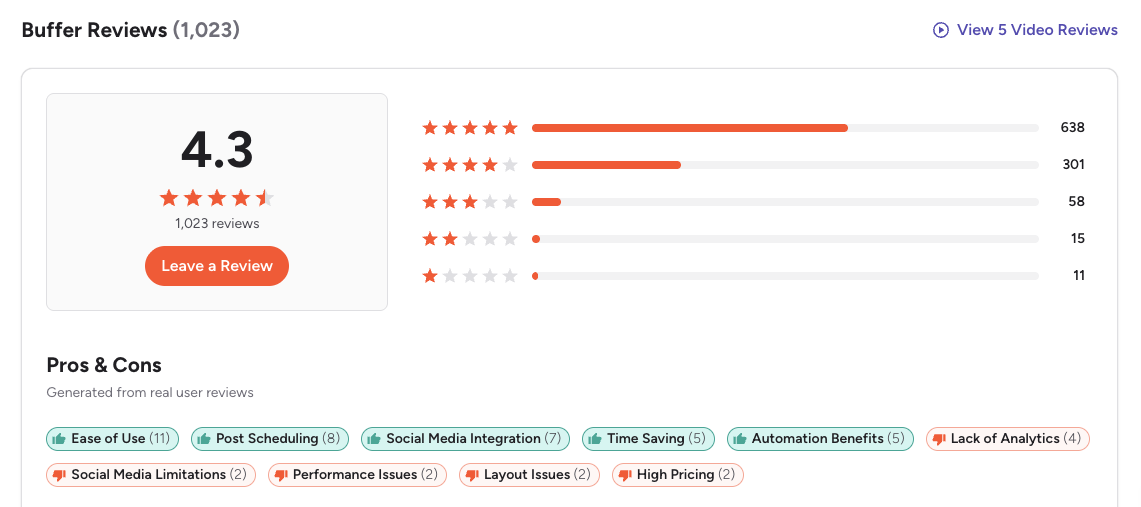
G2: 4.3/5 (1,023 reviews) — Users consistently praise Buffer for being the easiest scheduling tool to learn. The most common positive themes are the clean interface, simple queue-based workflow, and reliable publishing. On the negative side, G2 reviewers frequently mention that analytics feel basic compared to competitors, per-channel pricing adds up quickly for agencies, and the UI hasn't evolved much in recent years.
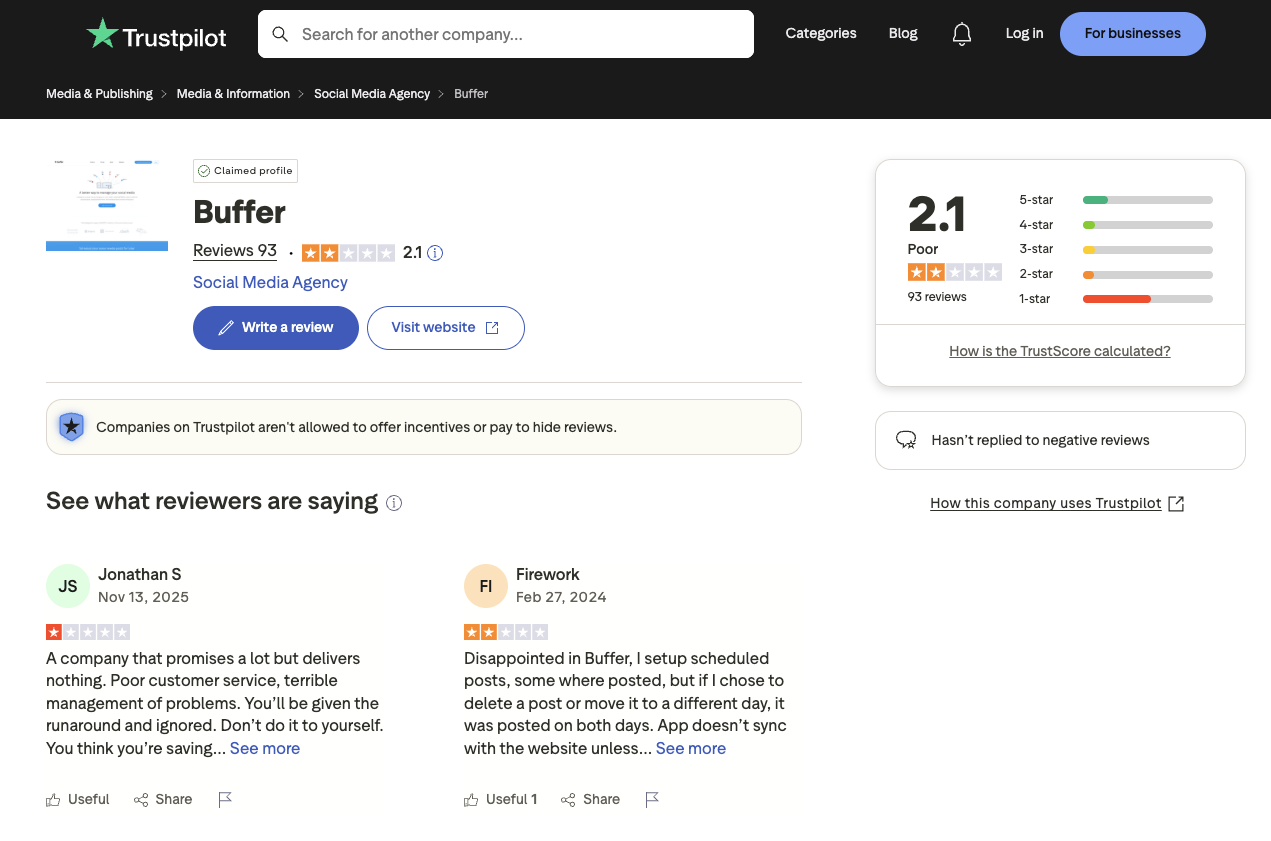
Trustpilot: 2.1/5 (93 reviews) — A notably lower rating, driven by complaints about customer support response times, scheduled posts failing to publish or duplicating, and sync issues with connected social accounts.
Metricool Reviews

G2: 4.5/5 (83 reviews) — Users highlight centralized multi-platform management, helpful scheduling suggestions, and ease of use. Some reviewers note that switching between multiple brands in the dashboard could be smoother, and a few mention scheduling issues and customer support delays. The smaller review count (83 vs Buffer's 1,023) means the rating is less statistically stable.

Trustpilot: 4.2/5 (519 reviews) — One of the highest Trustpilot ratings in the social media scheduling space. Users consistently praise Metricool's customer service responsiveness, friendliness, and quick turnaround. Metricool responds to 100% of negative reviews within 48 hours — a level of engagement that's rare among social media tools and adds credibility to the overall rating. A few negative reviews mention technical issues and pricing concerns, but they're far outnumbered by positive experiences.
Review Verdict
Metricool wins on user satisfaction across both platforms. It scores higher on G2 (4.5 vs 4.3) and dramatically higher on Trustpilot (4.2 vs 2.1). The Trustpilot gap is the most telling data point: Metricool's 4.2/5 from 519 reviews vs Buffer's 2.1/5 from 93 reviews suggests a fundamental difference in customer support quality and billing transparency. If responsive support matters to your team, Metricool has a clear advantage.
Review counts are as of February 2026 and are updated periodically. For deeper analysis, see our full Buffer reviews and Metricool reviews breakdowns.
PostPlanifyManage All Your Social Accounts Without the Chaos
Schedule posts, track performance, and collaborate with your team.
Who Should Use Buffer?
Buffer works best when you value simplicity over depth. If you manage a personal brand or a handful of social accounts and just want to queue posts without learning a complex dashboard, Buffer's clean interface gets you publishing in minutes. Its per-channel pricing keeps costs low when you only manage 3–5 accounts, and the free plan is genuinely useful for light publishing. If Buffer sounds right but you want to explore other options first, check out our best alternatives to Buffer. You can also see how Buffer compares to Hootsuite, Later, Publer, SocialBee, and Agorapulse.
Buffer is the better choice if you:
- Are a solo creator or freelancer who wants the simplest possible scheduling tool with minimal learning curve
- Need to schedule across 11 platforms including Bluesky and Mastodon — the widest platform support in this comparison
- Want unlimited AI caption generation without restrictions on paid plans
- Prefer per-channel pricing starting at $6/month — or the free plan for up to 3 channels
- Need first comment scheduling for Instagram hashtag strategies and engagement
- Want a social media management tool for small business that prioritizes ease of use over feature density
Who Should Use Metricool?
Metricool shines when data drives your decisions. If you're an agency that needs to prove ROI to clients, a marketing team benchmarking against competitors, or a brand manager who wants reporting automation — Metricool's analytics-first approach delivers tools that Buffer simply doesn't have. The per-brand pricing model also makes it dramatically cheaper than Buffer at scale. If Metricool is on your shortlist, you may also want to see our top alternatives to Metricool before committing. Also compare Metricool with Later, Hootsuite, Sprout Social, and SocialBee.
Metricool is the better choice if you:
- Are an agency or data-driven team that needs deep analytics and client-facing reporting
- Want competitor analysis tracking up to 100 profiles to benchmark your performance
- Need PDF/PPT report generation to share with clients or stakeholders
- Want Canva and Google Drive integration to streamline your creative workflow
- Need API access and Looker Studio connector for custom dashboards and BI tools
- Manage multiple brands and want per-brand pricing that doesn't scale per-channel
Scheduling tools like Buffer and Metricool help you plan, publish, and analyze content, but they don't isolate the accounts themselves. For agencies and teams managing multiple Instagram, Facebook, or TikTok accounts, Multilogin Cloud Phones run each mobile account on its own cloud device with its own session, while web accounts stay isolated in their own browser profiles from the same dashboard. It's a practical way for agencies and social media teams to organize and scale both mobile and web workflows.
Final Verdict: Buffer vs Metricool in 2026
So, should you choose Buffer or Metricool? It comes down to whether you prioritize simplicity or data. Buffer is the better pure scheduler; Metricool is the better analytics and reporting platform.
Buffer wins on: simple scheduling UX, wider platform support (11 platforms including Bluesky and Mastodon), first comment scheduling, unlimited AI usage on paid plans, and no Fair Use restrictions on publishing volume.
Metricool wins on: competitor analysis (up to 100 profiles), analytics depth and unlimited history, PDF/PPT reporting, Canva and Google Drive integration, API access, Looker Studio connector, and customer support satisfaction (4.2 vs 2.1 on Trustpilot).
The gap between them isn't about quality — it's about purpose. Buffer was built for publishing simplicity and does that exceptionally well. Metricool was built for analytics and reporting and excels in that space. The challenge is when you need both: a clean scheduling experience AND deep analytics. Buffer's analytics are too basic for agencies, and Metricool's Fair Use publishing limits may frustrate high-volume teams. That's the gap where tools like PostPlanify fit — combining intuitive scheduling with advanced analytics, AI-powered content creation, and social inbox in one flat-rate plan.
The bottom line: For solo creators and freelancers who just need to schedule and publish, Buffer delivers a clean, no-fuss experience. For agencies, data-driven marketers, and teams that need reporting and competitor insights, Metricool offers far more value. If neither feels like the right fit, explore our full list of social media management alternatives to find a tool that matches your workflow and budget.
Simple Scheduling Meets Smart Analytics
Buffer gives you simplicity but lacks depth. Metricool gives you data but charges per brand. What if you could get clean scheduling with built-in analytics, AI tools, and no scaling fees? PostPlanify combines an intuitive publishing workflow with the insights you need — plus AI image generation that neither Buffer nor Metricool offer.

| Feature | Buffer | Metricool | PostPlanify |
|---|---|---|---|
| Starting Price | $6/mo/channel | $0/mo (free) | $29/mo flat |
| Analytics | Basic | Advanced | Advanced (10 platforms, best time to post) |
| Social Inbox | Basic | Basic (7 platforms) | Yes (AI-assisted replies) |
| AI Caption Generation | Yes | Yes | Yes (vision-powered) |
| AI Image Generation | No | No | Yes (7 models) |
| Content Calendar | Yes | Yes | Yes (drag-and-drop, bulk scheduling) |
| Team Collaboration | $12/mo/channel | $54/mo | Unlimited members (no per-seat fees) |
| Approval Workflows | Team plan | Advanced plan | Premium $99/mo (multi-approver) |
| White-Label PDF Reports | No | Yes (Starter+) | Yes (Premium+ $99/mo) |
| Canva Integration | No | Yes | Yes |
| Google Drive Import | No | Yes | Yes |
| Link in Bio | Yes (Start Page) | Yes | Yes (8 themes, click analytics) |
| Competitor Analysis | No | Yes | No |
| Platforms Supported | 11 | 9+ | 10 |
| Unlimited Scheduling | Paid plans | Starter+ (Fair Use) | Growth+ ($49/mo) |
PostPlanify starts at $29/month for 5 social accounts with 200 posts/month and AI tools included. The Growth plan ($49/month, 10 accounts) adds analytics across all 10 platforms, social inbox with AI-assisted replies, best time to post suggestions, 1st comments & threads, bulk scheduling, and unlimited scheduled posts. The Premium plan ($99/month, 25 accounts) includes white-label PDF reports, multi-approver workflows, 5 team members, shared calendars, and roles & permissions. The Enterprise plan (custom pricing) adds custom social accounts, unlimited team members, and 1:1 onboarding. See all plans on the PostPlanify pricing page.
Try PostPlanify free for 7 days

Making the Switch
Switching from Buffer to Metricool (or vice versa) is straightforward — neither tool locks you in with long-term contracts, and both offer monthly billing. Here's the step-by-step for each direction:
Switching from Buffer to Metricool
- Export your Buffer data — download any analytics reports or scheduled post data you want to keep. Buffer doesn't offer a CSV export of scheduled posts, so screenshot or copy your upcoming queue.
- Sign up for Metricool — start with the free plan or 14-day trial to test before canceling Buffer.
- Connect your social accounts — add the same platforms you had on Buffer. Metricool uses the same Meta/X/LinkedIn APIs, so the auth flow is similar.
- Recreate your posting schedule — set up your content calendar and publishing times in Metricool. Take advantage of Metricool's best-time suggestions during setup.
- Set up competitor tracking — this is the main reason people switch. Add 5-10 competitor profiles immediately to start collecting benchmarking data.
- Cancel Buffer — once you've confirmed Metricool is publishing correctly for 1-2 weeks, cancel your Buffer subscription.
Switching from Metricool to Buffer
- Export your Metricool reports — download any PDF/PPT reports and analytics data. You'll lose access to analytics history after canceling.
- Sign up for Buffer — the free plan lets you test with 3 channels before committing to paid.
- Connect your social accounts — Buffer supports 11 platforms vs Metricool's 9+, so you may be able to add Bluesky or Mastodon accounts you couldn't connect before.
- Rebuild your queue — Buffer's queue-based workflow is different from Metricool's calendar. Set up your publishing schedule and time slots.
- Note what you'll lose — no competitor analysis, no PDF reports, no Looker Studio connector, and more limited analytics history. Make sure these trade-offs are acceptable.
- Cancel Metricool — after 1-2 weeks of successful publishing on Buffer.
Switching to PostPlanify
If neither Buffer nor Metricool fully fits, PostPlanify combines scheduling simplicity with analytics depth. The 7-day free trial lets you connect your accounts, test the full platform, and compare before committing. The process is the same: connect accounts, set up your calendar, and start scheduling.
Related Guides
- PostPlanify Pricing Breakdown
- Buffer Pricing Guide
- Metricool Pricing Guide
- Buffer Reviews
- Metricool Reviews
- Best Buffer Alternatives
- Best Metricool Alternatives
- Best Social Media Management Platform
- Social Media Scheduling Tools
- Social Media Analytics for Business
- How to Automate Social Media Posts
- Social Media Content Calendar Examples
- How to Schedule Social Media Posts
PostPlanifyManage All Your Social Accounts Without the Chaos
Schedule posts, track performance, and collaborate with your team.
FAQ
Is Buffer cheaper than Metricool?
For solo creators, Buffer's free plan (3 channels) and $6/month Essentials plan are slightly cheaper than Metricool's free plan (1 brand) and $22/month Starter. For agencies managing multiple brands, Metricool's per-brand pricing can be more cost-efficient than Buffer's per-channel model.
Does Metricool have a free plan?
Yes. Metricool offers a free plan with 1 brand, 50 posts per month, 5 competitor profiles, 3 months of analytics, and an AI assistant. Buffer also has a free plan with 3 channels and 10 posts per channel.
Which has better analytics — Buffer or Metricool?
Metricool has significantly better analytics. It includes competitor analysis (up to 100 profiles), unlimited analytics history, PDF/PPT report generation, Looker Studio integration, and API access. Buffer's analytics are basic by comparison.
Can I switch from Buffer to Metricool?
Yes. You can reconnect your social accounts to Metricool and start scheduling. The transition is straightforward. The main difference you'll notice is Metricool's stronger analytics and reporting but less emphasis on pure scheduling simplicity.
Which supports more social media platforms?
Buffer supports 11 platforms including Instagram, Facebook, LinkedIn, X/Twitter, TikTok, YouTube, Pinterest, Threads, Google Business, Bluesky, and Mastodon. Metricool supports 9+ platforms including Twitch but does not cover Bluesky or Mastodon. Buffer has wider platform coverage overall, but Metricool uniquely supports Twitch streaming analytics. If platform breadth is your top priority, Buffer is the stronger choice.
Is Metricool good for agencies?
Yes. Metricool's brand-based pricing, competitor analysis, customizable reports, and client management tools make it well-suited for agencies. However, costs scale up for 15+ brands. Both Metricool and PostPlanify offer better agency value than Buffer.
Does Buffer have competitor analysis?
No. Buffer does not offer competitor analysis or benchmarking at any plan level. If tracking competitor performance is important to your strategy, Metricool includes competitor analysis starting from the free plan (5 competitors) up to 100 competitors on Starter+. You can also explore other tools with competitor tracking in our social media analytics guide.
Which has better customer support — Buffer or Metricool?
Based on Trustpilot ratings, Metricool (4.2/5 from 519 reviews) has significantly better customer support satisfaction than Buffer (2.1/5 from 93 reviews). Metricool responds to 100% of negative reviews within 48 hours, which is uncommon in the social media management space. Buffer's lower Trustpilot score reflects recurring complaints about response times and unresolved technical issues reported by users.
Is Buffer or Metricool better for Instagram?
Both tools support Instagram scheduling, but they serve different needs. Buffer is better for creators who want simple post scheduling with first comment support to boost engagement. Metricool is stronger for Instagram analytics, offering competitor tracking and detailed performance reporting. If Instagram is your primary platform, also check out our guide on how to schedule Instagram posts for tips that work with either tool.
What if I need both simple scheduling and deep analytics?
That's the core trade-off in this comparison — Buffer excels at scheduling simplicity, Metricool excels at analytics depth, but neither combines both strengths. PostPlanify bridges that gap with an intuitive content calendar, AI-powered content creation including image generation starting at $29/month, and analytics across 10 platforms with best time to post suggestions plus a social inbox for managing engagement on the Growth plan ($49/month). Browse our full list of social media management alternatives to compare all your options side by side.
Buffer vs Metricool for small business — which is better?
For small businesses, the better choice depends on your priorities. Buffer is ideal if you want a simple, affordable tool for scheduling posts across many platforms starting at $6/month per channel. Metricool is better if you need analytics, competitor tracking, and reporting to prove ROI. Read our guide on social media management software for small business for more recommendations.







