


Think of an AI caption generator as your creative partner for Instagram. It’s a smart tool that writes compelling captions for your posts. Instead of wrestling with writer's block, you give it a quick prompt, and it whips up engaging text in seconds—often complete with spot-on hashtags and calls-to-action designed to stop the scroll. This guide will walk you through exactly how to use these tools, the common mistakes to avoid, and how to integrate them into your workflow for maximum efficiency.
Why Your Instagram Captions Matter More Than Ever

In the endless scroll of visual content, your Instagram caption is the hook that truly connects with your audience. A photo or video can grab attention, but the caption provides the context, personality, and story that makes people care. A great caption doesn't just describe the image; it makes your followers feel something.
This is critical because the Instagram algorithm prioritizes content that holds attention and starts conversations. A well-written caption is your best tool for doing just that, and the best AI social media management tools comparison covers which platforms generate them well, turning passive scrollers into an active, engaged community.
Driving Engagement and Building Community
Your caption is a direct invitation to start a conversation. It's your chance to ask a question, share a relatable story, or nudge followers toward a specific action. Every comment and reply signals to Instagram that your content is valuable, which can seriously boost your reach.
More importantly, this is how you build a genuine community. When followers feel like you're talking with them and not just at them, they're far more likely to stick around, trust your brand, and become your biggest fans. In fact, a thoughtfully crafted caption is one of the most powerful ways to improve social media engagement. The caption sits inside a larger drafting workflow — for the full process from goal to publish, see our guide on how to draft an Instagram post.
Establishing a Unique Brand Voice
Your captions are a huge part of your brand's personality. Are you witty and playful? Or are you more professional and informative? This consistency in tone helps your audience know exactly what to expect from you, building a much stronger connection over time.
A caption transforms your post from a simple image into a powerful engagement tool. It gives the context that a single visual often lacks, building your brand's unique voice and fostering a genuine community.
The real challenge, of course, is keeping up that quality and consistency day after day. This is exactly why the AI caption generator for Instagram market is exploding. Social media managers everywhere are already weaving these tools into their daily workflows, seeing them not just as time-savers but as strategic assets for real growth.
 PostPlanify
All your social media in one simple dashboard
Schedule posts, track analytics, and reply to comments/DMs without switching tabs.

Engagement
+18%
Views
52.8k
How an AI Caption Generator Actually Works
To really trust an AI caption generator, it helps to peek behind the curtain. These tools aren't just pulling random words out of a hat. They’re powered by some seriously smart technology designed to understand and write just like a human.
At the heart of every AI caption tool are Large Language Models, or LLMs. An LLM is a type of artificial intelligence that has been trained on a truly massive amount of text—books, articles, websites, and social media posts. This training teaches it to recognize patterns, context, grammar, and even subtle things like tone and emotion.
From Prompt to Polished Caption
So, what happens when you type in a prompt, like "a witty caption for a new coffee blend"? The AI doesn't just scan its database for the word "coffee." Instead, it dissects your request to figure out exactly what you're trying to do.
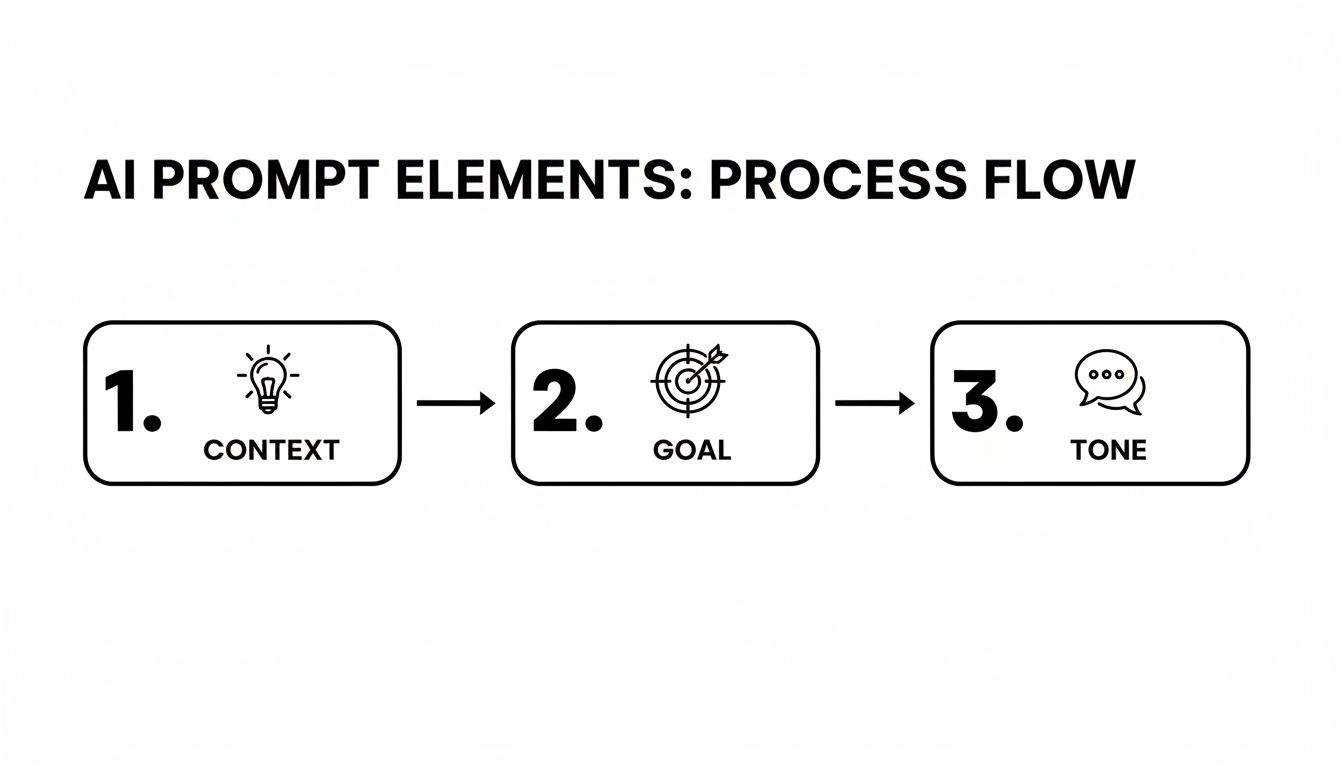
- Context: It looks at the subject (a new coffee blend) and any other details you give it.
- Tone: It picks up on the vibe you’re going for ("witty").
- Goal: It understands the underlying mission, which is almost always to grab an audience's attention on Instagram.
The LLM then gets to work, predicting the most natural sequence of words to build a caption that ticks all those boxes. It can spin up multiple options by going down different creative paths, giving you a handful of choices that all nail your original request. Most of the top-tier AI caption generators use powerful models like those accessed through the GPT-4 API to deliver that level of quality.
The real magic of an AI caption generator is its knack for understanding context. It’s not just matching keywords; it’s interpreting your brand voice and your post’s goal to create something that feels genuinely you.
And the best part? This whole process is lightning-fast, turning what used to be a tough creative task into something that takes seconds. A simple prompt can spit out everything from a short, punchy one-liner to a full-blown story, complete with the right hashtags and emojis. This is exactly how a platform like PostPlanify can deliver spot-on suggestions that fit your brand, saving you a ton of time without making your content feel generic.
Ultimately, knowing how the tech works gives you confidence. You're not just crossing your fingers and hoping for the best; you're actively guiding a powerful language tool to bring your vision to life. This insight also helps you write much better prompts, which leads to better captions and, down the line, better results. You can learn more about tracking those results in our deep dive on social media analytics and reporting.
Crafting AI Prompts That Deliver Perfect Captions

The magic of an AI caption generator isn't really magic at all—it's a direct reflection of what you ask it to do. If you give it a vague, one-line request, you'll get a generic, one-size-fits-all caption in return. To get captions that actually sound like your brand and connect with your audience, you need to learn how to guide the AI.
Think of it less like giving an order and more like briefing a creative partner. The more context you provide, the better the final result will be. A great prompt gives the AI the raw materials it needs to build a caption that not only describes your photo but also drives a specific business goal.
The Anatomy of a Powerful Prompt
Getting past simple requests like "caption for a new sneaker" is the key to unlocking the AI's full potential. A high-quality prompt for an AI caption generator for Instagram should always include a few core components that work together to shape the output. A weak prompt just describes the image. A strong prompt tells the AI why the image matters to your audience.
Here are the essential ingredients to include in every prompt:
- Context: Briefly explain what’s happening in the image or video. Is it a polished product shot, a messy behind-the-scenes moment, or a glowing customer testimonial? Be specific.
- Audience: Who are you trying to reach? Mentioning your target audience (e.g., "busy moms," "tech startup founders," "college students") helps the AI pick the right words and cultural references.
- Goal or Call-to-Action (CTA): What do you want people to do after reading? Maybe you want to drive comments, encourage website clicks, get post saves, or just share a core brand value.
- Tone of Voice: This is absolutely crucial for brand consistency. Use descriptive words like "witty and playful," "inspirational and empowering," "professional and informative," or "casual and friendly."
- Constraints: Set clear boundaries. You can specify a character count, ask for a certain number of hashtags, or request specific emojis.
From Vague to Valuable: A Step-by-Step Example
Let’s look at how this framework can transform a simple idea into a detailed prompt that delivers far better results.
Before (Weak Prompt):
"Write a caption for a picture of our new running shoe."
This prompt is way too simple. The AI has zero context about the brand, the audience, or the goal. The result will probably be a bland, forgettable caption that fails to connect with anyone.
After (Powerful Prompt):
"Write three Instagram caption options for an image of our new 'TrailBlazer 2.0' running shoe. The tone should be motivational and adventurous. Our target audience is amateur trail runners who value durability and eco-friendly materials. The goal is to drive clicks to the product page. End with a question to boost comments and include 3-5 relevant hashtags."
This detailed prompt gives the AI everything it needs to succeed. It specifies the product name, target audience, tone, goal, and clear constraints, ensuring the generated captions are strategic, on-brand, and much more effective.
The table below breaks down this prompting framework into a simple, repeatable process.
Prompting Framework for Better AI Captions
This structure helps you build a high-quality prompt every time by combining key elements.
| Prompt Element | Description | Example |
|---|---|---|
| Context | What is the image/video about? | "An image of our new 'TrailBlazer 2.0' running shoe." |
| Audience | Who are you talking to? | "Our target audience is amateur trail runners." |
| Goal/CTA | What action do you want them to take? | "The goal is to drive clicks to the product page." |
| Tone of Voice | How should the caption sound? | "The tone should be motivational and adventurous." |
| Constraints | What rules should the AI follow? | "End with a question and include 3-5 hashtags." |
By following this simple recipe, you move from just getting a caption to getting the right caption.
While AI can suggest hashtags, knowing the strategy behind them is key. For more on that, check out our guide on how many hashtags to use on Instagram. And to make sure your AI-generated captions truly hit the mark, it helps to understand the fundamental principles of social media copywriting that make any caption effective.
With a tool like PostPlanify, you can plug these detailed prompts directly into your workflow, generate multiple high-quality options in seconds, and schedule your post—all in one place.
Real-World Examples of AI-Generated Captions
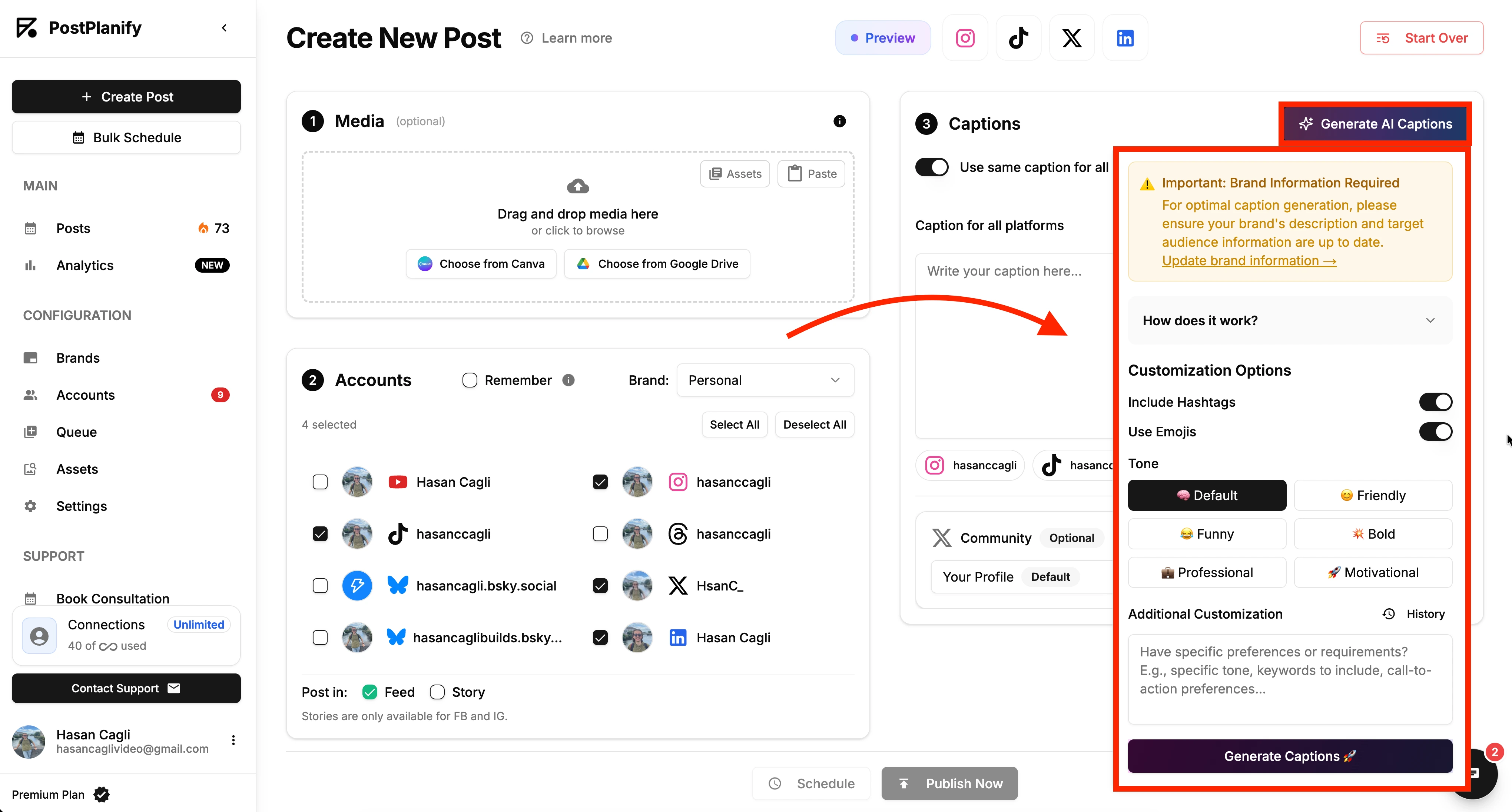
Theory is great, but let's see how an AI caption generator for Instagram performs in real-world scenarios. We'll walk through a few common situations, providing the exact prompt used and the caption generated, so you can see the process in action.
Scenario 1: E-Commerce Product Launch
You're launching a new product and need to build hype while driving sales. The caption must be compelling but not overly salesy.
- The Prompt: “Write an Instagram caption for a photo of our new sustainable yoga mat, the ‘TerraFlow.’ The tone should be calm and inspiring. Our target audience is eco-conscious yogis who value quality and mindfulness. The goal is to drive clicks to the product page. End with a question to encourage comments and include 3 relevant hashtags.”
The AI-Generated Caption:
"Find your flow, grounded in nature. ✨ Introducing the TerraFlow mat, crafted from 100% sustainable materials for a practice that honors both you and the planet. Ready to elevate your mindfulness journey? Tap the link in our bio to shop the collection. What helps you stay present on your mat? #SustainableYoga #EcoFriendlyLiving #MindfulMovement"
This caption works because it connects the product's features (sustainability) directly to the audience's values (mindfulness, eco-consciousness) and includes a simple call-to-action and engagement question.
Scenario 2: Behind-the-Scenes Post
Behind-the-scenes content helps humanize your brand. The caption needs to feel authentic and offer followers an exclusive look. If you're looking for more ideas for seasonal content, our guide to holiday captions for Instagram has you covered.
- The Prompt: “Craft a caption for a candid photo of our team laughing during a brainstorming session. The tone should be casual, friendly, and a little humorous. We want to show the human side of our brand. Goal: foster community and connection. End with a fun call-to-action.”
The AI-Generated Caption:
"This is where the magic (and a whole lot of coffee-fueled chaos) happens! 💡 Some of our best ideas start with a good laugh. We love what we do, and we love the team we do it with. Tell us your favorite work-from-home snack in the comments—we need new ideas! 👇 #TeamCulture #BehindTheScenes #StartupLife"
This caption is effective because it’s relatable and lighthearted. It avoids corporate jargon and invites followers into a genuine moment, building a stronger sense of community.
Scenario 3: Educational Carousel Post
For an educational carousel, the caption must hook the reader and explain the value of swiping through the slides.
- The Prompt: “Write an introductory caption for an Instagram carousel titled ‘5 Myths About SEO.’ The tone should be authoritative but approachable. The goal is to get saves and encourage users to swipe through all slides. Start with a hook to grab attention.”
The AI-Generated Caption:
"Think you know SEO? You might be surprised. 🤫 We're busting 5 common myths that could be holding your website back. Swipe through to see if you've fallen for any of them. 👉 Don't forget to save this post for later! #SEOMyths #DigitalMarketingTips #SmallBusinessGrowth"
This caption hooks the reader with a question, clearly states the value proposition (busting myths), and includes two clear calls-to-action (swipe and save).
These examples show that with the right prompt, an AI can produce versatile, strategic, and on-brand content for various post types.
Weaving AI Captions into Your Content Workflow
Using an AI tool for a single caption is helpful, but integrating it into a structured workflow is where you unlock significant time savings and improve content consistency. A systematic approach moves you from last-minute posting to strategic content planning.
The key is batching your content creation. Instead of creating posts one by one, set aside a block of time to plan, generate, and schedule a week or month's worth of content at once. This approach ensures a more cohesive brand voice and visual aesthetic. For a deeper look at this strategy, see our guide on how to plan social media content.
A Practical 3-Step Integration Workflow
Here is a step-by-step process to seamlessly integrate an AI caption generator for Instagram into your routine, blending AI efficiency with human oversight.
-
Generate in Batches: Start by uploading your visuals for the upcoming week or month into your content library. Using your detailed prompts, generate several caption options for each post. This creates a repository of ideas and eliminates the pressure of starting from a blank slate for every post.
-
Review and Refine: This step is non-negotiable. The AI provides the first draft, but your expertise adds the final polish. Read through each caption, tweak the phrasing to match your brand's unique voice, verify any facts or stats, and add personal anecdotes where appropriate. This hybrid approach ensures your content remains authentic and error-free.
-
Schedule and Analyze: Once your captions are perfected, schedule them to post at optimal times. An all-in-one platform is invaluable here. Tools like PostPlanify allow you to generate captions, manage your media library, preview posts, and schedule everything from a single dashboard.
The goal isn't just to automate caption writing. It's to create a completely frictionless path from the initial idea to the final published post. When you can generate, review, and schedule all in one spot, you stop wasting time flipping between a dozen different tabs and tools. That's where the real efficiency kicks in.
By combining AI-powered generation with your human oversight and smart scheduling, you create a powerhouse content engine. This workflow lets you maintain a super consistent presence on Instagram without the daily stress of having to create everything from scratch.
Troubleshooting: Common Mistakes and How to Fix Them
An AI caption generator is a powerful assistant, but relying on it blindly can lead to generic or off-brand content. The most common mistake is copying and pasting the AI's first output without any review. This often results in captions that are technically correct but lack the personality needed to connect with your audience. Remember, the goal is to augment your creativity, not replace it.
Forgetting the Human Review Step
Every AI-generated caption must be treated as a first draft. Skipping the review process can lead to several problems:
- Factual Inaccuracies: AI models can sometimes "hallucinate" and invent facts, statistics, or product details. Always verify any specific claims before publishing. For example, an AI might invent a discount percentage or a product feature that doesn't exist.
- Platform Mismatches: A caption suitable for LinkedIn's professional audience will likely feel out of place on Instagram or TikTok. You must manually adjust the tone, formatting, and hashtags to fit each platform's unique culture and best practices.
- Loss of Brand Voice: The final caption must sound like it came from you. Read it aloud. Does it reflect your brand’s personality? Edit words, phrases, and emoji usage to ensure it aligns perfectly.
Remember, the most effective workflow is a hybrid one. Let the AI handle 80% of the initial heavy lifting to save time, but always reserve that final 20% for your strategic human review to add authenticity and ensure accuracy.
Writing Vague and Uninspired Prompts
Another frequent error is providing low-effort, generic prompts and expecting high-quality, specific results. A prompt like "caption for a coffee photo" is doomed to produce a bland, predictable caption because the AI lacks the necessary context.
To get better results, treat your prompt like a creative brief for a junior copywriter. As we covered earlier, a strong prompt always includes:
- Clear Context: Describe the visual in detail.
- Defined Audience: Who are you talking to?
- Specific Goal: What action do you want them to take?
- Tone of Voice: How should it sound?
- Key Constraints: Mention any character limits or hashtag requirements.
Quick-Fix Troubleshooting Table
Here’s a quick reference for solving the most common issues when using an AI caption generator.
| Problem | Common Cause | Actionable Fix |
|---|---|---|
| Generic, Boring Captions | The prompt was too vague (e.g., "post about coffee"). The AI has no context. | Write a detailed prompt with tone, audience, goal, and visual description. Give it more to work with. |
| "Hallucinated" or Fake Facts | The AI is designed to be creative and can sometimes invent information to fulfill a prompt. | Always fact-check any statistic, quote, or specific claim. Never trust AI-generated data blindly. |
| Doesn't Sound Like My Brand | You copied the output directly without editing for your unique voice and style. | Read the caption aloud. Edit words, sentence structure, and emojis to match your brand's personality. |
| Wrong Format for the Platform | The prompt didn't specify the platform, so the AI used a generic structure. | Always include the platform in your prompt (e.g., "for an Instagram Reel"). Manually adjust hashtags and line breaks. |
| Weak or No Call-to-Action | You forgot to tell the AI what you want the reader to do after reading the caption. | Explicitly state the desired action in your prompt, like "end with a question asking them..." or "drive clicks to the link in bio." |
Getting great results from an AI caption generator is a skill. It's less about pressing a button and more about learning how to have a productive conversation with your new creative partner.
Frequently Asked Questions
Switching to an AI caption generator for Instagram is a practical step, but it's normal to have questions. Here are clear answers to the most common ones.
Can an AI Tool Really Sound Like My Brand?
Yes, but it requires your direction. An AI cannot read your mind, but it excels at following detailed instructions. The key is in the prompt: specify your target audience, desired tone (e.g., "witty and playful," "professional and informative"), and even provide examples of past captions that performed well.
Treat the AI's output as a strong first draft. Your role is to perform the final review, tweaking a word or phrase to infuse your unique personality. This final human touch is what ensures the caption is 100% on-brand.
Are the AI-Generated Hashtags Effective?
They are an excellent starting point. An AI can quickly generate a list of relevant, high-volume keywords related to your post, which saves significant research time.
However, for optimal results, combine the AI's suggestions with your own expertise. Review the list, remove any hashtags that are too broad or generic, and add niche, community-specific hashtags that the AI might have missed. This tag-team approach leverages both AI's data-processing power and your deep understanding of your audience.
How Much Time Will I Actually Save?
The time savings are substantial and scale with your workload. A solo creator might save 2-3 hours per week by overcoming writer's block and generating drafts instantly. For an agency managing multiple accounts, this can easily increase to 8+ hours weekly. The biggest efficiency gain comes from integrating the tool into a unified workflow.
When you use a tool like PostPlanify, you’re not just generating captions. You’re generating, refining, and scheduling all in one smooth workflow. This eliminates the clunky process of jumping between different apps and keeps your entire content machine running smoothly. Learn more and start your free trial at PostPlanify.
PostPlanifyAll your social media in one simple dashboard
Schedule posts, track analytics, and reply to comments/DMs without switching tabs.
Engagement
+18%
Views
52.8k
About the Author

Hasan Cagli
Founder of PostPlanify, a content and social media scheduling platform. He focuses on building systems that help businesses, agencies, and teams plan, publish, and manage content and social media more efficiently across platforms.


