


You started a YouTube channel. You're uploading videos, getting some views, maybe even a few hundred subscribers. Now the question that every creator eventually asks: when does YouTube actually start paying you?
The short answer: YouTube starts paying you after you join the YouTube Partner Program (YPP), which requires 1,000 subscribers and 4,000 watch hours in the past 12 months. After that, you still need to earn at least $100 before YouTube sends your first payment.
But the real answer is more nuanced than a couple of thresholds. There's a specific sequence of milestones you need to hit, a review process that can take weeks, multiple revenue streams that unlock at different stages, and a payment cycle that means your first dollar won't hit your bank account for months after you start.
This guide walks through the entire timeline — from zero to first paycheck — so you know exactly what to expect and how to get there faster.
The Two Monetization Tiers (2026 Requirements)
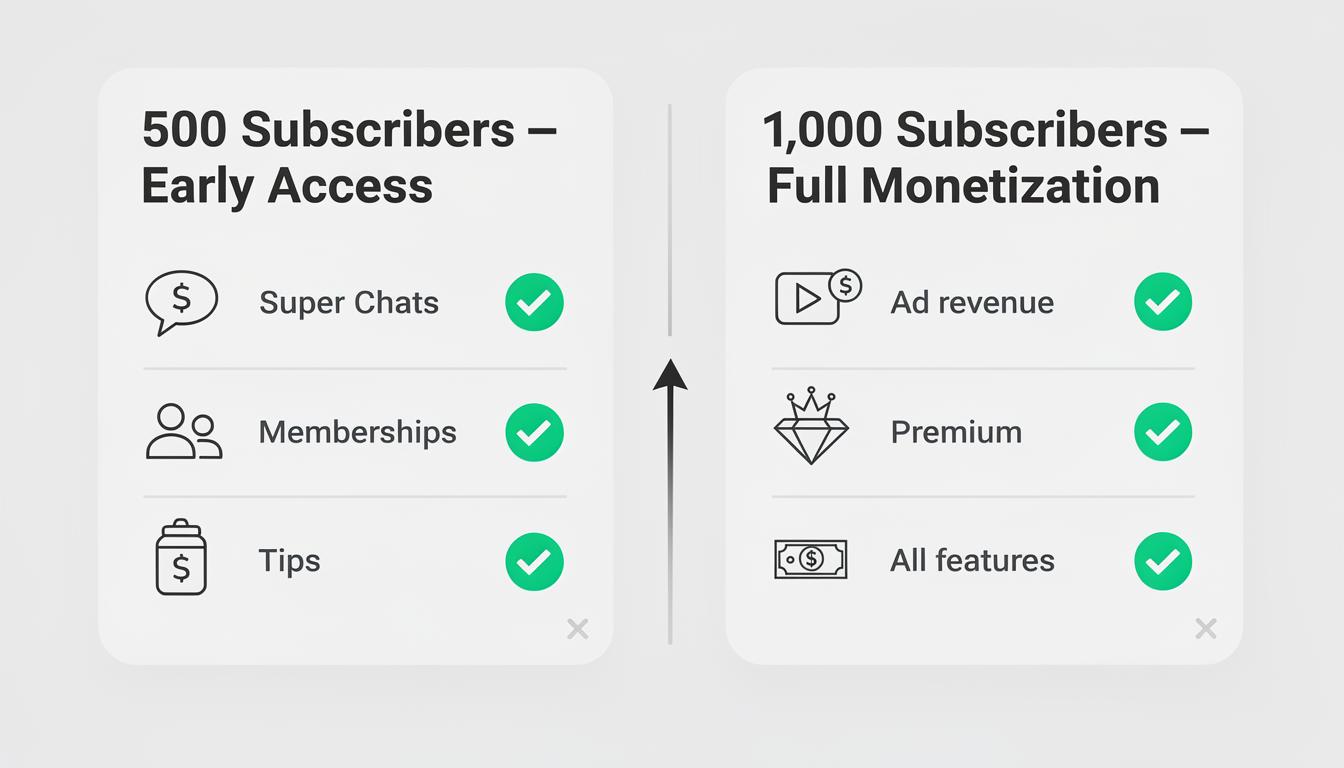
YouTube doesn't have a single "start earning" point. There are two tiers, and they unlock very different features.
Tier 1: Early Access (Fan Funding Only)
This lower tier was introduced in 2023 to let smaller creators start earning before hitting full YPP requirements. It does not include ad revenue.
| Requirement | Threshold |
|---|---|
| Subscribers | 500 |
| Watch hours (past 12 months) | 3,000 hours |
| OR Shorts views (past 90 days) | 3 million views |
| Public uploads in last 90 days | 3 |
| YouTube community guidelines | No active strikes |
| Two-factor authentication | Enabled |
What you unlock at 500 subscribers:
- Super Thanks — viewers can tip on your videos ($2–$50 per tip)
- Super Chats & Super Stickers — paid messages during live streams
- Channel Memberships — monthly subscriptions from fans ($0.99–$49.99/month)
- YouTube Shopping — tag products in your videos
What you don't get: ad revenue. No pre-roll, mid-roll, or post-roll ads. Zero cents from the ads YouTube shows on your videos. YouTube still runs ads on your content at this tier — they just keep 100% of it.
Tier 2: Full Monetization (Ad Revenue)
This is where the real money starts. Full YPP membership unlocks ad revenue sharing - the primary income source for most YouTubers.
| Requirement | Threshold |
|---|---|
| Subscribers | 1,000 |
| Watch hours (past 12 months) | 4,000 hours |
| OR Shorts views (past 90 days) | 10 million views |
| YouTube community guidelines | No active strikes |
| Two-factor authentication | Enabled |
| AdSense account | Linked and verified |
| Age | 18+ (or legal guardian manages account) |
What you unlock at 1,000 subscribers:
Everything from Tier 1, plus:
- Ad revenue sharing — you earn 55% of all ad revenue generated on your long-form videos
- Shorts ad revenue — your share of the Shorts ad revenue pool
- YouTube Premium revenue — a cut when Premium subscribers watch your content
This is the milestone that matters. Fan funding from Tier 1 is nice, but ad revenue is what turns YouTube from a hobby into income. The average creator earns $2–$12 per 1,000 views from ads alone — dwarfing what most channels earn from tips and memberships.
The Full Timeline: From Zero to First Payment
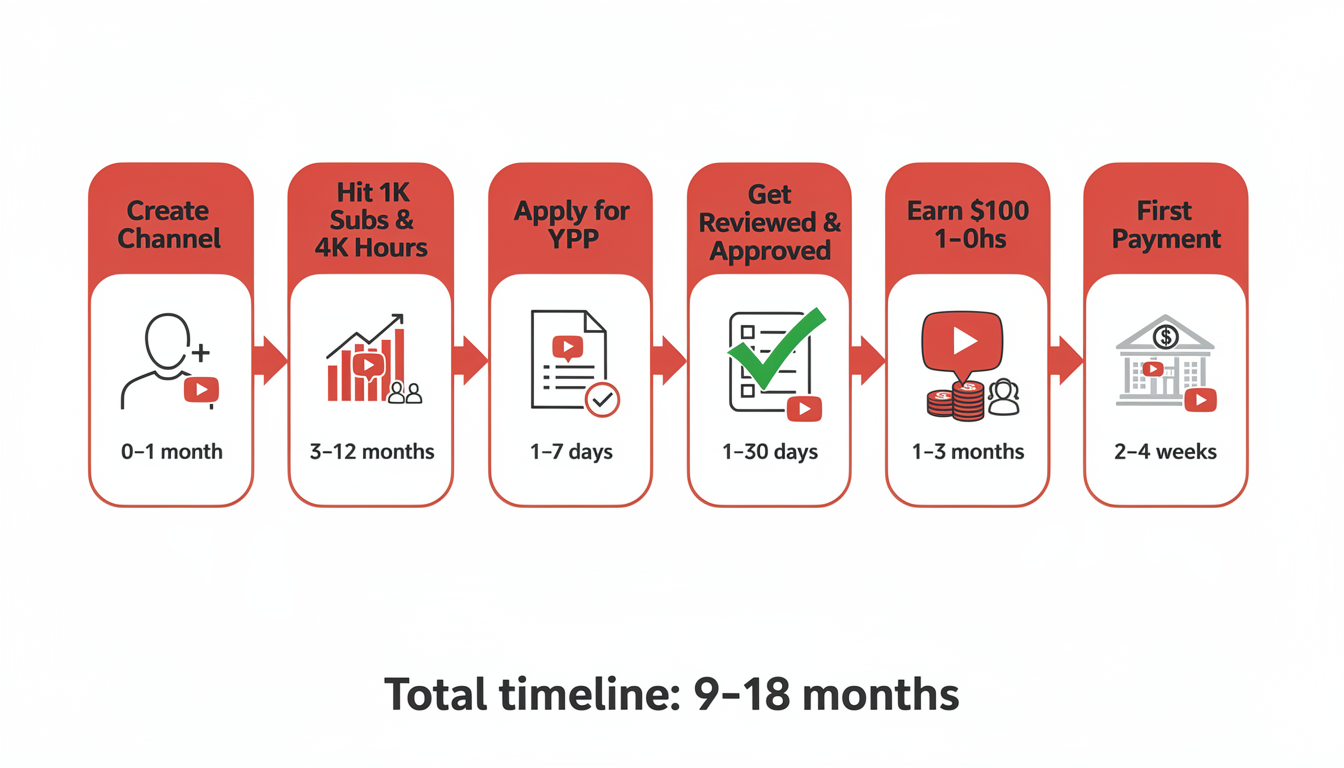
Most guides list the requirements and stop there. But the gap between "hitting 1,000 subscribers" and "money in your bank account" involves several steps that each take time. Here's the complete sequence:
Step 1: Create and Grow Your Channel
Timeline: 3–18 months (varies wildly)
This is the longest phase. The average YouTube channel takes 12–15 months to reach 1,000 subscribers and 4,000 watch hours, though some niches move faster or slower:
| Niche | Avg. Time to 1K Subs | Why |
|---|---|---|
| Gaming & Entertainment | 3–8 months | High volume of potential viewers, easy to start |
| Tech Reviews | 6–12 months | Moderate competition, search-driven discovery |
| Education & How-To | 6–14 months | Evergreen content compounds over time |
| Finance & Business | 8–18 months | Smaller audience but extremely high value |
| Vlogs (Non-Niche) | 12–24 months | Hard to discover without existing audience |
| Faceless/Automated Channels | 6–18 months | Scalable output but variable quality; see does YouTube automation actually work? for realistic timelines |
| Kids & Family | 6–12 months | High view volume but lower CPM; see our guide on how to start a YouTube channel for kids for COPPA rules and content strategies |
You can track your progress toward these milestones in YouTube Studio, or see our guide on how to see your YouTube subscribers for all the ways to monitor your growth. Watch hours are usually the bottleneck, not subscribers. Here's why: 4,000 watch hours means your videos need to accumulate 240,000 total minutes of watch time in a rolling 12-month window. If your average video is 10 minutes long and viewers watch 50% of it, you need roughly 48,000 views in a year just to qualify.
Step 2: Apply for the YouTube Partner Program
Timeline: 5 minutes
Once you hit the thresholds, YouTube Studio will show a notification that you're eligible to apply. The application process itself is straightforward:
- Go to YouTube Studio → Earn tab
- Click Apply for the YouTube Partner Program
- Review and accept the YPP terms
- Connect an existing AdSense account or create a new one
- Submit your channel for review
Step 3: Wait for YPP Review
Timeline: 3–30 days (typically 7–14 days)
YouTube manually reviews your channel to ensure it meets their policies. They check:
- Content originality — no re-uploaded or stolen content
- Community guidelines compliance — no strikes or borderline violations
- Advertiser-friendliness — content suitable for ads
- Channel authenticity — real channel, not a spam operation
| Review Outcome | What Happens | Can You Reapply? |
|---|---|---|
| Approved | Monetization turns on within 24–48 hours | N/A |
| Rejected (policy issue) | Specific reason provided in YouTube Studio | Yes, after 30 days |
| Rejected (not eligible) | Thresholds weren't met or dipped below during review | Yes, once thresholds are met again |
Common rejection reasons: reused content (compilations, reaction videos without substantial commentary), misleading metadata, or content that's borderline for advertisers. If you're rejected, YouTube tells you why. Fix the issue, wait 30 days, and reapply.
Step 4: Set Up AdSense and Verify Your Identity
Timeline: 1–4 weeks
Even after YPP approval, you can't get paid until your AdSense account is fully verified:
- Tax information — submit a W-9 (US) or W-8BEN (non-US) form in AdSense
- Identity verification — once you earn $10, Google requires identity verification with a government-issued ID (you have 45 days to complete this)
- Address verification — Google mails a physical PIN to your address (takes 2–4 weeks to arrive). You enter this PIN in AdSense to confirm your address
- Payment method — add your bank account or payment method in AdSense
Step 5: Reach the $100 Payment Threshold
Timeline: 1–6 months after monetization starts
YouTube doesn't pay you for every dollar you earn. Your earnings accumulate until you hit the $100 minimum payment threshold. If you earn $47 in your first month, that rolls over. If you earn $38 the next month, bringing your total to $85, it rolls over again. You get paid once the balance crosses $100.
How long this takes depends entirely on your views and niche:
| Monthly Views | Estimated RPM | Monthly Earnings | Months to Reach $100 |
|---|---|---|---|
| 10,000 | $3 | $30 | ~4 months |
| 25,000 | $4 | $100 | ~1 month |
| 50,000 | $5 | $250 | First month |
| 100,000 | $7 | $700 | First month |
Step 6: Receive Your First Payment
Timeline: 21–26 days after crossing $100
YouTube pays on a net-21 to net-26 monthly cycle:
- Earnings are finalized on the last day of each month
- If your balance is $100+, payment is processed between the 21st and 26th of the following month
- Payment method determines exact timing (bank transfer is fastest, wire transfer can take longer)
Example timeline: You cross $100 in total earnings by March 31. Your payment is processed between April 21–26. Depending on your bank, funds appear within 1–5 business days after that.
Total Realistic Timeline
| Phase | Duration | Cumulative Time |
|---|---|---|
| Grow to 1,000 subs + 4,000 hours | 6–18 months | 6–18 months |
| Apply for YPP | Same day | — |
| YPP review | 1–4 weeks | 7–19 months |
| AdSense verification | 1–4 weeks | 7.5–20 months |
| Reach $100 threshold | 1–6 months | 8–26 months |
| Payment processing | 3–4 weeks | 9–27 months |
For most creators, the first YouTube payment arrives 9–18 months after starting their channel. Creators in high-CPM niches with strong growth can see it as early as 6 months. Slower-growing channels in competitive spaces may take 2+ years.
How YouTube Actually Pays You (Payment Methods & Schedule)
Once you've cleared the $100 threshold, here's exactly how the money reaches your bank account:
| Detail | How It Works |
|---|---|
| Payment processor | Google AdSense — all YouTube earnings flow through your linked AdSense account |
| Payment methods | Direct bank transfer (EFT), wire transfer, checks, or Western Union (varies by country) |
| Payment currency | USD by default; some countries support local currency |
| Payment schedule | Monthly — earnings finalized on the last day of each month, paid between the 21st–26th of the following month |
| Minimum threshold | $100 USD (rolls over each month until met) |
| Tax withholding | YouTube may withhold 24% (US) or 30% (non-US without tax treaty) if tax info isn't submitted |
| Where to check earnings | YouTube Studio → Analytics → Revenue tab (updates daily with ~48-hour delay) |
| AdSense dashboard | adsense.google.com — shows finalized balance, payment history, and pending payments |
Payment Timeline Example
Here's a concrete example of how the payment cycle works:
- March 1–31: Your videos earn $147 in ad revenue throughout the month
- April 3–5: YouTube finalizes March earnings in your AdSense account (shows as "Balance")
- April 21–26: Google processes your payment (since balance exceeds $100)
- April 23–30: Money appears in your bank account (1–5 business days after processing, depending on payment method and country)
Key detail: If your March earnings are only $62 (below the $100 threshold), nothing happens in April. The $62 rolls over. If you earn $55 in April, your total reaches $117 — and that $117 is paid between May 21–26.
Setting Up Payments (Don't Skip This)
Many creators get monetized but forget to complete AdSense setup, delaying their first payment by weeks:
- Submit tax information — W-9 (US creators) or W-8BEN (non-US). Without this, Google withholds up to 30% of your earnings
- Verify your identity — required once you earn $10. Upload a government-issued ID within 45 days
- Verify your address — Google mails a physical PIN to your address (2–4 weeks delivery). Enter the PIN in AdSense to confirm
- Add payment method — bank account details for direct deposit (fastest) or choose an alternative method
Complete all four steps as soon as you're accepted into YPP — don't wait until you hit $100, or your first payment will be delayed by the verification process.
 PostPlanify
All your social media in one simple dashboard
Schedule posts, track analytics, and reply to comments/DMs without switching tabs.

Engagement
+18%
Views
52.8k
Every Revenue Stream Explained (And When Each Unlocks)
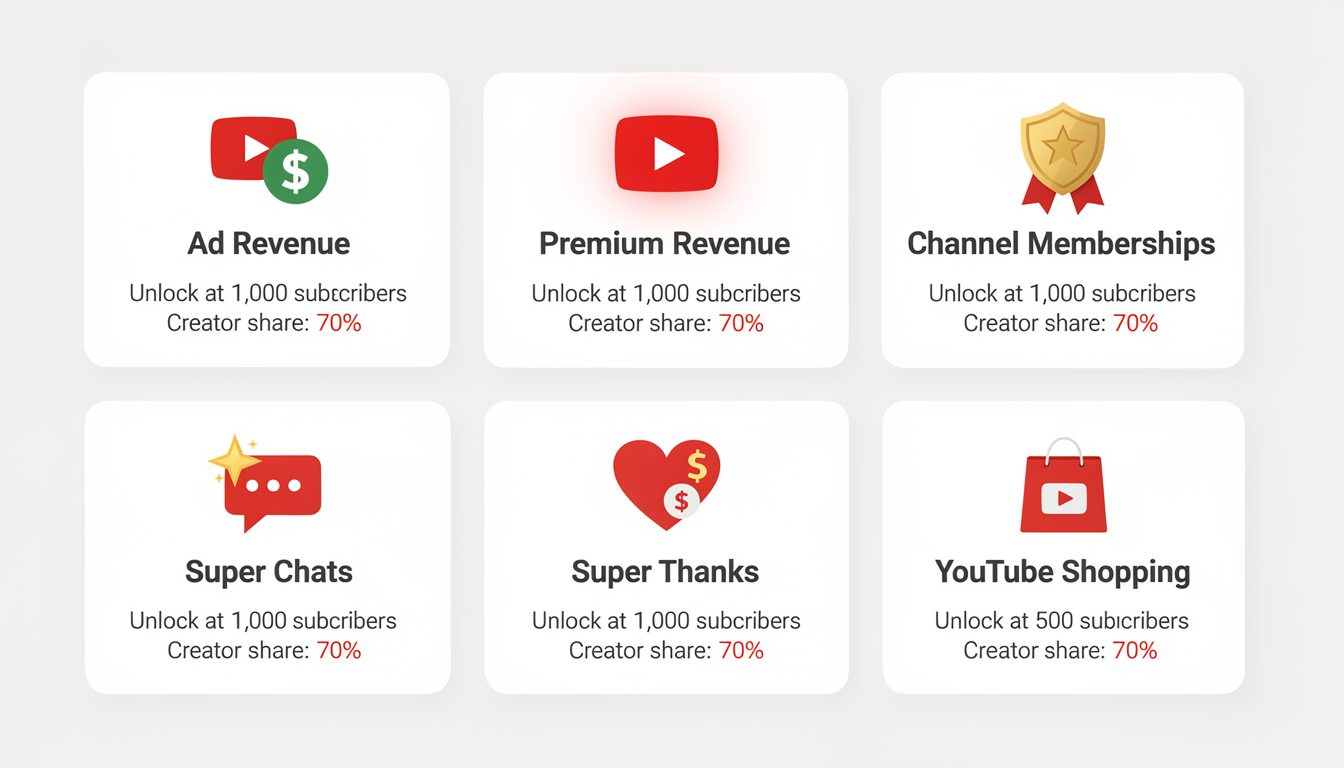
YouTube isn't a single income source — it's six. Each one works differently and becomes available at different points in your growth.
1. Ad Revenue (55/45 Split)
Unlocks at: 1,000 subscribers + 4,000 watch hours
This is the core revenue stream. YouTube sells ad placements on your videos (pre-roll, mid-roll, post-roll, display ads) and gives you 55% of the revenue. YouTube keeps 45%.
| Ad Type | Where It Appears | Creator Control |
|---|---|---|
| Pre-roll | Before your video starts | Can't disable (default) |
| Mid-roll | During videos 8+ minutes | You choose placement |
| Post-roll | After your video ends | Automatic |
| Display/overlay | Sidebar and bottom banner | Automatic |
| Bumper ads | 6-second non-skippable | Automatic |
The big lever here is video length. Videos under 8 minutes get one ad slot (pre-roll). Videos over 8 minutes unlock mid-roll ads, which can double or triple your per-video earnings. This is why so many YouTubers target the 10–15 minute range.
For detailed earnings data by niche and country, see our full breakdown of how much YouTube pays for 1,000 views.
2. YouTube Premium Revenue
Unlocks at: 1,000 subscribers + 4,000 watch hours (automatic with YPP)
When a YouTube Premium subscriber watches your video, you earn a share of their subscription fee — proportional to how much of their watch time your content represents. No ads are shown to these viewers, but you still get paid.
Premium revenue typically adds 10–20% on top of your ad earnings. You don't need to do anything special to earn it — it's automatic once you're in YPP.
3. Channel Memberships
Unlocks at: 500 subscribers (Tier 1) or 1,000 subscribers (Tier 2)
Fans pay a monthly fee ($0.99–$49.99) for perks you define — custom badges, exclusive posts, members-only videos, or early access to content.
- Revenue split: 70% to you, 30% to YouTube
- Best for: Channels with dedicated communities (gaming, education, fitness)
- Realistic expectation: Most channels convert 1–3% of subscribers into members
4. Super Chats & Super Stickers
Unlocks at: 500 subscribers (Tier 1)
Viewers pay to highlight their messages during live streams. Amounts range from $1 to $500 per message.
- Revenue split: 70% to you, 30% to YouTube
- Best for: Live streamers, Q&A formats, community-driven channels
- Tip: Acknowledge Super Chats on stream to encourage more. Creators who read and respond to every paid message see significantly higher Super Chat volume
5. Super Thanks
Unlocks at: 500 subscribers (Tier 1)
Similar to Super Chats, but for regular (non-live) videos. Viewers can tip $2–$50 on any uploaded video. The comment appears highlighted in your comment section.
- Revenue split: 70% to you, 30% to YouTube
- Typical earnings: Small channels see $5–$30/month. It's supplemental, not primary income
6. YouTube Shopping
Unlocks at: 500 subscribers (Tier 1) in eligible countries
Tag products from your own store or affiliate partners directly in your videos. Viewers can browse and buy without leaving YouTube.
- Revenue: Varies by product and partnership (commission-based for affiliate products, full margin for your own products)
- Best for: Product review channels, fashion/beauty, tech
Revenue Stream Comparison
| Revenue Stream | Unlock Tier | Revenue Split | Typical % of Total Income | Scales With |
|---|---|---|---|---|
| Ad Revenue | Full YPP | 55% creator | 60–80% | Views |
| Premium Revenue | Full YPP | Proportional | 10–20% | Watch time |
| Memberships | Tier 1/2 | 70% creator | 5–15% | Community loyalty |
| Super Chats | Tier 1/2 | 70% creator | 2–10% | Live stream frequency |
| Super Thanks | Tier 1/2 | 70% creator | 1–3% | Video engagement |
| Shopping | Tier 1/2 | Varies | 0–10% | Product relevance |
For most creators, ad revenue makes up 60–80% of YouTube income. Fan funding features are meaningful supplements, but they rarely replace ad revenue as the primary source. Focus on hitting full YPP (1,000 subs) as your first major goal.
The Shorts Monetization Question
A lot of creators wonder: can I shortcut to monetization through Shorts? After all, Shorts can go viral with millions of views. Let's look at the math.
Shorts Path to YPP
You can qualify for YPP through Shorts views instead of watch hours:
| Tier | Watch Hours Path | Shorts Views Path |
|---|---|---|
| Tier 1 (Fan Funding) | 3,000 hours + 500 subs | 3 million Shorts views + 500 subs |
| Tier 2 (Ad Revenue) | 4,000 hours + 1,000 subs | 10 million Shorts views + 1,000 subs |
Why 10 Million Shorts Views Is Brutally Hard
That number looks achievable if you've seen Shorts hit millions of views. But there's a catch — it's 10 million views across your channel in 90 days, not on a single video over its lifetime.
Here's what that requires:
- ~111,000 views per day, every day, for 90 consecutive days
- If you post one Short per day, each one needs to average 111K views
- If you post three Shorts per day, each one needs to average ~37K views
Most creators with viral Shorts have a few that hit big and many that get under 1,000 views. Consistently averaging 37K+ views per Short across 90 days puts you in roughly the top 1% of Shorts creators.
Shorts Revenue After YPP
Even if you qualify through Shorts, the earnings from Shorts content are dramatically lower than long-form:
| Metric | Shorts | Long-Form |
|---|---|---|
| RPM | $0.03–$0.10 | $3–$12 |
| Earnings per 1M views | $30–$100 | $3,000–$12,000 |
| Mid-roll ads | Not possible | Available (8+ min videos) |
| Music penalty | Yes (splits with rights holders) | No |
The practical advice: Use Shorts as a growth tool to build subscribers and funnel viewers to your long-form content. Don't rely on Shorts for direct revenue. A single long-form video with 100K views earns more than a Short with 10 million views. For more context on what Shorts earn compared to other platforms, see our breakdown of how much TikTok pays for 1 million views. And if you're weighing YouTube against other platforms for creator income, our comparison of which social media platform pays the most breaks down earnings across every major channel.
PostPlanifyAll your social media in one simple dashboard
Schedule posts, track analytics, and reply to comments/DMs without switching tabs.
Engagement
+18%
Views
52.8k
How to Reach Monetization Faster
The biggest variable in your timeline isn't YouTube's review process or payment cycles — it's how quickly you reach 1,000 subscribers and 4,000 watch hours. Here are the tactics that actually move those numbers.
Prioritize Watch Time Over Views
A video with 10,000 views and 20% retention generates less watch time than a video with 3,000 views and 70% retention. YouTube's algorithm rewards retention, and so does your path to monetization.
| Video | Views | Avg. View Duration | Watch Hours Generated |
|---|---|---|---|
| 10-min video, 20% retention | 10,000 | 2 minutes | 333 hours |
| 10-min video, 70% retention | 3,000 | 7 minutes | 350 hours |
Actionable steps:
- Hook viewers in the first 5 seconds — open with a question, surprising stat, or preview of the payoff
- Cut ruthlessly — every second of filler costs you retention
- Deliver on the title and thumbnail promise within the first third of the video
- Make longer videos (10–20 min) only if you can maintain retention above 50%
Double Down on Search-Driven Content
Videos that rank in YouTube search generate views for months or years. A single evergreen tutorial can contribute hundreds of watch hours long after you publish it.
Search-friendly content includes:
- "How to" tutorials
- Product reviews and comparisons
- "Best [category] for [use case]" lists
- Problem/solution videos ("Fix [common issue]")
Use YouTube's search suggest to find keywords. Type your topic into the YouTube search bar and note the auto-complete suggestions — these are terms people are actively searching for.
Post Consistently
YouTube's algorithm favors channels that upload on a predictable schedule. You don't need to post daily — but you do need to be consistent. A YouTube scheduling tool helps you plan and queue uploads in advance so you never miss your cadence.
| Upload Frequency | Typical Growth Rate | Best For |
|---|---|---|
| Daily | Fastest (if quality is maintained) | Shorts-focused, news, commentary |
| 3x per week | Fast | Gaming, vlogs, entertainment |
| 2x per week | Moderate-fast | Most niches |
| 1x per week | Moderate | High-production content (tech reviews, education) |
| 2x per month | Slow | Film-quality production |
Posting at the right time matters too. Uploading when your audience is most active gives your video the initial engagement boost that triggers algorithmic promotion. Check out our guide on the best time to upload a YouTube video for specific time slots by day.
Cross-Promote on Other Platforms
Your YouTube videos shouldn't live on YouTube alone. Every platform you post to is another funnel driving subscribers and watch time back to your channel.
What to repurpose:
- Turn long-form YouTube videos into Shorts (here's how to clip them) and post them on YouTube, TikTok, and Instagram Reels. Schedule your Shorts in advance so they publish at peak times
- Share video clips natively on X (Twitter) and LinkedIn with a link to the full video
- Post behind-the-scenes content on Instagram Stories to build personal connection
- Share your content in relevant Reddit communities and Facebook groups
For the full system, see our content repurposing strategies guide. Managing multiple platforms manually is a time drain that most creators can't sustain. A social media scheduling tool lets you plan and publish across YouTube, TikTok, Instagram, X, LinkedIn, and more from a single dashboard — so you spend more time creating content and less time posting it.

Go Live
Live streams count toward your 4,000 watch hours and often generate disproportionately high watch time. A 2-hour live stream with 50 concurrent viewers generates 100 watch hours in a single session. You'd need a well-performing uploaded video to match that.
Even with zero subscribers, you can live stream on YouTube — no follower minimum required. Check our guide on how to livestream on YouTube without 1,000 subscribers for a complete walkthrough.
Common Mistakes That Delay Monetization
These are the patterns that keep creators stuck below the YPP thresholds longer than necessary.
Chasing Viral Shorts Instead of Building Watch Time
Shorts can explode in views, but they don't count toward the 4,000 watch hours requirement. A Short with 500,000 views contributes zero watch hours. Many creators waste months focused entirely on Shorts, wondering why their watch hour counter isn't moving.
The fix: Use Shorts to attract subscribers, then convert those subscribers into long-form viewers. Your content strategy should be roughly 70% long-form, 30% Shorts.
Ignoring Audience Retention
Uploading more videos doesn't help if viewers leave after 30 seconds. Low-retention videos actually hurt your channel — the algorithm sees them as poor quality and reduces their distribution.
The fix: Check YouTube Studio → Analytics → Engagement → Audience Retention for every video. Find where viewers drop off and fix those patterns in your next video.
Uploading Without a Niche
"A little bit of everything" channels grow the slowest because YouTube's algorithm doesn't know who to recommend your content to. A channel about cooking, gaming, AND travel confuses both the algorithm and potential subscribers.
The fix: Pick one niche. Go deep. You can always expand later once you've built an audience.
Giving Up During the "Dead Zone"
Most channels experience a period between 100–500 subscribers where growth feels painfully slow. Videos get 50–200 views. Comments are rare. It feels like nobody cares.
This is normal. Every successful YouTuber went through it. The creators who push through this phase — continuing to improve their content, study their analytics, and post consistently — are the ones who reach monetization.
What Happens After You Get Monetized
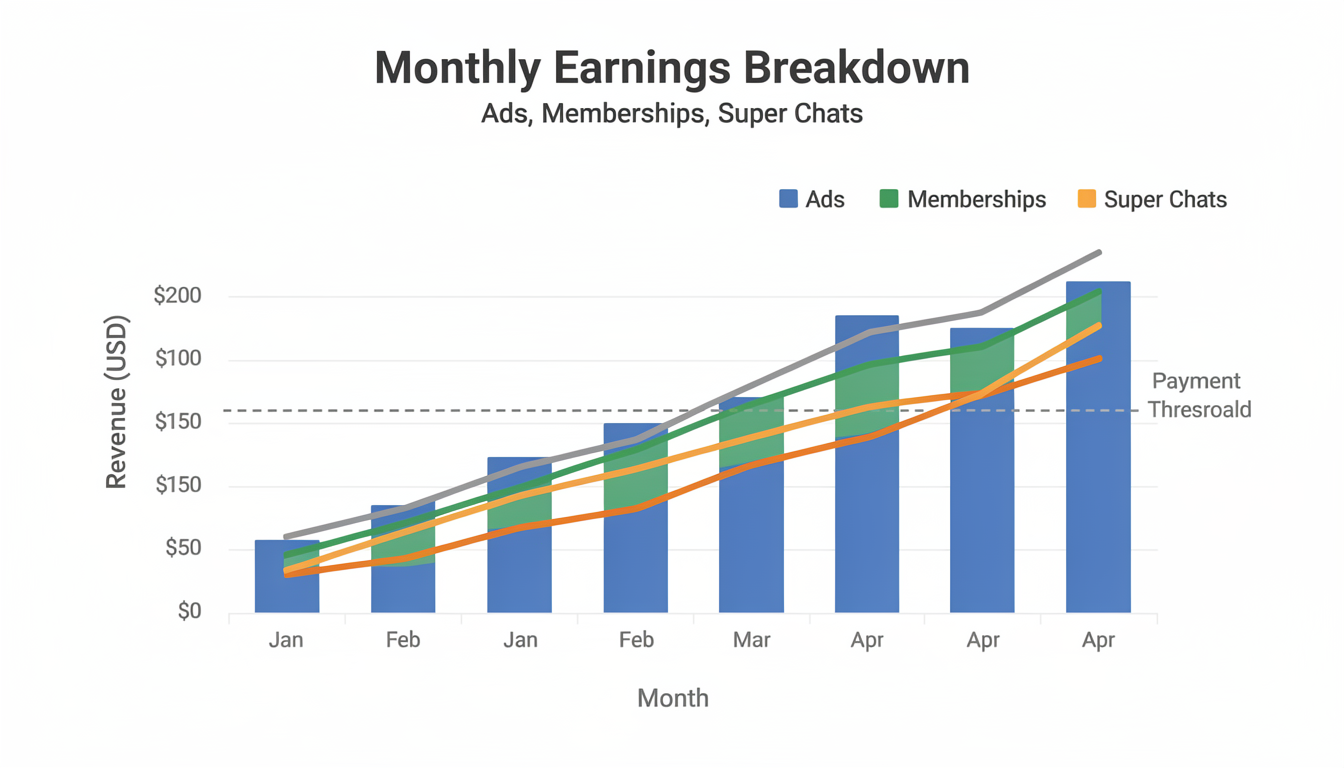
Getting into YPP isn't the finish line. It's the starting line. Here's what changes and what to focus on next.
Your First Month of Earnings Will Be Small
Set realistic expectations. Most newly monetized channels earn $20–$100 in their first month. That's normal. You just crossed 1,000 subscribers, which means your view counts are still relatively modest. Revenue scales with views, and views scale with subscribers and algorithm traction.
Focus Shifts to RPM Optimization
Once ads are running, your goal shifts from "get monetized" to "earn more per view." This means:
- Making videos over 8 minutes to unlock mid-roll ads
- Improving audience retention so more ad slots are actually seen
- Targeting higher-CPM content angles within your niche
- Publishing during peak hours when high-CPM audiences are active
Diversify Beyond Ad Revenue
As your channel grows past 5,000–10,000 subscribers, start building additional revenue streams:
| Subscriber Count | Revenue Focus |
|---|---|
| 1,000–5,000 | Ad revenue optimization, Super Thanks |
| 5,000–10,000 | Channel memberships, affiliate links |
| 10,000–50,000 | Sponsorship deals, digital products |
| 50,000+ | Diversified portfolio (ads + sponsors + products + affiliates) |
Sponsorships alone can pay 2–10x what ads pay. A tech review channel with 20,000 subscribers might earn $300/month from ads but $1,000–$3,000 from a single sponsor deal. Ad revenue builds the foundation, but sponsorships and products build the house.
What Your First Year of YouTube Earnings Realistically Looks Like
Most monetization guides show you the thresholds but never show realistic month-by-month numbers. Here's what a typical first year looks like for creators who hit YPP around month 8–12.
Example: Tech Review Channel (Monetized at Month 10)
| Month | Subs | Monthly Views | Ad Revenue | Other Income | Total |
|---|---|---|---|---|---|
| 1–6 | 0→350 | 500→5,000 | $0 (not monetized) | $0 | $0 |
| 7–9 | 350→900 | 5,000→15,000 | $0 (not monetized) | $0 | $0 |
| 10 | 1,100 | 20,000 | $80 (first month of ads) | $0 | $80 |
| 11 | 1,400 | 30,000 | $150 | $200 (first small sponsor) | $350 |
| 12 | 1,800 | 45,000 | $270 | $500 (sponsor) | $770 |
| Year 1 Total | $500 | $700 | $1,200 |
Example: Cooking Channel (Monetized at Month 7)
| Month | Subs | Monthly Views | Ad Revenue | Other Income | Total |
|---|---|---|---|---|---|
| 1–4 | 0→400 | 1,000→8,000 | $0 | $0 | $0 |
| 5–6 | 400→800 | 8,000→18,000 | $0 | $50 (affiliate) | $50 |
| 7 | 1,050 | 22,000 | $66 | $75 (affiliate) | $141 |
| 8–10 | 1,200→2,500 | 25,000→50,000 | $75→$150/mo | $100→$300/mo (affiliate + 1 sponsor) | $525→$1,350 |
| 11–12 | 3,000→4,000 | 55,000→70,000 | $165→$280 | $400→$800 | $1,690→$3,240 |
| Year 1 Total | $736 | $1,325 | $2,061 |
Key Takeaways from These Examples
- You earn $0 for the first 6–10 months — this is the reality that most guides sugarcoat
- The first month of ad revenue is usually $50–$150 — not the thousands that clickbait headlines promise
- Non-ad income (sponsors + affiliates) can exceed ad revenue by month 11–12 if you actively pursue it
- Growth is exponential, not linear — month 12 earnings are typically 3–5x month 10 earnings because subscriber growth compounds
- Total first-year income for most new channels: $500–$3,000 from all sources combined
These are realistic numbers for creators who post consistently (1–2x/week), pick a niche, and actively optimize. They're not sexy numbers — but they represent the foundation that scales to real income in year 2 and beyond.
Frequently Asked Questions
How many subscribers do you need to get paid on YouTube?
You need 1,000 subscribers plus 4,000 watch hours (or 10 million Shorts views in 90 days) to access ad revenue through the YouTube Partner Program. A lower tier at 500 subscribers plus 3,000 watch hours unlocks fan funding features like Super Chats and memberships, but no ad revenue.
How much does YouTube pay for 1,000 views?
YouTube pays $2–$12 per 1,000 views on long-form content, depending on your niche and audience geography. Finance and tech channels earn the most ($8–$25 RPM), while gaming and entertainment earn less ($1–$4 RPM). See our complete YouTube earnings breakdown for data by niche and country.
How long does it take to make money on YouTube?
Most creators receive their first payment 9–18 months after starting their channel. This includes time to reach 1,000 subscribers and 4,000 watch hours (6–18 months), YPP review (1–4 weeks), AdSense verification (1–4 weeks), reaching the $100 payment threshold (1–6 months), and payment processing (3–4 weeks).
Can you make money on YouTube without 1,000 subscribers?
With 500 subscribers and 3,000 watch hours, you can access YouTube's early monetization tier, which includes Super Chats, Super Thanks, channel memberships, and YouTube Shopping. However, you cannot earn ad revenue — the largest income source — until you reach 1,000 subscribers.
Why did my YPP application get rejected?
Common reasons include: reused content without substantial original commentary, misleading metadata or thumbnails, content that violates community guidelines, or channels that dropped below the subscriber/watch hour thresholds during the review period. YouTube provides the specific reason in YouTube Studio. Fix the issue, wait 30 days, and reapply.
Do YouTube Shorts count toward watch hours?
No. Shorts views do not count toward the 4,000 watch hours requirement. However, Shorts have their own separate path to YPP qualification — 10 million Shorts views in 90 days (for full monetization) or 3 million views in 90 days (for the early access tier).
How much do you need to earn before YouTube pays you?
YouTube requires a minimum balance of $100 before processing a payment. If your monthly earnings are below $100, the balance rolls over to the next month and continues accumulating until the threshold is met. Once you cross $100, payment is issued between the 21st and 26th of the following month.
Can you lose YouTube monetization after getting it?
Yes. YouTube can revoke YPP membership if your channel receives a community guidelines strike, drops below the subscriber or watch hour thresholds, or becomes inactive (no uploads or community posts for 6+ months). You'd need to reapply and go through the review process again.
Does YouTube pay monthly?
Yes. YouTube finalizes earnings on the last day of each month. If your balance is $100 or more, payment is processed between the 21st and 26th of the following month. For example, January earnings (finalized January 31) are paid out between February 21–26. Payments arrive via the method you set in AdSense (bank transfer, wire, or check).
What's the fastest way to reach YouTube monetization?
Focus on long-form, search-driven content in a specific niche. Post at least once per week on a consistent schedule. Prioritize audience retention over view count. Use Shorts to attract subscribers but don't rely on them for watch hours. Cross-promote on other social platforms to drive traffic back to your YouTube channel. And go live — a single 2-hour live stream with 50 viewers generates 100 watch hours.
The Bottom Line
YouTube starts paying you after you clear a specific sequence of milestones: 1,000 subscribers → 4,000 watch hours → YPP approval → $100 earnings threshold → payment processing. For most creators, the first check arrives 9–18 months after starting their channel.
The timeline is long, but every step is predictable. You know exactly what the targets are. You know what counts and what doesn't (Shorts views ≠ watch hours). You know how the payment cycle works. There are no surprises — just milestones to hit.
Here's the framework:
- Pick a niche and commit to it — scattered content grows the slowest
- Prioritize long-form, search-optimized videos — they generate the most watch hours and the highest RPM once monetized
- Use Shorts strategically — as a subscriber acquisition tool, not a revenue source
- Post consistently and at optimal times — check the best time to upload a YouTube video for data-backed time slots
- Cross-promote everywhere — every platform is a funnel back to your YouTube channel
- Don't quit during the dead zone — the 100–500 subscriber phase is where most creators give up, and it's also where the ones who succeed pushed through
And once you're monetized, remember: ad revenue is just the beginning. The real money in YouTube comes from sponsorships, products, and affiliates that you build on top of your audience.
If you're building a YouTube channel alongside other social platforms, PostPlanify helps you schedule and manage content across YouTube, TikTok, Instagram, LinkedIn, X, and more — all from one dashboard. Start your 7-day free trial and turn consistent posting into compounding growth.
Related: How Much Does YouTube Pay for 1,000 Views? | Does YouTube Automation Work? | What Social Media Platform Pays the Most? | How Much Does TikTok Pay for 1 Million Views? | Best YouTube Scheduling Tools | How to Schedule YouTube Shorts | Best Time to Upload a YouTube Video | How to Start a YouTube Channel for Kids | Content Repurposing Strategies
PostPlanifyAll your social media in one simple dashboard
Schedule posts, track analytics, and reply to comments/DMs without switching tabs.
Engagement
+18%
Views
52.8k
About the Author

Hasan Cagli
Founder of PostPlanify, a content and social media scheduling platform. He focuses on building systems that help businesses, agencies, and teams plan, publish, and manage content and social media more efficiently across platforms.


