


You open Instagram and see the message: "Your account has been suspended."
Your stomach drops. Years of content, followers, DMs, business connections — gone in a second. No warning. No explanation that makes sense.
Take a breath. Your account is almost certainly recoverable if you act correctly and quickly.
This guide walks you through exactly what to do, step by step, depending on your account type. It includes ready-to-use appeal letter templates, explains how Instagram's automated enforcement actually works (and why it gets things wrong), and covers what to do if your first appeal gets denied.
No generic advice. No vague "contact support" suggestions. Just the actual recovery playbook.
First: Understand What Happened to Your Account
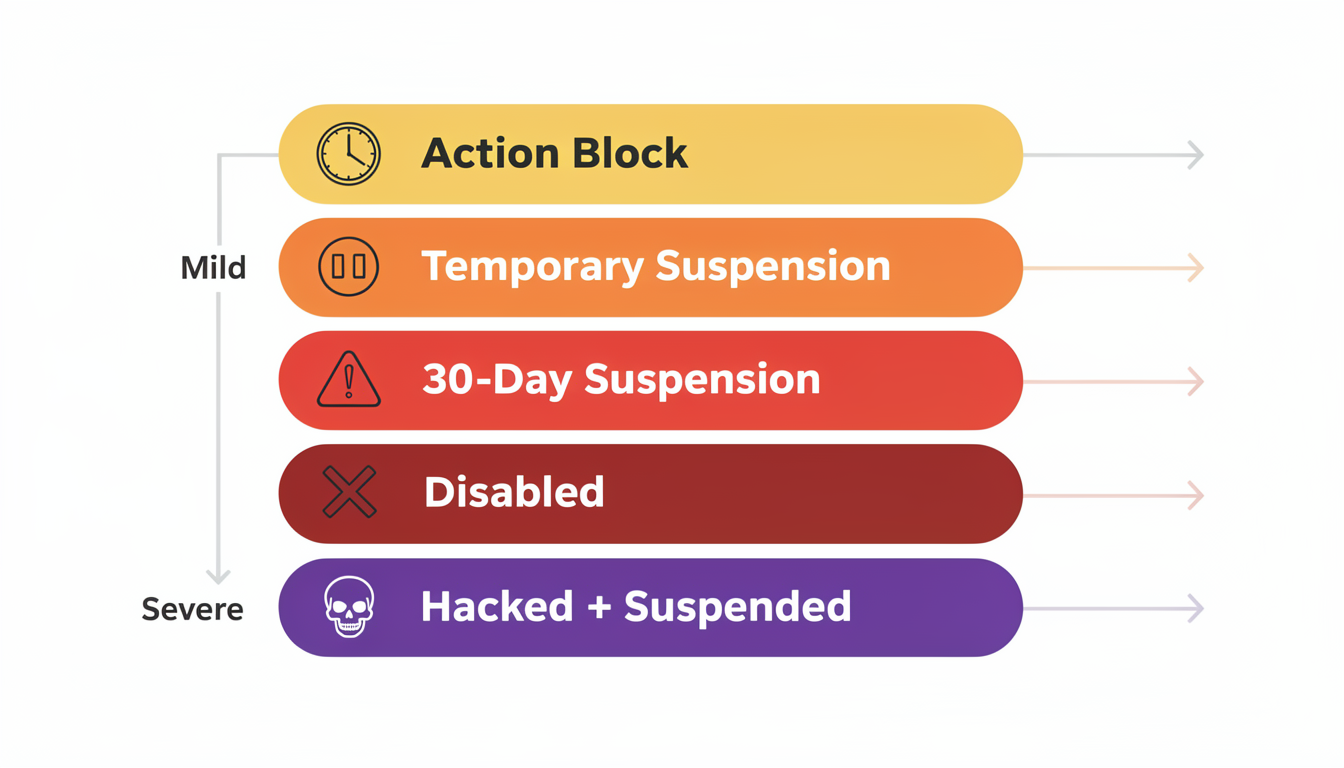
Instagram uses different terms that mean different things. Knowing which situation you're in determines your next move.
| Status | What it means | Can you log in? | Time to act | Recovery difficulty |
|---|---|---|---|---|
| Action Block | Temporary restriction on specific actions (liking, commenting, following) | Yes | Wait 24-48 hours | Easy — it resolves on its own |
| Temporary Suspension | Account is hidden from public but not deleted | Limited | 24 hours to 7 days | Moderate — usually lifts automatically |
| Suspended (30-day notice) | Account disabled with a 30-day appeal window | No | 30 days before permanent deletion | Moderate — appeal required |
| Disabled | Account permanently removed after failed/missed appeal | No | 180 days (data still exists) | Hard — requires escalation |
| Hacked + Suspended | Someone else violated terms using your account | No | 30 days | Moderate — different recovery path |
The critical number: 30 days. That's how long you have to submit your appeal before Instagram permanently deletes your account. After that, your data remains on their servers for approximately 180 days, but recovery becomes significantly harder.
Why Instagram Suspends Accounts (Even When You Didn't Do Anything Wrong)
Here's what most guides won't tell you: the majority of Instagram suspensions are triggered by automated AI systems, not human moderators.
Instagram processes billions of actions daily. Their enforcement system uses machine learning to flag accounts based on behavior patterns, content analysis, and reported activity. This system is fast, but it makes mistakes — sometimes flagging legitimate accounts that happen to trigger automated thresholds.
The 8 Most Common Suspension Triggers
1. Community Guidelines violations. Nudity, hate speech, graphic violence, harassment, or content promoting illegal activity. Even borderline content can trigger automated review — especially if it gets reported by multiple users within a short window.
2. Bot-like behavior patterns. Instagram tracks your actions per hour. If you exceed certain thresholds, the system flags you as a potential bot:
| Action | Safe threshold | Risk zone | Likely suspension |
|---|---|---|---|
| Likes | Under 30/hour | 30-60/hour | 60+/hour |
| Follows | Under 15/hour | 15-30/hour | 30+/hour |
| Unfollows | Under 15/hour | 15-30/hour | 30+/hour |
| Comments | Under 15/hour | 15-25/hour | 25+/hour |
| DMs | Under 15/hour | 15-30/hour | 30+/hour |
Note on DMs: In late 2024, Meta reduced the official Graph API DM rate limit from 5,000 to 200 messages per hour — a 96% reduction. Most third-party DM automation tools broke overnight, and accounts still using non-compliant DM tools face immediate suspension risk.
New accounts have even lower thresholds. If your account is less than 2 weeks old, cut these numbers in half.
Instagram's Trust Score (2026): Behind the scenes, Instagram now assigns each account an internal "trust score" based on login consistency (same devices, same locations), behavioral patterns (gradual vs sudden activity changes), account age, verification status, and connections to other flagged accounts. Accounts with higher trust scores get more lenient enforcement — the same action that triggers a suspension on a new, unverified account may only generate a warning on an established, verified one. You can't see your trust score directly, but maintaining consistent behavior, using the same devices, and avoiding third-party apps all build it over time.
3. Third-party app access. Apps that request your Instagram login credentials (follower trackers, "who unfollowed me" tools, auto-likers, mass DM tools) violate Instagram's Terms of Service. When Instagram detects these connections, they often suspend the account immediately. In 2025, account suspensions linked to non-compliant third-party apps increased by 30% (per TechCrunch). Instagram now uses device fingerprinting to detect automation patterns — even browser extensions that inject scripts can trigger flags.
4. Multiple user reports. If several users report your account within a short time frame, Instagram's system may auto-suspend first and review later. This is sometimes exploited maliciously by competitors or bad actors — and it's one of the most common reasons for "suspended for no reason" situations.
5. Intellectual property complaints. DMCA takedowns or trademark complaints from other users or brands. Even one valid IP complaint can trigger a suspension if the content is still live on your profile.
6. Operating multiple accounts from one device. Instagram allows up to 5 accounts per device, but rapidly switching between them or performing similar actions across accounts can trigger "coordinated inauthentic behavior" flags. As of 2026, Meta also enforces cross-platform cascade — a flag on one Meta platform (Facebook, Instagram, Threads) can auto-suspend related profiles linked through the same Accounts Center. If you've linked your Facebook and Instagram accounts, a violation on either platform can affect both.
7. Sudden spikes in activity. Going from posting once a week to posting 5 times a day, or suddenly following 200 people in an hour after months of inactivity, looks suspicious to the algorithm regardless of your intentions.
8. Identity verification failures. If Instagram requests identity verification and you fail to provide it (or provide documents that don't match your profile information), they may suspend the account.
"Instagram Disabled My Account for No Reason"
This is the most common complaint, and in many cases, it's genuinely true — you didn't consciously violate any rules. Here's what usually actually happened:
- A third-party app you forgot about still had API access to your account. Check your connected apps regularly via Settings > Security > Apps and Websites.
- You were mass-reported. Coordinated reporting campaigns can trigger automated suspensions. This is especially common for accounts in competitive niches, controversial topics, or accounts that recently went viral.
- Your content was flagged by AI incorrectly. Instagram's content moderation AI sometimes misidentifies medical content, art, fitness content, or historical imagery as violations. This is a known issue with no perfect fix on Instagram's end.
- Your VPN or IP address was flagged. If you regularly use VPNs, shared WiFi networks, or travel frequently, your login pattern can look like unauthorized access.
The good news: accounts suspended by automated systems (rather than human review) have the highest appeal success rates because a human reviewer can easily see the error.
How to Recover a Hacked Instagram Account (Before It Gets Suspended)
If your account was compromised and then suspended because the hacker violated Instagram's rules, you're in a specific recovery situation that requires a different approach than a standard suspension appeal.
Signs Your Instagram Was Hacked
| Sign | What It Means |
|---|---|
| You received a "password changed" email you didn't initiate | Someone accessed your account and changed credentials |
| Your email and phone number on the account were changed | The hacker locked you out of recovery options |
| Posts, Stories, or DMs were sent that you didn't create | The hacker used your account actively — these may trigger violations |
| You got a suspension notice for content you didn't post | Instagram's system flagged the hacker's activity under your account |
| Followers report receiving spam DMs from "you" | The hacker is using your account for spam, which triggers mass reports |
Immediate Steps (Do These First)
1. Secure your email BEFORE anything else. If the hacker changed your Instagram email, they may also have access to your email account. Change your email password immediately and enable 2FA on your email. Your email is the master key — without it, Instagram recovery becomes much harder.
2. Check for a login link email. Instagram sends "Was this you?" emails when someone logs in from a new device or changes account info. If you received one recently, tap "Secure your account" or "This wasn't me" — this may let you reverse the changes before the hacker locks you out completely.
3. Use Instagram's dedicated hacked account flow. Go to instagram.com/hacked from a device you've previously logged into Instagram from. This initiates a specialized recovery process that:
- Lets you verify your identity via video selfie
- Doesn't require your current password
- Is separate from the standard suspension appeal process
4. Request a login link via email or SMS. On the Instagram login screen, tap "Get help logging in" → enter your username, email, or phone number → tap "Send Login Link." If the hacker hasn't changed your recovery contacts, you can regain access this way.
5. If the hacker changed your email and phone: This is the hardest scenario. You'll need to:
- Go to instagram.com/hacked
- Select "My account was hacked"
- Complete the video selfie verification (Instagram compares it to photos in your account)
- Wait for Instagram to review — this can take 3-7 days
How to Frame Your Appeal for a Hacked + Suspended Account
If your account was suspended because of the hacker's activity, your appeal needs to clearly establish that:
- You were not in control of the account during the period when violations occurred
- You can identify the approximate date the hack happened (check your "Was this you?" emails)
- You have secured your account (changed passwords, removed unauthorized app access, enabled 2FA)
- The violating content was posted by the hacker, not by you
Use this framing in your appeal letter:
My account @yourusername was compromised by an unauthorized party on approximately [date]. During the period of unauthorized access, content was posted and/or actions were taken that violated Instagram's guidelines — none of which were performed by me. I have since secured my account by [changing passwords / enabling 2FA / revoking app access]. I request that the suspension be reviewed in light of the unauthorized access.
Prevention After Recovery
Once you recover a hacked account:
- Enable 2FA immediately — use an authenticator app, not SMS
- Revoke all third-party app access (Settings > Security > Apps and Websites)
- Change your password to something unique (not used on any other platform)
- Check your email forwarding rules — hackers sometimes add forwarding rules to your email to intercept future security notifications
- Review your DMs for any spam or scam messages the hacker sent — apologize to affected followers
 PostPlanify
All your social media in one simple dashboard
Schedule posts, track analytics, and reply to comments/DMs without switching tabs.

Engagement
+18%
Views
52.8k
How to Appeal: Step-by-Step by Account Type
The appeal process differs significantly depending on whether you have a personal account, a creator account, or a business account. Here's each path.
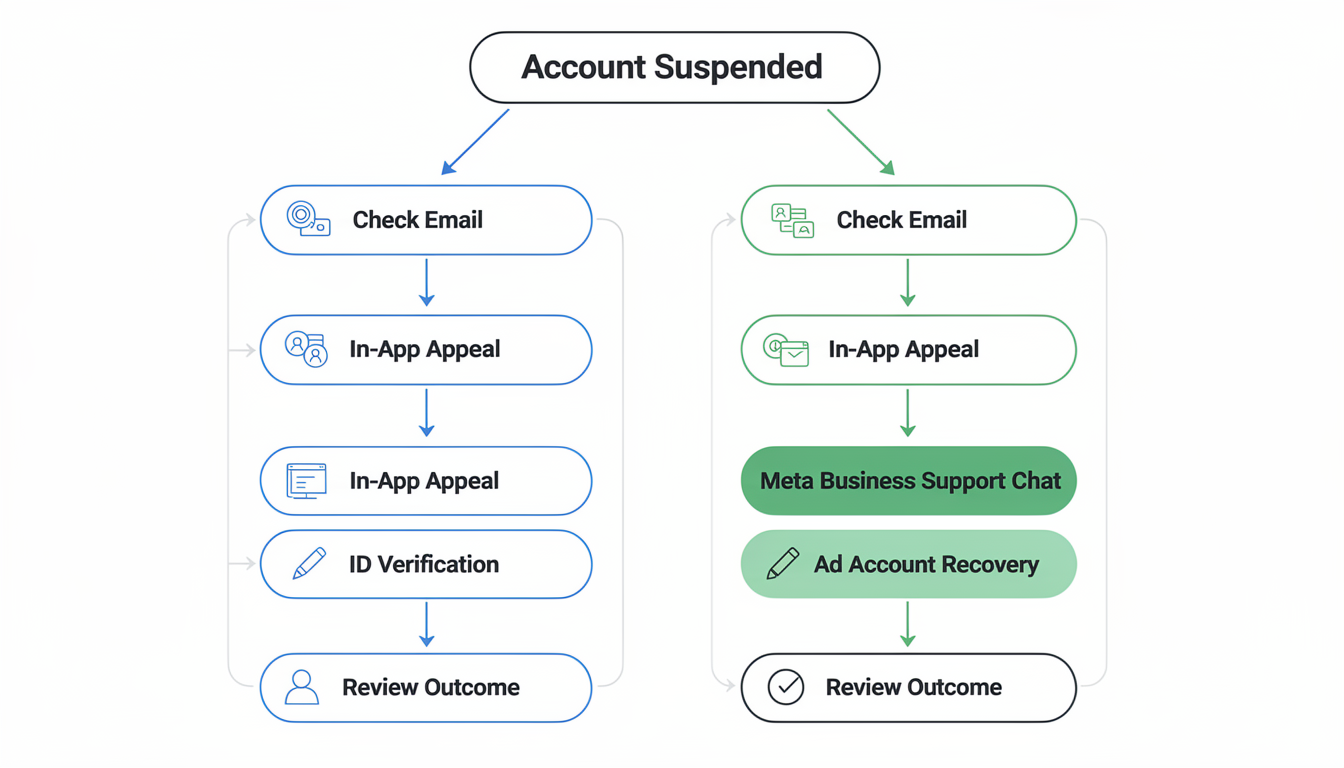
Path A: Personal Account Recovery
Step 1: Check your email. Instagram sends a suspension notification to the email linked to your account. This email contains the reason for suspension and often includes a direct appeal link. Check your spam folder — these emails frequently land there.
Step 2: Appeal through the app. Open the Instagram app and attempt to log in. You should see a message explaining the suspension with a "Disagree with Decision" or "Request Review" button. Tap it.
Step 3: Verify your identity. Instagram will ask you to verify you're a real person. This typically involves one or more of:
- A video selfie — a short clip where you turn your head in different directions (matching Instagram's on-screen prompts)
- A photo of government-issued ID (passport, driver's license, national ID card)
Tips for the video selfie: Use good lighting. Face a window during daytime. Remove sunglasses, hats, or face coverings. If the selfie verification fails, try again in different lighting before escalating.
Step 4: Submit your written appeal. This is where most people fail. A vague "I didn't do anything wrong" appeal gets ignored. Use the templates in the next section for a structured response.
Step 5: Wait (and don't make it worse). Standard response time: 24-72 hours, though some appeals take up to 2 weeks. Do not submit multiple appeals — this can reset your position in the queue or flag your account for "spamming support." Important: as of 2025, Instagram has restricted many users to a single appeal attempt through the app, making your first submission even more critical.
Path B: Creator/Business Account Recovery
Business and creator accounts have additional recovery options that personal accounts don't.
Step 1-4: Same as personal accounts above.
Step 5: Access Meta Business Support. If your Instagram account was linked to a Facebook Page or Meta Business Suite:
- Log into Meta Business Suite on desktop
- Click the "?" help icon in the bottom-left corner
- Select "Contact Support" or "Get Support"
- Choose "Instagram" as the platform
- Describe the issue and request a live chat or callback
This is the single most effective escalation path. Business support agents are human, and they can see your account status and escalate internally. This option is not available to personal accounts.
Step 6: Check your ad account status. If you were running Instagram ads, your ad account may be separately suspended. Even after recovering your Instagram profile, you may need to separately appeal your ad account through Meta Ads Help Center.
What Happens After You Submit Your Appeal
You've hit "Submit" and now you're staring at your phone wondering what's actually happening on the other end. Here's the internal review pipeline — understanding it reduces anxiety and helps you set realistic expectations.
The Review Pipeline
| Stage | What Happens | Typical Timing |
|---|---|---|
| 1. AI First-Pass | Your appeal is screened by an automated system that checks for obvious patterns: account age, violation history, type of violation, whether the content was flagged by AI or human reports | Instant (seconds) |
| 2. Priority Queue | Your appeal enters a review queue. Business/Creator accounts with ad spend history get higher priority. Accounts with no prior violations also rank higher. | Queued immediately |
| 3. Human Review | A human moderator reviews your account — they see your content history, the specific violation, your appeal text, and your verification documents | 24 hours to 2 weeks |
| 4. Decision | The reviewer either approves (account restored), denies (suspension upheld), or escalates (sends to a senior reviewer for edge cases) | Usually same session as review |
| 5. Notification | You receive an email and/or in-app notification with the decision. Approvals typically restore your account within 24 hours of the decision. | 1-48 hours after decision |
What Affects Your Position in the Queue
- Account type: Business/Creator accounts with linked ad accounts are reviewed faster than personal accounts
- Violation severity: Appeals for "minor" violations (hashtag misuse, borderline content) are processed faster than serious ones (hate speech, impersonation)
- Verification completeness: Appeals with completed video selfie or ID verification move ahead of those without
- First-time vs repeat: Accounts with no prior strikes get faster, more favorable reviews
- Volume: During mass ban events (like the May 2025 wave), the queue backs up significantly — response times can stretch from days to weeks
What You Can and Can't Do While Waiting
Do:
- Check your email (including spam) daily for a response
- Keep your appeal evidence organized in case you need to escalate
- Continue posting on other platforms to maintain your audience
Don't:
- Submit duplicate appeals — this can restart your queue position or flag you for spam
- Try to log in repeatedly — excessive login attempts on a suspended account can be logged as suspicious activity
- Create a new Instagram account from the same device — this triggers ban evasion detection
- Contact Instagram through multiple channels simultaneously (app appeal + Facebook form + Business Support) — conflicting tickets can confuse the process
If You Hear Nothing After 2 Weeks
No response after 14 days usually means your appeal was deprioritized, not that it was denied. At this point:
- Check your Support Inbox (if you have any app access) for updates
- If you have a business account, escalate through Meta Business Support chat
- If personal, submit a single follow-up through facebook.com/help referencing your original appeal date
- Consider the Oversight Board path if your case involves a content moderation dispute
Appeal Letter Templates (Copy, Customize, Send)
Your appeal letter is the most important factor in recovery. Instagram support reviews thousands of appeals daily — yours needs to be clear, specific, and professional. No begging, no threats, no essays.
Template 1: Standard Appeal (First Attempt)
Use this for your initial appeal regardless of account type.
Subject: Appeal for Account Suspension — @yourusername
Dear Instagram Support Team,
My Instagram account @yourusername was suspended on [date]. I believe this was done in error and I would like to request a review.
Account details:
- Username: @yourusername
- Email on file: [email protected]
- Account type: [Personal / Creator / Business]
- Approximate follower count: [number]
- Account age: [how long you've had it]
Why I believe this is an error: [Choose the one that applies and customize it]
- I have not knowingly violated Instagram's Community Guidelines or Terms of Service. I use my account for [describe your use: personal sharing / business promotion / content creation in X niche]. My content consists of [describe: product photos, educational posts, personal updates, etc.].
- I recently revoked access to a third-party application that may have triggered automated enforcement. I have since removed all unauthorized app connections.
- I believe my account was targeted by coordinated false reports. [Mention if you're in a competitive niche or recently had a public disagreement.]
I have completed identity verification as requested. I respectfully ask that a human reviewer examine my account and its content history. This account represents [X years] of work and is important to [me personally / my business / my livelihood].
Thank you for your time.
[Your full legal name]
Template 2: Appeal After First Denial
Wait at least 7 days after your first denial before submitting a second appeal. Use new information or framing.
Subject: Second Appeal — @yourusername (Case Reference if Available)
Dear Instagram Review Team,
I previously submitted an appeal for my suspended account @yourusername, which was not approved. I'm writing to provide additional context that may not have been considered in the initial review.
New information:
- [If applicable: "I have identified and removed the third-party app (name of app) that had unauthorized access to my account."]
- [If applicable: "I have reviewed Instagram's Community Guidelines thoroughly and identified the content that may have been flagged. I understand why it could have been misinterpreted and am committed to ensuring all future content complies."]
- [If applicable: "I believe automated enforcement flagged my account incorrectly because (specific reason — e.g., fitness content misidentified, art photography misclassified, sudden follower growth from a viral post)."]
My account has been active for [duration] and has never received a prior warning or strike. I rely on this account for [reason — e.g., my small business, connecting with my community, my creative work].
I respectfully request that this appeal be reviewed by a senior moderator. I'm happy to provide any additional verification needed.
[Your full legal name] [Phone number associated with the account]
Template 3: Business Account — Meta Business Support
Use this when contacting Meta Business Support via live chat for a business/creator account.
Hi, I need help recovering my Instagram business account @yourusername which was suspended on [date].
This account is connected to my Facebook Page [page name] and is actively used for [describe business: e-commerce, service promotion, client communication]. The suspension is affecting my ability to [run ads / communicate with customers / process orders].
My account has been active for [duration] with no prior violations. I believe this may have been triggered by [your theory — coordinated reports, third-party app, automated detection error].
I've already submitted an app-based appeal on [date] but have not received a response. Could you please escalate this to the Instagram account review team?
Account details:
- Instagram: @yourusername
- Connected Facebook Page: [name]
- Business email: [email protected]
What to Do While You Wait
Your appeal is submitted. Now the worst part: waiting. Here's how to use that time productively instead of refreshing your email every 5 minutes.
Immediate Actions (First 24 Hours)
1. Secure your other platforms. If your Instagram was hacked before suspension, immediately change passwords on any platform where you used the same credentials. Enable two-factor authentication everywhere.
2. Download your data (if you still can). If you have any level of account access, go to Settings > Your Activity > Download Your Information. Request a full download immediately. This preserves your content, messages, and follower list even if recovery fails.
3. Notify your audience on other channels. If you have a business, post a brief update on your other platforms — your website, email list, TikTok, X, LinkedIn, Facebook. Something simple:
"Our Instagram account is temporarily down due to a platform issue. We're working on getting it back. In the meantime, follow us here for updates."
Don't say "we were suspended" — it creates unnecessary doubt about your brand.
4. Audit your connected apps. Even though you can't access Instagram, you can check what apps had access by logging into your Facebook account (if linked) and reviewing connected apps there. Revoke anything suspicious.
While Waiting for Response (Days 2-14)
5. Document everything. Screenshot every email from Instagram, every step of the appeal process, and any evidence that supports your case (e.g., proof that content was original, that reports were coordinated, that a third-party app was involved). This documentation matters if you need to escalate.
6. Do NOT create a new Instagram account. This is the biggest mistake people make. Creating a new account from the same device, phone number, or IP address can be flagged as ban evasion, which can permanently block you from the platform and hurt your active appeal. Wait until your appeal is fully resolved.
7. Do NOT pay for "recovery services." There is an entire scam industry built around desperate people with suspended accounts. No third-party service has special access to Instagram's moderation team. The only legitimate paths are: in-app appeal, Meta Business Support (for business accounts), and the Oversight Board escalation.
PostPlanifyAll your social media in one simple dashboard
Schedule posts, track analytics, and reply to comments/DMs without switching tabs.
Engagement
+18%
Views
52.8k
Your Appeal Was Denied. Now What?
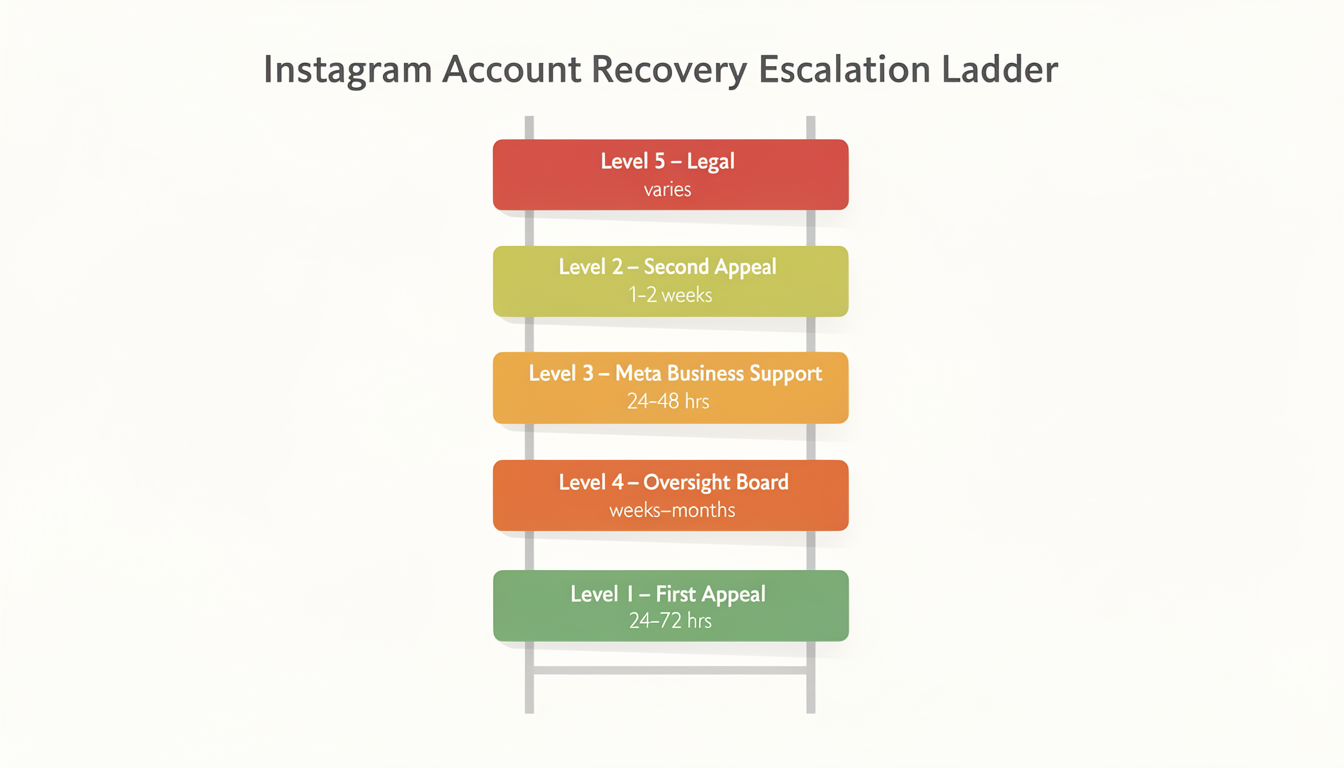
A denied first appeal is not the end. Here's the escalation ladder, in order of effectiveness.
Level 1: Second Appeal (Wait 7+ Days)
Use Template 2 above. Include new information or framing that wasn't in your first appeal. If you've since identified the cause (a connected third-party app, specific content that was misinterpreted), mention it explicitly.
Level 2: Meta Business Support (Business/Creator Accounts Only)
If you haven't already tried this channel, this is your strongest option. Business support agents can escalate directly to the Instagram account review team. Be polite, specific, and concise. These agents handle hundreds of cases daily.
Level 3: Facebook Support Forms
Even for Instagram-specific issues, Meta's broader support forms can sometimes reach a different review team:
- Go to facebook.com/help
- Navigate to "Disabled Accounts" or "Account Recovery"
- Submit a request referencing your Instagram account specifically
Level 4: Meta Oversight Board
The Oversight Board is an independent body that reviews Meta's content moderation decisions. This is a last-resort option for cases where you believe your suspension involves a significant content moderation error — particularly around free expression, political speech, or artistic content.
Important: The Oversight Board only reviews a small number of cases and typically takes weeks to months. It's not a fast fix, but for wrongful suspensions involving content decisions, it's the most authoritative escalation path.
Level 5: Legal Channels
For business accounts where the suspension is causing measurable financial damage, a formal legal letter from an attorney to Meta's legal team can prompt a faster review. This is expensive and should only be considered when the account has significant business value.
The 180-Day Window Most People Don't Know About
Here's something critical that most recovery guides miss or misexplain:
Even after the initial 30-day appeal window closes and your account is marked as "permanently disabled," Instagram retains your account data for approximately 180 days. During this window:
- Your username, content, followers, and DMs still exist on Instagram's servers
- Recovery is still technically possible through escalation channels (Meta Business Support, Oversight Board, legal)
- After 180 days, Instagram begins permanent data deletion — though the actual removal process can take an additional 90 days to fully purge all data from their servers. Once deletion starts, recovery is impossible regardless of how much data remains in processing
What this means practically: If you missed the 30-day window or your appeal was denied, you're not necessarily out of options. The 180-day data retention period is your extended window. The difficulty increases significantly, but success stories exist — particularly through Meta Business Support for business accounts and the Oversight Board for content moderation errors.
How to Prevent This From Happening (Again)
Once you get your account back — or if you're reading this preventively — here's how to stay safe.
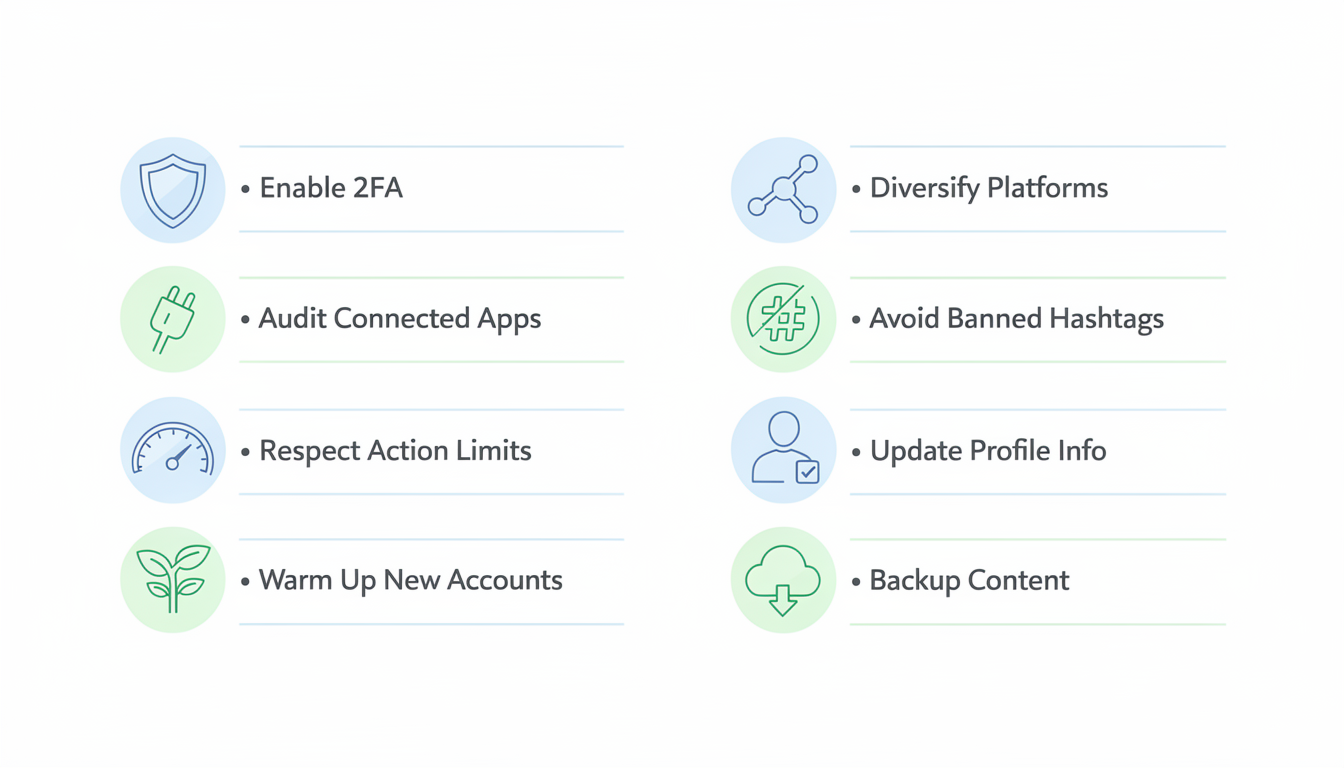
The Non-Negotiables
1. Enable two-factor authentication. Settings > Security > Two-Factor Authentication. Use an authenticator app (not SMS — SIM swapping attacks can bypass SMS verification).
2. Audit connected apps quarterly. Settings > Security > Apps and Websites. Remove anything you don't actively use and recognize. If an app asks for your Instagram password directly (rather than using Instagram's official OAuth login), it's violating ToS and putting your account at risk.
3. Stay within action limits. Keep your hourly actions well within the safe thresholds listed earlier in this guide. If you're using a scheduling tool, make sure it uses Instagram's official API — tools like PostPlanify connect through Meta's approved API, which means your scheduled posts are treated as native actions and won't trigger bot detection.
4. Warm up new accounts gradually. New accounts (under 30 days old) face much stricter automated enforcement. During your first month:
- Post 1-2 times per day maximum
- Keep follows under 10 per day
- Don't use any automation or scheduling tools for the first 2 weeks
- Engage genuinely (real comments, real interactions) to build account trust signals
5. Diversify your platform presence. Never put 100% of your audience on one platform. Build parallel presence on at least 2-3 platforms so that if one account goes down, your business doesn't go with it. Understanding which format works best on Instagram helps you create content that performs well without resorting to risky tactics. A multi-platform scheduling tool makes this manageable — you can plan and schedule content for Instagram, TikTok, X, LinkedIn, and more from a single calendar instead of juggling five apps.

6. Avoid banned hashtags. Instagram maintains a constantly changing list of banned or restricted hashtags. Using them — even unknowingly — can reduce your reach or trigger account flags. Check our hashtag guide for best practices.
7. Keep your profile information current. Make sure your email, phone number, and linked Facebook account are all up to date. These are the primary channels Instagram uses for account verification during recovery. If any of these are outdated, the recovery process becomes significantly harder.
8. Save your content locally. Regularly download your Instagram data (Settings > Your Activity > Download Your Information). Keep local backups of your photos, videos, and captions. If the worst happens, you can rebuild faster.
Instagram Suspension vs Shadowban: What's the Difference?
These two terms get confused constantly, but they're completely different situations requiring different responses.
Quick Comparison
| Suspension | Shadowban | |
|---|---|---|
| Can you log in? | No (or limited) | Yes — full access |
| Can you post? | No | Yes — but nobody sees it |
| Is it official? | Yes — you get a notification | No — Instagram denies it exists |
| Your content | Hidden from everyone | Visible to followers, invisible to everyone else |
| Duration | Until appeal resolves (or permanent) | Usually 2-4 weeks (can be indefinite) |
| Notification | Yes — suspension message in app | None — you discover it from analytics |
| Recovery | Appeal required | Behavioral changes, time |
What a Shadowban Actually Is
Instagram has never officially acknowledged "shadowbanning." What actually happens is a distribution restriction — Instagram's algorithm silently reduces or eliminates your content's reach to non-followers. Your posts still appear on your profile and in your followers' feeds (sometimes), but they're excluded from:
- Explore page
- Hashtag search results
- Reels tab recommendations
- Suggested accounts
You can still post, comment, like, and use the app normally. The only visible symptom is a sudden, dramatic drop in reach — typically your non-follower reach drops from 30-60% to under 5%.
How to Detect a Shadowban
- Check your reach metrics. Go to Instagram Insights on any recent post. If "From Non-Followers" is near zero on multiple posts, you may be shadowbanned.
- Search your hashtags. Post using a low-competition hashtag, then search for it on a different account (or logged out). If your post doesn't appear in Recent, your hashtags are being suppressed.
- Check Account Status. Go to Settings > Account > Account Status > "Limits to your reach." If it says your content doesn't qualify for recommendation, you have a confirmed distribution restriction.
- Ask a non-follower. Have someone who doesn't follow you search for your username. If they can find your profile but your recent posts don't appear in Explore or hashtag feeds, it's a shadowban.
Common Shadowban Triggers
- Banned hashtags — using hashtags that Instagram has restricted (these change frequently). See our hashtag guide for best practices.
- Repetitive actions — liking, following, or commenting at rates that trigger bot detection but below the suspension threshold
- Reported content — multiple reports that don't result in removal but lower your trust score
- Sudden behavior changes — going from inactive to hyper-active overnight
- Engagement pods — groups of accounts that artificially like/comment on each other's content
How to Fix a Shadowban
- Stop all automation immediately — no auto-likes, auto-follows, or engagement pods
- Remove banned hashtags from recent posts (edit and delete them)
- Reduce your activity for 48-72 hours — minimal posting, liking, and commenting
- Check Account Status and appeal any flags through the dashboard
- Post high-quality, original content consistently for 1-2 weeks — the algorithm needs positive signals to lift the restriction
- Wait — most shadowbans lift within 14-28 days if you stop the triggering behavior
The Key Difference for Your Strategy
A suspension requires immediate action — you have 30 days before permanent deletion. A shadowban requires patience — you need to change behavior and wait for the algorithm to recalibrate. The worst thing you can do with a shadowban is panic-post or try to "hack" your way out with more aggressive tactics. That escalates a shadowban into a real suspension. If you're dealing with a similar issue on TikTok, our TikTok shadowban guide covers the full recovery process.
PostPlanifyAll your social media in one simple dashboard
Schedule posts, track analytics, and reply to comments/DMs without switching tabs.
Engagement
+18%
Views
52.8k
What Changed: The 2025 AI Mass Ban Wave
In May 2025, Meta rolled out new AI moderation models that caused the largest mass suspension event in Instagram's history. Tens of thousands of accounts were disabled overnight — many for no legitimate reason.
The new AI systems were designed to catch terrorism, hate speech, and child exploitation content, but proved severely context-blind. Family photos, fitness content, car pictures, and art photography were misclassified as serious violations. Internal reports indicated that a single threshold tweak generated thousands of false positives.
The ban wave started in the US, expanded to UK-based creators by mid-June, and continued through global markets into August 2025. A Change.org petition reached over 25,500 signatures. Meta Verified subscribers — paying $12-15/month for priority support — reported receiving little to no help during the crisis.
What this means for you in 2026: Meta has since refined its AI models and reported a 75% decline in enforcement mistakes in the US. But the episode revealed a fundamental truth about Instagram's enforcement: the system removes first and asks questions later. Automated confidence thresholds are rising, meaning fewer warnings before action. The prevention and recovery strategies in this guide are more important than ever.
How to Check Your Account Status (Before It's Too Late)
Most people don't know Instagram has a built-in dashboard that shows your account's standing — before a suspension happens.
How to access Account Status:
- Go to your profile
- Tap the three-line menu
- Tap Settings and privacy
- Tap Account
- Tap Account Status
Account Status shows four categories:
| Category | What it shows |
|---|---|
| Removed content & messaging issues | Policy violation strikes against your account |
| Limits to your reach | Whether your content qualifies for recommendation to non-followers |
| Features you can't use | Any temporarily disabled Instagram capabilities |
| Monetization eligibility | Access to badges, branded content tools, and partner monetization |
A healthy account shows green checkmarks across all four categories. If you see warnings, you can tap "Request a Review" directly from the dashboard to appeal specific violations — reviews typically take 24-72 hours.
First-strike removal: Instagram now offers the ability to remove a first-time strike from your account through Account Status. If you've never had a violation before, this can clear a false positive without a formal appeal.
Pro tip: A healthy Instagram account typically shows 30-60% of its reach coming from non-followers. If your non-follower reach drops below 10% without any content or format changes, that's an early warning sign of a silent distribution restriction — even if Account Status doesn't show an explicit flag.
Check your Account Status at least once a month as a routine health practice.
Meta's New Support Hub (December 2025)
In December 2025, Meta launched a centralized, 24/7 support hub for both Facebook and Instagram — the most significant support improvement in years.
What changed:
- Unified support location — one place to report account issues, check appeal status, and access recovery tools on both iOS and Android
- AI-powered search — Meta AI helps you find relevant help articles and recovery flows faster
- AI support assistant — currently being tested for personalized guidance on account recovery, settings, and profile management
- Smarter recovery flows — the system now adapts to your specific situation rather than providing generic instructions
- Video selfie verification — a new identity verification option during the recovery process
- Improved device recognition — the system better identifies your familiar devices and locations
Results so far: Meta reported that hacked account recovery success rates improved by more than 30% in the US and Canada, and new account hacks decreased by more than 30% globally since the hub launched.
This doesn't change the fundamental appeal process outlined earlier in this guide, but it makes each step faster and more accessible — especially for users who previously struggled to find the right forms or contact channels.
FAQ
How long does Instagram take to respond to an appeal?
Standard appeals are typically reviewed within 24-72 hours. However, during periods of high volume (holidays, major policy changes, platform outages), response times can stretch to 1-2 weeks. Business accounts using Meta Business Support chat generally get faster responses — often within 24 hours.
Can I create a new Instagram account while my old one is suspended?
Don't. Creating a new account from the same device, phone number, email, or IP address can be flagged as ban evasion. This can result in the new account being immediately suspended and can negatively impact your active appeal. Wait until your appeal is fully resolved before considering a new account.
Does Meta Verified help with account recovery?
Meta Verified subscribers ($12-15/month) get access to priority support, which can speed up appeal response times during normal operations. However, the 2025 mass ban wave exposed serious limitations — paying subscribers were banned alongside free accounts and reported receiving little to no help from Meta's support reps. Being verified does not guarantee recovery, doesn't change the review criteria, and doesn't protect against automated enforcement. If your account was legitimately suspended for a real violation, verified status won't override that decision.
How many times can I appeal a suspension?
There's no hard limit, but submitting more than 2-3 appeals is counterproductive. Each appeal should include new information or framing. Wait at least 7 days between appeals. Submitting rapid repeat appeals with the same content can be flagged as spam and may hurt your case.
What if my Instagram was hacked and then suspended?
This is a specific recovery path. Instead of the standard suspension appeal, use Instagram's hacked account flow: go to instagram.com/hacked from a device you've previously logged in from. This initiates a different verification process that accounts for unauthorized access. Make sure to mention in your appeal that the violations were committed by an unauthorized party, not by you.
Can I recover a suspended Instagram account after 30 days?
It gets significantly harder, but it's not always impossible. Instagram retains your account data for approximately 180 days after the suspension. During this extended window, recovery may still be possible through Meta Business Support (for business accounts), the Oversight Board, or legal channels. After 180 days, your data is permanently deleted.
How do I know if I was suspended by a bot or a human?
If your suspension happened instantly with no prior warning — especially during or immediately after a specific action (posting, following, logging in from a new device) — it was almost certainly automated. Suspensions from human review typically follow a content report and may reference specific posts or comments. Automated suspensions generally have higher appeal success rates because a human reviewer can easily identify the false positive.
Will Instagram tell me exactly which rule I broke?
Sometimes. The suspension notification may reference a specific guideline (e.g., "Community Guidelines on nudity" or "Terms of Use violation"). Other times, it's vague ("Your account has been disabled for violating our terms"). In vague cases, common causes are third-party app connections, bot-like behavior patterns, or coordinated reporting — not necessarily content violations.
How do I protect my account after getting it back?
Immediately enable two-factor authentication, revoke all third-party app access, update your recovery email and phone number, and reduce your activity levels for the first 1-2 weeks after recovery. Your account is on a probationary period after reinstatement — any new flags will be treated more seriously.
What is Instagram's Account Status tool and how do I use it?
Account Status is Instagram's built-in dashboard that shows your account's standing across four categories: removed content, reach limits, feature restrictions, and monetization eligibility. Access it via Settings > Account > Account Status. A healthy account shows green checkmarks across all categories. You can appeal specific violations directly from this dashboard, and Instagram even allows you to remove a first-time strike. Check it monthly to catch issues early.
Did Instagram have a mass ban wave in 2025?
Yes. Starting in May 2025, Meta rolled out new AI moderation models that caused tens of thousands of false suspensions globally. The AI systems were designed to catch serious violations like terrorism and child exploitation content, but misclassified innocent content — family photos, fitness posts, art photography, even car pictures. The wave continued through August 2025. Meta Verified subscribers were affected equally and reported inadequate support. Meta has since refined its models and reported a 75% decline in enforcement mistakes in the US.
Can using a scheduling tool get my Instagram account suspended?
It depends entirely on how the tool connects to Instagram. Tools that use Meta's official Instagram Graph API — like PostPlanify, Meta Business Suite, and other authorized scheduling platforms — are completely safe. Your scheduled posts are treated as native actions. Tools that require your Instagram password directly, use unofficial APIs, or simulate human behavior (auto-liking, auto-following, auto-commenting) are dangerous and can trigger immediate suspension. Always verify that your scheduling tool uses OAuth authentication and Meta's official API.
What happens to my followers and data when my account is suspended?
During a suspension, your profile, posts, stories, followers, and DMs are hidden from all users but not deleted. Everything is preserved on Instagram's servers. If your appeal succeeds, your account restores exactly as it was — same followers, same content, same DMs. If your appeal fails or you miss the 30-day window, Instagram retains your data for approximately 180 days before permanent deletion. After 180 days, everything is gone and your username becomes available for others to claim. If you're starting fresh with a new handle, check Instagram username availability to secure the best option.
How do I remove a first-time strike from my Instagram account?
If you've never had a violation before, Instagram offers a first-strike removal option through the Account Status dashboard. Go to Settings > Account > Account Status, find the violation listed, and look for the option to remove or appeal the strike. This can clear a false positive without going through the formal appeal process. This option is only available for your first strike — subsequent violations must go through standard appeals.
Key Takeaways
- Most suspensions are automated — Instagram's AI systems flag accounts based on behavior patterns, and false positives are common. Automated suspensions have the highest appeal success rates.
- You have 30 days to appeal before Instagram marks your account for permanent deletion, and 180 days of data retention after that for escalation attempts.
- The 2025 AI ban wave suspended tens of thousands of accounts by mistake. Meta has since improved accuracy by 75%, but the "remove first, ask questions later" approach remains.
- Business accounts have more recovery options — Meta Business Support live chat is the single most effective escalation path, with approximately 60% success rates for documented cases.
- Third-party apps are the #1 preventable cause of suspensions. Only use tools that connect through Meta's official API. Suspensions linked to non-compliant apps increased 30% in 2025.
- Check Account Status monthly (Settings > Account > Account Status) to catch violations early. You can remove a first-time strike directly from this dashboard.
- Never create a new account while your old one is suspended — it triggers ban evasion flags and can permanently block you.
- Meta's December 2025 support hub improved hacked account recovery rates by 30%+ and provides 24/7 support with AI-powered guidance.
Making the Switch
If your Instagram account was suspended because of a non-compliant third-party tool — or if you want to prevent that from ever happening — switching to a scheduling platform that uses Meta's official API is the single most important step you can take.
PostPlanify connects through Meta's approved Instagram Graph API, so every scheduled post, Reel, and Story is treated as a native action — no bot detection triggers, no Terms of Service violations. Beyond safe scheduling, PostPlanify gives you:
- Multi-platform scheduling — plan content for Instagram, TikTok, X, LinkedIn, Facebook, YouTube, Pinterest, Threads, and Bluesky from one calendar
- Advanced analytics — track performance across all platforms so you can spot reach drops (a potential early warning sign) before they escalate
- Social inbox — manage comments and messages across platforms without using risky third-party DM tools
- AI assistant — generate captions and improve content without leaving the dashboard
- Team collaboration — invite 3 users on Growth, 6 on Premium, 12 on Scale, or use a custom Enterprise plan with role-based permissions, so no one needs to share login credentials (another common suspension trigger)
PostPlanify plans start with Growth at $99/month, or $79/month billed yearly. All plans include a 7-day free trial and a 14-day money-back guarantee.
Related Reading
- Why Can't I Post on Instagram? 15 Fixes
- How to Schedule Instagram Posts in 2025
- How to Grow Instagram Followers Organically
- Instagram Scheduled Posts Not Working: How to Fix It
- Automating Instagram Posts Safely
- How Many Hashtags on Instagram: Best Practices
- How to Go Viral on Instagram
- Social Media Best Practices
- How to Recover Your YouTube Account
- How to Schedule Instagram Stories
- How to Check Instagram Username Availability
- Shadowbanned on TikTok? How to Fix It
PostPlanifyAll your social media in one simple dashboard
Schedule posts, track analytics, and reply to comments/DMs without switching tabs.
Engagement
+18%
Views
52.8k
About the Author

Hasan Cagli
Founder of PostPlanify, a content and social media scheduling platform. He focuses on building systems that help businesses, agencies, and teams plan, publish, and manage content and social media more efficiently across platforms.


