


You spent hours creating the perfect Facebook post, hit "publish," and... nothing. A few likes, maybe a comment from your mom, and then it disappears into the digital void. It’s a common and frustrating problem for social media managers.
The best time of day to post on Facebook in 2026 is between 7 AM and 9 AM on weekday mornings, with Tuesday through Thursday showing the highest engagement. A secondary peak at 12 PM to 1 PM captures lunch-break scrollers.
The issue often isn’t your content -- it’s your timing. Publishing when your audience is asleep, in meetings, or just offline is like opening a retail store at 3 AM. No matter how great your products are, no one is around to see them. This guide will walk you through exactly how to find your specific, data-backed best time to post so your content gets the visibility it deserves. For a quick-reference version with day-by-day recommendations, see our companion guide on the best time to post on Facebook.
Why Your Facebook Posting Time Is So Important
The problem starts with the Facebook algorithm, which is built on momentum. It heavily favors posts that get a burst of likes, comments, and shares right after going live. This initial wave of engagement is a powerful signal that tells the platform, "Hey, people like this! Show it to more of them."
This is where a concept called algorithmic decay comes into play. Think of it like trying to get a snowball rolling down a hill.
The Snowball Effect: How Early Engagement Drives Reach
When you post at the right time—when your audience is most active—you get those first few interactions almost immediately. That's your little snowball starting its roll. This early momentum encourages Facebook to push your content into more feeds, helping it pick up speed and grow. It gets bigger, faster, and reaches far more people than you could on your own.
But a post published at the wrong time never gets that initial push. It just sits at the top of the hill, motionless. By the time your audience finally logs on hours later, it's already buried under dozens of newer, more engaging posts from other accounts. Your snowball effectively melts before it even starts rolling.
This is why a strategic posting schedule is non-negotiable for maximizing reach. Using a Facebook scheduler to publish at your proven peak times ensures your content has the best possible chance to build momentum and succeed.
Common Causes of Poor Timing
Understanding why your timing is off is the first step to fixing it. Here are the most common scenarios that cause great posts to fail:
- Ignoring Audience Habits: You post during a typical 9-to-5 workday because it’s convenient for you. The problem? Your audience might be most active during their morning commute (7-8 AM), their lunch break (12-1 PM), or their late-night scroll session (9-11 PM). You have to meet them when and where they are.
- Time Zone Mismatches: Your business is based in New York, so you post at 9 AM ET. But if a large chunk of your followers are in Los Angeles, they won't see it until 6 AM their time—long before they're active. You’ve likely missed both groups.
- Assuming All Platforms Are Equal: The best time to post on Instagram or TikTok is often completely different from Facebook. Each platform has its own unique user behavior and rhythm. A successful strategy requires a tailored approach for each channel. For a complete overview, check out our guide on the best time to post on social media.
While nailing your posting time is a huge first step, it works best when paired with broader social media engagement best practices. A well-timed post combined with a smart engagement strategy is the real key to unlocking consistent growth on Facebook.
Starting Point: The Best Times to Post on Facebook (Based on General Data)
If you have a new page or limited data, you need a solid, data-backed starting point. Massive industry studies analyzing millions of posts show clear patterns in when people are most active. Tapping into these patterns gives you an immediate edge.
Think of these recommended times as the major highways of user traffic. They follow the daily rhythms of millions of people: the morning commute scroll, the lunchtime catch-up, and the evening wind-down. Scheduling your social media posts around these rhythms is the simplest way to boost reach. By posting during these peak windows, you’re putting your content right in the flow, massively boosting its chances of being seen.
The Most Engaging Windows for Facebook
So, what does the data actually say? Broadly speaking, engagement on Facebook spikes during standard business hours on weekdays. People often check their feeds during short breaks, creating a steady stream of activity from morning until late afternoon.
This chart gives you a bird's-eye view of how user engagement typically plays out over the course of a day.
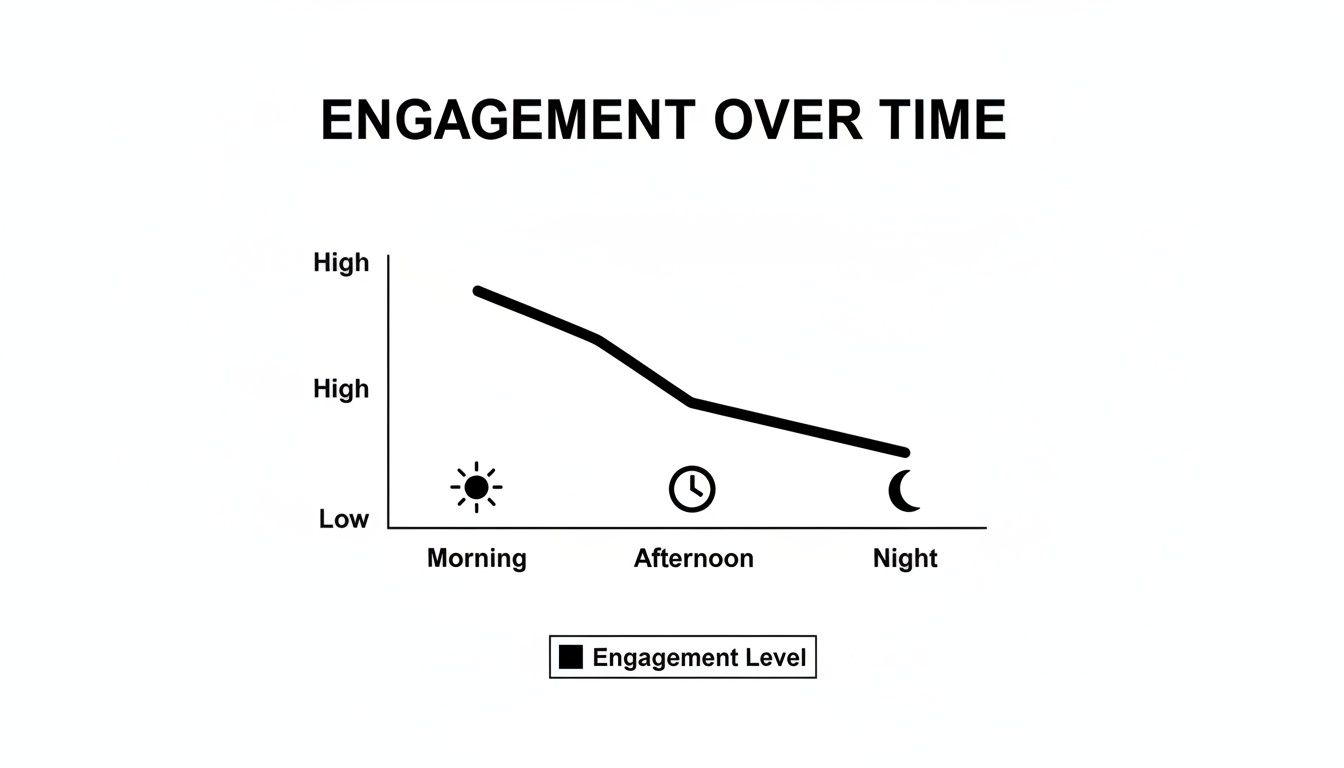
As you can see, engagement generally kicks off high in the morning and slowly tapers off into the evening.
This isn't just a hunch. A 2025 study found several prime windows for engagement. The sweet spots were weekdays from 7 AM to 9 AM, 12 PM to 1 PM, and 6 PM to 9 PM. Midweek days—specifically Tuesdays through Thursdays—consistently pulled in the highest interaction rates.
These time slots line up perfectly with daily routines. Morning coffee scrolls can lead to 18% higher clicks, lunch breaks often trigger a 22% spike in shares, and those evening relaxation periods can drive up to 25% more comments. You can dive deeper into how timing impacts different industries in this detailed research from Miracamp.
A Day-by-Day Breakdown of Peak Times
To make this super actionable, here’s a breakdown of the best times for each day of the week, based on aggregated data. Use this as your foundation before you start fine-tuning.
- Mondays & Tuesdays (9 AM – 6 PM): The start of the workweek sees a long, steady stretch of high engagement. People are active from their morning coffee right through the end of the traditional workday.
- Wednesdays & Thursdays (8 AM – 6 PM): Midweek engagement often kicks off even earlier. These days are frequently cited as the absolute best days to post, giving you a full 10-hour window of peak activity for your most important content.
- Fridays (9 AM – 11 AM and 2 PM – 4 PM): As the week winds down, user activity breaks into two smaller, distinct windows. People tend to check in during their late-morning break and again in the mid-afternoon as they get ready for the weekend.
- Saturdays (8 AM – 6 PM): Surprisingly, Saturdays can show a long and steady period of engagement that rivals a typical weekday. This tells us users stay highly active on the platform even during their downtime.
- Sundays (9 AM – 11 AM and 3 PM – 6 PM): While Sunday is often the day with the lowest overall engagement, you can still find strategic pockets of activity. You can reach users in the late morning and again in the late afternoon as they relax before the week ahead.
These times are your research-backed foundation. They aren't a magic bullet, but they're the most logical place to begin. A scheduling tool like PostPlanify can help you set up this initial calendar with ease, letting you test these windows consistently without having to post manually every single day.
 PostPlanify
Manage All Your Social Accounts Without the Chaos
Schedule posts, track performance, and collaborate with your team.


Actionable Fix: How to Find Your Unique Best Time to Post
General industry data is a great starting point, but the real solution is hiding in your own audience's behavior. Your followers have their own unique habits. Are they night owls, early birds, or lunchtime scrollers? Figuring that out is how you move beyond guesswork and start making decisions backed by your data.
The best part? You don’t need to pay for fancy third-party tools. Facebook gives you everything you need right inside its own platform: Meta Business Suite. You can complement it with social media analytics from PostPlanify for a cross-platform view. This is where you'll find the specific, actionable data that tells you exactly when your audience is online and ready to engage.
Step-by-Step Guide to Using Meta Business Suite
Meta Business Suite is your command center for understanding when your followers are most active. It collects all the data and presents it as a simple heatmap, showing your peak engagement windows. Follow these steps to find your personalized posting times.
Here's how to access and analyze that data:
- Log into Meta Business Suite: Go to your Facebook Page. In the left-hand menu, click on Meta Business Suite. You can also navigate there directly and select the Page you want to analyze.
- Navigate to Insights: In the suite, find the Insights tab in the left-hand navigation menu. This is the analytics hub for your Facebook Page.
- Find Your Audience Data: Inside the Insights section, click on Audience. Scroll down until you find the chart titled "Most active times." This is your goldmine.
- Analyze the Activity Heatmap: This chart gives you a day-by-day and hour-by-hour breakdown of when your followers were online over the last week. The darker the color, the more people were active. Look for those dark blocks—they represent your peak hours.
How to Interpret Your Audience Activity Data
You have the heatmap in front of you. Now what? The next step is to turn that visual data into an actionable schedule. It’s not about finding just one "best" time, but about identifying several high-potential slots you can test.
- Identify 3-5 Peak Slots: Don't just zero in on the single darkest square. Instead, identify the top 3-5 time blocks throughout the week. This gives you more flexibility and lets you test different windows to see which ones drive the best results for different kinds of posts.
- Check Your Time Zone: Meta Business Suite usually defaults to your local time zone (often Pacific Standard Time if your account is US-based), but it’s crucial to confirm this. Posting at 9 AM PST is a completely different ballgame for an audience that’s mostly on the East Coast. Make sure the data you're seeing aligns with the time zone you're scheduling in.
Troubleshooting: What If You Have Limited Data?
If you manage a brand-new page or have an inconsistent posting history, your "Most active times" chart might look empty or show no clear patterns. This is normal and fixable.
Here’s the game plan if you're in this situation:
- Start with General Best Times: Revert to the industry-wide best times we covered earlier (e.g., weekday mornings and early afternoons). Use these as your initial testing ground.
- Post Consistently for 30 Days: The key is to publish high-quality content consistently for a few weeks. This generates the data Meta needs to build an accurate picture of your audience's habits. Posting once per day is a great starting point.
- Check Back in a Month: Revisit your Audience Insights after 2-4 weeks of consistent posting. You should start to see much more defined patterns emerge as Facebook gathers more information.
Once you’ve identified these potential time slots, it's time to put them into practice. Using a powerful Facebook scheduler like PostPlanify can help you plan and automate your posts for these peak windows, ensuring you never miss an opportunity to connect. This consistency is essential for gathering reliable data and fine-tuning your strategy.
Advanced Strategy: Optimizing for Industries and Time Zones
A "one-size-fits-all" schedule doesn’t work because different audiences have different daily rhythms. Small businesses often have a tight local audience, while a B2B tech company’s followers are scrolling at different times than those of a local restaurant. Your industry shapes your audience's behavior, and your posting schedule has to match it.
The same goes for time zones. If your audience is spread across the country or the globe, posting at 9 AM in your local time could mean you're hitting your largest audience segment in the middle of the night.
Industry-Specific Posting Windows
The best time to post on Facebook shifts dramatically depending on your niche. A retail brand might catch shoppers scrolling during their lunch break, while a healthcare page sees more action before the workday even kicks off.
Here’s a breakdown of recommended posting windows for different sectors, based on when their audiences are typically most active.
| Industry | Best Days | Recommended Time Slots (Local Time) | Why It Works |
|---|---|---|---|
| Retail & E-commerce | Weekdays | 12 PM - 3 PM | Catches users during lunch breaks and afternoon browsing sessions when they are looking for a distraction. |
| B2B & Technology | Weekdays | 8 AM - 10 AM & 4 PM - 6 PM | Aligns with the start and end of the business day when professionals are checking in on industry news. |
| Healthcare & Wellness | Weekdays | 6 AM - 9 AM | Reaches people in the morning when they are focused on health routines and self-improvement. |
| Food & Beverage | Daily | 11 AM (Pre-lunch) & 4 PM (Pre-dinner) | Taps into the times when people are thinking about their next meal and looking for inspiration. |
These industry-specific windows are your launchpad. From here, you can dive into your own data to pinpoint which of these slots drives the best results. You can also plan different content types for these times; our guide on how to schedule carousel posts on Instagram and Facebook can help.
How to Handle Multiple Time Zones
If your audience is geographically diverse, sticking to a single time zone schedule guarantees you’re missing huge chunks of your followers. The goal is to publish content when the largest segments of your audience are actually awake and scrolling.
Here are two practical fixes:
- Prioritize Your Main Time Zone: Dive into your Facebook Insights to see where most of your audience lives. If 60% of your followers are in the Eastern Time Zone, make that your primary schedule for your most important posts.
- Schedule Multiple Posts for Key Areas: Identify your top 2-3 audience locations. Publish your most critical content more than once, scheduled for the peak hours in each of those key time zones. For example, post at 9 AM ET for your East Coast audience and then again at 9 AM PT (12 PM ET) for your West Coast audience.
Early morning posts in the US often hit a global sweet spot. They catch East Coast users starting their day while simultaneously reaching European users in their afternoon or evening. Research highlights early weekday mornings like 5 AM - 9 AM as an engagement goldmine for this reason. You can read the full research on Buffer for more on global timing strategies.
Juggling these industry nuances and time zone calculations manually is prone to error. This is where a scheduling tool like PostPlanify becomes essential. It lets you set up and automate a complex posting schedule, ensuring you hit the right audience at the perfect time, every single time.
How to Test and Finalize Your Facebook Schedule
You’ve gathered general data and analyzed your own insights. Now it’s time to move from theory to practice with a controlled experiment. Building a social media content calendar before you start testing keeps your experiment organized and your content quality consistent. The goal is to test your best time slots against each other to see which ones actually deliver the highest reach and engagement for your audience.
By isolating time as the main variable, you can gather clean, actionable data to build your future content calendar around. This approach builds your schedule on what works, not what you think should work.
Your 30-Day Facebook Timing Test: A Step-by-Step Plan
A 30-day test provides enough data to spot real patterns while filtering out random noise from a holiday or a one-off viral trend. Here’s a simple four-step plan.
-
Form a Hypothesis: Based on your Meta Business Suite Insights and industry benchmarks, pick 3-4 high-potential time slots to test. Your hypothesis might be: "For our audience, posting at 8 AM, 12 PM, and 5 PM on weekdays will generate the most engagement."
-
Create a Consistent Content Calendar: Plan your content for the next 30 days. To keep your test results clean, the type and quality of your content must be consistent. Don't post a high-production video at 8 AM and a simple text update at 5 PM—that will skew your results. Learning how to build a better social media content calendar is crucial for this step.
-
Schedule and Post Consistently: Manually posting at precise times every day is unreliable. A scheduler is non-negotiable for a clean test. Using a tool like PostPlanify, you can set up the entire 30-day experiment in one session, ensuring every post goes out exactly on time. Our guide on how to schedule Facebook posts walks you through the process.
-
Analyze the Results: After 30 days, export your post performance data from Facebook Insights. Look beyond vanity metrics and focus on the numbers that align with your business goals.
Key Metrics to Track During Your Test
When analyzing your data, look for the average performance for each time slot. A single viral post can be an outlier; you need to identify consistent winners.
- Reach: How many unique people saw your posts? This measures visibility. Use the reporting features in PostPlanify to pull these numbers across all your accounts in one place.
- Engagement Rate: This is your most important metric. Calculate it as (Total Engagements / Total Reach) x 100. It measures how compelling your content is relative to its audience size.
- Link Clicks: If your goal is driving traffic, this is your north star. Which time slot sent the most people to your website?
- Comments and Shares: These are high-value interactions. They indicate your content was interesting enough for someone to start a conversation or endorse it to their own network.
After analyzing the numbers, a few clear winning time slots should emerge. These are your new, data-backed "best times to post."
Common Testing Mistakes to Avoid
A poorly executed test will give you unreliable data. Watch out for these common pitfalls:
- Changing Too Many Variables: If you test new times while also rolling out a new video format and a different brand voice, you'll have no idea what actually caused the change in performance. Isolate one variable at a time. For this test, that variable is time.
- Testing for Too Short a Period: One week is not enough data. A single holiday or slow news day can throw everything off. Commit to a minimum of 30 days.
- Inconsistent Content Quality: You can't compare a high-effort video against a low-effort link post and expect meaningful data. Keep your content quality and format consistent across all tested time slots. A great way to ensure this is by using a content batching system in our guide.
- Setting It and Forgetting It: This isn't a one-and-done project. Audience habits evolve, and algorithms change. Fold re-testing into a regular social media audit every quarter or at least twice a year to keep your schedule optimized.
Troubleshooting and FAQs
Here are answers to some of the most common questions about finding the best time to post on Facebook.
What’s the single best time to post on Facebook in 2026?
If you need one single time to start, data points to 5 AM on Tuesdays. This early morning window catches people scrolling their feeds right after they wake up, before work, or during their commute. This often leads to 20-30% higher reach and interaction than posts that go live later in the day. You can dive deeper into the research from Hootsuite to see the full analysis.
Does the day of the week really matter?
Yes, absolutely. Engagement levels are not consistent across the week. Midweek days—Tuesdays, Wednesdays, and Thursdays—consistently show the highest levels of user activity. Engagement tends to drop off over the weekend, with Sunday often being the quietest day. Reserve your most important content for weekdays to maximize its impact.
How often should I post on Facebook?
Consistency is more important than frequency. Aim to post at least once per day. This keeps your page active in the eyes of the Facebook algorithm and ensures you regularly appear in your audience's feed. Posting more than twice a day can sometimes lead to lower engagement per post or follower fatigue. Start with one high-quality post per day, scheduled during a peak time.
What if my audience is global?
When managing followers across multiple time zones, you have two primary strategies:
- Focus on Your Largest Audience Segment: Use your Facebook Insights to identify the location with the highest concentration of your followers. Schedule your posts based on their peak times.
- Post for Multiple Time Zones: Take your most important content and schedule it to go live during the peak hours for your top two or three audience locations. A social media scheduler makes this process manageable without requiring you to post manually at odd hours.
Frequently Asked Questions
What is the absolute best time to post on Facebook in 2026?
Data from multiple studies points to weekday mornings between 7 AM and 9 AM, with Tuesday at around 8 AM consistently delivering the highest reach. Early morning posts catch users during their commute scroll, generating up to 20-30% higher engagement than midday content on the same days.
Does the Facebook algorithm favor posts published at certain times?
Yes. The algorithm evaluates early engagement signals -- likes, comments, shares -- within the first 30 to 60 minutes after publishing. Posts that gain momentum quickly are shown to more people. Timing your post for a peak activity window gives it the initial push the algorithm rewards.
Is it worth posting on Facebook on weekends?
Saturdays can perform surprisingly well, with engagement rivaling typical weekdays between 8 AM and 6 PM. Sundays tend to be the quietest day overall, though strategic pockets exist around 9-11 AM and 3-6 PM. Test weekend slots for your audience before ruling them out entirely.
How do I post at the best time if my audience spans multiple time zones?
Identify your largest audience segment using Facebook Insights and schedule for their peak hours first. For secondary regions, republish key content at their local peak times or use overlapping windows -- such as early US morning, which simultaneously reaches European evening users.
Should I post the same content on Facebook and Instagram at the same time?
Not typically. Facebook and Instagram have different user behaviors and peak hours. Facebook engagement peaks in the morning and early afternoon, while Instagram has a strong evening window between 7 PM and 9 PM. Stagger your posts and tailor them to each platform for the best results.
How long does a Facebook post stay visible in the feed?
A typical Facebook post's effective lifespan is 5 to 6 hours, though high-engagement posts can resurface for up to 24 hours. This short window makes initial timing critical. Publishing during a peak activity period maximizes the number of people who see your post before it decays in the feed.
Summary Checklist: Find Your Best Posting Time
Ready to stop guessing and build a data-driven Facebook schedule? Follow this simple checklist.
- [ ] Review General Data: Start with industry-standard peak times (weekday mornings and early afternoons) as your baseline.
- [ ] Analyze Your Own Insights: Use Meta Business Suite to find the "Most active times" for your specific audience. Note the darkest blocks on the heatmap.
- [ ] Form a Hypothesis: Choose 3-4 of your most promising time slots to test against each other.
- [ ] Run a 30-Day Test: Schedule consistent, high-quality content at your chosen test times for one month. Use a scheduling tool for precision.
- [ ] Track Key Metrics: At the end of the test, analyze the average Reach and Engagement Rate for each time slot.
- [ ] Finalize Your Schedule: Make the winning time slots the new core of your official posting calendar.
- [ ] Repeat Quarterly: Re-run this test every 3-6 months to ensure your schedule stays aligned with your audience's evolving habits. If you also post on other platforms, check our guides on the best time to post on social media for a complete cross-platform strategy.
Ready to stop guessing and start getting your Facebook content in front of the right people at the right time? With PostPlanify, you can automate your entire posting calendar based on when your audience is most active, making sure every post gets the visibility it deserves. Plan, schedule, and analyze your content from one spot to save time and get way better results. Start your free 7-day trial of PostPlanify today!
PostPlanifyManage All Your Social Accounts Without the Chaos
Schedule posts, track performance, and collaborate with your team.
About the Author

Hasan Cagli
Founder of PostPlanify, a content and social media scheduling platform. He focuses on building systems that help creators, businesses, and teams plan, publish, and manage content more efficiently across platforms.


