


An impression on Twitter—now called X—is a single view of your tweet. Every time your post appears on someone's screen, whether they scroll past it, read it, or ignore it, that counts as one impression.
Think of it like this: you put up a billboard on a busy digital highway. Each time a car drives by and the billboard enters their field of vision, that’s an impression. It’s the most basic measure of your content’s visibility. Understanding this metric is the first step to figuring out if your content strategy is actually working.
What Are Impressions on Twitter? A Simple Analogy
Let's break down what an impression actually means, without any marketing fluff. When we talk about impressions, we are simply counting the total number of times your tweet has been delivered to a screen.
This can happen in several common scenarios:
- In a follower’s timeline: When someone who follows you is scrolling their main "Following" feed.
- In the "For You" feed: When the X algorithm shows your tweet to someone who doesn't follow you.
- In search results: When a user searches for a hashtag, keyword, or topic you've included in your tweet.
- On your profile: When someone visits your profile page and sees your tweets listed there.
The most critical thing to understand is that impressions are not unique. If one person sees your tweet in their feed in the morning and then sees it again later when a friend retweets it, that counts as two impressions. It’s just like the same driver passing that billboard on their way to work and again on their way home—two separate views from one unique person.
Differentiating Key Metrics
This is a common point of confusion for creators and marketers. Impressions track total views, not the number of unique people who saw your content (that's reach) or the actions they took (that's engagement). Getting this distinction right is essential for accurately measuring your performance. For a deeper dive, many resources explain the Twitter impressions meaning to clear up any lingering confusion.
To make this crystal clear, let's break down the three core metrics that often get mixed up.
Impressions vs Reach vs Engagements At a Glance
The table below provides a side-by-side comparison to help you finally understand the difference. It’s a common hurdle, but this simple breakdown helps clarify each metric's role.
| Metric | What It Measures | Example Scenario |
|---|---|---|
| Impressions | Total number of times a post is displayed | Your tweet is shown to 100 people. 50 of them see it twice. Total impressions = 150. |
| Reach | Total number of unique people who see a post | Your tweet is shown to 100 people. 50 of them see it twice. Total reach = 100. |
| Engagements | Total number of interactions with a post | Your tweet gets 10 likes, 5 retweets, and 2 replies. Total engagements = 17. |
Seeing the numbers laid out like this makes the relationship obvious: impressions will almost always be your highest number, followed by reach, and finally engagements. Each metric tells a different part of your content's story.
An impression is a passive metric. It confirms your tweet was delivered to a screen, but it doesn't tell you if the person actually read it, understood it, or cared about it. It’s the first step in the journey toward engagement.
Once you grasp this, you can build a smarter strategy on X. While impressions are just one piece of the puzzle, they are the very first signal that your content is getting out there and has the potential to be seen. To see how this fits into the bigger picture, check out our complete guide to social media impressions.
Impressions vs Reach vs Engagements Explained
Now that the basics are covered, let's dig into what these metrics actually mean for your strategy. It’s very common to see your impression count climb far higher than your follower count—and that's a good thing. It means people are seeing your content multiple times, and it's reaching beyond your immediate audience.
Impressions are all about total views. If a follower sees your tweet in their feed, that's one impression. If a non-follower sees it because the algorithm served it to them, that’s another. Once it gets shared and lands on even more timelines, those impressions really start to accumulate.
Impressions: The Total Views
Imagine one of your tweets starts getting traction and hits 10,000 impressions. This means your post was displayed on a screen 10,000 times. It’s a measure of total exposure, not how many unique individuals saw it. A single user scrolling past it three different times during the day would contribute three impressions to that total.
This diagram shows how these key metrics are related, starting with the broadest measure (Impressions) and narrowing down to the most specific (Engagements).
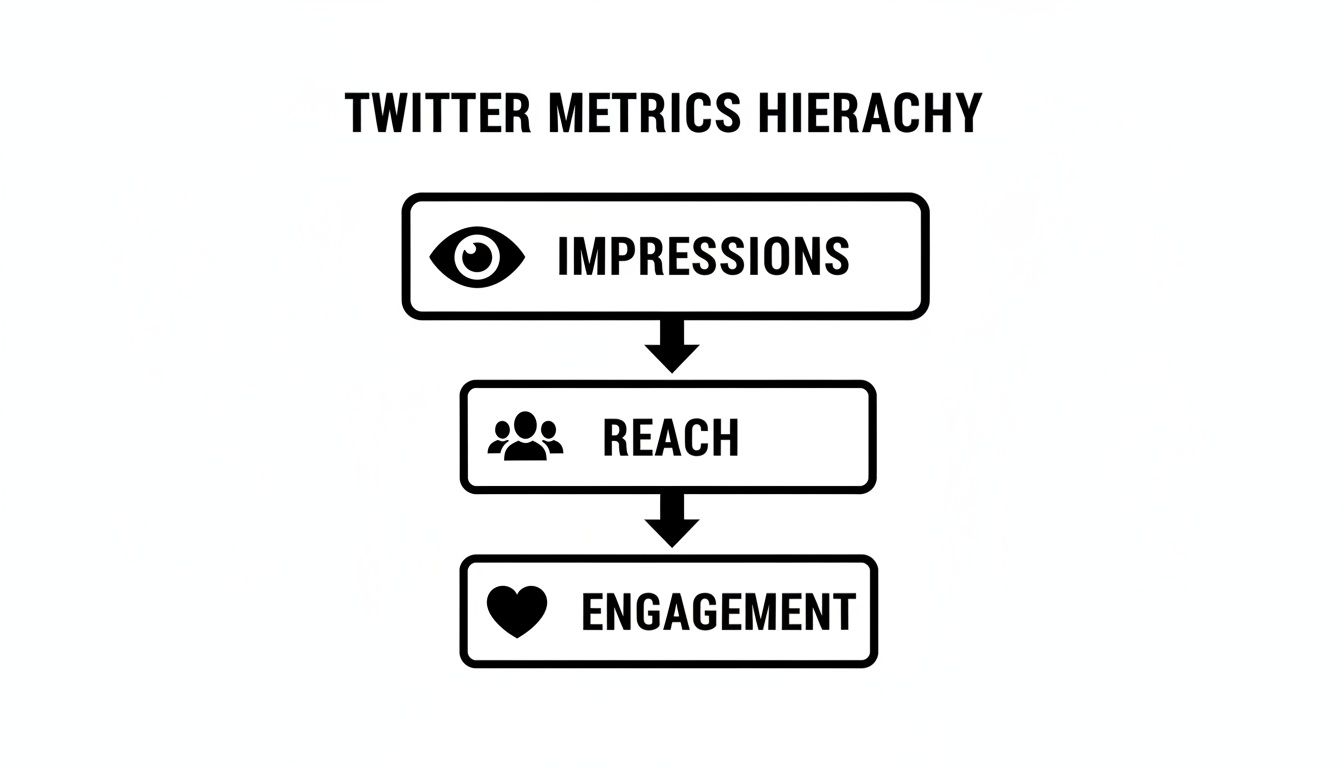
As you can see, every person who engages with your post first had to be reached, and every person who was reached first had to see it—generating an impression.
Reach: The Unique Viewers
Let's use the same scenario. What if those 10,000 impressions came from 7,000 unique users? That number—7,000—is your reach.
Reach counts the individual people who saw your post at least once. It will always be equal to or lower than your impression count. A high number of impressions with a relatively low reach often indicates that a smaller, more dedicated audience is seeing your content multiple times, which can be valuable for reinforcing a message.
Engagements: The Active Participants
Finally, we have engagements—the actions people take on your tweet. Out of those 7,000 unique viewers, perhaps 500 of them liked, replied, shared, or clicked a link.
Engagements are your most valuable metric because they represent active participation, not just passive scrolling. They are the signal that your content was compelling enough to make someone stop, think, and interact. Learning how to improve social media engagement is the key to turning visibility into tangible results.
Key Takeaway: Impressions measure visibility, Reach measures unique audience size, and Engagements measure audience interaction. You need all three to get a complete picture of your performance.
Why Impressions Actually Matter for Your Growth
While engagements like replies and retweets often get all the attention, impressions are the engine driving your growth on X. Think of it like a physical storefront. Impressions are the number of people who walk past your window. Without that foot traffic, nobody can come inside to browse (engage) or buy (convert).
Impressions are a direct signal of your content's visibility and its performance within the X algorithm. A high impression count, even if engagement isn't high, tells you that the platform is showing your content to people. That’s the foundation for building brand awareness and attracting a new audience.
An Early Warning System for Content Performance
Think of your impression trends as an early warning system for your content strategy. A sudden or steady drop in impressions is often the first sign that something is wrong—long before you’d notice a dip in followers or engagement.
A downward trend could indicate several issues:
- Content fatigue: Your content format may be getting stale and isn't grabbing attention.
- Poor timing: You might be posting when your target audience is offline.
- Algorithm changes: The X algorithm may have shifted, making your old strategy less effective.
- A shadowban: If your impressions have dropped dramatically and nothing else has changed, your account may have been shadowbanned. Learn how to check if you're shadowbanned on Twitter and what to do about it.
Catching these patterns early allows you to pivot before it impacts your larger goals. You can start testing new post types, adjust your schedule, or refine your messaging. Keeping an eye on these numbers in a dashboard like PostPlanify helps you spot these trends without having to manually dig through data.
The Growing Importance of Visibility on X
Getting seen on X is more important than ever. The average post now receives 2,121 impressions, a significant jump from 1,206 the previous year. That’s a nearly 76% increase in just one year, highlighting how much the platform's algorithm now prioritizes visibility. Impressions have become a critical metric for achieving organic reach. For a deeper dive into the numbers, you can explore the full analysis from Hootsuite.
Key Insight: Impressions aren't just a vanity metric. They are a direct measure of your content’s potential within the algorithm—the essential first step to building a larger, more engaged audience.
Ultimately, a healthy flow of impressions is the starting point for every other goal you have on the platform, from gaining followers to driving traffic — and eventually, monetization. X now pays creators based on impression volume through its ad revenue sharing program. To see how X stacks up against other platforms for creator earnings, check out our comparison of which social media platform pays the most. This is the exact foundation we build on in our guide on how to gain Twitter followers. For a broader look at what drives your view count and how to increase it, see our complete guide to views on Twitter.
How to Find and Analyze Your Twitter Impressions
Knowing what impressions are is the first step, but turning that data into a better content strategy is the real goal. Let's walk through exactly where to find your impression metrics on X and how to start making sense of them.
Finding Impressions in Native X Analytics
X provides a free, built-in analytics dashboard that offers a solid overview of your account’s performance. It’s the perfect place to start.
- Go to X Analytics: Log into your X account on a desktop browser and navigate to
analytics.x.com. Note that this dashboard is not available on the mobile app. - Review Your 28-Day Summary: The main dashboard immediately shows a 28-day summary of your key metrics, with Tweet impressions featured prominently. This gives you a quick, at-a-glance view of your recent visibility trend.
- Analyze Individual Tweets: Click the "Tweets" tab at the top. This is where you can see the impression count for every single post. You can also export this data as a CSV file to analyze it further in a spreadsheet.
This native dashboard is more than sufficient for identifying which of your posts are performing well and which ones are not.
Analyzing Your Impression Data
Now that you have the numbers, what do you do with them? The real value comes from asking questions about your data.
Start by sorting your tweets by "Top Tweets" to see which ones earned the most impressions. Look for common patterns among your top-performing content:
- Content Format: Are videos outperforming static images? Are text-only tweets getting more visibility than you thought?
- Topic or Theme: Do posts about a specific subject consistently reach a wider audience? Does a certain angle or tone resonate more?
- Posting Time: Check the timestamps. Do tweets posted in the morning consistently get more impressions than those posted in the evening?
This analysis is a core part of effective social media analytics and reporting. The objective is to identify these patterns so you can replicate your successes and improve your underperforming content.
Pro Tip: Always compare impressions to your engagement rate. A tweet with high impressions but a very low engagement rate is a major red flag. It means you reached many people, but the message didn't resonate enough to inspire action. This is a crucial insight—it tells you that your hook, call-to-action, or overall creative needs refinement.
To get a complete picture of your performance on X, you must look at multiple metrics together. For a deeper dive into this, check out this Essential Social Media Engagement Metrics Guide. It will help you connect the dots between how many people see your content and how many of them actually care enough to interact.
Actionable Strategies to Increase Your Impressions
Understanding impressions is one thing, but making them grow is the objective. Increasing your visibility on X isn’t about a single hack; it’s about a consistent and intelligent approach to earning more screen time from both your audience and the algorithm.
Here are proven methods that deliver results.

Optimize Your Posting Cadence and Timing
If you remember one thing, let it be this: consistency is crucial. Posting regularly signals to the algorithm that you are an active contributor, which increases the likelihood that your content will be shown to more people.
Just as important is when you post. Publishing content when your audience is most active dramatically increases its chances of getting an initial wave of engagement, which in turn fuels more impressions.
The Fix: Use your X Analytics to identify when your followers are most active. Then, build a content calendar around those peak hours and maintain a consistent schedule. A social media scheduler like PostPlanify can help you automate this process by letting you schedule posts in advance, ensuring you hit those prime windows without being tied to your devices.
Engage With Purpose
X is a conversational platform, not a broadcast channel. Simply posting your own content won't get you far. You need to participate in conversations, especially with larger, more established accounts in your niche. This puts your profile and your insights in front of their audiences.
- Add value in replies: Don't just post "great tweet!" Offer a unique perspective, ask an intelligent follow-up question, or share a relevant experience. Meaningful replies get significantly more visibility.
- Participate in trends: Join relevant trending conversations and use popular hashtags (sparingly). This is a direct way to get discovered by users interested in those topics.
To systematize your posting schedule, learn how to automatically post tweets and maintain the consistency that the algorithm rewards.
Prioritize High-Quality Visuals
The X feed moves incredibly fast. To make someone stop scrolling, your content needs to capture their attention instantly. This is why posts with high-quality images and videos consistently outperform text-only updates.
The algorithm favors multimedia content because users engage with it more. A compelling image or a well-edited video can earn impressions far beyond your follower count as it gets shared and recommended by the platform.
Common Questions About Twitter Impressions
Let's address some of the most common questions about X analytics. Understanding these details will help you analyze your data with more accuracy.
Do My Own Views Count as Impressions?
No, X does not count your own views of your tweets as impressions. The metric is designed to measure how many times other users have seen your content, whether in their feed, in search results, or on a profile.
Can Impressions Be Higher Than My Follower Count?
Yes, and they should be. It is not only common but also a positive sign that your content is reaching beyond your existing audience. When your tweet gets retweeted, appears in search results, or is promoted by the algorithm to non-followers, your impressions will easily surpass your follower count. Think of it as proof that your content is discoverable and has viral potential.
Why Did My Tweet Get Impressions But Zero Engagement?
This is a very common scenario: people saw your tweet, but they scrolled right past it. It means your content successfully reached an audience (good visibility), but it failed to provide a reason for them to stop and interact (e.g., like, reply, share). This could be due to a weak headline, uninteresting visual, or simply the fast-paced nature of the feed.
This is a critical diagnostic signal. High impressions with low engagement indicate that your distribution is working, but your creative or messaging needs improvement. Your tweet failed the "stop the scroll" test.
Does X Premium Increase Impressions?
Yes, it can. X has stated that subscribers to X Premium (formerly Twitter Blue) receive a boost in the algorithmic ranking of their replies. This prioritized placement can lead to more visibility in conversations and, consequently, more impressions. However, this is not a substitute for a solid content strategy. Quality and consistency are still the primary drivers of growth. The boost is a small advantage, not a magic solution.
Ready to turn these insights into a consistent, high-impression strategy? PostPlanify helps you schedule your best content for peak times, analyze your performance, and save hours every week. Start your 7-day free trial today.
 PostPlanify
All your social media in one simple dashboard
Schedule posts, track analytics, and reply to comments/DMs without switching tabs.

Engagement
+18%
Views
52.8k
About the Author

Hasan Cagli
Founder of PostPlanify, a content and social media scheduling platform. He focuses on building systems that help businesses, agencies, and teams plan, publish, and manage content and social media more efficiently across platforms.


