


Posting on social media without a plan feels like shouting into the void. A documented social media marketing strategy is what turns that random activity into something that actually moves the needle for your business. It’s your roadmap from guesswork to consistent, measurable growth.
A winning social media marketing strategy for small business starts with 3-5 SMART goals tied to revenue, a clear customer persona, 2-3 focused platforms backed by the right tools, content pillars that mix education with promotion, and a weekly batching workflow that saves 5+ hours while keeping your posting consistent.
Why "Winging It" On Social Media Is Costing Your Business

Let's be direct—as a small business owner, your time is everything. Between running operations, keeping customers happy, and putting out fires, social media often becomes an afterthought. It’s that frantic, end-of-day scramble to post something, anything, just to stay visible.
This "ad-hoc" approach, while it feels productive, is quietly draining your most valuable resources. You spend precious minutes staring at a blank screen, wondering what to post. The content you finally push out often misses the mark, leading to crickets in the comment section and that sinking feeling that you’re just wasting time.
The Problem: The Real Cost Of Guesswork
The problem with just posting whenever you feel like it isn't just the time you lose; it's the opportunities you miss. Every post without a clear purpose is a potential new customer you didn't attract, a loyal follower you didn't build a connection with, or a sale you didn't make. For small businesses with tight budgets, every action has to count.
Without a strategy, you’re flying blind. This leads to predictable problems:
- Inconsistent Messaging: Your brand voice changes from one post to the next, which confuses your audience and makes your brand feel unprofessional.
- Wasted Effort: You create content that nobody seems to care about, resulting in low likes, comments, and shares. If this sounds familiar, our guide on how to improve social media engagement provides actionable fixes.
- Burnout: The constant pressure to come up with fresh ideas on the fly is mentally exhausting. It’s a surefire recipe for burnout. A bank of social media post ideas can ease the pressure.
A documented strategy is the antidote to all of this. It's what saves you hours every week, gives you a clear plan for what to post, and ensures you're actually getting a return on your investment. To get expert support and move beyond the ad-hoc chaos, exploring professional social media marketing services can provide the structure you need.
From Chaos to Clarity: Ad-Hoc vs. Strategic Posting
The difference between posting randomly and posting with a strategy is night and day. One is based on hope, the other on a plan. We've seen this shift firsthand with countless small businesses who finally decide to get organized. It completely changes the game.
Here's what this looks like in the real world.
| Area | Without a Strategy (Common Pitfalls) | With a Strategy (Your Goal) |
|---|---|---|
| Content Creation | Scrambling daily for ideas, often leading to low-quality or off-brand posts. | Content is planned in batches, aligned with marketing goals, and high-quality. |
| Time Management | 20-30 minutes every day spent worrying about what to post. It's a constant time drain. | A few hours once a month to plan everything. Daily time is spent on engaging, not stressing. |
| Audience Engagement | Inconsistent posting times miss your audience's peak activity, leading to low interaction. | Posts are scheduled for optimal times when your audience is most active, boosting engagement. |
| Brand Voice | Tone and messaging change depending on your mood, confusing followers. | A consistent brand voice is maintained, building trust and recognition. |
| Results | Metrics are an afterthought. "Likes" are nice, but there's no way to know if it's helping the business. | Clear KPIs (leads, website clicks, sales) are tracked to measure ROI and justify the effort. |
| Stress Level | High. The constant pressure and lack of results lead to frustration and burnout. | Low. You have a clear plan and confidence that your efforts are purposeful. |
A strategic approach isn't a "nice-to-have" anymore; it's essential. In fact, 96% of small businesses now use social media in their marketing, recognizing its power to boost brand visibility by as much as 83%.
A clear strategy gives you a framework for everything—what you post, when you post, and most importantly, why you're posting it. It’s how you ensure every piece of content serves a purpose and pushes your business forward.
 PostPlanify
All your social media in one simple dashboard
Schedule posts, track analytics, and reply to comments/DMs without switching tabs.

Engagement
+18%
Views
52.8k
Step 1: Set Goals That Actually Drive Business Results
Before you think about what to post, you need to know why you’re posting. A real social media marketing strategy for a small business isn't about throwing content at the wall to see what sticks. It starts with clear, measurable goals that connect directly to your business's health.
Without goals, you're just making noise. You have no way of knowing if the time and energy you’re pouring into social media is actually moving the needle. It's time to stop chasing vague targets like "more followers" or "better engagement." While those numbers feel good, they don't directly pay the bills. Your social media goals should be a bridge between your activity and your bottom line.
Actionable Fix: Use the SMART Goal Framework
The best way to turn fuzzy ideas into concrete plans is the SMART framework. It’s a classic for a reason—it forces you to create goals that are clear, trackable, and achievable for a small business.
- Specific: What, exactly, do you want to accomplish? "Get more website traffic" is a wish. "Increase website clicks from our Instagram bio link by 15%" is a specific goal.
- Measurable: How will you know you’ve succeeded? You need a number. "Improve brand awareness" is fluffy. "Grow our Facebook post reach by 20% within a 10-mile radius" is something you can measure.
- Achievable: Is this goal realistic right now? Aiming for 10,000 new followers in your first month is setting yourself up for failure. Aiming for 200 genuine, local followers? That’s a solid, attainable target.
- Relevant: Does this goal actually help your business? If your number one priority is to sell more of a particular product, then a social media goal focused on driving traffic to that product page is relevant.
- Time-bound: When will you hit this goal? Adding a deadline, like "by the end of Q3," creates urgency and a clear date to check your progress.
A real-world SMART goal for a local bakery might sound like this: "Increase online orders for custom cakes by 10% in the next quarter by promoting our cake portfolio on Instagram Stories three times a week and running one targeted Facebook ad campaign."
See the difference? It's specific (online cake orders), measurable (10% increase), achievable (using platforms they already have), relevant (drives revenue), and time-bound (next quarter).
Actionable Fix: Dig Deep to Understand Your Audience
Once you know what you want to achieve, you have to know who you’re talking to. And no, "everyone" is not a target audience. To create content that connects, you need to build a customer persona—a detailed sketch of your ideal customer.
This goes beyond basic demographics. It’s about getting inside their head to understand their problems, what motivates them, and where they spend their time online. The good news? You already have most of this information.
Where to Find Your Audience Insights
You don’t need to spend a fortune on market research. Just start with the data you already have.
-
Analyze Your Existing Customers: Who is already buying from you? Look through your customer database. Are there common threads in their age, location, or what they buy? That's your starting point.
-
Use Free Platform Analytics: Every social media platform offers powerful, free analytics tools that are a goldmine of information.
- Facebook Audience Insights: This tool can tell you the demographics, interests, and online behavior of people connected to your Page.
- Instagram Insights: Head to the "Total Followers" section. You'll see a breakdown of age ranges, gender, and top locations. This tells you exactly who is already listening.
- TikTok Analytics: The "Followers" tab gives you similar demographic data and even shows you what other videos and sounds your audience is into.
-
Analyze Your Competitors: Look at who follows and engages with your direct competitors. What kinds of questions are people asking in the comments? Which of their posts get the most interaction? This is free, public research—use it.
After this exercise, you should have two crucial documents: a list of 3-5 core business objectives and a detailed profile of the customer you want to reach. This foundation is non-negotiable. It will inform every single post, caption, and campaign you create.
Step 2: Choose Your Platforms and Plan Your Content
You've set your goals and you know exactly who you're talking to. Now comes the part that trips up most small business owners: "Where should I post?" and "What should I even post?"
This isn't about being everywhere. Trying to manage five different platforms is a recipe for burnout. A smart social media marketing strategy for small business is about picking the 2-3 channels where your audience actually lives and creating content that genuinely helps them.
Your customer persona is your north star here. Let it guide you to where you'll get the biggest impact.
Actionable Fix: Match Your Business to the Right Platforms
Every social media platform has its own vibe and audience. Picking the right one is like choosing the right tool for the job. You wouldn't use a sledgehammer to hang a picture frame, and you shouldn't try to sell high-end B2B consulting services on TikTok.
Use this quick-reference table to match your business to the right channels. This isn't about rigid rules, but it’s a solid starting point.
| Platform | Ideal For (Business Type) | Primary Audience | Top Content Formats |
|---|---|---|---|
| E-commerce, restaurants, artists, local shops, visual service providers (e.g., designers, stylists) | Under 35, visually-driven consumers | High-quality photos, Reels (behind-the-scenes, tutorials), user-generated content, interactive Stories | |
| Local businesses, community-focused brands, services with an older demographic | 30+, local communities, families | Community updates, events, customer testimonials, blog links, video, Facebook Groups for loyal fans | |
| TikTok | Brands with personality, B2C products, entertainment-focused services | Under 30, trend-followers, looking for authentic content | Short-form video: tutorials, "day in the life" clips, trend participation, raw behind-the-scenes |
| B2B services, consultants, professional services (e.g., legal, finance), tech companies | Professionals, B2B decision-makers, job seekers | Industry insights, company news, case studies, professional advice, articles, building authority |
If you're a local bakery, Instagram and Facebook are likely your best bets. If you're a B2B software company, LinkedIn is non-negotiable. Don't overcomplicate it—go where your people are.
A quick note on video: Understanding how to create effective video marketing for small businesses is a massive advantage, especially on platforms like TikTok and Instagram where it dominates.
Research shows 90% of small businesses use social media to drive revenue, not just for brand awareness. And 78% of consumers use social platforms to research before they buy. Picking the right channel matters.
Actionable Fix: Build Your Content Pillars
Now, let's solve the "what to post" problem. The solution is to stop thinking post-by-post and start thinking in themes. These are your content pillars—the 3-4 core topics your brand will consistently talk about. They form the backbone of your entire content plan, making sure you never run out of ideas and your message stays focused.
Your pillars should be a mix of what you want to say about your business and what your audience is genuinely interested in. For real-world inspiration, browse our social media strategy examples.
Here’s a simple way to brainstorm them:
- Educate: What can you teach your audience that makes their life easier? A local garden center could have a pillar on "Seasonal Planting Tips."
- Entertain/Inspire: How can you connect on an emotional level? A personal trainer could build a pillar around "Client Transformation Stories."
- Promote: How can you talk about your products without being pushy? A boutique could create a pillar called "How to Style Our New Arrivals."
- Connect (Community): How can you show the real people behind the logo? A coffee shop’s pillar might be "A Day in the Life of Our Baristas."
Once you have your pillars, ideas flow naturally. That garden center’s "Seasonal Planting Tips" pillar could spawn a Reel on pruning roses, a carousel post on the best spring bulbs, and a Story Q&A. No more staring at a blank screen.
If you want to go deeper on this, our guide on how to plan social media content breaks this process down further.
Actionable Fix: Use a Content Calendar
You have your platforms and pillars. The final piece is a content calendar. This simple tool turns your strategy into a manageable workflow.
This doesn't have to be fancy. A basic spreadsheet or a dedicated scheduling tool will do the trick. Your calendar is where you'll map out what you're posting, where you're posting it, and when. See our content calendar examples for templates. This is how you stay consistent, kill the last-minute panic, and finally make your social media feel organized.
Step 3: Build Your Daily and Weekly Social Media Workflow
Having a strategy is one thing. Putting it into practice without falling back into chaos is another. This is where a simple, repeatable workflow saves the day. It turns your plan into a low-stress system, so you can stay on track without social media eating up your entire week.
The goal isn’t to work harder; it’s to work smarter. By batching creative work and scheduling posts ahead of time, you free up your daily to-do list for what really grows your business: engaging with your community.
This simple workflow breaks down into three core actions: Create, Schedule, and Engage.
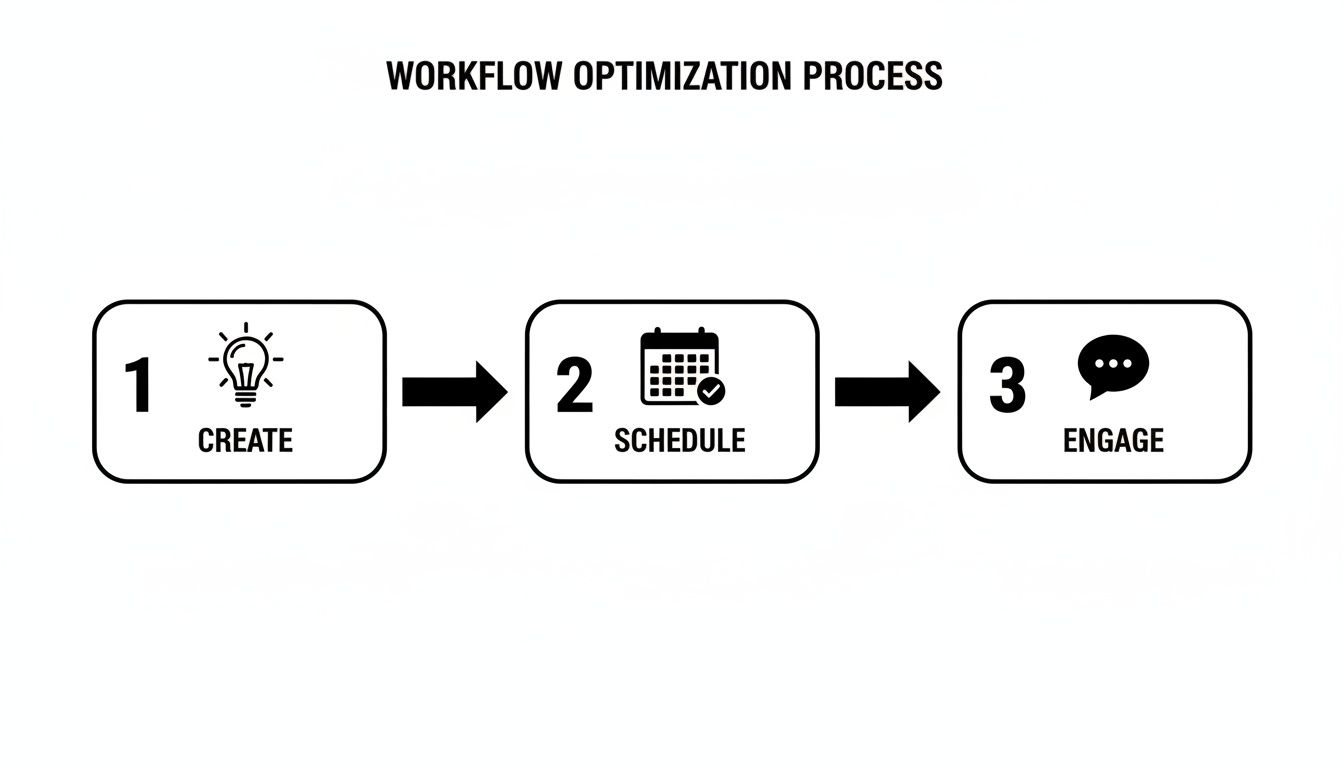
This isn't a one-way street; it's a cycle. Creating and scheduling content allows for consistent daily engagement, which in turn sparks new ideas for what to create next.
Actionable Fix: The Weekly Batching Session
The most effective way to stay consistent without the daily grind is content batching. This just means you block off a chunk of time once a week—maybe two hours on a Monday morning—to create and schedule everything for the week ahead.
Instead of waking up with that dreaded feeling of, "What do I post today?" you'll have a full queue ready to go. It’s a game-changer for busy small business owners. If you want to nail this process, our guide on content batching breaks down exactly how it can save you hours.
Here’s what to do in your batching session:
- Write Your Captions: Draft all the text for the week's posts, aligned with your content pillars.
- Create Your Visuals: Design graphics, edit photos, or trim videos. Get it all done at once.
- Schedule Everything: Load it all up into a scheduling tool and set the times. Learn how in our guide to automating social media posts.
A tool like PostPlanify can act as your command center here. You can bulk schedule posts across all your platforms, pull in designs directly from Canva, and see your whole week laid out visually.

Actionable Fix: The 15-Minute Daily Engagement Routine
With your content publishing on autopilot, your daily social media task shrinks dramatically. All you need is a focused 15-minute block each day to handle the human side of things. It’s this small, consistent effort that builds a loyal audience.
Here’s your daily checklist:
- Respond to Comments: Acknowledge every comment on your recent posts. Even a simple "Thank you!" shows you're listening.
- Check Direct Messages (DMs): Your DMs are a direct line to potential customers. Answer questions quickly.
- Engage with Others: Spend five minutes liking and commenting on posts from other accounts in your niche or from your followers. This builds relationships and gets more eyes on your profile.
Social media is a two-way street. Scheduling automates the "speaking" part, but you still need to show up daily to do the "listening" and "responding." This is how you turn followers into a community.
Troubleshooting: Platform Limitations and Bugs
While scheduling is a lifesaver, it’s not always perfect. It's good to know about the occasional technical hiccup. Each platform's API (the tech that lets scheduling tools connect to them) has its own quirks.
- Instagram: API rules sometimes prevent direct scheduling for certain Reel features, like adding trending audio or specific stickers. You might have to add those manually on your phone right after the video goes live.
- Facebook: Every now and then, a link preview might not generate correctly. It’s always smart to double-check your posts after they publish.
- API Delays & Bugs: On rare occasions, a platform's API might have a temporary glitch, causing a scheduled post to fail. A good scheduling tool will notify you if a post fails so you can quickly reschedule it.
Knowing about these quirks helps you troubleshoot without getting frustrated. The massive time-saving benefits of scheduling far outweigh these occasional hiccups.
Step 4: Measure What Matters and Optimize Your Strategy
A social media strategy is only as good as its results. Pouring hours into creating content without checking what works is like driving with your eyes closed—you're moving, but you have no idea if you're on the right road.
This is where you cut through the noise of analytics and build a simple feedback loop to keep improving.
Stop obsessing over vanity metrics. A rising follower count is meaningless if none of those followers are engaging, clicking, or buying. A real social media marketing strategy for small business zeros in on the numbers that connect back to your bottom line.
Actionable Fix: Ditch Vanity for Actionable KPIs
Focus on Key Performance Indicators (KPIs) that tell you if your strategy is working. These numbers reveal what your audience truly cares about.
- Engagement Rate: This is your content’s health score. It’s the percentage of your audience that interacts with your posts (likes, comments, shares, saves). High engagement means your content is hitting the mark. Use our Instagram engagement calculator to benchmark yours.
- Click-Through Rate (CTR): This tracks how many people clicked the link in your post, bio, or story. If your goal is to drive traffic to your website, this metric is a must-watch.
- Reach and Impressions: Reach is how many unique people saw your post. Impressions are the total number of times it was seen. This helps you understand how far your content is traveling.
- Conversions: Did a user from your social page make a purchase, sign up for your newsletter, or fill out a form? This directly measures your return on investment.
Over 5.07 billion active users spend an average of 143 minutes daily on social media. For small businesses, 77% use these platforms for customer engagement, and 41% drive direct revenue through them. Tracking engagement and reach shows how your strategy is capturing a slice of this massive, active audience.
Where to Find the Data That Matters
You don’t need to spend money on fancy tools to get started. Every platform has its own free, built-in analytics dashboard.
Here’s exactly where to look:
| Platform | How to Access Analytics | Key Data to Check |
|---|---|---|
| Go to your profile > "Professional Dashboard" > "Account Insights" | Accounts Reached: See your top-performing posts, Reels, and Stories. Total Followers: View audience demographics (age, location). | |
| On your Business Page, go to "Insights" or "Meta Business Suite" | Content: See the reach and engagement for individual posts. Audience: Detailed demographic and location data. | |
| TikTok | Go to your profile > three-line menu > "Creator Tools" > "Analytics" | Content: See which videos are trending. Followers: Find out when your audience is most active. |
| On your Company Page, click the "Analytics" tab | Visitors: See who is viewing your page. Updates: Track the performance of your posts, including CTR. |
These dashboards are your source of truth. They take the guesswork out of your strategy.
For a deeper dive into what to track, check out our guide on social media analytics and reporting.
Actionable Fix: Your Monthly Optimization Loop
Turn this data into action. Set aside one hour at the end of each month to review your performance and optimize.
- Review Your KPIs: Pull up your engagement rate, CTR, and reach for the last 30 days. Did they go up or down?
- Identify Winners and Losers: Pinpoint the top 3 best-performing posts and the 3 worst-performing ones. What do the winners have in common? Was it the format (Reel vs. carousel), the topic (behind-the-scenes vs. educational), or the caption style?
- Ask "Why?": Why did that quick Reel about packing an order get 3x more saves than your polished product shot? Maybe your audience craves that authentic view of your business.
- Adjust Next Month's Plan: Based on what you found, decide what to do more of and what to do less of. Your plan should be clear: "Based on our data, we're going to create more behind-the-scenes Reels and fewer static product images."
This simple monthly habit ensures your strategy is always evolving and getting smarter. Pair this with a quarterly social media audit for a complete performance review.
Step 5: Scale Smartly with a Small Budget

Your organic social media is hitting its stride. Now what? The next step isn't to start over, but to amplify what’s already resonating with your audience.
This is where a small, strategic paid budget can be a game-changer. It’s not about spending a fortune; it's about giving your best content a push to reach new, ideal customers.
Actionable Fix: Start by Boosting Your Best Posts
The easiest way to test paid social is by "boosting" your top-performing organic posts. A boosted post is a simplified ad. You’re just paying to show a post that already did well to a wider, targeted audience.
The logic is simple: you’re not guessing what might work. You’re putting money behind a proven winner.
Here's how to start on Facebook & Instagram:
- Go to your analytics and find your best-performing post.
- Click the "Boost Post" or "Boost Again" button.
- Choose a Goal: Decide what you want to happen. "Get more website visits"? "Get more messages"? Pick one.
- Target Your Audience: This is the most important part. You can build an audience based on location, age, and interests. A great starting point is to create a "lookalike" audience based on your current followers.
- Set Your Budget: You can start with as little as $5 per day. Let it run for 3-5 days, then check the results.
Actionable Fix: Launch a Simple Ad Campaign
Once you're comfortable with boosting, you can create a basic ad campaign with a single, clear goal.
A classic example is driving traffic to a specific landing page. Using a tool like Facebook Ads Manager, you can set up a campaign with a "Traffic" objective. You'll upload your ad creative (an image or video), write some copy, and send users to your chosen URL. The platform guides you through the process.
Paid social media should supplement, not replace, your organic efforts. Your consistent, valuable organic content builds the community and trust, while a small ad spend amplifies your reach and accelerates growth.
Actionable Fix: Collaborate with Micro-Influencers
Another budget-friendly way to scale is by partnering with micro-influencers. These are creators with follower counts between 10,000 and 50,000 in a specific niche. Their audiences are often incredibly engaged and trusting.
For small businesses, this is a huge opportunity. While global social media ad spend is projected to hit $276.7 billion in 2025, you don't need a huge slice of that pie. In fact, 74% of shoppers have purchased a product after seeing it in an influencer recommendation. According to sproutsocial.com, micro-influencers often deliver 60% higher engagement than bigger counterparts, making them a cost-effective way to scale.
Many are open to collaborating for free products or a modest fee. It's a great way to get authentic content while tapping into a new, relevant audience. As you scale, keeping everything organized is key. Check out our guide on social media scheduling hacks for small businesses for tips.
FAQ: Your Top Social Media Strategy Questions
Let's dig into some of the most common, real-world questions from small business owners.
How many times a week should I be posting?
There’s no magic number, but a great starting point is 3-5 times per week on your primary channels (like Facebook or Instagram) and 1-3 times on secondary ones (like LinkedIn).
However, consistency beats frequency every time. It's better to publish three high-quality posts every week like clockwork than to push out seven rushed, low-effort ones.
Start with a sustainable rhythm, then check your analytics. Your audience will tell you what’s working.
What’s the single most important metric to track?
If you have to pick one, make it your Engagement Rate.
This number shows how many people are actually interacting with your content (liking, commenting, sharing, saving) relative to how many people see it. A healthy engagement rate is proof that your content is connecting.
If your main goal is sales, also keep a close eye on your Click-Through Rate (CTR) and website Conversion Rate. Resist the vanity metric of follower count. A massive, unengaged audience won't help your bottom line.
Is it possible to have a good strategy with zero budget?
Absolutely. You should build a strong organic presence before you think about spending money on ads. A powerful social media strategy is built on clever planning, not a huge ad spend.
Here's where to focus your energy:
- Create Valuable Content: Stick to your content pillars. Educate, entertain, or inspire. Share helpful tips, take people behind the scenes, and show off customer testimonials.
- Be Part of the Community: Don't just post and ghost. Set aside time every day to reply to comments and DMs, and engage with other accounts in your niche.
- Champion User-Generated Content (UGC): This is your secret weapon. Encourage customers to share photos with your products and then feature them on your feed. It’s authentic, free, and the best social proof you can get.
How do I create enough content without it taking over my life?
The key isn't to work harder; it's to work smarter. The technique that will save your sanity is content batching.
Instead of scrambling every day, dedicate one block of time each week to create all of your social content at once. Plan the posts, write the captions, and create the visuals in one focused session.
Then, plug everything into a scheduling tool so it all publishes automatically. This is where a platform like PostPlanify becomes a lifesaver, letting you schedule out all that batched content in advance. The daily "what do I post?!" panic is gone. Once your audience starts growing, explore how to monetize social media to turn your consistent presence into revenue streams.
What platforms should a small business focus on in 2026?
Start with the 2-3 platforms where your target audience is most active. For local B2C businesses, Instagram and Facebook typically deliver the best results. B2B companies should prioritize LinkedIn. If your audience skews under 30, TikTok is essential. Avoid spreading yourself across 5+ platforms, as managing multiple accounts without proper tools leads to inconsistency.
How do I measure ROI from social media as a small business?
Track metrics that connect directly to revenue: website clicks from social profiles, lead form completions, discount code redemptions, and direct messages that convert to sales. Use UTM parameters on your links to attribute website traffic to specific posts. Review your analytics and reporting monthly to calculate cost-per-lead and revenue generated from social channels.
What is the best time to post on social media for small businesses?
The best posting times depend on your specific audience, not generic benchmarks. Check your platform analytics to find when your followers are most active. Generally, weekday mornings (8-10 AM) and evenings (7-9 PM) work well for B2C brands, while B2B content performs best during business hours. Our best time to post guide has platform-specific data.
How can I compete with bigger brands on social media?
Small businesses have a natural advantage in authenticity and personal connection. Show the real people behind your brand, respond to every comment and message personally, and lean into local community content. Focus on niche topics where you have genuine expertise. Bigger brands cannot replicate the personal touch that builds loyal communities. Use engaging content strategies to stand out.
Strategy Summary Checklist
Here is a quick checklist to keep your social media marketing strategy on track:
- Define 3-5 SMART Goals: Are your goals Specific, Measurable, Achievable, Relevant, and Time-bound?
- Know Your Audience: Have you created a detailed customer persona based on real data?
- Choose 2-3 Core Platforms: Are you focusing your efforts where your audience actually spends their time?
- Establish 3-4 Content Pillars: Do you have clear themes to guide your content creation and prevent running out of ideas?
- Implement a Workflow: Are you using content batching and a 15-minute daily engagement routine to stay consistent and save time?
- Schedule a Monthly Review: Are you setting aside one hour each month to analyze your KPIs and optimize your plan?
PostPlanifyAll your social media in one simple dashboard
Schedule posts, track analytics, and reply to comments/DMs without switching tabs.
Engagement
+18%
Views
52.8k
About the Author

Hasan Cagli
Founder of PostPlanify, a content and social media scheduling platform. He focuses on building systems that help businesses, agencies, and teams plan, publish, and manage content and social media more efficiently across platforms.


