
Post Bridge is a deliberately simple social media scheduler built for people who want to post to a lot of accounts without learning a platform. It publishes to 10 networks, puts no cap on the number of posts, and ships an MCP server and REST API on its entry plan, which is unusual at this price.
The question is whether simple is what you need, or whether the things it leaves out are the things you actually do every day.
Below is the full Post Bridge pricing structure, what each plan includes, and where the limits sit.
Post Bridge Pricing at a Glance (2026)
| Plan | Price | Connected accounts | Team members |
|---|---|---|---|
| Marketer (Most popular) | $39/month | 15 | No, single user |
| Operator | $99/month | 99 minimum, $1 each after | Yes |
Both plans include unlimited posts and a 7-day free trial with nothing due at signup. Yearly billing gives 2 months free. There is no free plan and no enterprise tier.
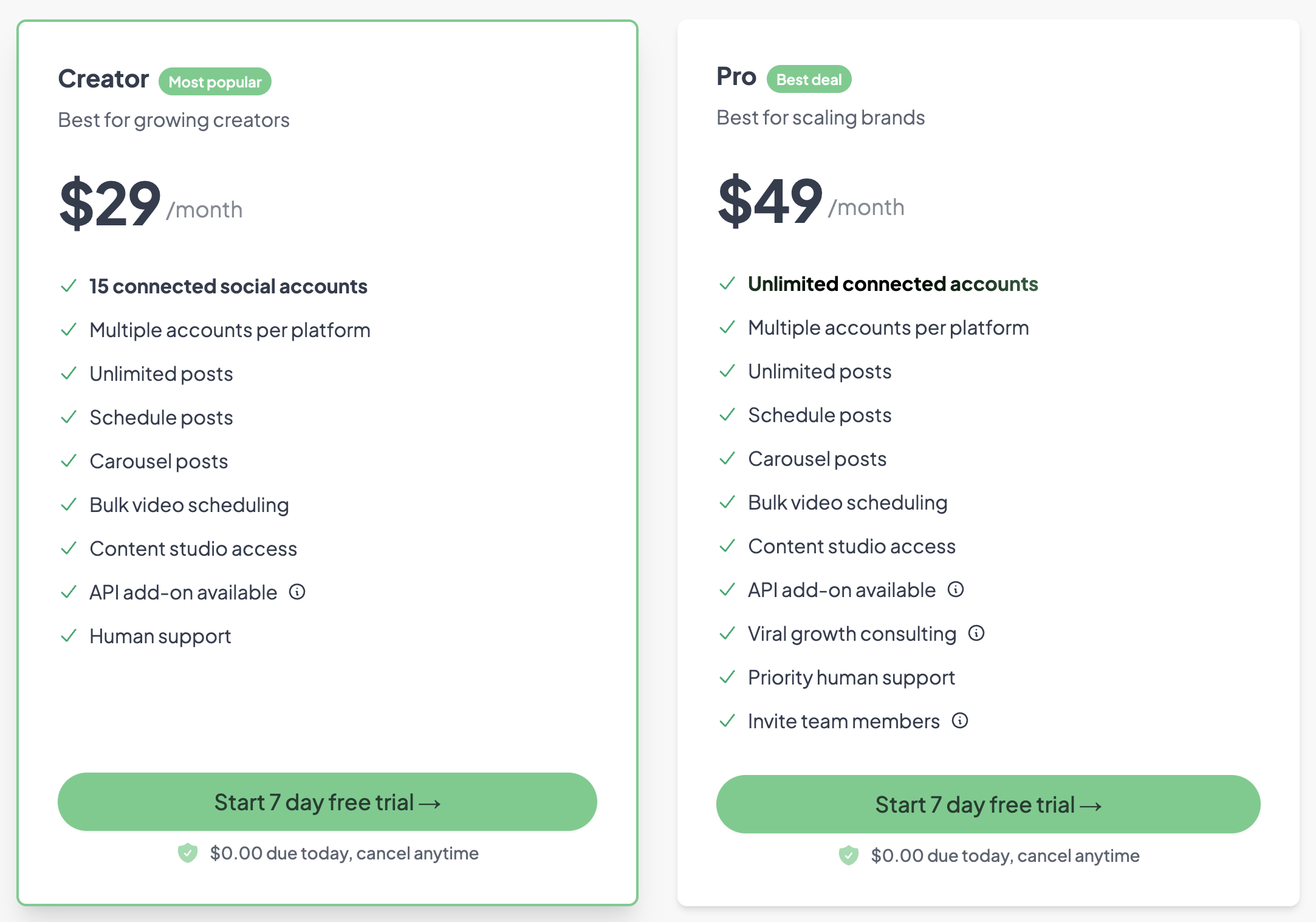
Source: post-bridge.com/pricing
Post Bridge Social Media Scheduling Pricing Plans
Post Bridge keeps its structure to two plans. The split is not about features, it is almost entirely about how many accounts you connect and whether anyone else needs to log in.
Both plans include:
- Unlimited scheduled posts
- Multiple accounts per platform
- Carousel posts
- Bulk video scheduling
- MCP agent connect
- API access
- Analytics, currently in beta
- Founder support
1. Marketer Plan
The Marketer plan costs $39/month and covers 15 connected social accounts. Post Bridge describes it as being "for one person marketing a business," which is the important detail: it is a single-user plan with no way to invite anyone else.
What's included:
- 15 connected social accounts
- Unlimited posts
- Multiple accounts per platform
- Post scheduling
- MCP agent connect, so an AI assistant can draft and schedule for you
- API included
- Carousel posts
- Bulk video scheduling
- Analytics, in beta
- Founder support
Best for: a solo operator or in-house marketer running one business across a lot of profiles.
2. Operator Plan
The Operator plan costs $99/month and is described as being "for those with an army of accounts." It starts at 99 connected accounts and charges $1/month for each one beyond that, so it scales without a hard ceiling.
What's included, on top of everything in Marketer:
- No account limit, starting at 99 accounts and $1 each after
- Invite team members
Best for: someone running a very large number of profiles, or a small team that needs more than one login.
The gap between the two plans is worth stating plainly: team access costs $99/month. There is no middle tier. If you are two people managing 20 accounts, you are on the $99 plan for the second login, not for the accounts.
Post Bridge Annual Billing
Post Bridge offers yearly billing with 2 months free, which works out to roughly 17% off. Both plans are available monthly or yearly, and the 7-day trial charges nothing upfront.
What Post Bridge Does Not Include
Post Bridge is honest about being a scheduler rather than a management platform, but it is worth knowing what is absent before you commit:
- No social inbox. Comments and DMs are not surfaced anywhere in the product, so engagement happens in each native app.
- No approval workflows. There is no way to route a post to a client or manager for sign-off before it publishes.
- No client workspaces. Accounts sit in one flat list, so separating one client's profiles from another's is manual.
- Analytics are in beta. Reporting exists but is explicitly unfinished, and there are no client-ready reports.
- No white labeling. Nothing can carry your agency's branding.
- Team access only at $99. The entry plan is single-user by design.
Pros and Cons of Post Bridge
Pros of Post Bridge:
- Genuinely simple pricing: Two plans, published prices, no add-on matrix to decode.
- Unlimited posts on both plans: Volume never changes what you pay.
- MCP and API on the entry plan: You can hand scheduling to ChatGPT or Claude from $39/mo, which most competitors reserve for higher tiers or do not offer at all.
- Multiple accounts per platform: Useful when one brand runs several profiles on the same network.
- Bulk video scheduling: Practical for TikTok, Reels and YouTube Shorts workflows.
- Scales without a ceiling: Operator keeps going at $1 per account past 99.
Cons of Post Bridge:
- Single-user entry plan: Adding one teammate means jumping from $39 to $99/mo.
- No social inbox: Engagement has to happen in each native app.
- No approvals: Client sign-off has to live in email or a chat thread.
- No client separation: Accounts are one flat list, with no workspace per brand.
- Analytics still in beta: Not something to build client reporting on yet.
- No Canva or Google Drive workflow: Assets are uploaded by hand.
The Better Post Bridge Alternative for Agencies
Post Bridge is a good scheduler for one person posting a lot. The moment a second person needs access, or a client wants to approve a post before it goes out, the model stops fitting: team access is a $99/month jump, and there is no approval step or client workspace at any price.
PostPlanify is built for agencies serving local businesses. Each client gets their own workspace with its own calendar, approvals, inbox and reporting, and team members and client approvers are never billed as seats.

Pricing starts at $39/month for your first client workspace, or $31/month billed yearly, and the per-workspace rate drops as you add clients:
| Client workspaces | Growth | Premium | Scale |
|---|---|---|---|
| 1 | $39/mo | $99/mo | $199/mo |
| 3 | $97/mo | $99/mo | $199/mo |
| 5 | $155/mo | $177/mo | $199/mo |
| 10 | $250/mo | $322/mo | $394/mo |
| Social accounts per workspace | 4 | 6 | 8 |
Every plan includes unlimited team members and unlimited posts. Here is what each adds:
- Growth ($39/mo first workspace): unlimited users and posts, analytics across all 10 platforms, social inbox, approval workflows, shared calendar, roles and permissions, bulk scheduling, media library with Canva and Google Drive, and link in bio
- Premium ($99/mo first workspace): everything in Growth, plus advanced analytics, branded client reports, scheduled report delivery, team comments and mentions, AI brand voice, AI knowledge base, and full API and MCP access
- Scale ($199/mo first workspace): everything in Premium, plus a white-label dashboard, white-label client emails and reports, dedicated 1:1 onboarding, migration help and priority human support
Post Bridge vs PostPlanify: Side-by-Side Comparison
| Feature | Post Bridge (Marketer) | PostPlanify (Growth) |
|---|---|---|
| Price | $39/mo | $39/mo first workspace |
| Connected accounts | 15 | 4 per workspace, 12 across 3 clients |
| Unlimited posts | Yes | Yes |
| Team members | No, single user. $99/mo plan required | Unlimited on every plan |
| Client approvers | Not supported | Free, never billed as seats |
| Client workspaces | Not a concept | One per client, up to 100 |
| Approval workflows | No | Included from Growth |
| Social inbox | No | Instagram, Facebook, LinkedIn, Google Business, YouTube |
| Analytics | Beta | Full, all 10 platforms |
| Client reports | No | Premium and above |
| White labeling | No | Scale |
| MCP and API | Included from $39/mo | Premium and above |
| Canva and Google Drive | No | Yes |
| Link in bio | No | Yes |
| Platforms | 10 | 10 |
Being straight about it: at $39/mo for 15 accounts, Post Bridge is cheaper than a single PostPlanify workspace if all you need is scheduling, and it beats us on one real point, MCP and API access on its entry plan rather than on Premium. Credit where it is due.
The difference is what happens when the work becomes client work. A second team member on Post Bridge costs $60/month more. A client who wants to approve their own posts cannot, at any tier. And with no workspace concept, ten local businesses live in one flat account list. On PostPlanify, five client workspaces is $155/mo with 20 accounts, unlimited seats, and approvals included from the entry plan.
All plans include a 7-day free trial backed by a 14-day money-back guarantee.

Related Guides
- Best Post Bridge Alternatives
- Best Social Media Management Platform (2026)
- Best MCP Servers for Social Media Management
- Social Media Content Calendar Examples
- Social Media Analytics and Reporting
- Social Media Marketing Strategy for Small Business
FAQ on Post Bridge Pricing
Is Post Bridge free?
No. Post Bridge has no free plan. Pricing starts at $39 per month on the Marketer plan, with a 7-day free trial that charges nothing at signup.
How much does Post Bridge cost?
Post Bridge has two plans. Marketer is $39/month for 15 connected social accounts. Operator is $99/month and starts at 99 accounts, charging $1/month for each account beyond that. Yearly billing gives 2 months free on both.
Does Post Bridge offer a free trial?
Yes. Both plans include a 7-day free trial with nothing due at signup, and you can cancel at any time.
Can I invite team members to Post Bridge?
Only on the Operator plan at $99/month. The Marketer plan at $39/month is described by Post Bridge as being for one person marketing a business, and it is single-user.
Does Post Bridge have an API or MCP server?
Yes, and both are included on the entry plan. Post Bridge ships MCP agent connect and API access from $39/month, so an AI assistant like ChatGPT or Claude can draft and schedule posts for you.
Does Post Bridge have analytics?
Analytics exist but are labelled beta on both plans. There are no client-ready or white-label reports, so it is not currently a fit for agencies that report results to clients.
Is Post Bridge good for agencies?
It depends on the shape of your agency. As a cheap way for one person to publish across many accounts it works well. It has no client workspaces, no approval workflows and no social inbox, and team access requires the $99/month plan, so agencies managing client sign-off usually need something structured around clients rather than accounts.










