
Before choosing a social media collaboration tool-especially one focused on content approvals and visual previews-it's important to understand what real users have experienced. In this article, we break down Planable reviews from two major platforms to help you evaluate performance, usability, and reliability in 2026.
If you're debating whether to use Planable or explore alternatives, this overview will guide you.
Planable Overview
Planable is a collaboration-first social media tool known for its visual content previews and approval workflows. It's especially popular among agencies and teams that value clean content organization and simplified client approvals.

Some of its highlighted capabilities include:
- Visual feed, grid, and calendar previews
- Multi-user collaboration
- Approval workflows
- Workspace and campaign organization
- Multi-brand content planning
While Planable excels in content reviews and team workflows, user feedback reveals both strengths and areas where features feel limited.
User Reviews and Ratings
On G2
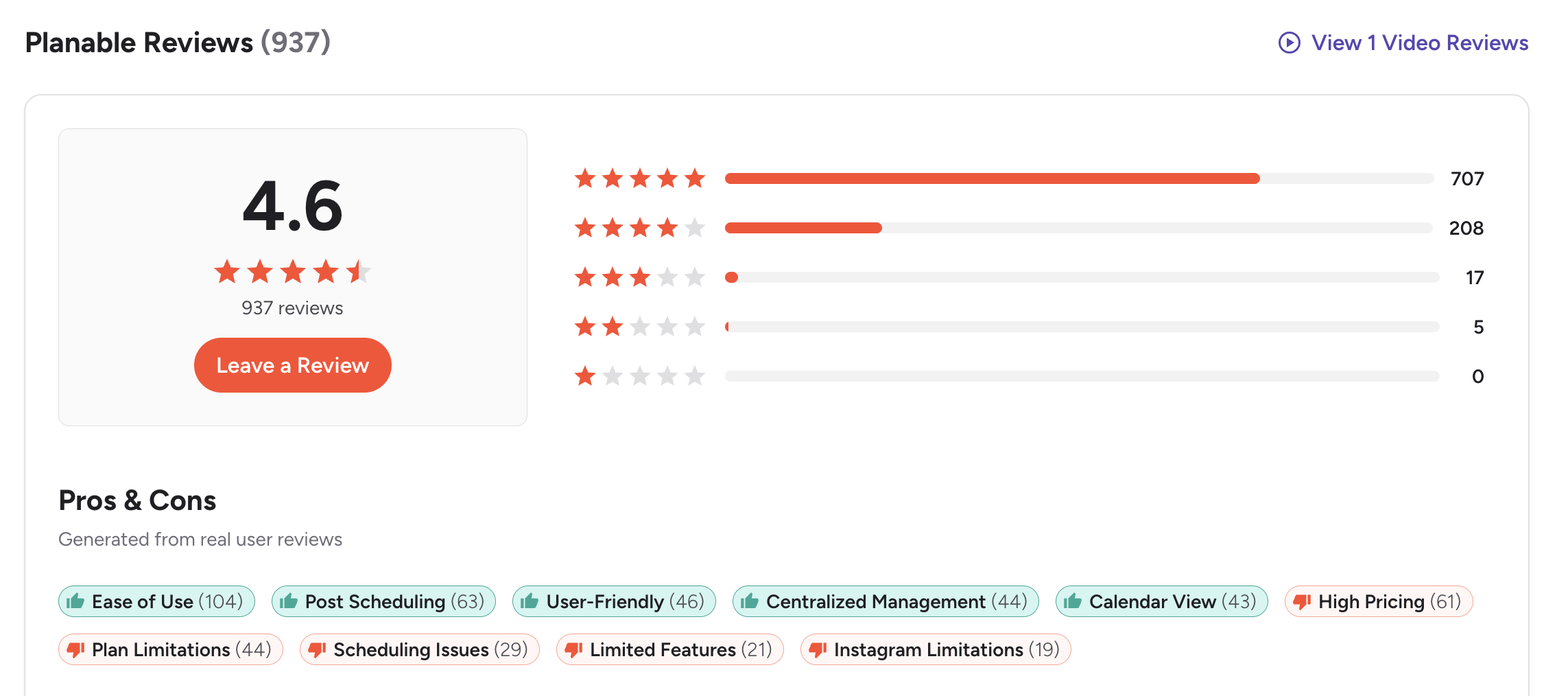
Planable has a strong reputation on G2, holding a 4.6 out of 5 rating across 937 reviews.
Most users report a highly positive experience:
- 707 5-star
- 208 4-star
- 17 3-star
- 5 2-star
- 0 1-star
Users frequently highlight:
Pros
- Ease of Use (104 mentions)
- Post Scheduling (63)
- User-Friendly Interface (46)
- Centralized Management (44)
- Calendar View (43)
However, reviewers also bring attention to recurring limitations:
Cons
- High pricing (61 mentions)
- Plan limitations (44)
- Scheduling issues (29)
- Limited features (21)
- Instagram limitations (19)
A common theme on G2 is that Planable is excellent for collaboration but lacks depth in scheduling, analytics, and platform-specific capabilities, making users rely on additional tools.
Rating: 4.6/5 (937 reviews)
(credit: G2)
On Trustpilot
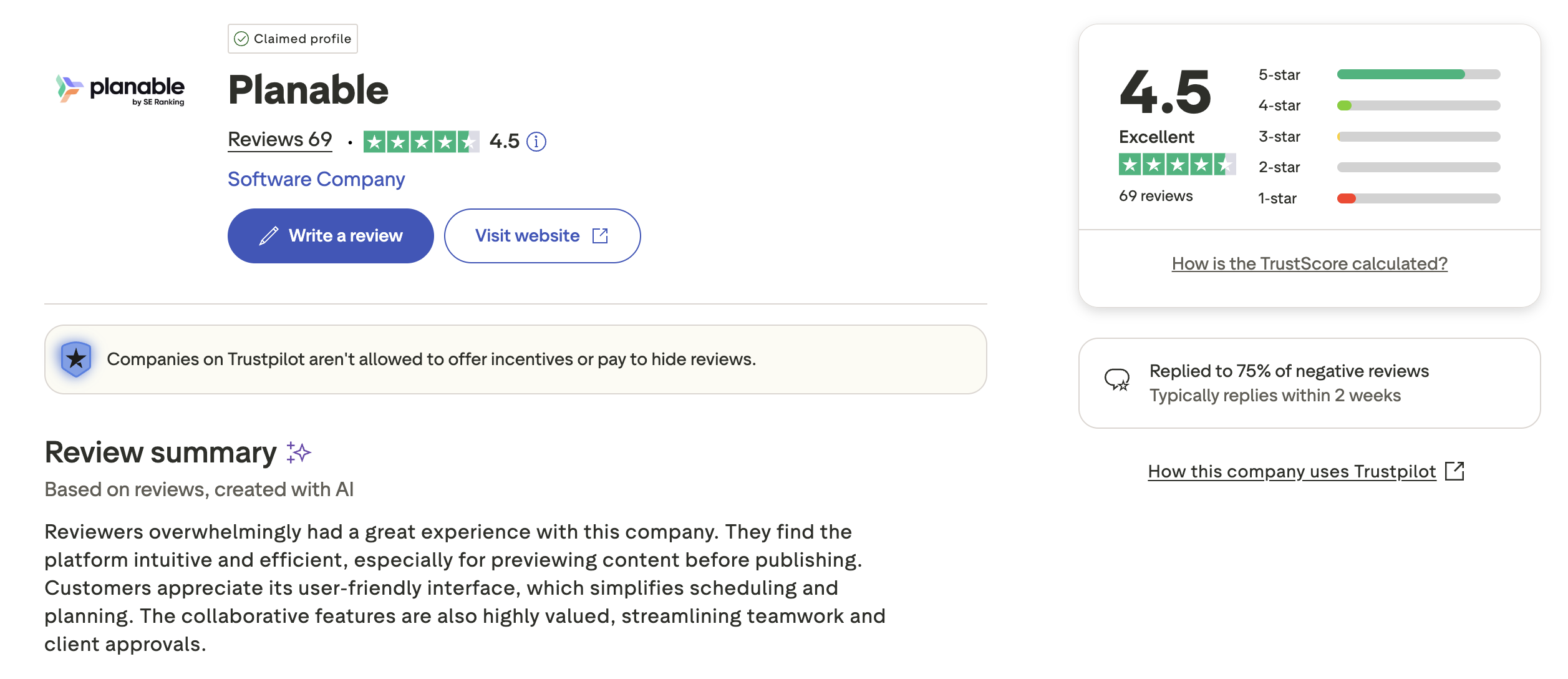
Planable also performs well on Trustpilot, where it holds a 4.5 out of 5 rating from 69 reviews.
Customers often highlight:
Pros
- Intuitive user experience
- Efficient content previewing
- Helpful collaboration features
- Streamlined client approvals
The AI-generated Trustpilot summary mentions that reviewers appreciate Planable's interface and its ability to simplify scheduling and planning.
Some users, however, mention issues such as:
Cons
- Feature limitations
- Occasional scheduling inconsistencies
- Pricing concerns for scaling teams
Planable also responds to 75% of negative reviews, typically within two weeks, indicating moderate engagement from the support team.
Rating: 4.5/5 (69 reviews)
(credit: Trustpilot)
What Reddit and Community Users Say About Planable
Community forums and marketing discussions reveal candid opinions about Planable that go beyond formal review scores. Here are the key themes:
- The approval workflow is considered the best in class. Planable is regularly recommended in community discussions specifically for content approval. Users describe how the multi-tier approval system (creative to brand to client) cut their approval cycle from days to hours. One-click client approvals and the ability to lock content after final sign-off are frequently cited as game-changers for agency workflows.
- The visual preview quality earns consistent praise. Community members note that no other tool matches Planable in how the content preview mirrors the actual platform appearance. The pixel-perfect feed, grid, and calendar views give teams confidence that what they see in Planable is what their audience will see on each platform.
- Workspace pricing compounds quickly for agencies. The most common complaint in community discussions is the per-workspace pricing model. Each client requires a separate workspace, and add-ons (analytics at $14/workspace/month, engagement at $9/workspace/month) stack up. Community members calculate that a fully equipped workspace costs $62/month minimum, and managing 10 client workspaces quickly reaches $620/month or more. The per-workspace model is not always obvious from the pricing page.
- The post-counting method surprises users. A frequently discussed frustration is that a single post published to three platforms counts as three posts against workspace limits. For agencies running multi-platform calendars, this counting method means they hit posting caps faster than expected, forcing upgrades to higher tiers.
- Analytics and social listening gaps push teams to second tools. Community members regularly note that Planable excels at the planning and approval phase but lacks depth in analytics, social listening, and engagement management. Many teams use Planable alongside a second tool for reporting and monitoring, which adds both cost and workflow complexity.
Feature-by-Feature User Feedback
- Scheduling Reliability: Planable's scheduling works well for standard publishing workflows, but users report some friction points. Timezone changes can cause glitches where posts do not publish at the expected time, requiring manual verification. Some users have experienced posts failing to publish silently, without clear error notifications. For teams that rely on precise scheduling across multiple time zones, these issues require extra vigilance.
- Analytics: Analytics is Planable's most significant gap according to user feedback. The feature is not included in the base product and requires a paid add-on ($14/workspace/month). Even with the add-on, users describe the analytics as basic compared to dedicated analytics tools. Teams needing competitor benchmarking, audience demographics, or cross-platform trend analysis typically supplement Planable with a separate reporting solution.
- Pricing and Value: Pricing is the most-mentioned con on G2 (61 mentions), making it the single biggest pain point for Planable users. The workspace-based model works well for teams managing 1-3 brands, but costs escalate rapidly for agencies. Users note that the initial pricing page does not make the full cost obvious until add-ons and multiple workspaces are factored in. Despite this, many agency users consider the approval workflow valuable enough to justify the expense.
- Customer Support: Planable's support team receives moderate praise. On Trustpilot, the company responds to 75% of negative reviews, typically within two weeks. Users describe support as helpful but not always fast. The self-service help center and onboarding documentation are generally sufficient for getting started, though some users report needing additional guidance for complex approval workflow configurations.
- Ease of Use: Ease of use is Planable's second-strongest point after collaboration, with 104 mentions on G2. Users consistently describe the interface as clean, intuitive, and aesthetically pleasing. New team members and clients can navigate the platform with minimal training. The drag-and-drop calendar, visual content organization, and straightforward commenting system reduce the learning curve significantly.
- Collaboration: Collaboration is Planable's defining strength. The commenting system keeps feedback centralized rather than scattered across email, Slack, and WhatsApp. Internal notes allow team-only discussions while giving clients access to everything else. The approval workflow supports multiple tiers, and the unlimited user model (included in workspace pricing) removes the per-seat cost barrier that limits collaboration on other platforms.
Review Authenticity
Across both G2 and Trustpilot, the feedback for Planable is consistently positive, especially around ease of use and collaboration.
- Why G2 and Trustpilot scores are close: Planable holds 4.6/5 on G2 (937 reviews) and 4.5/5 on Trustpilot (69 reviews). The narrow gap between platforms suggests consistent user satisfaction regardless of where feedback is submitted. This alignment is a positive signal, indicating that the product experience matches expectations set during evaluation.
- Review volume context: With 937 G2 reviews, Planable has a substantial review base that provides reliable signal. The review distribution is heavily positive (707 five-star, 208 four-star) with very few low ratings (5 two-star, 0 one-star). On Trustpilot, the 69-review count is modest, but the score aligns closely with G2, reinforcing the overall picture.
- Rating trends: Planable's G2 score has remained stable at 4.6 for over a year, with steady review flow. The high volume of pricing-related cons (61 mentions) existing alongside a strong overall rating suggests that users acknowledge the cost concern but still rate the product highly based on its collaboration strengths. This pattern indicates authentic feedback rather than inflated scores.
However, recurring pain points remain clear:
- Limited publishing and scheduling functionality
- Missing deeper features common in modern schedulers
- Higher pricing for what's offered, especially at scale
- Restrictions on Instagram capabilities
- Lack of built-in AI tools and social listening
In short:
- Great for visual planning, collaboration, and approvals
- Not ideal as a full publishing + analytics scheduler
Planable works best as a collaboration layer, but many teams need more than that.
Who Planable Works Best For (Based on Reviews)
Based on positive reviews: who is happiest?
- Agencies managing client approvals who need multi-tier approval workflows, client-facing content previews, and centralized feedback
- Creative teams that value pixel-perfect visual previews and want to see exactly how content will appear before publishing
- Teams with multiple stakeholders where content passes through several approval stages (designer to manager to client)
- Organizations that prioritize collaboration and want unlimited team members included in workspace pricing without per-seat fees
Based on negative reviews: who should look elsewhere?
- Agencies managing 10+ client workspaces where per-workspace pricing plus add-ons creates costs exceeding $500-600/month
- Data-driven marketers who need built-in analytics, competitor tracking, or audience insights without paying for a separate tool
- Teams needing social inbox or listening features since Planable does not offer inbox management or brand monitoring
- High-volume publishers who post across many platforms and are affected by the multi-platform post counting method
- Solo creators or freelancers who primarily need scheduling and analytics rather than approval workflows, making Planable's core strength less relevant
Before choosing a social media platform...
Consider the following:
- Do you need advanced scheduling tools or just content reviews?
- Will you require analytics, AI tools, or platform-specific previews?
- Do you manage multiple brands with heavy posting volume?
- Does your team need unlimited posts or deep campaign tools?
If your needs go beyond content approvals, you may want to explore Planable alternatives.
The Best Planable Alternative for Agencies
The reviews above are unusually consistent. Planable's approval workflow and visual previews are praised as best in class, and the complaints are almost entirely about the pricing structure: a flat per-workspace rate that compounds with every client, post counts that surprise people, and analytics that is not included at all but sold as a $14 per workspace add-on.
PostPlanify bills the same way, per workspace, but the rate falls as you add clients, posts are unlimited on every plan, and team members and client approvers are never billed as seats.

Pricing starts at $39/month for your first client workspace, or $31/month billed yearly:
| Client workspaces | Growth | Premium | Scale |
|---|---|---|---|
| 1 | $39/mo | $99/mo | $199/mo |
| 3 | $97/mo | $99/mo | $199/mo |
| 5 | $155/mo | $177/mo | $199/mo |
| 10 | $250/mo | $322/mo | $394/mo |
| Social accounts per workspace | 4 | 6 | 8 |
Planable Basic is $39 per workspace, but analytics costs another $14 and the social inbox another $9, so a workspace with both is $62. Ten clients set up that way is $620/month against $250/month here, with no post cap and both features included.
Each plan answers a theme from the reviews:
- Growth ($39/mo first workspace) removes the two structural complaints: unlimited posts instead of a monthly count, and a rate that steps down as you add clients. It also includes approval workflows, a social inbox across Instagram, Facebook, LinkedIn, Google Business and YouTube included rather than sold as a per-workspace add-on, full analytics on all 10 platforms, shared calendar, roles and permissions, bulk scheduling and a media library.
- Premium ($99/mo first workspace) goes further on the reporting reviewers say they add a second tool for: advanced analytics, branded client reports that schedule themselves, team comments and mentions, AI brand voice and knowledge base, plus full API and MCP access.
- Scale ($199/mo first workspace) puts the platform under your agency's brand with a white-label dashboard, white-label client emails and reports, dedicated onboarding, migration help and priority human support.
Credit where it is due: Planable does approvals and previews better than anyone in this category, including PostPlanify. If client sign-off is the hardest part of your week and nothing else matters much, it earns its price. PostPlanify's case is the rest of the job around that sign-off: an inbox and analytics included rather than billed as $9 and $14 add-ons per workspace, and a bill that does not scale linearly with your client list.
Start your 7-day free trial today.










