
Planable is a social media collaboration and approval platform used by teams, agencies, and brands to organize content workflows. It focuses on feed-style previews, approval layers, workspaces, and campaign management. With multiple pricing tiers and add-ons, it can be difficult to understand where each plan fits.
So - is Planable worth the price?
Today, we'll break down the full Planable pricing structure based on the latest publicly available information.
Planable Pricing at a Glance (2026)
| Plan | Price | Posts per workspace | Social pages per workspace |
|---|---|---|---|
| Basic | $39/workspace/month | 60 | 4 |
| Pro (Most popular) | $59/workspace/month | 150 | 10 |
| Enterprise | Custom pricing | Unlimited | Custom |
Pricing is per workspace per month. There is no free plan: new accounts get the first 50 posts free with no time limit and no card required. Yearly billing gives 2 months free. Analytics, social inbox and social listening are paid add-ons on Basic and Pro.
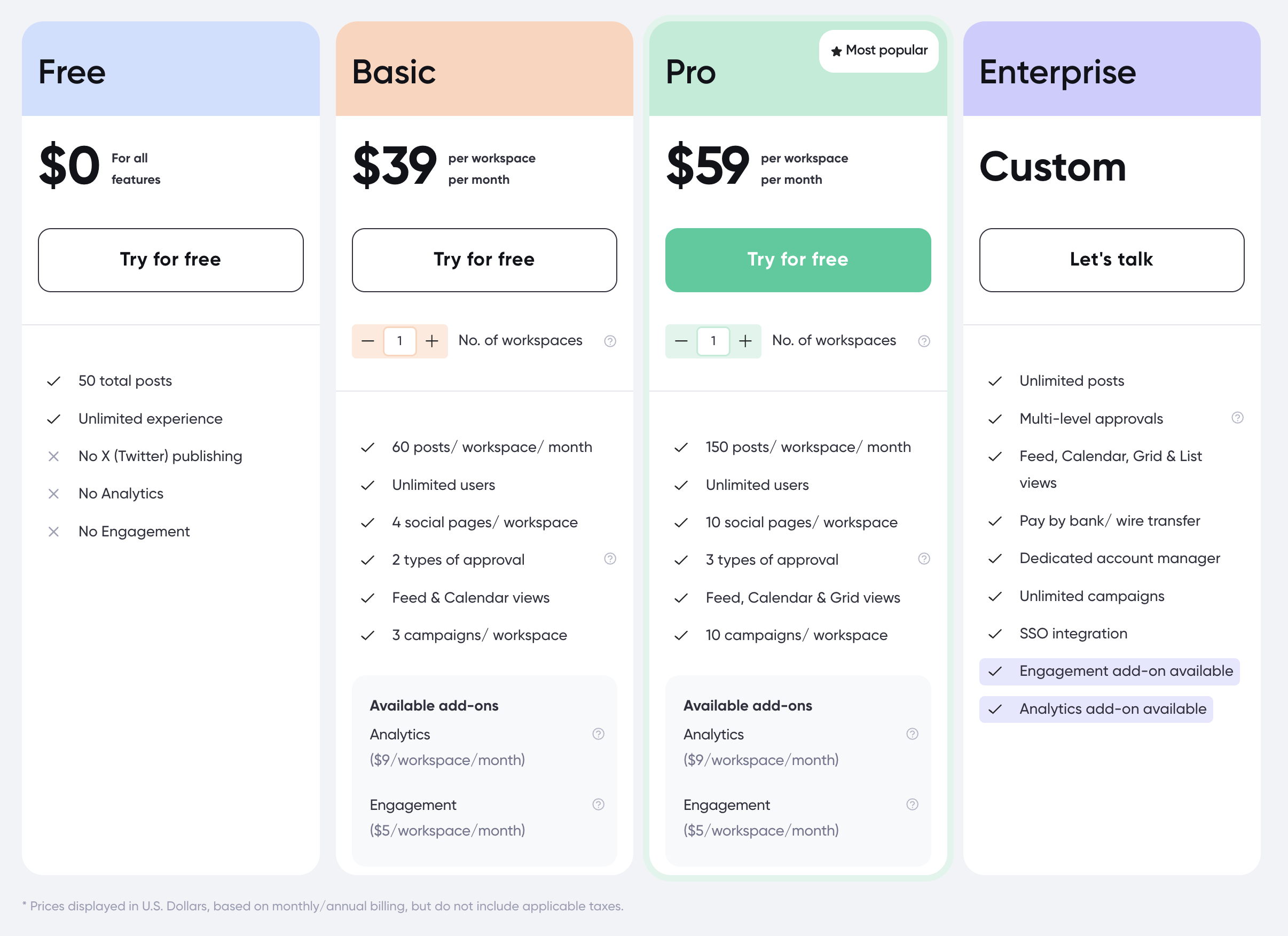
Source: https://planable.io/pricing/
Planable Social Media Scheduling & Collaboration Pricing Plans
Planable's pricing is structured per workspace per month, which means the cost increases based on how many workspaces your team needs. Posting limits, approval workflows, and analytics/engagement add-ons vary by plan.
Every plan includes:
- Unlimited users
- Approval workflows, with more types on higher plans
- Feed and Calendar views
- Campaign organization
- MCP Connector, so an AI assistant can work with your content
Where plans differ is post limits, social pages per workspace, approval types, campaign counts and which views you get. Analytics, social inbox and social listening are not included on Basic or Pro at all: each is a separate paid add-on.
Planable Add-On Pricing
This is the part that catches agencies out. Analytics and the social inbox are not features of the Basic or Pro plans, they are add-ons billed per workspace on top of the plan price:
| Add-on | Price | Available on |
|---|---|---|
| Analytics | $14/workspace/month | Basic, Pro, Enterprise |
| Social inbox | $9/workspace/month | Basic, Pro, Enterprise |
| Social listening | $99/workspace/month | Basic, Pro, Enterprise |
A Basic workspace with analytics and a social inbox is therefore $62/workspace/month, not $39. Across five clients that is $310/month before anyone has looked at social listening.
There is no free plan. New accounts get the first 50 posts free, with no time limit and no credit card required, after which you pick a plan.
1. Basic Plan
The Basic plan costs $39 per workspace/month.
It includes:
- 60 posts per workspace per month
- Unlimited users
- 4 social pages per workspace
- 2 types of approval workflows
- Feed and Calendar views
- 3 campaigns per workspace
- MCP Connector
Available add-ons: Analytics at $14/workspace/month, social inbox at $9/workspace/month, social listening at $99/workspace/month
Best for: small teams needing a structured content calendar, basic approvals, and controlled posting limits.
2. Pro Plan (Most Popular)
The Pro plan costs $59 per workspace/month.
Includes everything in Basic, plus:
- 150 posts per workspace per month
- Unlimited users
- 10 social pages per workspace
- 3 types of approval workflows
- Feed, Calendar and Grid views
- 10 campaigns per workspace
- MCP Connector
- Public API
Available add-ons: Analytics at $14/workspace/month, social inbox at $9/workspace/month, social listening at $99/workspace/month
Best for: small agencies and brands needing deeper workflows, more profiles, more campaigns, and more approval steps.
3. Enterprise Plan
The Enterprise plan offers Custom pricing.
Includes everything in Pro, plus:
- Unlimited posts
- Multi-level approvals
- Feed, Calendar, Grid & List views
- Pay by bank/wire transfer
- Dedicated account manager
- Unlimited campaigns
- SSO integration
- MCP Connector and Public API
- Analytics, social inbox and social listening add-ons available
Best for: large teams, agencies, and enterprise companies with advanced approval needs and multiple stakeholders.
Is Planable Pricing Worth It?
Planable is strong for collaboration, especially for teams that focus on content previews, approval flows, and campaign organization. The interface is clean, visual, and easy for clients to understand - one of Planable's biggest selling points.
However, when you look at what real users are saying about the platform, a few key limitations come up consistently:
- Strict posting limits (60 to 150 posts per workspace)
- Analytics & engagement cost extra
- Approvals limited on lower plans
- Workspace pricing scales up quickly
- No built-in AI captions or deep platform previews
If you publish frequently or manage many brands, the post limits and workspace fees become restrictive. And without analytics included by default, teams must pay additional monthly fees.
For creators, agencies, and teams who want unlimited scheduling, AI captions, Canva integration, and real platform previews, Planable may feel too limited - especially compared to newer schedulers.
Pros and Cons of Planable
Pros of Planable:
- Best-in-class post previews: Feed-style visuals are excellent for collaboration.
- Flexible approval workflows: Especially on Pro and Enterprise.
- Unlimited users on paid plans: Great for teams and clients.
- Clean, intuitive workspace structure: Helps organize campaigns.
- 50 free posts to start: No time limit and no credit card required, so you can test properly before paying.
Cons of Planable:
- Posting limits per workspace: 60 or 150 posts/month can feel restrictive.
- Analytics costs extra: $14 per workspace per month, not included on Basic or Pro.
- Social inbox is a paid add-on: Engagement costs $9 per workspace per month on top of the plan.
- Advanced approvals locked behind higher tiers: Teams may need Pro or Enterprise.
- No AI caption generation or deep scheduling tools: More suited for collaboration than publishing.
The Better Planable Alternative for Agencies
Planable and PostPlanify price the same way, per workspace, which makes this the most direct comparison on this site. Two things differ: Planable's per-workspace rate is flat, so the tenth client costs exactly what the first did, and every plan caps posts per workspace.
PostPlanify is built for agencies serving local businesses. The per-workspace rate falls as you add clients, posts are unlimited on every plan, and team members and client approvers are never billed as seats.

Pricing starts at $39/month for your first client workspace, or $31/month billed yearly:
| Client workspaces | Growth | Premium | Scale |
|---|---|---|---|
| 1 | $39/mo | $99/mo | $199/mo |
| 3 | $97/mo | $99/mo | $199/mo |
| 5 | $155/mo | $177/mo | $199/mo |
| 10 | $250/mo | $322/mo | $394/mo |
| Social accounts per workspace | 4 | 6 | 8 |
Every plan includes unlimited team members and unlimited posts. Here is what each adds:
- Growth ($39/mo first workspace): unlimited users and posts, analytics across all 10 platforms, social inbox, approval workflows, shared calendar, roles and permissions, bulk scheduling, media library with Canva and Google Drive, and link in bio
- Premium ($99/mo first workspace): everything in Growth, plus advanced analytics, branded client reports, scheduled report delivery, team comments and mentions, AI brand voice, AI knowledge base, and full API and MCP access
- Scale ($199/mo first workspace): everything in Premium, plus a white-label dashboard, white-label client emails and reports, dedicated 1:1 onboarding, migration help and priority human support
What the Same Number of Clients Costs on Each
Both tools bill per workspace, so the totals line up directly. The honest comparison adds Planable's analytics ($14) and social inbox ($9) add-ons, since PostPlanify includes both:
| Clients | Planable Basic | Basic + analytics + inbox | PostPlanify Growth |
|---|---|---|---|
| 1 | $39/mo, 60 posts | $62/mo | $39/mo, unlimited posts |
| 3 | $117/mo | $186/mo | $97/mo |
| 5 | $195/mo | $310/mo | $155/mo |
| 10 | $390/mo | $620/mo | $250/mo |
Planable's rate is flat, so ten clients costs ten times one client. PostPlanify's rate steps down at the second, sixth and eleventh workspace, posts are never capped, and analytics and the inbox are included rather than billed per workspace.
Planable vs PostPlanify: Side-by-Side Comparison
| Feature | Planable (Pro) | PostPlanify (Growth) |
|---|---|---|
| Price | $59 per workspace, flat | $39/mo first workspace, rate drops as you add |
| Posts per month | 150 per workspace | Unlimited |
| Social pages | 10 per workspace | 4 per workspace |
| MCP connector | Yes, every plan | Premium and above |
| Social accounts | Per workspace | 4 per workspace |
| Team members | Unlimited | Unlimited |
| Client approvers | Included | Free, never billed as seats |
| Approval workflows | Best in class, multi-level | Single and multi-step, from Growth |
| Visual previews | Best in class | Yes |
| Social inbox | Add-on, $9/workspace/month | Included: Instagram, Facebook, LinkedIn, Google Business, YouTube |
| Analytics | Add-on, $14/workspace/month | Included, all 10 platforms |
| Client reports | Enterprise | Premium and above |
| White labeling | Enterprise | Scale |
| First 50 posts | Free, no card required | 7-day free trial |
| Platforms supported | 9 | 10 |
Being straight about it: Planable's approval workflow and visual previews are the best in this category, and reviewers say so consistently. If getting a client to sign off on a post is the single hardest part of your week, Planable does that one job better than anyone, including us.
The reasons agencies leave are structural rather than about quality. The per-workspace rate is flat, so it never rewards growth. Posts are capped, so a busy month becomes an upgrade conversation. And analytics and the social inbox are add-ons at $14 and $9 per workspace per month, which means the real cost of a Basic workspace with both is $62, not $39. PostPlanify includes all of that, includes approvals from the entry plan, and gets cheaper per client as you grow.
All plans include a 7-day free trial backed by a 14-day money-back guarantee.

Related Guides
- Best Planable Alternatives for Social Media Scheduling
- How to Create a Social Media Content Calendar
- Social Media Scheduling Tools Compared
- Social Media Analytics & Reporting: What to Track
FAQ on Planable Pricing
Is Planable free?
No. Planable has no free plan. New accounts get the first 50 posts free with no time limit and no credit card required, and after that you choose Basic at $39 per workspace per month or Pro at $59. Analytics, the social inbox and social listening are separate paid add-ons.
Does Planable offer a free trial?
Yes, you can try paid plans for free - typically with full access before upgrading.
Is Planable good?
Yes, Planable is strong for content previews, approvals, and workflows. But it's less ideal for creators who want AI captions, unlimited posts, and an all-in-one scheduling experience.
What is Planable used for?
Planable is used for planning, approving, and collaborating on social media content with visual previews and structured workflows.










