
SocialBee is a social media scheduling and content management tool used by creators, small businesses, and agencies. It offers category-based scheduling, analytics, AI assistance, workspaces, and multi-profile management across 10 social media platforms. With multiple pricing tiers and different limits on profiles, users, and workspaces, it can be hard to know which plan is right for you.
So - is SocialBee worth the price?
Today, we'll break down the full SocialBee pricing structure, monthly and annual costs, add-on pricing, what each plan includes (and what it doesn't), and how it compares to alternatives. Everything here is based on the most up-to-date public pricing from SocialBee's pricing page.
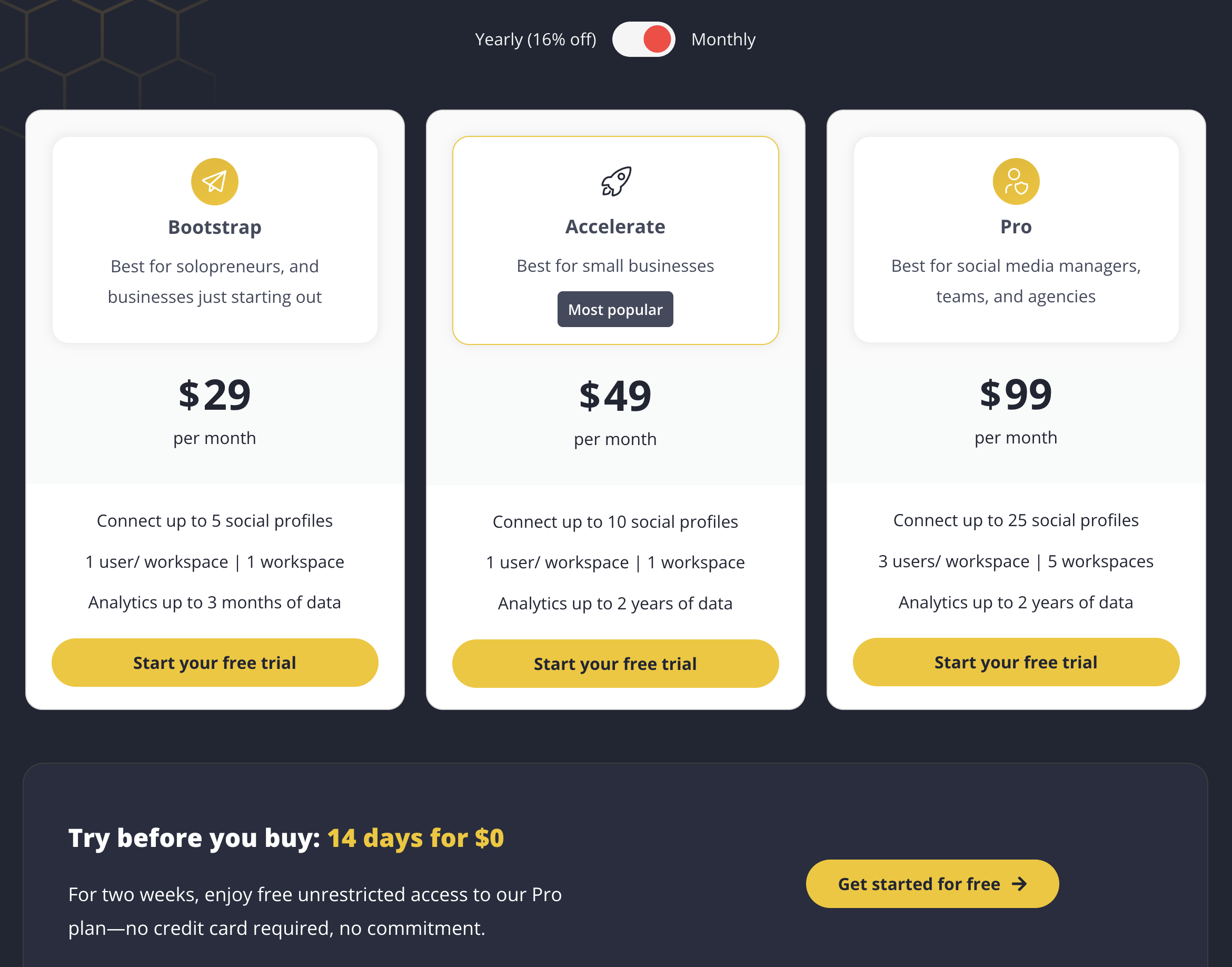
SocialBee Pricing at a Glance (2026)
| Plan | Monthly | Annual (per month) | Social Profiles | Users | Workspaces |
|---|---|---|---|---|---|
| Bootstrap | $29/mo | $24.20/mo | 5 | 1 | 1 |
| Accelerate | $49/mo | $40.80/mo | 10 | 1 | 1 |
| Pro | $99/mo | $82.50/mo | 25 | 3 | 5 |
Annual billing saves ~16%. SocialBee also offers agency-level plans (Pro50, Pro100, Pro150) for 50 to 150 profiles.
Source: socialbee.com/pricing
SocialBee Monthly vs Annual Pricing
SocialBee offers a ~16% discount when you pay annually. Here's the full breakdown including agency plans:
| Plan | Monthly Price | Annual Price (per month) | Annual Savings |
|---|---|---|---|
| Bootstrap | $29/mo | $24.20/mo | $57.60/year |
| Accelerate | $49/mo | $40.80/mo | $98.40/year |
| Pro | $99/mo | $82.50/mo | $198/year |
| Pro50 (Agency) | $179/mo | $149.20/mo | $357.60/year |
| Pro100 (Agency) | $329/mo | $274.20/mo | $657.60/year |
| Pro150 (Agency) | $449/mo | $374.20/mo | $897.60/year |
All plans come with a 30-day money-back guarantee, so you can commit to annual billing with less risk.
SocialBee Social Media Scheduling Pricing Plans
SocialBee's pricing is structured around the number of social profiles you can connect, workspace limits, user seats, and how far back analytics can be viewed.
Every plan includes:
- Scheduling & publishing tools
- Category-based posting (content recycling)
- AI text assistance (caption generation)
- Canva integration
- Analytics (history varies by plan)
- Workspaces (varies by plan)
- RSS feed imports
The real differences come down to profile limits, analytics depth, user limits, content categories, and workspace availability.
1. Bootstrap Plan
The Bootstrap plan costs $29/month ($24.20/mo billed annually).
What's included:
- Connect up to 5 social profiles
- 1 user per workspace
- 1 workspace
- 10 content categories
- 1,000 posts per category
- 10 RSS feeds
- Analytics for up to 3 months of data
Best for: solopreneurs or small creators just getting started with scheduling tools who manage a handful of social accounts.
Limitations: The 3-month analytics history is quite short for tracking long-term growth. Only 10 content categories may feel restrictive if you manage diverse content types.
2. Accelerate Plan (Most Popular)
The Accelerate plan costs $49/month ($40.80/mo billed annually).
Includes everything in Bootstrap, plus:
- Connect up to 10 social profiles
- 1 user per workspace
- 1 workspace
- 50 content categories
- 5,000 posts per category
- 50 RSS feeds
- Analytics for up to 2 years of data
Best for: small businesses and creators who want deeper analytics and more profile connections.
Limitations: Still limited to 1 user and 1 workspace, so this plan doesn't work for teams, even small ones. You'll need to upgrade to Pro ($99/mo) or purchase add-ons for any collaboration.
3. Pro Plan
The Pro plan costs $99/month ($82.50/mo billed annually).
Includes everything in Accelerate, plus:
- Connect up to 25 social profiles
- 3 users per workspace
- 5 workspaces
- Unlimited content categories
- 5,000 posts per category
- Unlimited RSS feeds
- Analytics for up to 2 years of data
Best for: agencies, teams, or managers handling multiple brands and needing collaboration features.
Limitations: Even at $99/mo, you're limited to 3 users per workspace and 25 profiles total. For larger teams, you'll need to purchase add-ons or jump to the agency tiers.
Agency Plans (Pro50, Pro100, Pro150)
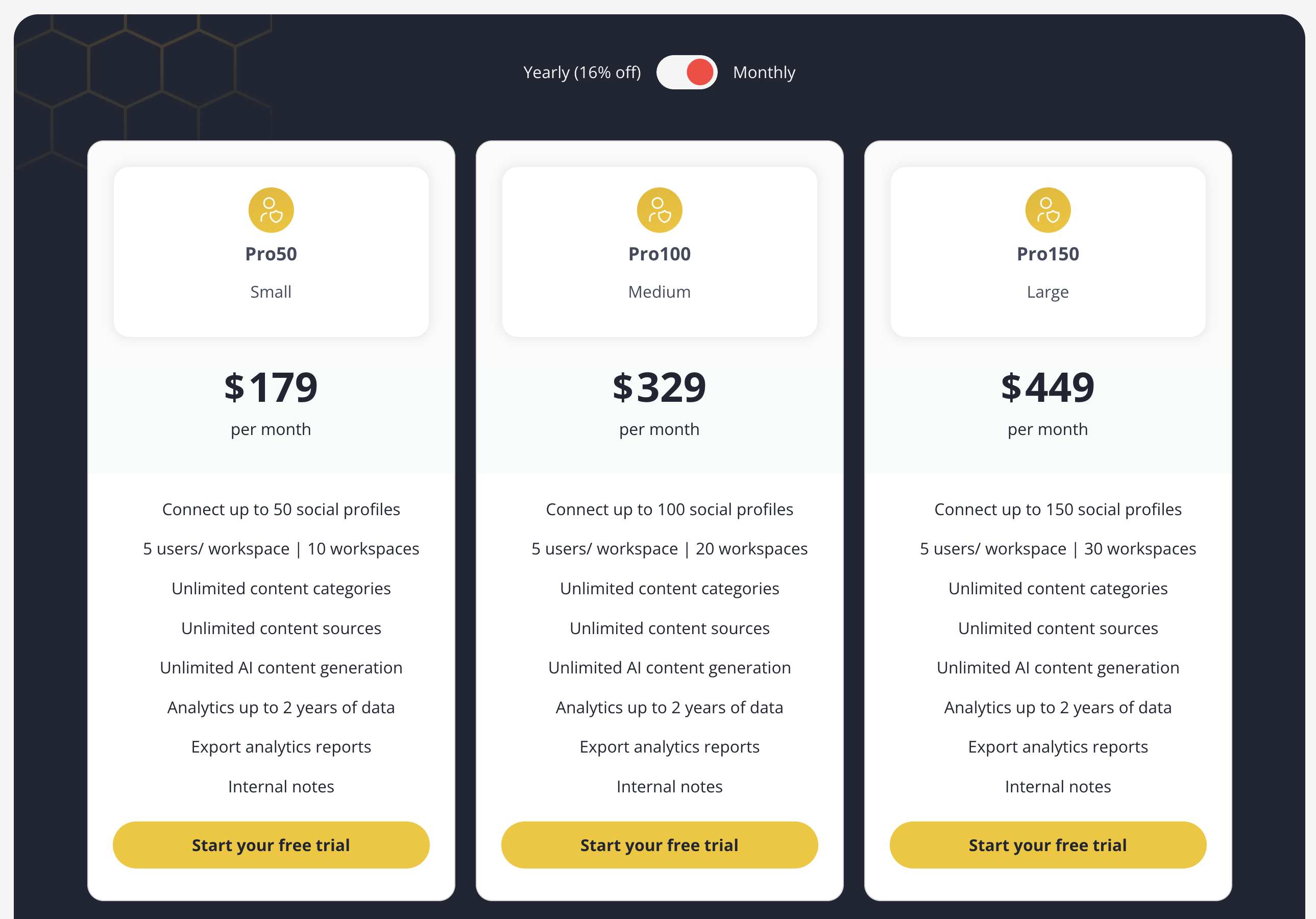
For agencies managing many clients, SocialBee offers three additional tiers:
| Feature | Pro50 | Pro100 | Pro150 |
|---|---|---|---|
| Price (monthly) | $179/mo | $329/mo | $449/mo |
| Price (annual) | $149.20/mo | $274.20/mo | $374.20/mo |
| Social Profiles | 50 | 100 | 150 |
| Users per Workspace | 5 | 10 | 15 |
| Workspaces | 10 | 20 | 30 |
| Content Categories | Unlimited | Unlimited | Unlimited |
All agency plans share the same feature set as the Pro plan, the difference is purely in volume limits.
SocialBee Add-On Pricing
If you need more capacity without upgrading to a higher plan, SocialBee offers add-ons:
| Add-On | Cost |
|---|---|
| Extra social profiles | $15/month per bundle of 5 profiles |
| Extra users | $10/month per additional user |
| Extra workspaces | $10/month per additional workspace |
Example: If you're on the Accelerate plan ($49/mo) and need 15 profiles and 2 users, you'd pay $49 + $15 (5 extra profiles) + $10 (1 extra user) = $74/month. At that point, upgrading to Pro ($99/mo) may offer better value since it includes 25 profiles and 3 users.
Supported Social Media Platforms
SocialBee supports 10 social media platforms across all plans:
- Facebook (Pages, Groups, Profiles)
- Instagram (Business & Creator accounts)
- X (Twitter)
- LinkedIn (Profiles & Company Pages)
- TikTok
- YouTube
- Google Business Profile
- Threads
- Bluesky
Each connected account counts as one social profile toward your plan limit.
Detailed Feature Comparison by Plan
| Feature | Bootstrap ($29) | Accelerate ($49) | Pro ($99) |
|---|---|---|---|
| Social profiles | 5 | 10 | 25 |
| Users per workspace | 1 | 1 | 3 |
| Workspaces | 1 | 1 | 5 |
| Content categories | 10 | 50 | Unlimited |
| Posts per category | 1,000 | 5,000 | 5,000 |
| RSS feeds | 10 | 50 | Unlimited |
| Analytics history | 3 months | 2 years | 2 years |
| Post recycling | ✅ | ✅ | ✅ |
| AI caption generation | ✅ | ✅ | ✅ |
| Canva integration | ✅ | ✅ | ✅ |
| Category-based scheduling | ✅ | ✅ | ✅ |
| Approval workflows | ❌ | ❌ | ✅ |
| Social inbox | ❌ | ❌ | ❌ |
| Bulk scheduling | ✅ | ✅ | ✅ |
Notable gaps across all plans: SocialBee does not offer a social inbox for managing comments and DMs. There are also no platform-specific post previews, you can't see exactly how your post will look on each platform before publishing.
Free Trial
SocialBee offers a 14-day free trial of the Pro plan, no credit card required.
This gives you full access to 25 profiles, 5 workspaces, 3 users, and unlimited content categories before committing. SocialBee also offers a 30-day money-back guarantee on all paid plans.
SocialBee Discounts
- Annual billing: ~16% off all plans (see monthly vs annual table)
- Education discount: 50% off all plans for registered educational institutions using code
EDU50(monthly) orEDU50YEARLY(annual) - Nonprofits: Contact SocialBee directly for nonprofit pricing, discounts are available on a case-by-case basis
Is SocialBee Pricing Worth It?
SocialBee is appealing for creators and businesses who want category-based scheduling and multi-profile management at a predictable price. The analytics history expansion in higher tiers is also valuable for long-term insights, and the 10-platform support is competitive.
However, based on SocialBee reviews across multiple platforms, many users notice that:
- The interface is more traditional, not optimized for modern preview-driven workflows
- No social inbox for managing comments and DMs from one place
- No real post previews for each platform
- AI captioning is limited compared to newer platforms
- Collaboration features only unlock on the $99/month plan
- Workspaces and user limits can restrict growing teams
For creators and teams who prioritize fast workflows, real-platform previews, easy scheduling, AI captioning, and integrated design, SocialBee can feel limiting, especially considering other powerful SocialBee alternatives available at similar or lower price points.
Pros and Cons of SocialBee
Pros of SocialBee:
- Simple, predictable pricing: Easy to understand profile and workspace limits.
- Category-based scheduling: Great for organized posting workflows and content recycling.
- Generous analytics history on Accelerate & Pro: Up to 2 years of data.
- 10 platform support: Including Google Business Profile, Pinterest, Threads, and Bluesky.
- Flexible add-ons: Buy extra profiles, users, or workspaces without upgrading.
- 14-day free trial with no credit card: Easy onboarding with 30-day money-back guarantee.
Cons of SocialBee:
- Very limited users and workspaces on lower plans: Only 1 user/workspace for both Bootstrap and Accelerate.
- No social inbox: Cannot manage comments or DMs across platforms.
- No platform-specific post previews: Hard to visualize posts before publishing.
- AI tools less advanced than modern schedulers: Not built for high-quality caption generation.
- Collaboration locked behind $99/mo plan: Teams must upgrade for basic multi-user functionality.
- Profile limits can become restrictive: Even Pro maxes out at 25 profiles, agencies need $179+/mo plans.
The Better SocialBee Alternative for Agencies
SocialBee's limits stack in a way that catches agencies out. Bootstrap and Accelerate are single-user and single-workspace, so there is no way to separate one client from another. Pro at $99/mo finally adds workspaces, and still caps you at 3 users and 25 profiles, with extra seats at $10 each.
PostPlanify is built for agencies serving local businesses. Each client gets their own workspace from the entry plan, and team members and client approvers are never billed as seats.

Pricing starts at $39/month for your first client workspace, or $31/month billed yearly, and the per-workspace rate drops as you add clients:
| Client workspaces | Growth | Premium | Scale |
|---|---|---|---|
| 1 | $39/mo | $99/mo | $199/mo |
| 3 | $97/mo | $99/mo | $199/mo |
| 5 | $155/mo | $177/mo | $199/mo |
| 10 | $250/mo | $322/mo | $394/mo |
| Social accounts per workspace | 4 | 6 | 8 |
Every plan includes unlimited team members and unlimited posts. Here is what each adds:
- Growth ($39/mo first workspace): unlimited users and posts, analytics across all 10 platforms, social inbox, approval workflows, shared calendar, roles and permissions, bulk scheduling, media library with Canva and Google Drive, and link in bio
- Premium ($99/mo first workspace): everything in Growth, plus advanced analytics, branded client reports, scheduled report delivery, team comments and mentions, AI brand voice, AI knowledge base, and full API and MCP access
- Scale ($199/mo first workspace): everything in Premium, plus a white-label dashboard, white-label client emails and reports, dedicated 1:1 onboarding, migration help and priority human support
SocialBee vs PostPlanify: Side-by-Side Comparison
| Feature | SocialBee (Accelerate) | PostPlanify (Growth) |
|---|---|---|
| Price | $49/mo | $39/mo first workspace, $97/mo for 3 |
| Billing unit | Plan tier, with profile and seat caps | Client workspaces |
| Social profiles | 10 | 4 per workspace, 12 across 3 clients |
| Workspaces | 1, until Pro at $99/mo | One per client, up to 100 |
| Team members | 1, extra seats $10 each | Unlimited on every plan |
| Client approvers | Counted as paid seats | Free, never billed as seats |
| Social inbox | Not offered on any plan | Instagram, Facebook, LinkedIn, Google Business, YouTube |
| Approval workflows | Pro and above | Included from Growth |
| Content recycling | Yes, category-based | Not offered |
| Analytics | 2 years history | Full, all 10 platforms |
| Best time to post | No | Yes |
| Client reports | No | Premium and above |
| White labeling | No | Scale |
| Platforms supported | 10 | 10 |
| Canva integration | Yes | Yes |
| Link in bio | No | Yes |
The trade-off: SocialBee's category-based content recycling is genuinely good and PostPlanify does not have an equivalent. If evergreen recycling is the core of how you work, that alone may decide it.
For client work the maths runs the other way. An agency with three local business clients needs three separate workspaces, which on SocialBee means the $99/mo Pro plan, and adding the second and third team member takes it to $119/mo with a 25-profile ceiling. The same setup on PostPlanify is $97/mo with 12 accounts, unlimited seats, approvals from the entry plan, and a social inbox SocialBee does not offer at any price.
All plans include a 7-day free trial backed by a 14-day money-back guarantee.

Related Guides
- SocialBee Reviews 2026
- Best SocialBee Alternatives
- Best Social Media Scheduling Tools
- How to Schedule Social Media Posts
- Social Media Content Calendar Examples
- Social Media Marketing Strategy for Small Business
- Instagram Post Scheduler Tools
FAQ on SocialBee Pricing
Is SocialBee free?
No, SocialBee does not offer a free plan, only a 14-day free trial of the Pro plan. After the trial ends, you must select a paid plan starting at $29/month (Bootstrap).
Does SocialBee offer a free trial?
Yes. You get 14 days for free with full access to Pro plan features, no credit card required. SocialBee also offers a 30-day money-back guarantee on all paid plans.
How much does SocialBee cost per year?
SocialBee's annual pricing is: Bootstrap at $290.40/year ($24.20/mo), Accelerate at $489.60/year ($40.80/mo), and Pro at $990/year ($82.50/mo). This saves roughly 16% compared to monthly billing.
What is the cheapest SocialBee plan?
The cheapest plan is Bootstrap at $29/month ($24.20/mo if billed annually). It includes 5 social profiles, 1 workspace, 1 user, and 3 months of analytics history.
Can I cancel SocialBee anytime?
Yes, SocialBee has no contracts. You can cancel anytime through self-service in the app. All plans include a 30-day money-back guarantee. You also have the option to pause your subscription instead of cancelling.
Does SocialBee charge per user?
On the Bootstrap and Accelerate plans, you get 1 user per workspace. The Pro plan includes 3 users per workspace. Additional users can be added as an add-on for $10/month per user on any plan.
What happens when I exceed my profile limit on SocialBee?
SocialBee enforces hard limits, you cannot connect more profiles than your plan allows. If you hit the limit, you must either purchase an add-on ($15/month per 5 extra profiles), upgrade to a higher plan, or disconnect existing profiles.
Does SocialBee support TikTok and Instagram?
Yes. SocialBee supports 10 platforms: Facebook, Instagram, X (Twitter), LinkedIn, Pinterest, TikTok, YouTube, Google Business Profile, Threads, and Bluesky. All platforms are available on every plan.
Is SocialBee good for agencies?
SocialBee can work for agencies, but the standard plans are limiting. Only the Pro plan ($99/mo) offers multiple workspaces and users, and it caps at 25 profiles and 3 users. Agencies with larger needs should consider the Pro50 ($179/mo), Pro100 ($329/mo), or Pro150 ($449/mo) agency plans.
Does SocialBee have a social inbox?
No. SocialBee does not offer a social inbox for managing comments and direct messages. If you need unified inbox functionality, you'll need to pair SocialBee with a separate tool or consider an alternative that includes a social inbox.
Is SocialBee good?
Yes, SocialBee is solid for category-based scheduling and small business workflows. Its content recycling feature is particularly strong for evergreen content strategies. But teams looking for social inbox, post previews, AI workflows, and deeper analytics often choose more modern platforms.
What is SocialBee used for?
SocialBee is used for scheduling posts, managing social profiles across 10 platforms, organizing content into categories for automated recycling, collaborating across workspaces, importing content via RSS feeds, and analyzing performance with up to 2 years of historical data.
Does SocialBee offer a student or nonprofit discount?
Yes. Educational institutions get 50% off all plans with the code EDU50 (monthly) or EDU50YEARLY (annual). Nonprofit organizations should contact SocialBee directly, discounts are handled on a case-by-case basis.
How does SocialBee pricing compare to Buffer?
Buffer charges per channel ($6/channel on Essentials, $12/channel on Team), while SocialBee charges a flat rate per plan. For 5 channels, Buffer Essentials costs $30/mo vs SocialBee Bootstrap at $29/mo, roughly the same. But at 10 channels, Buffer is $60/mo vs SocialBee Accelerate at $49/mo. SocialBee becomes more cost-effective as you add more profiles. See our full social media scheduling tools comparison for more.










