
Before choosing a social media scheduler-especially one positioned for creators, small businesses, and agencies-it's important to examine real user feedback. In this article, we break down SocialBee reviews across two major platforms to help you understand what users actually think in 2026.
If you're debating whether to use SocialBee or explore alternatives, this overview will give you clarity. For a detailed look at what each plan costs, see our SocialBee pricing breakdown.
SocialBee Overview
SocialBee is a social media management tool focused on category-based scheduling, multi-brand organization, and simple workflows. It's designed for creators, solopreneurs, and small teams who need a structured, easy-to-use posting system.

Some of its highlighted features include:
- Category-based posting
- Multi-profile management
- Workspaces for teams
- Basic analytics (depending on plan)
- Collaboration tools on higher tiers
- Post recycling and scheduling queues
While SocialBee is appreciated for simplicity and customer service, reviews show both strengths and recurring limitations.
User Reviews and Ratings
On G2
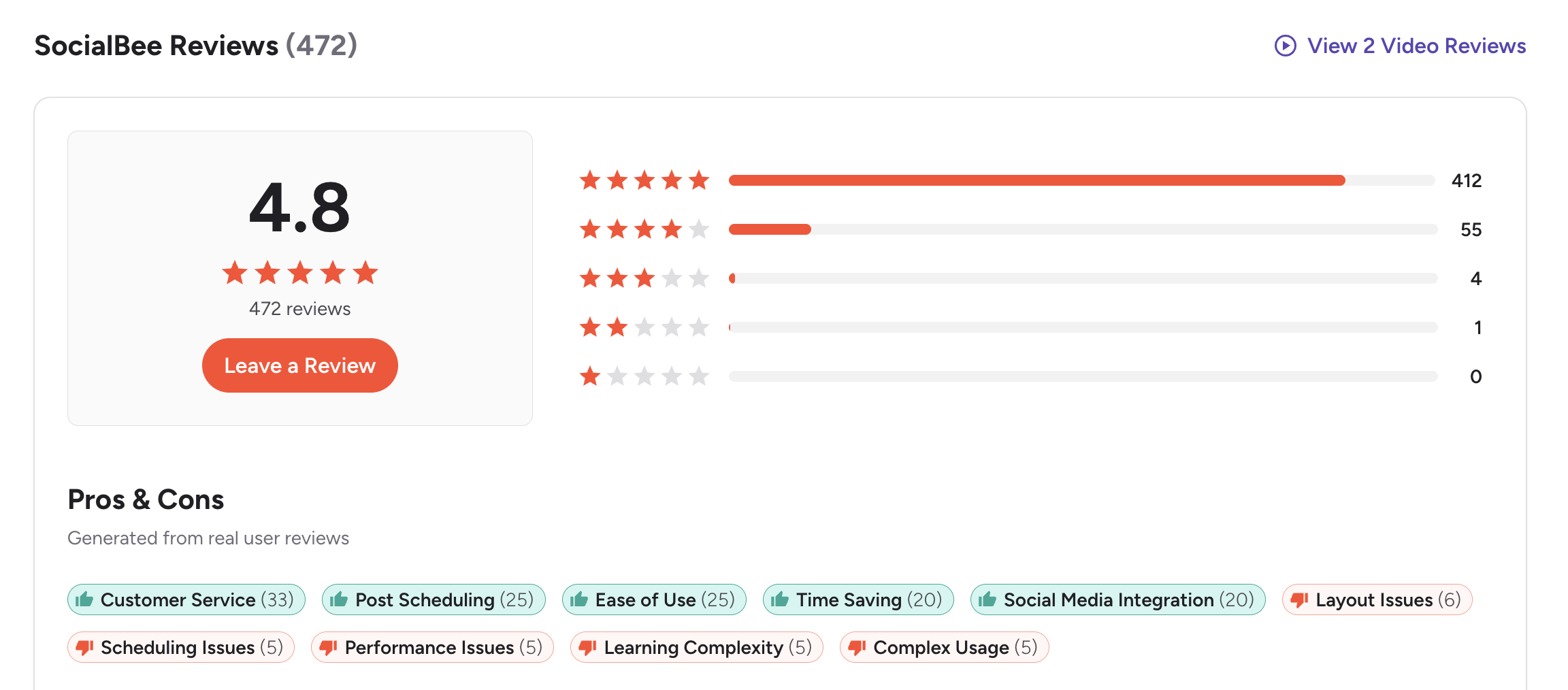
SocialBee has a very strong presence on G2, with a 4.8 out of 5 rating from 472 reviews.
The distribution is overwhelmingly positive:
- 412 5-star
- 55 4-star
- 4 3-star
- 1 2-star
- 0 1-star
Users frequently highlight:
Pros
- Customer service (33 mentions)
- Post scheduling (25)
- Ease of use (25)
- Time saving (20)
- Social media integration (20)
But even with a high rating, users also point out areas where SocialBee struggles:
Cons
- Layout issues (6 mentions)
- Scheduling issues (5)
- Performance issues (5)
- Learning complexity (5)
- Complex usage (5)
A recurring theme is that SocialBee is simple and helpful, but it's not ideal for advanced workflows, deeper analytics, or teams needing modern content previews and AI tools.
Rating: 4.8/5 (472 reviews)
(credit: G2)
On Trustpilot
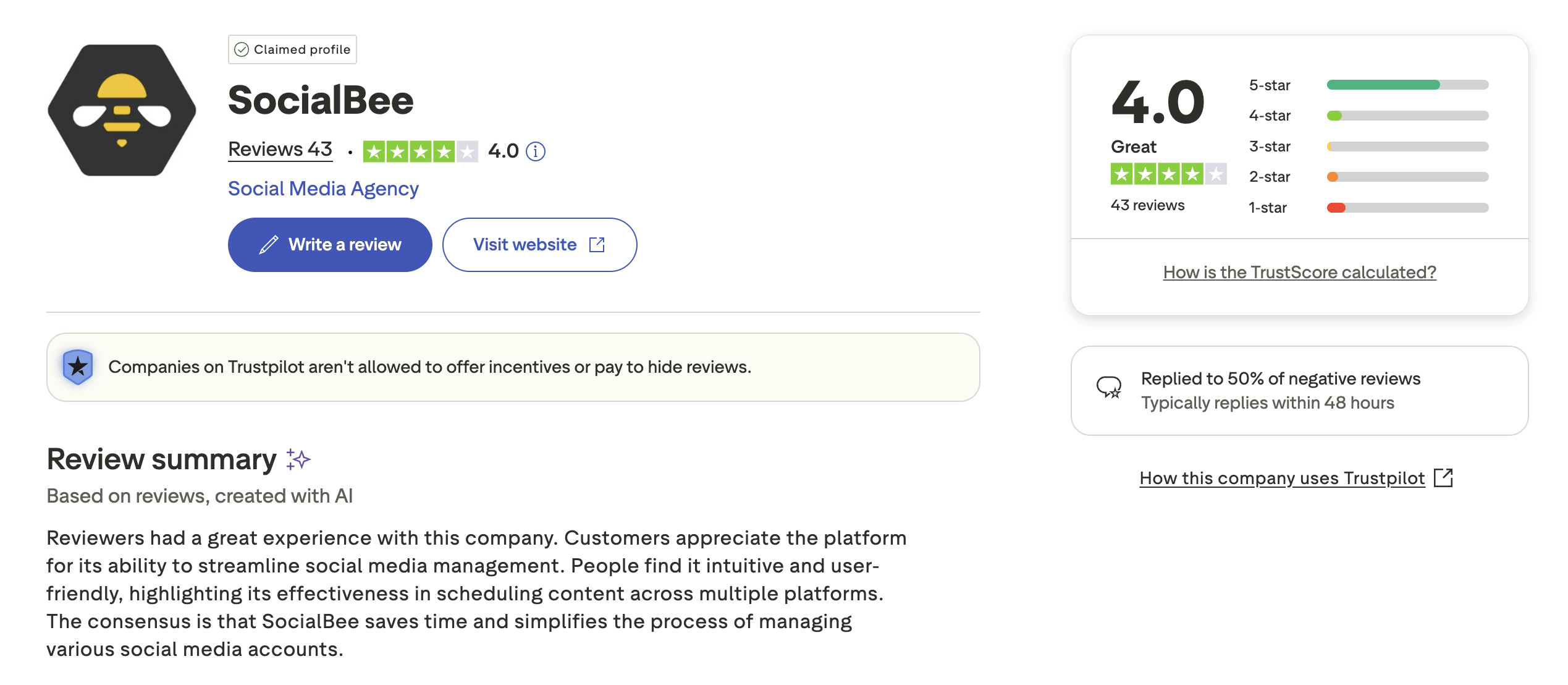
On Trustpilot, SocialBee holds a 4.0 out of 5 rating from 43 reviews, which indicates consistent satisfaction among smaller teams and entrepreneurs.
Reviewers frequently mention:
Pros
- Helpful customer support
- Easy setup
- Intuitive workflows
- Time savings from grouped scheduling
However, a smaller number of users mention:
Cons
- Occasional technical issues
- Limited analytics compared to bigger tools
- Features that feel basic for agency-level needs
Trustpilot's own AI summary states that customers find SocialBee intuitive, effective for scheduling content across multiple platforms, and helpful for managing several social media accounts.
Rating: 4.0/5 (43 reviews)
(credit: Trustpilot)
What Reddit and Community Users Say About SocialBee
Beyond formal review platforms, online communities like Reddit, Product Hunt, and marketing forums offer unfiltered opinions. Several recurring themes emerge from community discussions about SocialBee:
- Category-based scheduling is a standout. Users in social media marketing communities consistently highlight SocialBee's content categories as the feature that sets it apart. The ability to organize posts by topic and cycle through evergreen content automatically is frequently cited as the primary reason people choose SocialBee over competitors.
- Queue stalling and double-posting problems. A recurring complaint across community threads is that SocialBee has been known to double-post scheduled content and that a single misconfigured post in a queue can stall the entire category with no notification. Users report discovering days later that their scheduled posts never went out because one problematic post blocked the whole queue.
- The mobile app is widely criticized. Community members regularly advise new users to stick with the web version. The mobile app has limited functionality, carries low app store ratings, and users find it cumbersome for managing schedules on the go.
- Customer support hours frustrate international users. European users in particular report that customer support is unavailable during their daytime hours, making communication difficult. Some users report multiple unanswered emails and note there is no phone support available.
- Great value for solopreneurs, but teams outgrow it. The general community consensus is that SocialBee punches above its weight for individual creators and solopreneurs, but teams needing robust collaboration, approval workflows, or advanced analytics tend to switch to other tools relatively quickly.
Feature-by-Feature User Feedback
- Scheduling Reliability: SocialBee's core scheduling generally works well for straightforward posting across platforms. However, users report specific pain points: the calendar view does not support drag-and-drop rescheduling, Instagram image uploads can be finicky, and the queue system can silently stall when a single post encounters an error. For users who set up recurring content weeks in advance, these queue failures are particularly disruptive because they may go unnoticed without manual checking.
- Analytics: SocialBee provides a basic analytics dashboard for tracking post performance, but reviewers consistently describe it as surface-level. Analytics data retention varies by plan (ranging from 3 months to 2 years), which limits long-term trend analysis. Users looking for granular insights, audience demographics, or competitor benchmarking often supplement SocialBee with a separate analytics tool. The platform does not offer advanced social listening or brand monitoring.
- Pricing and Value: Community sentiment on pricing is mostly positive. Users frequently compare SocialBee favorably to more expensive tools like Hootsuite and Sprout Social, noting that it delivers solid scheduling at a lower price point. The main pricing complaint is that collaboration features are locked behind higher tiers, which can make it unexpectedly expensive for small teams.
- Customer Support: Customer support is one of the most polarizing topics. G2 reviewers list it as the most-mentioned pro (33 mentions), and many users praise the onboarding calls and quick response times. However, a subset of users report slow response times, unanswered emails, and support staff who do not fully grasp the technical problems being reported.
- Mobile App: The mobile app is the weakest point in user feedback. Multiple review sources describe it as having limited functionality, a poor user interface, and performance issues. The near-universal recommendation from existing users is to rely on the desktop web version for anything beyond basic monitoring.
- Ease of Use: SocialBee's desktop interface receives consistently positive feedback for its clean layout and intuitive category-based workflow. New users report getting up and running within a short time. The learning curve steepens when configuring advanced features like RSS feeds, post variations, or multi-workspace setups.
Review Authenticity
The review patterns across platforms are consistent but reveal important nuances:
- G2 users (4.8/5, 472 reviews) praise SocialBee overwhelmingly, with 87% of reviews being 5-star. This exceptionally high rating is partly explained by the user base: SocialBee attracts solopreneurs and small teams who value simplicity, and these users tend to be highly satisfied.
- Trustpilot users (4.0/5, 43 reviews) echo similar sentiments, but with a lower overall score. The smaller review volume on Trustpilot makes it more susceptible to individual negative experiences pulling down the average.
- Why the scores diverge: G2 reviews skew toward business software evaluators who appreciate SocialBee's specific niche (category-based scheduling for small operations). Trustpilot attracts a broader audience, including users who may have expected more enterprise-level capabilities. The 0.8-point gap between platforms is notable and suggests that satisfaction varies significantly depending on use case complexity.
- Rating trend context: SocialBee's G2 score has remained stable at 4.8 over the past two years, with review volume growing steadily rather than in suspicious bursts. Trustpilot reviews are fewer but spread across multiple years, indicating organic feedback rather than coordinated review campaigns.
Overall, the reviews paint a clear picture: SocialBee is genuinely well-loved by its target audience of individuals and small teams who want structured, set-it-and-forget-it scheduling. It consistently falls short when users need advanced analytics, team collaboration, or enterprise-grade reliability.
Who SocialBee Works Best For (Based on Reviews)
Based on positive reviews: who is happiest?
- Solo creators and solopreneurs who manage 2-5 social accounts and want category-based content recycling without a steep learning curve
- Small business owners who post consistently but do not need advanced reporting or team approval workflows
- Content creators with evergreen libraries who benefit from SocialBee's automatic post recycling and queue-based scheduling
- Budget-conscious users migrating from free tools who want more structure without paying enterprise prices
Based on negative reviews: who should look elsewhere?
- Agencies managing multiple clients who need approval workflows, white-label reporting, and robust multi-brand dashboards
- Teams larger than 2-3 people who need collaboration features, task assignment, and shared workspaces with granular permissions
- Data-driven marketers who require deep analytics, competitor benchmarking, or long-term performance trend analysis
- Mobile-first managers who need to create, edit, and monitor content primarily from a phone or tablet
- High-volume publishers posting more than 10-20 times per day across platforms, where queue reliability becomes critical
Before choosing a social media scheduler...
Keep these points in mind:
- SocialBee is great for small-scale workflows, but bigger teams may outgrow it.
- Analytics depth is limited, especially compared to modern AI-driven tools.
- Post previews are minimal compared to newer schedulers.
- Consider whether you need advanced creation features like AI captions or Canva integration.
If you're looking for a more modern posting experience, optimized for speed, creation, and cross-platform accuracy, you may want to explore SocialBee alternatives.
The Best SocialBee Alternative for Agencies
The community consensus in the feedback above is blunt: SocialBee is great value for solopreneurs, and teams outgrow it. That is a pricing structure talking. Bootstrap and Accelerate are single-user and single-workspace, so client separation is not possible until the $99/mo Pro plan, which still caps you at 3 users and 25 profiles.
PostPlanify is built for agencies serving local businesses. Each client gets their own workspace from the entry plan, with its own calendar, approvals, inbox and reporting, and team members and client approvers are never billed as seats.

Pricing starts at $39/month for your first client workspace, or $31/month billed yearly, and the per-workspace rate falls as you add clients:
| Client workspaces | Growth | Premium | Scale |
|---|---|---|---|
| 1 | $39/mo | $99/mo | $199/mo |
| 3 | $97/mo | $99/mo | $199/mo |
| 5 | $155/mo | $177/mo | $199/mo |
| 10 | $250/mo | $322/mo | $394/mo |
| Social accounts per workspace | 4 | 6 | 8 |
Each plan answers a theme from the reviews above:
- Growth ($39/mo first workspace) is where teams stop outgrowing the plan: unlimited users and posts, a workspace per client, approval workflows, a social inbox across Instagram, Facebook, LinkedIn, Google Business and YouTube that SocialBee does not offer at any tier, full analytics on all 10 platforms, shared calendar, roles and permissions, bulk scheduling and a media library.
- Premium ($99/mo first workspace) adds the client reporting layer: advanced analytics, branded client reports that schedule themselves, team comments and mentions, AI brand voice and knowledge base, plus full API and MCP access.
- Scale ($199/mo first workspace) puts the platform under your agency's brand with a white-label dashboard, white-label client emails and reports, dedicated onboarding, migration help and priority human support.
Credit where it is due: SocialBee's category-based content recycling is the feature reviewers praise most, and PostPlanify has no equivalent. If evergreen recycling is how you work, that is a real reason to stay. What PostPlanify offers instead is the structure around client work, which is exactly what reviewers say they outgrow SocialBee for: three clients on PostPlanify is $97/mo with 12 accounts and unlimited seats, against $119/mo on SocialBee Pro once you add two teammates.
Start your 7-day free trial today.










