


Every ad your competitor runs on Facebook and Instagram is public. Every single one.
Most businesses don't know this. They spend hours guessing what their competitors are doing — what offers they're pushing, what creative is working, what audience they're targeting — when Meta literally gives you a free tool to see all of it.
The Meta Ads Library (formerly Facebook Ad Library) is a publicly searchable database of every active ad running across Facebook, Instagram, Messenger, and the Audience Network. No login required. No cost. No limit on how many ads you can view.
It was originally built for political ad transparency after the 2018 election controversies. But marketers quickly realized it's one of the most powerful competitive research tools available — for free.
This guide shows you exactly how to use it: from basic search to advanced competitive intelligence techniques that most advertisers never think of. Whether you're running paid ads yourself, planning your organic social media strategy, or just trying to understand what your competitors are doing, Meta Ads Library gives you a level of visibility that didn't exist a few years ago.
What Is the Meta Ads Library?
Meta Ads Library is a free, public database maintained by Meta that contains every active advertisement running across its platforms. Anyone can access it at facebook.com/ads/library — you don't need a Facebook account, an ad account, or any kind of login.
What you can see:
- Every active ad from any advertiser on Facebook, Instagram, Messenger, and Audience Network
- The ad creative (images, videos, carousels)
- The ad copy and call-to-action
- The date each ad started running
- Whether the ad runs on Facebook, Instagram, or both
- Multiple ad variations (A/B tests) running simultaneously
- For political/social issue ads: spend ranges, impressions, and demographic targeting
What you can't see:
- Ad performance metrics (CTR, conversion rate, ROAS)
- Exact budget or spend amounts (except for political ads)
- Targeting criteria (age, interests, custom audiences)
- Which ad variation is "winning" in a split test
- Historical ads that are no longer running (except political ads, which are archived for 7 years)
| You Can See | You Can't See |
|---|---|
| Ad creative (images, videos, carousels) | Click-through rate or conversion rate |
| Ad copy and CTA button | Exact budget or daily spend |
| Start date (how long it's been running) | Audience targeting criteria |
| Platform placement (Facebook, Instagram, both) | Which A/B test variant is winning |
| Multiple ad variations from same advertiser | Ads that are no longer active |
| Advertiser Page name and details | Campaign objective (awareness, conversions, etc.) |
Why this matters: Even without performance data, you can infer a lot. An ad that's been running for 6 months is almost certainly profitable — no advertiser keeps spending money on ads that don't work. The duration an ad runs is one of the best proxies for performance you'll find anywhere.
How to Use Meta Ads Library (Step-by-Step)
Step 1: Go to Meta Ads Library
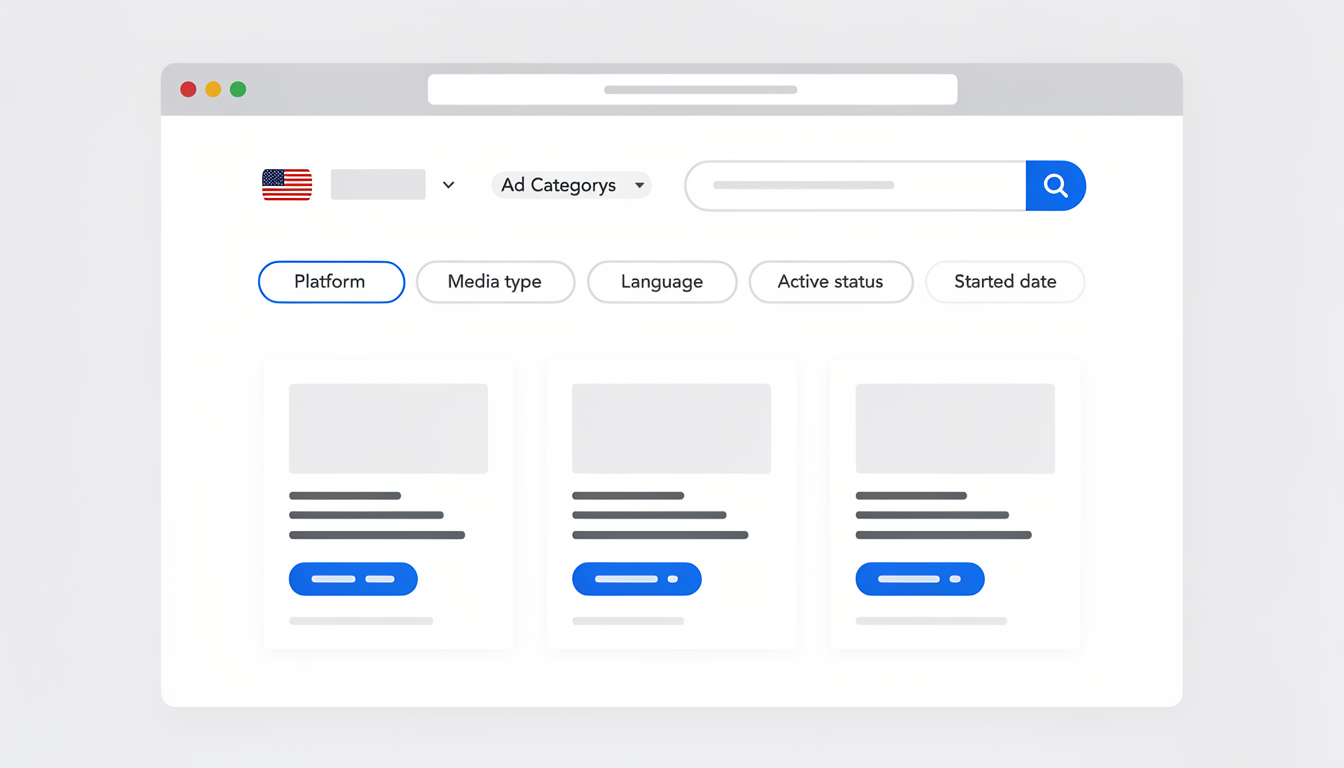
Open facebook.com/ads/library in any browser. You'll see a search bar with two dropdowns: country and ad category.
No login. No account. Just go.
Step 2: Set Your Country
Select the country where you want to see ads. This filters by where the ads are being shown, not where the advertiser is based. If you're researching a US market, select United States even if the competitor is based elsewhere.
Pro tip: Search the same competitor in multiple countries. Brands often test different messaging, offers, and creative in different markets. A promotion that's running in the UK but not the US might be coming to your market soon.
Step 3: Choose an Ad Category
You have two options:
| Category | What It Shows | When to Use |
|---|---|---|
| All ads | Every active ad from the advertiser | General competitive research, creative inspiration |
| Issues, elections or politics | Regulated ads with extra transparency (spend, impressions, demographics) | Political research, advocacy organizations, social issue campaigns |
For most competitive research, select "All ads."
Step 4: Search for a Competitor
Type a brand name, Page name, or keyword into the search bar.
Searching by Page name (recommended): Type your competitor's exact business name. A dropdown will show matching Facebook Pages. Select the right one to see all their active ads. This is the most reliable method.
Searching by keyword: Type a product name, industry term, or phrase (e.g., "protein powder" or "project management software"). This returns ads from any advertiser that use that keyword in their ad copy. Useful for discovering competitors you didn't know about.
Step 5: Apply Filters
Once you're viewing results, use the filter bar to narrow down:
| Filter | Options | Best For |
|---|---|---|
| Platform | Facebook, Instagram, Messenger, Audience Network | Seeing which platforms a competitor prioritizes |
| Media type | Images, videos, memes, no image/video | Identifying the formats a competitor invests in |
| Language | Any language | Multi-market research |
| Active status | Active, inactive | Seeing only currently running ads |
| Started date | Date range | Finding recently launched campaigns or long-running evergreen ads |
The most valuable filter combination: Platform = Instagram + Media type = Video + Started date = more than 30 days ago. This shows you Instagram video ads that have been running for over a month — which almost certainly means they're performing well enough to keep spending on.
Step 6: Analyze Individual Ads
Click on any ad to see the full details:
- Creative: The actual image, video, or carousel the audience sees
- Primary text: The ad copy above the creative
- Headline and description: The text below the creative
- CTA button: What action the advertiser wants (Shop Now, Learn More, Sign Up, etc.)
- Started running date: When the ad was first published
- Platforms: Which Meta platforms the ad is running on
- Ad variations: If the advertiser is running multiple versions, you'll see them all listed under the same Page
What to look for in each ad:
- The hook — What's the first line of copy? What stops the scroll?
- The offer — What are they promoting? Discount? Free trial? Content?
- The creative format — Static image, video, carousel, or UGC-style?
- The CTA — Are they going for direct purchase or lead generation?
- The landing page — Click "See ad details" and note the destination URL
- The duration — Ads running 30+ days are likely winners
Step 7: Check the "About This Advertiser" Section
For each ad, you can click through to the advertiser's Page and see:
- When the Page was created
- Any name changes the Page has had
- The country where the Page is managed from
- Total number of active ads
This is particularly useful for spotting new competitors (recently created Pages with aggressive ad spend) or identifying when an established brand is pivoting their strategy.
How to Use Meta Ads Library for Competitive Research
Knowing how to search is step one. Knowing what to look for — and how to turn it into actionable intelligence — is where the real value is.
1. Identify What Offers Your Competitors Are Pushing
Search your top 3-5 competitors and look at their active ads. What are they promoting right now?
- Discounts and sales — Are they running a percentage off? A bundle deal? Free shipping?
- Lead magnets — Are they offering free guides, templates, or webinars in exchange for email signups?
- Free trials — Are they leading with a free trial or freemium product?
- Content — Are they promoting blog posts, videos, or podcasts to build awareness?
Why this matters: If three of your five competitors are all running free trial ads, that tells you the market responds to trial offers. If they're all running discount ads, price sensitivity is high in your space. This data shapes your own offer strategy — both for paid ads and organic content.
2. Study Their Creative Formats
Look at the types of creative your competitors invest in:
| Creative Type | What It Signals | Your Takeaway |
|---|---|---|
| UGC-style videos | Authentic content converts in this market | Create relatable, low-production content |
| Polished product photos | Visual quality matters to this audience | Invest in professional imagery |
| Carousel ads | They need multiple touchpoints to convert | Consider multi-image posts on organic too |
| Text-heavy graphics | Education and information drives action | Create informative captions and infographics |
| Before/after visuals | Transformation messaging works | Show results and outcomes in your content |
| Testimonial/review ads | Social proof drives their conversions | Feature customer reviews in organic posts |
This directly informs your organic content. If your competitors are spending money on UGC-style video ads, that's a strong signal that your organic Reels and TikToks should follow a similar format. Paid ad data tells you what formats the market responds to — and you can apply those lessons to your social media content calendar without spending a dollar on ads.
3. Reverse-Engineer Their Messaging
Look at the ad copy patterns across a competitor's ads:
- What pain points do they lead with? The first line of ad copy almost always targets a specific frustration or desire.
- What language do they use? Formal or casual? Technical or simple? This tells you how the audience expects to be spoken to.
- What objections do they address? "No credit card required," "Cancel anytime," "30-day money back guarantee" — these reveal what's stopping people from buying.
- What CTAs perform best? If they have 20 ads and 15 use "Shop Now" while 5 use "Learn More," they've likely tested both and found "Shop Now" converts better for their offer.
Apply this to your captions. The pain points and language patterns you find in competitor ads are exactly what you should be using in your organic social media copy. Use our Facebook Caption Generator or Instagram Caption Generator to create variations based on messaging themes you've identified.
4. Track How Long Ads Run (The Best Performance Signal)
Since Meta Ads Library doesn't show performance metrics, duration is your best proxy.
| Ad Duration | What It Likely Means |
|---|---|
| 1–7 days | Just launched, or testing — no performance signal yet |
| 7–30 days | Showing promise, advertiser is letting it run |
| 30–90 days | Performing well — profitable enough to sustain |
| 90+ days | Evergreen winner — this ad is making money consistently |
| Multiple similar variants | Active A/B testing — the advertiser is optimizing aggressively |
Bookmark and check back. Save the URLs of competitor Pages in the Ads Library and check back every 2-4 weeks. Ads that are still running after your last check are confirmed performers. Ads that disappeared didn't make the cut.
5. Discover Competitors You Didn't Know About
Don't just search for brands you already know. Use keyword search to find advertisers targeting the same audience:
- Search for your product category ("meal prep service," "CRM software," "yoga mat")
- Search for pain points your product solves ("tired of meal planning," "manage leads," "back pain relief")
- Search for your competitor's brand name — the ads that appear alongside them are often from other competitors bidding on similar audiences
This is especially valuable for discovering smaller, emerging competitors who are advertising aggressively but haven't appeared on your radar yet.
6. Monitor Seasonal and Campaign Patterns
Check competitors' ads at different times of year to identify patterns:
- Pre-holiday ramp-up — When do they start running holiday promotions? (Usually 4-6 weeks before the event)
- Product launches — New ad creative appearing suddenly usually signals a launch
- Seasonal offers — Summer sale, back-to-school, New Year — track what offers they use for each
- Event-based campaigns — Industry conferences, awareness months, cultural moments
This helps you plan your own content calendar around the same moments — and potentially get ahead of competitors by launching your seasonal content earlier.
7. Analyze Platform Placement Strategy
Use the platform filter to see where each competitor focuses their ad spend:
- Facebook only: Targeting an older demographic (25-55), likely using link click or conversion objectives
- Instagram only: Targeting younger users (18-35), relying on visual creative and Stories/Reels placements
- Both platforms: Broad reach strategy, likely using Advantage+ or automatic placements
- Heavy on Instagram but not Facebook: The brand's visual identity and aesthetic are a core selling point
This tells you where your competitor's audience lives — and where your own organic content should be focused. If every competitor in your space is running Instagram ads but barely touching Facebook, your Instagram posting strategy should probably be your priority too.
8. Research Influencer and Brand Partnership Ads
Most people use Meta Ads Library to find traditional paid ads, but it also surfaces branded content — ads that appear as "Paid partnership with [brand]" in the feed. These are influencer collaborations where a creator runs an ad on behalf of a brand using their own account.
What to look for:
- Which influencers your competitors work with. Search a competitor's brand name and look for ads running from creator accounts (not the brand's own Page). These are partnership ads.
- What influencer creative looks like vs brand creative. Influencer ads typically use casual, UGC-style content. If your competitor's influencer ads look different from their brand ads, note which style is running longer — that tells you which performs better.
- The creator's audience size. Click through to the creator's profile to see their follower count. This reveals whether your competitor is investing in micro-influencers (10K-100K) or macro-influencers (100K+).
- Partnership frequency. If a competitor keeps running partnership ads with the same creator over multiple months, that relationship is generating ROI. One-off partnerships that don't repeat usually didn't perform.
How to apply this: If you discover that competitors in your niche consistently use micro-influencer partnerships with UGC-style creative, you can replicate that approach — either through paid partnerships or by creating UGC-style organic content that mimics the format. The ad library shows you what influencer marketing looks like in your specific market, not just generic best practices.
 PostPlanify
All your social media in one simple dashboard
Schedule posts, track analytics, and reply to comments/DMs without switching tabs.

Engagement
+18%
Views
52.8k
Advanced Tips: Getting More From Meta Ads Library
These techniques go beyond basic searching. They're how professional media buyers and marketing strategists use the tool.
Search for Ad Copy Phrases, Not Just Brand Names
Instead of searching for a competitor's name, search for specific phrases that appear in ads:
- "Free shipping" — Find every advertiser in your market offering free shipping
- "Limited time" — See who's running urgency-based promotions right now
- "As seen on" — Find brands using social proof and media mentions
- "Join 10,000+" — Discover which brands lead with community size as a selling point
This reveals messaging trends across your entire industry, not just one competitor.
Use the Ads Library API for Scale
If you're doing serious research, Meta offers a free Ads Library API that lets you programmatically search and retrieve ad data. This is useful for:
- Tracking hundreds of competitors simultaneously
- Building a database of ad creative in your niche
- Monitoring when competitors launch or pause ads
- Analyzing trends across thousands of ads
The API requires a Facebook developer account (free) and basic programming knowledge. For most businesses, the standard web interface is more than sufficient.
Cross-Reference With Other Ad Libraries
Meta isn't the only platform with an ad transparency tool. Cross-referencing gives you a more complete picture of a competitor's strategy:
| Platform | Ad Library URL | What You Can See |
|---|---|---|
| Meta (Facebook/Instagram) | facebook.com/ads/library | All active ads, creative, copy, platform, start date |
| Google Ads | adstransparency.google.com | Search, Display, and YouTube ads |
| TikTok | library.tiktok.com | Active TikTok ads with targeting info |
| Page → Posts → Ads tab | Active LinkedIn ads from any company Page |
If a competitor is running the same offer across Meta, Google, and TikTok, that offer is almost certainly their best performer. The more platforms they replicate it on, the more confident you can be that it converts.
Identify A/B Tests in Progress
When a competitor runs multiple ad variations with the same offer but different creative or copy, they're A/B testing. You can see all active variants in the Ads Library.
What to look for:
- Same product/offer with different images
- Same image with different headlines
- Same copy with different CTA buttons
- Video vs. static image for the same product
What to do with this: Check back in 2-3 weeks. The variants that are still running are likely the winners. The ones that disappeared lost the test. This gives you free insights into what creative and messaging works — without spending any of your own ad budget to test.
Study "About This Advertiser" for Competitive Intelligence
Click through to the advertiser's Page transparency section to find:
- Page creation date — How long have they been in business? New Pages with heavy ad spend could signal a new competitor or a rebranded existing one.
- Previous Page names — Has the brand been renamed or pivoted? This can reveal strategic shifts.
- Country of management — Is the Page managed from the same country they're advertising in? Different countries could indicate an outsourced marketing team or international expansion.
- Total active ads — A brand running 200+ ads simultaneously is investing heavily in testing and scaling. A brand running 3-5 ads is either starting out or maintaining a small evergreen campaign.
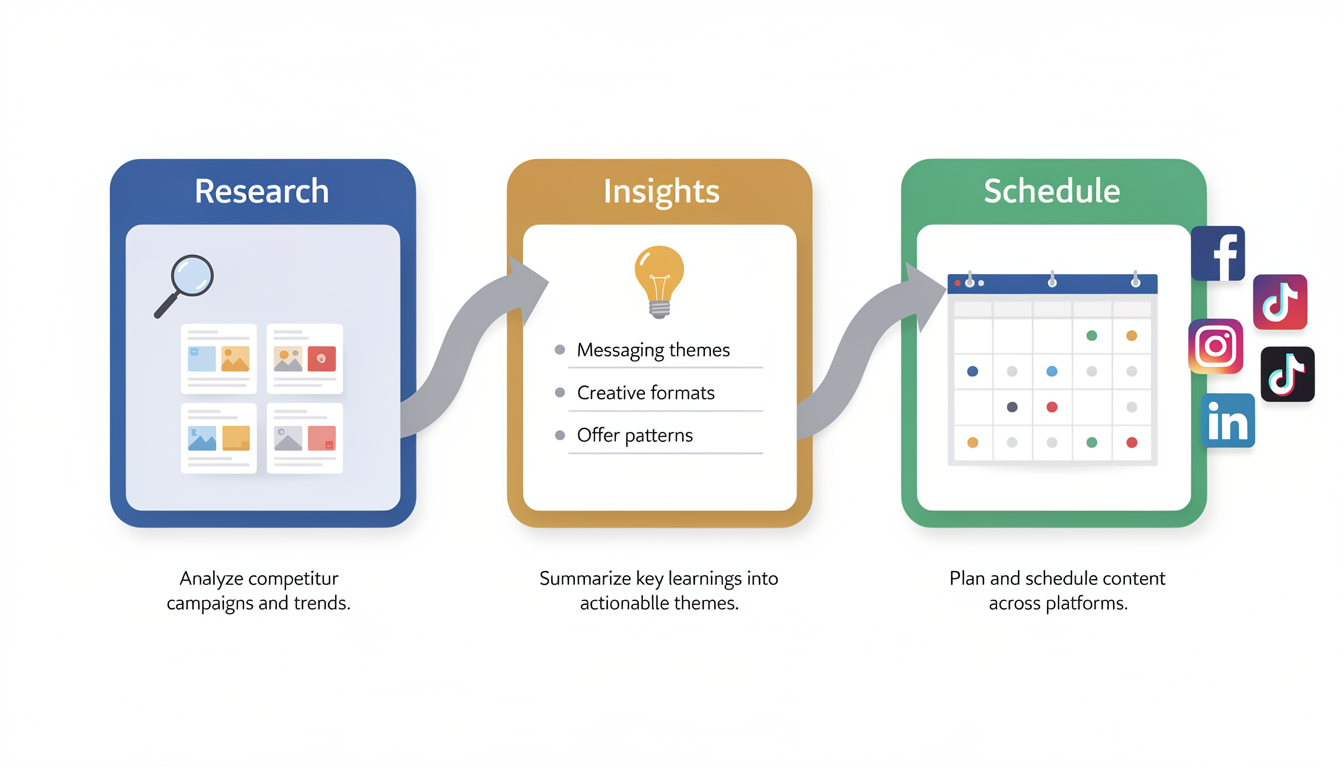
How to Turn Ad Research Into Your Content Strategy
This is where Meta Ads Library becomes genuinely useful for organic social media — not just paid advertising.
The core principle: Companies spend real money testing ad creative. The ads that survive are the ones that resonate with the audience. You can apply those validated insights to your organic content for free.
Step 1: Build a Competitor Ad Swipe File
Create a simple spreadsheet or folder with the best ads you find. For each ad, note:
- Competitor name
- Ad format (video, image, carousel)
- Primary hook (first line of copy)
- Main offer or value proposition
- CTA type
- How long it's been running
- What makes it stand out
Review this file before creating your own content. It's like having a cheat sheet of what works in your market.
Step 2: Adapt Messaging Themes for Organic Posts
The pain points, benefits, and language in successful ads translate directly to organic social media. If a competitor's top-performing ad leads with "Tired of spending 3 hours on meal prep?", you can create an organic Instagram post that addresses the same pain point from an educational angle.
Example workflow:
- Find a competitor ad that's been running 60+ days (confirmed performer)
- Identify the core message: "Save time on [task]"
- Create an organic post that addresses the same theme: a tip, a how-to, a before/after
- Use our Instagram Caption Generator or Facebook Caption Generator to draft variations
- Schedule it during peak engagement hours using PostPlanify
Step 3: Match Creative Formats to What's Working
If every top ad in your space uses short-form video with text overlays, your organic Reels and TikToks should follow the same format. If carousel ads dominate, your feed posts should use multi-image formats.
The ad market has already done the testing for you. Use the results.
Step 4: Schedule Your Content Consistently
The best insights are worthless if you don't publish consistently. After building your swipe file and planning content themes:
- Use PostPlanify to schedule posts across Facebook, Instagram, TikTok, LinkedIn, and more from one dashboard
- Apply the messaging patterns you found in competitor ads to your organic captions
- Post at the optimal times for each platform to maximize reach
- Use hashtag generators to increase discoverability on themes you've identified

The brands running the best ads are also posting the most consistent organic content. The two work together — ads drive awareness, organic content builds trust. Even if you're not running ads yourself, the organic side of that equation is fully within your control.
👉 Start your 7-day free trial: PostPlanify
Meta Ads Library Limitations (And Workarounds)
The tool is powerful, but it has real gaps. Here's what to be aware of:
| Limitation | What This Means | Workaround |
|---|---|---|
| No performance data | You can't see CTR, conversion rate, or ROAS | Use ad duration as a proxy — ads running 30+ days are likely profitable |
| No budget/spend data | You don't know how much they're spending (except political ads) | Count the number of active ads — more ads = bigger budget |
| No targeting information | You can't see who they're targeting | Check their organic Page content — the audience they speak to organically is likely the same audience they target in ads |
| No historical ads | Once an ad is deactivated, it disappears (non-political) | Check the Ads Library regularly and save screenshots of ads you want to reference later |
| Search is basic | No advanced Boolean search, no "sort by date" option | Use specific keyword phrases and check multiple variations |
| A/B test winners unknown | You see all variants but not which one performs best | Check back in 2-3 weeks — surviving variants are likely winners |
| No campaign context | You see individual ads but not the full funnel (retargeting sequences, audience stages) | Look at all ads from the same advertiser and infer the funnel structure from the variety of messaging |
The biggest limitation is the lack of historical data. Once a competitor turns off an ad, it vanishes from the library. This is why checking regularly and building a swipe file matters — if you don't save it, it's gone.
What Changed in Meta Ads Library (2025–2026)
Meta has continued updating the Ads Library. Here's what's different:
Enhanced AI transparency (2025). Meta now labels ads that use AI-generated or AI-modified creative. You'll see a "Made with AI" or "AI-modified" tag on ads that used Meta's AI creative tools. This helps you identify which competitors are using AI creative versus original production.
Improved search relevance. Keyword search results are now ranked by relevance rather than recency, making it easier to find specific types of ads without scrolling through hundreds of irrelevant results.
Expanded Audience Network visibility. Ads running on the Audience Network (Meta's external ad network on third-party apps and websites) now show more placement detail, so you can see if a competitor is investing in off-platform distribution.
Political ad archive expansion. Political and social issue ads are now archived for 7 years (up from the original retention period), and the spend/impression data is more granular.
Meta Ads Library vs. Other Ad Spy Tools
You might be wondering: should you use the free Meta Ads Library or pay for a third-party ad spy tool? Here's how they compare:
| Feature | Meta Ads Library (Free) | Paid Spy Tools (AdSpy, BigSpy, etc.) |
|---|---|---|
| Cost | Free | $50–$200+/month |
| Data source | Official Meta data | Scraped from Meta + other platforms |
| Ad creative | Full quality, official | Full quality, sometimes cached |
| Historical ads | Active only (no archive for non-political) | Archives ads even after deactivation |
| Performance estimates | None | Some tools estimate engagement/reach |
| Search filters | Basic (platform, media type, date, language) | Advanced (by niche, engagement, format, text) |
| Cross-platform | Meta platforms only | Often includes TikTok, Google, Pinterest |
| Reliability | Official source — always accurate | Scraped data can be delayed or incomplete |
My recommendation: Start with Meta Ads Library. It's free, official, and sufficient for 90% of competitive research needs. Only consider paid tools if you need historical ad data, cross-platform search in one interface, or if you're an agency managing multiple clients' competitive intelligence.
FAQ: Meta Ads Library Questions Answered
Is Meta Ads Library free?
Yes, completely free. No Facebook account required, no login needed, no usage limits. Just go to facebook.com/ads/library and search. Meta is required to provide this transparency as part of regulatory agreements around political advertising, but the tool covers all ads, not just political ones.
Can I see how much a competitor spends on ads?
No — not for regular commercial ads. Spend data is only available for ads in the "Issues, elections or politics" category, where Meta is legally required to disclose it. For all other ads, you can infer relative budget by counting the number of active ads an advertiser is running.
Can I see Instagram ads in Meta Ads Library?
Yes. Meta Ads Library includes ads from Facebook, Instagram, Messenger, and the Audience Network. You can filter by platform to see only Instagram ads. This includes feed ads, Story ads, Reels ads, and Explore ads.
How long are ads stored in the library?
Regular commercial ads are only visible while they're active. Once the advertiser stops the ad, it disappears from the library. Political and social issue ads are archived for 7 years regardless of whether they're still active. If you want to keep a record of competitor ads, screenshot or save them during your research sessions.
Can I download ads from Meta Ads Library?
There's no official download button. You can right-click images to save them or use screen recording for video ads. For large-scale data collection, Meta offers the Ads Library API for programmatic access. Remember to use downloaded creative only for research purposes — running someone else's ad creative as your own violates Meta's policies and potentially copyright law.
Does Meta Ads Library show targeting information?
No. You cannot see who an advertiser is targeting — no age ranges, interests, lookalike audiences, or custom audience information. The only exception is political ads, which show a demographic breakdown of who saw the ad. For regular ads, you can infer targeting from the ad's messaging, creative, and the advertiser's organic content.
Can I use Meta Ads Library on my phone?
Yes, the tool works on mobile browsers, though the experience is better on desktop. The search, filters, and ad previews all function on mobile, but reviewing multiple ads and comparing creative is easier on a larger screen.
How often should I check competitors' ads?
Every 2-4 weeks is sufficient for most businesses. This cadence lets you spot new campaigns, identify long-running winners, and detect when competitors shift their messaging or offers. Set a recurring calendar reminder and spend 15-20 minutes per session reviewing your top 3-5 competitors.
Is it legal to research competitor ads this way?
Yes. Meta Ads Library is a public tool specifically designed for transparency. Viewing competitor ads is completely legal and explicitly intended by Meta. What you can't do: copy competitor ad creative and run it as your own (that's copyright infringement), or scrape the library at scale in ways that violate Meta's terms of service.
Can I see ads from any country?
Yes. Use the country dropdown at the top of the Ads Library to select any country. You can see what ads a brand runs in the US, UK, Germany, Brazil, or any other market. This is especially useful for brands that run different offers or creative in different regions.
Final Thoughts
Meta Ads Library is the most underused free tool in digital marketing. Your competitors are spending thousands — sometimes millions — testing ad creative, messaging, and offers. Every result of that testing is publicly visible, and most businesses never bother to look.
Here's a 15-minute competitive research routine you can start this week:
- Open facebook.com/ads/library
- Search your top 3 competitors
- Filter for ads running 30+ days (confirmed performers)
- Note the messaging hooks, creative formats, and offers
- Apply those patterns to your own organic content
- Schedule your posts across platforms using PostPlanify
The brands with the best organic social media presence aren't guessing what content to create. They're studying what the market responds to — and Meta Ads Library is the easiest way to find out.
👉 Related guides:
- Social Media Strategy Examples — build a complete strategy informed by competitive research
- How to Create Engaging Social Media Content — apply ad insights to organic content
- Social Media Content Calendar Examples — plan and organize content based on what you've learned
- Best Time to Post on Social Media — publish at peak engagement times
- How to Measure Social Media ROI — track the impact of your competitive intelligence
- Social Media Analytics for Business — understand the metrics that matter
- Content Repurposing Strategies — adapt ad insights across formats and platforms
- How to Schedule Social Media Posts — automate your publishing after research
- Instagram Reels Algorithm — understand what Instagram's algorithm rewards for organic content
PostPlanifyAll your social media in one simple dashboard
Schedule posts, track analytics, and reply to comments/DMs without switching tabs.
Engagement
+18%
Views
52.8k
About the Author

Hasan Cagli
Founder of PostPlanify, a content and social media scheduling platform. He focuses on building systems that help businesses, agencies, and teams plan, publish, and manage content and social media more efficiently across platforms.


