


On Instagram, impressions are the total number of times your content is displayed on a screen. It’s that simple. If one person sees your Reel twice, that counts as two impressions, even though it’s only a single viewer. Think of it purely as a measure of visibility.
Decoding Instagram Impressions in Plain English
Let’s cut through the jargon. Imagine your post is a digital billboard on a busy highway. One driver might pass that billboard several times a day on their commute. Every single time they lay eyes on it, that adds to the billboard’s total view count.
That’s exactly how impressions work on Instagram. The platform tracks every single time your post, Story, or Reel appears in front of someone, regardless of whether they’ve seen it before.
This is a totally different metric from Reach, which only counts the number of unique people who saw your content. In our billboard analogy, reach is the total number of individual drivers who saw the ad, no matter how many times they drove past it.
Getting this distinction right is crucial. A high impression count compared to your reach is a great sign—it means people are seeing your content multiple times, which tells the Instagram algorithm your stuff is engaging and worth showing again.
Why This Metric Matters Right Now
Impressions are the first domino to fall in a successful content strategy. They are a direct, unfiltered measure of your content’s visibility and how well it's resonating with Instagram's massive, active user base. To get a wider view on how this metric works elsewhere, it's helpful to understand what are social media impressions across all platforms.
The numbers don't lie. Instagram's potential advertising reach has ballooned to an incredible 1.74 billion people worldwide as of January 2025. That’s a solid 5.5% year-over-year increase, cementing its place as a global attention powerhouse. Your content has the potential to connect with over a third of the planet's internet users.
Mastering what impressions are and how to influence them is the foundational step toward building a real presence on the platform. If you're ready for a deeper dive into measuring what's working, check out our guide on social media analytics and reporting.
Impressions vs. Reach: A Practical Comparison
This is where most creators get stuck, so let’s make it simple. At their core, reach measures how many unique people see your content, while impressions measure how many times your content is seen in total.
They sound similar, but knowing the difference is the key to figuring out what’s actually working with your strategy.
Let's walk through a real-world scenario. Imagine you post a new Carousel. One of your loyal followers, Alex, sees it pop up in their feed while scrolling.
- At this point, you have 1 reach (Alex) and 1 impression. Simple enough.
Alex loves the Carousel and decides to share it to their Story. Ten of their friends see it there.
- Now, your numbers have jumped. You’re at 11 reach (Alex + 10 new people) and 11 impressions.
The next day, because the post did so well, the Instagram algorithm decides to show your original Carousel to Alex again in their main feed.
- Here's the important part: your reach is still 11 because no new, unique people saw it. But your impressions just climbed to 12. Alex, just one person, has now given you two impressions.
This concept map breaks down how a single post branches out into these different performance metrics.
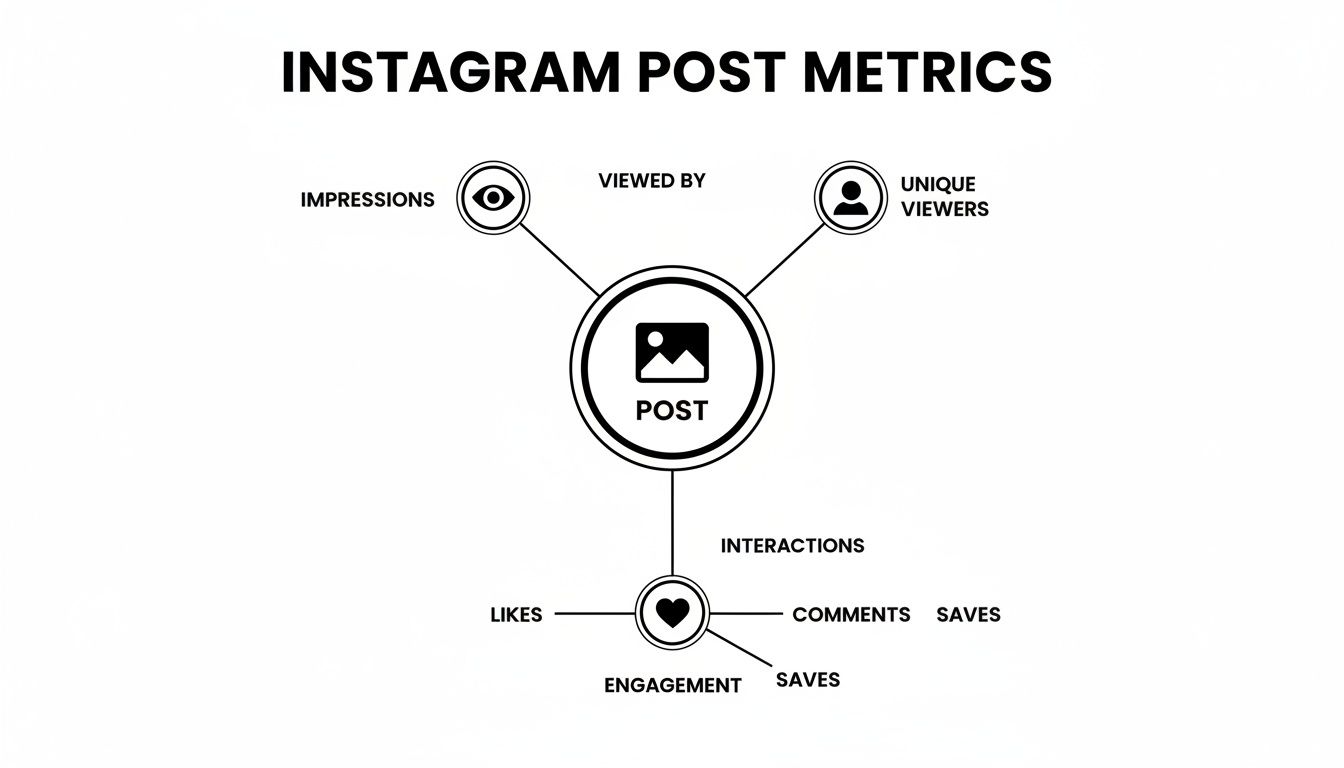
As you can see, impressions, reach, and engagement are all distinct outcomes from your content. Each one tells a different part of the story of your post's performance.
Why The Difference Is A Big Deal
A high impression-to-reach ratio is a powerful sign that your content is engaging and re-watchable. When your impressions are way higher than your reach, it means your existing audience is coming back for more, seeing your content multiple times.
This is a huge signal to the algorithm that your post is valuable, which can boost its chances of being shown to an even wider audience. If you want to turn those signals into more consistent reach, our guide on how to get Instagram views walks through the full system.
Key Takeaway: Reach tells you about your content's breadth (how far it spread), while impressions tell you about its depth (how often it was seen). A healthy strategy needs both, but a high impression count reveals content that truly hits the mark.
To make things crystal clear, here’s a quick comparison table breaking down the most important metrics at a glance.
 PostPlanify
All your social media in one simple dashboard
Schedule posts, track analytics, and reply to comments/DMs without switching tabs.

Engagement
+18%
Views
52.8k
Instagram Metrics At a Glance
| Metric | What It Measures | Example Scenario |
|---|---|---|
| Impressions | The total number of times your content was seen. | 500 people watched your Reel an average of 3 times each. Your impressions are 1,500. |
| Reach | The total number of unique accounts that saw your content. | 500 individual people saw your Reel. Your reach is 500. |
| Engagement | The total number of interactions (likes, comments, saves, shares). | Those 500 people left 50 likes, 10 comments, and 20 saves. Your engagement is 80. |
Think of it like a billboard on a highway. Reach is how many different cars drove past it. Impressions is how many total times the billboard was seen, counting the commuter who drives past it every morning and evening.
For a deeper dive into these and other essential metrics, check out our complete glossary of crucial social media terms.
How to Find and Read Your Impression Data
Now that you know what impressions are, let's find your numbers. Instagram puts this data right at your fingertips, but there's one requirement: you need an Instagram Professional Account.
If you're on a personal profile, you'll have to switch to either a Business or Creator account. It’s free, takes less than a minute in your settings, and unlocks all your analytics.
Once you’re set up, all your analytics live in a hub called Insights.
Step 1: Accessing Your Overall Account Insights
First, look at the big picture. Checking your total impressions over time helps you spot trends and see if your visibility is growing month-over-month.
Here’s the step-by-step process:
- Go to your Instagram profile page.
- Tap the Professional Dashboard button located directly under your bio.
- Under the "Your tools" section, find and tap Account Insights.
- You'll see a summary for Accounts Reached and Accounts Engaged. Tap "Accounts Reached" to see more details.
- On this screen, you’ll find your total Impressions. You can change the time frame to see data for the last 7, 30, or 90 days.
This dashboard is your high-level report card. It shows you the total number of times all of your content has been displayed.
Step 2: Checking Impressions for Individual Posts
Next, drill down into specific posts. This is where the most valuable lessons are. By analyzing individual posts, you can figure out exactly what’s working with your audience and what isn’t.
Here's how to find the data for a specific Feed post, Reel, or Story:
- Navigate to the post you want to analyze.
- Tap the View Insights link, which sits just below your photo or video.
- A screen will pop up with metrics like Likes, Comments, Saves, and Shares.
- Scroll down to the Reach section. You’ll see the total number of Impressions for that piece of content.
This view is critical because it also breaks down where those impressions came from. You’ll see sources like From Home, From Hashtags, or From Explore. If you see a high number of impressions from hashtags, that’s a clear sign your hashtag strategy is effective.
Getting a handle on these numbers is the first step, but turning them into growth is the real goal. For a deeper dive, our guide on how to improve social media engagement shows you how to connect visibility metrics like these to real, actionable tactics.
Why Your Impressions Are a Key to Growth
Impressions aren't just a vanity metric; they're the first signal you send to the Instagram algorithm, telling it whether your content is worth showing to more people.
Think of the algorithm as a gatekeeper. When you share a new post, it doesn’t immediately show it to everyone. Instead, it shows your content to a small group of your followers first to see how they react.
This initial test is critical. High impressions right away are the first sign you’ve created something people want to see.
The Algorithm's Domino Effect
When the algorithm sees your content getting impressions quickly, it takes that as a vote of confidence. This initial validation kicks off a powerful domino effect:
- Better Feed Placement: The algorithm starts showing your post higher up in the feeds of your other followers, making sure more of your own audience sees it.
- A Shot at the Explore Page: Strong impression data tells Instagram your content is high-quality. This significantly increases your chances of landing on top hashtag pages and the Explore page, which is how you break out of your follower bubble.
- Snowballing Visibility: As more people discover your post through these new channels, they generate even more impressions and engagement. This tells the algorithm, "Hey, this is a winner!" and the cycle continues.
In short, a high impression count is the fuel that powers your content's journey from your close followers to a much larger audience. For a full breakdown of how to capitalize on this, our guide on how to grow Instagram followers organically dives deep into the strategies that build on this principle.
Turning Impressions into a Business Tool
Impressions are also a practical tool for making smarter business decisions without spending money.
Imagine a small e-commerce brand thinking about launching a new line of handmade wallets. Instead of investing thousands in inventory and ads, they could post an organic Reel showing off a prototype.
If that Reel gets an unusually high number of impressions, that’s a direct signal of strong market interest. The visibility alone validates the product idea. This simple piece of data gives them the confidence to move forward, turning an organic post into powerful, free market research.
Key Takeaway: Treat your impression data as an early warning system. It tells you what your audience is excited about before you pour money into ad spend or bigger campaigns.
When you start seeing impressions as the first step in a chain reaction, you stop just tracking numbers and start using them to drive real growth.
3 Actionable Steps to Increase Your Instagram Impressions
Getting more impressions means your content is showing up in front of more people, more often. This sends strong signals to the Instagram algorithm that your content is worth pushing out to a wider audience. Here are three practical fixes you can implement today.
Fix 1: Refine Your Hashtag Strategy
Hashtags are your direct line to people who don't follow you yet. They categorize your content, making it discoverable on hashtag feeds and the Explore page—both are goldmines for impressions.
A smart strategy isn't about using the biggest hashtags; it's about using the right ones. Use a mix to maximize your visibility without getting lost in the noise.
- Niche Hashtags (Under 50k posts): These are hyper-specific to your topic. Competition is low, giving you a real shot at ranking near the top and being seen by a relevant audience.
- Community Hashtags (50k - 250k posts): This is where you connect with established communities in your industry. There's more traffic here, but it’s still targeted enough to attract the right kind of attention.
- Broad Hashtags (250k+ posts): Use these sparingly. They have massive volume, but your post can get buried in seconds. They're best for content you think has a genuine chance of going viral.
Pro Tip: Avoid copying and pasting the same block of 30 hashtags on every post. The algorithm may flag this as spammy behavior. Create a few different groups of relevant hashtags and rotate them depending on the content.
For a deeper dive into crafting the perfect mix, check out our guide on how many hashtags to use on Instagram.
Fix 2: Post When Your Audience Is Online
The first hour after you publish a post is critical. The Instagram algorithm pays close attention to early engagement and impressions to decide how far to push your content. If you post when most of your followers are offline, you're starting with a disadvantage.
Here's how to find your optimal posting times:
- Go to your Professional Dashboard.
- Tap on Account Insights, then Total Followers.
- Scroll down to the Most Active Times section. Instagram will show you a breakdown of when your followers are online, by day and by the hour.
Posting just before these peak times ensures your content is waiting for them when they open the app, maximizing those crucial early impressions. Using a scheduler like PostPlanify lets you consistently hit these peak windows without being tied to your phone.

Fix 3: Create Content Built for Sharing
Shares are the ultimate impression multiplier. When someone shares your post to their Story, every person who watches that Story adds to your impression count. The key is to create content people want to share because it reflects their humor, values, or interests.
Here are a few formats that are built for sharing:
- Relatable Memes: Humor connects everyone. A meme that captures a common struggle or feeling in your niche is highly shareable.
- Helpful Infographics: People love sharing content that makes them look smart and helpful. A clean, well-designed infographic that simplifies a complex topic is prime share-bait.
- Interactive Story Stickers: Use polls, quizzes, and "Add Yours" stickers in your Stories. They encourage participation, and people often share them to get their own followers to join in.
Using Impression Data to Refine Your Strategy
Data is useless if you don't act on it. The best creators use impression numbers as clues to understand how people find their work. Analyzing this data is the difference between guessing what your audience wants and knowing what gets them to stop scrolling.
Instagram breaks down where your impressions come from into a few key sources. Each one tells a different story about your content’s journey.
Decoding Your Impression Sources
When you tap into a post's insights, you'll see a breakdown of where your impressions came from. This is your roadmap to understanding what’s really working.
- From Home: These are views from people who already follow you and saw your post in their main feed. A high number here is a great sign—it means your existing audience is paying attention.
- From Hashtags: This number tracks how many times your post was seen from the specific hashtag pages you used. If this is a big number, your hashtag strategy is working. If it's low, it's time to experiment with new tags.
- From Explore: Impressions from the Explore page mean Instagram's algorithm flagged your content as high-quality and is pushing it out to a massive new audience of people who don't follow you yet.
- From Profile: This counts views from people who landed on your profile and then clicked into a specific post. High numbers here suggest your bio, grid aesthetic, or a recent viral Reel convinced someone to dig deeper.
Troubleshooting: Common Scenarios & Fixes
Your impression data is also a great diagnostic tool. By spotting certain patterns, you can pinpoint what’s going wrong with your strategy and fix it.
Key Insight: Don't just look at one metric in isolation. The relationship between your metrics is where the real story is. A big spike in one number without a matching jump in another is a major clue.
Let's break down two common scenarios:
Scenario 1: High Impressions, Low Engagement A post gets tons of impressions, but the likes, comments, and saves are low.
- The Problem: Your content was visible enough to stop the scroll (good visuals, catchy headline), but it didn't give people a reason to act. It made a promise it didn't keep.
- The Fix: Focus on stronger calls-to-action (CTAs). Ask direct questions in your captions to spark conversation. Create more save-worthy content like checklists, templates, or quick tips. Ensure every post delivers real value.
Scenario 2: High Reach, Low Impressions This means you reached a lot of unique people, but they only saw your content once. The post didn't have staying power.
- The Problem: Your post got a good initial push but wasn't "sticky" enough for the algorithm to show it to people multiple times. It didn't grab them in a way that inspired a second look.
- The Fix: Focus on creating more layered or re-watchable content. For Reels, add quick-cut text that's hard to catch in one go, forcing re-watches. For carousels, pack each slide with so much value that users swipe back and forth to absorb it all. Choosing the right format matters too — our guide on Instagram Post vs Story vs Reel explains how impressions and reach differ across each content type.
FAQ: Your Top Instagram Impressions Questions
Here are answers to the most common questions creators and marketers have about tracking impressions.
Why Are My Instagram Impressions Lower Than My Reach?
This is rare, but if you ever see your impressions are lower than your reach, it almost always points to a data reporting lag or a temporary bug in Instagram's analytics.
By definition, for someone to be counted in your reach, they have to see the post at least once. That first view is also their first impression. Therefore, your impressions can never be lower than your reach—they can only be equal to or greater than it.
If you spot this, don't worry. It's not a sign your content is broken. Give it 24-48 hours, and the numbers will almost always correct themselves.
Do Impressions from My Own Views Count?
Yes, they do. Every time you view your own post, Instagram counts it as an impression. If you watch your new Reel five times to check the audio sync, you've just given yourself five impressions.
This is why we treat impressions as a measure of overall visibility, not a perfect gauge of audience activity. For smaller accounts, your own views might slightly inflate the number, but as your account grows, your own activity becomes negligible.
Can a Single Post Get Impressions Days After Posting?
Absolutely. A post's life doesn't end after 24 hours. Good content can continue getting impressions for days, weeks, or even months.
Here’s how it happens:
- The Explore Page: Getting featured on the Explore page puts your content in front of a massive, targeted audience that can discover it long after you've published.
- Hashtag Feeds: If your post ranks well for a specific hashtag, anyone searching for or following that tag can see it, creating a steady stream of new views.
- Shares and Saves: When people share your post to their Stories or save it, they (and their followers) often come back to it later. Each return visit counts as a new impression, extending the life of your post.
Ready to turn those impression insights into a smarter, faster content strategy? With PostPlanify, you can analyze your performance, find the best times to post for maximum visibility, and schedule your content in advance—all from one simple dashboard. Stop guessing and start growing. Try PostPlanify free for 7 days.
PostPlanifyAll your social media in one simple dashboard
Schedule posts, track analytics, and reply to comments/DMs without switching tabs.
Engagement
+18%
Views
52.8k
About the Author

Hasan Cagli
Founder of PostPlanify, a content and social media scheduling platform. He focuses on building systems that help businesses, agencies, and teams plan, publish, and manage content and social media more efficiently across platforms.


