
Iconosquare and Vista Social represent two distinct philosophies in social media management. Iconosquare is an analytics-first platform — it was built to measure performance, and scheduling was added later. With 100+ metrics, competitor tracking for up to 5 competitors, and industry benchmarks, it's the tool you choose when understanding your data matters more than anything else. Vista Social is a full-stack management platform designed for agencies and enterprises that need to handle every aspect of social media from a single dashboard: scheduling, engagement, DM automations, review management, social listening, and employee advocacy across 12+ platforms.
These tools don't just differ in features — they differ in who they're built for. This comparison lays out where each excels. Skip to the pricing comparison for cost analysis, or dive into the feature comparison for a detailed capability breakdown. For a broader view of what's available, browse our social media management alternatives.
Iconosquare vs Vista Social at a Glance
| Feature | Iconosquare | Vista Social |
|---|---|---|
| Starting Price | $39/mo (Launch) | $79/mo (Professional) |
| Platforms Supported | 6 | 12+ social + 5 review sites |
| Scheduling | 100 posts/mo (Launch) | Unlimited |
| AI Caption Generation | No | Yes (credit-based) |
| AI Image Generation | No | No (Canva Magic Media only) |
| DM Automations | No | Yes (AI-powered) |
| Review Management | No | Yes (5 review sites) |
| Social Listening | No | Yes ($75/mo addon) |
| Analytics Metrics | 100+ | Standard |
| Competitor Tracking | Up to 5 competitors | Basic |
| Industry Benchmarks | Yes | No |
| Custom Dashboards | Yes | Yes |
| Scheduled PDF Reports | Yes | Yes |
| Link-in-Bio | No | Vista Page |
| G2 Rating | 4.5/5 (135 reviews) | 4.8/5 (1,071 reviews) |
Iconosquare Overview
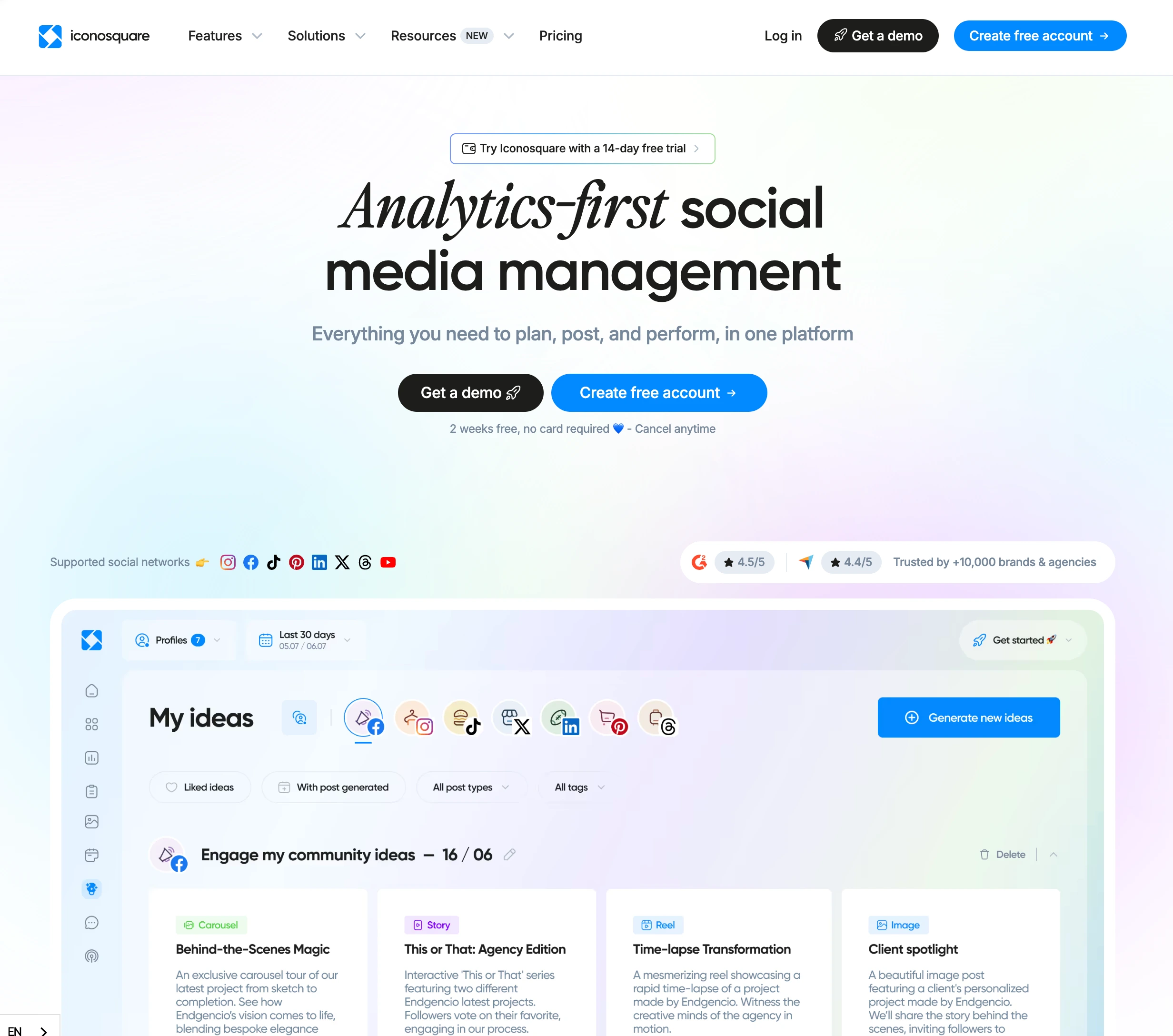
Iconosquare's identity is analytics. Born as an Instagram analytics tool, it has expanded to cover Facebook, X (Twitter), LinkedIn, TikTok, and Pinterest — six platforms total. The scheduling and content management features are functional but not the reason you choose Iconosquare. You choose it for the 100+ analytics metrics, the ability to track up to 5 competitors side by side, industry benchmarks that show how your accounts perform relative to your vertical, and custom dashboards that let you build the exact reporting view your team or clients need.
The platform also offers scheduled PDF reports (a major time-saver for agencies delivering recurring client reports), an Instagram grid preview for planning visual feeds, and data retention of 1 year on Launch or 2 years on Scale and Excel plans. Its Conversations feature provides basic inbox management, but it's not a primary strength. Where Iconosquare falls short is in AI tools (it has none), platform breadth (6 platforms), and post limits on the entry plan (100/mo on Launch). For detailed user perspectives, read our Iconosquare reviews analysis.
Vista Social Overview

Vista Social is built for agencies and enterprises that want one platform to do everything. It supports 12+ social platforms — including Reddit, Snapchat, Tumblr, and Bluesky that most competitors miss — plus 5 review sites (Google Business, Yelp, TripAdvisor, OpenTable, Trustpilot). The feature set extends well beyond scheduling: AI-powered DM automations handle incoming messages on Instagram, Facebook, and TikTok; review management lets you monitor and respond to customer reviews across platforms; social listening ($75/mo addon) tracks brand mentions and sentiment; and employee advocacy ($199/mo addon) mobilizes internal teams to amplify content.
The AI system is credit-based — 500 on Professional, 1,000 on Advanced, unlimited on Scale — covering caption generation and smart suggestions. Multi-step approval workflows, CSV bulk scheduling, and Vista Page (link-in-bio) round out a platform designed for complex, high-volume operations. The tradeoff is that X (Twitter) is a paid addon, and the feature density creates a steeper learning curve. See our Vista Social reviews breakdown for more.
Pricing Comparison
Iconosquare Pricing
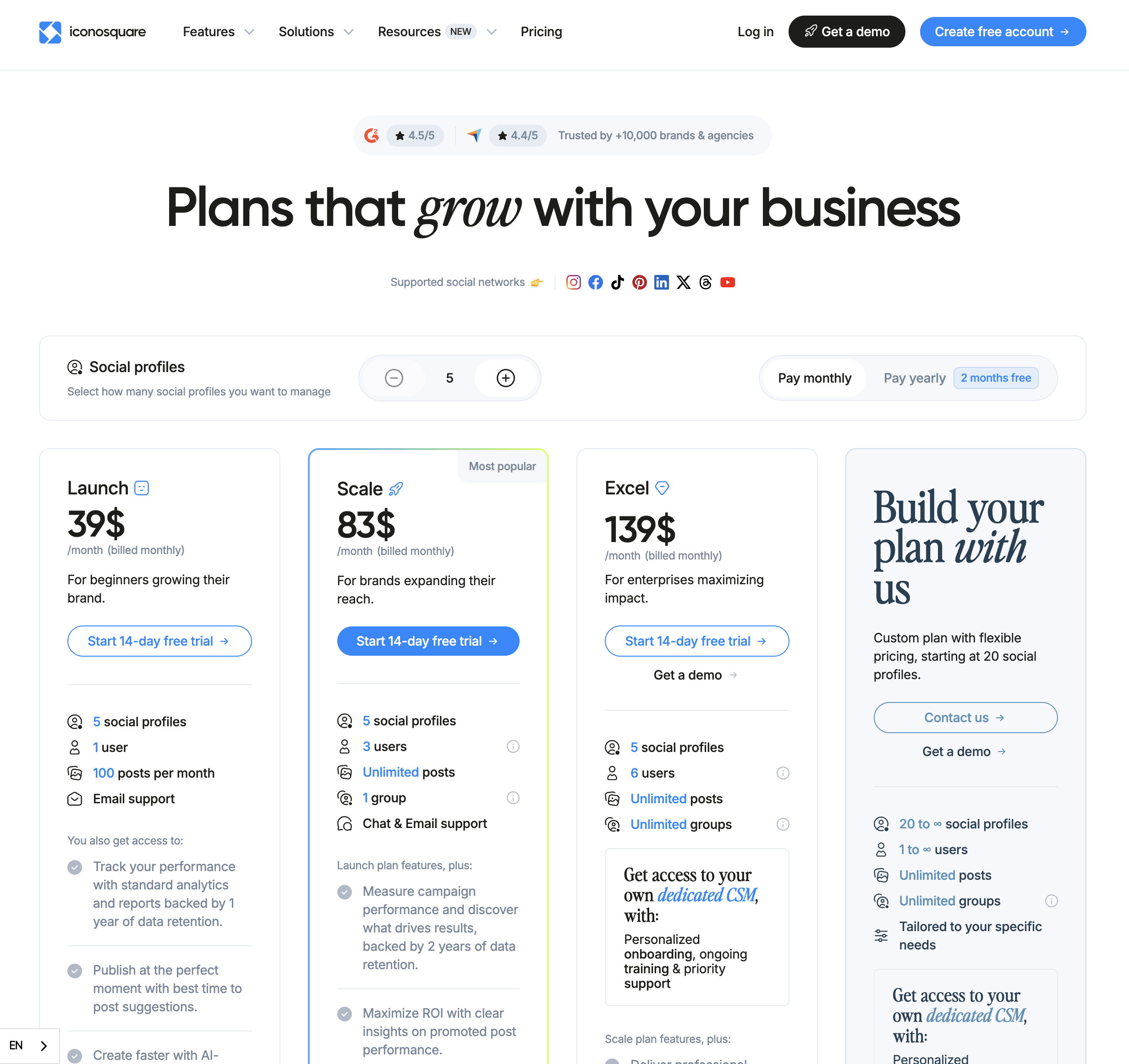
Iconosquare includes 5 social profiles per plan, with additional profiles available at $4–6 each. Data retention varies by tier. See our Iconosquare pricing guide for the full analysis.
| Plan | Price/mo | Profiles | Users | Posts | Data Retention |
|---|---|---|---|---|---|
| Launch | $39 | 5 | 1 | 100/mo | 1 year |
| Scale | $83 | 5 | 3 | Unlimited | 2 years |
| Excel | $139 | 5 | 6 | Unlimited | 2 years |
Example cost: A brand tracking 5 social profiles, 3 competitors, and needing team access would pay $83/mo (Scale). Adding 5 more profiles would cost approximately $25–30 extra, bringing the total to around $108–113/mo.
Vista Social Pricing
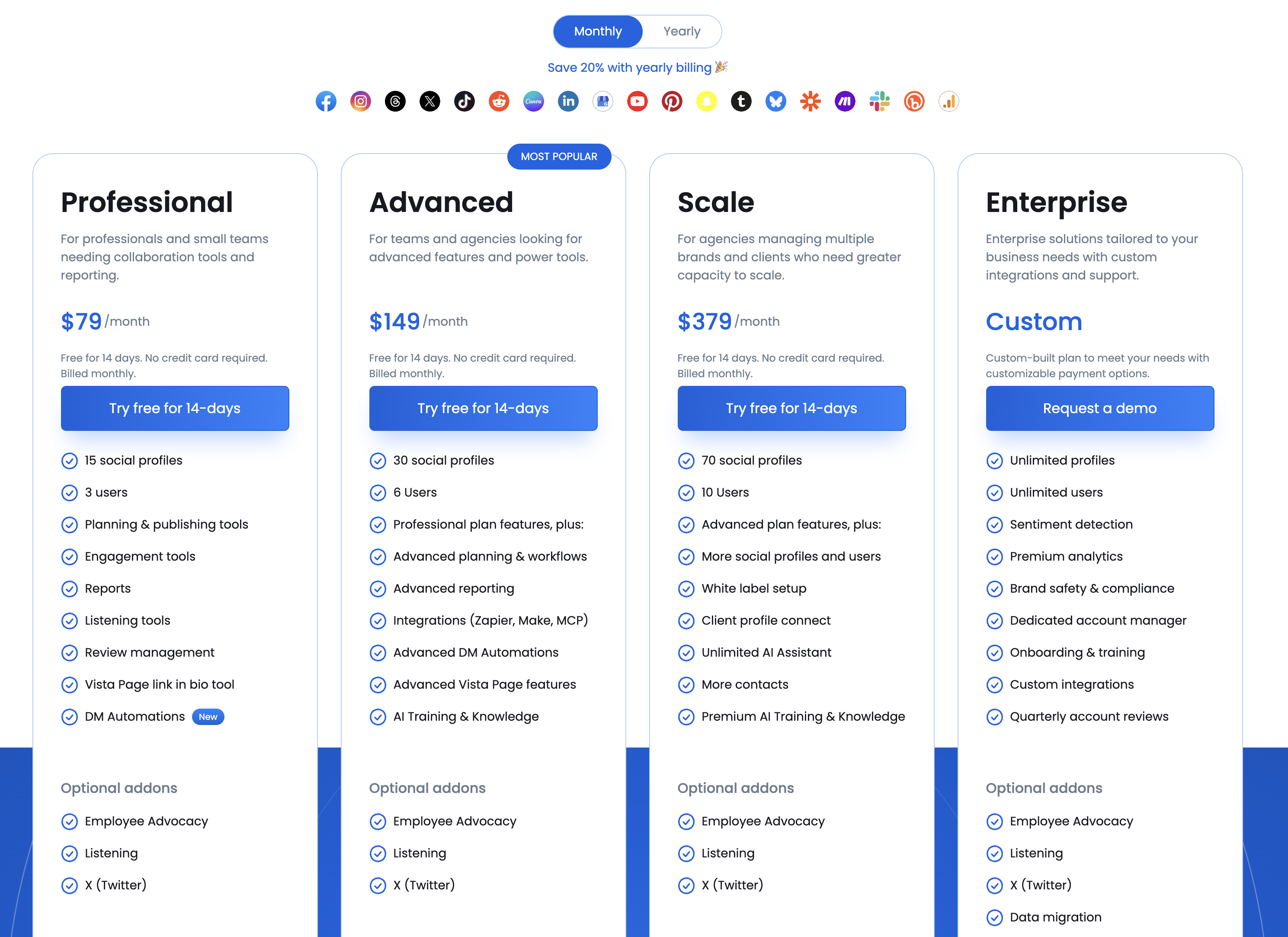
Vista Social's base prices include generous profile counts but key features are behind addons. For complete pricing details, check our Vista Social pricing guide.
| Plan | Price/mo | Profiles | Users | AI Credits | Key Features |
|---|---|---|---|---|---|
| Professional | $79 | 15 | 3 | 500 | Scheduling, inbox, analytics |
| Advanced | $149 | 30 | 6 | 1,000 | + DM automations, review mgmt |
| Scale | $379 | 70 | 10 | Unlimited | + Listening, advocacy |
Example cost: An agency on the Advanced plan managing 25 profiles with social listening and X (Twitter) support would pay $149/mo base + $75/mo listening + X addon, likely totaling $250+/mo depending on X pricing.
Price Verdict
Iconosquare is more accessible at $39/mo, but that entry plan has real limitations — 100 posts per month, 1 user, and 1 year of data retention. The Scale plan at $83/mo is where Iconosquare becomes fully functional for teams. Vista Social starts at $79/mo with 15 profiles and unlimited scheduling, which is solid base value, but addons can significantly increase costs. The key question isn't which is cheaper — it's whether you need analytics depth (Iconosquare) or management breadth (Vista Social). They solve different problems at different price points.
 PostPlanify
Manage All Your Social Accounts Without the Chaos
Schedule posts, track performance, and collaborate with your team.


Feature Comparison
Scheduling & Publishing
| Capability | Iconosquare | Vista Social |
|---|---|---|
| Post Scheduling | 100/mo (Launch), Unlimited (Scale+) | Unlimited |
| Optimal Time Suggestions | Yes | Yes |
| Content Calendar | Yes | Yes |
| Bulk Scheduling | No | CSV bulk scheduling |
| Instagram Grid Preview | Yes | No |
| Link-in-Bio | No | Vista Page |
| Post Previews | Yes | Yes |
| Draft Posts | Yes | Yes |
Winner: Vista Social. Unlimited scheduling on all plans, CSV bulk scheduling for high-volume workflows, and Vista Page (link-in-bio) give Vista Social the edge for publishing. Iconosquare's 100-post cap on Launch is a real constraint, and the lack of bulk scheduling makes it less practical for high-volume content operations. Iconosquare's Instagram grid preview is a genuine differentiator for visually-focused brands, but it's a niche strength.
AI Tools
| Capability | Iconosquare | Vista Social |
|---|---|---|
| AI Caption Generation | No | Yes (credit-based) |
| AI Image Generation | No | No (Canva Magic Media only) |
| AI DM Automations | No | Yes (Instagram, Facebook, TikTok) |
| AI Smart Suggestions | No | Yes |
| AI Hashtag Suggestions | No | Yes |
Winner: Vista Social. This category is one-sided. Iconosquare offers zero AI capabilities — no caption generation, no smart suggestions, nothing. Vista Social provides AI caption generation (credit-based), AI-powered DM automations across three platforms, and smart suggestions. Neither tool offers native AI image generation, but Vista Social is clearly ahead on AI overall.
Analytics & Reporting
| Capability | Iconosquare | Vista Social |
|---|---|---|
| Analytics Metrics | 100+ | Standard set |
| Competitor Tracking | Up to 5 competitors | Basic |
| Industry Benchmarks | Yes | No |
| Custom Dashboards | Yes | Yes |
| Scheduled PDF Reports | Yes (automated) | Yes |
| White-Label Reports | No | Yes (Advanced+) |
| Data Retention | 1–2 years by plan | Standard |
| Review Analytics | No | Yes |
| Audience Demographics | Detailed | Yes |
| Best Time to Post (data) | Yes | Yes |
Winner: Iconosquare. This is Iconosquare's domain. Over 100 analytics metrics, competitor tracking for up to 5 competitors, industry benchmarks, and long-term data retention (up to 2 years) put it in a different league for performance measurement. Vista Social offers competent analytics with the added benefit of white-label reports and review analytics, but it can't match the granularity and benchmarking capabilities that define Iconosquare. If analytics is your primary need, Iconosquare is the clear choice.
Team Collaboration
| Capability | Iconosquare | Vista Social |
|---|---|---|
| Max Team Members | 6 (Excel) | 10 (Scale) |
| Approval Workflows | Basic | Multi-step |
| Role Permissions | Yes | Yes (granular) |
| Client Collaboration | Limited | Built-in |
| Employee Advocacy | No | Yes ($199/mo addon) |
| Conversations/Inbox | Basic | Full unified inbox |
Winner: Vista Social. Multi-step approval workflows, more granular role permissions, a full unified inbox, built-in client collaboration, and optional employee advocacy tools give Vista Social a comprehensive collaboration feature set. Iconosquare's collaboration features are functional but basic — they were designed for analytics-focused teams, not complex agency workflows.
Platform Support
| Platform | Iconosquare | Vista Social |
|---|---|---|
| Yes | Yes | |
| Yes | Yes | |
| X (Twitter) | Yes | Paid addon |
| Yes | Yes | |
| TikTok | Yes | Yes |
| Yes | Yes | |
| YouTube | No | Yes |
| Google Business | No | Yes (review site) |
| Threads | No | Yes |
| No | Yes | |
| Snapchat | No | Yes |
| Tumblr | No | Yes |
| Bluesky | No | Yes |
| Review Sites | No | 5 sites |
Winner: Vista Social. The gap here is significant — 12+ social platforms and 5 review sites versus 6 social platforms. Vista Social covers YouTube, Threads, Reddit, Snapchat, Tumblr, Bluesky, and five review sites that Iconosquare simply doesn't support. However, Iconosquare includes X (Twitter) in its base price while Vista Social charges extra for it, which is an odd limitation for a platform positioned as comprehensive.
What Real Users Say
Iconosquare Reviews
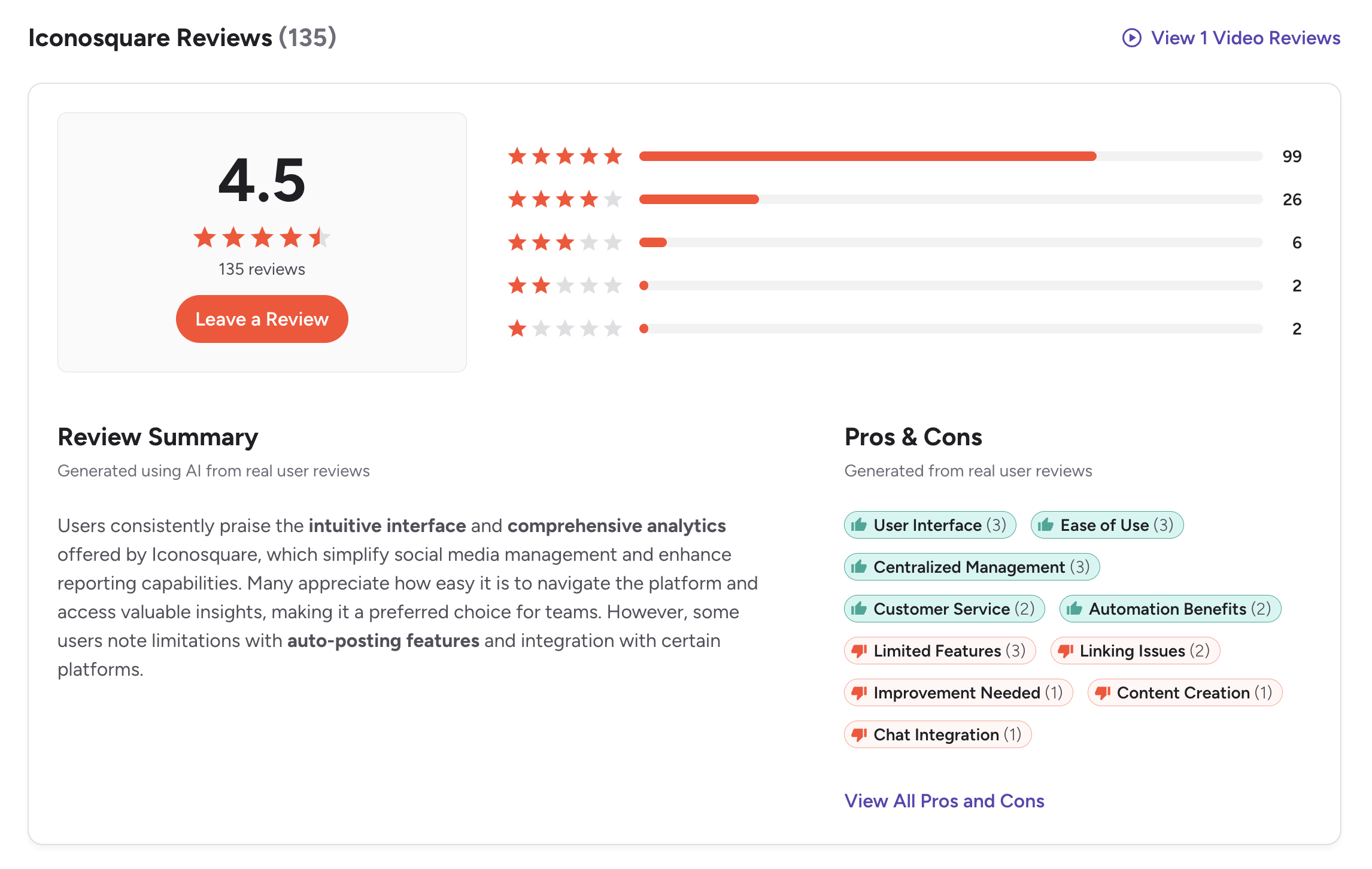
G2: 4.5/5 from 135 reviews. Users who love Iconosquare tend to love it specifically for analytics — the depth of data, the custom dashboards, and the competitor tracking features receive the highest praise. Common criticisms include limited platform support, the absence of AI features, and the post cap on the Launch plan. Several reviewers note that they use Iconosquare alongside another scheduling tool, which says something about where it excels and where it doesn't.
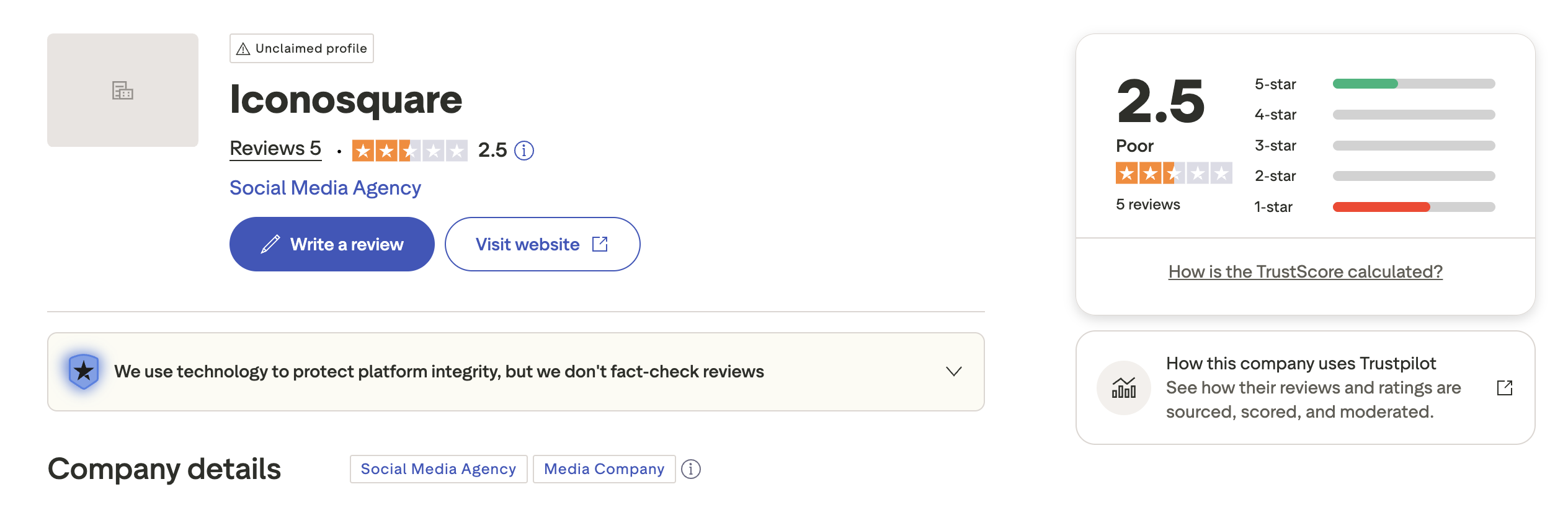
Trustpilot: 2.5/5 from 5 reviews. With only 5 reviews, this rating is statistically meaningless and should not influence your decision. We include it for transparency, but the sample is far too small to draw conclusions from.
Vista Social Reviews
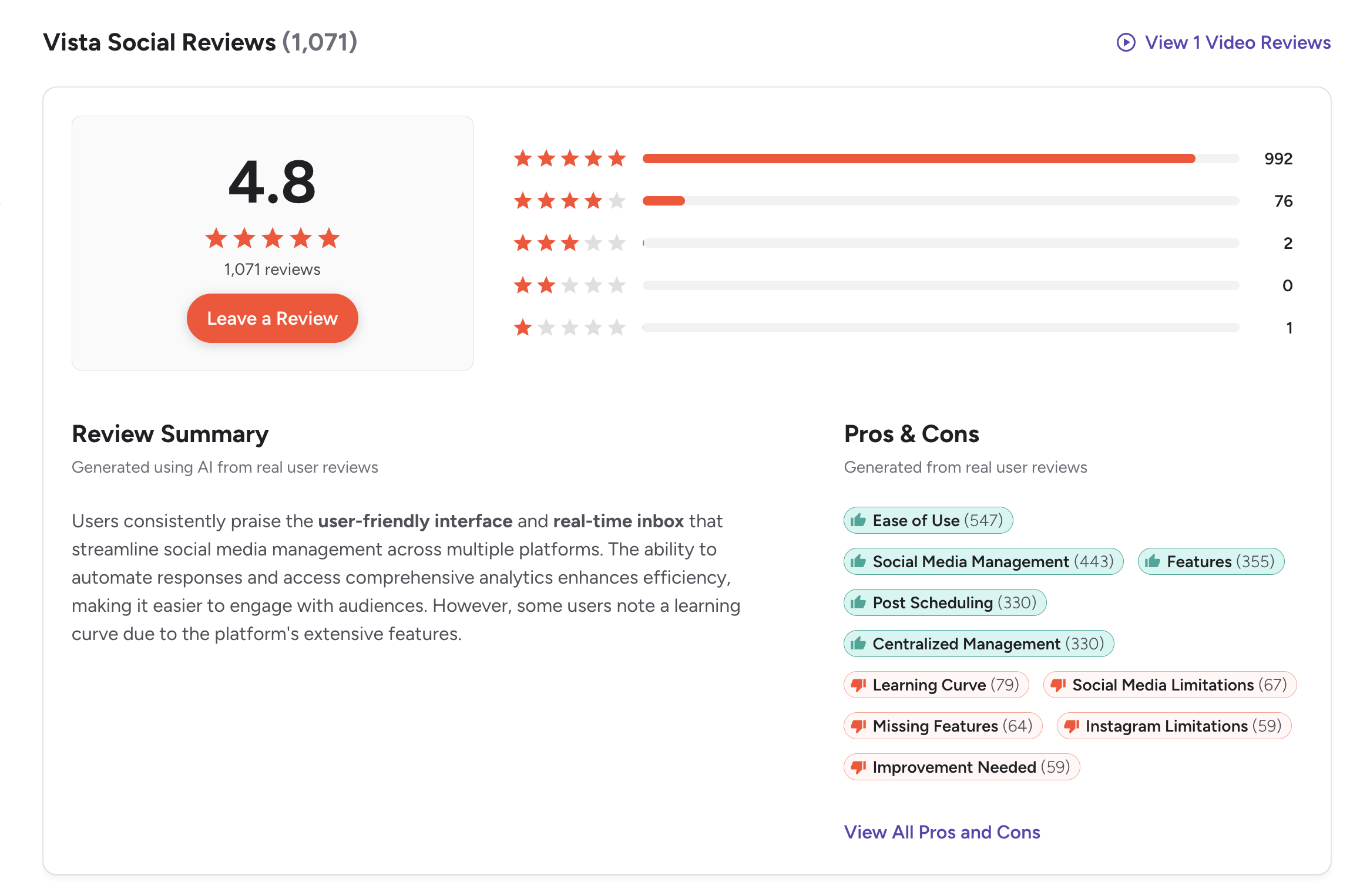
G2: 4.8/5 from 1,071 reviews — one of the highest ratings in the entire social media management category and from a substantial sample size. Users frequently praise the platform's comprehensiveness, the responsive support team, and the DM automation capabilities. The most common complaints are the learning curve associated with the feature density and the cost escalation when adding features like social listening and employee advocacy.
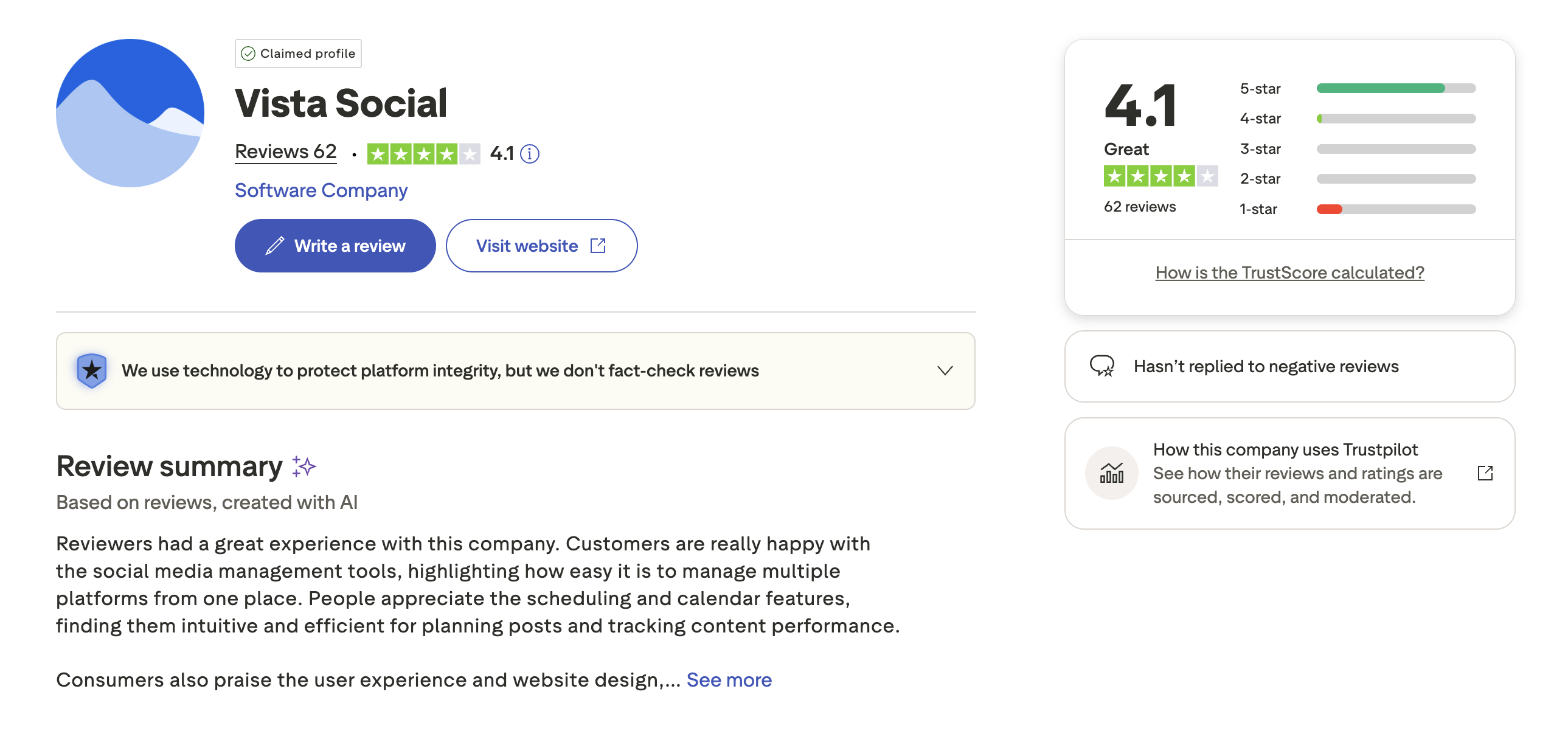
Trustpilot: 4.1/5 from 62 reviews. A smaller but meaningful sample. Users appreciate the breadth of platform support and the all-in-one nature of the tool. Some reviewers mention that the X (Twitter) addon pricing feels out of step with the rest of the platform, and the credit-based AI system can feel limiting for teams with heavy content needs.
Review Verdict
Vista Social has a decisive advantage in both rating (4.8 vs 4.5 on G2) and review volume (1,071 vs 135). The 4.8/5 rating is remarkable for a tool this comprehensive — it suggests that users who need full-stack social media management are genuinely satisfied. Iconosquare's smaller review base still reflects positive sentiment, particularly from analytics-focused users, but the narrower appeal is reflected in the lower volume.
PostPlanifyManage All Your Social Accounts Without the Chaos
Schedule posts, track performance, and collaborate with your team.
Who Should Use Iconosquare?
If Iconosquare is on your radar, explore Iconosquare alternatives and see how it stacks up in our Zoho Social vs Iconosquare comparison.
- Brands that need deep performance analytics — 100+ metrics provide a level of insight that most social media tools simply don't offer
- Agencies delivering recurring performance reports — custom dashboards and scheduled PDF reports make client reporting efficient
- Competitive brands running benchmarks — tracking up to 5 competitors with industry benchmarks is a unique capability
- Instagram-centric brands — the grid preview, detailed Instagram analytics, and Instagram-focused heritage make it a strong fit
- Teams that need long historical data — 2 years of data retention on Scale and Excel plans supports trend analysis
- Brands using another tool for scheduling — many Iconosquare users pair it with a separate scheduling tool and use Iconosquare purely for analytics
Who Should Use Vista Social?
If Vista Social fits your profile, also check Vista Social alternatives and our Zoho Social vs Vista Social comparison.
- Agencies managing 10+ client accounts — profile-based pricing, multi-step approvals, and white-label reports are built for agency operations
- Businesses that receive high volumes of DMs — AI-powered DM automations on Instagram, Facebook, and TikTok can handle scale that manual responses cannot
- Multi-location businesses managing reviews — monitoring Google Business, Yelp, TripAdvisor, OpenTable, and Trustpilot from one dashboard is a major workflow improvement
- Brands active on niche platforms — Reddit, Snapchat, Tumblr, and Bluesky support is genuinely rare
- Enterprises that need social listening — the $75/mo addon provides brand mention tracking and sentiment analysis
- Teams that want one tool for everything — Vista Social's breadth means fewer tools in your stack, even if it means a steeper learning curve
The Complete Toolkit Without the Complexity or Credit Limits
Iconosquare makes you choose analytics over AI. Vista Social's credit system and addon pricing make the full platform expensive. PostPlanify delivers unlimited AI, straightforward pricing, and the features most teams actually use every day — without compromise.
| Feature | Iconosquare (Scale) | Vista Social (Professional) | PostPlanify (Growth) |
|---|---|---|---|
| Monthly Price | $83 | $79 | $49 |
| Social Accounts | 5 profiles | 15 profiles | 10 accounts |
| Team Members | 3 | 3 | 5 (Premium) |
| Post Scheduling | Unlimited | Unlimited | Unlimited |
| AI Captions | None | 500 credits | Unlimited |
| AI Image Generation | No | No | Yes (7 models) |
| Platforms | 6 | 12+ | 10 |
| Canva Integration | No | Yes | Yes |
| Social Inbox | No | Yes (all plans) | Yes |
| Link-in-Bio | No | Vista Page | Yes |
| Post Previews | Yes | Yes | Yes (all 10 platforms) |

PostPlanify includes unlimited AI caption generation and AI image generation across 7 models on every plan — no credit limits, no addons. The Growth plan at $49/mo gives you 10 social accounts, unlimited scheduling, analytics across all platforms, social inbox, bulk scheduling, white-label PDF reports, Canva and Google Drive integration, post previews for all 10 platforms, and a built-in link-in-bio builder. For teams that need approval workflows and team collaboration, the Premium plan at $99/mo includes 25 accounts and 5 team members. View PostPlanify pricing or start your free trial.

Related Guides
- How to Schedule Social Media Posts
- Manage Multiple Social Media Accounts
- How to Automate Social Media Posts
- Best Iconosquare Alternatives
- Best Vista Social Alternatives
FAQ
Is Iconosquare or Vista Social better for analytics?
Iconosquare is significantly better for pure analytics. It offers 100+ metrics, competitor tracking for up to 5 competitors, industry benchmarks, custom dashboards, and up to 2 years of data retention. Vista Social provides standard analytics that cover the basics well and adds review analytics, but it cannot match Iconosquare's depth in social media performance measurement. If analytics is your primary reason for choosing a tool, Iconosquare is the stronger choice.
Does Iconosquare have any AI features?
No. As of 2026, Iconosquare does not offer AI caption generation, AI image generation, DM automations, or any AI-powered tools. This is increasingly unusual in the social media management space and is Iconosquare's most notable gap. If AI tools are important to your workflow, you'll need to look elsewhere — Vista Social offers credit-based AI, and PostPlanify includes unlimited AI on all plans.
How does Vista Social's AI credit system work?
Vista Social allocates AI credits by plan: 500 on Professional ($79/mo), 1,000 on Advanced ($149/mo), and unlimited on Scale ($379/mo). Credits are consumed when you use AI features like caption generation and smart suggestions. The Professional plan's 500 credits can feel limiting for teams creating content daily across multiple accounts. If you burn through credits, you'll need to upgrade to a higher tier or wait for the next billing cycle.
Can I use Iconosquare just for analytics alongside another scheduling tool?
Yes, and many users do exactly this. Iconosquare's analytics depth makes it a strong complement to scheduling-focused tools. Some teams use a tool like PostPlanify or Buffer for day-to-day scheduling and Iconosquare purely for performance measurement, competitor tracking, and client reporting. The downside is paying for two tools, but if analytics depth is critical to your workflow, this combination can be effective.
Is Vista Social's X (Twitter) addon worth it?
That depends on how important X is to your social media strategy. Having to pay extra for one of the most widely used social platforms feels like an odd limitation for a tool that positions itself as comprehensive. If X is a core channel for your brand, factor the addon cost into your total budget. If you only post occasionally on X, the cost may not be justified. Both Iconosquare and PostPlanify include X support in their base pricing.
Which tool is better for small businesses?
Neither is ideal for small businesses with limited budgets. Iconosquare's $39/mo Launch plan has a 100-post limit and only 1 user, which constrains even small teams. Vista Social's $79/mo starting price is a significant commitment for a small business. For small businesses, tools like PostPlanify (starting at $29/mo with unlimited scheduling) or Zoho Social (which has a free plan) offer more accessible entry points. See our alternatives guide for more options.
What platforms does Vista Social support that Iconosquare doesn't?
Vista Social supports YouTube, Google Business Profile, Threads, Reddit, Snapchat, Tumblr, and Bluesky — none of which are available on Iconosquare. Vista Social also covers 5 review sites: Google Business, Yelp, TripAdvisor, OpenTable, and Trustpilot. If your brand has a presence on any of these platforms, Vista Social is the only option between these two tools.
Which tool has better customer support?
Based on user reviews, Vista Social receives more consistent praise for customer support responsiveness. The 4.8/5 G2 rating reflects overall satisfaction that includes support quality. Iconosquare's support is generally rated as adequate but not a standout feature. For both tools, higher-tier plans typically receive faster support response times. If support quality is a priority, Vista Social's track record is stronger.







