
Buffer and Vista Social sit at opposite ends of the social media management spectrum. Buffer is a lightweight, creator-friendly scheduling tool that prioritizes simplicity and accessibility. Vista Social is a full-featured enterprise platform with DM automations, review management, social listening add-ons, and support for 12+ social platforms plus 5 review sites. The price difference reflects this gap: Buffer starts at $6/mo per channel while Vista Social's entry point is $79/mo. These tools are not really competing for the same users, but if you are weighing your options, understanding exactly what each provides is essential.
This comparison is based on 2,249 verified user reviews across G2 and Trustpilot, current pricing pages, and hands-on feature evaluation as of February 2026.
This comparison helps you determine which tool matches your scale and needs. Jump to pricing comparison to see the full cost picture, or skip to feature comparison for a detailed capabilities breakdown. You can also browse our full social media management alternatives directory for more options across every price range.
Buffer vs Vista Social at a Glance
| Feature | Buffer | Vista Social |
|---|---|---|
| Starting Price | $0/mo (Free) | $79/mo (Professional) |
| Free Plan | Yes (3 channels) | No |
| Paid Starting Price | $6/mo per channel | $79/mo (15 profiles, 3 users) |
| Platforms Supported | 11 social | 12+ social + 5 review sites |
| Unlimited Scheduling | On paid plans | Yes |
| AI Caption Generation | AI Assistant | Yes (500 credits on base plan) |
| AI Image Generation | No | No native generation |
| Bulk Scheduling | CSV import | Yes |
| Team Collaboration | Team plan ($12/channel) | All plans (3+ users) |
| Approval Workflows | Team plan | All plans |
| Analytics | Basic on Essentials | Advanced on all plans |
| Social Inbox | Community Inbox (basic) | Unified inbox with DM automations |
| Social Listening | No | $75/mo add-on |
| Review Management | No | Yes (5 review platforms) |
| Employee Advocacy | No | $199/mo add-on |
| Link in Bio | Start Page | No |
| G2 Rating | 4.3/5 (1,023 reviews) | 4.8/5 (1,071 reviews) |
| Trustpilot Rating | 2.1/5 (93 reviews) | 4.1/5 (62 reviews) |
| Best For | Solo creators, small teams | Large agencies, enterprises |
Buffer Overview

Buffer is the tool you reach for when you want to schedule content across multiple platforms without complexity. It supports 11 social networks, offers a clean queue-based scheduling interface, and includes an AI Assistant for generating captions. The Start Page feature gives creators a simple link-in-bio page, and the Community Inbox provides basic engagement management. Everything about Buffer is designed to be fast to learn and easy to maintain.
The pricing model is per-channel: free for 3 channels, $6/mo per channel on Essentials, and $12/mo per channel on Team (which adds collaboration and approval workflows). This structure makes Buffer highly accessible for individuals and small teams. A solo creator managing 3 social accounts pays $18/mo on Essentials. For a thorough look at what users think, read our Buffer reviews analysis.
Vista Social Overview

Vista Social is built for organizations that need a complete social media operations platform, not just a scheduling tool. Beyond standard publishing and analytics, it offers DM automations that can route and respond to direct messages based on rules, review management across 5 review platforms (Google, Yelp, Tripadvisor, etc.), and optional add-ons for social listening ($75/mo) and employee advocacy ($199/mo). The platform supports 12+ social networks plus those review sites, giving it one of the broadest coverage footprints in the market.
The Professional plan starts at $79/mo and includes 15 profiles, 3 users, and 500 AI credits. Advanced ($149/mo) bumps to 30 profiles, 6 users, and 1,000 AI credits. Scale ($379/mo) offers 70 profiles, 10 users, and unlimited AI credits. It is worth noting that X (Twitter) access is a paid add-on, which is an unusual restriction. For detailed user feedback, see our Vista Social reviews roundup.
Pricing Comparison
Buffer Pricing
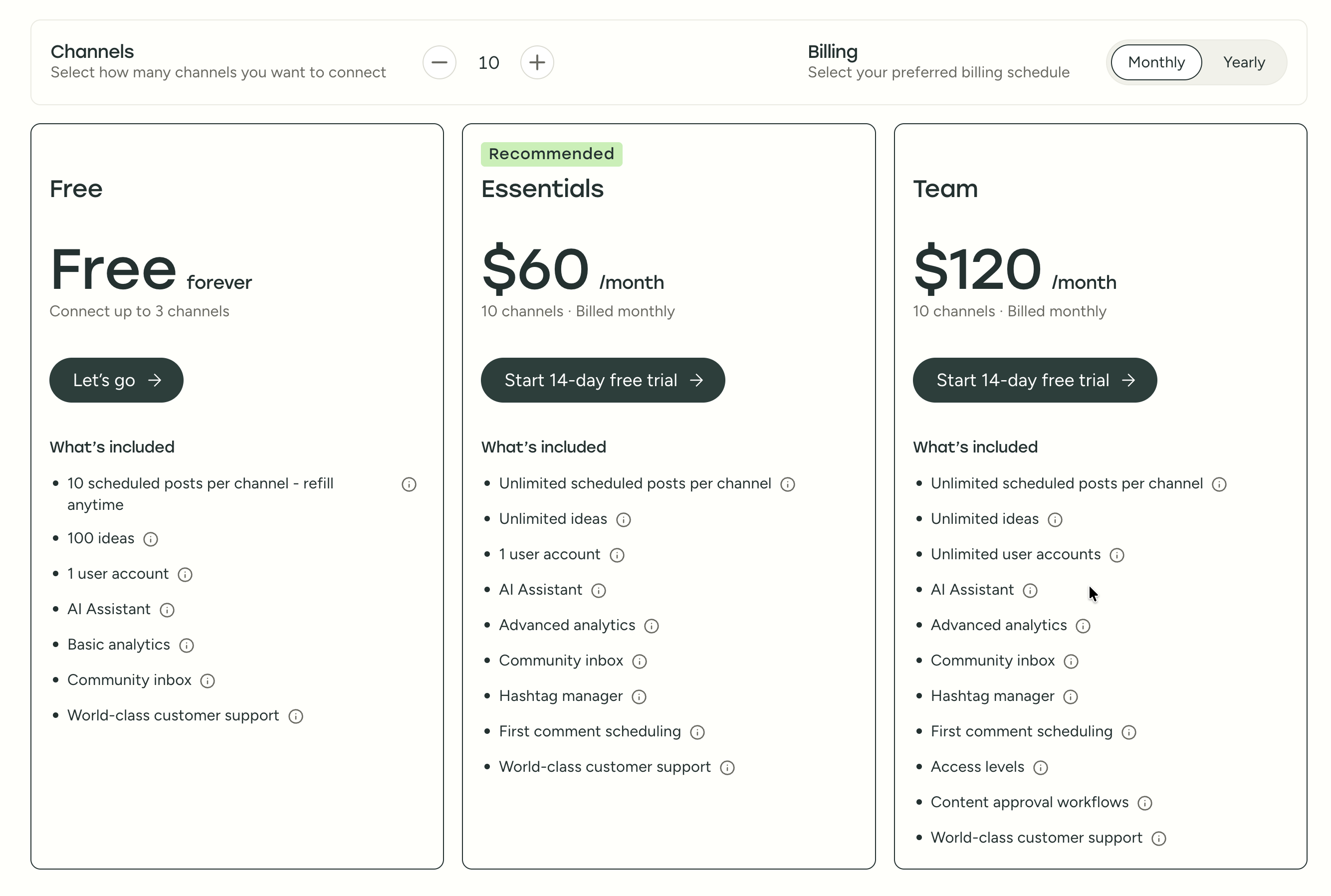
For a full breakdown, visit our Buffer pricing guide.
| Plan | Price | Channels | Users | Key Features |
|---|---|---|---|---|
| Free | $0/mo | 3 | 1 | Basic scheduling, Start Page |
| Essentials | $6/mo/channel | Unlimited | 1 | AI Assistant, analytics, engagement |
| Team | $12/mo/channel | Unlimited | Unlimited | Approvals, collaboration, reports |
Cost at scale examples:
- 3 channels, free: $0/mo
- 5 channels on Essentials: $30/mo
- 10 channels on Essentials: $60/mo
- 5 channels on Team: $60/mo
- 10 channels on Team: $120/mo
- 15 channels on Team: $180/mo
Vista Social Pricing
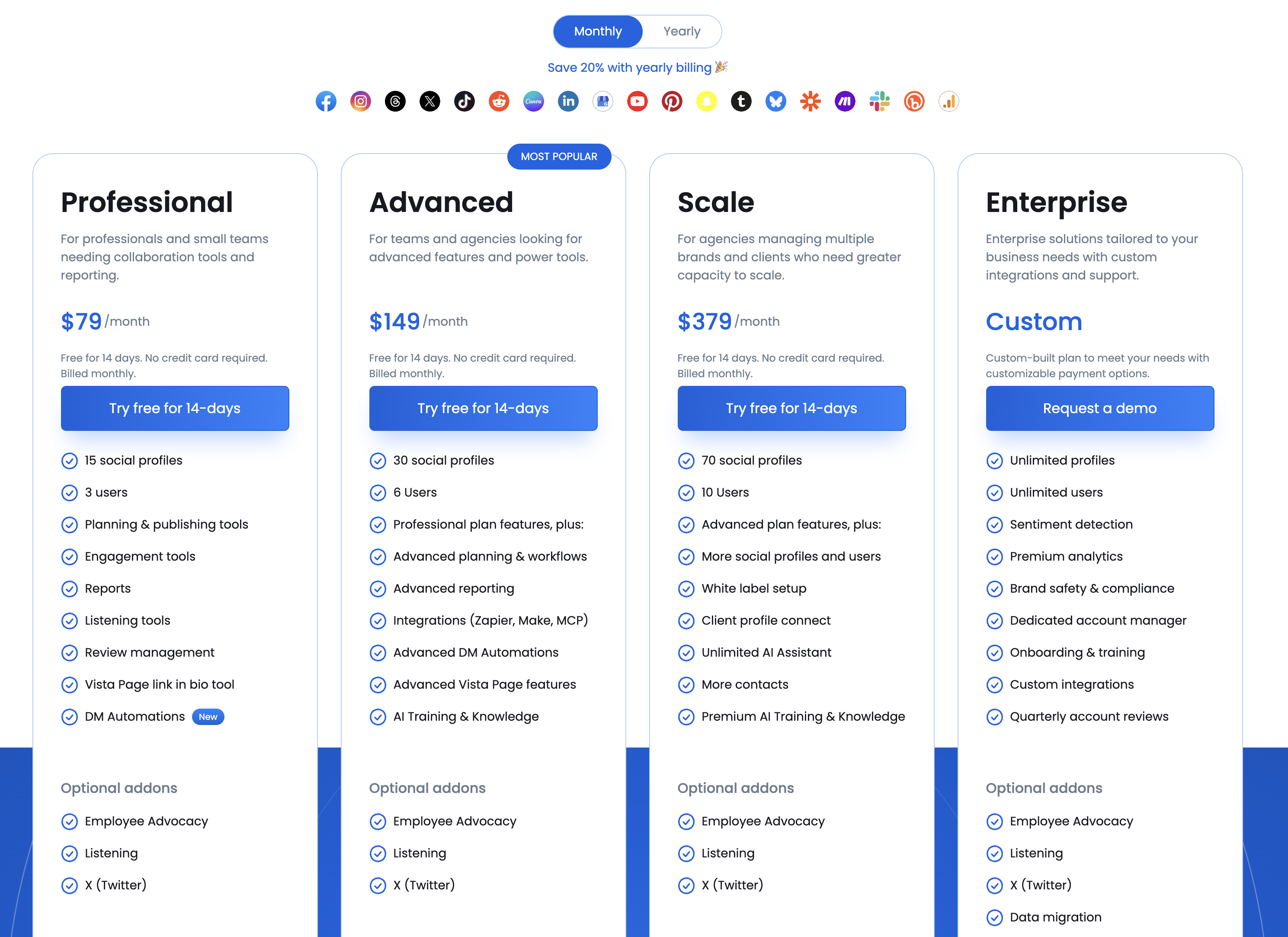
For a full breakdown, visit our Vista Social pricing guide.
| Plan | Price | Profiles | Users | AI Credits | Key Features |
|---|---|---|---|---|---|
| Professional | $79/mo | 15 | 3 | 500/mo | DM automations, review management |
| Advanced | $149/mo | 30 | 6 | 1,000/mo | Expanded limits |
| Scale | $379/mo | 70 | 10 | Unlimited | Full platform access |
Add-on costs:
- X (Twitter) access: Paid add-on (price varies)
- Social listening: $75/mo
- Employee advocacy: $199/mo
Cost at scale examples:
- 15 profiles, 3 users: $79/mo
- 15 profiles, 3 users + social listening: $154/mo
- 30 profiles, 6 users: $149/mo
- 70 profiles, 10 users + all add-ons: $653/mo
What You'll Actually Pay
Here are three real-world scenarios showing how costs compare across team sizes:
Scenario 1: Solo creator, 5 social accounts
- Buffer Essentials: $30/mo (5 x $6)
- Vista Social Professional: $79/mo (15 profiles included, 12 unused)
- PostPlanify Starter: $29/mo (5 accounts) or Growth: $49/mo (10 accounts)
Scenario 2: Small agency, 15 client profiles, 4 team members
- Buffer Team: $180/mo (15 x $12)
- Vista Social Advanced: $149/mo (30 profiles, 6 users)
- PostPlanify Premium: $99/mo (25 accounts, 5 team members)
Scenario 3: Growing agency, 30 profiles, 6 team members + social listening
- Buffer Team: $360/mo (30 x $12, no listening available)
- Vista Social Advanced + listening: $224/mo ($149 + $75)
- PostPlanify Enterprise: custom pricing (custom accounts, unlimited members, no listening)
Price Verdict
The price gap between these tools is massive, and it should be. Buffer at $6/mo per channel serves a fundamentally different use case than Vista Social at $79/mo. A solo creator managing 5 social accounts pays $30/mo with Buffer Essentials; the same person would pay $79/mo for Vista Social and barely use most of its features. Conversely, an agency managing 30 client profiles with 6 team members would find Buffer's per-channel pricing ($360/mo on Team) more expensive than Vista Social's Advanced plan ($149/mo) while getting far fewer features. The crossover point is roughly 10-15 channels -- below that, Buffer is more cost-effective; above that, Vista Social's flat-rate plans offer better value if you need the advanced features.
 PostPlanify
Manage All Your Social Accounts Without the Chaos
Schedule posts, track performance, and collaborate with your team.


Feature Comparison
Scheduling & Publishing
| Capability | Buffer | Vista Social |
|---|---|---|
| Visual calendar | Yes | Yes |
| Queue-based scheduling | Yes | No |
| Optimal time suggestions | Limited | Yes |
| Bulk scheduling | CSV import | Full bulk composer |
| First comment scheduling | Yes | Yes |
| Recurring posts | No | Yes |
| Content categories | No | Yes |
| Content library | Basic | Advanced |
Winner: Vista Social. While Buffer's queue system is elegant for individual scheduling, Vista Social offers a more complete publishing toolkit with recurring posts, content categories, and a robust content library. For teams managing high-volume content across many profiles, Vista Social's publishing features are substantially more capable. Buffer's strength here is speed -- you can go from sign-up to first scheduled post in minutes, which matters for creators who do not need enterprise publishing workflows.
AI Tools
| Capability | Buffer | Vista Social |
|---|---|---|
| AI caption generation | AI Assistant (unlimited) | Credit-based (500-unlimited) |
| AI hashtag suggestions | Yes | Yes |
| AI image generation | No | No native generation |
| AI content repurposing | No | Yes |
| DM automations | No | Yes (rule-based AI) |
Winner: Vista Social for automation breadth, Buffer for simplicity. Vista Social's DM automations and content repurposing tools go beyond what Buffer offers, and the rule-based DM workflows can handle keyword-triggered replies, comment-to-DM flows, and lead data collection across Instagram, Facebook, and TikTok. However, Buffer's AI Assistant provides unlimited caption generation on all paid plans, while Vista Social caps AI usage at 500 credits per month on the entry plan. Neither tool offers native AI image generation -- a gap that tools like PostPlanify fill with 7 built-in models.
Analytics & Reporting
| Capability | Buffer | Vista Social |
|---|---|---|
| Post-level analytics | Basic | Comprehensive |
| Channel analytics | Essentials+ | All plans |
| Competitor analysis | No | Yes |
| Custom reports | Team plan | All plans |
| White-label reports | No | Yes |
| Review analytics | No | Yes |
| Sentiment analysis | No | Yes (listening add-on) |
Winner: Vista Social. The analytics gap is significant. Vista Social provides white-label reporting, competitor analysis, review platform analytics, and optional sentiment analysis through the social listening add-on. Buffer's analytics cover basic post performance and engagement trends but lack the depth agencies and enterprises need. If reporting is a core deliverable for your clients, Vista Social is the only real option between these two.
Team Collaboration
| Capability | Buffer | Vista Social |
|---|---|---|
| Multi-user access | Team plan ($12/channel) | All plans (3+ users) |
| Approval workflows | Team plan | All plans |
| Role-based permissions | Yes | Yes (granular) |
| Client management | Limited | Built for agencies |
| Employee advocacy | No | $199/mo add-on |
| DM routing | No | Yes |
Winner: Vista Social. Collaboration is baked into every Vista Social plan, with 3 users included at the base tier. Buffer requires the Team plan for multi-user access. Vista Social's granular permissions, DM routing, and optional employee advocacy make it far more suited to large teams. Buffer's collaboration works fine for small teams but lacks the agency-grade features Vista Social provides. The multi-step approval workflows with external approval links give Vista Social a clear edge for client-facing workflows.
Platform Support
| Platform | Buffer | Vista Social |
|---|---|---|
| Yes | Yes | |
| Yes | Yes | |
| X (Twitter) | Yes (included) | Paid add-on |
| Yes | Yes | |
| Yes | Yes | |
| TikTok | Yes | Yes |
| YouTube | Yes | Yes |
| Mastodon | Yes | No |
| Bluesky | Yes | No |
| Google Business | Yes | Yes |
| Threads | Yes | Yes |
| Review sites | No | 5 platforms |
| Total social platforms | 11 | 12+ |
Winner: Tie with caveats. Vista Social supports more platforms overall (12+ social plus 5 review sites), but X (Twitter) requires a paid add-on, which is a significant asterisk. Buffer includes X (Twitter) on all plans and also covers Mastodon and Bluesky, which Vista Social does not. If you need review site management, Vista Social wins. If you need X (Twitter) included in your base price or manage audiences on Mastodon and Bluesky, Buffer wins. For most teams, X inclusion alone tips the scales.
What Real Users Say
Buffer Reviews
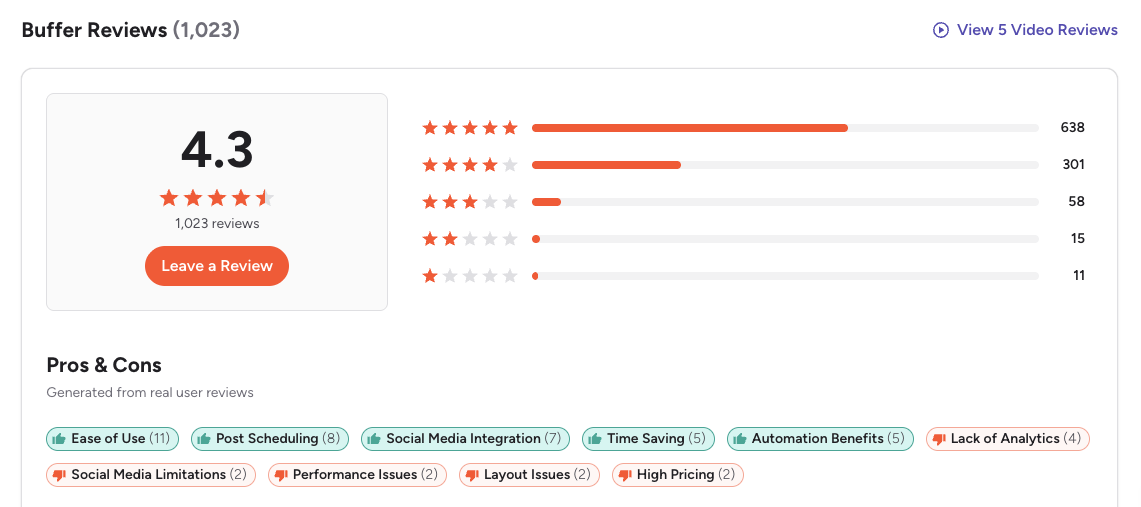
Buffer holds a 4.3/5 on G2 from 1,023 reviews. Users consistently praise the intuitive interface, fast onboarding, and reliable scheduling. The recurring theme is that Buffer does scheduling well but falls short on analytics and advanced features. Many reviews explicitly say Buffer is ideal for small teams and individuals but not sufficient for larger organizations. The queue-based scheduling model gets frequent praise for its simplicity.
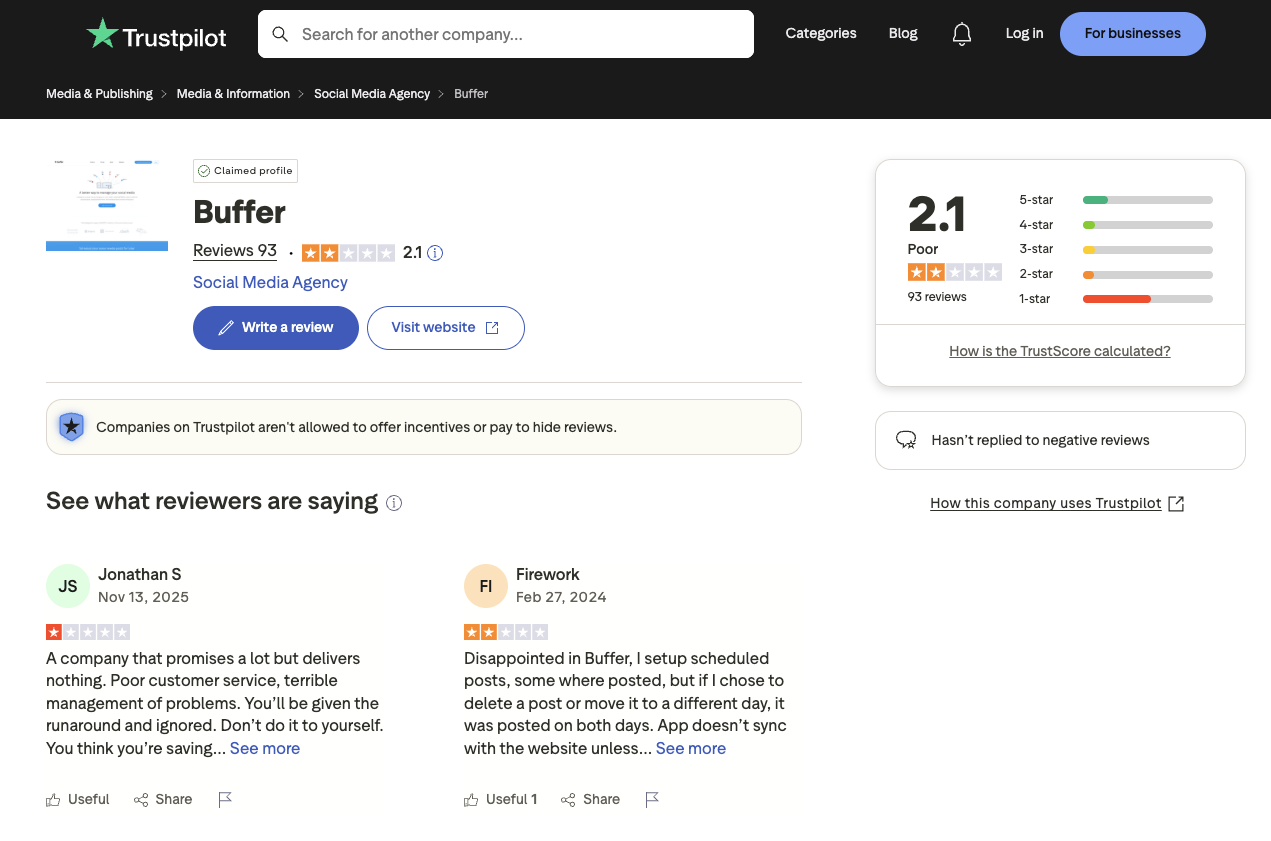
On Trustpilot, Buffer scores 2.1/5 from 93 reviews. The score is dragged down by billing and cancellation complaints. Positive Trustpilot reviews praise the product's simplicity and free plan generosity, but the negative reviews focus heavily on unexpected charges and slow support response times for account issues.
Vista Social Reviews
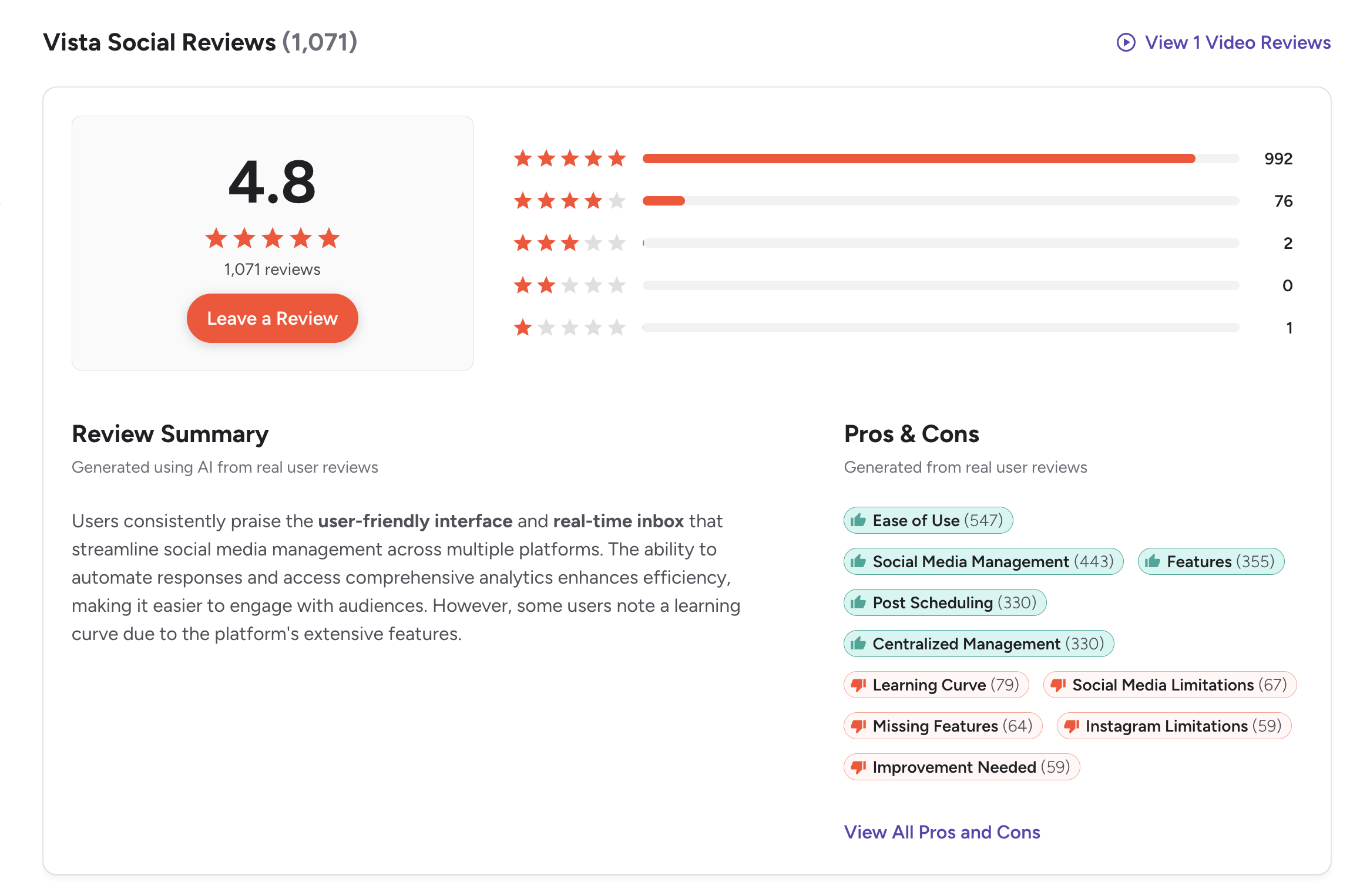
Vista Social has an impressive 4.8/5 on G2 from 1,071 reviews, making it one of the highest-rated social media management tools on the platform. G2 ranked it #1 Easiest to Use and Top 5 Fastest Growing in 2026. The top review themes include ease of use (547 mentions), social media management (443 mentions), features (355 mentions), and post scheduling (330 mentions). Users praise the comprehensive feature set, responsive customer support, and the value proposition at the Professional tier. A featured enterprise review highlights that Vista Social's AI enhancements work contextually without needing external tools like GPT. Common criticisms include the learning curve for new users (79 mentions), limitations with newer integrations like Threads, and the X (Twitter) add-on pricing.
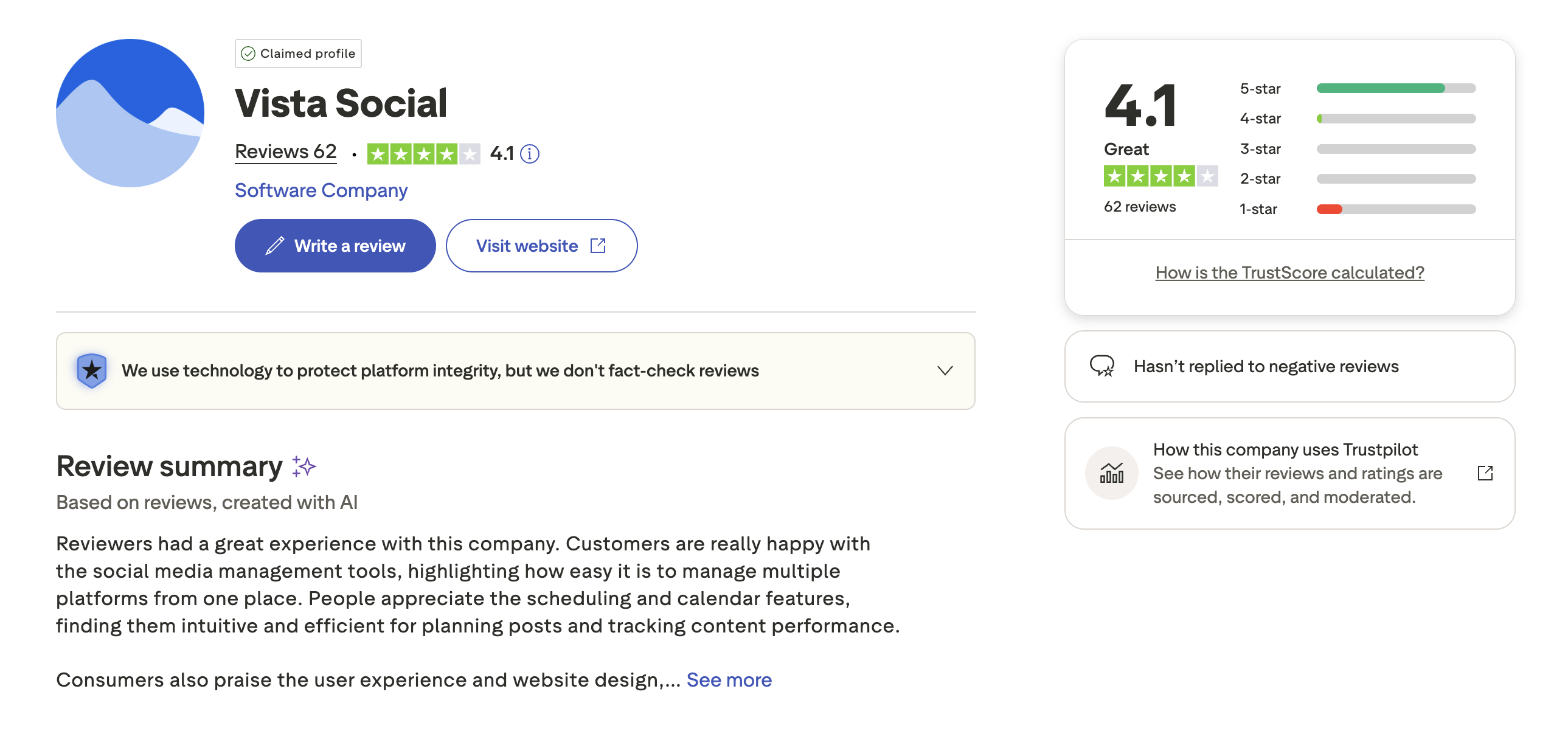
On Trustpilot, Vista Social scores 4.1/5 from 62 reviews with a "Great" TrustScore. Customers highlight how easy it is to manage multiple platforms from one place and praise the intuitive scheduling and calendar features. Some reviews mention that the platform can feel overwhelming initially due to the sheer number of features available. Vista Social has not replied to negative reviews on the platform.
Review Verdict
Vista Social has the stronger review profile across both platforms. The 4.8/5 G2 score from over 1,000 reviews is exceptional and reflects genuine user satisfaction with the platform's capabilities -- backed by 992 five-star reviews out of 1,071. Buffer's 4.3/5 G2 score is respectable but reflects its narrower feature scope. The Trustpilot gap (4.1 vs 2.1) further favors Vista Social, though Buffer's low score is amplified by a small, complaint-skewed sample. Vista Social's reviews make it clear that users who need enterprise features are well-served, while Buffer's reviews confirm it excels at what it is designed to do: simple scheduling.
Review counts: Buffer -- 1,023 G2 + 93 Trustpilot (1,116 total). Vista Social -- 1,071 G2 + 62 Trustpilot (1,133 total). All counts as of February 2026.
PostPlanifyManage All Your Social Accounts Without the Chaos
Schedule posts, track performance, and collaborate with your team.
Who Should Use Buffer?
Buffer is the right choice for people who want to start publishing quickly without learning a complex platform. If your workflow is "write caption, pick platforms, schedule, done," Buffer handles that better than almost any tool on the market. The free plan lets you test the waters with 3 channels before committing any budget.
If you want to explore alternatives, check out our Buffer alternatives guide or compare Buffer vs Zoho Social and Buffer vs Iconosquare.
- Solo creators and freelancers who need simple scheduling without enterprise complexity
- Small teams (1-3 people) managing a handful of social accounts
- Users who want a free starting point with the option to scale per channel
- Multi-platform publishers who need support for 11 networks including Mastodon and Bluesky
- Content creators who want AI caption assistance and a built-in link-in-bio page
- Anyone who values simplicity and wants to be publishing within minutes of signing up
Who Should Use Vista Social?
Vista Social is built for teams that have outgrown simple scheduling tools and need an operations platform. If your daily work involves managing DMs across multiple brands, responding to reviews on Google and Yelp, and delivering white-label reports to clients, Vista Social consolidates those workflows into one dashboard. The 4.8/5 G2 rating from over 1,000 reviews reflects that agencies and enterprises genuinely find value in the breadth.
If you want to explore alternatives, check out our Vista Social alternatives guide or browse our alternatives directory.
- Agencies managing multiple clients who need granular permissions and white-label reports
- Enterprises that require DM automations, review management, and social listening
- Teams managing 15+ social profiles where Vista Social's flat-rate pricing becomes efficient
- Businesses on review platforms (Google, Yelp, Tripadvisor) who need unified review management
- Organizations that need employee advocacy programs at scale
- Marketing teams that want comprehensive analytics, competitor tracking, and sentiment analysis
Want the Publishing Workflow Without the Enterprise Price Tag?
Buffer is simple but limited. Vista Social is powerful but expensive. If you have outgrown Buffer's basic analytics and single-user Essentials plan but do not need Vista Social's DM automations, review management, or $75/mo listening add-on, there is a gap in the market. PostPlanify fills that gap with AI tools on every plan, team collaboration without per-seat fees, and analytics across all 10 supported platforms on the Growth plan ($49/mo) — with plans starting at $29/mo.

PostPlanify Features
| Feature | Details | Learn More |
|---|---|---|
| Analytics | All 10 platforms, best time to post suggestions, historical trends | Analytics features |
| Social Inbox | Unified inbox with AI-assisted reply suggestions | Social inbox features |
| AI Assistant | Vision-powered, generates captions from images and videos | AI assistant features |
| AI Image Generation | 7 native models, no external subscription needed | AI assistant features |
| Team Collaboration | Unlimited members, no per-seat fees, role-based permissions | Team features |
| Multi-Approver Workflows | Designate multiple approvers per post, approval tracking | Team features |
| Content Calendar | Drag-and-drop, shared team calendars, monthly/weekly views | Calendar features |
| Media Library | Canva integration, Google Drive import, organized folders | Media library features |
| Link in Bio | 8 customizable themes, click analytics, custom domains | Link in bio features |
| White-Label PDF Reports | Branded reports for client delivery | Analytics features |
| Unlimited Scheduling | Growth+ ($49/mo), Starter has 200 posts/mo | Pricing |
| X (Twitter) Included | All plans, no add-on fees | Pricing |
| 10 Platforms | Instagram, Facebook, X, LinkedIn, TikTok, Pinterest, YouTube, Threads, Bluesky | Pricing |
PostPlanify Pricing
| Plan | Price | Accounts | Team Members | Key Features |
|---|---|---|---|---|
| Starter | $29/mo | 5 | 1 | 200 posts/mo, AI assistant, content calendar, media library |
| Growth | $49/mo | 10 | 1 | Unlimited scheduled posts, analytics (all 10 platforms), social inbox, best time to post, 1st comments & threads, bulk scheduling |
| Premium | $99/mo | 25 | 5 | White-label PDF reports, multi-approver workflows, shared calendars, roles & permissions |
| Enterprise | Custom | Custom | Unlimited | 1:1 onboarding, priority support, all features |
All plans include a 7-day free trial. See the full breakdown on the PostPlanify pricing page.
How PostPlanify Compares
| Feature | Buffer (Team) | Vista Social (Professional) | PostPlanify (Growth) |
|---|---|---|---|
| Price | $12/mo/channel | $79/mo | $49/mo |
| Accounts | 1 per $12 | 15 profiles | 10 accounts |
| Users | Unlimited | 3 | 1 |
| Unlimited Scheduling | Yes | Yes | Growth+ ($49/mo) |
| AI Captions | AI Assistant | 500 credits/mo | Unlimited AI |
| AI Image Generation | No | No | Yes (7 models) |
| Analytics | Basic | Advanced | Yes (10 platforms, best time to post) |
| Social Inbox | Basic | Yes (all plans) | Yes (AI-assisted replies) |
| White-Label Reports | No | Yes (Scale $379/mo) | Yes (Premium+ $99/mo) |
| Canva Integration | No | No | Yes |
| Google Drive Integration | No | No | Yes |
| Approval Workflows | Yes | Yes | Premium ($99/mo) |
| DM Automations | No | Yes | No |
| Review Management | No | Yes | No |
| Link-in-Bio | Start Page | No | Yes (8 themes) |
| X (Twitter) | Included | Paid add-on | Included |
PostPlanify does not try to match Vista Social's enterprise feature set or Buffer's 11-platform breadth. What it delivers is unlimited AI caption generation, AI image generation with 7 models, and creative workflow integrations (Canva, Google Drive) that neither competitor offers. Analytics with best time to post suggestions are included from the Growth plan ($49/mo). White-label PDF reports are available starting at $99/mo (Premium plan) -- Vista Social locks white-label reporting behind the Scale plan at $379/mo. The Premium plan ($99/mo) adds multi-approver workflows, 5 team members, and shared calendars. The Enterprise plan (custom pricing) adds custom accounts and unlimited team members with 1:1 onboarding -- all without per-channel surcharges or paid add-ons. Explore the full PostPlanify pricing.
Try PostPlanify free for 7 days

Final Verdict
Buffer and Vista Social are both good tools that serve different audiences. Buffer is the best lightweight scheduler for creators and small teams who want simplicity. Vista Social is one of the most capable enterprise platforms available, with DM automations, review management, and platform coverage that few competitors match. The 4.8/5 G2 score from 1,071 reviews backs that up.
The real question is what happens when you fall between these two extremes. If you need more than Buffer's basic analytics and single-user Essentials plan but do not need Vista Social's DM automations, review site management, or $75/mo listening add-on, neither tool is a natural fit. Buffer will leave you wanting better analytics, team workflows, and AI image generation. Vista Social will charge you for enterprise capabilities you may never use. That mid-market gap -- teams that need solid analytics, AI-powered content creation, team collaboration, and straightforward pricing -- is exactly where PostPlanify competes.
Making the Switch
Switching social media management tools does not need to be disruptive. Here is a practical approach:
- Sign up for the new tool's trial alongside your current platform. Run both in parallel for the trial period so there are no gaps in your publishing schedule.
- Reconnect your social accounts. OAuth connections take seconds per platform. Neither Buffer nor Vista Social transfers account connections automatically.
- Recreate your content queue. Draft and scheduled posts do not migrate between platforms. Export what you can and rebuild your queue in the new tool.
- Rebuild team permissions. If you are moving from Vista Social's granular roles, map those permissions to your new tool's structure before inviting team members.
- Accept that historical analytics will not transfer. No social media management tool imports analytics from another. Your new platform starts tracking from day one. Export any reports you need from your current tool before cancelling.
- Cancel only after your new workflow is stable. Keep both tools active until you have confirmed that scheduling, publishing, and engagement workflows are running smoothly on the new platform.
Start your PostPlanify free trial and run it alongside your current tool to compare the experience firsthand.
PostPlanifyManage All Your Social Accounts Without the Chaos
Schedule posts, track performance, and collaborate with your team.
Related Guides
- Best Buffer Alternatives
- Best Vista Social Alternatives
- Best Social Media Management Platform
- Buffer Pricing Breakdown
- Vista Social Pricing Breakdown
- Buffer Reviews Analysis
- Vista Social Reviews Analysis
- Best Time to Post on Social Media
- How to Create a Social Media Content Calendar
- Social Media Analytics and Reporting
- Content Batching Guide
- How to Manage Multiple Social Media Accounts
FAQ
Is Vista Social overkill for small teams?
In most cases, yes. Vista Social's Professional plan at $79/mo includes DM automations, review management, and 15 profiles -- features that a small team of 1-3 people managing a few accounts will rarely use. Buffer's Essentials plan at $6/mo per channel is a much better fit for small teams that just need reliable scheduling and basic analytics. You only need Vista Social's power if you are genuinely managing a large operation.
Can Buffer scale to enterprise use?
Not effectively. Buffer's per-channel pricing means 20 channels on the Team plan costs $240/mo, and you still do not get DM automations, review management, social listening, or white-label reporting. Buffer is transparent about its target audience: creators and small teams. If your needs have grown beyond what Buffer offers, it is time to evaluate tools built for that scale.
Why does Vista Social charge extra for X (Twitter)?
Vista Social cites X's API pricing as the reason for making Twitter/X a paid add-on. The X API has become significantly more expensive for third-party developers, and Vista Social passes that cost through rather than absorbing it into the base price. Buffer includes X (Twitter) on all plans, as do most other social media management tools, so this is a notable drawback for Vista Social.
Which tool has better customer support?
Vista Social receives consistently strong support feedback across G2 and Trustpilot, with users frequently mentioning responsive and helpful support interactions. Buffer's support feedback is more mixed -- the product documentation is solid, but Trustpilot reviews suggest slower response times for billing and account issues. For teams where support responsiveness is critical, Vista Social has the stronger track record.
Do I need Vista Social's social listening add-on?
Social listening ($75/mo) tracks brand mentions, industry keywords, and competitor conversations across social platforms. It is valuable for brands that need to monitor reputation or track market trends, but it is not essential for basic social media management. If you are primarily scheduling and publishing content, you can skip this add-on. If brand monitoring is a core part of your workflow, the $75/mo cost is reasonable compared to standalone listening tools.
Can I migrate from Buffer to Vista Social?
There is no automated migration path. You will need to reconnect all social accounts, recreate your content queue, and rebuild any team permissions. Historical analytics and engagement data will not transfer. If you are making the jump, plan for a transition week where you maintain both tools to ensure no gaps in your publishing schedule. Vista Social's onboarding support can help with the setup process.
Which tool is better for managing client social accounts?
Vista Social is substantially better for client management. It offers granular role-based permissions, white-label reporting, and a structure designed for agencies handling multiple brands. Buffer's Team plan supports collaboration but lacks the agency-specific features (white-label reports, client-segmented dashboards) that make client management scalable. For a full comparison of agency-friendly tools, see our social media management alternatives.
Is there a middle ground between Buffer and Vista Social?
Yes. The gap between a $6/mo per-channel tool and a $79/mo enterprise platform is where several tools compete. PostPlanify's Growth plan at $49/mo offers unlimited AI tools, analytics across 10 platforms, and a social inbox with AI-assisted replies. The Premium plan at $99/mo adds multi-approver workflows and 5 team members. See our Buffer vs Zoho Social comparison for another mid-range option, or explore the full alternatives directory to find the right fit for your budget and feature requirements.







