
Buffer and Iconosquare are both well-known names in social media management, but they solve different problems. Buffer is a scheduling-first tool that prioritizes simplicity and broad platform coverage across 11 networks. Iconosquare is an analytics-first platform that goes deep on data -- 100+ metrics, competitor tracking, and industry benchmarks -- but only covers 6 platforms. Choosing between them is less about which is "better" and more about whether your primary need is getting content published or understanding how that content performs.
We compared current published pricing, tested both platforms, and analyzed 1,250+ user reviews across G2 and Trustpilot to give you an unbiased breakdown.
This comparison breaks down the real differences so you can make an informed decision. Jump to pricing comparison to see what each tool costs at different scales, or go directly to feature comparison for a side-by-side breakdown. If neither tool fits, browse our complete social media management alternatives guide.
Buffer vs Iconosquare at a Glance
| Feature | Buffer | Iconosquare |
|---|---|---|
| Starting Price | $0/mo (Free) | $39/mo (Launch) |
| Free Plan | Yes (3 channels) | Yes (2 profiles, 10 posts/profile) |
| Paid Starting Price | $6/mo per channel | $39/mo (5 profiles, 1 user) |
| Platforms Supported | 11 | 8 |
| Unlimited Scheduling | On paid plans | Scale plan and above |
| Post Limits | None on paid plans | 200 posts/mo on Launch |
| AI Caption Generation | Yes (AI Assistant) | Yes (AI-powered) |
| AI Image Generation | No | No |
| Bulk Scheduling | CSV import | Yes |
| Team Collaboration | Team plan ($12/channel) | Scale plan ($83/mo) |
| Approval Workflows | Team plan | Scale plan |
| Analytics Metrics | Basic engagement stats | 100+ metrics |
| Competitor Tracking | No | Yes |
| Industry Benchmarks | No | Yes |
| Instagram Grid Preview | No | Yes |
| Social Inbox | Community Inbox (basic) | No |
| Link in Bio | Start Page | No |
| G2 Rating | 4.3/5 (1,023 reviews) | 4.5/5 (135 reviews) |
| Trustpilot Rating | 2.1/5 (93 reviews) | 2.5/5 (5 reviews) |
| Best For | Scheduling across many platforms | Deep analytics and benchmarking |
Buffer Overview

Buffer has built its reputation on being the easiest way to schedule social media content. The platform supports 11 networks -- including newer platforms like Mastodon and Bluesky -- and offers a clean, queue-based scheduling system that takes minutes to learn. The AI Assistant generates caption suggestions, and CSV import handles bulk content uploads. Start Page provides a simple link-in-bio builder, and the Community Inbox offers basic engagement management.
Buffer's pricing scales per channel: free for 3 channels, $6/mo per channel on Essentials, and $12/mo per channel on Team. This model works well for creators and small teams managing a handful of accounts, though costs grow linearly as you add channels. For more user perspectives, see our Buffer reviews analysis.
Iconosquare Overview
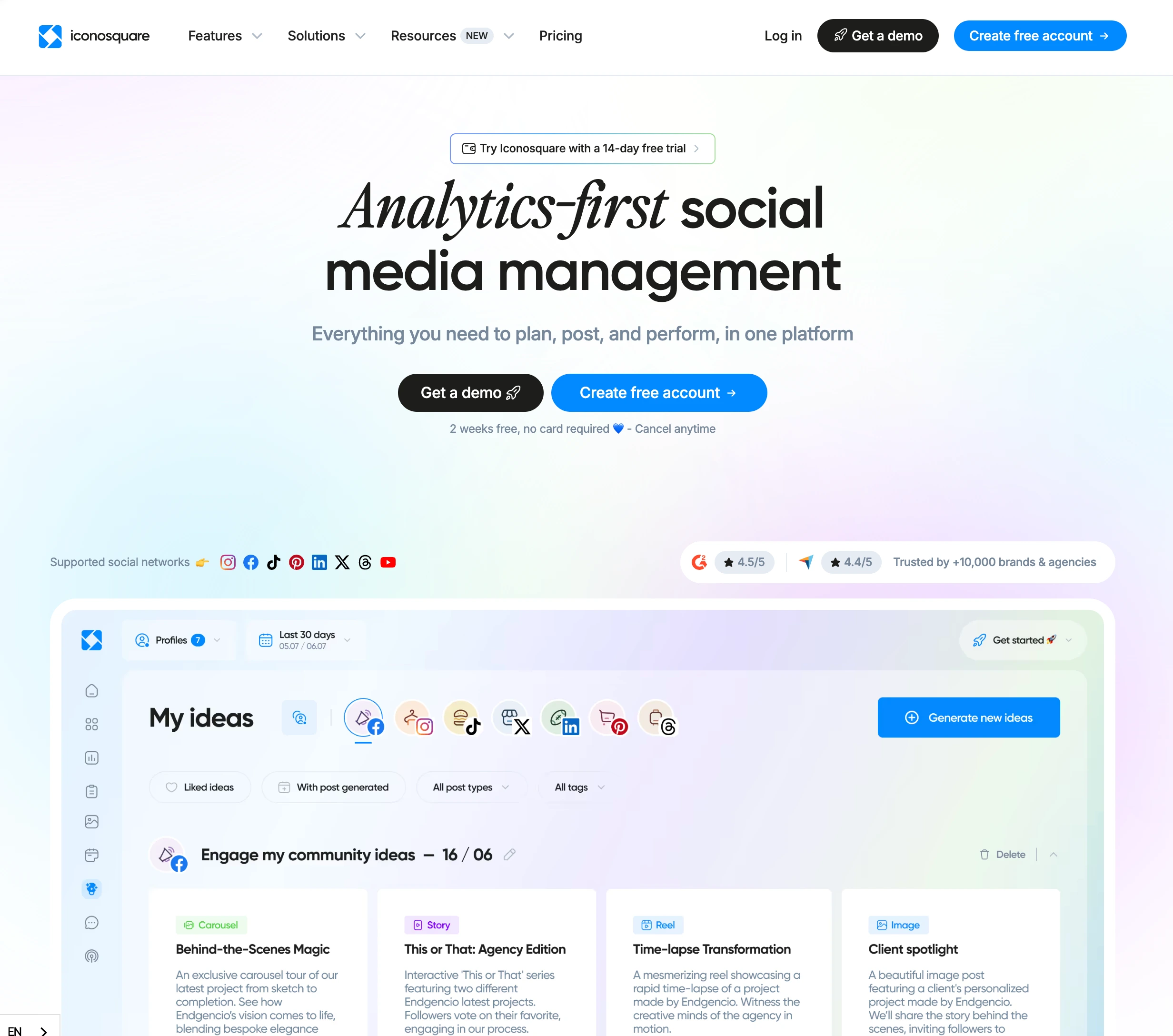
Iconosquare is not trying to be the simplest scheduling tool. It is trying to be the most comprehensive analytics platform for social media managers who need to understand performance at a granular level. The platform offers over 100 analytics metrics, competitor tracking across multiple brands, and industry benchmarks that let you see how your performance stacks up against others in your vertical. The Instagram grid preview is particularly valued by brands that care about visual feed aesthetics. Iconosquare also includes AI-powered caption generation and best time to post suggestions across all paid plans.
The trade-off for this analytics depth is narrower platform coverage (8 networks including YouTube and Threads) and higher entry pricing. The Launch plan starts at $39/mo for 5 profiles, 1 user, and a 100 post/month cap. Scale ($83/mo) unlocks 3 users and unlimited posts. Excel ($139/mo) expands to 6 users. Additional profiles cost extra on every tier. Iconosquare also offers a Free plan with 2 profiles and 10 posts per profile per month, plus a 14-day trial on paid plans. Check our Iconosquare reviews roundup for user feedback.
Pricing Comparison
Buffer Pricing
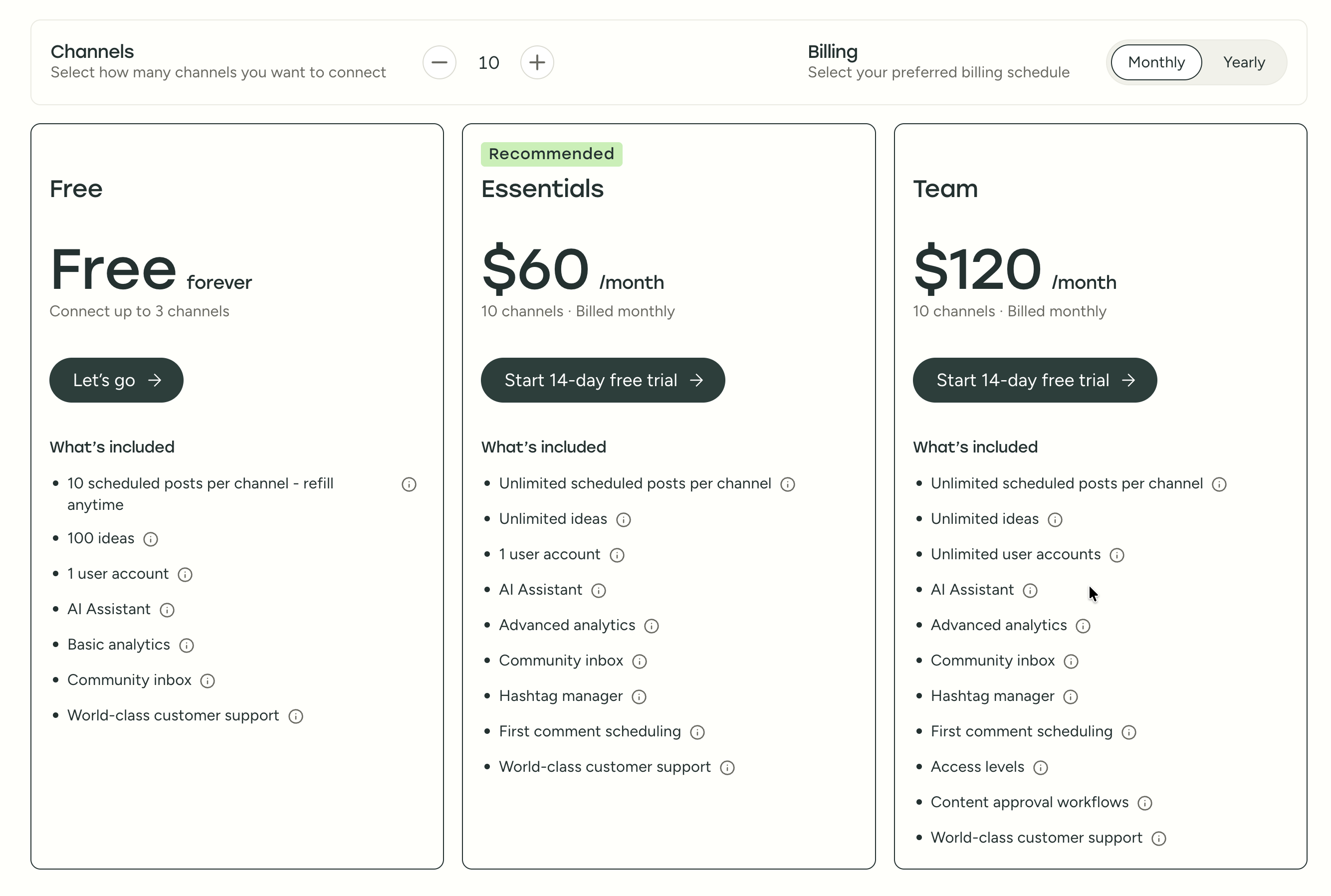
For a detailed breakdown, visit our Buffer pricing guide.
| Plan | Price | Channels | Key Features |
|---|---|---|---|
| Free | $0/mo | 3 | Basic scheduling, Start Page |
| Essentials | $6/mo/channel | Unlimited | AI Assistant, analytics, engagement |
| Team | $12/mo/channel | Unlimited | Approvals, collaboration, reports |
Cost at scale examples:
- 5 channels on Essentials: $30/mo
- 5 channels on Team: $60/mo
- 10 channels on Essentials: $60/mo
- 10 channels on Team: $120/mo
Iconosquare Pricing
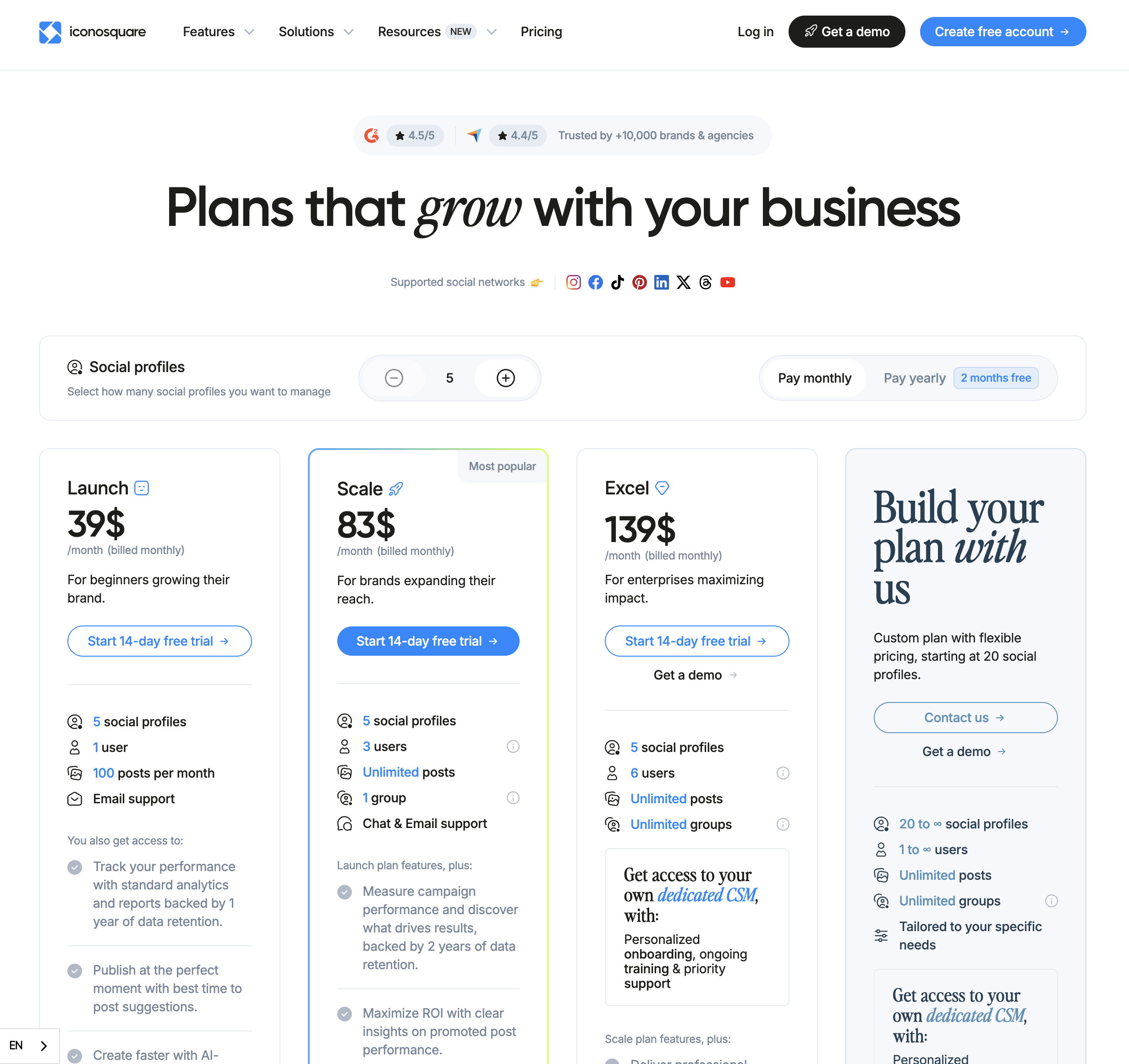
For a detailed breakdown, visit our Iconosquare pricing guide.
| Plan | Price | Profiles | Users | Post Limit | Key Features |
|---|---|---|---|---|---|
| Free | $0/mo | 2 | 1 | 10/profile | Basic scheduling, limited analytics |
| Launch | $39/mo | 5 | 1 | 100/mo | Analytics, competitor tracking, AI captions |
| Scale | $83/mo | 5 | 3 | Unlimited | Team features, approvals, campaign tracking |
| Excel | $139/mo | 5 | 6 | Unlimited | White-label reports, dedicated CSM |
Additional costs:
- Extra profiles are available as paid add-ons on all plans
- Additional users on Scale and Excel cost $16/month each
- The Free plan is limited to 10 posts per profile per month
Cost at scale examples:
- 5 profiles, 1 user: $39/mo (Launch)
- 5 profiles, 3 users: $83/mo (Scale)
- 5 profiles, 6 users: $139/mo (Excel)
- Additional profiles beyond 5 increase costs on each tier
What You'll Actually Pay: Real-World Scenarios
Buffer charges per channel, Iconosquare charges per plan with profile add-ons. Here is how real costs compare at different scales:
Solo creator managing 5 social accounts:
- Buffer Essentials: 5 x $6 = $30/month (unlimited posts, AI captions)
- Iconosquare Launch: $39/month (200 posts/month cap, 100+ analytics metrics, competitor tracking)
- Buffer is cheaper and has no post limit. Iconosquare costs more but includes deep analytics and competitor tracking that Buffer does not offer at any price.
Small team of 3 managing 5 accounts with approvals:
- Buffer Team: 5 x $12 = $60/month (unlimited users, approvals)
- Iconosquare Scale: $83/month (3 users included, unlimited posts, campaign tracking)
- Buffer is cheaper for team collaboration. Iconosquare justifies the premium with 100+ metrics, industry benchmarks, and branded report exports that Buffer cannot match.
Agency managing 10 accounts with 6 team members:
- Buffer Team: 10 x $12 = $120/month (unlimited users)
- Iconosquare Excel: $139/month base + profile add-ons for 5 extra profiles (6 users included, white-label reports, dedicated CSM)
- At this scale, the cost difference narrows. The decision hinges on whether you need Buffer's 11-platform reach or Iconosquare's analytics depth and white-label client reports.
Price Verdict
Buffer is significantly less expensive for straightforward scheduling. Five channels on Buffer Essentials cost $30/mo compared to Iconosquare's $39/mo entry point, and Buffer includes unlimited posting while Iconosquare's Launch plan caps you at 100 posts per month. However, comparing these tools purely on price misses the point. Iconosquare's pricing buys you an analytics engine that Buffer does not have. If you need competitor tracking and industry benchmarks, Iconosquare's cost reflects capabilities that would require additional tools to replicate with Buffer. The question is whether you need those capabilities.
 PostPlanify
Manage All Your Social Accounts Without the Chaos
Schedule posts, track performance, and collaborate with your team.


Feature Comparison
Scheduling & Publishing
| Capability | Buffer | Iconosquare |
|---|---|---|
| Visual calendar | Yes | Yes |
| Queue-based scheduling | Yes | No |
| Optimal time suggestions | Limited | Yes (data-driven) |
| Bulk scheduling | CSV import | Yes |
| Instagram grid preview | No | Yes |
| First comment scheduling | Yes | Yes |
| Post limit on entry plan | None | 100/mo |
| Draft management | Yes | Yes |
| AI caption generation | Yes (AI Assistant) | Yes (AI-powered) |
Winner: Buffer for simplicity and volume, Iconosquare for Instagram-focused brands. Buffer's queue system and unlimited posting make it easier for high-volume publishers who just want content out the door. Iconosquare's grid preview is a genuine differentiator for brands where visual feed aesthetics matter, and its data-driven best time to post suggestions are more comprehensive than Buffer's limited optimal timing. However, the 100 post/month cap on the Launch plan is a real limitation that forces active teams to upgrade to Scale at more than double the price.
AI Tools
| Capability | Buffer | Iconosquare |
|---|---|---|
| AI caption generation | Yes (AI Assistant) | Yes (AI-powered) |
| AI hashtag suggestions | Yes | Yes |
| AI image generation | No | No |
| AI content ideas | Yes | No |
Winner: Buffer. Both platforms now offer AI caption generation, but Buffer's AI Assistant goes further with content ideas and post suggestions. Neither tool offers AI image generation, which is a notable gap for teams that want to create visuals directly in their scheduling workflow. If AI-assisted content creation beyond basic captions matters to your workflow, Buffer provides more options.
Analytics & Reporting
| Capability | Buffer | Iconosquare |
|---|---|---|
| Post-level metrics | Basic (likes, shares, reach) | Detailed (100+ metrics) |
| Competitor tracking | No | Yes (up to 10 per profile) |
| Industry benchmarks | No | Yes |
| Custom date ranges | Yes | Yes |
| Exportable reports | Yes | Yes (branded PDFs) |
| Hashtag analytics | Basic | Advanced |
| Best time to post analysis | Limited | Comprehensive |
| Audience demographics | Basic | Detailed |
| Stories analytics | Limited | Yes |
| YouTube analytics | Basic | 40+ metrics |
| Custom dashboards | No | Yes (Excel plan) |
Winner: Iconosquare. This is where Iconosquare justifies its higher price, and the gap is substantial. The depth of analytics is in a different league -- 100+ metrics, competitor tracking for up to 10 profiles per account, and industry benchmarks that provide context raw numbers alone cannot offer. Iconosquare also stands out with 40+ YouTube-specific metrics, which is more detailed than most competitors. If analytics drive your strategy and you need to prove ROI with branded client reports, Iconosquare is the clear choice.
Team Collaboration
| Capability | Buffer | Iconosquare |
|---|---|---|
| Multi-user access | Team plan ($12/channel) | Scale plan ($83/mo) |
| Approval workflows | Team plan | Scale plan |
| Role-based permissions | Yes | Yes |
| Content calendar sharing | Yes | Yes |
| Client-facing reports | No | Yes (branded PDFs) |
| External collaborator links | No | Yes (Scale+) |
| Per-user add-on cost | None (unlimited users) | $16/mo each |
Winner: Iconosquare for agencies, Buffer for small teams. Iconosquare's branded PDF reports and external collaborator links are clear wins for agencies that need to present analytics to clients and get content approved through a shared link without requiring an Iconosquare account. Buffer's collaboration is more accessible at a lower price point for internal teams, and crucially, Buffer includes unlimited users on the Team plan while Iconosquare charges $16/month per additional user beyond the plan's included count.
Platform Support
| Platform | Buffer | Iconosquare |
|---|---|---|
| Yes | Yes | |
| Yes | Yes | |
| X (Twitter) | Yes | Yes |
| Yes | Yes | |
| Yes | Yes | |
| TikTok | Yes | Yes |
| YouTube | Yes | Yes |
| Threads | Yes | Yes |
| Mastodon | Yes | No |
| Bluesky | Yes | No |
| Google Business | Yes | No |
Winner: Buffer. Eleven platforms versus eight is a meaningful gap. If you publish to Mastodon, Bluesky, or Google Business, Buffer is your only option between these two. Iconosquare has expanded its platform coverage to include YouTube and Threads, and it offers particularly strong analytics on the platforms it does support -- including 40+ YouTube-specific metrics. But if multi-platform reach is a priority, Buffer covers more ground.
What Real Users Say
Buffer Reviews
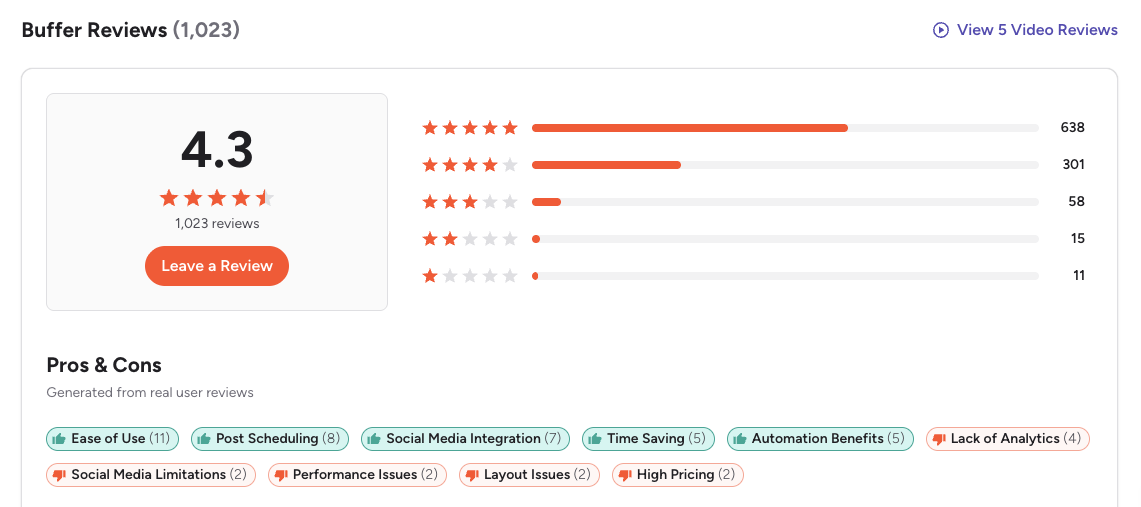
G2: 4.3/5 (1,023 reviews) — Users consistently praise Buffer for being the easiest scheduling tool to learn. The most common positive themes are the clean interface, simple queue-based workflow, and reliable publishing. On the negative side, G2 reviewers frequently mention that analytics feel shallow compared to dedicated analytics platforms -- which is exactly the gap Iconosquare fills. Some users also note that per-channel pricing adds up quickly as you scale.
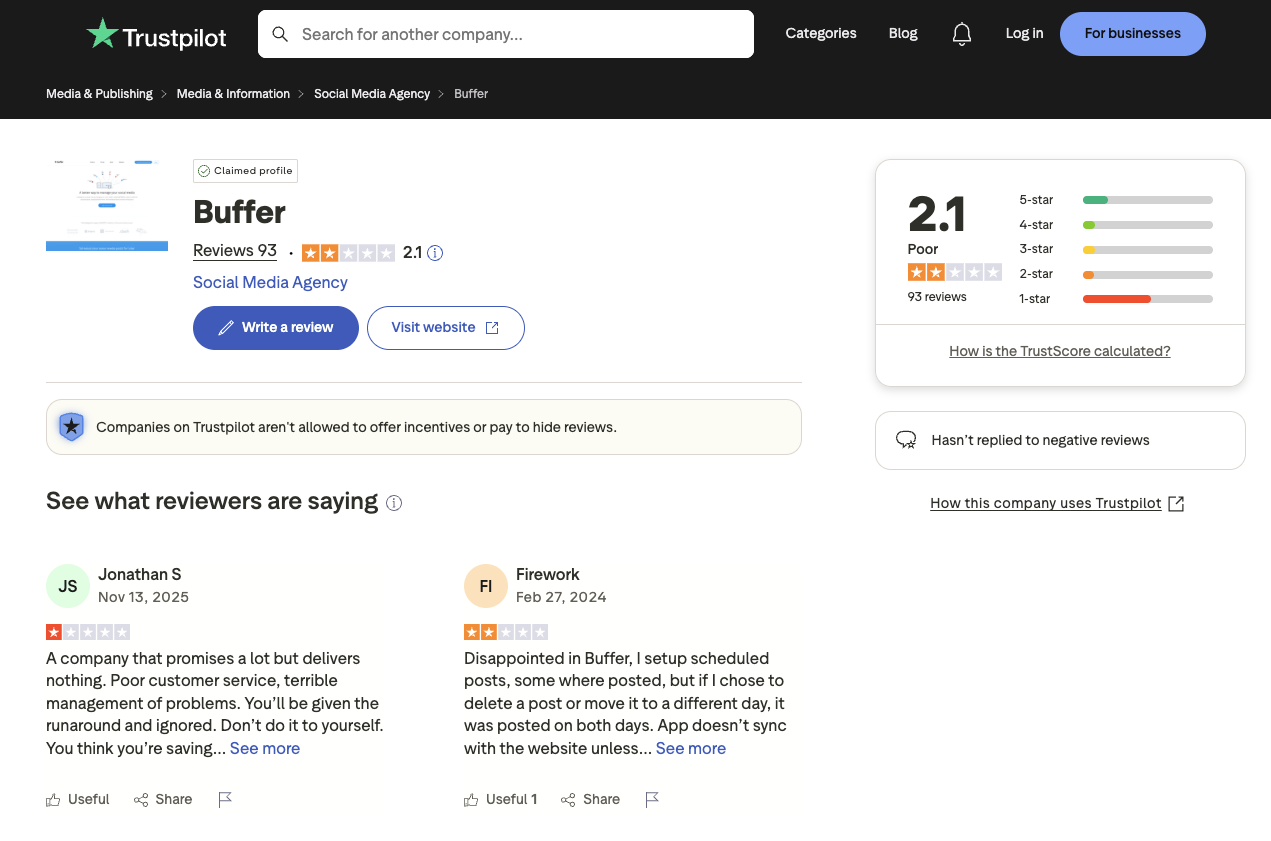
Trustpilot: 2.1/5 (93 reviews) — A notably lower rating, driven by complaints about billing issues, support responsiveness, and scheduled posts failing to publish. The small review count means a few negative experiences heavily skew the average.
Iconosquare Reviews
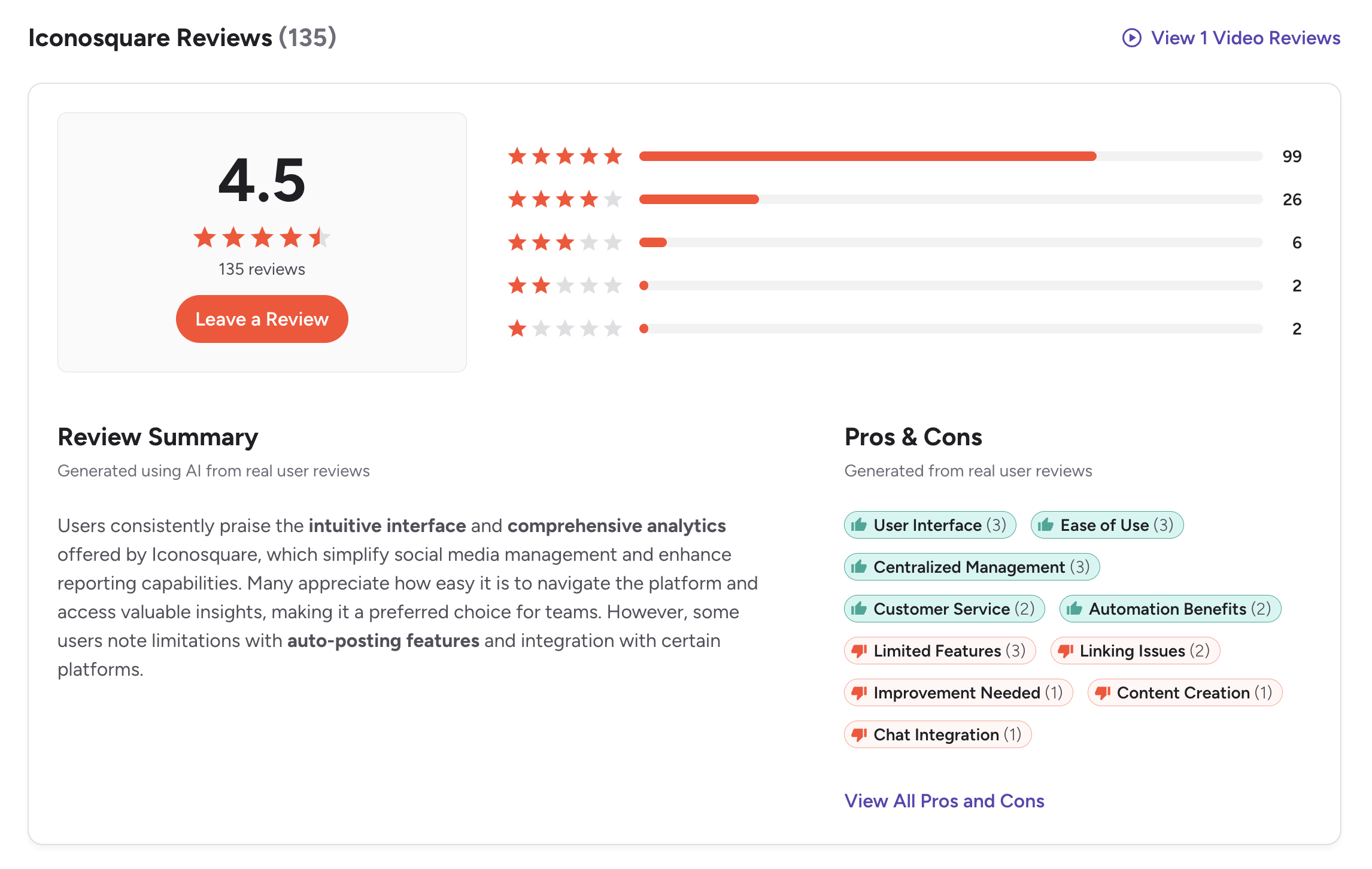
G2: 4.5/5 (135 reviews) — Users praise the analytics depth, competitor tracking, and reporting capabilities. The most common positive themes on G2 include the intuitive interface, centralized management across platforms, and the ease of accessing valuable insights. A featured review from a Social Media Manager highlights how Iconosquare brings together client content in a single platform where text and visuals can be approved and cross-posted. The most common criticism is the pricing model, particularly the cost of additional profiles beyond the base 5 included in each plan. Some users also note limitations with auto-posting features and LinkedIn carousel scheduling.
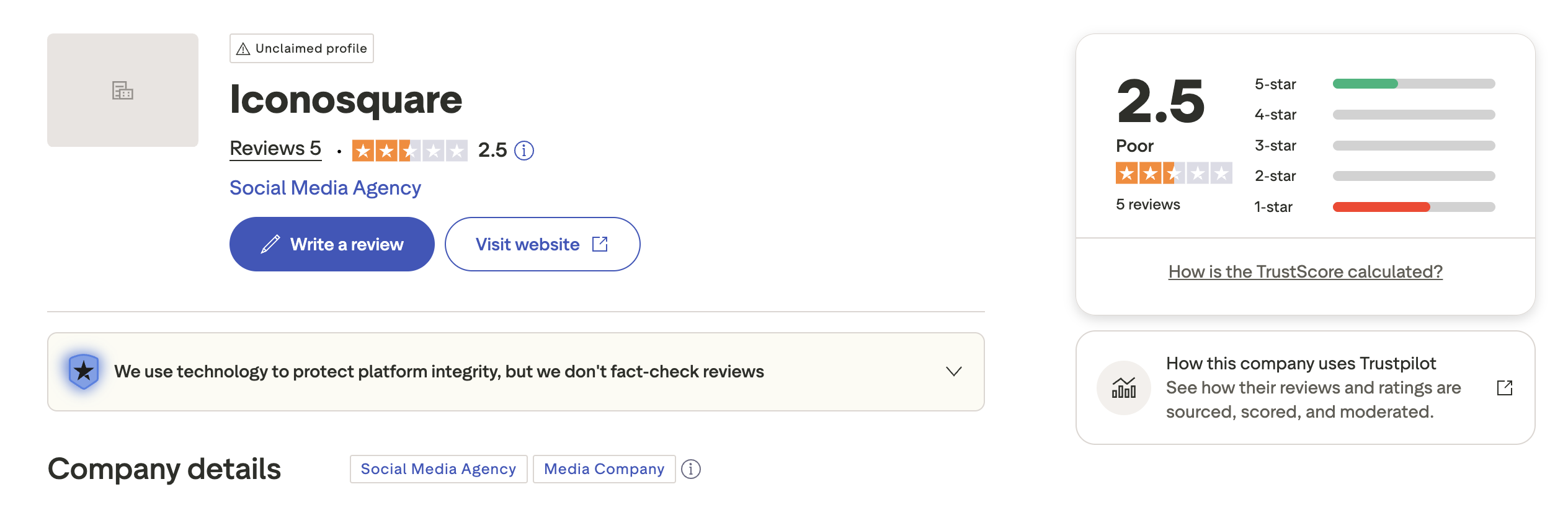
Trustpilot: 2.5/5 (5 reviews) — This sample size is statistically irrelevant and should not factor into your decision. With only 5 reviews and an unclaimed profile, one or two negative experiences dominate the score entirely.
Review Verdict
Both tools have respectable G2 ratings, with Iconosquare slightly ahead at 4.5 versus Buffer's 4.3. The Trustpilot scores are unreliable for both -- Buffer's 93 reviews trend negative due to billing complaints, and Iconosquare's 5 reviews are too few to draw any conclusions. The G2 data is more meaningful: both tools are well-regarded by their respective audiences, with users choosing based on whether they prioritize scheduling ease (Buffer) or analytics depth (Iconosquare).
Review counts are as of February 2026 and are updated periodically. For deeper analysis, see our full Buffer reviews and Iconosquare reviews breakdowns.
PostPlanifyManage All Your Social Accounts Without the Chaos
Schedule posts, track performance, and collaborate with your team.
Who Should Use Buffer?
Buffer works best when you value simplicity and platform breadth over analytics depth. If you manage a personal brand or a growing business across many social networks and just want to queue posts without learning a complex dashboard, Buffer's clean interface gets you publishing in minutes. Its per-channel pricing keeps costs low when you only manage 3-5 accounts, and the free plan is genuinely useful for light publishing. If Buffer interests you but you want to explore options, see our Buffer alternatives guide or compare Buffer vs Zoho Social and Buffer vs Vista Social.
Buffer is the better choice if you:
- Are a creator publishing across many platforms who needs support for 11+ networks including Bluesky and Mastodon
- Want a simple, intuitive scheduling experience without a steep learning curve
- Need AI caption assistance to speed up content creation
- Prefer a free plan or low per-channel pricing to keep costs predictable
- Want a link-in-bio page bundled with your scheduling tool
- Are a high-volume publisher who needs unlimited posting without monthly caps
Who Should Use Iconosquare?
Iconosquare shines when data drives your decisions. If you are an agency that needs to prove ROI to clients with branded reports, a marketing team benchmarking against competitors, or a brand manager who wants to understand exactly what content resonates and why, Iconosquare's analytics-first approach delivers tools that Buffer simply does not have. If Iconosquare interests you but you want to explore options, see our Iconosquare alternatives guide or browse our alternatives directory.
Iconosquare is the better choice if you:
- Are a brand that prioritizes analytics and needs 100+ metrics to drive strategy
- Need competitive intelligence with tracking for up to 10 competitors per profile
- Are an agency that needs branded PDF reports and external collaborator approval links
- Are an Instagram-focused brand that relies on grid preview for visual feed planning
- Need industry benchmarks to contextualize your performance against your vertical
- Make data-driven content decisions rather than scheduling by intuition
- Want 40+ YouTube-specific metrics for deep video performance analysis
Final Verdict: Buffer vs Iconosquare in 2026
So, should you choose Buffer or Iconosquare? These tools target fundamentally different needs. Buffer is built for publishing simplicity across the widest platform coverage in the space. Iconosquare is built for analytics depth that helps you understand what is working and why.
Buffer wins on: platform coverage (11 vs 8), unlimited posting on all paid plans, simpler per-channel pricing, AI content ideas, free plan with 3 channels, and link-in-bio builder.
Iconosquare wins on: analytics depth (100+ metrics), competitor tracking (up to 10 per profile), industry benchmarks, branded PDF reports, external collaborator approval links, Instagram grid preview, and 40+ YouTube-specific metrics.
The gap neither fills: Buffer gives you scheduling breadth without analytics depth. Iconosquare gives you analytics depth without scheduling breadth. Neither offers AI image generation, and both lack a unified social inbox with AI-assisted replies. Teams that want clean scheduling combined with meaningful analytics, AI-powered content creation including image generation, and a social inbox for managing engagement across platforms will find both tools incomplete. That is the gap where tools like PostPlanify fit -- combining intuitive publishing with analytics across 10 platforms, AI tools for captions and images, and a social inbox in one flat-rate plan.
The bottom line: If your primary need is getting content published across many platforms with minimal friction, Buffer delivers. If your primary need is understanding how that content performs with deep analytics and competitive intelligence, Iconosquare delivers. If you need both publishing and insights without juggling two subscriptions, explore our full list of social media management alternatives to find a tool that bridges the gap.
Scheduling Breadth Meets Analytics Depth
Buffer gives you platform breadth without analytics. Iconosquare gives you analytics depth without platform breadth. What if you could get clean scheduling with built-in analytics, AI tools, and no per-profile fees? PostPlanify combines an intuitive publishing workflow with the insights you need -- plus AI image generation that neither Buffer nor Iconosquare offers.

| Feature | Buffer (Essentials) | Iconosquare (Launch) | PostPlanify |
|---|---|---|---|
| Starting Price | $6/mo/channel | $39/mo | $29/mo flat |
| Analytics | Basic | 100+ metrics | Advanced (10 platforms, best time to post) |
| Social Inbox | Basic | No | Yes (AI-assisted replies) |
| AI Caption Generation | Yes | Yes | Yes (vision-powered, unlimited) |
| AI Image Generation | No | No | Yes (7 models) |
| Content Calendar | Yes | Yes | Yes (drag-and-drop, bulk scheduling) |
| Team Collaboration | $12/mo/channel | $83/mo (Scale) | 5 members (Premium), unlimited (Enterprise) |
| Approval Workflows | Team plan | Scale plan | Premium $99/mo (multi-approver) |
| White-Label PDF Reports | No | Yes (Excel $139/mo) | Yes (Premium+ $99/mo) |
| Canva Integration | No | No | Yes |
| Google Drive Import | No | No | Yes |
| Link in Bio | Start Page | No | Yes (8 themes, click analytics) |
| Competitor Tracking | No | Yes (up to 10) | No |
| Platforms Supported | 11 | 8 | 10 |
| Unlimited Scheduling | Paid plans | Scale+ | Growth+ ($49/mo) |
PostPlanify starts at $29/month for 5 social accounts with 200 posts/mo and AI tools included. The Growth plan ($49/month, 10 accounts) adds unlimited scheduled posts, analytics across all 10 platforms, social inbox with AI-assisted replies, best time to post suggestions, 1st comments & threads, and bulk scheduling. The Premium plan ($99/month, 25 accounts) includes white-label PDF reports, multi-approver workflows, 5 team members, shared calendars, and roles & permissions. The Enterprise plan (custom pricing) adds custom social accounts, unlimited team members, and 1:1 onboarding. See all plans on the PostPlanify pricing page.
Try PostPlanify free for 7 days

Making the Switch
Switching from Buffer to Iconosquare (or vice versa) is straightforward -- reconnect your social accounts, set up your posting schedule, and you are live. Neither tool locks you in with long-term contracts, and both offer monthly billing. The main consideration when switching from Buffer to Iconosquare is the narrower platform coverage: you will lose support for Mastodon, Bluesky, and Google Business. When switching from Iconosquare to Buffer, you will gain platform breadth but lose the analytics depth, competitor tracking, and branded reports. If you are moving to PostPlanify, the process is the same: connect your accounts, import your content calendar, and start scheduling. PostPlanify's 7-day free trial lets you test the full platform before committing.
Related Guides
- PostPlanify Pricing Breakdown
- Buffer Pricing Guide
- Iconosquare Pricing Guide
- Buffer Reviews
- Iconosquare Reviews
- Best Buffer Alternatives
- Best Iconosquare Alternatives
- Best Social Media Management Platform
- Social Media Scheduling Tools
- Social Media Analytics for Business
- How to Measure Social Media ROI
- Manage Multiple Social Media Accounts
- Content Batching Guide
PostPlanifyManage All Your Social Accounts Without the Chaos
Schedule posts, track performance, and collaborate with your team.
FAQ
Is Buffer or Iconosquare better for Instagram?
For scheduling Instagram content, both work well. For understanding Instagram performance, Iconosquare is significantly better. Its 100+ metrics, Stories analytics, competitor tracking, and grid preview make it the stronger choice for brands where Instagram is the primary channel. Buffer's advantage is that it handles Instagram alongside 10 other platforms from the same dashboard.
Can Iconosquare replace Buffer for scheduling?
Partially. Iconosquare has scheduling features, but the Launch plan's 100 post/month cap is a real constraint for active publishers. You also lose support for Mastodon, Bluesky, and Google Business. If you schedule heavily across many platforms, Iconosquare alone may not be sufficient. Some teams use both -- Buffer for scheduling and Iconosquare for analytics -- though that doubles the cost.
Which tool is better for agencies?
Iconosquare's branded PDF reports, external collaborator approval links, and competitor tracking make it more agency-friendly for client-facing work. Buffer is simpler to manage but lacks the reporting depth agencies typically need to justify their services. For large-scale agency needs, you might also want to look at Buffer vs Vista Social, as Vista Social offers more agency-oriented features.
Does Buffer or Iconosquare offer AI image generation?
Neither tool offers AI image generation. Buffer provides AI caption generation through its AI Assistant, and Iconosquare now offers AI-powered caption generation and hashtag suggestions on paid plans. If AI-generated images are part of your workflow, PostPlanify includes 7 AI image generation models on all plans.
How do the free plans compare?
Buffer offers a functional free plan with 3 channels and basic scheduling. Iconosquare offers a Free plan with 2 profiles and 10 posts per profile per month, which is enough to test the platform but impractical for active social media management. If you need a no-cost option for real publishing, Buffer is the stronger choice. Iconosquare also provides a 14-day trial on all paid plans.
Which tool provides better competitor analysis?
Iconosquare is the clear winner here. Its competitor tracking feature lets you monitor up to 10 competitors per profile, compare growth rates, and benchmark engagement against industry averages. Buffer has no competitor analysis features. This is one of Iconosquare's core differentiators and a primary reason teams choose it over scheduling-focused tools.
Can I use both Buffer and Iconosquare together?
Yes, and some teams do. The combination of Buffer for scheduling across 11 platforms and Iconosquare for deep analytics on your core channels can work well, though you are paying for two tools. Before committing to that approach, consider whether a single platform that combines scheduling and analytics -- like PostPlanify -- could meet your needs at a lower total cost.
Is Iconosquare's limited platform support a dealbreaker?
It depends entirely on where your audience is. If you primarily publish to Instagram, Facebook, X, LinkedIn, Pinterest, TikTok, YouTube, and Threads, Iconosquare covers your needs. If Mastodon, Bluesky, or Google Business are important to your strategy, you will need a different tool for those platforms. The 8-platform limitation is intentional -- Iconosquare trades breadth for depth.
What if I need both simple scheduling and deep analytics?
That is the core trade-off in this comparison -- Buffer excels at scheduling simplicity, Iconosquare excels at analytics depth, but neither combines both strengths. PostPlanify bridges that gap with an intuitive content calendar, analytics across 10 platforms with best time to post suggestions, AI-powered content creation including image generation, and a social inbox for managing engagement. Plans start at $29/month with flat pricing. Browse our full list of social media management alternatives to compare all your options side by side.







