


If you've ever posted a vertical video only to watch your main text disappear behind a caption box, profile icon, or engagement button, you know the frustration of "blind posting." In 2026, platform UI updates have made vertical video safe zones more critical than ever—and more complex.
This is the complete technical guide to social media safe zones (also called the content safe area) across TikTok, Instagram Reels, Stories, and YouTube Shorts. You'll learn the exact TikTok video dimensions, Reels dimensions 2026, device-specific variations, and how to use our free checker tools to preview your content before it goes live.
Quick Answer: 2026 Safe Zone Dimensions
All platforms use a 1080×1920 pixel canvas, but the actual visible area is smaller:
| Platform | Safe Zone | What It Avoids |
|---|---|---|
| TikTok | 900×1492 px | Captions, profile icon, like/comment/share buttons |
| Instagram Reels | 996×1400 px | Caption bar, audio label, engagement buttons |
| Instagram Stories | 1080×1620 px | Profile bar, reply field |
| YouTube Shorts | 984×1500 px | Subscribe button, channel name, description |
Universal safe zone (works on every platform): 900×1400 pixels, centered.
What Are Social Media Safe Zones?
A safe zone (also called the "action-safe area") is the central region of your vertical video where important content—text overlays, faces, logos, CTAs—remains fully visible without being covered by platform UI elements like:
- Profile pictures and usernames
- Engagement buttons (like, comment, share)
- Auto-generated captions
- Sound attribution
- Ad CTAs (for sponsored content)
While most platforms recommend a 9:16 aspect ratio (1080×1920 pixels), the visible area is significantly smaller depending on device type, caption length, and whether your content is organic or paid.
Posting without checking your safe zone is like designing a billboard and hoping the important parts aren't hidden behind a tree. In 2026, with AI-generated captions, dynamic ad placements, and device notches, the "dead zones" are larger and more unpredictable than ever.
TikTok Safe Zones 2026: The "Dead Zone" Blueprint

Standard TikTok Dimensions
- Recommended Upload Size: 1080×1920 pixels (9:16 aspect ratio)
- Safe Zone (Central Area): 900×1492 pixels
- Top Dead Zone: 108 pixels (profile picture, "Follow" button)
- Bottom Dead Zone: 320 pixels (captions, engagement buttons, sound)
- Left Dead Zone: 60 pixels (edge margin)
- Right Dead Zone: 120 pixels (like, comment, share stack)
Why TikTok's Safe Zone Is the Trickiest
TikTok's interface in 2026 has three major UI hazards:
- Dynamic Caption Height: A one-line caption takes up 80 pixels at the bottom. A three-line caption (with hashtags) can consume 250+ pixels. Your safe zone shrinks depending on how much text you write.
- Sponsored Content CTAs: TikTok Ads include a "Shop Now" or "Learn More" button that adds an extra 50 pixels of dead space at the bottom (370px total). If you're running paid campaigns, design for a 900×1442 safe zone instead.
- Notch and Pill Variations: On iPhone 14 Pro and newer (with Dynamic Island), the top safe zone shrinks by an additional 40 pixels. On older Android devices with standard notches, you lose 30 pixels.
TikTok Safe Zone Best Practices
- Keep faces, logos, and text centered horizontally between pixels 60 and 960, and vertically between pixels 108 and 1600
- Avoid placing CTAs in the bottom 320 pixels (370px for ads)
- Test on both notched and non-notched devices
- For ads, design assuming a 900×1442 safe zone (50px less vertical space)
👉 Use our free TikTok Safe Zone Checker to preview your video with real TikTok UI overlays before posting.
Related: How to Schedule TikTok Posts in 2025 | Best Time to Post on TikTok
Instagram Reels & Stories Safe Zones 2026
Instagram has two distinct safe zone configurations depending on whether your content appears as a Reel or a Story. In 2026, the UI differences are more pronounced than ever.
Instagram Reels Safe Zone
- Recommended Upload Size: 1080×1920 pixels
- Safe Zone (Central Area): 996×1400 pixels
- Top Dead Zone: 210 pixels (profile picture, "Follow" button, three-dot menu)
- Bottom Dead Zone: 310 pixels (caption, audio, engagement buttons)
- Right Dead Zone: 84 pixels (affects edge text and buttons)
Instagram Reels in 2026 have a particularly aggressive bottom UI, especially when:
- Captions are enabled (auto-generated or custom)
- Audio attribution is long (trending sounds with long names)
- You include location tags or product tags
- The Reel has a "View Products" or "Learn More" CTA
For Reels designed for both feed and Explore page, design for the smallest common safe zone: 996×1400 pixels centered. The Instagram Reels algorithm actively penalizes low-quality content, so getting your dimensions right isn't just aesthetic — it directly affects reach.
Instagram Stories Safe Zone
- Recommended Upload Size: 1080×1920 pixels
- Safe Zone (Central Area): 1080×1620 pixels
- Top Dead Zone: 100 pixels (profile picture, time, close button)
- Bottom Dead Zone: 200 pixels (reply bar, share button)
Stories have more breathing room than Reels, but the top and bottom are still restricted. For scheduling Story content in advance, see our guide on how to schedule Instagram Stories. In 2026, Instagram has added "Add to Story" stickers that can appear dynamically, so leave at least 300 pixels of margin on all edges for interactive elements.
Instagram Safe Zone Best Practices
- Design Reels with text horizontally between pixels 0 and 996, vertically between pixels 210 and 1610
- For Stories, keep text and faces vertically between pixels 100 and 1720 (full width available)
- Test with long audio names (they take up more bottom space)
- Preview on both iOS and Android (Android bottom nav bar adds 48 pixels)
- Avoid placing CTAs in the bottom 310 pixels for Reels
 PostPlanify
All your social media in one simple dashboard
Schedule posts, track analytics, and reply to comments/DMs without switching tabs.

Engagement
+18%
Views
52.8k
👉 Use our free Instagram Safe Zone Checker to preview Reels and Stories with accurate 2026 UI overlays.
Related: How to Schedule Instagram Reels | Instagram Image Size Guide | Best Time to Post on Instagram | Instagram Post vs Story vs Reel | How to Post a Long Video on Instagram
YouTube Shorts Safe Zones 2026
YouTube Shorts has the cleanest UI of the three major platforms, but it still has critical dead zones that change based on viewing context.
Standard YouTube Shorts Dimensions
- Recommended Upload Size: 1080×1920 pixels (9:16 aspect ratio)
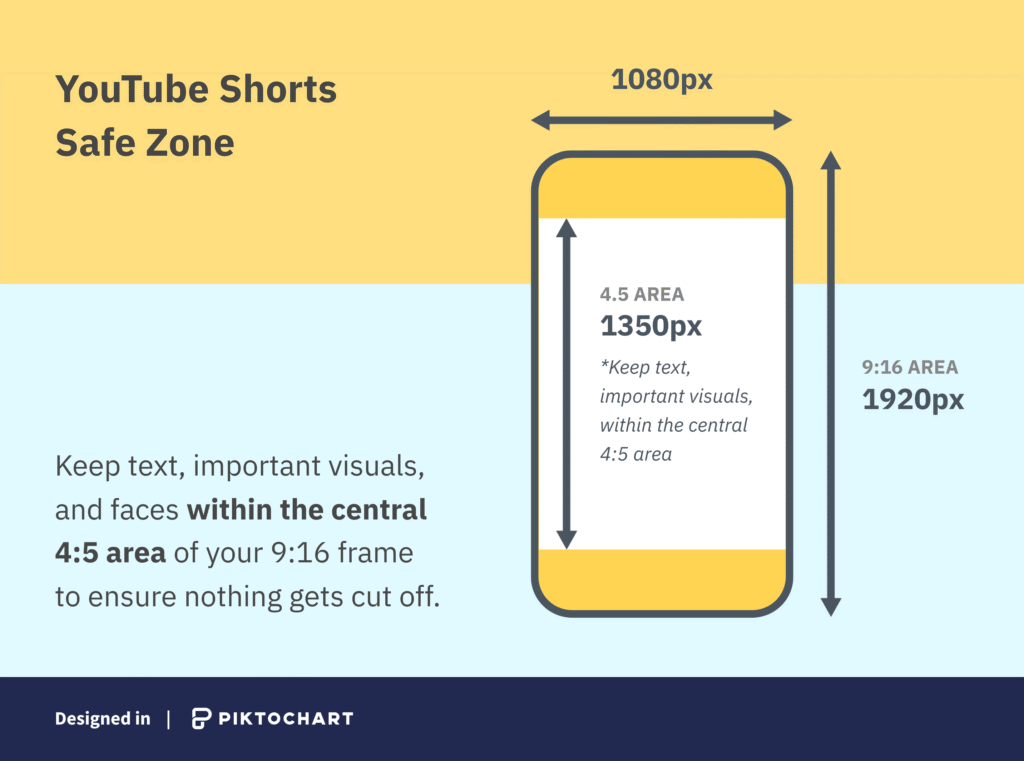
- Safe Zone (Central Area): 984×1500 pixels
- Top Dead Zone: 120 pixels (minimal, but grows on devices with notches)
- Bottom Dead Zone: 300 pixels (channel name, subscribe button, audio, description)
- Right Dead Zone: 96 pixels (engagement buttons)
Why YouTube Shorts Safe Zones Are Simpler (But Not Simple)
YouTube Shorts in 2026 has two major UI modes:
- Swipe Mode (Full-Screen): The UI is minimal except for the bottom 300 pixels. This is the default viewing experience.
- Expanded Mode (Description Open): When a viewer taps the description, the bottom dead zone expands to 360 pixels. If your CTA is at pixel 1560, it will be hidden when someone opens the description to read more.
YouTube's subscribe button is also larger and more prominent in 2026, sitting at the bottom-left corner and consuming roughly 180×80 pixels. If you place a logo in the bottom-left corner, it will be partially covered.
YouTube Shorts Safe Zone Best Practices
- Keep all critical text and faces horizontally between pixels 0 and 984, vertically between pixels 120 and 1620
- Avoid the bottom-left corner (subscribe button overlap)
- Design assuming the description will be expanded (360px bottom margin for expanded mode)
- Test on iPhone notched devices (Dynamic Island adds 40px top dead zone)
- For landscape content cropped to 9:16, ensure faces are centered vertically
👉 Use our free YouTube Shorts Safe Zone Checker to preview your Short with accurate bottom UI and subscribe button overlays.
Related: How to Schedule YouTube Shorts | Best Time to Upload a YouTube Video
Facebook Reels Safe Zones 2026
Facebook Reels is often overlooked, but it's a growing format — especially for creators who already post Instagram Reels and want to maximize reach with the same content.
Standard Facebook Reels Dimensions
- Recommended Upload Size: 1080×1920 pixels (9:16 aspect ratio)
- Safe Zone (Central Area): 1080×1520 pixels
- Top Dead Zone: 100 pixels (back button, search icon)
- Bottom Dead Zone: 300 pixels (profile name, caption, share/comment/like buttons)
How Facebook Reels Differ from Instagram Reels
Facebook Reels have a simpler UI than Instagram Reels — fewer buttons on the right side and no audio attribution bar. However, the bottom dead zone is nearly identical (300px vs 310px) because Facebook displays the creator name, caption, and engagement buttons in the same area.
| Spec | Instagram Reels | Facebook Reels |
|---|---|---|
| Safe zone | 996×1400 px | 1080×1520 px |
| Bottom dead zone | 310 px | 300 px |
| Right dead zone | 84 px | 60 px |
| Top dead zone | 210 px | 100 px |
| Overall | Tighter safe zone | More breathing room |
If you're cross-posting Reels from Instagram to Facebook, the good news is that content designed for Instagram's tighter safe zone (996×1400px) will look fine on Facebook — you'll just have extra margin. For a full walkthrough on Facebook Reels, see our guide on how to post Reels on Facebook.
Design Once, Publish Everywhere: Cross-Platform Safe Zone Workflow
If you're posting the same vertical video to TikTok, Instagram Reels, YouTube Shorts, and Facebook Reels, here's the most efficient workflow to ensure safe zones are covered on every platform.
The Universal Safe Zone Approach
Instead of designing four separate versions, design for the smallest common safe zone: 900×1400 pixels, centered in a 1080×1920 frame. This leaves enough margin on every platform:
| Margin | Pixels Reserved | What It Covers |
|---|---|---|
| Top | 260 px | TikTok profile (108px), Instagram Reels profile (210px), YouTube (120px) — 260px covers all |
| Bottom | 320 px | TikTok captions (320px) is the largest — covers Instagram (310px), YouTube (300px), Facebook (300px) |
| Left | 90 px | TikTok left margin (60px) + extra buffer |
| Right | 90 px | TikTok right buttons (120px partially, Instagram 84px, YouTube 96px) |
Step-by-Step Workflow
- Create your video at 1080×1920 — this is your export canvas
- Place all critical content (text, faces, logos, CTAs) within 900×1400 pixels centered — that means between x:90 and x:990 horizontally, and y:260 and y:1660 vertically
- Use a safe zone overlay while editing — download one from our free checker tools and layer it in CapCut, Premiere Pro, or DaVinci Resolve
- Export once at 1080×1920, H.264, 30fps
- Upload the same file to all platforms — or use a scheduling tool to publish to TikTok, Instagram, YouTube, and Facebook from one dashboard
- Preview on each platform using our safe zone checkers before the post goes live
This workflow saves hours compared to designing separate versions for each platform. The trade-off is a slightly smaller content area — but for 90% of vertical video content, the 900×1400 safe zone provides more than enough space.
PostPlanifyAll your social media in one simple dashboard
Schedule posts, track analytics, and reply to comments/DMs without switching tabs.
Engagement
+18%
Views
52.8k
The Master Safe Zone Specs Table (2026)
This table provides pixel-perfect technical specifications for every major platform. Bookmark this for quick reference.
| Platform | Recommended Size | 2026 Safe Zone (Central Area) | UI Hazards to Avoid |
|---|---|---|---|
| TikTok | 1080×1920 px | 900×1492 px | Bottom 320px (captions), Right 120px (icons), Top 108px (profile), Left 60px (margin) |
| Instagram Reels | 1080×1920 px | 996×1400 px | Top 210px (profile), Bottom 310px (caption/audio), Right 84px (buttons) |
| Instagram Stories | 1080×1920 px | 1080×1620 px | Top 100px (profile), Bottom 200px (reply bar) |
| YouTube Shorts | 1080×1920 px | 984×1500 px | Bottom 300px (channel/subscribe), Right 96px (buttons), Top 120px (minimal) |
| Facebook Reels | 1080×1920 px | 1080×1520 px | Bottom 300px (profile/share), Top 100px (back button) |
| LinkedIn Video | 1080×1920 px | 1010×1720 px | Top 100px (profile), Bottom 100px (engagement) |
| Pinterest Idea Pins | 1080×1920 px | 1000×1700 px | Bottom 220px (save button), Top 100px (profile) |
Note: These are conservative estimates based on the smallest common safe zone across devices. Some newer devices (iPhone 16 Pro Max, Samsung Galaxy S24 Ultra) may have slightly larger safe zones, but designing for the smallest ensures universal compatibility.
Why "9:16" Is Not Enough: The Deep Dive
Most blog posts and YouTube tutorials tell you to "just use 1080×1920 and you're good." That's technically correct for the upload resolution, but the visible area is never 1080×1920. Here's why.
1. Device Aspect Ratio Variations
While 9:16 is the standard, actual device screens vary:
- iPhone 16 Pro Max: 19.5:9 aspect ratio (taller than 9:16)
- Samsung Galaxy S24 Ultra: 20:9 aspect ratio (even taller)
- iPhone SE (3rd Gen): 16:9 aspect ratio (wider, not taller)
- Older Android Devices: Exact 9:16 (1080×1920)
When you upload a 1080×1920 video to TikTok and view it on an iPhone 16 Pro Max, the platform letterboxes your content (adds black bars) or center-crops it depending on how you exported. Either way, the visible frame changes.
Solution: Always design for the smallest safe zone (900×1400px for TikTok Reels, 984×1400px for YouTube/Instagram), and let platforms handle cropping. Never place critical content outside this zone. If you're cross-posting the same video across platforms, this universal zone is your baseline.
2. Organic vs. Paid Content UI Differences
Sponsored content has different UI overlays than organic posts:
- TikTok Ads: Add a "Shop Now" or "Learn More" button at the bottom, consuming an extra 50 pixels (370px total bottom margin)
- Instagram Sponsored Reels: Include a "Sponsored" label and "Learn More" button, reducing safe zone by 80 pixels
- YouTube Shorts Ads: Display a "Skip Ad" or "Visit Site" button at the bottom
If you're running paid campaigns, you need to design for an even narrower safe zone than organic content. Most brands make the mistake of designing once and using the same asset for both—resulting in CTAs being covered in ads.
Solution: Create two versions of your video — or design for the stricter paid dimensions from the start. Our content repurposing guide covers how to efficiently adapt one video for multiple platforms and placements.
| Platform | Organic Safe Zone | Paid/Ad Safe Zone | Extra Dead Space from Ads |
|---|---|---|---|
| TikTok | 900×1492 px | 900×1442 px | +50px bottom (CTA button) |
| Instagram Reels | 996×1400 px | 996×1320 px | +80px bottom (Sponsored label + CTA) |
| YouTube Shorts | 984×1500 px | 984×1440 px | +60px bottom (Visit Site button) |
3. Caption Length Affects Visible Area
In 2026, AI-generated captions are enabled by default on TikTok, Instagram Reels, and YouTube Shorts. The caption height varies based on:
- Caption Length: A 10-word caption takes 80 pixels; a 40-word caption takes 250 pixels
- Font Size: Users can increase caption size in accessibility settings (up to 150% larger)
- Language: Languages with longer words (German, Finnish) create taller caption boxes
- Hashtags: Instagram captions with 5+ hashtags push the caption box higher
Solution: When designing text overlays, assume captions will be tall (250-300 pixels). Preview your content with long captions enabled using our safe zone checkers.
4. The Notch, the Pill, and the Punch-Hole
In 2026, phone screens have three types of top obstructions:
- Notch (iPhone X to iPhone 13): 30-40 pixels of top dead space
- Dynamic Island (iPhone 14 Pro and newer): 40-50 pixels, plus it expands when active
- Punch-Hole (Most Android Devices): 20-30 pixels, usually off-center
Platforms handle these obstructions by shifting content down slightly, which means your top margin effectively shrinks by 30-50 pixels depending on the device.
Solution: Add an extra 50 pixels of padding to the top of your safe zone. Instead of designing for pixel 180, design for pixel 230 to account for notch variations.
5. Platform Updates Change UI Layouts
Every year, TikTok, Instagram, and YouTube each roll out multiple UI updates that shift safe zone boundaries. Recent examples:
- TikTok (January 2026): Added "Add to Playlist" button at the bottom-right, expanding the right dead zone by 20 pixels
- Instagram Reels (Late 2025): Enlarged the audio attribution bar, increasing the bottom dead zone by ~50 pixels
- YouTube Shorts (Late 2025): Made the subscribe button 30% larger, expanding the bottom-left dead zone
These updates mean safe zones are moving targets. What worked last year may not work today.
Solution: Use our regularly updated safe zone checker tools (updated monthly with the latest platform UIs) instead of relying on static templates or outdated guides.
Free Safe Zone Checker Tools (Updated for 2026)
We've built three free tools to help you preview your vertical videos with real platform UI overlays:
TikTok Safe Zone Checker
Upload your 1080×1920 video and preview it with TikTok's 2026 UI—profile picture, engagement buttons, captions, and sound attribution. Test with different caption lengths and device types.
Use TikTok Safe Zone Checker →
Instagram Safe Zone Checker
Preview your content as both a Reel and a Story. See how Instagram's bottom caption bar, audio attribution, and engagement buttons cover your video. Test with long audio names and hashtags.
Use Instagram Safe Zone Checker →
YouTube Shorts Safe Zone Checker
Preview your Short with YouTube's 2026 UI including the subscribe button, channel name, and description. Test with the description expanded to see how the bottom dead zone grows.
Use YouTube Shorts Safe Zone Checker →
All three tools are free, no sign-up required, and updated monthly with the latest platform UI changes.
Free Safe Zone Overlay Templates
Prefer working in your own editor? Each checker tool page includes a downloadable PNG overlay at 1080×1920 pixels that you can drag into Premiere Pro, DaVinci Resolve, CapCut, Canva, or any editor that supports layers. Place the overlay on top of your video timeline to check safe zones frame-by-frame during editing — before you ever upload.
Scheduling your content after checking safe zones? See our guides on scheduling Instagram Reels vs TikTok videos for platform-specific best practices.
Safe Zone Design Checklist for 2026
Use this checklist before posting any vertical video to TikTok, Instagram, or YouTube:
- Canvas size: 1080×1920 pixels (9:16 aspect ratio)
- TikTok: Text/faces horizontally between 60–960px, vertically between 108–1600px
- Instagram Reels: Text/faces horizontally between 0–996px, vertically between 210–1610px
- YouTube Shorts: Text/faces horizontally between 0–984px, vertically between 120–1620px
- Bottom margin clear: No CTAs or logos in the bottom 320px (TikTok), 310px (Instagram Reels), or 300px (YouTube Shorts)
- Caption test: Previewed with a long caption (30+ words) to check for overlap
- Device test: Previewed on both iOS and Android
- Ad-safe: If running ads, designed for 900×1442px safe zone (TikTok Ads)
- Final check: Previewed with one of our free safe zone checker tools
PostPlanifyAll your social media in one simple dashboard
Schedule posts, track analytics, and reply to comments/DMs without switching tabs.
Engagement
+18%
Views
52.8k
Frequently Asked Questions
What is the safe zone for TikTok in 2026?
The TikTok safe zone in 2026 is 900×1492 pixels centered in a 1080×1920 frame. This central area avoids the profile UI at the top (108px), captions at the bottom (320px), left margin (60px), and engagement buttons on the right (120px). For TikTok Ads, use a 900×1442 safe zone to account for CTA buttons (370px bottom margin).
What is the safe zone for Instagram Reels vs Stories?
Instagram Reels have a safe zone of 996×1400 pixels due to the bottom caption and audio UI (310px) and right-side buttons (84px). Instagram Stories have a larger safe zone of 1080×1620 pixels with less UI overhead—only 100px top and 200px bottom margins, with full horizontal width available.
Why does my text get covered on some devices but not others?
Phone screens have different aspect ratios (19.5:9, 20:9, 16:9) and top obstructions (notches, Dynamic Island, punch-holes). Platforms center-crop or letterbox your video to fit each device, which shifts the visible area. Designing for the smallest common safe zone ensures compatibility across all devices.
How much space should I leave for captions at the bottom?
For TikTok and Instagram Reels, leave at least 300-350 pixels at the bottom to account for captions, especially if using AI-generated captions or long hashtags. For YouTube Shorts, leave 300 pixels for the channel name and subscribe button.
Do safe zones change between organic and paid content?
Yes. Sponsored content includes additional CTAs like "Shop Now" or "Learn More" buttons that consume extra pixels at the bottom. If running paid campaigns, design for a narrower safe zone: TikTok Ads use 900×1442px (370px bottom margin instead of 320px), while Instagram Sponsored Reels reduce the safe zone by approximately 80 pixels.
What happens if I upload 4:5 or 1:1 content to TikTok?
TikTok and Instagram will letterbox your content (add black bars on top and bottom) to fit the 9:16 feed. This reduces your visible area and makes your content less immersive. Always export vertical content as 9:16 for TikTok, Reels, and Shorts.
Can I use the same video asset for TikTok, Instagram, and YouTube?
Yes, but preview on each platform first using our safe zone checkers. While all three use 9:16, their UI dead zones differ. TikTok has a 900×1492px safe zone with left/right margins, Instagram Reels has 996×1400px with right-side buttons, and YouTube Shorts has 984×1500px with a prominent subscribe button. Design for the smallest common area (900×1400px) to ensure universal compatibility.
How often do safe zone specifications change?
Major platforms update their UI 3-5 times per year. In 2026, TikTok, Instagram, and YouTube have each introduced new buttons, moved engagement icons, and changed caption layouts. We update our safe zone checker tools monthly to reflect the latest UI changes.
What is the universal safe zone that works on all platforms?
The smallest common safe zone across TikTok, Instagram Reels, and YouTube Shorts is 900×1400 pixels, centered in a 1080×1920 frame. If you design all text, faces, logos, and CTAs within this area, your content will be visible on every major short-form video platform without any element being covered by UI overlays. This is the safest approach for creators who cross-post the same video everywhere.
How do I add a safe zone overlay in CapCut or Premiere Pro?
Download a safe zone overlay PNG (transparent background with marked dead zones) from any of our free checker tool pages. In CapCut, import the PNG as a new layer above your video and reduce its opacity to 50%. In Premiere Pro, place the PNG on a track above your video, set the blend mode to Multiply or reduce opacity, and use it as a visual guide while editing. Delete the overlay layer before exporting.
What is the TikTok safe zone in pixels?
The TikTok safe zone is 900×1492 pixels centered in a 1080×1920 frame. This means keeping all critical content (text, faces, logos) at least 60 pixels from the left edge, 120 pixels from the right edge, 108 pixels from the top, and 320 pixels from the bottom. For TikTok Ads, use a tighter 900×1442 pixel safe zone to account for the CTA button at the bottom.
Do I need different videos for TikTok and Instagram Reels?
Not necessarily. If you design for the universal safe zone of 900×1400 pixels (centered in a 1080×1920 frame), the same video file works on both platforms without any content being hidden. TikTok's safe zone (900×1492px) is slightly taller but narrower than Instagram's (996×1400px), so the 900×1400 overlap covers both. The only reason to create separate versions is if you want to maximize the visible area on each platform individually, or if you're using platform-specific features like TikTok's green screen effect or Instagram's Reels templates.
What is the best resolution for vertical video in 2026?
Export at 1080×1920 pixels (9:16 aspect ratio) for all platforms. This is the standard accepted by TikTok, Instagram Reels, YouTube Shorts, and Facebook Reels. Uploading at higher resolutions (like 4K 2160×3840) forces platforms to downscale, which adds an extra compression step and can reduce quality. Uploading below 1080×1920 results in visible pixelation on modern phone screens. For codec settings, use H.264 at 30fps with 10–12 Mbps bitrate for the best quality-to-compression ratio.
Do safe zones apply to Instagram carousel posts and feed videos?
Safe zones primarily apply to full-screen vertical formats — Reels, Stories, TikTok, and YouTube Shorts. Standard Instagram feed posts (1:1 square or 4:5 portrait) don't have the same UI overlay problem because they display in a contained card with captions below the image, not on top of it. However, if a feed video opens in full-screen Reels view (which Instagram increasingly does), the Reels safe zone of 996×1400px applies. For a full breakdown of Instagram formats, see our guide on Instagram post vs Story vs Reel.
Key Takeaways
- Upload at 1080×1920, but design for the smallest safe zone (900×1400px works across TikTok, Instagram Reels, and YouTube Shorts)
- TikTok: 900×1492px (organic) or 900×1442px (ads)
- Instagram Reels: 996×1400px, Stories: 1080×1620px
- YouTube Shorts: 984×1500px (normal) or 984×1560px (expanded description)
- Test with captions enabled — AI-generated captions consume 250-350 pixels at the bottom
- Preview on notched and non-notched devices — top margins vary by 30-50 pixels depending on Dynamic Island, notch, or punch-hole
- Paid content needs tighter safe zones — ad CTAs add 50-80 extra pixels of dead space at the bottom
- Check regularly — platforms update UI multiple times per year, shifting safe zone boundaries
- Use our free safe zone checker tools before every post
Making the Switch
Getting your safe zones right is only half the battle — you also need to get your content out on time, every time. PostPlanify lets you schedule posts to TikTok, Instagram, YouTube, Facebook, LinkedIn, and more from one dashboard, with visual post previews so you can catch safe zone issues before publishing. Plans start at $29/month for up to 5 social accounts.
Related Reading
- How to Schedule Instagram Reels
- How to Schedule Instagram Stories
- How to Schedule TikTok Posts in 2025
- How to Schedule YouTube Shorts in 2025
- Instagram Image Size Guide
- Instagram Post vs Story vs Reel
- Instagram Reels Algorithm Guide
- How to Post Reels on Facebook
- How to Post a Long Video on Instagram
- Scheduling Instagram Reels vs TikTok Videos
- Content Repurposing Strategies
- Social Media Cross-Posting
PostPlanifyAll your social media in one simple dashboard
Schedule posts, track analytics, and reply to comments/DMs without switching tabs.
Engagement
+18%
Views
52.8k
About the Author

Hasan Cagli
Founder of PostPlanify, a content and social media scheduling platform. He focuses on building systems that help businesses, agencies, and teams plan, publish, and manage content and social media more efficiently across platforms.


