


You created a great TikTok video, spent an hour editing it, and found the perfect trending audio. You hit "post," expecting a flood of views, but get... nothing. This is a common problem, and it's usually not about your content quality.
The best time to post on TikTok is the evening: PostPlanify's analysis of 12,000+ videos found both engagement and views peak around 6 PM Eastern — videos posted at 6 PM averaged 4.7× the views of a typical post. The 5–10 PM block is consistently strongest, Monday and Thursday are the best days, and early afternoon (12–3 PM) is the weakest window.
Posting your video at the wrong time means your audience isn't there to see it. Getting that timing right is often the difference between a video that flops and one that goes viral.
We Analyzed 12,000+ TikToks: What the Data Says
Instead of recycling generic timing charts, we ran the numbers on our own data. PostPlanify analyzed 12,000+ TikTok videos published through our platform since 2019, measuring both engagement rate (interactions ÷ views) and raw view counts by the exact day and hour each video went live, in US Eastern time.
On TikTok, the evening wins decisively — and 6 PM is the standout. Because TikTok is a discovery engine, views matter as much as engagement rate, and both point the same way: videos posted at 6 PM Eastern earned 4.7× the views of the daily average and the highest engagement rate (+67%).
Best times to post on TikTok, by hour
| Time (ET) | Median engagement vs. daily average |
|---|---|
| 6:00 PM | +67% (best) |
| 9:00 PM | +61% |
| 10:00 PM | +53% |
| 8:00 PM | +52% |
| 5:00 PM | +47% |
By raw views — what TikTok's algorithm rewards most — the evening edge is even bigger: 6 PM (+366%), 4 PM (+315%), and 5 PM (+259%) pull far more views than the daily average. The weakest stretch is early afternoon (12–3 PM) and pre-dawn (5–7 AM).
Best days to post on TikTok
Day matters less than hour on TikTok, but Monday (+7%) and Thursday (+5%) edge out the week; Saturday (−7%) and Wednesday (−5%) are the weakest.
An honest caveat (and a useful one): a few overnight slots — like 4 AM — appear to have sky-high engagement rates. Don't be fooled. That's a mirage caused by tiny view counts (a few die-hard fans engaging with a video almost no one saw). For real reach, the evening is unambiguously better: it's where engagement rate and views both peak.
Methodology: 12,000+ TikTok videos (views ≥ 100) published via PostPlanify, measured by median engagement rate and average views per day/hour, normalized to US Eastern. We use the median so viral outliers don't skew the rates. Your audience may differ — check Creator Tools > Analytics > Follower Activity for your account.
Why Your Posting Time on TikTok Matters
The problem comes down to how TikTok's "For You" page algorithm works. As TikTok's official Creator Portal explains, the recommendation system evaluates user interactions, video information, and device settings to decide what to surface. Understanding these signals is essential whether you are a creator or a brand. The algorithm needs to see immediate positive signals — likes, comments, shares, and watch time — within the first one to two hours after you post. This initial engagement tells the algorithm that your content is worth showing to more people.
If you post when your target audience is asleep, at work, or otherwise offline, your video gets no initial traction. For creators monetizing through the Creator Rewards Program, this directly affects how much TikTok pays per million views — fewer initial views means lower qualified view counts and smaller payouts. The algorithm interprets this silence as a sign that your content isn't engaging, and it stops pushing it to new viewers before it ever has a chance.
The "Golden Hour" of Engagement
Think of the first hour after you post as a critical test. Posting at 3 AM is like setting up a shop in an empty street. No matter how good your product is, no one is around to buy it.
But if you post right when your followers are scrolling during their evening downtime, you give your video the initial burst of activity it needs. This surge of engagement is the green light the algorithm is looking for.
This chart shows general user activity, highlighting how engagement is often concentrated on weekday evenings. On weekends, user schedules are less predictable, making activity more spread out.
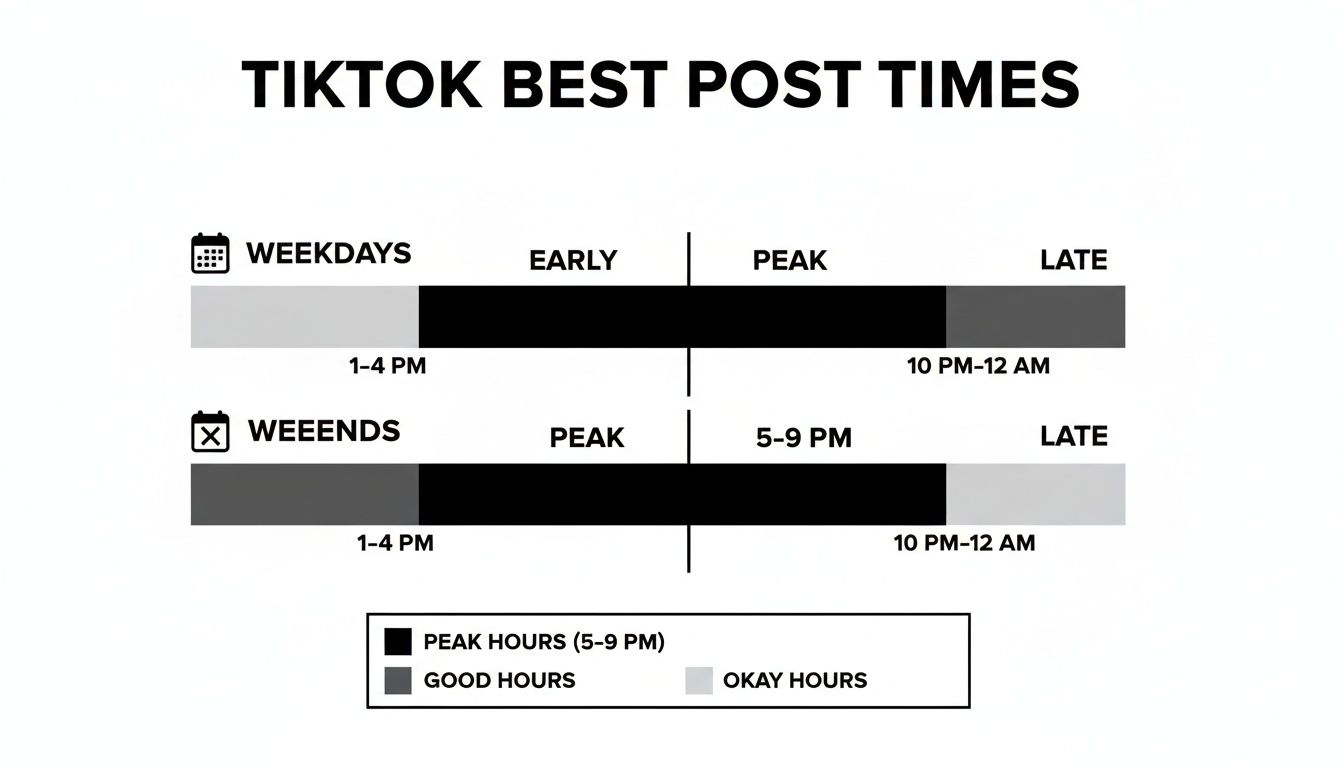
General Best Times to Post on TikTok (in Your Local Time)
While your specific audience is unique, global data provides a reliable starting point. Use these widely recognized peak times as a baseline for your initial posting schedule, and pair them with a TikTok scheduler for hands-free publishing.
| Day of the Week | Peak Times (Local Time) | Why These Times Work |
|---|---|---|
| Monday | 10 AM, 6 PM, 9 PM | Morning scroll + post-work wind-down. Monday evenings show strong engagement as users decompress from the workday. |
| Tuesday | 9 AM, 12 PM, 7 PM | Lunch-break browsing + evening entertainment. Buffer's 2026 data (7M posts) ranks Tuesday as a top engagement day. |
| Wednesday | 8 AM, 12 PM, 7 PM | Mid-week peak. Morning commute, lunchtime, and evening are all strong. Wednesday consistently ranks in the top 3 days for TikTok engagement. |
| Thursday | 11 AM, 6 PM, 9 PM | A top evening day — our data ranks Thursday just behind Monday, with engagement peaking in the 6–9 PM block. |
| Friday | 11 AM, 3 PM, 7 PM | End-of-week energy. Users are more relaxed and browse longer sessions. Friday afternoon through evening is a wide high-engagement window. |
| Saturday | 11 AM, 3 PM, 8 PM | Weekend leisure scrolling. Late morning and evening are the most concentrated windows — mid-afternoon also performs well. |
| Sunday | 9 AM, 1 PM, 4 PM | Sunday mornings and early afternoons are strong as users relax. Evening drops off as people prepare for the work week. |
2026 data note: Sprout Social's analysis of 2.7 billion engagements and Buffer's study of 7.1 million TikTok posts both confirm that evening hours (5–9 PM) now drive 23% higher engagement than morning slots compared to 2025. The shift reflects TikTok's maturing user base beyond Gen Z — more working professionals now use the app during post-work downtime.
These times are a good foundation, but true optimization comes from analyzing your own account data. For more strategies on building a content calendar, see our guide on social media scheduling hacks for small businesses.
 PostPlanify
All your social media in one simple dashboard
Schedule posts, track analytics, and reply to comments/DMs without switching tabs.

Engagement
+18%
Views
52.8k
How to Find Your Personal Best Time to Post
Generic posting times are a good start, but they don't account for your unique audience. Your followers have specific habits, and uncovering them is the key to unlocking consistent engagement — and pairing your timing with the right posting frequency (2–5 TikToks a week is the data-backed sweet spot) compounds the effect. Combining TikTok analytics with a broader social media analytics platform gives you a complete picture of when your followers are most active. Instead of guessing, use TikTok's built-in analytics to find data-driven answers.
Step 1: Switch to a Creator or Business Account
You cannot access analytics with a personal account. If you're serious about growth, you need the data that Creator or Business accounts provide. The switch is free and takes less than 60 seconds.
Actionable Fix:
- Open your TikTok profile and tap the three horizontal lines in the top-right corner to open Settings and privacy.
- Tap on Account.
- Select Switch to Business Account or Switch to Creator Account. Both provide analytics, but Business accounts offer additional features like a clickable link in your bio. If you're setting up a new account, first check that your TikTok username is available so you can lock in a memorable handle from the start.
Limitation: You need at least 100 followers to unlock the follower activity data. If you aren't there yet, use the general times listed above to grow your audience first.
Step 2: Locate Your Follower Activity Data
Once your account is set up, you can access the analytics that show when your followers are most active.
Actionable Fix:
- Go to your profile and tap the three horizontal lines again.
- Choose Creator Tools or Business Suite.
- Tap on Analytics.
- Select the Followers tab at the top.
- Scroll down to the Follower activity section. This is where you will find hourly and daily graphs of user activity.
Step 3: Interpret the Data to Find Your Peak Times
The Follower activity graph provides a clear picture of when your audience is online.
How to Use the Data:
- Hourly Activity: The graph shows bars for each hour. The tallest bars represent the "golden hours" when the largest number of your followers are active. If you see consistent peaks around 8 PM, that is a strong signal to post just before or during that time.
- Daily Activity: The daily graph shows which days of the week your followers are most active. You might find your audience is more engaged on Wednesdays than on Saturdays. Use this information to schedule your highest-quality content for the days it will have the most impact.
Check your analytics weekly to spot shifting trends in audience behavior. As you gather more data, you can use a TikTok engagement calculator to measure how your new posting times are improving performance.
Analyze Past Video Performance to Confirm Your Timing
Your Follower Activity graph shows when your audience is online, but your past video performance shows when they actually engage with your content. Reviewing this data as part of a periodic social media audit helps you spot shifts before they hurt your reach. By analyzing your most successful posts, you can find hard evidence of what works for your specific account.

Step 1: Identify Your Top-Performing Videos
First, locate the videos that have already performed well. These posts provide the clearest data on what resonates with your audience.
Actionable Fix:
- Go to your TikTok profile, tap the three horizontal lines, and select Creator Tools (or Business Suite).
- Tap Analytics and navigate to the Content tab.
- Filter your videos from the last 28 or 60 days to get a good sample size.
- Identify your top 5-10 videos based on view count and engagement (likes, comments, shares).
Step 2: Find the Hidden Time Patterns
With your list of top videos, dig into their individual data to find patterns related to posting time.
Actionable Fix:
- For each top-performing video, record the exact day of the week and time it was published.
- Create a simple spreadsheet or log to track this information.
- Look for commonalities. Do your viral videos consistently get posted on Tuesday mornings? Do comedy sketches perform best on Friday evenings? This helps you match content type to the right time slot.
Step 3: Create a Performance Log
Organize your findings in a simple table. This log will become your personalized guide to the best posting times for your account.
Example Log:
| Video Topic | Views | Likes | Post Day | Post Time | Notes |
|---|---|---|---|---|---|
| "Video Editing Tutorial" | 550K | 45K | Tuesday | 9:05 AM | Educational Content |
| "Funny Office Skit" | 210K | 28K | Friday | 6:30 PM | Comedy/Entertainment |
| "Q&A with Followers" | 150K | 18K | Sunday | 11:15 AM | Community Engagement |
This process often reveals powerful trends that general analytics might miss. You may discover a hidden sweet spot that becomes your secret weapon for growth. To learn more about how timing strategies differ across platforms, see our comparison of scheduling Instagram Reels vs. TikTok videos.
PostPlanifyAll your social media in one simple dashboard
Schedule posts, track analytics, and reply to comments/DMs without switching tabs.
Engagement
+18%
Views
52.8k
How to Test and Confirm Your Best Posting Times
Your analytics and past performance have given you a strong hypothesis. Now it's time to run a structured experiment to confirm your findings and remove any guesswork. For a broader look at timing across every network, see our guide on the best time to post on social media. This process will give you a proven, data-backed time slot for your most important content.
Step 1: Set Up a Controlled A/B Test
An A/B test allows you to compare two different posting times to see which one performs better. This method provides clear, reliable data.
Actionable Fix:
- Choose Two Time Slots. Based on your research, select two potential "best" times. For example, your follower analytics might point to 7 PM (Time A), while your past hits suggest 9 AM (Time B).
- Prepare Consistent Content. To ensure a fair test, the quality and style of your videos must be similar for both weeks. A significant difference in content quality will skew your results.
- Run Week 1 (Time A). For one full week, post one video each day at your first chosen time (e.g., 7 PM).
- Run Week 2 (Time B). The following week, post similar-quality content at your second time (e.g., 9 AM).
Step 2: Measure the Right Metrics
After two weeks, analyze the results. Focus on metrics that measure the initial impact of your video, as this is what the TikTok algorithm values most.
Key Metrics to Track:
- Views in the first hour: This is the best indicator of whether you reached your audience when they were active.
- Engagement rate after 24 hours: Calculate (likes + comments + shares) / views. This shows how well the content resonated.
- New followers from each video: This measures whether the content was effective at growing your community.
Create a spreadsheet to compare the average performance for Week 1 (Time A) vs. Week 2 (Time B). The time slot with the higher initial views and engagement is your winner.
Troubleshooting Common Testing Mistakes
A poorly run experiment can lead to inaccurate conclusions. Avoid these common pitfalls to ensure your data is reliable.
- Problem: Inconsistent Content Quality. Posting a high-effort video one week and a low-effort video the next makes it impossible to know if the results are due to timing or content.
- Fix: Plan your content in advance to ensure the videos tested are comparable in style, format, and effort.
- Problem: Testing for Too Short a Period. One or two days is not enough data. A random fluctuation can skew the results.
- Fix: Run each test for at least one full week to get a reliable average.
- Problem: Forgetting to Post at the Exact Time. Manual posting is prone to human error. Missing your target time by even 30 minutes can affect your data.
- Fix: Use a scheduling tool to automate your posts. A platform like PostPlanify ensures your videos go live at the precise times you set for your test. See our guide on how to schedule TikTok posts to get started.
How to Build a Consistent TikTok Posting Schedule
You've identified your optimal posting times. Now, the challenge is to apply that knowledge consistently. A reliable schedule not only helps your audience know when to expect content but also signals to the algorithm that your account is active.
Manually posting at the perfect time every day is difficult and often leads to missed opportunities. The key is to create a realistic schedule and use automation to execute it flawlessly.
Step 1: Choose a Sustainable Posting Frequency
Your schedule should match your ability to create high-quality content without burning out. Consistency is more important than frequency. Building a social media content calendar keeps your posting cadence sustainable over the long term.
Common Schedule Frameworks:
- The Daily Driver (2-3 Posts Per Day):
- Goal: Maximize daily visibility and audience growth.
- How it works: Post once in the morning (e.g., 9 AM), once at midday (e.g., 1 PM), and once in the evening (e.g., 7 PM) to catch different segments of your audience.
- The Power Poster (1 Post Per Day / 3-5 Per Week):
- Goal: Focus on creating fewer, higher-impact videos with a greater chance of going viral.
- How it works: Post only during your single most effective time slot. If your data shows Tuesday at 6 PM is your absolute peak, save your best content for that moment.
Step 2: Automate Your Schedule to Ensure Consistency
Once you have a schedule, the best way to stick to it is through automation. Social media scheduling tools remove the burden of manual posting.
Why Automation Works:
- It Eliminates Human Error: You will never forget to post or publish at the wrong time. Your content goes live at the optimal moment, even if you're busy, asleep, or on vacation.
- It Saves Time: You can batch your content for the week, then upload and schedule everything in one session. This frees you from the daily pressure of posting.
- It Maintains Momentum: A consistent posting history signals to the TikTok algorithm that you are a reliable creator, which can help improve your social media engagement and overall visibility.
Using a TikTok scheduler like PostPlanify allows you to set your schedule and trust that your content will be published at the right time, every time. This simple change in workflow is often the key to achieving sustainable growth.
Best Day of the Week to Post on TikTok
Not all days are equal. If you can only post a few times per week, these are the days to prioritize:
| Rank | Day | Why |
|---|---|---|
| #1 | Monday | Highest median engagement in our data (+7% vs the weekly average) — strongest in the evening, around 6 PM. |
| #2 | Thursday | A close second (+5%). Another strong evening day; post in the 6–9 PM window. |
| #3 | Tuesday | Solid midweek engagement (+2%), with a notable late-morning slot (~10 AM) on top of the evening peak. |
| #4 | Sunday | Right around the weekly average — afternoon and evening hold up as users relax before the work week. |
| #5 | Friday | Slightly below average, but a wide, relaxed evening window as users wind down into the weekend. |
| #6 | Monday | Decent engagement but lower than mid-week. Users are ramping up and less in "entertainment mode." |
| #7 | Sunday | Weakest day overall. Morning and early afternoon are the only reliable windows. |
The takeaway: If you post 3 times per week, target Tuesday, Wednesday, and Thursday. If you post daily, use Thursday and Tuesday for your highest-effort content.
Best TikTok Posting Times by Niche
Your audience's daily routine shapes when they're on TikTok. A student scrolls at different hours than a working parent or a fitness enthusiast. Here's how timing shifts by content niche:
| Niche | Best Times | Best Days | Why |
|---|---|---|---|
| Fitness / Health | 6–8 AM, 5–7 PM | Mon–Wed | Pre-workout motivation in the morning + post-work gym crowd in the evening |
| Food / Cooking | 11 AM–1 PM, 5–7 PM | Tue–Fri | Lunch inspiration + dinner planning windows |
| Beauty / Fashion | 12–2 PM, 7–9 PM | Wed–Sat | Midday browsing + evening "get ready with me" content |
| Comedy / Entertainment | 7–10 PM | Thu–Sat | Evening relaxation when users want to laugh and unwind |
| Education / How-To | 8–10 AM, 4–6 PM | Tue–Thu | Morning learning sessions + after-school/work self-improvement |
| Business / Finance | 7–9 AM, 12–1 PM | Tue–Thu | Before-work motivation + lunch-break content |
| Gaming | 4–6 PM, 8–11 PM | Fri–Sun | After-school hours + late-night gaming sessions |
| Parenting / Family | 10 AM–12 PM, 8–10 PM | Mon–Wed | Mid-morning when kids are at school + evening after bedtime |
| Travel | 12–2 PM, 7–9 PM | Wed–Sun | Lunch-break dreaming + evening trip planning |
| Music / Dance | 6–9 PM | Thu–Sat | Evening entertainment prime time |
How to use this table: Find your niche, cross-reference with the general day-by-day table above, and look for overlapping windows. The overlap is your highest-probability posting time. Then validate with your own follower activity data — your specific audience may deviate from these averages.
PostPlanifyAll your social media in one simple dashboard
Schedule posts, track analytics, and reply to comments/DMs without switching tabs.
Engagement
+18%
Views
52.8k
Summary Checklist: Finding Your Best Time to Post
Use this checklist to turn audience data into a powerful, repeatable posting strategy.

- Step 1: Start with General Peak Times. Use globally recognized best times as your initial guide before you have enough of your own data.
- Step 2: Switch to a Creator or Business Account. This is required to access your TikTok Analytics.
- Step 3: Analyze Your Follower Activity. Go to Analytics > Followers and identify the days and hours your specific audience is most active.
- Step 4: Review Your Top-Performing Content. Look at your 5-10 best videos from the last 60 days. Log the day and time each was posted to find patterns.
- Step 5: Run a Controlled Test. Pick two promising time slots and post consistently at each time for one week. Measure views in the first hour and 24-hour engagement to find the winner.
- Step 6: Create a Consistent Schedule. Choose a posting frequency you can maintain and build a content calendar around your proven best times.
- Step 7: Check Your Safe Zones. Before scheduling, run your video through the TikTok safe zone checker to make sure captions, CTAs, and key visuals aren't covered by TikTok's UI overlays.
- Step 8: Automate Your Posting. Use a tool like PostPlanify to schedule your social media posts in advance. This ensures you never miss a peak time and removes the stress of manual posting.
Frequently Asked Questions
How often should I post on TikTok?
The general recommendation is 1-3 times per day. This frequency keeps your account active for the algorithm without overwhelming your audience. However, consistency is more important than volume. One high-quality video per day is better than three rushed ones.
Do posting times matter if a video goes viral?
Yes. Good timing is often what gives a video the initial momentum it needs to go viral. Posting during a peak activity window provides an immediate burst of engagement. This signals to the algorithm that the content is high-quality, prompting it to push the video to a much wider audience on the For You page.
Should I change my posting times for holidays?
Yes. Holidays and major events disrupt normal daily routines. Your audience will likely be online at different times than usual. Check your analytics in the days leading up to a holiday to see if new patterns emerge, and adjust your schedule accordingly.
Does my niche affect the best time to post?
Absolutely. Your niche determines your target audience, and their lifestyle dictates when they are active on TikTok. An audience of students will have different active hours than an audience of working professionals. Always consider the daily routine of the person you are trying to reach when analyzing the best time to post on TikTok.
What is the worst time to post on TikTok?
Posting between 1 AM and 5 AM in your audience's local time zone typically produces the lowest views and engagement. Activity drops sharply after midnight as most users are asleep. If you publish during this dead zone, the algorithm's initial test reaches too few viewers to generate momentum.
Should I post on TikTok every day?
Posting daily helps signal consistency to the algorithm, but quality matters more than frequency. One strong video per day typically outperforms three rushed clips. Data from top creators shows that accounts posting one to two high-quality videos per day see the most sustainable follower growth over a 90-day period.
Does TikTok posting time matter for business accounts?
Yes. Business accounts follow the same algorithmic rules as creator accounts. The first-hour engagement test applies equally, so timing is just as critical. The main difference is that business accounts can access additional analytics and use a TikTok scheduler through the official API for precise publishing.
How far in advance should I schedule TikTok posts?
Most successful creators schedule content one to two weeks ahead using a scheduling tool. This gives you enough lead time to batch-produce videos while staying flexible enough to jump on emerging trends. TikTok's native scheduler allows scheduling up to 10 days in advance — third-party tools like PostPlanify can extend this further. Pair advance scheduling with a few spontaneous trend posts each week for the best results.
Does TikTok show my video to followers first or strangers?
TikTok tests your video with a small mixed group — typically a combination of your followers and non-followers who have shown interest in similar content. If this test group engages positively (high watch time, likes, shares), the algorithm progressively expands distribution to larger audiences. This is why timing matters: posting when your followers are active ensures the test group sees your video quickly, giving the algorithm stronger early signals. TikTok's official Creator Portal confirms this staged distribution model.
Are TikTok posting times different by country?
Yes, and not just because of time zones. User behavior patterns vary by culture. In the US, evening engagement (6–9 PM) dominates. In parts of Southeast Asia and the Middle East, late-night usage (10 PM–1 AM) is significantly higher. In Europe, lunch-break engagement (12–2 PM) is proportionally stronger than in the US. Always check your TikTok Analytics > Followers > Top territories to see where your audience is concentrated, then optimize for that region's peak hours.
Should I delete and repost a TikTok if I posted at the wrong time?
Generally no. Deleting and reposting the exact same video can trigger TikTok's duplicate content detection, which may suppress the repost's distribution. If a video underperformed due to poor timing, a better approach is to create a slightly different version — change the hook, add a new text overlay, or use different audio — and post it during your optimal time window. Many creators successfully "remix" their own underperforming content this way.
Ready to stop guessing and start scheduling? PostPlanify helps you automate your posting schedule, ensuring your content always goes live at your proven peak times.
Start your free 7-day trial today and reclaim your time.
Related Reading
TikTok guides:
- How to Schedule TikTok Posts in 2026
- TikTok Scheduled Posts Not Working? 7 Proven Fixes
- How Much Does TikTok Pay for 1 Million Views?
- How to Check TikTok Username Availability
- Best TikTok Scheduling Tools
- How to Do Voiceovers on TikTok
- TikTok Safe Zone Checker
- TikTok Line Break Generator
- TikTok Text Formatter
Cross-platform timing & strategy:
PostPlanifyAll your social media in one simple dashboard
Schedule posts, track analytics, and reply to comments/DMs without switching tabs.
Engagement
+18%
Views
52.8k
About the Author

Hasan Cagli
Founder of PostPlanify, a content and social media scheduling platform. He focuses on building systems that help businesses, agencies, and teams plan, publish, and manage content and social media more efficiently across platforms.


