
Later and Publer both serve creators and small teams, but with very different philosophies. Later is a visual-first content planner built around Instagram and TikTok, while Publer is an affordable all-rounder that supports 13 platforms and packs in automations at a fraction of the price. If you're weighing Later or Publer for your workflow, this 2026 comparison covers everything you need to make a confident decision.
Two tools built for creators, two very different approaches to pricing and features. We go beyond the surface to compare what you actually get at each price point — from AI tools and platform support to the hidden costs that add up. Comparing the full market? Browse all social media scheduling alternatives.
Later vs Publer at a Glance
Here's a quick side-by-side overview before we dive deeper:
| Category | Later | Publer |
|---|---|---|
| Starting Price | $25/mo (1 Social Set) | $5/mo (1 account) |
| Free Plan | No (14-day trial) | Yes (3 accounts, limited) |
| Platforms Supported | 8 | 13 |
| Unlimited Scheduling | Scale plan only ($110/mo) | No (post limits per account) |
| AI Tools | AI content tools (credit-based: 5-100/mo) | AI Assist (GPT-4 + DALL-E 3, Business only) |
| AI Image Generation | No | Yes (DALL-E 3, Business only) |
| Bulk Scheduling | No | Yes (CSV import) |
| Team Collaboration | Growth plan ($50/mo) | Business plan |
| Approval Workflows | Growth plan | Business plan |
| Analytics | 3 months to 2 years | Business plan only |
| Canva Integration | No | Yes |
| G2 Rating | 4.5/5 (347 reviews) | 4.7/5 (486 reviews) |
| Trustpilot Rating | 1.3/5 (329 reviews) | 4.8/5 (863 reviews) |
| Best For | Visual-first Instagram/TikTok creators | Budget-conscious multi-platform schedulers |
Later Overview

Later is a visual-first social media platform built around content planning and scheduling. Originally focused on Instagram, it has expanded to support multiple platforms while keeping its visual calendar at the core.
Later supports 8 platforms: Instagram, Facebook, LinkedIn, Pinterest, X/Twitter, TikTok, YouTube, and Threads.
Key features:
- Visual content calendar and media library
- AI content tools with monthly credit system
- Link in Bio page
- Social inbox (Growth+)
- UGC collection (Growth+)
- Smart Scheduling with Future Trends
- Competitive benchmarking (Scale)
Later targets creators and brands that prioritize visual content planning, especially on Instagram and TikTok. If Instagram is your primary focus, check out our guide to Instagram scheduling tools. Read real user reviews of Later from G2 and Trustpilot.
Publer Overview
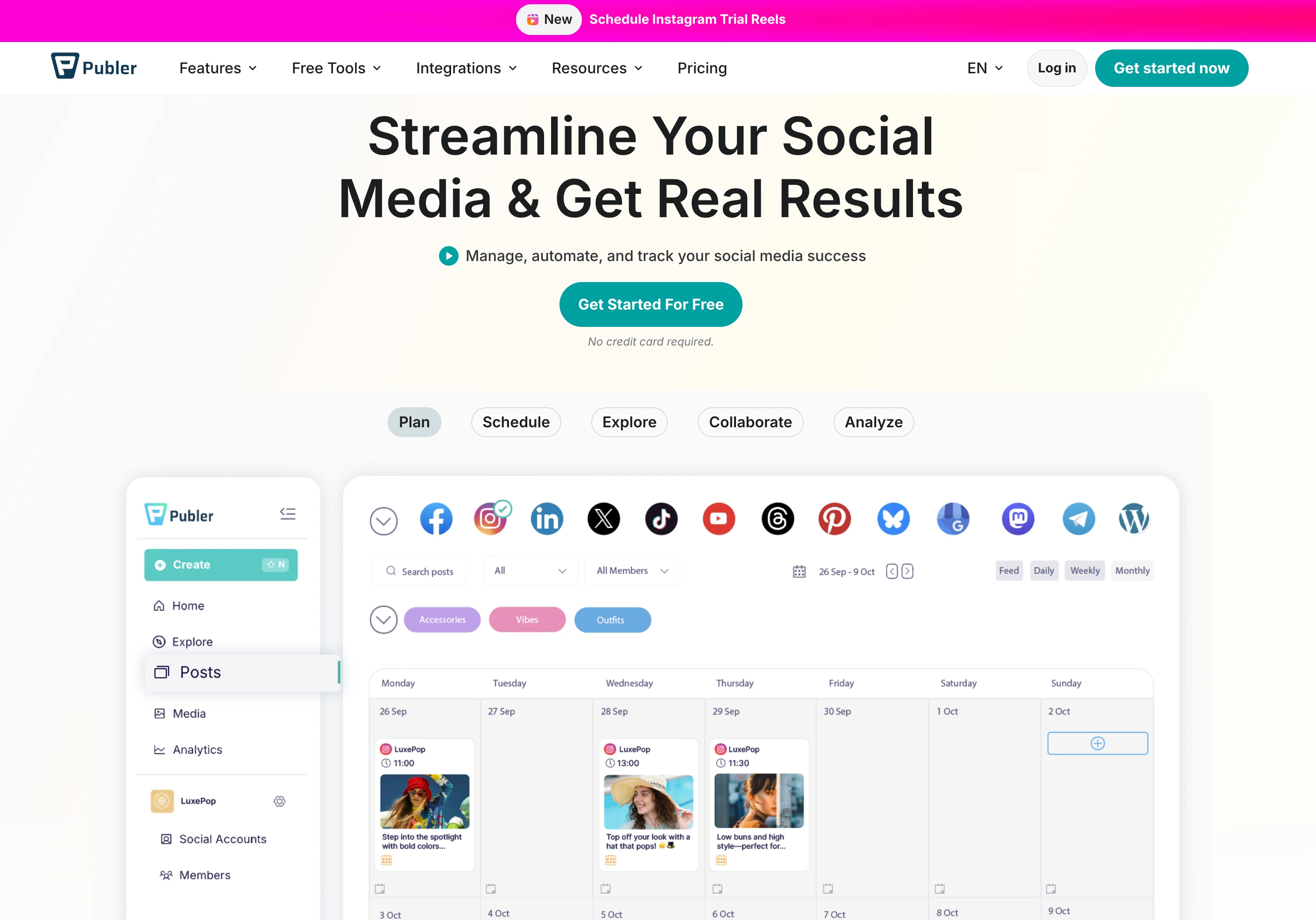
Publer is an affordable social media scheduling tool built for creators and small teams who need wide platform support without high costs. It covers 13 platforms and includes automation features like RSS feeds, bulk scheduling, and watermarking.
Publer supports 13 platforms: Facebook, Instagram, X/Twitter (paid only), LinkedIn, Pinterest, Google Business, YouTube, TikTok, WordPress, Telegram, Mastodon, Threads, and Bluesky.
Key features:
- Bulk scheduling via CSV import
- RSS feed automations
- AI Assist with GPT-4 and DALL-E 3 (Business only, unlimited)
- Canva and VistaCreate integration
- Auto-scheduling and watermarks
- Analytics and competitor analysis (Business only)
- 13 platform support including WordPress, Telegram, and Bluesky
Publer targets budget-conscious creators and small businesses who need multi-platform scheduling with automations at an affordable price. Small teams can also benefit from reading our guide to social media management for small businesses. Read real user reviews of Publer from G2 and Trustpilot.
Pricing Comparison
Later and Publer use very different pricing models — Later charges per Social Set (a bundle of profiles), while Publer charges per connected account. Publer also offers a free plan, which Later does not.
Later Pricing
Later uses Social Set pricing — each set bundles one profile per platform. See the full Later pricing breakdown for details.
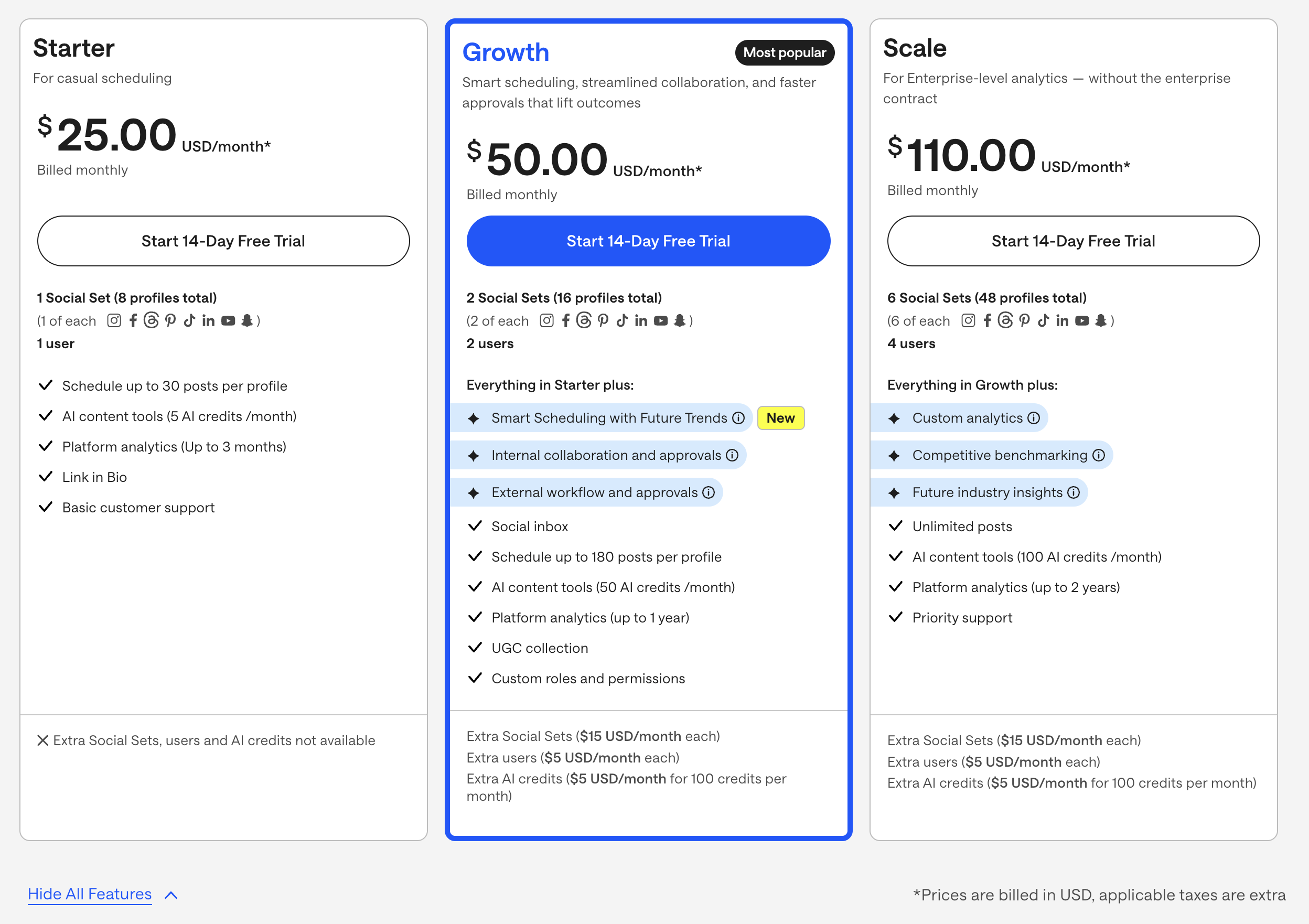
| Plan | Price | Social Sets | Users | Key Features |
|---|---|---|---|---|
| Starter | $25/mo | 1 (8 profiles) | 1 | 30 posts/profile, 5 AI credits, 3-month analytics |
| Growth | $50/mo | 2 (16 profiles) | 2 | 180 posts/profile, 50 AI credits, approvals, inbox |
| Scale | $110/mo | 6 (48 profiles) | 4 | Unlimited posts, 100 AI credits, custom analytics |
Example costs:
- 1 Social Set on Starter = $25/month
- 2 Social Sets on Growth = $50/month
- Extra Social Sets = $15/month each
- Extra AI credits = $5/month per 100
Publer Pricing
Publer uses per-account pricing that scales as you add social accounts. See the full Publer pricing breakdown for details.
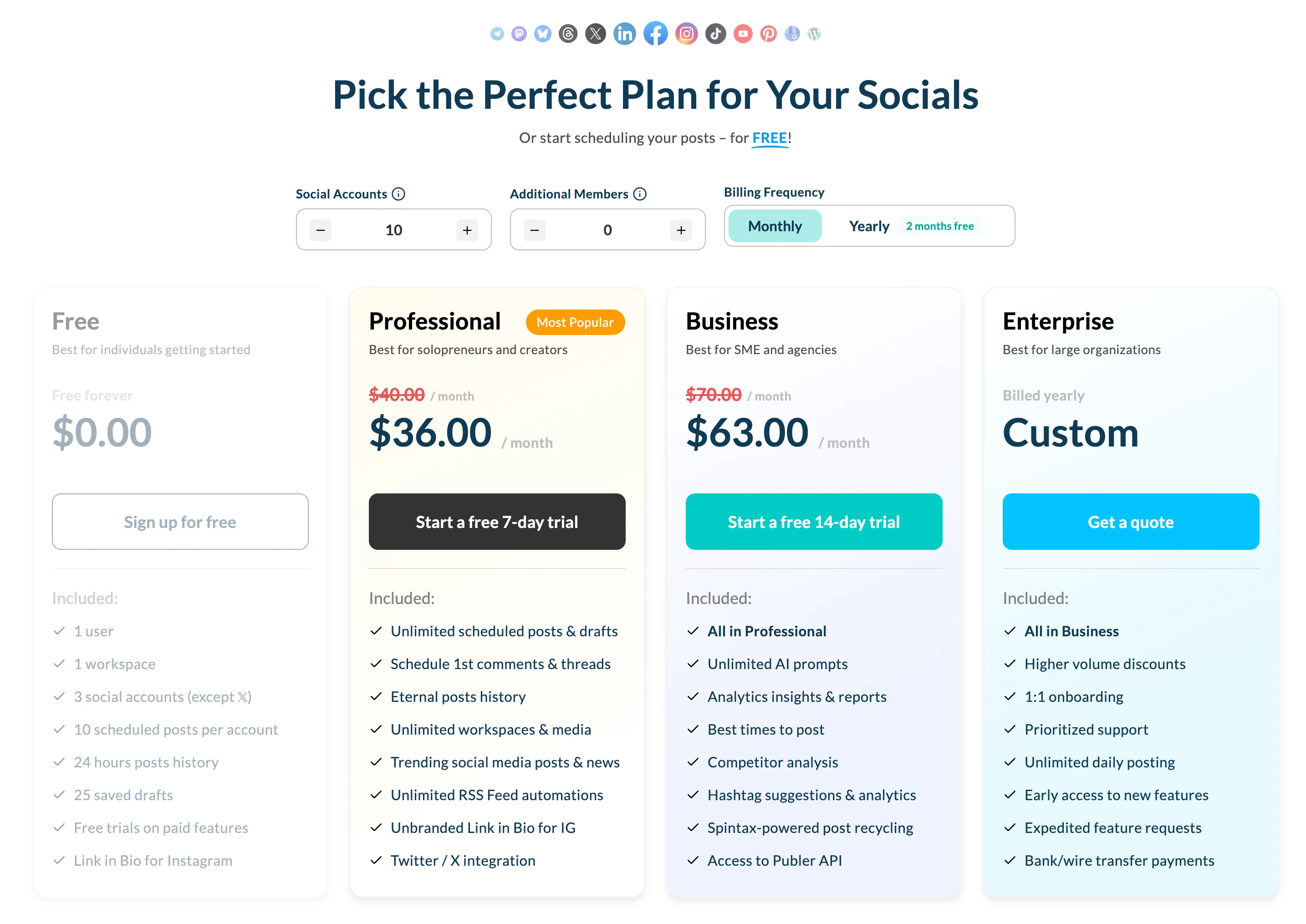
| Plan | Price | Accounts | Key Features |
|---|---|---|---|
| Free | $0/mo | 3 (no X/Twitter) | 10 pending posts/account, basic scheduling |
| Professional | From $5/mo (+$4/acct) | Scales per account | All platforms, auto-scheduling, bulk scheduling |
| Business | From $10/mo (+$7/acct) | Scales per account | AI Assist unlimited, analytics, competitor analysis |
Example costs (3 accounts):
- Free = $0/month (no X/Twitter, 10 pending posts each)
- Professional = ~$12/month
- Business = ~$21/month
Price Verdict
Publer is dramatically cheaper. A creator managing 3 accounts pays $0/month on Publer's free plan vs $25/month on Later's Starter. Even on paid plans, 3 accounts on Publer Business costs ~$21/month with unlimited AI and analytics — Later's comparable Growth plan costs $50/month with credit-based AI and post limits.
Later's add-on costs (extra Social Sets at $15/month, extra AI credits at $5/month) compound quickly. Publer's per-account model is more predictable and affordable, especially for teams managing multiple accounts.
 PostPlanify
Manage All Your Social Accounts Without the Chaos
Schedule posts, track performance, and collaborate with your team.


Feature Comparison
Scheduling & Publishing
| Feature | Later | Publer |
|---|---|---|
| Unlimited scheduling | Scale plan only ($110/mo) | No (pending post limits) |
| Post limits | 30-180 per profile | 10 (free) to higher on paid |
| Best time to post | Yes (Smart Scheduling) | Yes (auto-scheduling) |
| First comment scheduling | No | No |
| Content calendar | Yes (visual) | Yes |
| Bulk scheduling | No | Yes (CSV import) |
| RSS automations | No | Yes |
| Draft saving | Yes | Yes |
Winner: Publer — bulk scheduling via CSV and RSS automations give Publer a clear edge for efficiency. Later's Smart Scheduling with Future Trends is a nice touch, but the post limits on Starter and Growth are restrictive. Neither tool offers truly unlimited scheduling on their entry plans. For a broader overview, see our guide to the best social media schedulers.
AI Tools
| Feature | Later | Publer |
|---|---|---|
| AI caption generation | Yes (credit-based) | Yes (Business, unlimited) |
| AI image generation | No | Yes (DALL-E 3, Business) |
| AI post ideas | Limited by credits | Yes (GPT-4, Business) |
| AI credits system | 5-100 credits/month | No limits (Business) |
Winner: Publer — unlimited AI usage with GPT-4 and DALL-E 3 image generation on the Business plan (~$21/month for 3 accounts). Later's credit system (5-100 credits/month) limits AI usage, extra credits cost $5/month per 100, and there is no image generation at any tier. Explore more options in our roundup of AI social media tools.
Analytics & Reporting
| Feature | Later | Publer |
|---|---|---|
| Basic analytics | All plans | Business only |
| Analytics history | 3 months to 2 years | Business only |
| Competitor analysis | Scale only ($110/mo) | Business only |
| Custom reports | Scale only | No |
| Export reports | Scale only | No |
Winner: Later — analytics are available on all Later plans (even Starter gets 3-month history), with deep custom analytics and competitive benchmarking on Scale. Publer locks all analytics behind the Business plan. However, Later's advanced analytics require the $110/month Scale plan. For more on this topic, see our guide to social media analytics tools.
Team Collaboration
| Feature | Later | Publer |
|---|---|---|
| Multiple users | Growth+ (2-4 users) | Business plan |
| Approval workflows | Growth plan | Business plan |
| Custom roles | Growth plan | Business plan |
| External approvals | Growth plan | No |
Winner: Later — includes external approval workflows on Growth ($50/mo), which is useful for client-facing teams. Publer covers basic team collaboration on Business but lacks external approvals.
Content & Creative Tools
| Feature | Later | Publer |
|---|---|---|
| Link in Bio | Yes | No |
| Media library | Yes (visual-first) | Basic |
| UGC collection | Growth+ | No |
| Canva integration | No | Yes |
| VistaCreate integration | No | Yes |
| Watermarks | No | Yes |
| RSS automations | No | Yes |
Winner: Tie. Later has the stronger visual media library, UGC collection, and Link in Bio. Publer has Canva and VistaCreate integration, watermarking, and RSS automations. The winner depends on whether visual planning or creative tool integrations matter more to you.
Platform Support
| Platform | Later | Publer |
|---|---|---|
| Yes | Yes | |
| Yes | Yes | |
| X/Twitter | Yes | Paid only |
| Yes | Yes | |
| TikTok | Yes | Yes |
| YouTube | Yes | Yes |
| Yes | Yes | |
| Threads | Yes | Yes |
| Google Business | No | Yes |
| WordPress | No | Yes |
| Telegram | No | Yes |
| Mastodon | No | Yes |
| Bluesky | No | Yes |
Winner: Publer — supports 13 platforms vs Later's 8. Publer includes Google Business, WordPress, Telegram, Mastodon, and Bluesky, none of which Later supports. The one caveat is that X/Twitter requires a paid Publer plan.
What Real Users Say
Later Reviews
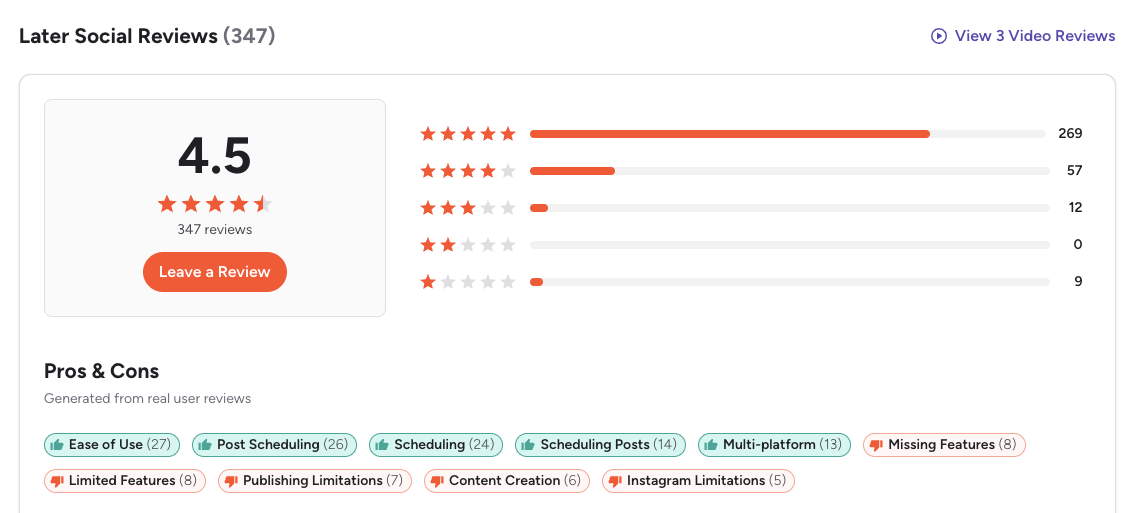
G2: 4.5/5 (347 reviews) — Users appreciate the ease of use, scheduling features, and multi-platform support. Top complaints include limited features, publishing limitations, and Instagram-specific restrictions.
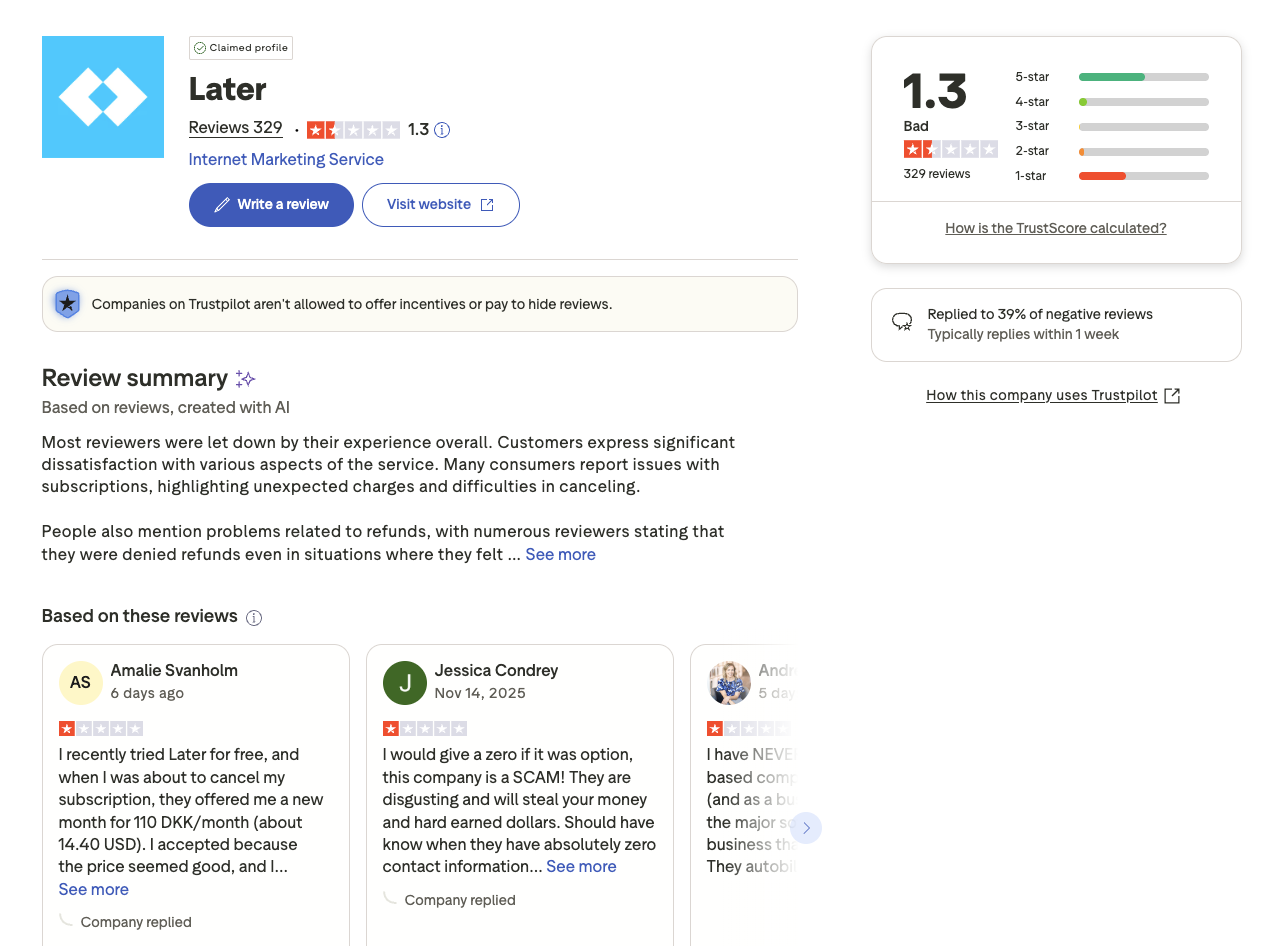
Trustpilot: 1.3/5 (329 reviews) — Very low rating with widespread complaints about unexpected charges, difficulty canceling subscriptions, and denied refunds.
Publer Reviews
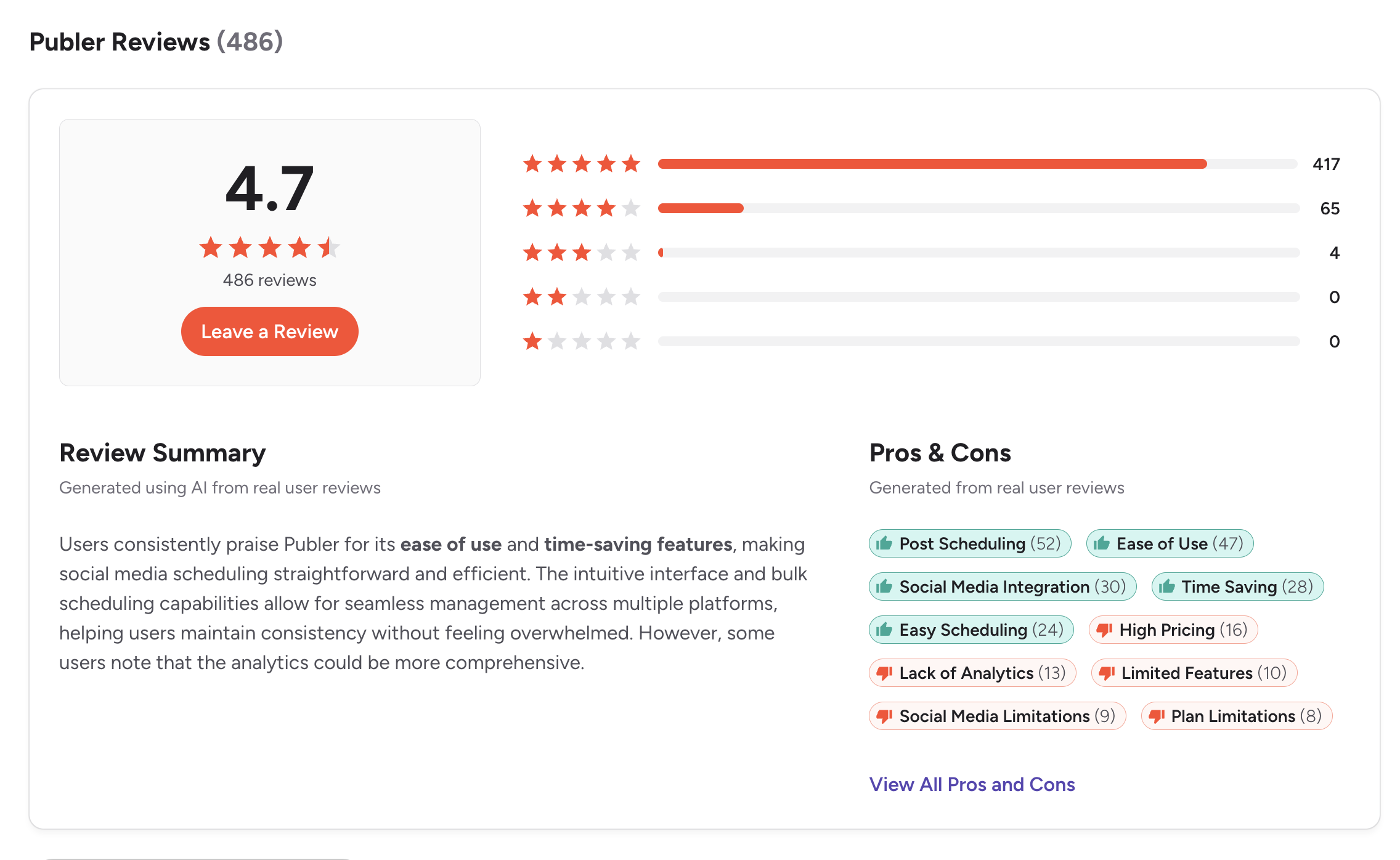
G2: 4.7/5 (486 reviews) — Users highlight the affordable pricing, wide platform support, and bulk scheduling capabilities. Publer consistently scores high for value for money and ease of use.
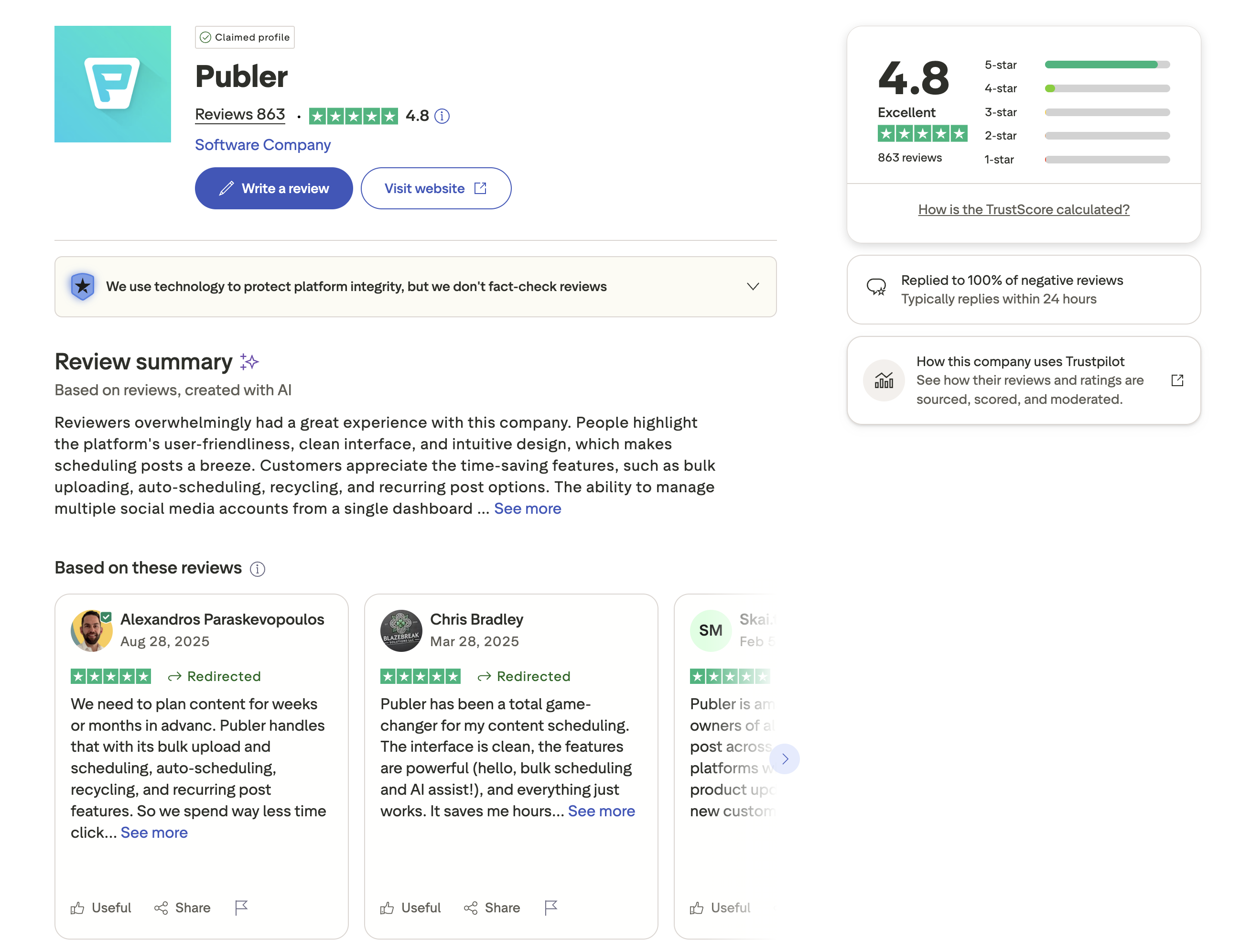
Trustpilot: 4.8/5 (863 reviews) — Exceptionally high rating. Users praise Publer's customer support, reliability, and affordability. The volume of positive reviews (863) is notably higher than most competitors in this space.
Review Verdict
Publer wins on both platforms. On G2, Publer scores 4.7/5 (486 reviews) vs Later's 4.5/5 (347 reviews). On Trustpilot, the gap is enormous — Publer's 4.8/5 from 863 reviews vs Later's 1.3/5 from 329 reviews. Later's billing and cancellation complaints are a serious red flag, while Publer is one of the highest-rated scheduling tools across both review sites. Review counts and ratings are as of February 2026 and are updated periodically.
PostPlanifyManage All Your Social Accounts Without the Chaos
Schedule posts, track performance, and collaborate with your team.
Who Should Use Later?
If Later is on your shortlist, you may also want to see our top alternatives to Later before committing. You can also see how Later stacks up against Buffer, Hootsuite, Metricool, Sprout Social, and SocialBee. Later remains a top visual scheduling tool in 2026 for creators who want a polished Instagram and TikTok planning experience. For tips on timing your posts, see our guide on the best time to post on social media.
Later is the better choice if you:
- Are a visual-first creator focused on Instagram and TikTok
- Need a visual content calendar and media library
- Want UGC collection tools built in
- Need external approval workflows for client work
- Prefer Smart Scheduling with trend-based timing suggestions
- Want Link in Bio functionality included
Who Should Use Publer?
If Publer sounds right but you want to explore other options, check out our best alternatives to Publer. You can also see how Publer compares to Buffer, Hootsuite, Sprout Social, Metricool, and SocialBee. Publer's affordable multi-platform scheduling makes it a strong pick for budget-conscious creators and small businesses looking for the most value per dollar. For more on building an efficient content workflow, read our guide to social media content calendars.
Publer is the better choice if you:
- Are a budget-conscious creator or small team looking for the lowest cost
- Need to schedule across 13 platforms including WordPress, Telegram, and Bluesky
- Want bulk scheduling via CSV and RSS automations
- Need AI image generation (DALL-E 3) alongside caption writing
- Want Canva and VistaCreate integration built in
- Need a free plan to get started without commitment
Final Verdict
Later is the better choice if you are a visual-first creator focused on Instagram and TikTok who needs a polished content calendar, media library, Link in Bio, and external approval workflows for client work.
Publer is the better choice if you are a budget-conscious creator or small team that needs wide platform coverage (13 platforms), bulk scheduling, RSS automations, and affordable AI tools without restrictive credit systems.
For most creators and small teams, Publer delivers significantly more value for the price, with a free plan to start, lower paid tiers, and stronger AI and automation features. If neither tool fully meets your needs, PostPlanify offers unlimited scheduling with AI content generation, Canva integration, and no post caps starting at $29/month flat — see how it compares.
The Creator Tool That Doesn't Make You Choose
Later makes you choose between post limits and expensive plans. Publer makes you choose between AI features and budget pricing. Why choose at all? PostPlanify gives creators unlimited scheduling, AI captions, AI image generation, and Canva integration — all starting at $29/month. No post caps, no credit systems, no feature gates.

| Feature | Later | Publer | PostPlanify |
|---|---|---|---|
| Starting Price | $25/mo | $5/mo | $29/mo flat |
| Unlimited Scheduling | $110/mo plan only | No | All paid plans |
| AI Caption Generation | Yes (credit-based) | Yes (Business only) | Yes (unlimited) |
| AI Image Generation | No | Yes (Business only) | Yes |
| Canva Integration | No | Yes | Yes |
| Google Drive Import | No | No | Yes |
| Approval Workflows | $50/mo | Business plan | $99/mo (Premium) |
| Analytics | All plans | Business only | $49/mo (Growth) |
| Social Inbox | Growth+ (basic) | No | Yes |
| Platforms Supported | 8 | 13 | 10 |
| Link in Bio | Yes | No | No |
PostPlanify starts at $29/month for 5 accounts with unlimited scheduling and AI tools included. Analytics are included from the Growth plan ($49/month). The Premium plan at $99/month adds 25 accounts, 5 team members, and approval workflows. See all plans on the PostPlanify pricing page.
Create without limits — try PostPlanify free

Related Guides
- Best Social Media Management Platforms
- How to Schedule Social Media Posts
- Manage Multiple Social Media Accounts
- Best Later Alternatives
- Best Publer Alternatives
FAQ
Is Publer cheaper than Later?
Yes, significantly. Publer has a free plan with 3 accounts and paid plans starting at $5/month. Later starts at $25/month with no free plan. For 3 accounts, Publer Business costs ~$21/month with unlimited AI — Later's Growth plan costs $50/month with credit-limited AI.
Does Later have a free plan?
No. Later discontinued its free plan and now only offers a 14-day free trial on paid plans, after which you must subscribe to continue using the tool. Publer still offers a permanent free plan with 3 accounts (no X/Twitter support, 10 pending posts per account), making it the better option if you want to schedule content without an upfront commitment.
Which has better AI tools — Later or Publer?
Publer's Business plan includes unlimited GPT-4 caption generation and DALL-E 3 image generation. Later's AI tools are credit-based (5-100 credits/month depending on plan) with no image generation. Publer's AI offering is more generous, but it requires the Business plan.
Can I switch from Later to Publer?
Yes, switching from Later to Publer is straightforward. You can reconnect your social accounts to Publer and start scheduling immediately. Publer supports CSV import for bulk scheduling, which makes migrating your existing content queue easier than starting from scratch. The biggest differences you'll notice are Publer's wider platform support (13 vs 8) and significantly lower pricing, but a less visual content planning experience compared to Later's polished media library and drag-and-drop calendar.
Which supports more social media platforms?
Publer supports 13 platforms (including WordPress, Telegram, Mastodon, and Bluesky). Later supports 8 platforms. Publer has significantly wider platform coverage, though X/Twitter requires a paid Publer plan.
Is Later worth it for small businesses?
Later can work for small businesses focused on visual content, but the post limits on Starter (30/profile) and Growth (180/profile) are restrictive. Add-on costs for extra Social Sets, users, and AI credits add up. Publer or PostPlanify offer more affordable pricing for small teams.
Does Publer have analytics?
Only on the Business plan. Publer's Free and Professional plans do not include analytics. Later includes basic analytics on all plans, with advanced analytics on Scale ($110/month). If analytics are a priority on a budget, neither tool excels — consider PostPlanify or a dedicated analytics tool.
Which has better customer support — Later or Publer?
Based on Trustpilot ratings, Publer (4.8/5 from 863 reviews) has dramatically better customer satisfaction than Later (1.3/5 from 329 reviews). Later's low score is driven by billing disputes and difficulty canceling subscriptions, while Publer is consistently praised for responsive support. If customer service quality is a deciding factor, Publer has a clear advantage backed by a much larger volume of positive reviews.
Is Publer worth it in 2026?
Yes, Publer remains one of the best-value social media scheduling tools in 2026. Its free plan lets you manage 3 accounts at no cost, and paid plans start at just $5/month — making it one of the most affordable options on the market. The Business plan adds unlimited AI with GPT-4, DALL-E 3 image generation, and analytics for roughly $21/month for 3 accounts. With support for 13 platforms and strong user reviews (4.8/5 on Trustpilot), Publer delivers excellent value for budget-conscious creators and small teams.
What is the best alternative to Publer?
The best alternative to Publer depends on what you need. If visual content planning and Instagram feed previews are your priority, Later is a strong option. If you want automation and content recycling, SocialBee is worth considering. For a tool that combines scheduling, AI content generation, and Canva integration at a competitive price, PostPlanify starts at $29/month with unlimited scheduling. Explore more options in our full list of Publer alternatives.
Does Publer offer a free trial?
Yes. Publer offers a permanent free plan (not just a trial) with 3 connected accounts, basic scheduling, and 10 pending posts per account. This free plan does not include X/Twitter support or analytics, but it is enough to test the platform and schedule content across Instagram, Facebook, LinkedIn, and other supported platforms. For paid features like AI Assist and analytics, Publer also offers a trial period so you can evaluate the Business plan before committing.







