


If you're managing content from a spreadsheet, a Slack thread, a design folder, and a scheduling app, you're not running a system. You're patching one together every day. That's why deadlines slip, approvals stall, captions get lost, and somebody always asks which version is final.
An editorial calendar tool fixes that only if you use it as more than a posting calendar. Its primary purpose is to turn content planning into an operating system that handles topic selection, production, approvals, publishing, and review without forcing your team to chase updates across five places.
Quick Answer: What an Editorial Calendar Tool Should Do
A good editorial calendar tool replaces the spreadsheet-plus-Slack-plus-scheduler patchwork with a single operating system. At minimum, it should give you:
- One record per content item that appears in calendar, kanban, timeline, and table views
- Formal approval workflows so legal, client, and editorial signoff happens inside the tool — not in chat
- Platform-specific publishing with variants for Instagram, LinkedIn, X, TikTok, Facebook, YouTube, Threads, Pinterest, Bluesky, and Google Business
- Role-based permissions that separate admins, editors, freelancers, and clients
- Asset attachment so the approved visual lives on the record, not in a separate folder
- Drag-and-drop rescheduling that doesn't break status or ownership
- Performance reporting linked back to the planned content, not in a separate analytics tool
If your current setup forces the team to ask "what's the latest version?" or "who approved this?", the calendar isn't doing its real job.
Editorial Calendar vs Content Calendar: What's the Difference?
People use these terms interchangeably, but they're not the same.
- An editorial calendar tracks every piece of content your team produces — blog posts, newsletters, podcasts, video, and social — across the full lifecycle from idea to publish.
- A content calendar is usually narrower. It tracks what's going live and when, often per channel, without the full editorial workflow around it.
- A social media calendar is the most specific. It covers only social posts and is often a subset of the broader editorial calendar.
In practice, a good editorial calendar tool handles all three. You plan the long-form piece, the social variants that promote it, and the campaign-level themes in one system. For the wider category it sits inside, see our marketing planning software comparison.
Your Content Is Chaos — Is an Editorial Calendar Tool the Fix?
Many organizations don't start with a broken process. They start with a simple one that stops working.
A spreadsheet works when one person writes, designs, and publishes. It breaks when multiple people touch the same post. A shared doc helps for planning, but not for approvals. Slack helps with quick feedback, but it buries decisions. Then the team adds another tool to solve the previous tool's weakness, and the workflow gets harder instead of easier.
The useful way to think about an editorial calendar tool is this. It isn't just a publishing schedule. It's the place where a content idea becomes an approved asset and then becomes a published post.
The U.S. Chamber of Commerce notes that editorial calendars moved from publishing into mainstream digital marketing use and now act as a workflow layer that connects ideation, drafting, approvals, and distribution in one place, which is why they matter so much for coordinated teams and agencies in practice according to its guide on editorial calendars.
If you're still at the stage of defining the basics, this guide on creating a content calendar is a useful companion because it helps frame the planning side before you add workflow complexity.
What changes when the tool is doing its real job
A real editorial calendar tool should answer these questions fast:
- What's going live and when
- Who owns the next step
- What status each asset is in
- What still needs approval
- Which platform-specific version is ready
- What got delayed and what that affects
That last point is where content creators often feel the pain. One Instagram Reel gets pushed back, which affects a Facebook cross-post, a LinkedIn teaser, and the reporting deck due on Friday.
Practical rule: If your team has to ask for status updates in chat, your calendar isn't functioning as the operating system yet.
For a social-first setup, this article on content calendar for social media is a good example of how the calendar shifts from simple date tracking to channel-level execution.
Why Spreadsheets and Generic Calendars Fail for Content Teams
The frustration with spreadsheets is real, but the problem isn't that spreadsheets are bad. The problem is that they only store information. They don't manage content operations.
Once your team needs reviews, platform-specific formatting, reusable assets, client approvals, and publishing coordination, static tools stop helping and start creating cleanup work.

Where spreadsheets break first
Spreadsheets usually fail in four places:
- Version control gets messy. The title changes in the sheet, the caption changes in a doc, and the creative changes in a design file. Nobody is sure which combination is current.
- Approvals happen outside the system. Feedback sits in email, Slack, comments, or direct messages. The calendar doesn't show whether legal approved the copy or whether the client rejected the visual.
- Rescheduling creates manual work. Moving one campaign means updating dates, reminders, ownership, and dependencies by hand.
- Platform requirements stay invisible. A spreadsheet cell won't warn you that the LinkedIn version needs a different hook, or that a TikTok asset still needs an on-screen text review.
This is also why audits feel harder than they should. If you want to see what's been published, what themes are overused, or where the team has gone quiet, you often end up rebuilding the history manually. If you need a structured review process, a social media audit template can help surface gaps before you redesign the workflow.
Why basic calendar apps don't solve the real problem
Google Calendar or Outlook Calendar gives you dates and reminders. That's useful, but content teams need much more than date visibility.
A social post isn't a meeting. It has a caption, asset, target platform, owner, status, review notes, campaign tag, and often several variations. Calendar apps don't handle that well. They also don't help when you need to filter by client, content pillar, reviewer, or publish state.
Here's the practical difference:
| Tool type | Good for | Fails at |
|---|---|---|
| Spreadsheet | Early planning, simple lists, small volume | Approvals, version control, publishing workflow |
| Shared calendar | Date visibility, reminders, basic scheduling | Metadata, content previews, multi-step collaboration |
| Generic project tool | Task assignment, checklists, team coordination | Platform-specific publishing and content operations |
| Editorial calendar tool | Planning, approvals, publishing, reporting in one place | Pure project management with no content focus |
Generic project tools still leave gaps
Trello, Asana, Notion, and similar tools are better than spreadsheets for task visibility. But content teams quickly run into a different issue. They can track work, but they still can't run the full publishing workflow cleanly.
The main gap is that these tools aren't built around the final publishable object. They're built around tasks. That means content previews, per-platform variations, direct scheduling, approval handoff, and post-publish review often get bolted on awkwardly.
Kordiam makes this distinction clearly. Its comparison of editorial calendar tooling argues that many so-called calendar tools are really planning systems or social schedulers, but not both, which leaves teams stitching together approval, rescheduling, and reporting workflows by hand in its overview of editorial planning tools.
The calendar should reduce handoffs. If every handoff still requires another app, the system isn't complete.
Real-world failure patterns by platform
These failures show up differently depending on the channel:
- Instagram often breaks at asset review. Teams approve copy but forget the final carousel order, cover image, or Reel caption variant.
- Facebook tends to expose duplication problems when posts are copied over without adapting the message to audience context.
- TikTok creates workflow issues around draft ownership, editing status, and whether the final video file is the approved one.
- X punishes delays and poor coordination because reactive content moves fast and stale posts look obvious.
- LinkedIn usually breaks at stakeholder review. More people want to edit the message, which slows publishing when approvals aren't formalized.
When teams say they need an editorial calendar tool, what they usually mean is this: they need one place that can hold the plan, move work forward, and keep publishing from depending on memory.
 PostPlanify
All your social media in one simple dashboard
Schedule posts, track analytics, and reply to comments/DMs without switching tabs.

Engagement
+18%
Views
52.8k
Core Features of a Modern Editorial Calendar Tool
The strongest editorial calendar tools aren't just calendars. They are database-driven systems that let the team look at the same content record in different ways depending on the job.
Airtable describes this model well. Advanced editorial calendars support multiple views, such as kanban, timeline, and calendar, while keeping one underlying record that can be filtered by campaign, assignee, or status in its editorial calendar template guide.

That structure matters because content teams don't all need the same view at the same time. A strategist wants campaign coverage. A designer wants only the assets waiting on creative. A manager wants overdue approvals. A publisher wants what can go live today.
Multi-view planning that uses one source of truth
A good editorial calendar tool should support these working views:
- Calendar view for publish timing and spacing
- Kanban view for workflow stages like idea, draft, review, approved, scheduled, live
- Timeline view for campaign sequencing and launch coordination
- Filtered table view for metadata-heavy work such as sorting by client, platform, content pillar, or owner
Without this, teams duplicate records just to get different views. That causes drift fast.

Working standard: one content item should exist once, then appear in many views. If the same post has to be recreated in multiple places, errors are coming.
Approval workflows that remove ambiguity
Approval is where most content systems either become reliable or stay chaotic.
The tool should make it obvious:
- who needs to review
- what they're reviewing
- whether changes are required
- who can give final approval
- what happens after approval
This matters most for agencies and in-house teams with multiple reviewers. A legal team doesn't need full edit access. A client contact may need comment-only review. A junior coordinator may schedule posts but not publish without signoff.
Team permissions cross the line from a convenient feature into essential operational control. If you're evaluating what that collaboration layer should look like, this overview of team collaboration workflows is a useful reference point.
A practical approval path often looks like this:
| Stage | Main owner | What must be clear |
|---|---|---|
| Draft | Writer or social manager | Topic, message, asset placeholder |
| Review | Editor, strategist, client, legal | Required changes and final reviewer |
| Approved | Decision-maker | Ready for scheduling |
| Scheduled | Publisher or platform owner | Final date, time, platform versions |
| Live | System or publisher | Publish confirmed and linked |
Publishing support across platforms
A planner that can't hand off cleanly to publishing creates duplicate work.
For social teams, the editorial calendar tool should support:
- Platform-specific variants so Instagram, LinkedIn, Facebook, TikTok, and X aren't forced into one generic caption
- Asset attachment so the approved visual or video sits with the record
- Drag-and-drop rescheduling without breaking ownership and status
- Queued publishing for recurring content types
- Previewing before a post goes live
These features matter because every platform has its own friction. LinkedIn often needs stakeholder review. TikTok and Instagram usually involve video and visual QA. X moves quickly and needs flexible rescheduling. Facebook may require regional or page-level coordination.
A calendar that only stores dates leaves all of that for the team to solve manually. If you're juggling Instagram specifically and can't find queued content, our guide on how to see scheduled posts on Instagram walks through every method.
A short product walkthrough can help make those moving parts easier to picture:
Reporting and inbox visibility belong in the same system
A modern editorial calendar tool also needs to close the loop after publishing.
That doesn't mean it has to replace every analytics platform. It means the team should be able to see enough performance data and enough engagement activity to make better planning decisions. If reporting lives in one place and comments live in another, the planner stays disconnected from outcomes.
The same is true for replies and community management. If comments on Instagram or Facebook reveal confusion, objections, or repeated questions, those signals should influence the next round of content planning. A unified inbox helps turn audience response into editorial input instead of leaving it trapped in moderation tools.
Editorial Calendar Tools Compared by Team Type
There's no single best editorial calendar tool — the right one depends on team size, channel mix, and approval complexity. Use this to narrow your shortlist.
| Team type | What you actually need | Common options |
|---|---|---|
| Solo creator | Lightweight calendar, drag-and-drop reschedule, single-platform focus | Notion, Trello, Buffer, PostPlanify Growth |
| Small in-house team (2–5) | Multi-platform publishing, basic approvals, shared calendar | PostPlanify Growth, Later, Buffer Team |
| Agency or multi-brand team | Client workspaces, role-based permissions, white-label reports, multi-approver flows | PostPlanify Premium/Scale, Sprout Social, Hootsuite |
| Enterprise content team | Custom approval chains, SSO, dedicated CSM, higher seat counts | PostPlanify Enterprise, Sprout Social, Sprinklr |
For a deeper feature-by-feature comparison, our best content calendar tools guide covers each vendor in detail.
Practical Workflows for Agencies, Teams, and Creators
Monday starts with a client asking to swap a campaign theme, legal holding one product post, and a creator waiting on captions for six short videos. If all of that lives across spreadsheets, email, chat, and a basic scheduler, the calendar is not running operations. It is just recording dates after the actual decisions happen somewhere else.
That is the useful test here. A strong editorial calendar tool works as a content operating system. It connects planning, production, approvals, publishing, and reporting so work moves without someone manually stitching the process together.

Agency workflow with multiple clients and approvals
Agencies feel breakdowns first because they carry several operating models at once.
One client wants post-level approval on every LinkedIn update. Another only cares about campaign themes. A third sends feedback in email, then asks why the calendar status was never updated. The tool has to absorb that mess without forcing the team to rebuild the workflow for every account.
A workable agency setup usually includes:
- Separate client views so each account only sees its own content
- Role-based permissions so internal staff, freelancers, and clients do not share the same access
- Approval checkpoints tied to publishing status
- Shared asset access so approved files stay attached to the content item
- Reporting tied back to the planned content
This changes the calendar from a schedule into a delivery system. Strategists can see coverage gaps by client or campaign. Account managers can track what is blocked, what is waiting for feedback, and what is approved. Publishers can move final assets live without rebuilding captions, links, or metadata in another tool.
One common agency pain point is video-heavy social production. If your process keeps breaking between concept, edit, review, and publish, this piece on a content workflow for social media is useful for tightening the handoff between creation and distribution.
In-house team workflow across departments
In-house teams usually struggle with internal dependency, not client management.
A product launch may need input from product marketing, brand, legal, sales, and regional teams. Each group owns part of the work, but delays often stay invisible until the publish date is too close to save. A useful editorial calendar tool makes those dependencies visible early. It shows who owns each step, what must be approved first, and which downstream assets are blocked.
A healthy in-house workflow often looks like this:
- Campaign owner adds the master content plan.
- Channel owners create platform-specific versions.
- Design and copy review happen inside the record.
- Required approvers sign off by role.
- Scheduled posts move to publish.
- Performance notes feed back into the next planning cycle.
Your content calendar should show dependency, not just chronology. Content teams often miss deadlines because hidden dependencies stay outside the calendar.
The better systems also support content gap analysis inside the planning process. That matters because internal teams often publish what is urgent, not what is missing. If the calendar cannot show that the team keeps producing launch posts while neglecting onboarding, proof, objections, or education, strategy gets crowded out by requests.
For teams trying to tighten these handoffs, this guide to a social media management workflow maps the operational side well.
Creator workflow for batching and repurposing
Creators need fewer layers, but they still need a system.
The recurring problems are familiar. Posting becomes inconsistent. Too much time goes into deciding what to make next. One strong long-form piece gets published once, then disappears instead of feeding a week or month of derivative content.
An editorial calendar tool helps when it supports batching and reuse. A creator can script several short videos in one session, assign clips to TikTok, Instagram Reels, LinkedIn video, or X snippets, and keep captions, hooks, and assets linked to each version. Evergreen posts can be queued for reuse. Performance notes can show which formats and themes deserve another round.
For creators, the calendar sets production rhythm. It cuts context switching and reduces daily decision fatigue. Open the tool, see what is in production, what is scheduled, what needs adaptation, and what should be repurposed next. That is a real operating system, even for a team of one.
PostPlanifyAll your social media in one simple dashboard
Schedule posts, track analytics, and reply to comments/DMs without switching tabs.
Engagement
+18%
Views
52.8k
How to Choose the Right Editorial Calendar Tool
A team usually starts shopping for an editorial calendar tool after the spreadsheet stops being annoying and starts breaking work. Deadlines slip. Reviewers miss the latest draft. Social posts go out without the right asset. Nobody can answer a simple question like what is ready to publish next week.
That buying moment is easy to mishandle.
A polished calendar view can hide weak approvals, poor permissions, and reporting that lives in a separate product. If you want a real content operating system, choose the tool based on how it handles handoffs, channel differences, publishing, and reporting under pressure.

Start with operational load
Feature lists mislead buyers. Operational load is the better filter.
A solo creator with a simple publishing rhythm can work well in a lightweight scheduler. A small in-house team may need stronger collaboration, approvals, and asset organization, but not a fully specialized platform. An agency, publisher, or multi-brand team needs more than a place to assign due dates. They need a system that tracks ownership, versions, approvals, channel-specific outputs, and final publishing status without forcing the team into side chats and extra sheets.
Use this as a starting point:
| Your situation | Better starting point |
|---|---|
| One person, light posting, simple workflow | Spreadsheet or lightweight scheduler |
| Small team, moderate approvals, a few channels | Flexible social scheduling tool |
| Agency, multi-brand team, or complex approvals | Dedicated editorial calendar platform |
The goal is not to buy the biggest tool. The goal is to buy the one that matches your actual workflow and still holds up when volume increases.
Ask questions tied to failure points
Good buyers test the ugly scenarios.
Ask what happens when a client requests last-minute changes across five channels. Ask whether one campaign can hold multiple post variants with different copy, dimensions, owners, and approval states. Ask how a delayed video affects the rest of the schedule. Ask what a client, freelancer, and internal reviewer can each see and change.
Those answers tell you whether the product is a planning board or a usable operating system.
Use a trial account and test these questions:
- Can the tool manage platform-specific versions of one content asset?
- Are approvals formal, or are you expected to rely on comments and manual follow-up?
- Can the team reschedule content without losing status, dependencies, or ownership?
- Do permissions separate internal work from client-facing views cleanly?
- Can assets, captions, briefs, and final URLs stay attached to the same record?
- Does reporting connect back to planned content so future decisions improve?
- How does pricing change when you add reviewers, clients, or freelancers?
If you want a practical market view before shortlisting vendors, this comparison of content calendar tools is useful for checking workflow trade-offs, collaboration depth, and how pricing scales as more people touch the process.
Look for limits that appear after onboarding
The first demo usually shows the happy path. Real teams live in the exception cases.
Weak tools break in predictable ways. They cap connected accounts too early. They treat approvals as comment threads. They make asset management somebody else's problem. They separate analytics from planning, which means performance never feeds the next round of scheduling decisions. Some also punish collaboration with per-seat pricing, which sounds manageable until clients, contractors, and cross-functional reviewers all need access.
I usually look for three signs that a tool will age badly. The permission model is shallow. The workflow cannot reflect how content moves from draft to approval to publish. Reporting sits outside the calendar, so the team plans in one place and learns in another.
That split creates busywork. It also keeps teams from running content as an operating system.
Choose for the mess, not the demo
A useful editorial calendar tool keeps control when work gets messy. It helps the team absorb late approvals, missing assets, shifting priorities, and multi-platform changes without losing visibility.
That is the standard to use. If the tool only looks good when everything is on time, keep looking.
Implementing Your New Tool for a Smooth Transition
A new editorial calendar tool won't fix a messy workflow if you migrate the mess exactly as it is.
The clean rollout starts by deciding what the tool should control and what should stay outside it. For the majority of content departments, the tool should own planning, status, approvals, assets, scheduling, and review notes. It shouldn't become a dumping ground for every random idea and every side conversation.
Step 1: Import Only the Right Information
Don't copy every old sheet tab into the new system.
Move only the fields your team uses to make decisions:
- Content title or working topic
- Publish date
- Platform
- Owner
- Status
- Campaign or content pillar
- Asset link
- Approval state
- Published URL or final reference
Archive the rest separately. If you import junk fields, you train the team to ignore the system on day one.
Step 2: Build a Workflow That Matches Reality
Teams often either overbuild the workflow or leave it too vague.
A simple, practical setup usually works better:
- Idea
- In production
- Internal review
- Client or stakeholder review
- Approved
- Scheduled
- Live
If video content needs more steps, add them carefully. For example, scripting, edit review, and final asset check may be necessary for TikTok or Instagram Reels. But don't add five review stages just because the tool allows it.
Step 3: Set Permissions Before Inviting Everyone
Permissions are easier to set correctly at the start than to fix after people are already using the workspace.
Use roles deliberately:
| Role | Typical access |
|---|---|
| Admin or lead strategist | Full control over calendars, workflows, publishing |
| Editor or social manager | Create, edit, schedule, comment |
| Designer or freelancer | Asset upload, comments, limited edit rights |
| Client or stakeholder | Review and approve, limited visibility |
| Executive viewer | Read-only reporting and calendar access |
A person who should comment on LinkedIn copy shouldn't automatically be able to publish to every Facebook page or change a TikTok queue, due to the different risks associated with each platform.
Step 4: Test Edge Cases Before Launch
Before your team fully switches, test the situations that usually break social workflows:
- Timezone mismatch between calendar and publishing account
- Role confusion around who can approve and who can publish
- Missing assets on recurring post types
- Draft posts that need platform-specific versions
- Rescheduled posts that were already approved
- Delayed API sync or publishing lag from connected platforms
- Permission issues tied to page roles, business manager access, or account type
These issues often show up most on Instagram, Facebook, and LinkedIn because account permissions and business connections can block scheduling or publishing even when the content record itself is ready. TikTok and X can create different problems, especially around asset handling, session expiry, or changes to connected account access. If scheduled posts disappear or fail to publish entirely, our guide on Instagram scheduled posts not working covers the most common causes.
Step 5: Train the Team on Usage Rules
The tool needs operating rules, not just logins.
Define mandatory guidelines like:
- Approved content must be marked approved inside the tool, not in chat.
- Final assets must live on the content record.
- Every post needs one owner.
- Platform variants must be stored with the main item, not in separate docs.
- Reschedules happen in the calendar, not by sending a message to the publisher.
If you skip this step, the old process survives inside the new software.
Key Metrics to Measure Your Content Operations
You don't need dozens of metrics in your editorial calendar tool. You need a small set that helps you run the team better and choose smarter content.
The easiest mistake is tracking only post performance. The calendar should also tell you whether the operation itself is improving.
Operational metrics that show whether the system works
These are the first metrics to review:
- Publishing consistency. Are posts going live when planned, or is the schedule slipping?
- Approval speed. Which stage creates the longest delays?
- Reschedule frequency. Are certain channels or teams constantly moving content?
- Backlog health. Do you have enough ready content, or are you producing too close to publish time?
- Content by status. How much work is stuck in draft, review, or waiting for assets?
These metrics often reveal process problems before performance metrics do.
Performance metrics that connect content to response
At minimum, review performance by platform and content type:
| Metric bucket | What to look for |
|---|---|
| Engagement | Which themes or formats drive replies, saves, shares, or discussion |
| Reach or visibility | Which channels and post types are consistently getting seen |
| Click behavior | Which posts move people to the next step |
| Audience growth signals | Which patterns appear around stronger content periods |
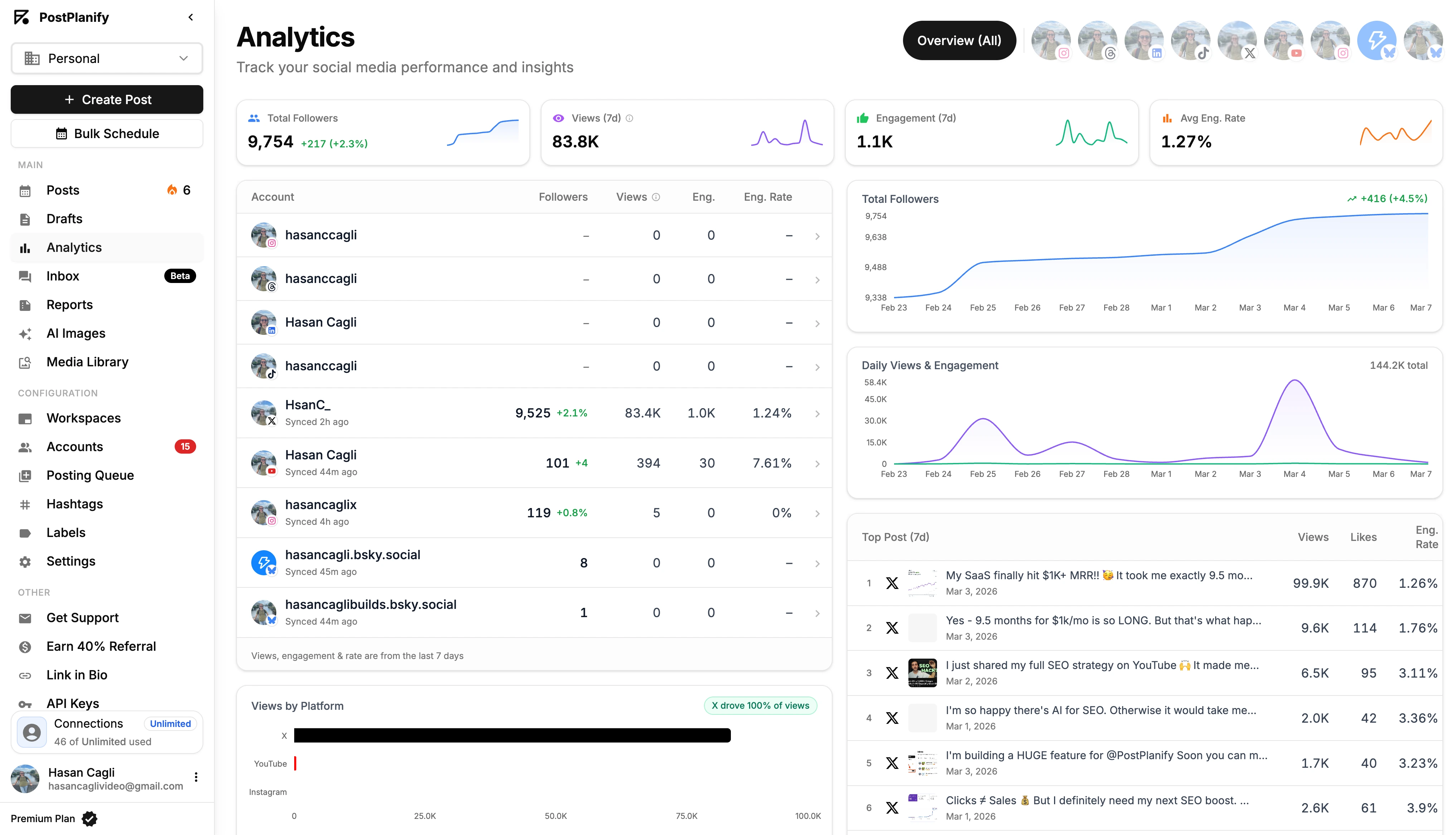
Keep this analysis tied to the planned content categories in your calendar. Otherwise, the team learns what performed, but not why it belonged in the plan.
For a deeper framework on that reporting loop, this guide to social media analytics and reporting is a practical reference.
Strategic metrics that improve planning quality
The most important long-term metric is whether the team is investing in the right topics.
Niara.ai describes the shift from intuition-based planning to demand-based planning and gives a concrete example. The keyword "content marketing" has 18,000 monthly searches, while "content marketing strategies" has 720, a 25:1 difference that shows why editorial planning should be anchored in demand data rather than instinct in its data-driven editorial calendar guide.
That doesn't mean every calendar needs SEO data for every social post. It means your planning system should have room for signals like demand, recurring audience questions, campaign priority, and content-gap analysis.
The calendar is doing its job when it helps your team decide what not to create, not just what to publish next.
Useful strategic checks include whether you're overloading one content pillar, neglecting another, or repeatedly creating low-priority content because it's easier to produce.
How PostPlanify Handles Editorial Calendar Workflows
If you've read this far, you already know what a workable editorial calendar tool needs to do. PostPlanify is built around that exact model — one record per content item, multiple views over the same data, formal approvals, and publishing that doesn't require leaving the tool.
Here's what that looks like in practice:
- Analytics across all 10 platforms — Instagram, Facebook, X, TikTok, LinkedIn, YouTube, Threads, Pinterest, Bluesky, and Google Business — with best-time-to-post recommendations built into the scheduling step
- Social inbox for comments, DMs, and mentions across supported platforms, so audience response flows back into planning instead of sitting in moderation tools
- AI assistant with vision-powered caption, hook, and variant generation — useful when adapting one approved post into platform-specific versions
- Approval workflows with multi-approver support per post, so legal, client, and editorial signoff happen inside the calendar rather than in email threads
- Team collaboration with role-based permissions — separate access for admins, editors, designers, freelancers, and clients
- White-label PDF reports for agencies sharing performance with clients
- Bulk scheduling via CSV for content batched in advance
- Content calendar and media library so assets stay attached to the records they belong to
Plans start at $79/mo billed yearly (or $99/mo monthly) for the Growth tier, which includes 15 social accounts and 3 team members. Agencies and larger teams typically pick Premium ($159/mo yearly) or Scale ($239/mo yearly) for higher seat counts, multi-workspace support, and white-label reporting.
For platform-specific use cases, see the Instagram scheduler, LinkedIn scheduler, or Google Business scheduler.
Your Editorial Calendar Tool Checklist
Use this before you switch tools or rebuild your current setup.
-
Confirm the core problem Is the issue missing dates, or is it broken approvals, weak visibility, scattered assets, and manual rescheduling?
-
Define the workflow clearly
Write down the actual stages your content goes through from idea to live post. -
List required channels
Include Instagram, Facebook, TikTok, X, LinkedIn, and any non-social content your team still needs to track. -
Map who needs access
Separate admins, editors, designers, freelancers, clients, and approvers. -
Check for platform-specific execution
Make sure the editorial calendar tool can support variations by channel instead of forcing one generic post across everything. -
Test operational pain points
Approvals, delays, rescheduling, permissions, reporting, and asset retrieval matter more than visual design. -
Track a few core metrics
Review publishing consistency, workflow bottlenecks, content performance, and topic coverage. -
Set team rules early
If approvals and status changes still happen in chat, the tool won't become your system.
A good editorial calendar tool doesn't just make the month look organized. It makes the work easier to run.
PostPlanifyAll your social media in one simple dashboard
Schedule posts, track analytics, and reply to comments/DMs without switching tabs.
Engagement
+18%
Views
52.8k
Editorial Calendar Tool FAQ
What is an editorial calendar tool?
An editorial calendar tool is a content operating system that holds your entire content lifecycle — ideas, drafts, approvals, scheduled posts, and published assets — in one place. Unlike a spreadsheet or a basic scheduler, it manages the workflow around the calendar: who owns each step, what's been approved, which platform versions exist, and how performance feeds back into planning.
Editorial calendar vs content calendar — what's the difference?
An editorial calendar covers all content types (blog, social, video, email) across the full lifecycle. A content calendar is usually narrower, tracking what's going live and when. A social media calendar is the most specific and only covers social posts. A strong editorial calendar tool handles all three in one system.
Do I need an editorial calendar tool if my team is small?
Probably yes, once more than one person is touching content. Even a two-person team runs into version-control issues, scattered approvals, and missing assets. A lightweight editorial calendar tool prevents the spreadsheet-plus-Slack patchwork from breaking before you scale.
Can I use a spreadsheet as an editorial calendar?
Yes, for early-stage planning or a one-person workflow. Spreadsheets fail once you need approvals, version control, platform-specific variants, asset attachment, or publishing handoff. If your team is asking "which version is final?" more than once a week, you've outgrown the spreadsheet.
How is an editorial calendar tool different from a social media scheduler?
A scheduler queues posts and publishes them at a set time. An editorial calendar tool covers the work before scheduling — ideation, drafting, approvals, asset management, platform variants — and the work after publishing, like analytics and inbox response. Most modern tools do both, but lightweight schedulers usually skip the editorial layer.
Can an editorial calendar tool replace project management software?
For content teams, often yes. Tools like Asana and Trello are built around tasks, not publishable content. An editorial calendar tool is built around the final post or asset, which means previews, platform variants, scheduling, and publishing live with the record. You can run a content team on it without bolting on another project tool.
How much does an editorial calendar tool cost?
Pricing ranges from free (Notion, Trello basic, Buffer free) to $500+/user/month for enterprise platforms like Sprout Social and Sprinklr. Mid-market options like PostPlanify start at $79/mo billed yearly for the Growth tier. The bigger cost driver is usually per-seat pricing — agencies and teams with many reviewers should check how cost scales as more people are added.
What's the best editorial calendar tool for agencies?
Agencies need client workspaces, role-based permissions, white-label reports, and multi-approver flows. PostPlanify Premium and Scale, Sprout Social, and Hootsuite all handle these. The right pick depends on how many client accounts you manage and how strict your approval chain is. Avoid tools that charge per client workspace as a separate add-on.
Does an editorial calendar tool support multi-platform publishing?
The better ones do. Look for direct publishing to Instagram, Facebook, X, LinkedIn, TikTok, YouTube, Threads, Pinterest, Bluesky, and Google Business — and platform-specific variants so each channel can have its own copy, asset, and hook. Some tools rely on push-notification reminders for unsupported formats, which adds friction.
Can I see analytics inside an editorial calendar tool?
Most modern tools include at least basic analytics — reach, engagement, follower growth — tied back to the planned content. Higher-tier plans usually add best-time-to-post recommendations, custom reports, and white-label exports. If analytics lives in a separate tool, the planner stays disconnected from outcomes, which is the most common reason teams stop improving.
How long does it take to migrate from a spreadsheet to an editorial calendar tool?
For most teams, 1–2 weeks. The work isn't the migration itself — it's deciding which fields to bring over, defining the workflow stages, setting permissions, and training the team on the new usage rules. Importing 6 months of old data is usually a mistake. Bring forward only what's in active production and archive the rest.
Can an editorial calendar tool help with content gap analysis?
Yes, if it supports tagging content by pillar, theme, or campaign. Once that structure is in place, you can filter by tag to see what you're overproducing and what you're neglecting. The calendar can then tell you not just what to publish next, but what's missing from the plan entirely.
Key Takeaways
- An editorial calendar tool only works when it's the single source of truth — not just a posting schedule
- Spreadsheets break first at approvals, version control, and platform-specific publishing
- Multi-view planning (calendar, kanban, timeline, table) on one record prevents drift across views
- Approval workflows must live inside the tool, not in chat or email — that's where most "missed" content originates
- Choose for operational complexity, not feature lists — test the messy scenarios, not the demo path
- Track operational metrics (publishing consistency, approval speed, backlog health) alongside performance
- A unified inbox closes the loop between planning and audience response
- The right tool varies by team type: solo creators need lightweight scheduling; agencies need client workspaces, role-based permissions, and white-label reports
Related Reading
- Content Calendar for Social Media: A Practical Guide
- Best Content Calendar Tools Compared
- How to Plan Social Media Content
- Social Media Management Workflow
- Social Media Analytics and Reporting Guide
- Team Collaboration for Content Teams
- How to See Scheduled Posts on Instagram
- Instagram Scheduled Posts Not Working? 10 Quick Fixes
- How to Schedule Instagram Posts
- Instagram Scheduler
- LinkedIn Scheduler
- Google Business Scheduler
- Best Social Media Management Tools for Teams
- Best Social Media Platforms for Business
- Best Marketing Planning Software
If you want one place to plan, approve, schedule, and review content without stitching together separate tools, PostPlanify is built for that operating-system approach. It supports multi-platform publishing across 10 networks, shared calendars, role-based permissions, multi-approver workflows, analytics with best-time-to-post recommendations, white-label PDF reports, and team collaboration for agencies, in-house teams, and creators.
Try PostPlanify free for 7 days — schedule, plan, and approve content across every major platform from one editorial calendar.
PostPlanifyAll your social media in one simple dashboard
Schedule posts, track analytics, and reply to comments/DMs without switching tabs.
Engagement
+18%
Views
52.8k
About the Author

Hasan Cagli
Founder of PostPlanify, a content and social media scheduling platform. He focuses on building systems that help businesses, agencies, and teams plan, publish, and manage content and social media more efficiently across platforms.


