


Here's how most "approval processes" actually work: a caption pasted into WhatsApp, a screenshot of a graphic, three days of silence, a voice note that says "can we make it pop more," and a scheduled post that quietly missed its slot while everyone waited.
It works — barely — with one client. At three clients it's chaos. At ten it's the reason agencies lose accounts.
This guide gives you the fix: a social media approval process you can set up this week — the four workflow models and which one fits your team, stage-by-stage setup with turnaround times, the one policy that stops silent clients from breaking your schedule, and a copy-paste template at the end.
What is a social media approval process?
A social media approval process is the defined workflow a post moves through between creation and publishing: who reviews it, in what order, how fast, and what happens when someone requests changes. A working process answers four questions for every post — who approves it, by when, where feedback goes, and what happens if the approver doesn't respond.
That last question is the one almost everyone skips, and it's where schedules go to die. We'll fix it below.
Why ad-hoc approval breaks (and what it costs)
The WhatsApp-and-spreadsheet method fails predictably as you grow:
- Feedback scatters. Comments arrive by email, chat, and voice note — none of them attached to the post they're about. Version four ships with version two's caption.
- There's no audit trail. When a client asks "who approved this?", the honest answer is a scroll through three chat histories.
- Nobody owns the clock. Without turnaround expectations, "waiting on approval" becomes a permanent state rather than a 48-hour window.
- Every stuck post breaks your cadence. This is the hidden cost: consistency is the single biggest engagement lever in social media — consistent posters earn 450% more engagement per post than sporadic ones (Buffer, 52M posts), and in PostPlanify's own platform data only 39.7% of accounts manage a consistent schedule at all. A slow approval doesn't just delay one post; it knocks the account out of the consistency the algorithm rewards.
An approval process isn't bureaucracy. It's how the posting schedule survives contact with other people's calendars.
The 4 approval workflow models (pick one, not all)
Approval workflows fail in two directions: not enough process (chaos) or too much (a solo founder running three review stages is theater). Match the model to your actual risk:
| Model | Flow | Best for | Typical turnaround |
|---|---|---|---|
| No approval | Create → schedule | Solo creators, founders posting as themselves | 0 |
| Single-stage | Create → one reviewer → schedule | Small teams; agencies with high-trust clients | 24h |
| Two-stage | Create → internal QA → client sign-off → schedule | Agencies — the standard setup | 48–72h total |
| Compliance-grade | Create → internal → legal/compliance → client → schedule | Finance, healthcare, pharma, public companies | 3–5 days |
Two rules for choosing:
- Every stage must catch something the previous one can't. Internal review catches typos, brand voice, and wrong-account mistakes. Client review catches facts, timing, and "we actually discontinued that product." Legal catches claims. If a stage doesn't have a distinct job, delete it.
- Start one stage lighter than feels safe. You can always add a stage after an incident; removing one after it's habitual is politically much harder.
The two-stage workflow, mapped
For agencies, the two-stage model is the standard for a reason: the client only ever sees work that's already passed internal QA, which trains them to approve quickly because what they see is consistently good.
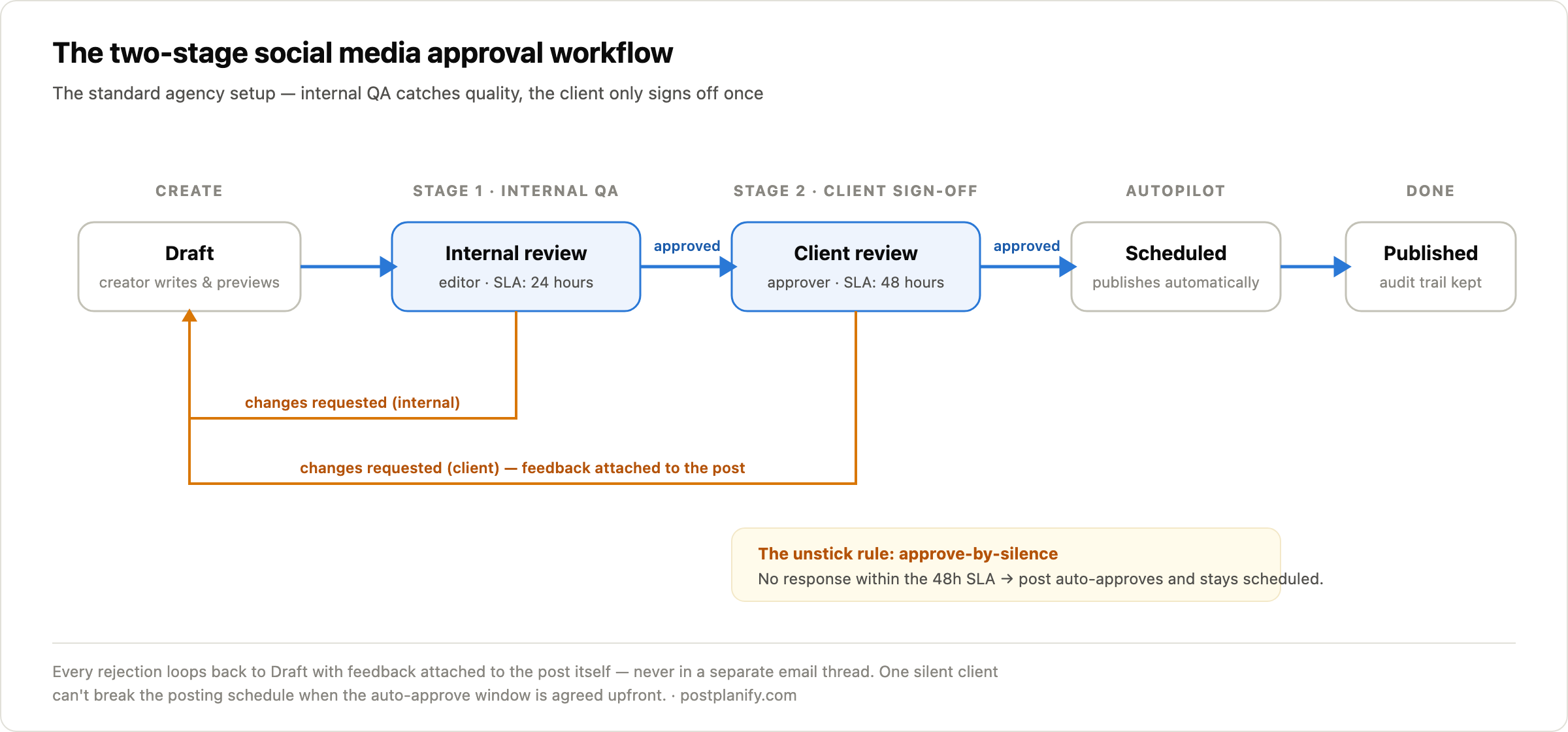
The parts that make this work in practice — and that most teams miss — are the SLAs and the loop rules, so let's build them.
How to set up your approval process in 6 steps
Step 1: Map your stages and name one owner per stage
Not a team — a person (or role). "Marketing reviews it" means nobody reviews it. The two-stage standard: creator drafts, editor owns internal review, one named client contact owns sign-off. If the client wants three people to see every post, that's fine — but one of them holds the approve button, and the other two comment.
Step 2: Define what each stage checks
Give every reviewer a short, explicit checklist so feedback stays in-scope:
- Internal review: typos, brand voice, correct account and platform format, image/crop check, links work, scheduled time matches the calendar plan.
- Client review: factual accuracy, product/pricing correctness, timing conflicts ("we're announcing that Tuesday, not Friday"), brand comfort.
When clients know their job is facts-and-comfort, they stop rewriting captions for sport.
Step 3: Set turnaround SLAs per stage
The clock is the process. Working defaults: 24 hours for internal review, 48 hours for client review (72 for regulated industries). Put the SLAs in your onboarding agreement — not as fine print, but as a mutual promise: "we deliver posts 5 business days before publish; you review within 48 hours; that's how your account stays consistent." It belongs in your client onboarding checklist from day one.
Step 4: Make feedback live on the post — nowhere else
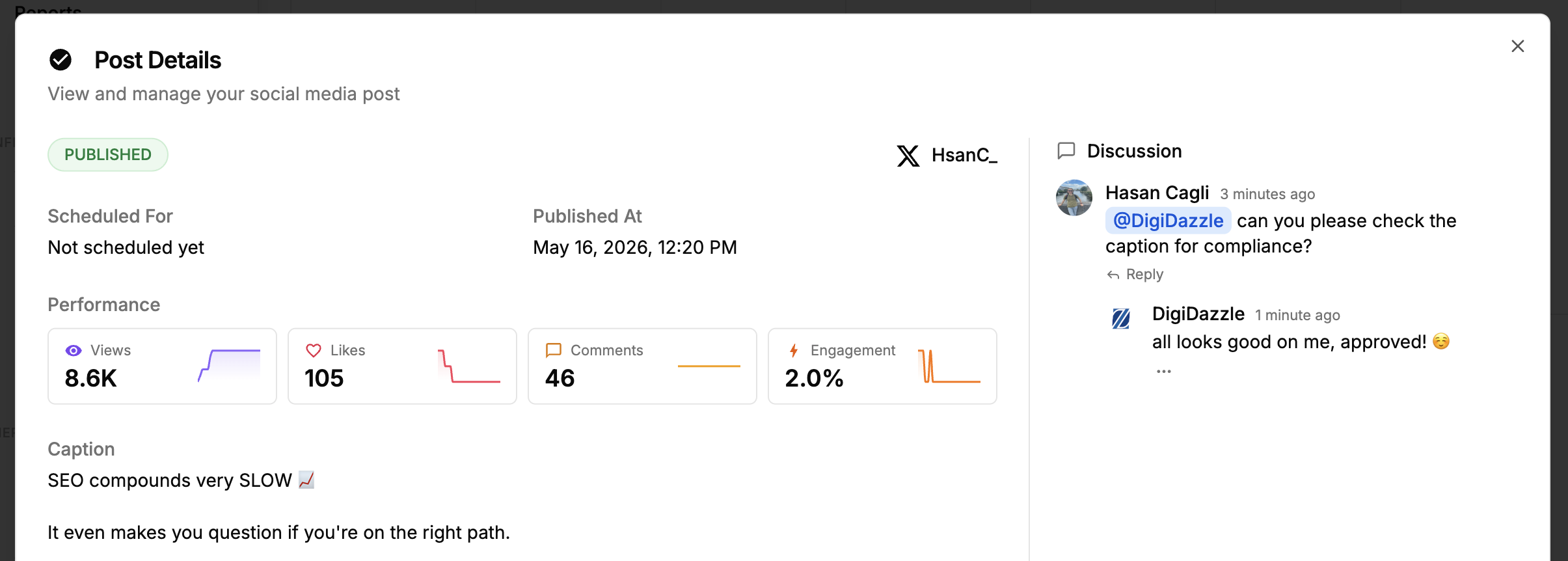
One rule, zero exceptions: changes are requested on the post itself, in the tool, attached to the version they're about. No email threads, no chat messages, no annotated screenshots. Rejections loop the post back to draft with its feedback attached, so the creator revises from one source of truth. This single rule eliminates most version chaos.
Here's what that looks like in practice — an @mention requesting a compliance check and the reviewer's sign-off, living on the post instead of in a chat thread:
Step 5: Agree the approve-by-silence policy
The most important 20 minutes of your client relationship: agree upfront that posts not reviewed within the SLA window auto-approve and publish as scheduled.
This sounds aggressive. It's the opposite — it's the only policy that's fair to both sides. The client keeps full veto power inside a generous window; the account keeps its posting cadence when someone's on vacation. Frame it exactly that way in the kickoff call: "this protects your account's consistency, and you can always pull a post before it goes live." Clients who hear the reasoning almost always agree; clients who won't agree have told you something important about the relationship.
Step 6: Batch approvals weekly, not per-post
Ten single-post approval pings a week train clients to ignore notifications. One weekly batch — "your 12 posts for next week are ready, 15 minutes to review" — gets scheduled into their calendar like a meeting. Batch approvals pair naturally with batch creation and scheduling: produce the week in one session, send it for review in one session, publish on autopilot.
The copy-paste approval workflow template
Steal this table, adjust the SLAs, and put it in your next client agreement:
| Stage | Owner | What they check | SLA | If SLA passes |
|---|---|---|---|---|
| Draft | Creator | Complete post: caption, media, platform format, time slot | — | — |
| Internal review | Editor / account lead | Typos, voice, links, right account, crop | 24h | Escalate to account lead |
| Client review | Named client approver | Facts, pricing, timing, brand comfort | 48h | Auto-approves, publishes as scheduled |
| Scheduled | — (automatic) | Publishes at planned slot | — | — |
| Published | — | Audit trail: who created, who approved | — | — |
And the two messages that operate it:
Weekly batch (to client): "Hi Sarah — next week's 12 posts are ready for your review: [link]. Anything you'd like changed, leave a comment right on the post. Per our agreement, anything unreviewed by Thursday 5pm auto-approves so your schedule stays on track."
SLA reminder (24h before auto-approve): "Quick nudge — 4 posts are still awaiting your review and will auto-approve tomorrow at 5pm. Two minutes now saves any surprises. 🙂"
The 5 failure modes to watch for
- The bottleneck approver. One founder personally approving every post for every client is a queue, not a process. Fix: delegate internal review; keep the founder only on flagged posts.
- "Make it pop" feedback. Vague feedback creates infinite loops. Fix: reviewers must propose the change, not just dislike the current version — it's in the stage checklist.
- Screenshot editing. Clients typing corrected captions into chat means transcription errors ship. Fix: comment-on-the-post rule (step 4), no exceptions.
- Approval theater. Three stages where each just skims because "someone else checked it." Fix: distinct checklists per stage — or delete the stage.
- Silent drift. SLAs agreed in January are ignored by June. Fix: the auto-approve consequence keeps the SLA real without you ever having to nag.
Tools: what actually runs this workflow
Spreadsheets + email are free and work for exactly one low-volume client. There's no version control, feedback lives in threads, and nothing connects the "approved" cell to the thing that actually publishes.
Project tools (Trello, Asana, Notion) handle stages and owners well — but reviewers approve a card describing a post, not the post itself. No platform-accurate preview, no publish connection, so approved content still gets manually re-entered into a scheduler (a second chance for errors).
Purpose-built approval tools put the preview, the comments, the approve button, and the publishing in one place — we compared the options in the best social media tools with approval workflows.
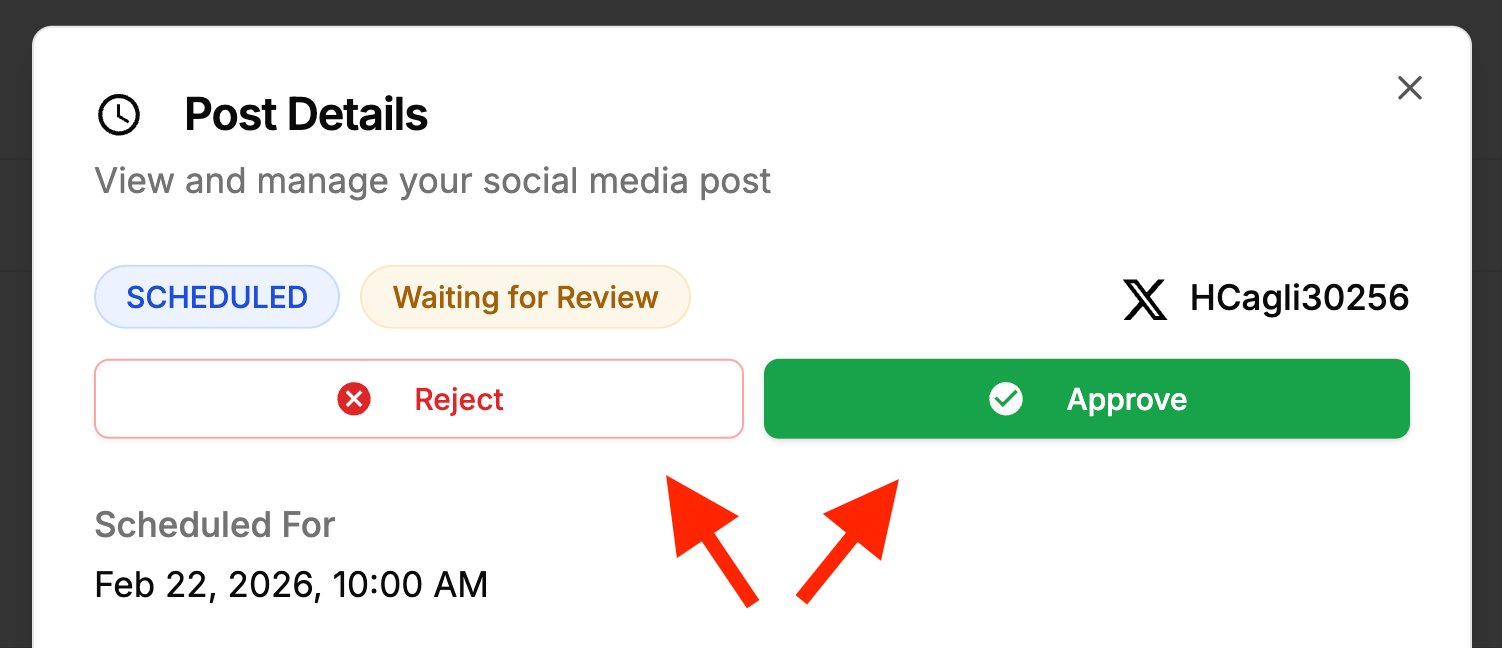
In PostPlanify, the workflow above maps one-to-one: single or multi-stage approvals per workspace, clients invited as approvers who see only their own workspace, platform-accurate post previews, comments and @mentions attached to each post, and an audit trail of who created and who approved. When the post is approved, it's already scheduled — there's no re-entry step, so the thing the client approved is the thing that publishes. As one agency owner put it in a G2 review: "Approvals happen inside the tool so we're not chasing people on Slack, and comments on drafts stay attached to the post so context doesn't get lost."
 PostPlanify
All your social media in one simple dashboard
Schedule posts, track analytics, and reply to comments/DMs without switching tabs.

Engagement
+18%
Views
52.8k
FAQ
What is a social media approval process?
The defined workflow a post moves through between creation and publishing: who reviews it, in what order, how fast, where feedback goes, and what happens if a reviewer doesn't respond. The standard agency version is two stages — internal review (24-hour SLA) then client sign-off (48-hour SLA) — with unreviewed posts auto-approving so the posting schedule holds.
How many approval stages should a social media workflow have?
As few as your actual risk requires: zero for solo creators, one internal reviewer for small teams, two stages (internal + client) for agencies, and a legal stage only for regulated industries. Each stage must catch something the previous one can't — a stage without a distinct checklist is delay, not quality control.
How long should client approval take for social media posts?
Set a 48-hour SLA for client review (72 hours in regulated industries), with posts delivered around 5 business days before publish. The critical companion policy: posts unreviewed within the window auto-approve and publish as scheduled — otherwise one busy week on the client's side breaks the account's posting consistency.
How do you deal with clients who don't approve posts on time?
Three mechanisms, agreed at onboarding rather than invented mid-crisis: weekly batch reviews instead of per-post pings (one 15-minute calendar slot beats ten notifications), a reminder 24 hours before the SLA expires, and an approve-by-silence policy so unreviewed posts publish on schedule. Clients keep full veto power inside the window; the account keeps its cadence.
Should social media feedback go in email or in the tool?
In the tool, attached to the post — as a hard rule. Feedback in email and chat gets separated from the version it refers to, which is how wrong captions ship. Comment-on-the-post workflows also create an audit trail: every revision request, who made it, and what changed in response.
Do small teams need a social media approval process?
A lightweight one, yes — a single internal reviewer with a 24-hour SLA catches typos, wrong-account posts, and broken links at almost no speed cost. What small teams should skip is multi-stage process: two or more approval layers on a three-person team slows publishing without catching more errors.
Can clients approve posts without buying software seats?
In tools built for agency workflows, yes — in PostPlanify, clients join as approvers with access to only their own workspace, review platform-accurate previews, and approve or request changes without a paid seat or any view into your other clients. Check this before choosing a tool; per-seat pricing that charges for client reviewers gets expensive fast.
What should an approval workflow template include?
Five columns: the stage, one named owner, what that stage checks (a short checklist), the SLA, and what happens when the SLA passes. The last column is the one most templates omit — and it's the one that keeps the process running when people are busy. Copy the template above and adjust the SLAs to your client mix.
The bottom line
An approval process isn't about control — it's about making quality and consistency compatible. The account that publishes on schedule with a two-stage review beats both the account that publishes fast and sloppy, and the account that reviews forever and posts twice a month.
Set the stages, name the owners, agree the SLAs and the auto-approve rule in the kickoff call, batch the reviews weekly — and then let the process, not your follow-up messages, do the chasing.
PostPlanifyAll your social media in one simple dashboard
Schedule posts, track analytics, and reply to comments/DMs without switching tabs.
Engagement
+18%
Views
52.8k
About the Author

Hasan Cagli
Founder of PostPlanify, a content and social media scheduling platform. He focuses on building systems that help businesses, agencies, and teams plan, publish, and manage content and social media more efficiently across platforms.


