


One wrong post can damage a brand. A typo in a product launch, an off-brand caption from a junior team member, or a client-facing post that was never reviewed. These mistakes happen when there's no structured approval process between content creation and publishing.
According to Sprout Social, clear content workflows with defined roles and approval steps are two of the eight best practices that separate organized social media teams from chaotic ones.
But social media approval software varies a lot from one tool to the next. Some offer a simple toggle that prevents publishing until a manager clicks "approve." Others provide multi-step, multi-approver systems where content passes through copywriters, designers, brand managers, and external clients before it goes live. The type of approval workflow you need depends on your team size, whether you work with clients, and how much control you need over what gets published.
I evaluated 11 social media approval tools based on the depth, flexibility, and accessibility of their approval workflows (if you need sign-off on video, design and print as well as social, see the wider marketing collaboration software comparison), from social media team collaboration with designated approvers to client-facing review systems. If you're specifically looking to set up a team workflow for Instagram, our guide on how to collaborate on Instagram walks through the full process from roles to approvals.
Quick Comparison
| Tool | Best For | Starting Price | Approval Type | Approval Starts On | Rating |
|---|---|---|---|---|---|
| PostPlanify | Multi-approver workflows | $39/mo | Multi-approver + role-based | First workspace ($39/mo) | 5/5 G2 |
| Planable | Approval-first platform | $39/mo | 2–3 approval types | Basic ($39/mo) | 4.6/5 G2 |
| Kontentino | Client approval via invite link | $83/mo | Internal then client | Starter ($83/mo) | 4.6/5 G2 |
| Loomly | Approval on entry plan | $65/mo | Workflows + roles | Starter ($65/mo) | 4.6/5 G2 |
| Buffer | Most accessible approvals | $0 (free plan) | Content approval | Team ($12/ch/mo) | 4.3/5 G2 |
| Later | Internal approvals | $25/mo | Internal + client comments | Growth ($50/mo) | 4.5/5 G2 |
| SocialPilot | Escalating approval tiers | $30/mo | Manager → client | Standard ($50/mo) | 4.5/5 G2 |
| Sendible | Agency approval workflows | $35/mo | Assignment + approval | Plus ($99/mo) | 4.5/5 G2 |
| Vista Social | Multi-step + external links | $99/mo | Multi-step + external | Professional ($99/mo) | 4.8/5 G2 |
| Agorapulse | One-step for mid-size teams | $99/user/mo (30-day trial) | One-step + multi-step | Professional ($149/mo) | 4.5/5 G2 |
| Hootsuite | Enterprise team workflows | $99/user/mo | Team workflows | Advanced ($399/user/mo) | 4.3/5 G2 |
 PostPlanify
All your social media in one simple dashboard
Schedule posts, track analytics, and reply to comments/DMs without switching tabs.

Engagement
+18%
Views
52.8k
Types of Approval Workflows Explained
Not all approval workflows work the same way. Understanding the differences helps you pick the right tool for your team structure, and which layer it belongs in alongside your marketing planning software. You can see how PostPlanify handles approvals as one example.
Single-step approval
The simplest form: one person reviews and approves content before it publishes. A team member creates a post, it goes into a "pending approval" state, and a designated approver (usually a manager or brand owner) either approves or rejects it. Tools like Agorapulse and Buffer use this approach.
Best for: Small teams (2–5 people) where one person has final say over all content.
Multi-step approval
Content passes through multiple stages before publishing, for example copywriter → designer → brand manager → client. Each step has its own reviewer, and content only advances when the current reviewer approves. Vista Social and Planable offer this on higher-tier plans.
Best for: Agencies managing client content or enterprises with compliance requirements.
Multi-approver (parallel)
Instead of sequential steps, multiple designated approvers must all sign off before content publishes. A post might need approval from both the marketing lead and the legal team simultaneously. PostPlanify uses this model: all designated approvers must approve, and the dashboard tracks progress as "2/3 Approved." See how multi-approver review works in practice.
Best for: Teams where multiple stakeholders need to review the same content without creating a bottleneck of sequential steps.
External/client approval
Some tools let external stakeholders (clients, partners, executives) review and approve content without giving them full platform access. This splits into two models that are easy to confuse, and the difference decides how fast your clients actually respond.
-
No-login approval links. The client gets a link by email, sees the post as it will publish, and approves or sends it back. No account, no password, works on a phone. SocialPilot (Approvals On-The-Go) works this way.
-
Account-based client roles. The client is invited to the platform under a restricted role, logs in, and approves inside the tool. They see only their own brand. PostPlanify works this way: the Client role is free and unlimited, but the client does sign in.
Watch for a third case that looks like the first and isn't. Planable's public share links let an external viewer read a post and leave comments, but not approve it. Formal approval there still requires an account.
Best for: Agencies that need client sign-off without onboarding clients to the full platform. If your clients are slow responders, the no-login model removes the most common excuse.
Role-based approval
Instead of designating specific approvers per post, the tool uses roles (Owner, Admin, Editor, Client) to determine who can approve. Any user with the right role can approve any pending post. PostPlanify supports both role-based and designated multi-approver workflows.
Best for: Teams with clear hierarchies where any senior member should be able to approve content.
Approval Feature Comparison Matrix
| Tool | Approval Type | External/Client Approvals | Rejection with Notes | Starts On | Approval Entry Price |
|---|---|---|---|---|---|
| PostPlanify | Multi-approver (parallel) + role-based | Yes, client logs in (free Client role, unlimited) | Yes | First workspace | $39/mo |
| Planable | 2–3 types by plan | Comment-only via public link; approval needs an account | Not specified | Basic | $39/workspace/mo |
| Kontentino | Internal, then client sign-off | Yes, via invite link (Standard+) | Not specified | Starter (internal), Standard (client) | $83/mo internal, $179/mo client |
| Loomly | Workflows + roles; custom on Beyond | Not specified | Not specified | Starter | $65/mo |
| Buffer | Content approval workflows | Not specified | Not specified | Team | $12/channel/mo |
| Later | Internal + external | Comments only; approvals are internal | Not specified | Growth | $50/mo |
| SocialPilot | Manager → Client escalation | Yes, no login (Approvals On-The-Go link, Premium+) | Not specified | Standard | $50/mo |
| Sendible | Assignment + approval | Client dashboards (Plus+), client logs in | Not specified | Plus | $99/mo |
| Vista Social | Multi-step with named stages | Yes (external approval links) | Not specified | Professional | $99/mo |
| Agorapulse | One-step; multi-step on Custom | Yes (Professional+) | Not specified | Professional | $149/user/mo |
| Hootsuite | Team approval workflows | Not specified | Not specified | Advanced | $399/user/mo |
1. PostPlanify: Best Multi-Approver Workflows

PostPlanify offers the most flexible approval system on this list with two distinct modes that cover different team structures.
The multi-approver mode lets you designate specific team members as approvers when creating a post. Every designated approver must sign off before the post can publish, and the dashboard tracks progress in real time, showing "2/3 Approved" status chips so you always know where a post stands. If any approver rejects a post, they can include a reason, and the post is automatically cancelled with the rejection note sent to the creator.
The role-based mode works when no specific approvers are designated. Any team member with an Owner or Client role can approve pending posts, which is useful for teams where multiple senior members share approval responsibility.
The Client role is specifically designed for external stakeholders: agency clients can be invited to review and approve content for their brand without getting access to other brands or platform features they don't need. Client reviewers are free and unlimited on every plan, though they do sign in to approve rather than clicking through an emailed link.
Beyond approvals, PostPlanify covers analytics across all 10 supported platforms with best time to post suggestions, a social inbox with AI-powered replies, a brand-aware AI assistant for caption and image generation, content calendar, media library, link in bio, team collaboration with unlimited team members on every plan, and branded PDF reports included from the first workspace. True white-label reporting is included in the Scale plan.
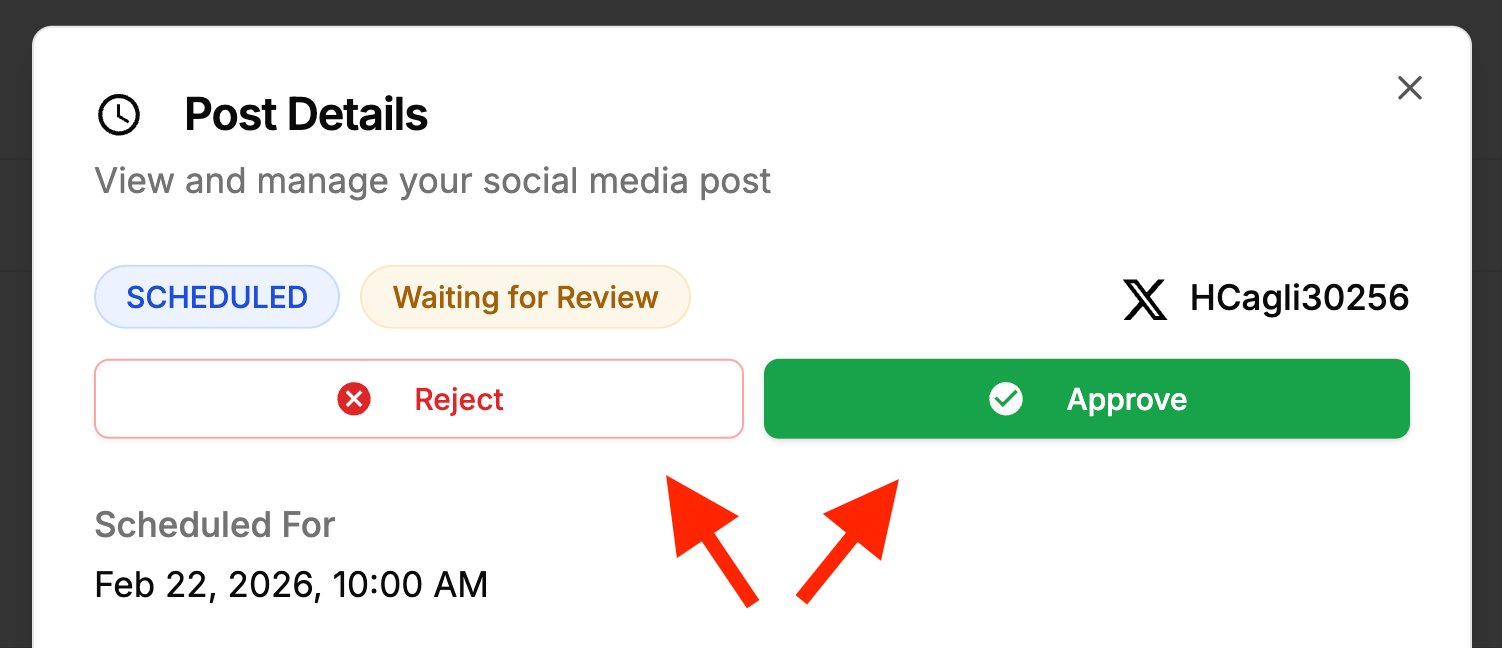
Key approval features:
- Multi-approver per post: designate specific team members; all must approve before publishing
- Real-time approval tracking: dashboard shows "X/Y Approved" progress for every pending post
- Rejection with reason: approvers can reject with notes; post auto-cancels and creator is notified
- Client role: external stakeholders review and approve their brand's content only, free and unlimited on every plan
- Role-based fallback: when no approvers are designated, Owner and Client roles can approve
- No per-seat fees at all: team members are unlimited on every plan, so adding an approver never raises the bill
- Email notifications: optional approval request and status emails for approvers and creators
| Plan | Starts at | Includes | Each extra workspace | Social accounts |
|---|---|---|---|---|
| Growth | $39/mo | 1 workspace | from $29, cheaper as you add more | 4 per workspace |
| Premium | $99/mo | 3 workspaces | from $39, cheaper as you add more | 6 per workspace |
| Scale | $199/mo | 5 workspaces | from $39, cheaper as you add more | 8 per workspace |
Unlimited team members on every plan, no per-seat fees. Yearly billing saves 20%. All plans include a 7-day free trial with a 14-day money-back guarantee.
Approval workflows are in the first workspace, not a tier upgrade. Extra workspaces add brands and social accounts; they do not unlock approvals, and they never add per-seat costs.
Pros:
- Multi-approver system: each post can have different designated approvers
- Approval progress tracking shows exactly who has and hasn't approved
- Rejection includes reasons so creators know what to fix
- Client role enables external approvals without full platform access, at no extra cost per client
- Unlimited team members on every plan, so every approver you add is free
Cons:
- Pricing tracks brands, not people: a second client brand means a second workspace at $39/mo
- Newer platform: smaller community compared to established tools
- No free plan available
- Clients sign in to approve; there is no no-login emailed approval link yet
- Multi-step sequential approvals not supported: uses parallel (all-at-once) model
Best for: Teams that need multiple stakeholders to approve the same content simultaneously, with clear tracking of who has approved and the ability to include external clients in the approval process.
Full detail on how it works: PostPlanify approval workflows.
PostPlanifyAll your social media in one simple dashboard
Schedule posts, track analytics, and reply to comments/DMs without switching tabs.
Engagement
+18%
Views
52.8k
2. Planable: Best Approval-First Platform

Planable is built around content collaboration and approval. While most tools add approval workflows as a secondary feature, Planable makes it the core of the product. Every plan is designed around the review-and-approve workflow.
The Basic plan includes 2 types of approval workflows (approval is optional), the Pro plan adds a third type with required approval, and Enterprise unlocks multi-level approvals. The platform focuses on visual content review: teams see posts exactly as they'll appear on each platform, making it easier to catch formatting issues before approving.
Planable's collaboration features include real-time comments on every post. There is no free plan, but your first 50 posts are free, so teams can test the approval experience before committing.
Key approval features:
- 2 types of approval workflows on Basic plan
- 3 types of approval workflows on Pro plan
- Multi-level approvals on Enterprise plan
- Visual content preview: see posts as they'll appear on each platform before approving
- Real-time collaboration: comments on posts during review
| Plan | Price | Posts | Approval Types | Users |
|---|---|---|---|---|
| Basic | $39/workspace/mo | 60/mo | 2 types (optional) | Unlimited |
| Pro | $59/workspace/mo | 150/mo | 3 types (required) | Unlimited |
| Enterprise | Custom | Unlimited | Multi-level | Unlimited |
Pros:
- Approval-first design: the entire platform is built around content review
- Visual preview shows exactly how posts will look on each platform
- Unlimited users on all plans, no per-seat fees
- High ratings across both G2 (4.6/5) and Trustpilot (4.5/5)
Cons:
- Per-workspace pricing: agencies with many clients pay per workspace
- Post limits on all plans except Enterprise (60 on Basic, 150 on Pro)
- Public share links are comment-only: a client has to create an account to actually approve
- Analytics ($14/mo) and social inbox ($9/mo) are paid add-ons per workspace
- No AI caption or image generation
Best for: Teams and agencies that prioritize content review and collaboration above all else, and want an approval-first experience rather than approvals bolted onto a scheduling tool.
User ratings: 4.6/5 on G2 (937 reviews) · 4.5/5 on Trustpilot (69 reviews)
For more details: Planable Pricing Breakdown · Planable Reviews · Best Planable Alternatives
3. Kontentino: Best for Client Approval via Invite Link
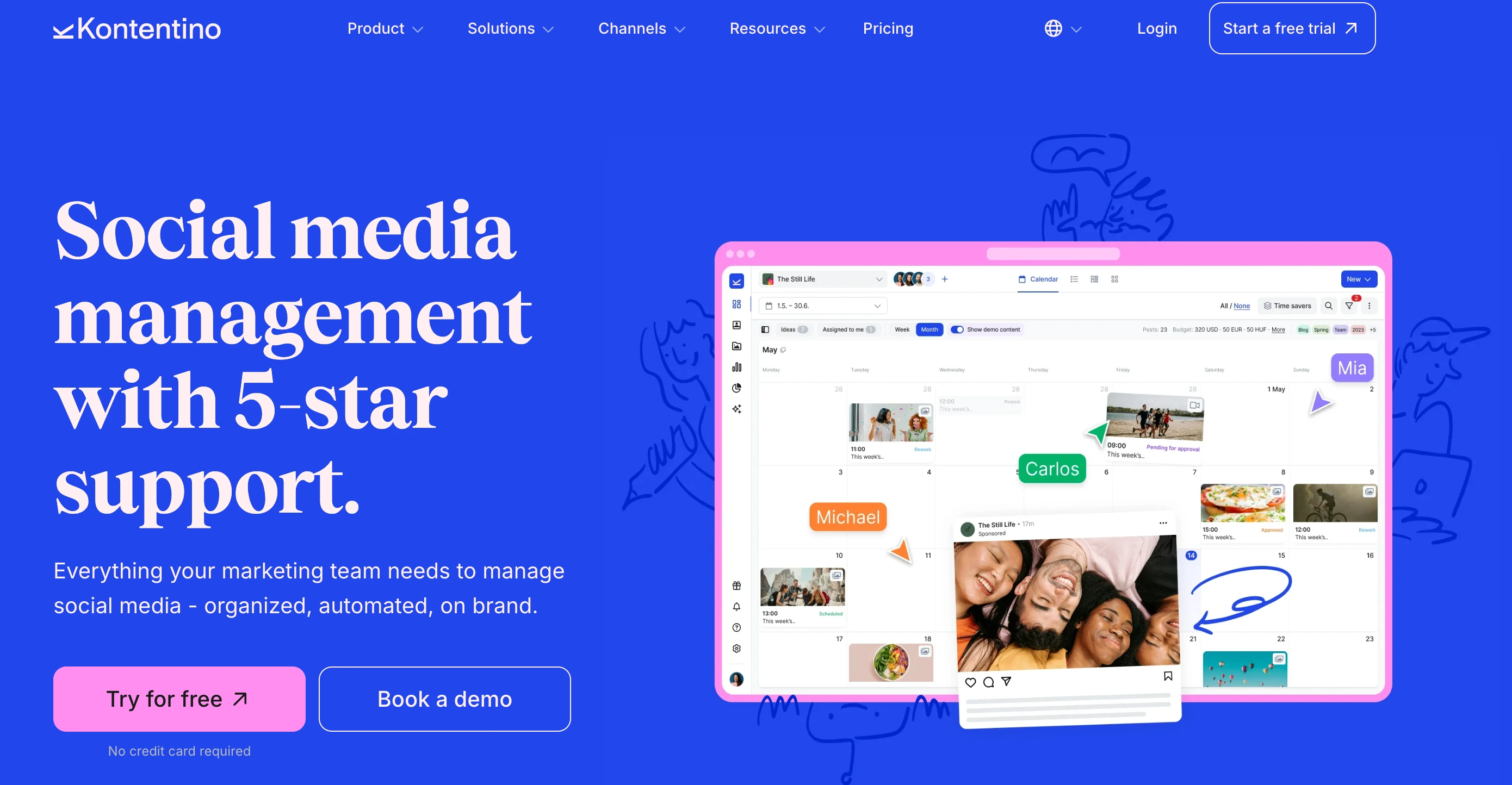
Kontentino is built around the agency review cycle: plan on a calendar, route internally, then send to the client for sign-off. Clients review through an invite link that shows each post as it will appear live rather than as a spreadsheet row.
The catch is where that client step starts. Internal team approvals are on the entry Starter plan, but client and external approvals require Standard at $179/month, so the feature Kontentino is best known for sits two tiers above its advertised entry price. Analytics is also a paid add-on on Starter and Standard, included only from Pro.
| Plan | Monthly | Yearly (per month) | Users | Profiles | Client Approvals |
|---|---|---|---|---|---|
| Starter | $83/mo | $59/mo | 3 | 10 | Internal only |
| Standard | $179/mo | $131/mo | 10 | 40 | Yes |
| Pro | $323/mo | $239/mo | 10 | Unlimited | Yes |
| Enterprise | Custom | Custom | Custom | Custom | Yes |
Kontentino prices in both USD and EUR; the euro rates are EUR 69, EUR 149 and EUR 269 monthly. Annual billing saves roughly 25%.
Key approval features:
- Live post previews: clients see the post as it will publish, on desktop or phone
- Internal then external routing: team sign-off first, client sign-off second
- Brand Hub and Kanban view on Standard and above
Pros:
- Internal approvals are included from the Starter plan
- Built for the agency review cycle rather than approvals bolted onto a scheduler
- Live previews cut down the "that's not what I approved" round trip
Cons:
- Client approvals need Standard at $179/mo, more than double the Starter price
- Analytics is a paid add-on on Starter and Standard, included only from Pro
- Starter is capped at 3 users and 10 profiles
Best for: Agencies that route content internally and then to clients, and can budget for the Standard plan.
User ratings: 4.6/5 on G2 (351 reviews) · 4.7/5 on Capterra (201 reviews)
For more details: Kontentino Pricing Breakdown · Kontentino Reviews · Best Kontentino Alternatives
4. Loomly: Best Approval on Entry Plan

Loomly includes approval workflows and roles on every paid plan, starting from the Starter plan at $65/month. While many competitors lock approvals behind mid-tier or enterprise plans, Loomly makes it accessible from the first paid tier.
The Starter plan includes standard approval workflows with role-based access. The Beyond plan ($332/month) upgrades to custom workflows and custom roles, giving teams more flexibility in how content moves through the review process. Loomly also offers an Interactions inbox for managing comments and DMs, and supports 10 platforms including Google Business and Threads.
Key approval features:
- Approval workflows and roles on all paid plans (Starter $65/mo+)
- Custom workflows and custom roles on Beyond plan ($332/mo)
- Role-based access control: define who can create, edit, and approve
- Interactions inbox: manage comments and DMs alongside content approval
| Plan | Price | Social Accounts | Approval Workflows | Users |
|---|---|---|---|---|
| Starter | $65/mo | 12 | Yes (standard) | 3 |
| Beyond | $332/mo | 60 | Yes (custom) | Unlimited |
| Enterprise | Custom | Custom | Yes (custom) | Custom |
Loomly no longer offers a free plan. Paid plans start at $65/mo, with a 15-day free trial.
Pros:
- Approval workflows on the first paid plan: $65/mo is lower than many competitors
- Custom workflows and roles on Beyond plan for complex review processes
- Interactions inbox covers comments and DMs across platforms
- Strong G2 rating at 4.6/5 from 1,793 reviews
Cons:
- Large pricing gap between Starter ($65/mo) and Beyond ($332/mo)
- No free plan: entry is the $65/mo Starter (15-day trial only)
- Starter plan limited to 3 users: restrictive for teams
- Trustpilot rating is low at 1.7/5 (26 reviews)
Best for: Small teams (up to 3 people) who want approval workflows at a reasonable entry price without jumping to enterprise-tier plans, and value built-in content review from day one.
User ratings: 4.6/5 on G2 (1,793 reviews) · 1.7/5 on Trustpilot (26 reviews)
For more details: Loomly Pricing Breakdown · Loomly Reviews · Best Loomly Alternatives
5. Buffer: Most Accessible Approval Workflow

Buffer offers content approval workflows on its Team plan at $12/channel/month, making it one of the lowest per-channel entry points for approval features. The Team plan also includes access levels and permissions, so you can control who creates content and who approves it.
Buffer's approval system is straightforward: team members draft posts, and designated approvers review and approve before scheduling. It's not multi-step or multi-approver: it's a clean, single-layer approval that fits small teams without adding complexity.
The platform includes a community inbox, AI Assistant for caption generation, and best time to post recommendations. Buffer supports unlimited channels on paid plans with per-channel pricing.
Key approval features:
- Content approval workflows on Team plan ($12/channel/mo)
- Access levels and permissions: control who can publish vs. who needs approval
- Unlimited team members on Team plan
- Simple approval flow: draft → review → approve → schedule
| Plan | Price | Channels | Approval Workflows | Users |
|---|---|---|---|---|
| Free | $0/mo | 3 | No | 1 |
| Essentials | $6/channel/mo | Unlimited | No | 1 |
| Team | $12/channel/mo | Unlimited | Yes | Unlimited |
Pros:
- Low per-channel entry price for approvals: $12/channel/mo
- Simple, clean approval process without unnecessary complexity
- Unlimited team members on Team plan
- 14-day free trial on paid plans
Cons:
- Per-channel pricing adds up (10 channels = $120/mo for Team)
- No multi-step or multi-approver workflows
- No external/client approval features
- Community inbox is basic compared to dedicated inbox tools
Best for: Small teams who want a simple, no-frills approval workflow at the lowest possible per-channel cost, without needing multi-step reviews or client-facing approval features.
User ratings: 4.3/5 on G2 (1,023 reviews) · 2.1/5 on Trustpilot (93 reviews)
For more details: Buffer Pricing Breakdown · Buffer Reviews · Best Buffer Alternatives
PostPlanifyAll your social media in one simple dashboard
Schedule posts, track analytics, and reply to comments/DMs without switching tabs.
Engagement
+18%
Views
52.8k
6. Later: Best for Internal Approvals with External Feedback

Later includes internal collaboration and approvals on its Growth plan ($50/month), plus external sharing so clients and partners can review posts and leave comments. Formal approval stays with your internal team.
The platform organizes profiles into "social sets": bundles of profiles across multiple platforms. The Growth plan covers 2 social sets (up to 16 profiles total) with 2 users, while Scale ($110/month) expands to 6 social sets and 4 users. Smart Scheduling with future trend analysis is also available on Growth and above.
Social inbox is included on Growth plans, so teams can manage approvals and engagement from the same platform.
Key approval features:
- Internal collaboration and approvals: team review workflows within the platform
- External feedback: share content with clients for review and comments (Growth, $50/mo)
- Social inbox: manage engagement alongside content approval (Growth+)
| Plan | Price | Social Sets (Profiles) | Approval Workflows | Users |
|---|---|---|---|---|
| Starter | $25/mo | 1 set (8 profiles) | No | 1 |
| Growth | $50/mo | 2 sets (16 profiles) | Internal + external feedback | 2 |
| Scale | $110/mo | 6 sets (48 profiles) | Internal + external feedback | 4 |
Pros:
- Internal approvals and external feedback on the same plan ($50/mo)
- Visual content calendar with drag-and-drop scheduling
- Social sets bundle profiles efficiently across platforms
- 14-day free trial on paid plans
Cons:
- No approval workflows on Starter plan ($25/mo)
- Growth plan limited to 2 users
- Trustpilot rating is 1.3/5 (329 reviews): lowest on this list
- AI features use a restrictive credit system (50 credits on Growth)
Best for: Teams that approve content internally and collect client feedback on the same plan, with a visual-first calendar designed for Instagram and media-heavy content.
User ratings: 4.5/5 on G2 (347 reviews) · 1.3/5 on Trustpilot (329 reviews)
For more details: Later Pricing Breakdown · Later Reviews · Best Later Alternatives
7. SocialPilot: Best Escalating Approval Tiers

SocialPilot uses a tiered approval model that separates internal manager approval from external client approval. The Standard plan ($50/month) includes manager approval for internal team review, while the Premium plan ($100/month) adds client approval, giving agencies a clear upgrade path as they take on client-facing work.
This escalating approach means teams pay only for the approval complexity they need. Small teams start with manager review on Standard, and agencies upgrade to Premium when they need clients signing off on content. The Ultimate plan ($200/month) includes both approval types with 50 social accounts and unlimited users.
Key approval features:
- Manager approval: internal team review (Standard plan, $50/mo)
- Client approval: external client sign-off (Premium plan, $100/mo)
- Escalating tiers: pay for the approval level you need
- White-label reports: available on Premium alongside client approval
| Plan | Price | Social Accounts | Approval Type | Users |
|---|---|---|---|---|
| Essentials | $30/mo | 7 | No | 1 |
| Standard | $50/mo | 15 | Manager approval | 3 |
| Premium | $100/mo | 25 | Manager + Client | 6 |
| Ultimate | $200/mo | 50 | Manager + Client | Unlimited |
| Enterprise | Custom | Custom | Full | Custom |
Pros:
- Clear separation between internal (manager) and external (client) approvals
- Manager approval starts at $50/mo: accessible entry point
- White-label reports on Premium for client reporting
- 14-day free trial
Cons:
- Client approval requires Premium ($100/mo): not available on Standard
- Essentials plan has no approval features at all
- Trustpilot rating is 2.4/5 (33 reviews)
- Standard plan limited to 3 users
Best for: Growing agencies that want to start with internal manager approval and upgrade to client-facing approval workflows as their client base grows, without switching platforms.
User ratings: 4.5/5 on G2 (841 reviews) · 2.4/5 on Trustpilot (33 reviews)
For more details: SocialPilot Pricing Breakdown · SocialPilot Reviews · Best SocialPilot Alternatives
8. Sendible: Best Agency Approval Workflows

Sendible builds its approval workflows around agency needs. The Plus plan ($99/month) includes assignment and approval workflows alongside client dashboards, so agencies can assign content to specific team members, route it through approval, and share results with clients from a branded dashboard. Users are unlimited on every Sendible tier, so adding reviewers never moves you up a plan.
Premium ($199/month) adds custom and automated reports on top, and Elite ($299/month) adds advanced user permissions for tighter control over who can approve what. Combined with support for 10 platforms (including Google Business and WordPress), Sendible covers the full agency content lifecycle from creation through approval to reporting.
White-label capabilities are available as an add-on on Elite ($299/month) and Enterprise ($750/month) plans, at $349/month on Elite and $800/month on Enterprise, letting agencies present a fully branded approval experience to clients.
Key approval features:
- Assignment and approval workflows: assign content and route through review (Plus $99/mo)
- Unlimited users on every plan: extra reviewers never cost more
- Client dashboards: share content and results with clients (Plus+)
- White label: branded approval experience (Elite+ add-on, $349/mo extra)
- AI Assist: unlimited AI caption generation on all plans
| Plan | Price | Social Profiles | Approval Workflows | Users |
|---|---|---|---|---|
| Core | $35/mo | 6 | No | Unlimited |
| Plus | $99/mo | 18 | Assignment + approval | Unlimited |
| Premium | $199/mo | 42 | Approval + custom reports | Unlimited |
| Elite | $299/mo | 90 | Approval + white label add-on | Unlimited |
| Enterprise | $750/mo | 300 | Full suite | Unlimited |
Pros:
- Assignment workflows pair naturally with approval: assign then review
- Client dashboards let clients see and review content without full access
- Unlimited users on every tier, so reviewers and approvers are always free
- 14-day free trial with no credit card required
Cons:
- Approval workflows start at $99/mo: the Core plan has no approvals
- Profiles are capped per tier, and extra workspaces cost $15 to $35/mo each on top
- White label is an expensive add-on ($349/mo on top of the $299/mo Elite plan)
- Very few Trustpilot reviews (8 total) make the rating unreliable
Best for: Mid-size agencies that need assignment-based workflows where content is created by one team member, assigned for review, and approved before publishing, with client dashboards for transparency.
User ratings: 4.5/5 on G2 (899 reviews) · 2.3/5 on Trustpilot (8 reviews)
For more details: Sendible Pricing Breakdown · Sendible Reviews · Best Sendible Alternatives
9. Vista Social: Best Multi-Step with External Links

Vista Social offers multi-step approval workflows where teams can create named workflow steps and assign specific members or clients to approve at each stage. External approval links let clients review and approve content.
The platform supports 15+ platforms (including review sites like Google Reviews, Trustpilot, Capterra, G2, and Yelp), making it one of the broadest in platform coverage. AI-powered DM automations, review management, and sentiment analysis round out the feature set.
Vista Social holds one of the highest G2 ratings on this list at 4.8/5 from 1,071 reviews, with users citing ease of use and feature depth. There is no free plan: the entry plan is Professional at $99/mo ($79/mo billed yearly).
Key approval features:
- Multi-step approval workflows: create named stages with specific approvers per step
- External approval links: clients review content without a platform account
- Named workflow steps: define custom stages (e.g., "Copy Review" → "Design Check" → "Client Sign-off")
- Advanced planning and workflows on Advanced plan ($199/mo)
| Plan | Price | Social Profiles | Users | Approval Workflows |
|---|---|---|---|---|
| Professional | $99/mo | 15 | 2 | Multi-step |
| Advanced | $199/mo | 30 | 3 | Advanced workflows |
| Scale | $449/mo | 70 | 4 | Full suite + white label |
| Enterprise | Custom | Unlimited | Unlimited | Custom workflows |
Pros:
- Named workflow steps allow custom approval stages
- External links enable client approval without onboarding to the platform
- 4.8/5 on G2 from 1,071 reviews
- 15+ platforms including review management sites
Cons:
- Starting price of $99/mo ($79/mo yearly) is higher than several competitors
- X (Twitter) is a $29/mo add-on on every tier, so the real entry price is $128/mo if you post to X
- Professional plan is limited to 2 users, so a third approver forces the $199/mo Advanced plan
- Advanced workflows require the $199/mo plan
Best for: Teams that need structured, multi-step approval processes with named stages and the ability to send external approval links to clients, combined with the broadest platform coverage.
User ratings: 4.8/5 on G2 (1,071 reviews) · 4.1/5 on Trustpilot (62 reviews)
For more details: Vista Social Pricing Breakdown · Vista Social Reviews · Best Vista Social Alternatives
PostPlanifyAll your social media in one simple dashboard
Schedule posts, track analytics, and reply to comments/DMs without switching tabs.
Engagement
+18%
Views
52.8k
10. Agorapulse: Best One-Step Approval for Mid-Size Teams

Agorapulse offers simple one-step approval workflows on its Professional plan ($149/user/month). The approach is intentionally streamlined: one reviewer approves or rejects content, keeping the process fast and straightforward for teams that don't need multi-step complexity.
For teams that do need more complexity, multi-step approval workflows are available on the Custom plan (contact sales). This enterprise tier unlocks multiple levels of review for organizations with compliance or legal requirements.
Agorapulse supports 11 platforms (including Reddit, Bluesky, and Threads) and includes a unified social inbox and AI Writing Assistant on all paid plans, with social listening from Advanced. The 30-day free trial with no credit card is the longest on this list.
Key approval features:
- Simple one-step approval: single reviewer approves/rejects (Professional $149/user/mo)
- Multi-step approval workflows: multiple review levels (Custom plan, contact sales)
- Client approvals: send posts to clients for sign-off (Professional+)
- AI Writing Assistant: generate content for approval on all paid plans
- Social CRM: track relationships alongside content review
| Plan | Price | Social Profiles | Approval Workflows | Users |
|---|---|---|---|---|
| Standard | $99/user/mo | 10 | No | Per user |
| Professional | $149/user/mo | 10 | One-step | Per user |
| Advanced | $199/user/mo | 10 | One-step | Per user |
| Custom | Contact sales | Unlimited | Multi-step | Custom |
Pros:
- One-step approval is clean and fast: no unnecessary complexity
- 30-day free trial with no credit card required: longest trial on this list
- 11 platforms including Reddit, Bluesky, and Threads
- Strong ratings on both G2 (4.5/5) and Trustpilot (4.0/5)
Cons:
- Per-user pricing: 3 users on Professional = $447/mo
- Approval workflows not available on Standard ($99/user/mo)
- Multi-step approvals require Custom (enterprise) plan
- 10 social profiles cap on Standard through Advanced plans
Best for: Mid-size teams that want a simple, one-reviewer approval process integrated into a full-suite platform with social inbox, listening, and CRM, and have budget for per-user pricing.
User ratings: 4.5/5 on G2 (967 reviews) · 4.0/5 on Trustpilot (57 reviews)
For more details: Agorapulse Pricing Breakdown · Agorapulse Reviews · Best Agorapulse Alternatives
11. Hootsuite: Best Enterprise Team Workflows

Hootsuite locks team approval workflows behind its Advanced plan at $399/user/month, making it the most expensive approval entry point on this list by a wide margin. Standard ($99/user/month) and Professional ($199/user/month) include scheduling, inbox, and analytics but no approval workflows.
The Advanced plan also includes message auto-routing, tagging, and team performance reporting. Enterprise adds white-glove onboarding, SSO, and add-ons like employee advocacy and social selling.
For large organizations already invested in the Hootsuite ecosystem, the approval workflows integrate into a mature platform with deep analytics, competitor benchmarking, and broad integrations. But for teams evaluating approval tools specifically, the price is hard to justify.
Key approval features:
- Team approval workflows: multi-user review before publishing (Advanced $399/user/mo)
- Message auto-routing: send incoming messages to the right team member (Advanced+)
- Enterprise add-ons: employee advocacy, social selling, compliance integration
| Plan | Price | Social Accounts | Approval Workflows | Users |
|---|---|---|---|---|
| Standard | $99/user/mo | 10 | No | Per user |
| Professional | $199/user/mo | Unlimited | No | Per user |
| Advanced | $399/user/mo | Unlimited | Yes | Per user |
| Enterprise | Custom | Unlimited | Yes + add-ons | Custom |
Pros:
- Mature platform with deep enterprise integrations
- 14-day free trial to test approval workflows
- Largest review volume on G2 (6,615 reviews) indicates wide adoption
Cons:
- Most expensive approval entry point: $399/user/mo (3 users = $1,197/mo)
- No approval workflows on Standard ($99/user/mo) or Professional ($199/user/mo)
- Trustpilot rating is 1.8/5 with billing and cancellation complaints
- Per-user pricing makes team scaling extremely expensive
Best for: Large enterprises already using Hootsuite that need to add approval workflows to their existing setup, where switching platforms would be more disruptive than upgrading to Advanced.
User ratings: 4.3/5 on G2 (6,615 reviews) · 1.8/5 on Trustpilot (511 reviews)
For more details: Hootsuite Pricing Breakdown · Hootsuite Reviews · Best Hootsuite Alternatives
When Do You Actually Need Approval Workflows?
Not every team needs content approvals. Here's how to decide.
You need approval workflows if:
-
Your team has more than one person creating content. Without approvals, anyone with publish access can post directly. Even trusted team members make mistakes: typos, wrong images, posting to the wrong account. Approval workflows add a safety net without slowing things down significantly.
-
You work with clients. Agency-client relationships require visibility and sign-off. Clients need to see what's going out under their brand name before it goes live. Tools with external approval links or client roles (PostPlanify, SocialPilot, Vista Social, Kontentino) solve this without onboarding clients to the full platform. If your clients routinely take days to reply, favour SocialPilot, whose approval links need no login.
-
You operate in a regulated industry. Healthcare, finance, legal, and government organizations often have compliance requirements for public communications. Multi-step or multi-approver workflows ensure the right people review content before it reaches an audience.
-
Brand consistency matters. If your brand has specific voice guidelines, visual standards, or messaging rules, approval workflows ensure every post is reviewed against those standards before publishing.
-
You've had a post go wrong before. If your team has published something that caused damage (wrong pricing, insensitive timing, off-brand messaging), approval workflows prevent that from happening again.
You probably don't need approval workflows if:
-
You're a solo creator. If only one person creates and publishes content, adding an approval step just slows you down. Focus on scheduling and analytics instead.
-
Your team is 2 people who sit next to each other. A quick "does this look good?" conversation can replace a formal workflow. But as soon as team members work remotely or asynchronously, formalized approvals become valuable.
-
You're just getting started with social media. Prioritize consistent posting first. You can add approval processes later as your content operation matures.
Parallel vs. Sequential Approvals: Which Model Fits Your Team?
The two main approval architectures work differently, and choosing the wrong one can either create bottlenecks or leave gaps in your review process.
Sequential (multi-step) approvals
Content moves through a defined chain: Step 1 reviewer approves, then Step 2 reviewer gets notified, and so on. Each step must complete before the next begins.
How it works: Copywriter submits → Editor reviews copy → Designer checks visuals → Brand manager gives final approval → Client signs off
Advantages:
- Each reviewer focuses on their specific area of expertise
- Later reviewers see an already-refined version of the content
- Clear accountability: you know exactly where content is stuck
Disadvantages:
- Slower: each step adds wait time
- A single bottleneck (one person on vacation) can stall the entire queue
- Overkill for simple posts that don't need 4 levels of review
Tools that support this: Vista Social (named workflow steps), Planable (multi-level on Enterprise), Agorapulse (multi-step on Custom plan)
Parallel (multi-approver) approvals
All designated approvers review simultaneously. Content publishes only when everyone has signed off.
How it works: Post is created → Marketing lead, legal, and client are all notified → Each reviews and approves independently → Post publishes when all three approve
Advantages:
- Faster: all reviewers work in parallel, not waiting for each other
- No single bottleneck can stall the process
- Dashboard shows clear progress ("2/3 Approved")
Disadvantages:
- Later approvers don't benefit from earlier reviewers' changes
- Conflicting feedback is possible (one approver wants changes, another already approved)
- Requires clear communication about who reviews what
Tools that support this: PostPlanify (multi-approver per post with progress tracking)
Hybrid approach
Some teams use both models. Route content sequentially through internal review (editor → brand manager), then send the approved version to external stakeholders for parallel client approval. Tools like PostPlanify's Client role can accommodate this by treating internal review as informal and using the formal multi-approver system for the final sign-off stage.
Setting Up an Effective Content Approval Process
1. Define who approves what
Not every post needs the same level of review. Establish categories:
- Standard posts (scheduled content, recurring themes): One approver is enough
- Campaign posts (product launches, promotions): Multiple approvers including stakeholders
- Sensitive content (responses to crises, political topics): Senior leadership review required
- Client content (agency work): Client approval required before publishing
2. Set clear turnaround expectations
Approval workflows only work if approvers respond promptly. Establish SLAs:
- Standard posts: 24-hour approval window
- Campaign posts: 48-hour window with reminder at 24 hours
- Time-sensitive content: Same-day approval with escalation if no response
3. Provide context for approvers
Don't just send a caption for review. Include:
- The visual content (image or video) alongside the caption
- Which platforms the post will go to
- Scheduled date and time
- Any campaign context or strategic rationale
- Brand guidelines reference if relevant
4. Use rejection notes, not rewrites
When an approver rejects content, they should explain why, not rewrite it themselves. Tools like PostPlanify include rejection reasons that notify the creator, keeping the feedback loop clear. The creator revises and resubmits, maintaining ownership of the content.
5. Review your process quarterly
Track metrics like average approval time, rejection rate, and bottleneck frequency. If one approver consistently delays the queue, either reassign their role or adjust the SLA. If rejection rates are high, invest in better briefs or content guidelines upfront.
Best Tool by Approval Need
Cheapest approval entry point
Buffer at $12/channel/month offers the lowest per-channel cost for basic content approval workflows. For a single channel, it's the most accessible option. But per-channel pricing adds up: 10 channels costs $120/month.
Best for agencies with clients
PostPlanify gives each client a dedicated Client role to review and approve their own brand's content, without access to other clients or platform settings, alongside multi-brand workspaces and per-workspace pricing with no per-seat fees, so extra client reviewers are always free. SocialPilot is the pick if your clients won't log in to anything: its Approvals On-The-Go links need no account. Kontentino sends clients an invite link to review, with client approvals from $179/mo. Sendible pairs assignment workflows with client dashboards.
Best for parallel multi-approver review
PostPlanify is the only tool on this list with a dedicated multi-approver system where multiple stakeholders approve simultaneously with real-time progress tracking and rejection notes, with unlimited approvers on every plan.
Best for sequential multi-step review
Vista Social offers named workflow steps with external approval links. Planable focuses on multi-level approvals on its Enterprise plan.
Best for approval-first teams
Planable is built entirely around content collaboration and approval. If approval workflows are your primary need and everything else is secondary, Planable's purpose-built design fits best. If you need the rest of the platform too, see our best Planable alternatives.
Best for enterprise
Hootsuite for organizations already in its ecosystem. Agorapulse Custom for teams needing multi-step approvals with social listening and CRM integration.
Making the Switch to an Approval-Based Workflow
-
Start with your highest-risk content. Don't mandate approvals for every post on day one. Begin with client content, campaign posts, or sensitive topics. Let your team adjust to the new workflow before expanding.
-
Onboard approvers first. Before content creators start submitting posts for review, make sure every approver knows how to access pending posts, how to approve or reject, and where to leave feedback. A 15-minute walkthrough prevents weeks of confusion.
-
Set up notification preferences. Most tools offer email or in-app notifications when posts need approval. Configure these so approvers don't have to check the platform manually. Missed notifications are the #1 cause of approval bottlenecks.
-
Create a "fast-track" path for urgent content. Not every post can wait 24 hours for approval. Establish a process for time-sensitive content, whether that's designating a single always-available approver or creating a simplified workflow for urgent posts.
-
Measure the impact. After 30 days, compare your content quality (fewer errors, more on-brand posts) against any slowdown in publishing speed. The goal is better content, not slower content. If approvals are creating bottlenecks without improving quality, simplify the process.
FAQ
What is the best social media tool with approval workflows?
For most teams, PostPlanify offers the best approval workflows: a multi-approver system where you designate specific approvers per post, track "X/Y approved" progress in real time, and capture rejection reasons, all on per-workspace pricing with no per-seat fees. From there it depends on your review style: Planable is the best approval-first specialist, Vista Social leads on multi-step named stages with external client links, Loomly makes approvals accessible from its entry plan, and SocialPilot separates manager and client approval cleanly for agencies.
Do I need approval workflows if my team is small?
Even a 2-person team benefits from a basic approval workflow. It prevents accidental publishing of drafts, catches typos before they go live, and creates accountability. The overhead of clicking "approve" is minimal compared to the risk of a bad post going out. For solo creators, though, approval workflows are unnecessary.
What's the cheapest tool with approval workflows?
Buffer offers content approval workflows at $12/channel/month on its Team plan. For a single channel, that's the lowest entry point. Planable's Basic plan at $39/workspace/month has optional approvals, with required approvals from Pro at $59. PostPlanify includes approval workflows in the first workspace at $39/month, with unlimited team members on every plan, so the approver count never changes the price. If avoiding per-seat fees is a priority, see our guide to social media tools with no per-seat fees.
Can clients approve content without having a full account?
It depends on the tool, and the distinction matters. SocialPilot (Approvals On-The-Go, Premium plan) sends the client a link they can open and approve on any device with no account and no password. Vista Social and Kontentino also send clients approval links. PostPlanify uses a Client role instead: the invite is free and client reviewers are unlimited, but the client signs in to approve. Sendible gives clients a login-based dashboard from Plus. Planable's public share links are the case to watch, because an external viewer can read and comment through them but cannot approve, which still requires an account. Later lets external viewers comment, but approval stays with your team.
What's the difference between single-step and multi-step approvals?
Single-step approval means one person reviews and approves content (Buffer, Agorapulse Professional). Multi-step approval routes content through multiple sequential reviewers, each handling a different aspect of review (Vista Social, Agorapulse Custom). Multi-approver (PostPlanify) is a third model where multiple people approve simultaneously rather than sequentially.
How do I prevent approval workflows from slowing down publishing?
Set clear turnaround expectations (24-hour SLA for standard posts), enable notifications so approvers don't miss requests, create a fast-track process for urgent content, and regularly review which posts actually need approval versus which can be auto-published. The goal is to catch mistakes, not to add bureaucracy.
Which tools offer external/client approval features?
Six of the 11. Approval links: SocialPilot (no login, Premium+), Vista Social, and Kontentino (Standard+). Client access inside the tool: PostPlanify (free, unlimited Client role), Sendible (client dashboards on Plus+), and Agorapulse (Professional+). Planable and Later let external viewers comment but not approve. Buffer, Loomly, and Hootsuite do not list external approval features.
Are approval workflows available on free plans?
No. None of the 11 tools on this list include approval workflows on their free plans. The lowest-cost approval option is Buffer Team at $12/channel/month for a single channel.
Can I set different approval rules for different types of content?
Most tools apply the same approval workflow to all content. PostPlanify lets you designate different approvers per post, so a product launch might have 3 approvers while a routine post has 1. Vista Social's named workflow steps can be configured per content type. Loomly's Beyond plan offers custom workflows for more flexibility.
Related Reading
- 9 Best Social Media Management Tools for Dental Clinics
- 10 Best Social Media Management Tools for Nonprofits
- PostPlanify Pricing
- Best Social Media Management Platform
- Best Social Media Scheduling Tools
- Best AI Social Media Management Tools
- Best Social Media Management Tools for Restaurants
- Best Social Media Management Tools for E-commerce
- Best Social Media Management Tools for Creators
- Best Social Media Management Tools for Agencies
- Best Social Media Management Tools for Real Estate
- Best Social Media Management Tools for SaaS
- Best Social Media Management Tools for Teams
- Best Free Social Media Management Tools
- Best Postiz Alternatives: where to go if you need approvals Postiz does not ship
- Best Hootsuite Alternatives: Hootsuite reserves approvals for Advanced at $399/user
- 12 Best Social Media Collaboration Tools: comments, @mentions and review workflows compared across 12 tools
- Best Marketing Collaboration Software
- Best Marketing Planning Software
- Best Social Media Tools for Franchises and Multi-Location Brands
- Best Social Media Tools with White-Label Reports
- 12 Best Sprinklr Alternatives in 2026
- Best Social Media Management Tools for Marketing Teams: Which tools handle brand, legal and comms approving in parallel
PostPlanifyAll your social media in one simple dashboard
Schedule posts, track analytics, and reply to comments/DMs without switching tabs.
Engagement
+18%
Views
52.8k
About the Author

Hasan Cagli
Founder of PostPlanify, a content and social media scheduling platform. He focuses on building systems that help businesses, agencies, and teams plan, publish, and manage content and social media more efficiently across platforms.


