


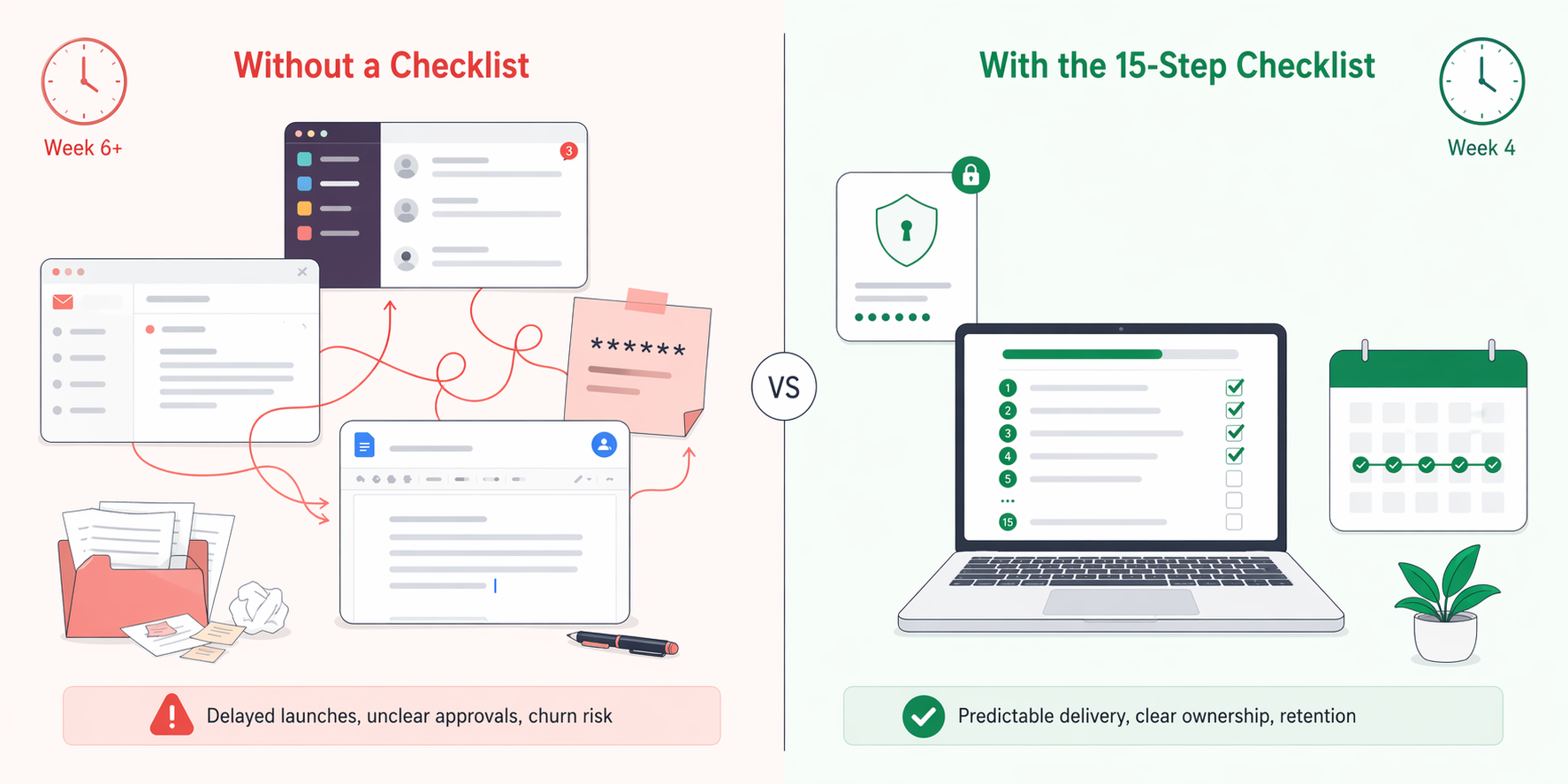
Most agencies lose more clients in the first 60 days than at any other point in the engagement. Not because the work was bad — because onboarding was improvised. Credentials arrived in a Slack message. The approval chain was verbal. The kickoff meeting ran 45 minutes, covered 12 topics, and ended with everyone unsure what Week 2 looked like.
The fix isn't more meetings. It's a documented onboarding workflow that every account manager follows the same way, every time. This guide lays out the exact 15-step checklist we've seen agencies use to shorten time-to-first-published-post from 6 weeks to under 3, reduce mid-engagement churn, and set up client relationships that survive the first bad month of performance.
The checklist is organized into five phases across four weeks: Pre-Kickoff, Discovery, Setup, Kickoff, and Launch. Every step has a specific deliverable, owner, and definition of done. Nothing is optional.
Quick Answer: How Long Should Social Media Agency Client Onboarding Take?
Most social media agencies should complete client onboarding in 3–4 weeks from contract signature to first scheduled content going live. Faster than that and you skip discovery or approvals. Slower and clients lose momentum and start questioning whether they hired the right partner.
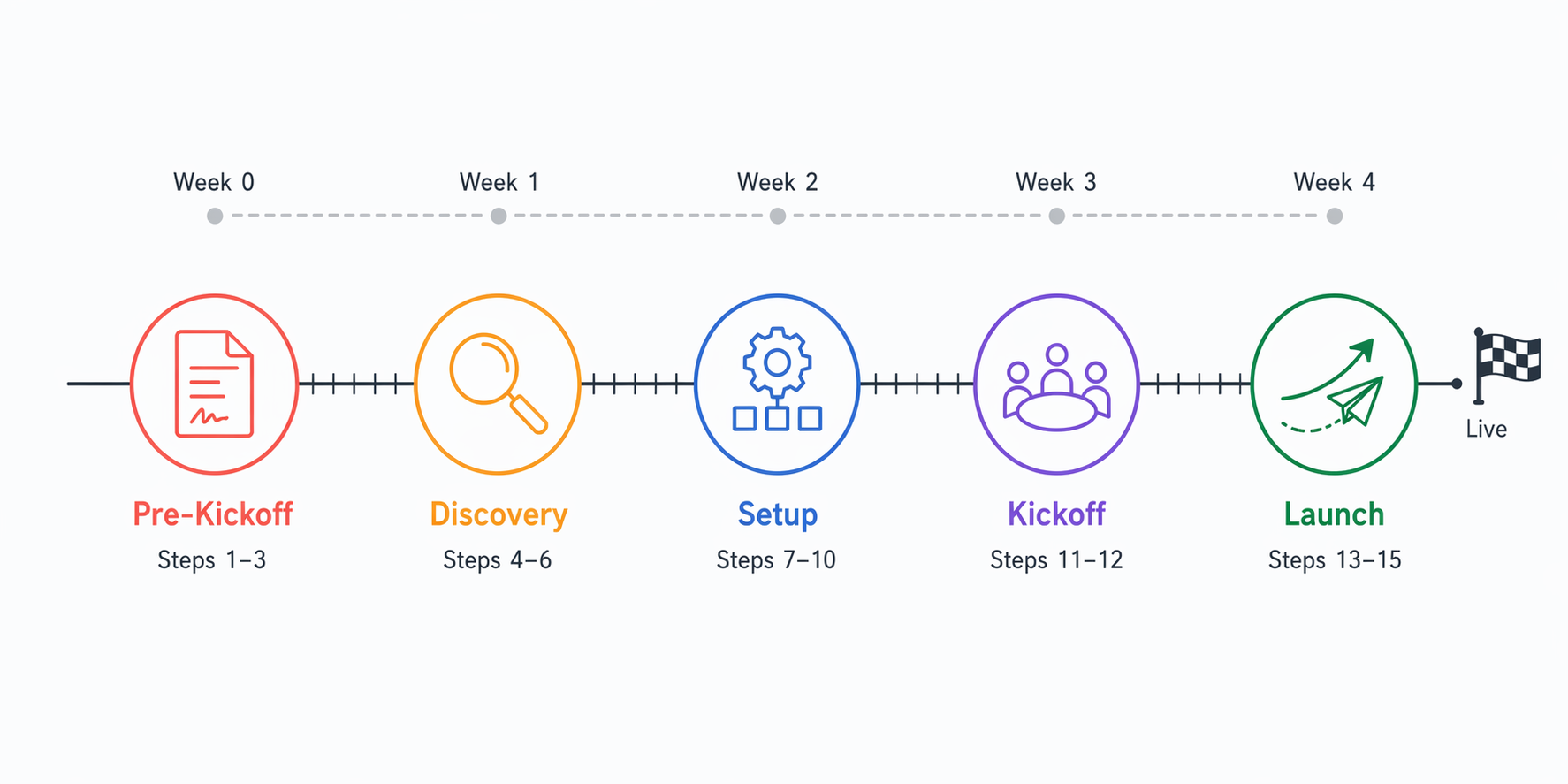
The 15-step checklist below breaks down into five phases:
- Pre-Kickoff (Week 0 — days 1–3): Steps 1–3. Confirm contract, assign team, send welcome kit.
- Discovery (Week 1): Steps 4–6. Audit, collect access, align on goals.
- Setup (Week 2): Steps 7–10. Create workspace, configure roles, build approval workflow, document voice.
- Kickoff (Week 3): Steps 11–12. Run kickoff meeting, lock communication cadence.
- Launch (Week 4): Steps 13–15. Build 30-day content plan, configure reporting, train client.
Onboarding that takes longer than 6 weeks usually signals a scope problem, a decision-maker problem, or an access problem. Resolve it before producing content — dragging content into a half-onboarded relationship is how agencies end up rewriting work.
Why Most Social Media Agency Onboarding Fails
Before the checklist, it helps to see the common failure modes. If any of these sound familiar, the checklist below is the direct fix.
- The "we'll figure it out" welcome kit. The client signs, the account manager sends a cheerful email, and nothing formal arrives for a week. The client's confidence drops from day one.
- Credentials in DMs. Passwords get shared in Slack or email threads. Audit trails don't exist. When the account manager leaves, the agency has to ask the client for everything again.
- Implicit approval chains. "Send it to Sarah for review" — but Sarah is on maternity leave, and nobody documented who covers for her. Content sits for 9 days.
- Voice by telepathy. The copywriter writes. The account manager reviews. The client rejects. Nobody wrote down what "our tone" actually means, so every round is guessed.
- Reporting as an afterthought. KPIs are mentioned in the sales call and never revisited. Month 2's report ships with vanity metrics because the dashboard was never configured.
- No 30-day content plan. Content gets made week-to-week from day one, so there's no strategic arc and no client-approved calendar.
The 15 steps below close every one of these gaps. Work through them in order — skipping ahead creates the exact problems they prevent.
Phase 1: Pre-Kickoff (Week 0)
Step 1: Confirm the Signed Contract and Collect the Deposit
Nothing starts until the contract is countersigned and the first invoice is paid. This is non-negotiable. Agencies that begin work "on a handshake" end up absorbing scope creep, chasing late payments, and writing off hours that should have been billable.
Action items:
- Confirm both parties have countersigned the Master Services Agreement
- Send the first invoice and confirm payment (50% deposit or first-month retainer, depending on your model)
- File the contract and SOW in a permanent location with an expiration date tagged for renewal
- Share a payment receipt and the contract end date with the client
For guidance on pricing models, retainer structures, and how to write an agency proposal that sets expectations clearly, see our full guide on how much to charge for social media management.
Definition of done: Signed contract filed. Deposit paid. Account officially open in your agency's CRM.
Step 2: Assign an Internal Account Owner and Delivery Team
Before any external work begins, the agency side needs to be staffed and named. Every client needs a single point of contact — the account owner — and a documented roster of everyone who will touch the account.
Action items:
- Assign one account manager as the client's single point of contact
- Name the strategist, copywriter, designer, paid media lead (if applicable), and any specialists involved
- Document each person's role and escalation path in a shared team doc
- Add the client to your internal project management tool (Asana, Notion, ClickUp, etc.)
- Schedule the internal kickoff so the team can review the SOW together before talking to the client
Sample internal team roster:
| Role | Name | Responsibility |
|---|---|---|
| Account Manager | — | Primary client contact, weekly calls, escalations |
| Strategist | — | Content pillars, 30/60/90 plan, reporting narrative |
| Copywriter | — | Captions, CTAs, voice consistency |
| Designer | — | Static graphics, video thumbnails, templates |
| Social Manager | — | Scheduling, inbox monitoring, community replies |
| Analytics Lead | — | Reporting configuration, KPI tracking |
Definition of done: Named team documented. Internal kickoff scheduled. Every team member has read the SOW.
Step 3: Send the Client Welcome Kit Within 24 Hours
The welcome kit is the single most underrated onboarding artifact. It sets tone, reduces ambiguity, and gives the client something to show internally that makes them look smart for hiring you.
A good welcome kit includes:
- A warm personal welcome note from the account manager (not templated)
- A 1-page overview of what happens in each of the next 4 weeks
- The team roster with photos and roles
- A link to the first intake form (brand questionnaire — see Step 6)
- Instructions for the kickoff meeting (date, Zoom link, agenda)
- Contact info for escalations
- Your agency's client handbook (optional but strong — covers communication expectations, meeting etiquette, response times)
Definition of done: Welcome email sent within 24 hours of the signed contract. Kickoff meeting on calendar. Brand questionnaire shared.
Phase 2: Discovery (Week 1)
Step 4: Run a Social Media Audit Across All Active Platforms
Discovery starts with understanding what you're inheriting. Every active, dormant, or forgotten social profile gets audited before you touch content strategy. Without an audit baseline, you can't prove improvement in month 3.
Action items:
- Inventory every social account the client owns — active, dormant, or rogue
- Audit profile health (bios, links, pinned posts, brand consistency) per platform
- Pull baseline KPIs across awareness, engagement, conversion, and audience for the last 90 days
- Benchmark against 2–3 named competitors
- Identify top- and bottom-performing content patterns
- Flag obvious quick wins (broken links, outdated offers, missing categories)
- Document findings in a structured report
For the full audit framework and copy-paste template, see our social media audit and social media audit template guides. The audit template's profile checklist, KPI scorecard, and SWOT blocks drop straight into the client report.
Definition of done: Audit report shared internally. 3–5 headline findings identified. Baseline KPIs documented.
Step 5: Collect Access Credentials Securely
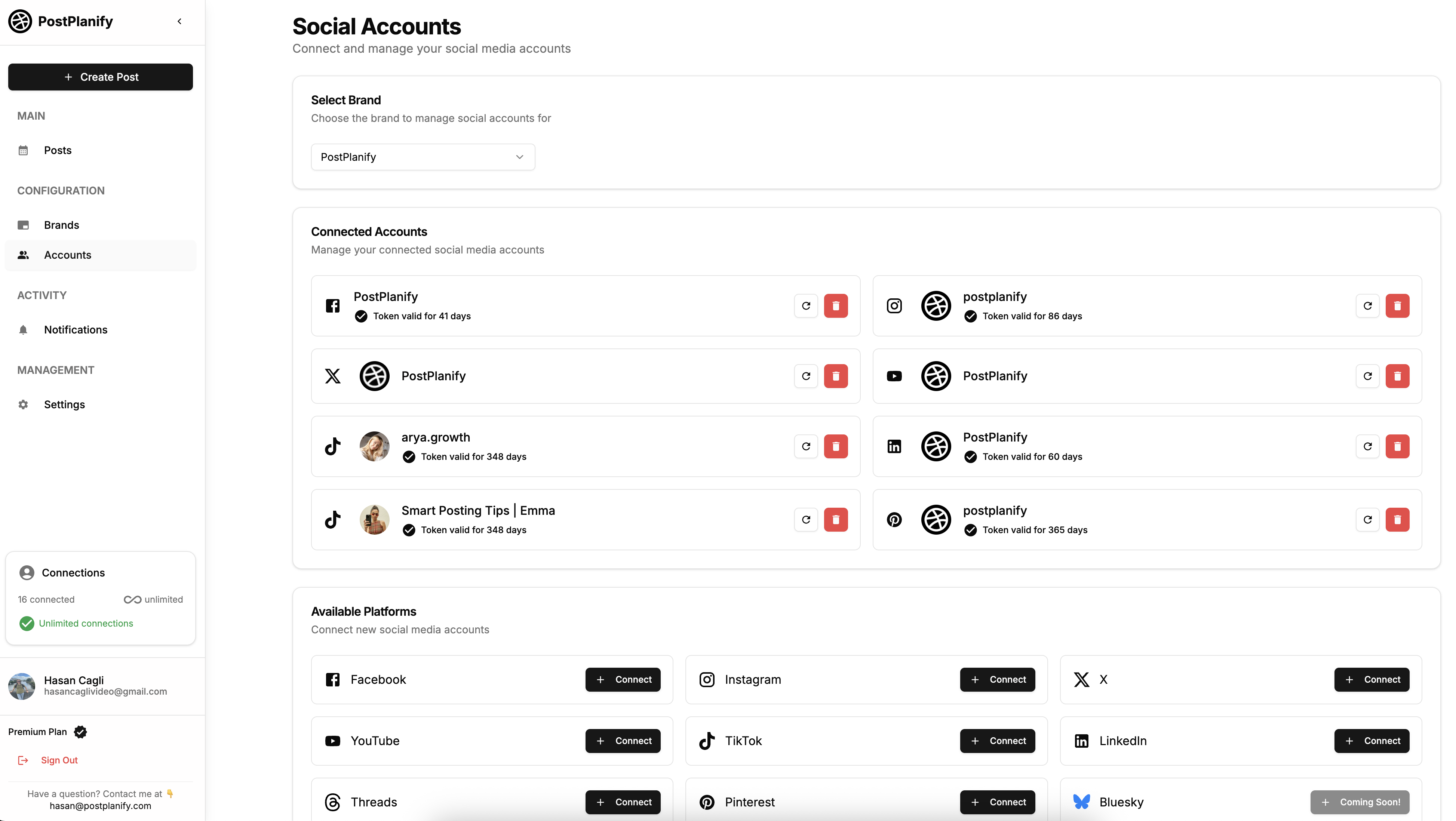
This is where most agencies create long-term security problems. Credentials collected in Slack, email, or Google Docs create audit-trail gaps, ex-employee risk, and legal exposure. Use a shared password manager from day one.
The typical handoff follows three moves. First, create a dedicated shared vault named after the client in your password manager and invite the client with temporary edit access. Second, ask the client to paste credentials directly into the vault rather than emailing or DMing them — nothing leaves the vault. Third, once credentials are verified and platforms are re-authenticated to agency-owned access (Meta Business Manager Partner access, LinkedIn Page admin, Google Business Profile manager invite, and similar), revoke the client's vault access. Only the agency team retains ongoing access, and every credential has an audit trail.
Action items:
- Send the client a secure intake link via a password manager (1Password, LastPass, Bitwarden, Dashlane)
- Request access to every platform you'll publish to (Instagram, Facebook, LinkedIn, TikTok, X, YouTube, Pinterest, Threads, Bluesky, Google Business Profile as applicable)
- Request access to ad accounts (Meta Business Manager, TikTok Ads Manager, LinkedIn Campaign Manager) if paid media is in scope
- Request analytics access — Meta Business Suite, Google Analytics 4, TikTok Analytics, LinkedIn Page Analytics
- Verify ownership: for Meta properties, confirm the client is an admin on the Facebook Page and Instagram Business account
- For platforms that support it, request the client grant your agency's Business Manager access rather than sharing passwords
Platforms and access types to collect:
| Platform | What to Request | Access Method |
|---|---|---|
| Business account access | Meta Business Manager (Partner access) | |
| Page admin / Content role | Meta Business Manager | |
| Page admin | LinkedIn Page Admin invitation | |
| TikTok | Business Center access | TikTok Business Center |
| X | Account credentials | Password manager share (X has limited multi-admin) |
| YouTube | Channel manager | Google Brand Account invitation |
| Partner access | Pinterest Business | |
| Threads | Linked to IG | Inherits from Instagram access |
| Google Business Profile | Manager | Google Business Profile invitation |
Definition of done: Every required account has agency-level access configured. Credentials logged in your password manager with the client as the source of truth.
Step 6: Clarify Goals, KPIs, and the Definition of Success
Goals decided in the sales cycle almost always need to be re-anchored during onboarding. What the client said six weeks ago during discovery isn't always what matters now. Force a conversation that pins down the one or two outcomes the relationship will be judged on.
Action items:
- Send the client the brand questionnaire (from the welcome kit) — cover business goals, target audience, competitors, brand voice, past agency experience, compliance or legal constraints
- Hold a 45-minute goals workshop call
- Agree on one primary objective (leads, traffic, brand awareness, community growth, sales)
- Define 3–5 secondary KPIs tied to that objective
- Align on benchmarks and 90-day targets based on the audit baseline
- Document the agreed KPIs in a single shared doc that gets referenced in every report
Sample goals doc structure:
| Field | Example |
|---|---|
| Primary objective | Drive qualified inquiries from LinkedIn to sales team |
| Primary KPI | Lead form submissions from LinkedIn-sourced traffic |
| 90-day target | +40% lead volume vs. baseline (24 → 34 leads/mo) |
| Secondary KPIs | LinkedIn follower growth, post engagement rate, click-through rate |
| Vanity metrics we're ignoring | Raw impressions, non-qualified traffic |
| Reporting cadence | Monthly report (PDF) + weekly pulse check |
For the full framework on picking KPIs that matter, see social media analytics and reporting.
Definition of done: Goals doc shared with the client. Primary KPI agreed in writing. Benchmarks recorded.
 PostPlanify
All your social media in one simple dashboard
Schedule posts, track analytics, and reply to comments/DMs without switching tabs.

Engagement
+18%
Views
52.8k
Phase 3: Setup (Week 2)
Step 7: Create a Dedicated Client Workspace
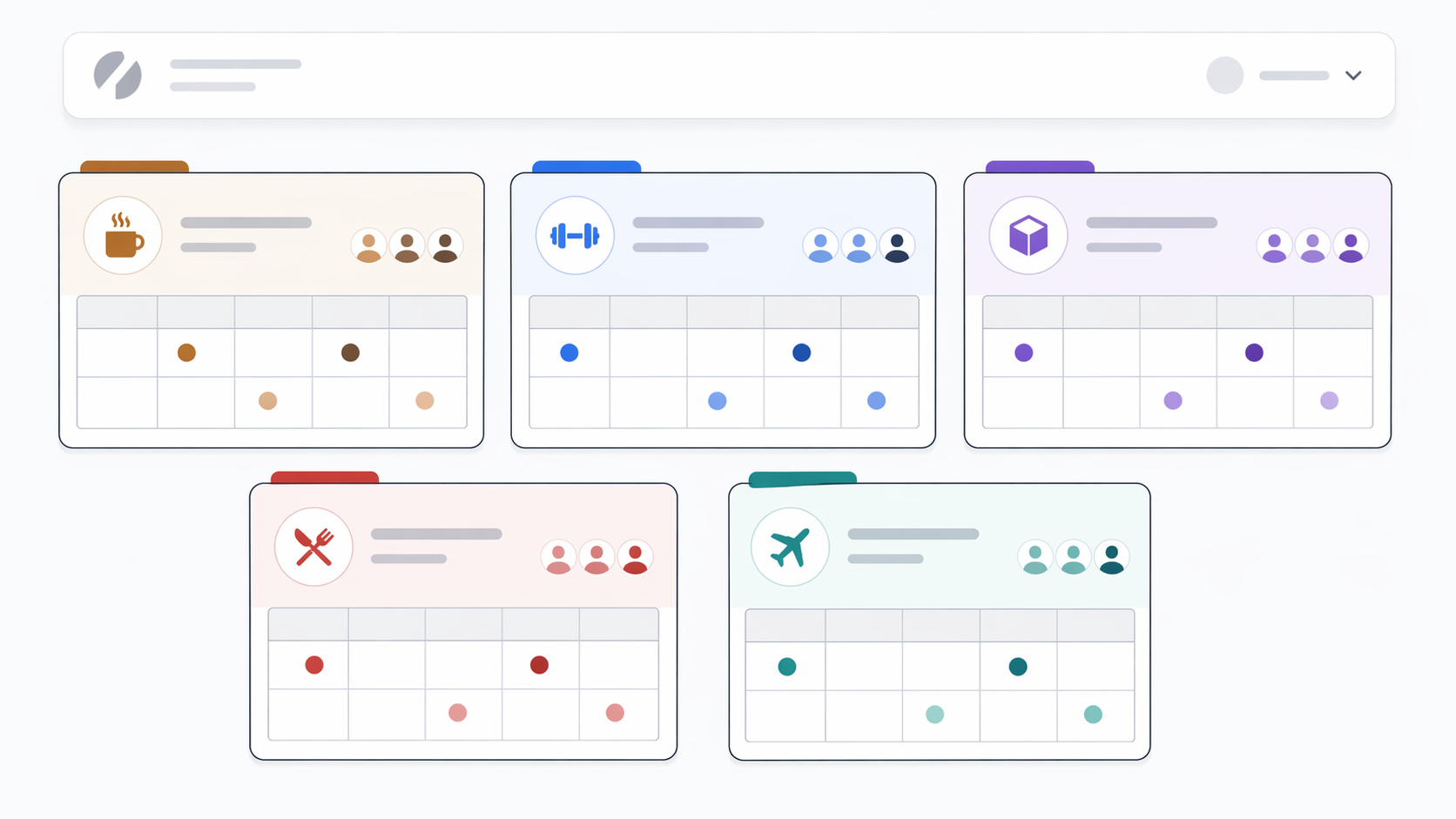
Every new client gets its own workspace. No shared-calendar shortcuts. No "we'll tag it with the client name." A dedicated workspace means the client's calendar, assets, approval chain, team members, and reporting are completely isolated from every other account.
This is where the agency's choice of tool matters most. If your tool doesn't support true workspace isolation — where a team member invited to Workspace A can't see Workspace B — you'll eventually ship the wrong client's content. We've covered this in detail in our guide on the best social media tools for managing multiple brands.
Action items:
- Create a new workspace inside your social media management tool (PostPlanify, for example, supports 5 workspaces on Growth, 15 on Premium, 50 on Scale, and unlimited on Enterprise)
- Connect all client social accounts to the workspace
- Upload the client's brand assets (logo, fonts, color palette, image templates) to the workspace's media library
- Configure the workspace timezone and business hours
- Set the default posting time preferences based on the audit's audience activity findings
- Test one draft post per platform to confirm publishing works
Definition of done: Workspace created. All platforms connected and publishing-verified. Brand assets uploaded.
Step 8: Configure Team Roles and Permissions
Role design is the quiet determinant of whether the engagement stays calm or turns chaotic. A content creator on one brand should never accidentally see another client's draft. The client should see exactly what they need to approve — and no more.
Action items:
- Add your agency team members to the workspace with the appropriate role (Owner, Editor, Social Manager, or similar, depending on the tool)
- Add the client's stakeholders as Client-role or review-only users — they should be able to comment and approve but not publish or alter settings
- Decide whether the client sees only their final content or full draft visibility
- Configure which team members receive which notifications (draft submitted, approval pending, comment added, publish failed)
- Document the role matrix in the client's internal brief
Sample role and access matrix:
| Task | Account Manager | Strategist | Copywriter | Designer | Client |
|---|---|---|---|---|---|
| View calendar | ✓ | ✓ | ✓ | ✓ | ✓ |
| Create drafts | ✓ | ✓ | ✓ | ✓ | ✗ |
| Edit settings | ✓ | ✗ | ✗ | ✗ | ✗ |
| Submit for approval | ✓ | ✓ | ✓ | ✗ | ✗ |
| Approve content | ✓ | ✗ | ✗ | ✗ | ✓ |
| Publish | ✓ | ✗ | ✗ | ✗ | ✗ |
| View analytics | ✓ | ✓ | ✗ | ✗ | ✓ |
| Reply in social inbox | ✓ | ✗ | ✓ | ✗ | ✗ |
PostPlanify team collaboration supports Owner, Editor, Client, and Guest roles without per-seat fees — a meaningful cost difference for agencies adding a client reviewer per account. Tools that bill per-seat turn every client reviewer into a line item.
Definition of done: Every team member and client stakeholder has the right role and notification setup.
Step 9: Build the Approval Workflow
Approval is where most agencies lose the most time. A content piece that moves through five unclear hands is a content piece that publishes late. Build the approval chain explicitly: who reviews, in what order, with what deadline.
Action items:
- Decide the default chain — e.g., Copywriter → Account Manager → Strategist (QA) → Client (final approval)
- Set SLA expectations per stage — e.g., Account Manager reviews within 24 hours, Strategist within 24 hours, Client within 48 hours
- Configure the chain inside your tool so it runs automatically
- Build a secondary "express" chain for time-sensitive content (news comments, reactive posts) — typically shorter: Copywriter → Account Manager → Publish
- Document both chains in the client's internal brief
- Decide whether the client approves every post or a sampled subset (common for high-volume accounts)
Sample approval workflow diagram:
Copywriter → Account Manager (24h) → Strategist QA (24h) → Client (48h) → Scheduled for publish
For content categories that don't need client approval (repeated evergreen posts, recurring series), set a separate lighter chain so approvals aren't the default bottleneck.
PostPlanify's multi-approver workflows on Premium and above let you run multiple approval chains per workspace and assign different chains per content type. For the full breakdown on approval workflow design — deep-dive on roles, SLAs, and preventing bottlenecks — see our guide on how to build a social media approval process; for tool options, compare the best tools with approval workflows.
Definition of done: Approval chain configured in the tool. SLAs documented. Backup approver named for each stage.
Step 10: Document the Brand Voice, Content Pillars, and Dos-and-Don'ts
Voice can't be telepathic. Every time a reviewer says "this doesn't sound like us" without a document to reference, the team loses hours. Write the voice guide in onboarding. Update it every quarter.
Action items:
- Document the client's voice in 5 adjectives (e.g., "approachable, expert, curious, warm, direct")
- List 3 sample phrases that sound like the client and 3 that don't
- Define 4–6 content pillars (e.g., Product education, Customer stories, Behind-the-scenes, Industry commentary, Community, Offers)
- Document dos-and-don'ts: emoji use, exclamation marks, regional spelling, industry jargon, forbidden competitor mentions, legal/compliance constraints
- Store the voice guide in the workspace media library or shared drive, and link it from every content brief
Sample voice guide template:
| Field | Example |
|---|---|
| Brand name | Acme Fitness |
| 5 voice adjectives | Motivating, expert, warm, honest, direct |
| Tone examples — yes | "Your legs will hate you tomorrow. Worth it." |
| Tone examples — no | "Get shredded FAST with our 10-day transformation!!!" |
| Content pillars | Workouts (30%), Form tutorials (25%), Member stories (20%), Nutrition (15%), Community (10%) |
| Emoji policy | Max 2 per post. Never in LinkedIn copy. |
| Forbidden topics | Competitor comparisons, medical claims, before/after photos without release |
| Required disclaimers | "Consult your doctor before starting any fitness program" on nutrition-adjacent posts |
Definition of done: Voice guide documented, shared with client, and acknowledged.
Phase 4: Kickoff (Week 3)
Step 11: Run the Kickoff Meeting
The kickoff is the single most important meeting of the engagement. It sets the relationship's operating system for the next 6–12 months. One 90-minute meeting. Named attendees. Fixed agenda. Clear decisions.
Action items:
- Schedule 90 minutes — no more, no less
- Required attendees: client's primary stakeholder, client's approver (if different), agency account manager, agency strategist, anyone else with decision rights
- Share the agenda 48 hours in advance with pre-read materials (audit summary, goals doc, voice guide)
- Record the meeting with consent so it becomes the reference artifact
- End with a 2-page recap: decisions made, action items, next meeting date
Suggested kickoff meeting agenda (90 minutes):
| Time | Section | Decisions / Outputs |
|---|---|---|
| 0–10 min | Introductions + team roster walkthrough | Everyone knows who does what |
| 10–25 min | Audit findings review | 3–5 insights from Step 4 |
| 25–40 min | Goals, KPIs, 90-day targets | Primary KPI confirmed in writing |
| 40–55 min | Content pillars and voice | Pillars approved; voice guide acknowledged |
| 55–70 min | Approval workflow walkthrough | Client sees the tool and tries one approval |
| 70–80 min | Communication cadence | Weekly call time, monthly reporting day |
| 80–90 min | Q&A, escalation path, next steps | Who to call in a crisis, when we publish first post |
Don't leave the kickoff without the client personally approving one test post inside the tool. That confirms access, approval UX, and tool familiarity before live content is on the line.
Definition of done: Meeting held. Recap doc shared within 24 hours. First test approval completed.
Step 12: Lock the Communication Cadence
Communication ambiguity is the silent killer of agency relationships. Put rhythms in writing. Put them on calendars. Honor them.
Action items:
- Weekly 30-minute pulse call (same day, same time, every week — e.g., Tuesday 2pm)
- Monthly 60-minute strategy + reporting call (first week of the month)
- Quarterly 90-minute business review (every 3 months)
- Async: Shared Slack channel, email, or client portal for questions
- Response-time SLAs documented: urgent (2 hours), standard (1 business day), non-urgent (2 business days)
- Escalation path: who the client contacts if the account manager is unavailable
Sample communication cadence doc:
| Rhythm | Frequency | Format | Duration | Day |
|---|---|---|---|---|
| Pulse call | Weekly | Video | 30 min | Tuesday 2pm ET |
| Reporting call | Monthly | Video | 60 min | First Thursday |
| Business review | Quarterly | Video | 90 min | First month of quarter |
| Slack / async | As needed | Written | N/A | Working hours |
| Emergency contact | As needed | Phone | N/A | 24/7 |
Definition of done: Recurring calendar invites sent. Escalation contact named. Async channel created.
PostPlanifyAll your social media in one simple dashboard
Schedule posts, track analytics, and reply to comments/DMs without switching tabs.
Engagement
+18%
Views
52.8k
Phase 5: Launch (Week 4)
Step 13: Build the First 30-Day Content Plan
By Week 4, the workspace is configured, the team is aligned, and the client has acknowledged voice, goals, and approval flow. Now content gets built — in one batch, not day-by-day.
Action items:
- Plan the first 30 days of content as a single batch (20–30 posts depending on cadence and platforms)
- Map each post to a content pillar and a primary KPI
- Align posts with any known client events, product launches, or seasonal moments
- Use the client's audit-identified top-performing formats as a starting point
- Generate variations with AI where appropriate — then edit for voice
- Submit the batch to the approval workflow in one sitting
- Set a realistic review deadline: a 30-day batch usually needs 5 business days for client review
For the full framework on building a 30-day content plan — including content batching, pillar ratios, and platform-specific timing — see how to plan social media content and how to create a social media content calendar.
Action items for tool configuration:
- Use the content calendar view to drag-and-drop posts across days
- Enable bulk scheduling (PostPlanify supports up to 20 posts per batch)
- Use the AI assistant for caption variations per platform — image-aware AI reads the uploaded visual so suggestions match the actual content
- Upload all assets to the workspace media library so they're reusable across posts
- Apply tags per content pillar for later reporting analysis
Definition of done: 30 days of content drafted and submitted for approval. All assets uploaded. Pillars tagged.
Step 14: Configure Reporting and White-Label PDFs
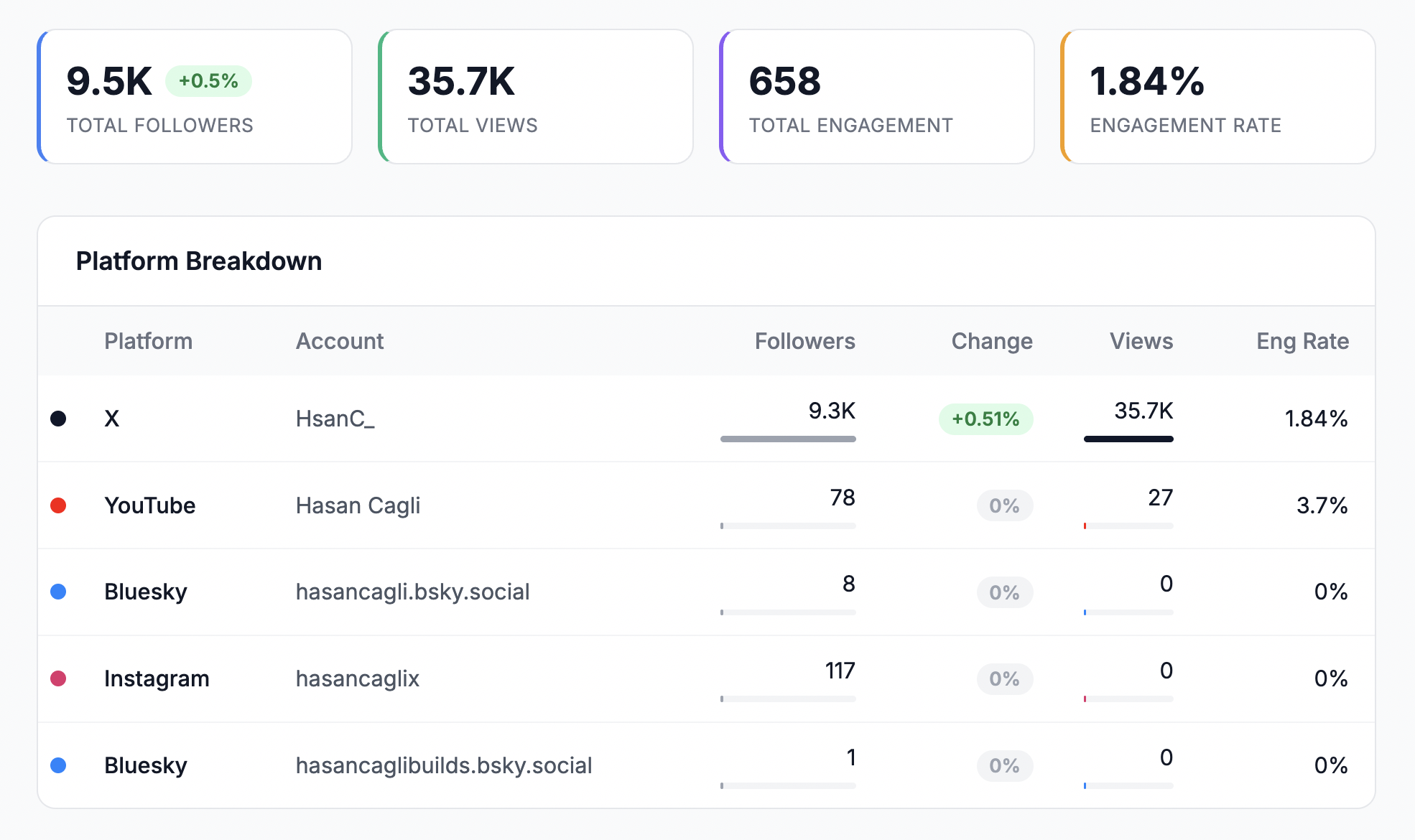
Reporting is where the engagement either looks professional or looks improvised. Configure the reporting template, cadence, and white-label branding before the first month ends — not on the day the first report is due.
Action items:
- Set up the reporting dashboard with the KPIs agreed in Step 6
- Configure the template for monthly reports — branded PDF with agency logo, accent color, custom footer, and client name
- Decide what goes in the monthly report: KPI summary vs. baseline, top 3 posts, bottom 3 posts, audience insights, next month's plan, notable anomalies
- Schedule the automated report delivery (monthly, first Monday) or the reporting call (where you walk through live)
- Share a sample of what the report will look like with the client during Step 11 kickoff
- Set up a live-link report URL the client can bookmark (reports that stay current always)
PostPlanify's reports on Premium ($159/mo billed yearly) and above support branded client reporting with your agency logo, accent color, and custom footer. Scale ($239/mo billed yearly) is where true white-label PDF reports begin and PostPlanify branding is removed from shared report pages. For the full breakdown on what belongs in a client report, see how to create a social media report and white-label social media reports for clients.
Sample monthly report structure:
| Section | Contents |
|---|---|
| Executive summary | 3 sentences: what happened, what changed, what's next |
| KPI scorecard | Primary KPI vs. target, secondary KPIs with trend arrows |
| Top 3 posts | Highest-performing content with hypothesis on why |
| Bottom 3 posts | Lowest-performing content with corrective lesson |
| Audience insights | Follower growth, demographic shifts, active time changes |
| Notable anomalies | Algorithm changes, viral moments, reach drops |
| Next month's plan | Content pillars, campaigns, tests |
| Questions for client | 1–2 specific asks to keep the relationship collaborative |
Definition of done: Reporting template branded. First month's report scheduled. Sample shared with client.
Step 15: Train the Client on Approvals and the Social Inbox
Onboarding isn't over until the client knows how to use their piece of the workflow. A client who can't find the approval button or doesn't know their brand is getting comments will become a frustrated client.
Action items:
- Walk the client through the approval interface in a 20-minute screen share
- Have them approve 2–3 real posts during the training
- Walk them through the social inbox — show them how to see comments and DMs, how to know if the agency has already replied, how to flag urgent responses
- Confirm which comments the client wants involvement in vs. which the agency handles fully
- Share a 1-page "client cheat sheet" with screenshots of the approval page, the calendar view, and the reporting dashboard
- Schedule a 30-day check-in call specifically to debug any workflow confusion
The social inbox scope matters here. PostPlanify's social inbox covers Instagram, Facebook, and LinkedIn — confirm with the client up front which platforms your agency will monitor and respond on.
Definition of done: Client has completed a live approval cycle. Client can locate the social inbox and reporting dashboard without guidance. Cheat sheet delivered.
Week-by-Week Timeline
Here's the full onboarding sequence compressed into a weekly view. Align your account managers to this schedule and you'll hit first-published-post by Day 28.
| Week | Focus | Steps | Key Deliverables |
|---|---|---|---|
| Week 0 (Days 1–3) | Pre-Kickoff | 1, 2, 3 | Contract filed, team assigned, welcome kit sent |
| Week 1 | Discovery | 4, 5, 6 | Audit report, credentials collected, goals doc |
| Week 2 | Setup | 7, 8, 9, 10 | Workspace live, roles set, approval chain built, voice guide |
| Week 3 | Kickoff | 11, 12 | Kickoff meeting held, cadence locked |
| Week 4 | Launch | 13, 14, 15 | 30-day content queued, reporting configured, client trained |
Common Onboarding Mistakes (And How to Avoid Them)
After watching this play out across hundreds of agency engagements, the same mistakes show up again and again. If you only fix these seven, onboarding quality will jump measurably.
1. Starting work before the contract is countersigned and paid. The "goodwill start" always costs more than it earns. Contract signed, deposit received, then the welcome kit goes out. Not before.
2. Collecting credentials via email, Slack, or Google Docs. Every credential moves through a password manager. Every agency staff member has their own account. No shared logins.
3. Using one shared workspace across all clients. This is how the wrong post lands on the wrong brand. One workspace per client. Non-negotiable.
4. Verbal approval chains. If the approval chain isn't written down with SLAs per stage, it doesn't exist. Document it in Step 9 and link it from every content brief.
5. Skipping the voice guide. "We'll figure out the tone as we go" is how you end up with four rejected caption rounds in month one. Write it in Step 10 or spend every future week writing it piece by piece.
6. Vague reporting cadence. "Monthly-ish" is not a cadence. Pick a day, pick a time, put it on the calendar, automate the delivery.
7. Launching content before the client has completed one full approval cycle. If the client hasn't approved anything inside your tool yet, you don't know whether they can find the button. Train them first (Step 15), then launch.
Red Flags During Onboarding: When to Pause or Walk Away
Not every signed contract is a good client. These warning signs usually surface during onboarding — if you see them, slow down before producing content.
- No named decision-maker. If the client can't point to one person with approval authority on content, budget, or strategic direction, the account will drown in committee. Push for a named approver before Week 3's kickoff.
- Refusing to grant platform admin access. Legitimate security concerns are fixable through Partner access or Business Manager invites. A client who won't grant any level of access is a client whose work you can't actually deliver.
- Scope changes during discovery. If the SOW is already shifting in Week 1 — "can we also do paid ads" or "can you handle email too" — get it amended in writing before content starts. Silent scope creep kills margins fast.
- Unrealistic performance expectations. A client signing a contract expecting "10x follower growth in 30 days" didn't hear you during the sales cycle. Reset expectations against the audit baseline or renegotiate before launch.
- Non-responsive on access or questionnaire. If the client hasn't returned the brand questionnaire or shared credentials by Day 14, the engagement is already late. Escalate to their decision-maker — if there's no urgency now, there won't be later.
When you spot red flags, the answer isn't always to walk away. But it's always to pause and document. A written "onboarding blocker" note to the client stating that Week 3 won't start until X is resolved usually surfaces the real issue faster than polite follow-ups do.
PostPlanifyAll your social media in one simple dashboard
Schedule posts, track analytics, and reply to comments/DMs without switching tabs.
Engagement
+18%
Views
52.8k
FAQ: Social Media Agency Client Onboarding
How long does social media agency client onboarding take?
Most agencies should complete onboarding in 3–4 weeks from contract signature to first scheduled content going live. Faster than 3 weeks typically means discovery or approvals got skipped. Longer than 6 weeks usually signals a scope problem, a missing decision-maker, or delayed credential handoff — fix the blocker before producing content.
What should a social media agency welcome kit include?
A personal welcome note from the account manager, a 1-page week-by-week overview, the team roster with roles and contact info, a brand questionnaire, kickoff meeting details, and escalation contacts. Send within 24 hours of contract signature. Don't template the welcome note — make it personal.
How do I collect social media credentials securely?
Use a password manager with shared vaults (1Password, LastPass, Bitwarden, or Dashlane). For Meta properties (Facebook, Instagram), request Partner access through Meta Business Manager rather than password sharing. For LinkedIn, request Page admin invitation. For Google Business Profile, request Manager invitation. Never accept credentials via email or chat — the audit trail doesn't exist and ex-employees retain access.
Should we audit the client's social accounts before starting content?
Always. You can't prove improvement in month 3 without a baseline. A proper audit covers profile health, last-90-day KPIs, audience fit, competitor benchmarks, and content-pattern analysis. Use our social media audit template as the starting structure.
How do we handle clients who don't want to use our management tool?
Push back. Working inside the agency's tool is a requirement for quality — shared calendars, approval audit trails, client access without per-seat fees, and reporting only work inside the tool. If the client insists on email approvals or Slack threads, bake the operational tax into the retainer. Better: explain during the sales cycle that the tool is part of the engagement and walk them through it during kickoff so familiarity builds early.
What roles should my team have on a new client workspace?
Account Manager as Owner (primary contact, full access). Strategist and Copywriter as Editor (create drafts, submit for approval, but not publish without review). Designer as Editor or Guest depending on workflow. Social Manager as Editor (schedule, reply in inbox). Client stakeholders as Client role (comment, approve, view reports — not edit or publish). Analytics Lead gets Editor or a view-only role on reporting.
How many approvers should a content approval chain include?
Three-to-four stages is typical: Copywriter → Account Manager → Strategist QA → Client. For high-volume accounts, consider two chains: full approval for campaign and hero content, lighter approval (Copywriter → Account Manager → Publish) for evergreen or reactive posts. More than four stages reliably creates bottlenecks.
What's the right communication cadence for a new client?
Weekly 30-minute pulse call, monthly 60-minute reporting and strategy call, quarterly 90-minute business review. Async via Slack, email, or client portal for questions. Response-time SLAs: 2 hours for urgent, 1 business day for standard, 2 business days for non-urgent. Put the recurring calendar invites out during Step 12 of onboarding.
How do I document brand voice during onboarding?
Five voice adjectives. Three "sounds like us" sample phrases. Three "doesn't sound like us" counter-examples. Four to six content pillars with percentage mix. Emoji policy. Forbidden topics. Required disclaimers. Store the voice guide in the workspace media library or shared drive, and link it from every content brief so reviewers reference the same source of truth.
What KPIs should we baseline during onboarding?
Pick one primary objective (leads, traffic, brand awareness, community growth, sales) and one primary KPI. Add 3–5 secondary KPIs that support it. Baseline against the last 90 days of audit data. Set 30-day and 90-day targets in writing. Ignore vanity metrics (raw impressions, follower counts that don't tie to conversion) unless they map to awareness goals.
How do we set expectations for the first 30 days of content?
Build the first 30 days as a single batch during Step 13. Map each post to a content pillar and KPI. Align with known launches, events, or seasonal moments. Use the audit's top-performing formats as a starting point. Submit the batch to approval in one sitting with a 5-business-day review window. Don't produce week-by-week in month one — it's too chaotic and kills the ability to show strategic coherence.
What's the typical approval workflow for a social media agency?
The most common chain: Copywriter drafts → Account Manager reviews (24-hour SLA) → Strategist QA on strategic fit (24-hour SLA) → Client approves (48-hour SLA) → Scheduled for publish. Total cycle: ~5 business days. High-volume accounts often run two chains — the full chain for campaign content, an express chain for evergreen and reactive.
Can we onboard multiple new clients at the same time?
Only if you have enough account manager capacity. A single account manager can usually absorb one new client into active onboarding without disrupting existing accounts. Two simultaneous onboarding kickoffs usually means one of them will get the shorter version — and that's the one that'll churn in month three.
What should we do if onboarding stalls past 30 days?
Diagnose the blocker. The three most common are: (1) missing decision-maker on the client side, (2) credentials still not provided, (3) scope changed during discovery and contract needs amending. Don't produce content until the blocker clears. Continuing to bill while onboarding stalls damages trust more than pausing cleanly does.
How does PostPlanify's workspace model fit into agency onboarding?
PostPlanify's workspace ladder (5 on Growth, 15 on Premium, 50 on Scale, unlimited on Enterprise) maps directly to agency onboarding workflow — one workspace per client, with isolated calendars, team members, approval chains, and reporting. Team members and clients are included in flat pricing (no per-seat fees), which matters when you add a client reviewer per account. For the full breakdown, see our guide on best social media tools for managing multiple brands.
The Complete 15-Step Onboarding Checklist
Copy this checklist into your agency's playbook. Work through it in order for every new client. Don't skip steps.
Phase 1: Pre-Kickoff (Week 0)
- Step 1. Contract countersigned and filed
- Step 1. Deposit / first invoice paid
- Step 2. Internal account owner assigned
- Step 2. Delivery team named and documented
- Step 3. Welcome kit sent within 24 hours of signature
- Step 3. Kickoff meeting on the calendar
Phase 2: Discovery (Week 1)
- Step 4. Full audit completed across all active platforms
- Step 4. Baseline KPIs documented (last 90 days)
- Step 4. 2–3 competitors benchmarked
- Step 5. All platform access collected via password manager
- Step 5. Ad account access confirmed (if applicable)
- Step 5. Analytics access verified
- Step 6. Brand questionnaire returned by client
- Step 6. Goals workshop held
- Step 6. Primary KPI and 90-day target agreed in writing
Phase 3: Setup (Week 2)
- Step 7. Dedicated client workspace created in the tool
- Step 7. All platforms connected and test-published
- Step 7. Brand assets uploaded to media library
- Step 8. Team roles assigned with correct permissions
- Step 8. Client stakeholders added as Client-role
- Step 8. Notification settings configured
- Step 9. Default approval chain built in the tool
- Step 9. Express approval chain built for reactive content
- Step 9. SLAs documented per stage
- Step 10. Voice guide documented
- Step 10. Content pillars defined with percentage mix
- Step 10. Dos-and-don'ts documented
Phase 4: Kickoff (Week 3)
- Step 11. 90-minute kickoff meeting held with all stakeholders
- Step 11. Kickoff recap shared within 24 hours
- Step 11. Client completed one test approval inside the tool
- Step 12. Weekly pulse call scheduled (recurring)
- Step 12. Monthly reporting call scheduled (recurring)
- Step 12. Quarterly business review scheduled (recurring)
- Step 12. Escalation contact named
Phase 5: Launch (Week 4)
- Step 13. 30-day content plan drafted and submitted for approval
- Step 13. All content tagged by pillar
- Step 13. Assets uploaded to workspace media library
- Step 14. Reporting template branded and scheduled
- Step 14. Sample report shared with client
- Step 14. Live-link report URL shared with client
- Step 15. Client trained on approval tool (screen share)
- Step 15. Client trained on social inbox
- Step 15. 1-page client cheat sheet delivered
- Step 15. 30-day check-in call scheduled
Key Takeaways
- Onboarding takes 3–4 weeks. Faster means steps were skipped. Slower means a blocker needs resolving before content production starts.
- Five phases, 15 steps, in order. Pre-Kickoff, Discovery, Setup, Kickoff, Launch. Skipping ahead creates the exact problems the sequence prevents.
- Credentials through a password manager only. Email and Slack create audit gaps, ex-employee risk, and legal exposure.
- One workspace per client. Shared workspaces eventually publish the wrong brand's content. Tools like PostPlanify support 5/15/50/unlimited workspaces with flat pricing and no per-seat fees.
- Written approval chains with per-stage SLAs. Verbal chains are the #1 cause of slow content. Document them in Step 9 and enforce them.
- The kickoff meeting is where decisions get locked. 90 minutes. Named attendees. Recap within 24 hours. Client completes one live approval before the meeting ends.
- Report template branded before the first report is due. White-label PDFs, KPIs matched to Step 6 goals, one live-link URL the client can bookmark.
- Train the client — don't hope. Step 15 is where most agencies stop short. If the client can't find the approval button, they won't use it.
PostPlanifyAll your social media in one simple dashboard
Schedule posts, track analytics, and reply to comments/DMs without switching tabs.
Engagement
+18%
Views
52.8k
The agencies that keep clients the longest aren't the ones with the flashiest creative. They're the ones whose operational foundation — onboarding, approvals, reporting, communication — feels predictable by month two. PostPlanify was built around that foundation: dedicated workspaces per brand, multi-approver workflows, white-label reports, social inbox, and flat pricing that doesn't reshape when the fourth client lands.
Related Reading
- How to Start a Social Media Marketing Agency
- Social Media Agency Proposal Template
- Social Media Agency Contract Template
- How to Find Social Media Marketing Agency Clients
- 40 Social Media Agency Statistics to Know in 2026
- Social Media Audit: Step-by-Step Guide
- Social Media Audit Template (Copy-Paste)
- How Much to Charge for Social Media Management
- Best Social Media Tools for Managing Multiple Brands
- Best Social Media Management Tools for Agencies
- Best Social Media Tools with Approval Workflows
- Managing Multiple Social Media Accounts
- White-Label Social Media Reports for Clients
- White-Label Social Media Management
- Social Media Analytics and Reporting
- How to Create a Social Media Report
- How to Plan Social Media Content
- How to Create a Social Media Content Calendar
- Social Media Tools with No Per-Seat Fees
- Client Engagement Metrics That Matter
- Save Time on Social Media Management
- Best Social Media Management Tools for Teams
- Best Social Media Management Platform
- Best Social Media Tools with White-Label Reports
PostPlanifyAll your social media in one simple dashboard
Schedule posts, track analytics, and reply to comments/DMs without switching tabs.
Engagement
+18%
Views
52.8k
About the Author

Hasan Cagli
Founder of PostPlanify, a content and social media scheduling platform. He focuses on building systems that help businesses, agencies, and teams plan, publish, and manage content and social media more efficiently across platforms.


