


Is "social media community management" just a fancy term for posting on Instagram? It's a common mix-up. Social media marketing gets people to the party; community management is being the host that makes them want to stay.
Your social media marketer is outside with a megaphone, inviting everyone in. Their goal is to attract new followers and build brand awareness.
Your community manager is inside the party. They're sparking conversations, answering questions, and making sure everyone feels heard and valued. It's the difference between broadcasting a message and building a relationship.
This guide breaks down exactly how to do it with practical, step-by-step actions.
What is Social Media Community Management?

At its core, social media marketing is about attraction. It’s a one-to-many broadcast designed to cast a wide net and pull new followers into your brand's world using ad campaigns, slick content, and brand awareness pushes.
Social media community management, on the other hand, is all about connection and retention. It’s the ongoing, hands-on work of nurturing the audience you already have. This means fostering genuine conversations, offering support, and creating a space where people feel connected not just to your brand, but to each other.
Why does this distinction matter?
When you treat social media as a two-way conversation instead of a one-way broadcast, you build loyalty that ad spend can't buy. A social media marketer focuses on the "what"—the content, the campaign, the message. A community manager focuses on the "who"—the people in the audience, their questions, and their relationships.
Here’s a simple table to see how their day-to-day work differs.
Community Management vs. Social Media Marketing
| Aspect | Social Media Marketing (Broadcasting) | Community Management (Connecting) |
|---|---|---|
| Primary Goal | Attract new followers; increase reach & brand awareness. | Nurture existing audience; build loyalty & trust. |
| Key Metrics | Impressions, follower growth, click-through rates, reach. | Engagement rate, response time, user sentiment, retention. |
| Core Activities | Creating & scheduling content, running ad campaigns, influencer outreach. | Responding to comments/DMs, moderating discussions, gathering user feedback. |
| Mindset | "How many people can we reach?" | "How can we make our followers feel valued?" |
While social media marketing fills the top of the funnel, social media community management is what keeps people from leaving out the bottom. It’s the engine for turning a casual follower into a die-hard fan.
The Business Case for Community Management
This isn't a "nice-to-have" strategy anymore. The data is clear.
Today, a staggering 90% of social media marketers say that building an active online community is critical for long-term success. While the average engagement rate for a brand post hovers around 1.8%, a well-managed community can blow that number out of the water. You can find more marketing statistics on HubSpot's research page.
A strong community becomes a strategic asset that no competitor can easily copy. It’s your built-in focus group, providing raw, unfiltered feedback for your products. It’s your first line of defense in a PR crisis. Most importantly, it’s what makes your customers feel like they belong—an advantage that marketing dollars alone can't buy.
A vibrant online community doesn't just happen. It's built on four strategic pillars: Proactive Engagement, Reactive Support, Content Curation, and Insight Gathering. Mastering these is the difference between having a passive audience and building an active, loyal community.
Pillar 1: Proactive Engagement
Proactive engagement is about starting the party, not waiting for it to happen. The goal is to create an atmosphere where members feel excited and comfortable sharing their own thoughts.
Common Scenarios:
- You launched a new feature and need to build buzz and get immediate feedback.
- The community has gone quiet, and you need to get the energy back up.
- You want your brand to be the go-to name when people discuss a specific industry trend.
Actionable Fixes:
- Ask Open-Ended Questions: Avoid yes/no questions that kill conversation. Instead of "Do you like our new update?" ask, "What's the most creative way you've used our new update so far?" This invites stories, not just one-word answers.
- Run Platform-Specific Polls and Q&As: Use Instagram Story stickers for quick, fun polls with a B2C audience. For a B2B crowd, LinkedIn polls are perfect for gathering professional opinions. Host an "Ask Me Anything" (AMA) on X with a team lead.
- Tag Members and Celebrate Them: When someone shares great advice, highlight it. Create a weekly "Member Spotlight" in your Facebook Group to recognize top contributors. This makes them feel seen and encourages others to participate.
Pillar 2: Reactive Support
Reactive support is about making sure every guest at the party has a good time. This pillar is all about listening and responding. It's about monitoring conversations, answering questions, and handling complaints with empathy and speed. The goal isn't just to fix a problem; it's to show you care.
Common Scenarios:
- A customer posts a negative review on your Facebook page.
- Someone asks a technical support question in the comments of an Instagram post.
- Users are confused about a recent change to your product.
Actionable Fixes:
- Respond Publicly, Then Move to Private: Always acknowledge the issue in public first. A simple, "We're so sorry to hear this, and we want to make it right. Can you please send us a DM with your account details?" shows accountability while taking sensitive information offline.
- Use Empathetic Language: Phrases like "I can see how frustrating that would be" or "That's definitely not the experience we want for you" validate the user's feelings and de-escalate tension.
- Follow Up: After resolving the issue in private, consider a final public reply like, "Glad we were able to get this sorted for you in DMs!" This closes the loop and shows the rest of the community that you solve problems. For a deep dive into managing these interactions specifically on Facebook, see our guide on mastering comments on Facebook.
Pillar 3: Content Curation
Content curation is about empowering your audience to become co-creators of your brand’s story. It means finding and showcasing the amazing things your members are already creating with your product. This is often called user-generated content (UGC).
Common Scenarios:
- Your content calendar is looking thin.
- You want to build social proof and show real people using your product.
- You want to make your community members feel valued and recognized.
Actionable Fixes:
- Launch a Branded Hashtag Campaign: Encourage followers on Instagram or TikTok to share photos or videos using your product with a unique hashtag (e.g., a coffee brand using #MyMorningMug).
- Create Shared Spaces: In a Facebook Group, create a dedicated photo album where users can post pictures of their projects. On a subreddit, create a weekly "Show-Off Sunday" thread.
- Repurpose with Credit: Found a fantastic post from a community member? Ask for their permission to feature it on your main brand channels and always give them a prominent shout-out. This provides you with authentic content and makes the creator feel like a valued partner. A strong UGC strategy is a huge part of learning how to plan social media content.
Pillar 4: Insight Gathering
Your community is a living, breathing focus group that gives you honest, unfiltered feedback. This pillar is about setting up a system to collect, analyze, and—most importantly—act on the insights your community shares. This feedback can fuel new product ideas and refine your marketing messaging.
Common Scenarios:
- The product team is debating which feature to build next.
- Marketing is unsure if their messaging is resonating with customers.
- You want to make your community members feel a sense of ownership.
Actionable Fixes:
- Create a Feedback Loop: Use a simple spreadsheet or a dedicated tool to log recurring product suggestions, feature requests, and pain points mentioned in the community.
- Run Targeted Polls: Don't just ask general questions. If the product team has two features in mind, run a poll on LinkedIn or in your Facebook Group asking which one would be more valuable.
- Share "You Asked, We Listened" Updates: When your company implements a change based on community feedback, announce it loudly. Tag the members who suggested it. This proves you're listening and makes people more likely to share ideas in the future.
Building Your Daily Community Management Workflow
A great strategy is useless without a consistent workflow. Without one, community management becomes a chaotic mess of putting out fires. A structured approach ensures you never miss a critical conversation while freeing up mental energy for bigger initiatives.
Your Daily Community Management Checklist
These are the non-negotiable tasks you tackle every day. The goal is to be present and responsive without getting sucked into a notification black hole.
- Morning Check-In (30-45 Minutes): Scan your primary community channels (Facebook Groups, Discord, X mentions). Prioritize urgent support questions, negative feedback, or brand mentions that need a fast response. A quick, empathetic reply first thing in the morning can completely reshape a user's experience.
- Engage with New Comments and Posts (45-60 Minutes): Dive into the latest comments and new discussions. Don't just lurk—like, reply, and ask follow-up questions to spark deeper conversation. This shows active members you're listening.
- Celebrate a Top Contributor: Find one person who has been especially helpful or positive and give them a public shout-out. Tag them in a post, grant them a special role on Discord, or just say thanks. This small act of recognition motivates others to participate.
Your Weekly Community Management Plan
Weekly tasks shift from daily maintenance to more strategic work. This is about looking at the bigger picture and checking your data.
- Plan Conversation Starters: Proactively plan and schedule at least 2-3 conversation starters for the week ahead. These could be open-ended questions, fun polls, or prompts related to industry trends.
- Analyze Community Sentiment: Carve out 30 minutes to review the overall tone of recent conversations. Are people generally positive? Or is there growing frustration? Use this to tweak your strategy.
- Track Key Metrics: Pull a simple report on your core community KPIs (engagement rate, average response times, UGC submitted). This helps you spot trends and report progress to stakeholders.
This workflow is part of a larger strategy focused on engagement, support, and gathering insights from your most dedicated users.
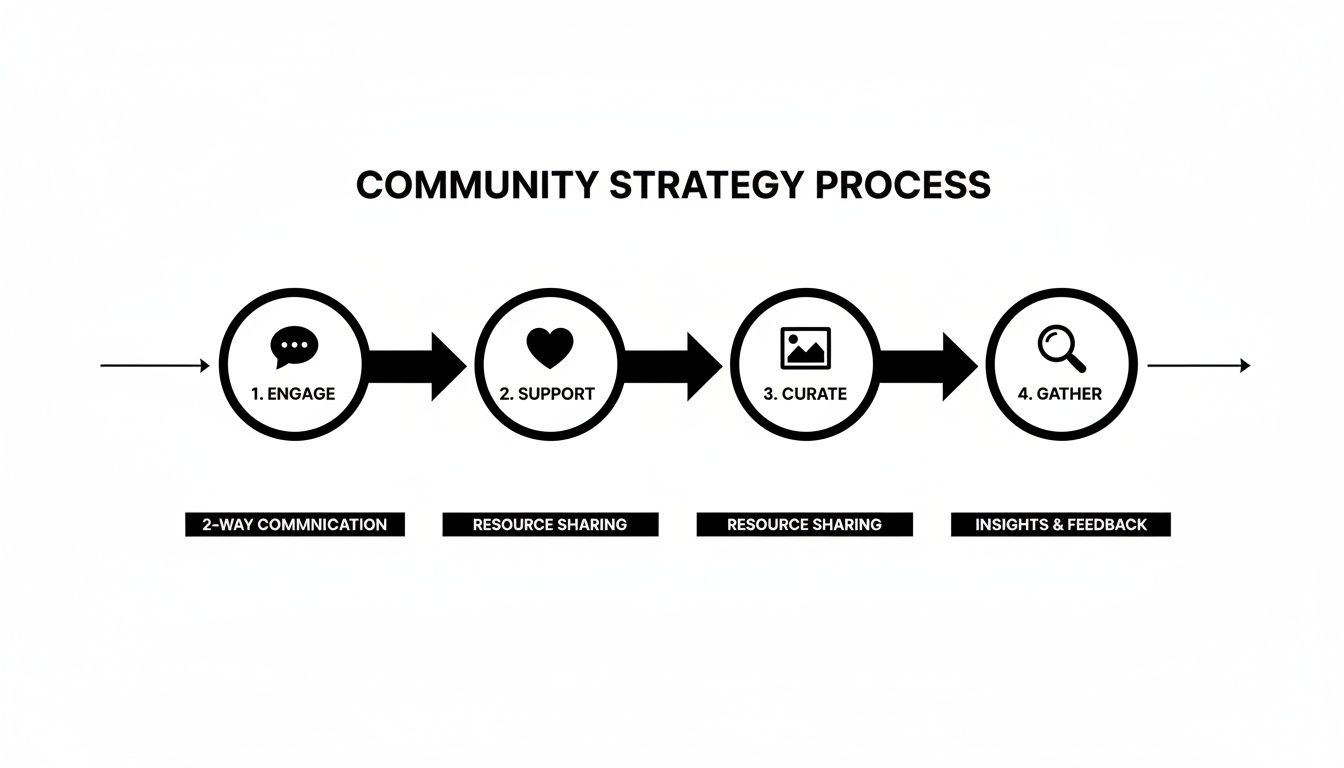
A successful community strategy isn't a single action but a continuous cycle. You engage, you support, you curate content, and you gather feedback—and then you use that feedback to start the loop all over again, making it stronger each time.
Your Monthly Strategic Review
Monthly tasks are about zooming out to focus on long-term community health.
- Review and Update Community Guidelines: Are your rules still working? Have new types of issues popped up that your guidelines don't address? Tweak them to ensure they continue to foster a safe and productive environment.
- Plan a Major Engagement Event: Get one significant event on the calendar for the following month. This could be an "Ask Me Anything" (AMA) with your CEO on LinkedIn, a guest expert workshop in your Facebook Group, or a user-generated content contest on Instagram.
- Synthesize Member Feedback for Internal Teams: Collate all the product suggestions, feature requests, and common pain points you've collected. Create a concise, actionable report and share it with your product, marketing, and support teams. Closing this feedback loop is one of the most valuable things a community manager can do.
Juggling these tasks across multiple platforms can be overwhelming. For a more efficient way to stay on top of it all, check out our guide on how to manage multiple social media accounts. If Instagram is your primary channel, our guide on how to collaborate on Instagram covers team roles, approval workflows, and shared inbox management in detail. Using a tool like PostPlanify to schedule your conversation starters and unify your inbox can automate repetitive work, giving you more time for the human interactions that build a thriving community.
 PostPlanify
All your social media in one simple dashboard
Schedule posts, track analytics, and reply to comments/DMs without switching tabs.

Engagement
+18%
Views
52.8k
How to Measure Community Management Success
How do you prove that all your hard work is paying off? You have to look beyond surface-level numbers like follower count. True success isn't about size; it's about health, activity, and loyalty. Focusing on the right Key Performance Indicators (KPIs) connects your community-building efforts to real business impact.
Moving Beyond Vanity Metrics
A giant follower count looks great on a slide deck, but it’s often a hollow victory. An army of 1,000 true fans who jump into every conversation is infinitely more valuable than 100,000 silent followers who never click, comment, or care.
Your focus should shift to metrics that signal a genuine, active connection.
- Engagement Rate: This is your north star metric. It tells you what percentage of your audience is actually interacting with your content.
- Sentiment Analysis: Are people talking about your brand in a positive, negative, or neutral way? Tracking the emotional tone shows if your efforts are building goodwill.
- Response Time & Rate: How quickly and consistently are you replying to people? Quick, reliable responses build an incredible amount of trust and make members feel valued.
Digging into how to measure community engagement means going deeper than just counting likes and shares. It’s about understanding the quality of the interactions.
Calculating Your Core Community KPIs
Getting started with these numbers is easier than you think. A few simple formulas will give you a powerful snapshot of your community’s health.
1. Engagement Rate (per post): This metric helps you figure out what content actually resonates with your audience.
Formula: (Total Likes + Comments + Shares) / Total Followers x 100
- Platform-Specific Example (Instagram): A brand posts a photo to their 10,000 followers. It gets 400 likes and 50 comments. Their engagement rate for that post is (400 + 50) / 10,000 x 100 = 4.5%.
2. Average Response Time: This KPI shows how responsive your team is when members reach out.
Formula: Total Time to Respond / Total Number of Inquiries
- Platform-Specific Example (Facebook Group): Your team answers 20 questions over a day. The total combined time it took to send all replies was 600 minutes. Your average response time is 600 / 20 = 30 minutes.
We're seeing a major shift toward smaller, more intimate communities on platforms like Discord and Threads. People are tired of algorithmic feeds and are seeking quality interactions. With users spending over two hours a day on social media, making every interaction count has never been more important.
Introducing the Community Health Score
Instead of juggling a dozen numbers, you can create a Community Health Score. This is a custom metric you create by combining several key KPIs into a single score. It gives leadership a simple, at-a-glance view of your community’s well-being and shows how it's trending over time.
You can weigh different metrics based on what matters most. A B2B brand on LinkedIn might place a heavier weight on positive comments. A DTC brand might see the volume of user-generated photos on Instagram as the most critical sign of a thriving community.
By tracking these more meaningful metrics, you can stop guessing and start making data-driven decisions. For a deeper dive into building out a full dashboard, our guide on social media analytics and reporting is a great next step.
Choosing the Right Tools for Your Community Stack
Trying to manage a social media community without the right tools is like trying to build a house with just a hammer. A solid toolkit transforms community management from a reactive scramble into a strategic, streamlined operation.
The goal is to automate repetitive tasks so you can focus on building real human connections. Each tool should solve a specific problem.
Listening and Monitoring Tools
You can't join a conversation you don't know is happening. Listening tools are your digital ears, scanning the social web for mentions of your brand, keywords, and industry chatter—even when you're not tagged. They help you find conversations you’d otherwise miss, acting as an early-warning system.
Engagement and Scheduling Platforms
This is your command center. An engagement and scheduling platform unifies your social channels into a single dashboard, saving you from constantly switching between a dozen tabs. It’s the single biggest time-saver for a community manager.
A platform like PostPlanify is built for this. Instead of manually posting everywhere, you can schedule all your content from one place. Features like AI-powered caption writing or one-click media imports from Canva cut out the grunt work. This frees up time to spend actually talking to your community. You can see how different platforms stack up in our guide to social media scheduling tools.
Analytics and Reporting Dashboards
You can't improve what you don't measure. Analytics tools turn community activity into simple, actionable data. They take you beyond vanity metrics and show you what content is driving results, when your audience is most active, and how your community is growing. This is how you prove the ROI of your work.
Dedicated Community Platforms
While public social media is great for casting a wide net, sometimes your most dedicated fans need a private space to connect. Dedicated platforms like Facebook Groups, Discord servers, or Slack channels create a focused home for your super-fans, away from the noise of the main feeds.
These platforms are becoming more important than ever. With 5.66 billion people on social media globally, the public square is incredibly crowded. The average person spends 2 hours and 23 minutes a day scrolling. Creating a dedicated space helps you stand out. Check out the latest social media user statistics to see just how big the landscape is.
Your Essential Community Management Tool Stack
Here’s a simple breakdown of the core tool categories and what they do.
| Tool Category | Core Function | Example Tools |
|---|---|---|
| Scheduling & Engagement | Your central hub for planning, publishing, and replying across all channels. | PostPlanify, Buffer, Hootsuite |
| Social Listening | Monitoring brand mentions, keywords, and sentiment outside your direct notifications. | Brand24, Mention, Awario |
| Analytics & Reporting | Translating community activity into performance data and actionable insights. | Sprout Social, Agorapulse, Iconosquare |
| Dedicated Platforms | Creating private, focused spaces for your most loyal members. | Facebook Groups, Discord, Slack, Circle |
| Content Creation | Designing visuals and editing videos without needing to be a graphic designer. | Canva, CapCut, Adobe Express |
By putting the right tools in place, you’re building a scalable engine for loyalty, feedback, and growth. Your stack should empower you, not overwhelm you.
Solving Common Community Management Challenges
Every social media community hits rough patches. You’ll face everything from trolls and negative feedback to a full-blown PR crisis. Having a clear, pre-planned playbook is what separates a controlled response from a panicked scramble. The goal isn't to dodge every problem; it's to have frameworks ready so you can act quickly and professionally.
Problem: Handling Negativity and Trolls
Why it happens: Negative feedback is inevitable. Some customers will have bad experiences, while trolls seek to provoke a reaction for their own amusement. How you handle it sets the tone for your entire community.
Common Scenarios:
- A customer posts a one-star review on your Facebook page detailing a bad experience.
- A user spams your Instagram comments with irrelevant links or abusive language.
Actionable Fixes:
- Acknowledge Immediately: Never ignore a legitimate complaint. A quick, public reply like, "Thanks for bringing this to our attention. We're looking into it right now," shows you’re on the ball.
- Empathize Genuinely: Show them you understand. Simple phrases like, "I can see why that would be frustrating," or "That’s not the experience we want for our customers" go a long way.
- Move to a Private Channel: After acknowledging the issue publicly, get the conversation out of the main feed. Say, "To get the details we need to fix this, could you please send us a DM?" This protects their privacy and keeps your timeline clean.
- For Trolls: Ignore, Delete, Ban: Do not engage. A troll's goal is to get a reaction. Your response should be swift and silent: delete their comments and ban the user. This protects your community from disruption.
Problem: Navigating a PR Crisis
Why it happens: A product fails, an executive makes a controversial statement, or misinformation about your brand goes viral. A PR crisis can feel like the sky is falling, but a structured, calm response is your best defense. The worst thing you can do is go silent.
Common Scenarios:
- A major service outage affects all your customers.
- A video critical of your company goes viral on TikTok.
Actionable Fixes:
- Pause All Scheduled Posts: The first thing you do is pause all scheduled marketing content. Nothing looks more tone-deaf than a cheerful promo post going live in the middle of a firestorm.
- Establish a Single Source of Truth: Get together with leadership and craft one clear, honest statement. Every single response from the social media team must align with this core message. No exceptions.
- Respond, Don't React: Keep your tone professional and calm. Acknowledge the situation, state the facts as you know them, and clearly outline the steps your company is taking to make things right.
Problem: Reviving a Quiet Community
Why it happens: Sometimes, the biggest challenge isn't anger; it's silence. Engagement dies down because members don't see a compelling reason to participate, the content has become stale, or the initial excitement has faded.
Common Scenarios:
- Your Facebook Group used to be active, but now only you are posting.
- You ask a question on X, and it gets zero replies.
Actionable Fixes:
- Launch a Member Spotlight: Find your most active, helpful members and celebrate them publicly. This gives them recognition and shows others what great participation looks like.
- Run an Exclusive Challenge: Start a fun, low-effort contest with a small prize. It could be a photo challenge or a "best tip" thread—anything to get people talking and sharing again.
- Ask for Direct Feedback: Post a poll or a simple question like, "What's one thing you'd love to see more of in this community?" This not only shows you value their opinion but also gives you a ton of fresh content ideas.
For a deep dive into rebooting your engagement, check out our full guide on how to improve social media engagement.
Frequently Asked Questions (FAQ)
Here are answers to some of the most common questions about social media community management.
What’s the difference between a community manager and a social media manager?
A social media manager is a marketer whose primary job is to broadcast content, grow reach, and attract new followers (one-to-many communication).
A community manager is a relationship builder whose primary job is to engage with the existing audience, foster conversations, and build loyalty (one-to-one and many-to-many communication).
How do I handle negative comments without making things worse?
Use the "Acknowledge, Empathize, Move Private" method.
- Acknowledge the comment publicly so others see you're listening.
- Empathize with their frustration to de-escalate the situation.
- Move the conversation to a private channel like DMs or email to resolve the specifics. Never delete legitimate criticism. Only remove comments that violate your community guidelines (spam, hate speech).
What’s a realistic budget for community management?
Your budget consists of two main costs: tools and talent.
- Tools: A solid scheduling and engagement platform can run from $30 to $300+ per month. Listening and analytics tools can add another $100 to $500+. Start with an essential scheduling tool and scale as you prove ROI.
- Talent: This is your biggest variable. The cost to hire a freelance, part-time, or full-time community manager depends on their experience and your needs.
Quick-Reference Community Management Checklist
- Daily: Monitor mentions, respond to comments/DMs, and engage with new posts.
- Weekly: Schedule conversation starters, analyze community sentiment, and track key metrics (engagement rate, response time).
- Monthly: Review/update community guidelines, plan a major engagement event (like an AMA or contest), and share member feedback with internal teams.
- Always: Differentiate between upset customers (help them) and trolls (ban them). In a crisis, pause all scheduled posts immediately.
PostPlanifyAll your social media in one simple dashboard
Schedule posts, track analytics, and reply to comments/DMs without switching tabs.
Engagement
+18%
Views
52.8k
About the Author

Hasan Cagli
Founder of PostPlanify, a content and social media scheduling platform. He focuses on building systems that help businesses, agencies, and teams plan, publish, and manage content and social media more efficiently across platforms.


