


You can schedule Bluesky posts using third-party scheduling tools like PostPlanify, Buffer, or Hootsuite - Bluesky doesn't have native scheduling built into the app yet. Scheduling lets you plan posts in advance, maintain consistency, and save time by batching content weekly instead of posting manually every day.
The main benefit: Stay active on Bluesky even when you're busy, ensuring consistent visibility without daily login.
This guide covers:
- Why schedule Bluesky posts (consistency, timing, efficiency)
- How to schedule Bluesky posts step-by-step (with PostPlanify)
- Best Bluesky schedulers compared (features, pricing, pros/cons)
- Bluesky posting best practices (timing, format, engagement)
Quick comparison:
| Scheduler | Price | Best For | Key Features |
|---|---|---|---|
| PostPlanify | From $99/mo monthly | Multi-platform teams | AI captions, Canva integration, 10 platforms |
| Buffer | $6/channel | Simple scheduling | Proven tool, mobile app |
| Hootsuite | $249/user/mo | Large teams | Team workflows, analytics |
Let's start with why scheduling matters on Bluesky.

(Choosing the tool itself? Our Bluesky scheduling tools comparison ranks 7 options, including three with free plans.)
Why Schedule Bluesky Posts?
Bluesky is a fast-growing decentralized social platform launched in 2023. As of early 2025, it has over 15 million users and is gaining traction as an alternative to X/Twitter.
The challenge: Staying consistent on any social platform is hard. Most people post actively for a week, then disappear when life gets busy.
The solution: Scheduling posts in advance ensures you maintain presence even during busy periods.
Benefits of Scheduling Bluesky Posts
1. Consistency Without Daily Effort
- Schedule a week or month of posts in one sitting
- Stay active even when traveling, sick, or focused on other work
- Build audience trust through regular posting rhythm
2. Post at Optimal Times
- Your audience might be most active when you're asleep
- Scheduling lets you post at 9 AM even if you wake at noon
- Test different times without manual posting
3. Save 5-10 Hours Per Week
- Batch-create content once instead of thinking "what should I post?" daily
- Spend saved time on engagement (replies, conversations)
- Reduce decision fatigue
4. Higher Quality Posts
- Writing in batches = better focus and creativity
- Time to edit and refine before publishing
- Less rushed, more thoughtful content
5. Cross-Platform Efficiency
- Post same content to Bluesky + X + LinkedIn + Instagram simultaneously
- Adapt captions for each platform
- Manage all social media from one dashboard
Does Bluesky Have Native Scheduling?
No. As of January 2025, Bluesky does not have built-in post scheduling in the app.
To schedule Bluesky posts, you need to use:
- Third-party scheduling tools (PostPlanify, Buffer, Hootsuite)
- Social media management platforms
- Automation tools (Zapier, Make)
Why third-party tools work: Bluesky has an open API, allowing scheduling tools to connect and publish posts on your behalf.
👉 Content Batching Guide: Create 30 Days of Posts in 3 Hours
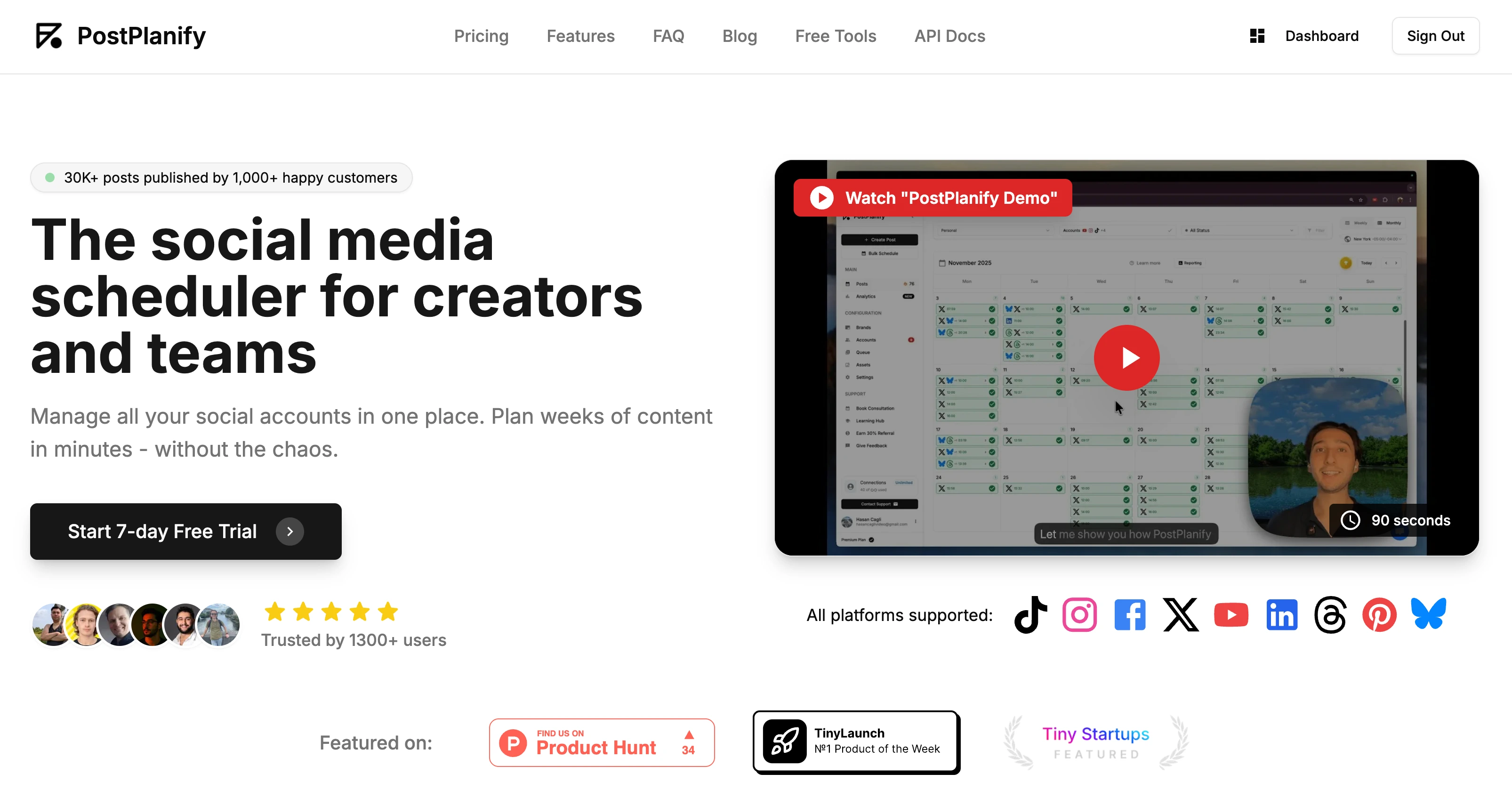
 PostPlanify
All your social media in one simple dashboard
Schedule posts, track analytics, and reply to comments/DMs without switching tabs.

Engagement
+18%
Views
52.8k
How to Schedule Bluesky Posts (Step-by-Step with PostPlanify)
Here's the complete process for scheduling Bluesky posts using PostPlanify:
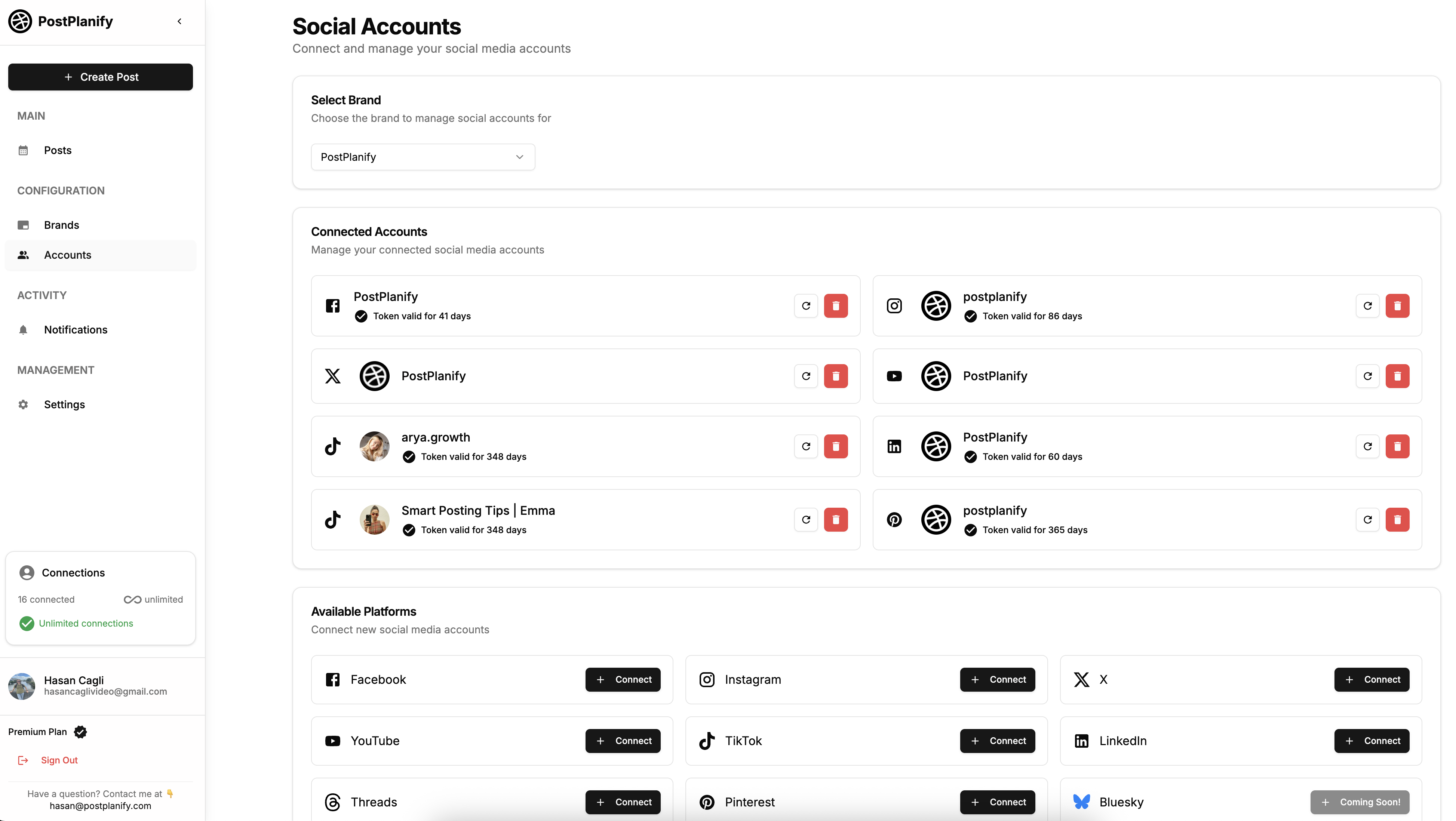
Step 1: Connect Your Bluesky Account
- Sign up at postplanify.com
- Go to "Social Accounts" → "Connect Account"
- Select Bluesky
- Enter your Bluesky username and app password
- Authorize PostPlanify
Note: You'll need to generate an "app password" in your Bluesky settings (Settings → App Passwords → Create New). This is separate from your main Bluesky password for security.
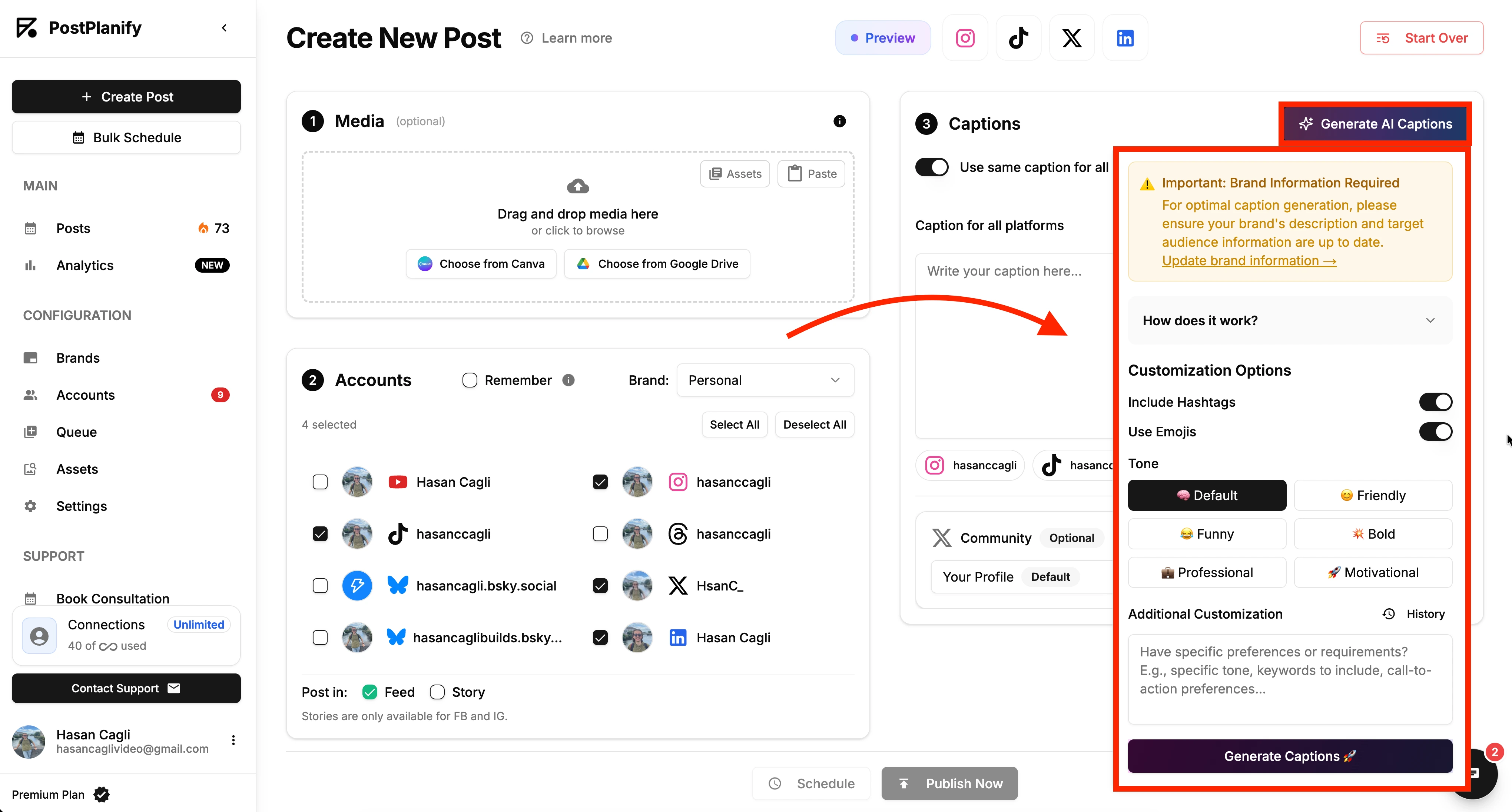
Step 2: Create Your Post
- Click "Create Post" in PostPlanify
- Select Bluesky as your platform (or select multiple platforms for cross-posting)
- Write your post content
- Character limit: 300 characters (Bluesky's current limit)
- Write naturally - Bluesky favors conversational tone over corporate language
- Optional: Use AI caption generator
- Click "Generate AI Caption"
- Select tone (casual, professional, funny)
- Edit to match your voice
Step 3: Add Media (Optional)
Supported media types:
- Images (up to 4 per post)
- Videos
- GIFs
How to add:
- Upload directly from computer
- Import from Canva (if using PostPlanify)
- Import from Google Drive
Image tips:
- Optimal size: 1200 x 675 pixels
- Keep file size under 1 MB for faster loading
- Use alt text for accessibility
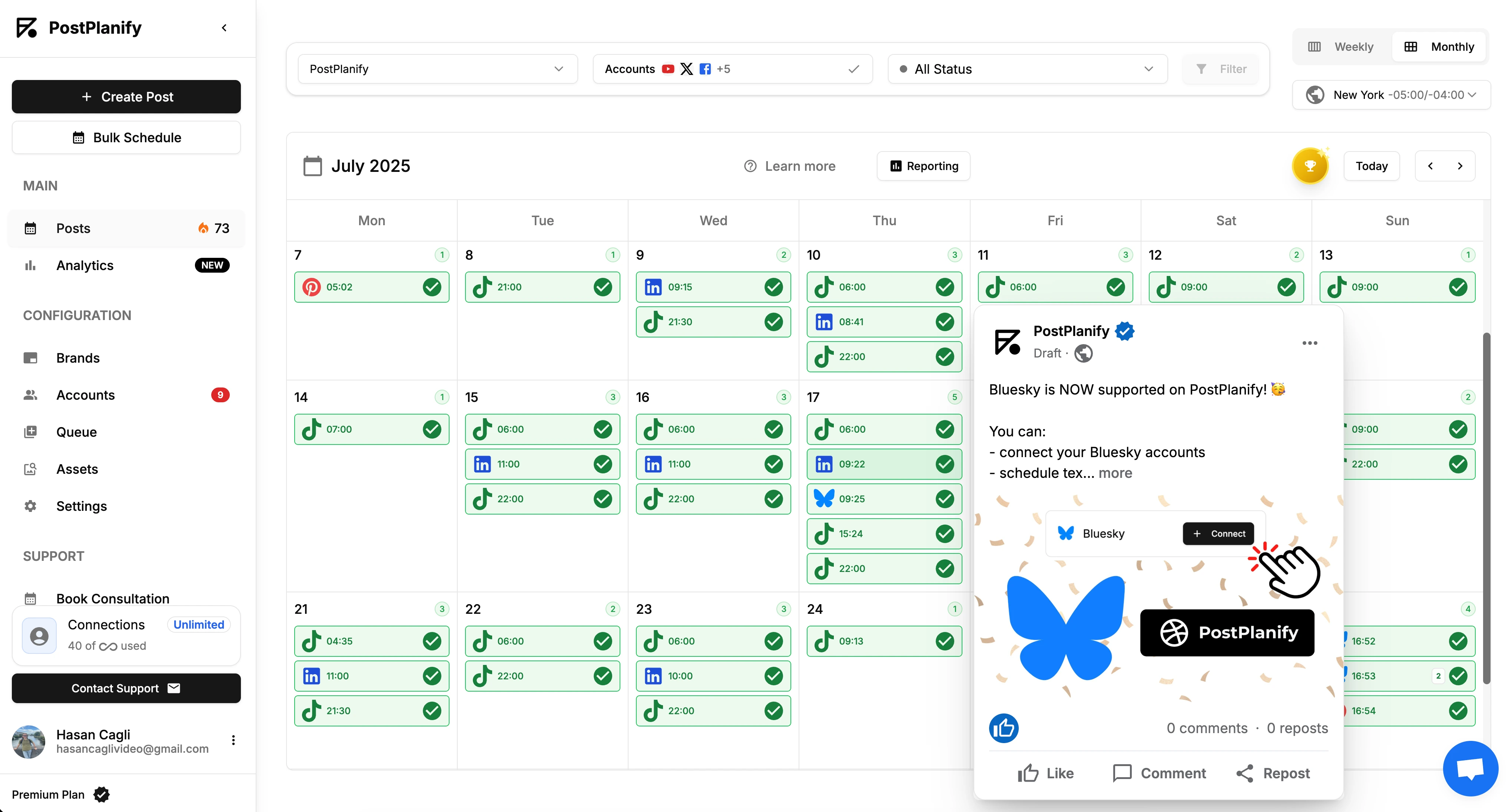
Step 4: Preview Your Post
Before scheduling, preview how your post will appear on Bluesky:
- Check character count
- Verify image/video displays correctly
- Confirm links are formatted properly
- Test on mobile preview
Step 5: Schedule Your Post
Choose scheduling option:
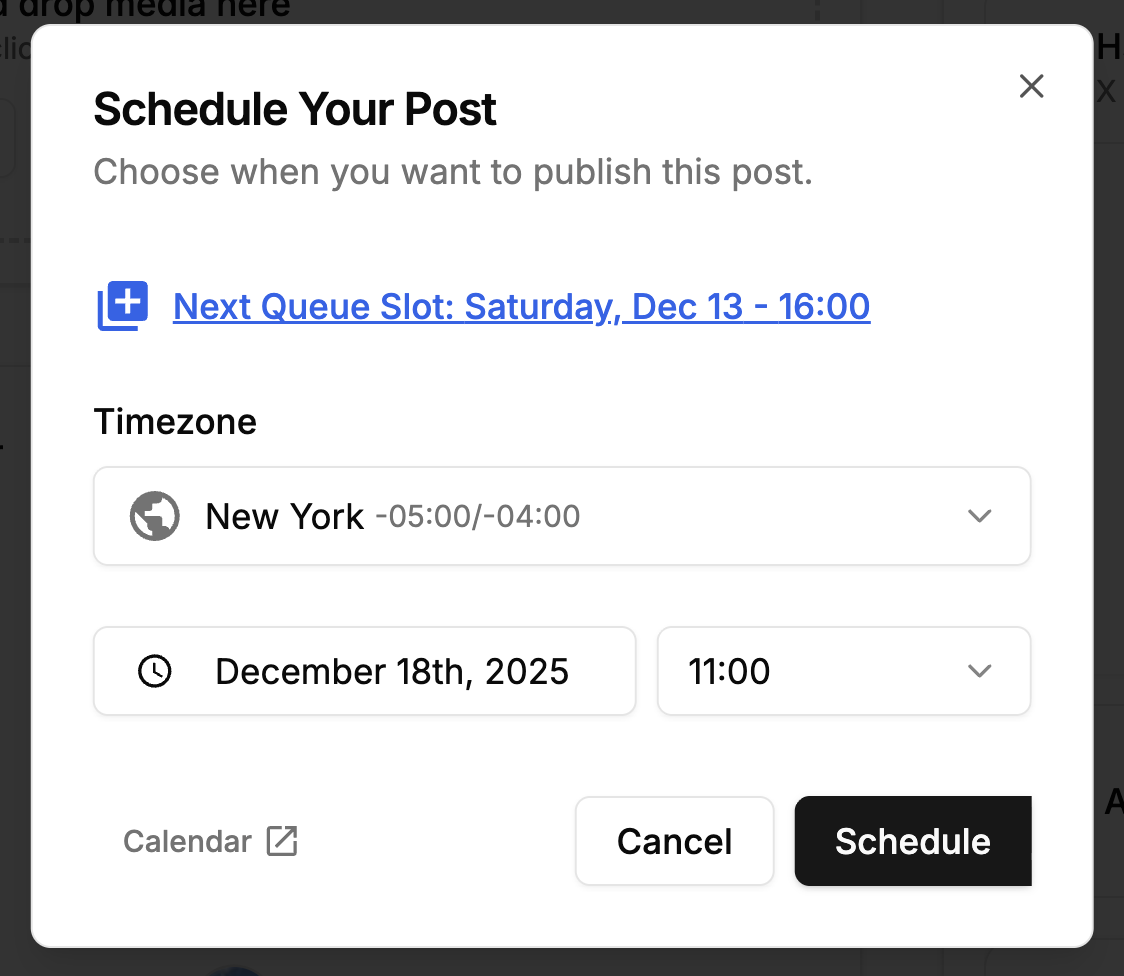
Option A: Pick specific date/time
- Click calendar icon
- Select date (today or future)
- Select time (consider your audience's timezone)
- Click "Schedule"
Option B: Add to queue
- Click "Add to Queue"
- Post fills next available queue slot
- Automatic spacing based on your queue settings
Option C: Save as draft
- Click "Save as Draft"
- Finish later
- Access from Drafts folder
Step 6: Manage Scheduled Posts
View scheduled posts:
- Calendar view: See all scheduled content at a glance
- List view: Sort by date, platform, or status
Edit scheduled posts:
- Click on any scheduled post
- Make changes to text, media, or timing
- Save updates
Reschedule or delete:
- Drag-and-drop to new time slot
- Right-click → Reschedule
- Delete if needed
Best Bluesky Schedulers Compared
Here's an honest comparison of tools that support Bluesky scheduling:
1. PostPlanify - Best for Multi-Platform Teams
Price: Growth $99/mo monthly ($79/mo billed yearly), Premium $199/mo monthly ($159/mo billed yearly), Scale $299/mo monthly ($239/mo billed yearly), or Enterprise custom pricing
Bluesky features:
- ✅ Schedule posts with images/videos
- ✅ AI caption generation (brand-aware)
- ✅ Canva + Google Drive integration
- ✅ Cross-post to 10 platforms (Bluesky, X, Instagram, TikTok, LinkedIn, Facebook, Threads, Pinterest, YouTube, Google Business)
- ✅ Unlimited scheduled posts
- ✅ Post previews
- ✅ Bulk scheduling
Pros:
- Great value for teams that need unlimited posting across multiple platforms
- Clean, simple interface
- Cross-platform efficiency
- No per-channel fees
Cons:
- No mobile app yet (coming soon)
- Newer tool (less brand recognition)
Best for: Teams, agencies, and creators managing multiple platforms
👉 Try PostPlanify free for 7 days
2. Buffer - Best for Simplicity
Price: $6/mo per channel (Essentials) to $120/mo (Team)
Bluesky features:
- ✅ Basic scheduling
- ✅ Mobile app (iOS/Android)
- ✅ Queue system
- ✅ Browser extension
Pros:
- Proven, trusted brand (14 years)
- Mobile app available
- Simple interface
- Free plan available (limited)
Cons:
- Price adds up ($6 per platform)
- Limited Bluesky-specific features
- Post limits on lower tiers
Best for: Users wanting simple, proven tool with mobile access
👉 Buffer vs PostPlanify: Detailed Comparison
3. Hootsuite - Best for Large Teams
Price: $249/user/mo (Standard) to Custom (Enterprise)
Bluesky features:
- ✅ Team collaboration
- ✅ Approval workflows
- ✅ Advanced analytics
- ✅ Bulk scheduling
Pros:
- Robust team features
- Enterprise-grade security
- Advanced reporting
- Supports 35+ platforms
Cons:
- Expensive for solo users
- Steep learning curve
- Overkill for small teams
Best for: Marketing teams (5+ people), agencies, enterprises
Comparison Table
| Feature | PostPlanify | Buffer | Hootsuite |
|---|---|---|---|
| Price (Bluesky only) | From $29/mo | $6/mo | $249/user/mo |
| Price (5 platforms) | $49/mo | $30/mo | $249/user/mo |
| AI captions | ✅ Brand-aware | ❌ | ❌ |
| Canva integration | ✅ | ❌ | ❌ |
| Unlimited posts | ✅ | ❌ (limits vary) | ✅ |
| Mobile app | ❌ (coming) | ✅ | ✅ |
| Team features | Basic | Basic | Advanced |
| Cross-posting | 10 platforms | 8+ platforms | 35+ platforms |
| Best for | Multi-platform creators | Simple needs | Large teams |
Quick decision:
- Best value: PostPlanify (from $99/mo monthly, or $79/mo billed yearly)
- Need mobile app: Buffer or Hootsuite
- Large team: Hootsuite
👉 Top 5 Social Media Scheduling Tools for Creators
Best Times to Post on Bluesky
Note: Bluesky is still growing, so optimal posting times are evolving. Here's what early data suggests:
General Best Times (EST)
Weekdays:
- 9-11 AM (morning coffee scroll)
- 12-1 PM (lunch break)
- 7-9 PM (evening wind-down)
Weekends:
- 10 AM - 12 PM (Saturday)
- 4-6 PM (Sunday)
By Timezone
EST (US East Coast): 9-11 AM, 7-9 PM
PST (US West Coast): 6-8 AM, 4-6 PM (to catch EST audience)
GMT (UK/Europe): 8-10 AM, 5-7 PM
Finding YOUR Best Times
Every audience is different. Test your optimal times:
-
Post at different times for 2 weeks
- Monday 9 AM
- Tuesday 1 PM
- Wednesday 7 PM
- Thursday 11 AM
- Friday 3 PM
-
Track engagement
- Note which posts get most likes, reposts, replies
- Check Bluesky's built-in analytics (if available)
- Use scheduler analytics (PostPlanify Growth and above)
-
Double down on winners
- Schedule most posts during top 2-3 time windows
- Test occasionally to find new opportunities
Scheduling advantage: Post at 6 AM without waking up early, or 9 PM while at dinner.
Bluesky Posting Best Practices
1. Post Frequency
Recommended: 1-3 posts per day
Why:
- 1 post/day = minimum for consistent presence
- 2-3 posts/day = optimal for growth without overwhelming followers
- 5+ posts/day = may annoy followers (unless high value)
Scheduling strategy:
- Batch-create 7-21 posts weekly
- Schedule evenly throughout week
- Leave room for real-time posts (trending topics, conversations)
2. Content Format Mix
Don't post just text. Mix formats:
- 60% text posts (quick thoughts, questions, threads)
- 30% image posts (screenshots, memes, infographics)
- 10% video posts (clips, tutorials)
Why variety matters: Different formats catch different scrollers' attention.
3. Engagement Strategy
Balance scheduled posts with real-time engagement:
- Scheduled: 70% of content (planned, batched)
- Real-time: 30% (replies, trending topics, spontaneous thoughts)
Important: Scheduling handles posting, but YOU must handle:
- Replying to comments (within 1-2 hours)
- Engaging with other creators
- Joining conversations
- Building relationships
Set up notifications:
- When someone replies to your scheduled post
- Reply quickly to boost engagement
4. Write Like a Human
Bluesky's culture favors:
- ✅ Conversational tone (not corporate)
- ✅ Personal stories and opinions
- ✅ Genuine questions
- ✅ Authentic reactions
Avoid:
- ❌ Overly polished marketing speak
- ❌ Generic motivational quotes
- ❌ Excessive hashtags (#like #this #everywhere)
- ❌ Robotic AI-generated content (without editing)
Use AI wisely:
- Generate draft captions
- Edit to sound like YOU
- Add personal touches, examples, humor
5. Use Threads for Longer Content
Bluesky supports threads (multi-post sequences).
When to use threads:
- Tutorials or how-tos (step 1, 2, 3...)
- Storytelling (beginning, middle, end)
- Lists (top 10, best practices)
- Deep dives on topics
How to schedule threads:
- Write all posts in sequence
- Schedule with 30-60 second spacing
- First post should hook readers ("Thread: How I grew from 0 to 10K followers 🧵")
6. Cross-Post Strategically
If posting to multiple platforms (Bluesky + X + LinkedIn):
Adapt your captions:
- Bluesky: Casual, conversational
- X/Twitter: Casual, punchy
- LinkedIn: Professional, industry-focused
Don't:
- Post identical content everywhere (lazy, ineffective)
- Use LinkedIn tone on Bluesky (too formal)
- Overuse hashtags (Bluesky isn't hashtag-heavy)
PostPlanify tip: AI caption generator adapts tone per platform automatically.
7. Monitor and Adjust
Weekly check-in (15 minutes):
- Review last week's posts
- Note top performers (most engagement)
- Identify patterns (time, format, topic)
- Adjust next week's schedule
Monthly optimization:
- Drop content types that consistently underperform
- Double down on what works
- Test new formats, times, topics
Common Bluesky Scheduling Mistakes
Mistake 1: Scheduling and Disappearing
Problem: Schedule posts but never engage with responses
Result: Low engagement signals, algorithm reduces reach
Fix:
- Set up post notifications
- Reply to comments within 1-2 hours
- Engagement = growth
Mistake 2: Over-Scheduling
Problem: Schedule 10 posts/day for next 3 months
Result: Feed feels robotic, followers tune out
Fix:
- 1-3 posts/day maximum
- Leave gaps for spontaneous content
- Balance scheduled + real-time posting
Mistake 3: Ignoring Bluesky's Culture
Problem: Post corporate marketing speak
Result: Ignored or unfollowed (Bluesky users value authenticity)
Fix:
- Write conversationally
- Share genuine thoughts, not sales pitches
- Be human, not brand
Mistake 4: No Engagement Strategy
Problem: Only schedule posts, never reply or engage
Result: One-sided broadcasting, no community
Fix:
- Schedule posting = 30% of effort
- Engagement = 70% of effort
- Reply, comment, join conversations
Mistake 5: Posting at Random Times
Problem: Schedule whenever, no timing strategy
Result: Inconsistent reach, missed optimal windows
Fix:
- Test different times
- Find YOUR audience's active hours
- Schedule during proven windows
Frequently Asked Questions
Can you schedule posts directly on Bluesky?
No. Bluesky doesn't have native scheduling built into the app as of January 2025. You need third-party scheduling tools like PostPlanify, Buffer, or Hootsuite.
What is the best Bluesky scheduler?
Best overall: PostPlanify (from $99/mo monthly, or $79/mo billed yearly) - AI captions, cross-platform, unlimited posts
Best for simplicity: Buffer ($6/mo per channel) - proven tool, mobile app
Best for teams: Hootsuite ($249/user/mo) - team workflows, advanced features
Choose based on your needs (budget, features, team size).
Do scheduled Bluesky posts get less reach?
No. Scheduled posts perform the same as manually posted content. What matters:
- Quality of content
- Posting consistency
- Engagement (replies, reposts, likes)
- Timing (when your audience is active)
Scheduling actually HELPS reach by ensuring you post during optimal times.
How far in advance can I schedule Bluesky posts?
Most schedulers allow unlimited advance scheduling. You can schedule:
- Days ahead (common for daily posters)
- Weeks ahead (common for weekly batching)
- Months ahead (common for evergreen content)
Best practice: Schedule 1-4 weeks ahead (allows flexibility for trending topics).
Can I schedule Bluesky threads?
Yes, with PostPlanify and most scheduling tools.
How:
- Write all posts in thread sequence
- Set spacing between posts (30-60 seconds)
- Schedule first post time
- Tool automatically posts thread in sequence
Can I schedule images and videos to Bluesky?
Yes. Bluesky supports:
- Images (up to 4 per post)
- Videos
- GIFs
All major schedulers (PostPlanify, Buffer, Hootsuite) support media scheduling.
What's Bluesky's character limit?
300 characters per post (as of January 2025).
This is longer than X's 280 but shorter than LinkedIn's 3,000. Schedulers show character count as you type.
Can I cross-post to Bluesky and other platforms?
Yes. Tools like PostPlanify let you:
- Create post once
- Select multiple platforms (Bluesky + X + Instagram + LinkedIn + etc.)
- Adapt captions per platform
- Schedule simultaneously
Time saved: 10-15 minutes per post (no re-uploading, rewriting).
👉 How to Schedule Posts on X: Complete Guide
Is there a free Bluesky scheduler?
Limited free options:
- Buffer Free (3 channels, 10 posts per channel/month)
- Most tools offer free trials (7-14 days)
Free workarounds:
- Draft posts in notes app
- Copy-paste manually at scheduled times
- Use phone reminders (not true scheduling)
Best value: PostPlanify (from $99/mo monthly, or $79/mo billed yearly, with unlimited posts across 10 platforms)
Can I edit scheduled Bluesky posts?
Yes, before they publish:
- Open scheduler
- Find scheduled post
- Click "Edit"
- Make changes
- Save
After publishing: Bluesky allows editing published posts (Settings → Edit post).
How do I find app password for Bluesky?
Bluesky app passwords are required for third-party tools (security feature):
- Open Bluesky app or website
- Go to Settings
- Select "App Passwords"
- Click "Create New App Password"
- Name it (e.g., "PostPlanify")
- Copy generated password
- Use this in scheduler (not your main password)
Why: App passwords can be revoked without changing main password (more secure).
Will Bluesky ban me for using schedulers?
No. Bluesky has an open API specifically for tools like schedulers. Using reputable schedulers is:
- ✅ Allowed by Bluesky
- ✅ Safe for your account
- ✅ Common practice
What IS against rules:
- Mass automation (spam)
- Bot-like behavior
- Inauthentic engagement
Scheduling original content is completely fine.
How much time does scheduling save?
Manual posting (daily):
- Think of what to post: 10 min
- Create/find media: 10 min
- Write caption: 5 min
- Post: 2 min
- Total: 27 min/day × 30 days = 13.5 hours/month
With scheduling (batching):
- Weekly batch session: 90 min
- Quick edits: 30 min/week
- Total: 3 hours/month
Savings: 10.5 hours/month = 126 hours/year
At $50/hour value = $6,300/year in reclaimed time.
Final Thoughts
Bluesky is growing as a decentralized alternative to traditional social platforms. As more users join, consistent posting becomes key to building presence and audience.
Scheduling removes the daily pressure of "what should I post today?" and lets you:
- Plan content when you have time and energy
- Stay active even during busy periods
- Post at optimal times for your audience
- Spend more time on engagement (which drives growth)
The goal isn't to post more - it's to post consistently without burnout.
Whether you choose PostPlanify, Buffer, Hootsuite, or another tool, the key is starting:
- Pick a scheduler
- Batch-create 7 posts
- Schedule them throughout the week
- Monitor engagement
- Adjust and repeat
Consistency beats intensity. A sustainable posting rhythm will always outperform sporadic bursts.
👉 Start scheduling Bluesky posts with PostPlanify (7-day free trial)
Questions? Email [email protected]
Related Resources
Scheduling Guides:
- Content Batching: Create 30 Days of Posts in 3 Hours
- How to Schedule Posts on X
- How to Schedule TikTok Posts
Comparisons:
- Buffer vs PostPlanify: Which Scheduler Is Best?
- 7 Best LinkedIn Schedulers Compared
- Top 5 Social Media Scheduling Tools
Platform Schedulers:
PostPlanifyAll your social media in one simple dashboard
Schedule posts, track analytics, and reply to comments/DMs without switching tabs.
Engagement
+18%
Views
52.8k
About the Author

Hasan Cagli
Founder of PostPlanify, a content and social media scheduling platform. He focuses on building systems that help businesses, agencies, and teams plan, publish, and manage content and social media more efficiently across platforms.


