
Sprout Social and SocialBee sit at opposite ends of the social media management spectrum. One is an enterprise powerhouse starting at $199/seat/month. The other is a budget-friendly scheduler starting at $29/month flat. Whether you're choosing Sprout Social or SocialBee, this 2026 comparison breaks down everything that matters.
Price isn't everything — we compare what you get for that money across scheduling, AI, analytics, engagement tools, and platform support. Here's the complete breakdown. Looking for more options? Browse all social media scheduling alternatives.
Sprout Social vs SocialBee at a Glance
Here's a quick side-by-side overview before we dive deeper:
| Category | Sprout Social | SocialBee |
|---|---|---|
| Starting Price | $199/seat/month | $29/month |
| Free Plan | No (30-day trial) | No (14-day trial) |
| Platforms Supported | 8+ | 10 |
| Unlimited Scheduling | Yes (all plans) | Yes (all plans) |
| AI Tools | AI Assist (text generation + replies) | AI Copilot, AI captions, DALL-E 3 image generation |
| AI Image Generation | No | Yes (DALL-E 3) |
| Bulk Scheduling | No native bulk import | CSV import |
| Team Collaboration | All plans (per-seat) | Pro plan ($99/mo, 3 users) |
| Approval Workflows | All plans | Pro plan only |
| Social Inbox | Full unified inbox | No |
| Social Listening | Yes (all plans) | No |
| Analytics | Advanced (all plans) | Basic to 2-year history |
| G2 Rating | 4.4/5 (5,731 reviews) | 4.8/5 (472 reviews) |
| Trustpilot Rating | 2.2/5 (75 reviews) | 4.0/5 (43 reviews) |
| Best For | Enterprises, large teams | Solo creators, small businesses |
Sprout Social Overview

Sprout Social is a premium, enterprise-grade social media management platform built for mid-size to large organizations. It offers a comprehensive suite of tools including publishing, a unified social inbox, advanced analytics, social listening, sentiment analysis, customer care workflows, and team collaboration — all in a polished, professional interface.
Sprout Social supports 8+ platforms: Instagram, Facebook, X/Twitter, LinkedIn, TikTok, YouTube, Pinterest, and Threads.
Key features:
- Multi-profile publishing and scheduling with optimal send times
- Unified Smart Inbox for messages, comments, and DMs
- Social listening and brand monitoring
- AI Assist for text generation and reply enhancement
- Advanced analytics with group, profile, and post-level reporting
- Customer care workflows and helpdesk integrations
- Competitor insights and sentiment analysis (Professional+)
- Review management
Sprout Social is the go-to choice for enterprise teams that need deep analytics, CRM-style engagement tools, and structured team workflows. For a deeper look, see what users say about Sprout Social on G2 and Trustpilot.
SocialBee Overview

SocialBee is a social media scheduling and content management tool designed for creators, solopreneurs, and small businesses. Its standout feature is category-based scheduling — a system that lets you organize content into categories and rotate posts automatically, including evergreen content recycling.
SocialBee supports 10 platforms: Instagram, Facebook, X/Twitter, LinkedIn, Pinterest, TikTok, YouTube, Google Business Profile, Threads, and Bluesky.
Key features:
- Category-based scheduling with content queues
- Evergreen content recycling
- AI Copilot and AI caption generation
- AI image generation (DALL-E 3)
- Canva integration for in-app design
- RSS feed auto-posting
- Bulk import via CSV
- Best time to post suggestions
- Approval workflows (Pro plan)
SocialBee is popular among budget-conscious creators and small businesses who want structured, organized posting without enterprise-level complexity. For a deeper look, see what users say about SocialBee on G2 and Trustpilot.
Pricing Comparison
Pricing is where the gap between Sprout Social and SocialBee is most dramatic. These two tools exist in entirely different price brackets.
Sprout Social Pricing
Sprout Social uses per-seat pricing, meaning costs multiply with every team member you add. We cover this in detail in our Sprout Social pricing guide.
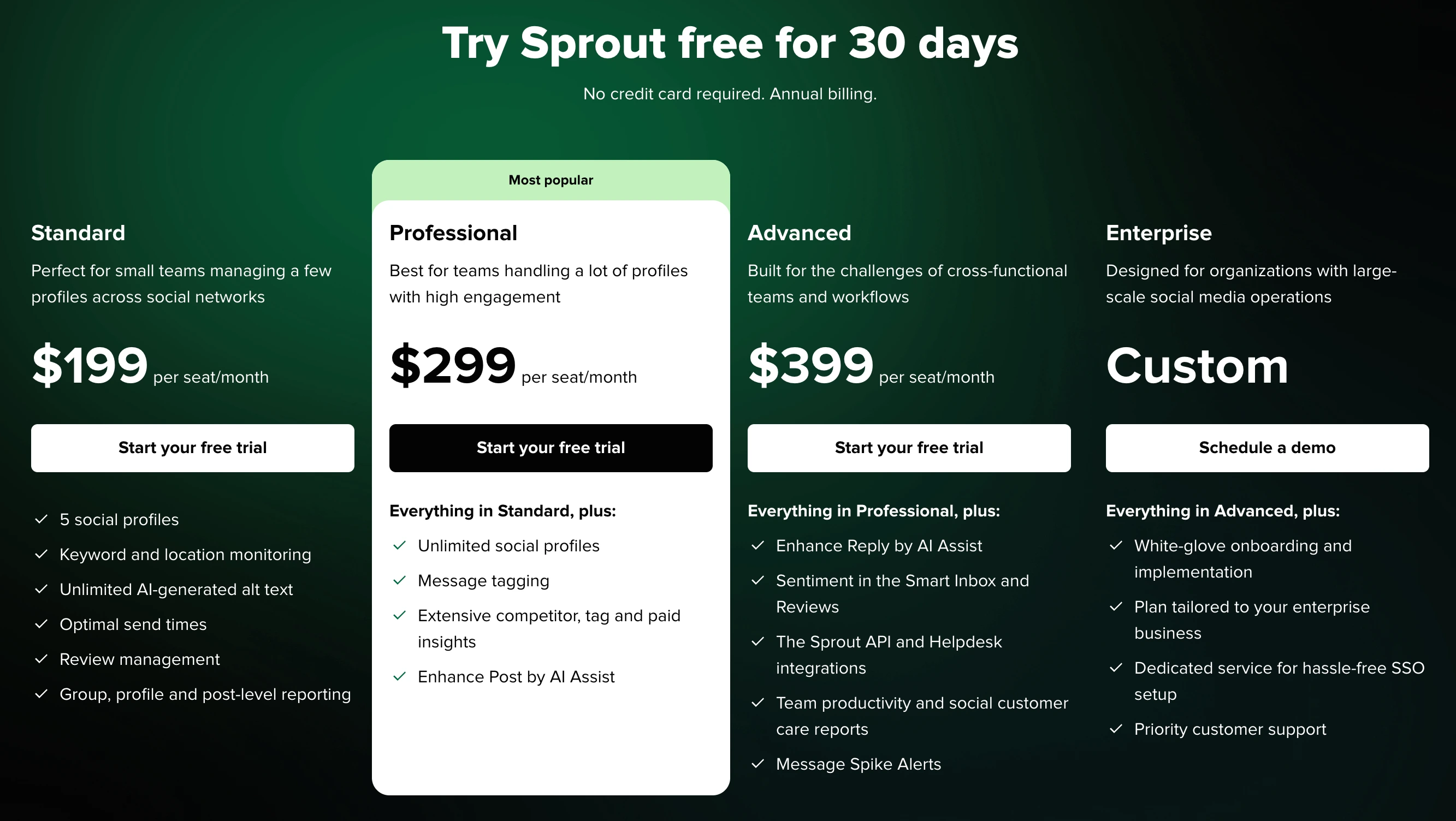
| Plan | Price | Social Profiles | Key Features |
|---|---|---|---|
| Standard | $199/seat/month | 5 profiles | Scheduling, inbox, monitoring, AI text, analytics |
| Professional | $299/seat/month | Unlimited | + Competitor insights, message tagging, paid insights |
| Advanced | $399/seat/month | Unlimited | + Sentiment analysis, API, helpdesk integrations, spike alerts |
| Enterprise | Custom pricing | Unlimited | + White-glove onboarding, SSO, priority support |
Example costs:
- 1 user on Standard = $199/month
- 3 users on Professional = $897/month
- 5 users on Advanced = $1,995/month
SocialBee Pricing
SocialBee uses flat monthly pricing with add-ons for extra profiles, users, and workspaces. See the full SocialBee pricing breakdown for details.
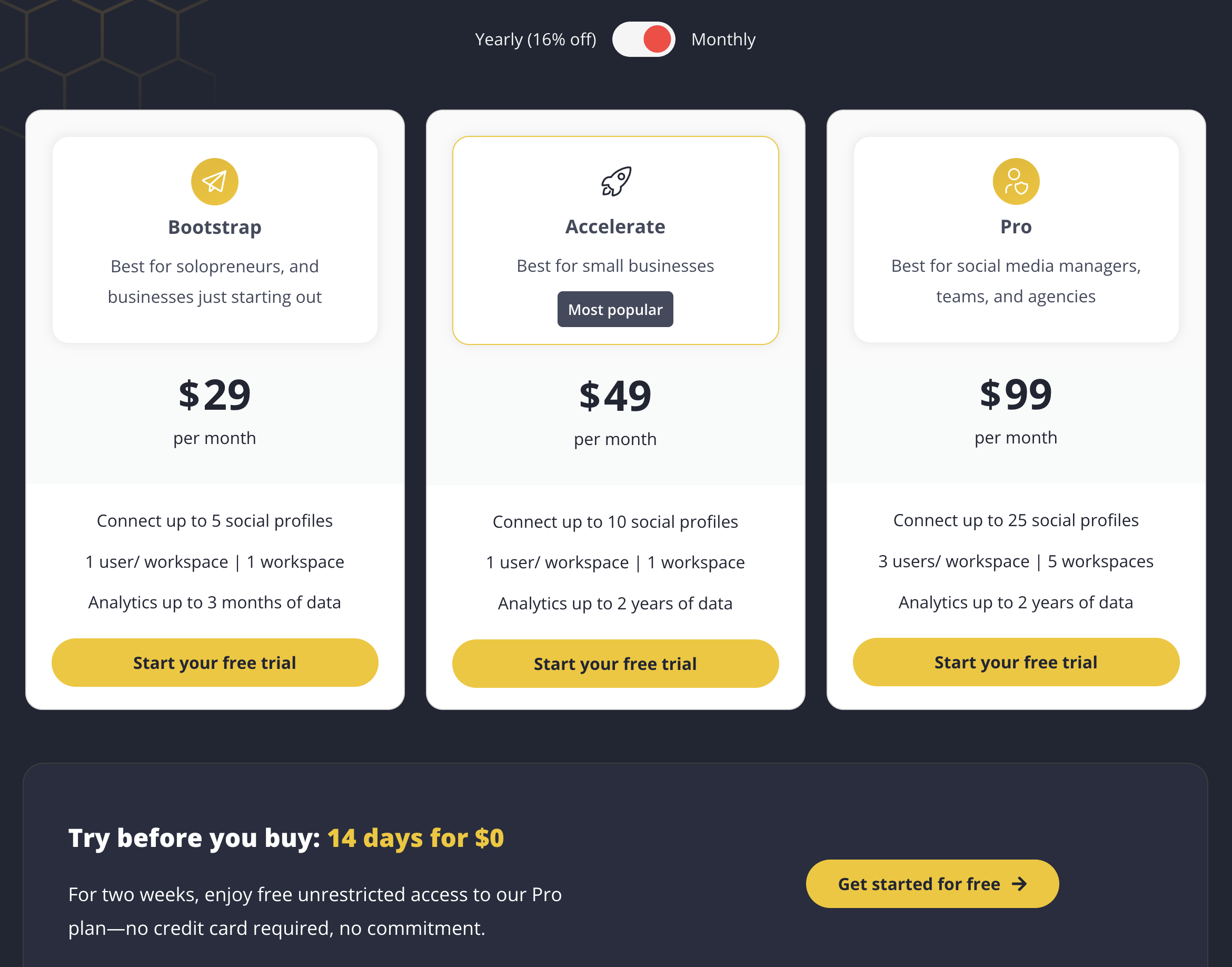
| Plan | Price | Social Profiles | Users | Workspaces | Key Features |
|---|---|---|---|---|---|
| Bootstrap | $29/month | 5 | 1 | 1 | Scheduling, categories, AI, 3-month analytics |
| Accelerate | $49/month | 10 | 1 | 1 | + 2-year analytics history |
| Pro | $99/month | 25 | 3 | 5 | + Approval workflows, team collaboration |
Add-on pricing:
- Extra 5 profiles: $15/month
- Extra user: $10/month
- Extra workspace: $10/month
Example costs:
- 1 user, 5 profiles = $29/month
- 1 user, 10 profiles = $49/month
- 3 users, 25 profiles, 5 workspaces = $99/month
Price Verdict
SocialBee is dramatically cheaper across every scenario. A solo user managing 5 profiles pays $29/month on SocialBee vs $199/month on Sprout Social — that is a $170/month difference for roughly the same profile count.
The gap widens with teams. Three users on SocialBee's Pro plan costs $99/month total. Three users on Sprout Social's Standard plan costs $597/month — six times more. At the Professional tier, those same three Sprout Social seats cost $897/month.
Sprout Social's pricing only makes sense for organizations that genuinely need enterprise-grade social listening, sentiment analysis, CRM integrations, and customer care workflows. If your primary need is scheduling and publishing content, SocialBee delivers far better value per dollar. For more affordable options, browse our list of best social media schedulers.
 PostPlanify
Manage All Your Social Accounts Without the Chaos
Schedule posts, track performance, and collaborate with your team.


Feature Comparison
Scheduling & Publishing
Both tools offer unlimited post scheduling, but their approaches differ significantly.
| Feature | Sprout Social | SocialBee |
|---|---|---|
| Unlimited scheduling | Yes (all plans) | Yes (all plans) |
| Content calendar | Yes | Yes |
| Category-based scheduling | No | Yes |
| Evergreen content recycling | No | Yes |
| Bulk scheduling | No native bulk import | CSV import |
| Best time to post | Yes (Optimal Send Times) | Yes |
| RSS feed auto-posting | No | Yes |
| Draft saving | Yes | Yes |
| Post queue management | Yes | Yes |
Winner: SocialBee. Its category-based scheduling system, evergreen recycling, bulk CSV import, and RSS feeds give it a clear edge for content-heavy workflows. Sprout Social's publishing tools are solid but more traditional. For help building your own content plan, see our guide to creating a social media content calendar.
AI Tools
| Feature | Sprout Social | SocialBee |
|---|---|---|
| AI caption generation | Yes (AI Assist) | Yes (AI Copilot) |
| AI reply enhancement | Yes (Advanced plan) | No |
| AI image generation | No | Yes (DALL-E 3) |
| AI content ideas | Yes | Yes |
| AI content rewriting | Yes | Yes |
Winner: SocialBee. DALL-E 3 image generation is a significant differentiator. Sprout Social's AI Assist is useful for text, but SocialBee's AI suite covers both copy and visuals. Sprout Social does win on AI-powered reply enhancement for inbox management, but that feature is locked behind the $399/seat/month Advanced plan. Learn more about what's available in our roundup of AI social media tools.
Analytics & Reporting
| Feature | Sprout Social | SocialBee |
|---|---|---|
| Basic analytics | All plans | All plans |
| Advanced analytics | Professional+ | Pro plan |
| Analytics history | Extensive | 3 months (Bootstrap), 2 years (Accelerate+) |
| Custom reports | Advanced plan | No |
| Competitor benchmarking | Professional+ | No |
| Sentiment analysis | Advanced plan | No |
| Export reports | Yes | Yes |
| Team productivity reports | Advanced plan | No |
Winner: Sprout Social. This is where Sprout Social justifies its premium pricing. Competitor benchmarking, sentiment analysis, custom reports, and team productivity tracking are capabilities SocialBee simply does not offer. If deep analytics drive your decisions, Sprout Social is the stronger platform. For more reporting options, check our guide to social media reporting.
Team Collaboration
| Feature | Sprout Social | SocialBee |
|---|---|---|
| Multiple users | All plans (per-seat) | Pro plan (3 users) |
| Approval workflows | All plans | Pro plan only |
| User permissions | Yes | Pro plan only |
| DM assignment | Yes | No |
| Saved replies | Advanced plan | No |
| Customer care workflows | Yes | No |
Winner: Sprout Social. Collaboration is baked into every Sprout Social plan from day one. SocialBee restricts multi-user access to the Pro plan, and even then, you get only 3 users. For teams of 5+ with structured approval and assignment workflows, Sprout Social is the clear choice — if the budget allows. Learn more about setting up social media approval workflows.
Social Inbox & Engagement
| Feature | Sprout Social | SocialBee |
|---|---|---|
| Unified inbox | Full Smart Inbox | No |
| Social listening | Yes (all plans) | No |
| Sentiment analysis | Yes (Advanced plan) | No |
| Brand monitoring | Yes | No |
| Message spike alerts | Advanced plan | No |
| Review management | Yes | No |
Winner: Sprout Social. This is Sprout Social's biggest competitive advantage. The unified Smart Inbox, social listening, and customer care tools have no equivalent in SocialBee. If managing inbound engagement, brand mentions, and customer conversations is central to your workflow, Sprout Social is the only real choice between these two.
Platform Support
| Platform | Sprout Social | SocialBee |
|---|---|---|
| Yes | Yes | |
| Yes | Yes | |
| X/Twitter | Yes | Yes |
| Yes | Yes | |
| TikTok | Yes | Yes |
| YouTube | Yes | Yes |
| Yes | Yes | |
| Threads | Yes | Yes |
| Google Business | No | Yes |
| Bluesky | No | Yes |
Winner: SocialBee — supports 10 platforms vs Sprout Social's 8+. SocialBee includes Google Business Profile and Bluesky, which Sprout Social does not currently support.
What Real Users Say
Sprout Social Reviews
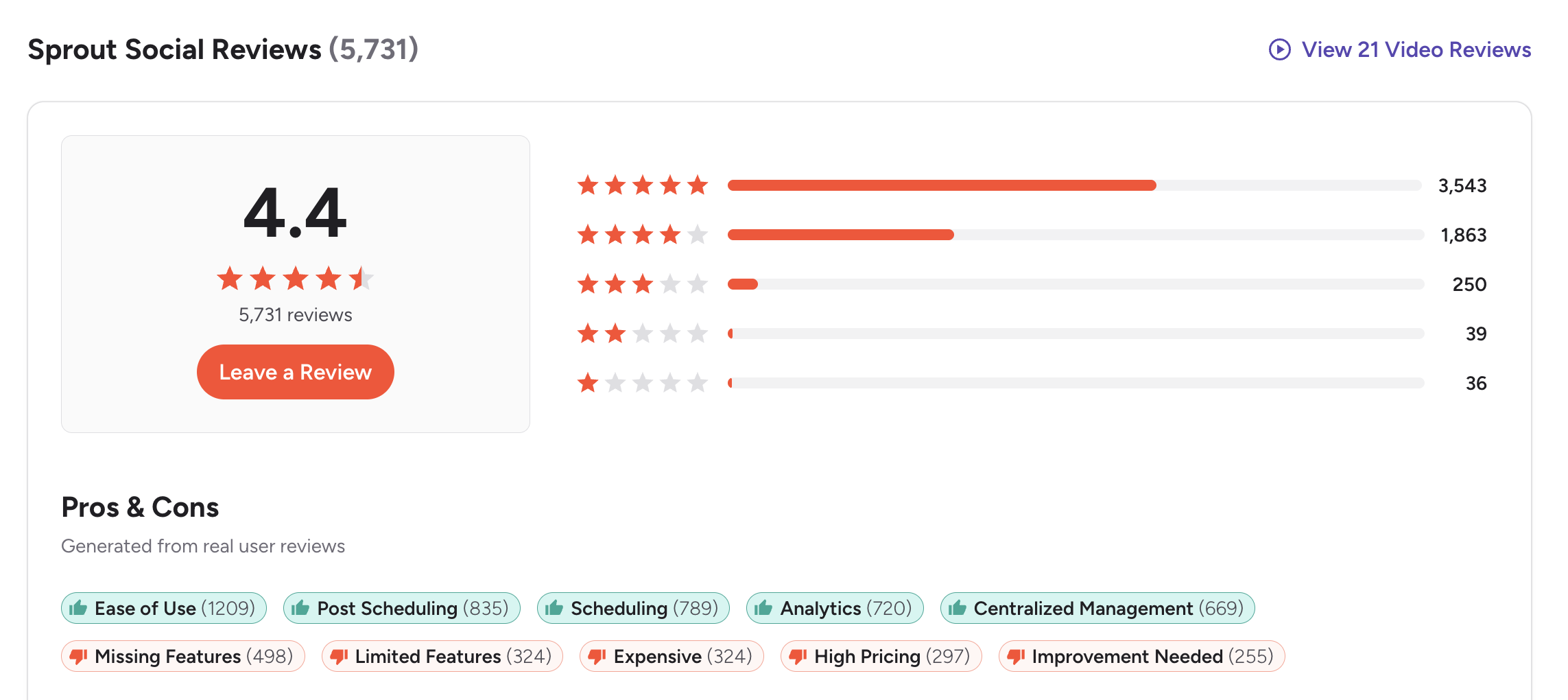
G2: 4.4/5 (5,731 reviews) — Users praise Sprout Social's ease of use (1,209 mentions), scheduling workflows (789), and analytics capabilities (720). Common complaints include expensive pricing (324 mentions), missing features on lower plans (498), and high cost that is hard for smaller teams to justify.
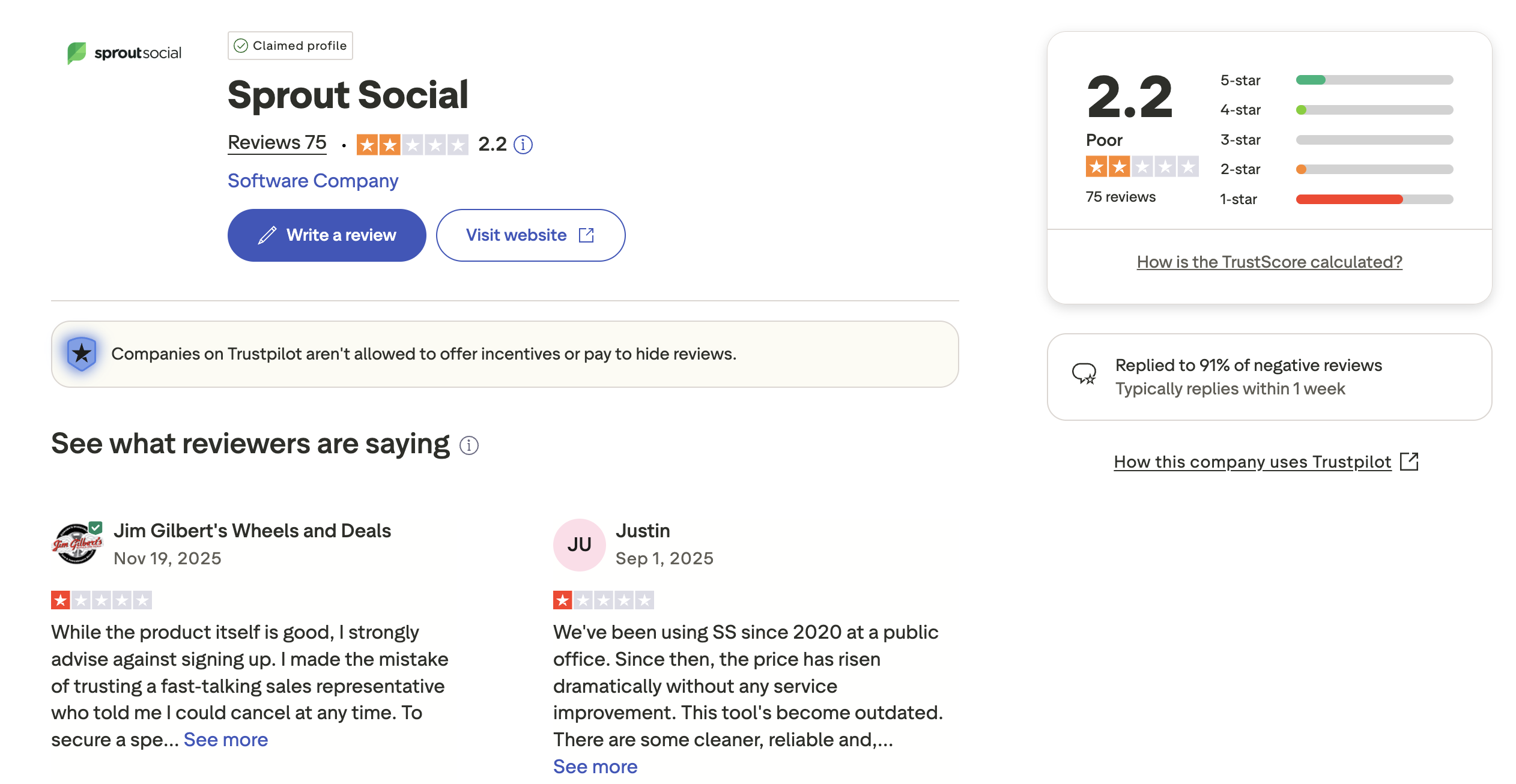
Trustpilot: 2.2/5 (75 reviews) — Significantly lower rating driven by complaints about unexpected price increases, difficulty canceling contracts, sales pressure, and customer service that feels slow or unhelpful.
SocialBee Reviews
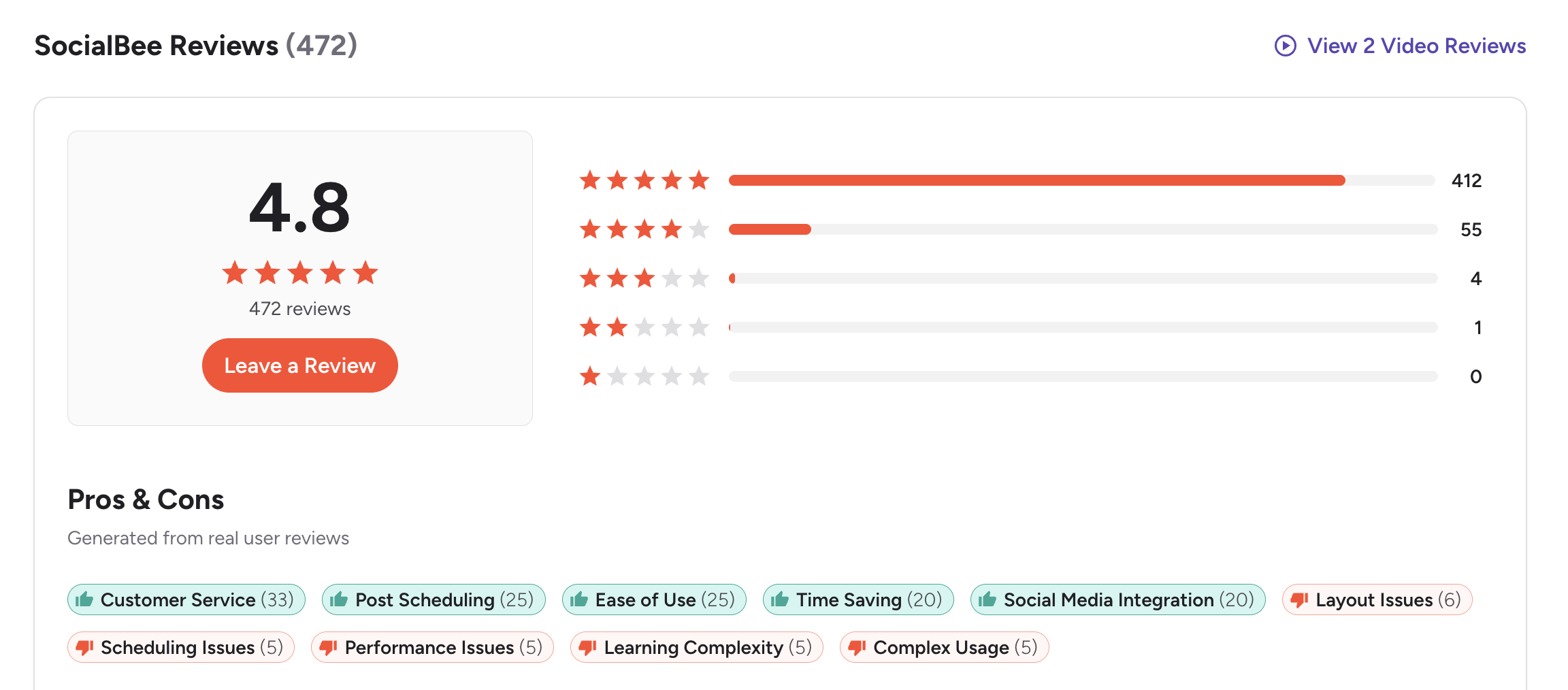
G2: 4.8/5 (472 reviews) — Overwhelmingly positive, with 412 five-star reviews. Users highlight excellent customer service (33 mentions), ease of use (25), effective scheduling (25), and time-saving workflows (20). Minor complaints include layout issues, occasional scheduling glitches, and a learning curve for the category system.
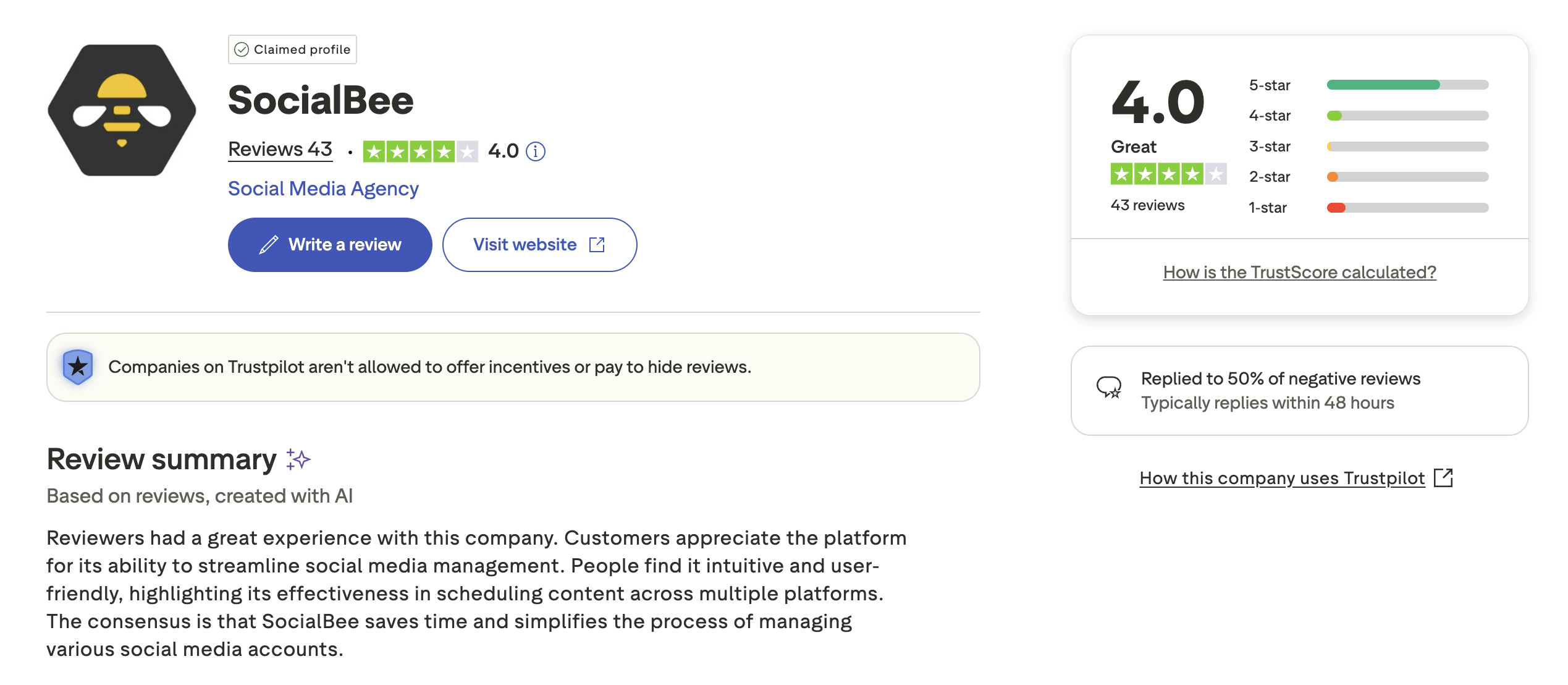
Trustpilot: 4.0/5 (43 reviews) — Solid rating with users praising helpful customer support, easy setup, intuitive workflows, and time savings from grouped scheduling. A smaller number mention occasional technical issues and limited analytics compared to larger platforms.
Review Verdict
SocialBee wins on user satisfaction across both platforms. Its G2 rating (4.8/5) is notably higher than Sprout Social's (4.4/5), and its Trustpilot score (4.0/5) is nearly double Sprout Social's (2.2/5). Sprout Social has a much larger review base on G2 (5,731 vs 472), which gives it more statistical weight, but the recurring complaints about pricing and contract issues on Trustpilot are concerning. SocialBee's smaller user base tends to be more consistently satisfied — likely because expectations align better with the price point.
Review counts and ratings are as of February 2026 and are updated periodically.
PostPlanifyManage All Your Social Accounts Without the Chaos
Schedule posts, track performance, and collaborate with your team.
Who Should Use Sprout Social?
If Sprout Social is on your shortlist, you may also want to see our top alternatives to Sprout Social before committing. Also compare Sprout Social with Hootsuite, Buffer, Later, Publer, and Metricool. For agencies evaluating enterprise tools, see our guide to social media management for agencies.
Sprout Social is the better choice if you:
- Are an enterprise or mid-size organization with dedicated social media teams
- Need a unified social inbox with DM assignment, saved replies, and customer care workflows
- Require social listening, brand monitoring, and sentiment analysis
- Want competitor benchmarking and custom analytics reports
- Have structured team approval workflows across multiple departments
- Have the budget for $199-$399+ per seat per month
- Need helpdesk integrations, API access, or SSO
- Want a comprehensive Sprout Social or SocialBee solution with enterprise-level engagement
Who Should Use SocialBee?
If SocialBee sounds right for you but you want to explore other options first, check out our best alternatives to SocialBee. You can also see how SocialBee compares to Buffer, Hootsuite, Later, Publer, and Metricool. Small business owners should also read our guide to social media management for small business.
SocialBee is the better choice if you:
- Are a solo creator, freelancer, or small business on a budget
- Want category-based scheduling with evergreen content recycling
- Need AI image generation (DALL-E 3) alongside AI captions
- Prefer flat, predictable pricing without per-seat costs
- Want to schedule across 10 platforms including Bluesky and Google Business
- Need Canva integration and bulk CSV import for efficient content workflows
- Don't require social listening, a social inbox, or enterprise-grade analytics
- Are looking for a budget-friendly social media scheduling tool with strong AI features
Final Verdict
Sprout Social is the better choice if you are an enterprise or mid-size team that needs a unified social inbox, social listening, sentiment analysis, and structured customer care workflows — and can justify the $199-$399+ per seat per month cost.
SocialBee is the better choice if you are a solo creator, freelancer, or small business that wants category-based scheduling, AI image generation, evergreen content recycling, and broad platform support at a flat $29-$99/month price.
For most small businesses and growing teams, SocialBee delivers far better value per dollar, with AI tools and scheduling features that rival platforms costing 5-10x more. If neither tool fully meets your needs, PostPlanify offers flat-rate pricing with AI content and image generation, unlimited scheduling, and team collaboration from $29/month — see how it compares.
Premium Features Don't Require Premium Pricing
Sprout Social proves that great features exist — at $199+/seat. SocialBee proves that affordable tools can be powerful — at $29+/month. PostPlanify proves you can have both: AI content generation, team approvals, unlimited scheduling, and multi-platform support starting at $29/month. No per-seat scaling, no compromises.

| Feature | Sprout Social | SocialBee | PostPlanify |
|---|---|---|---|
| Starting Price | $199/seat/month | $29/month | $29/mo flat |
| Unlimited Accounts | $299/seat/month | $99/mo (25 profiles) | $99/mo (Premium, 25 accounts) |
| AI Caption Generation | Yes | Yes | Yes |
| AI Image Generation | No | Yes (DALL-E 3) | Yes |
| Canva Integration | No | Yes | Yes |
| Google Drive Import | No | No | Yes |
| Approval Workflows | $199/seat/month | $99/mo (Pro) | $99/mo (Premium) |
| Social Inbox | Yes (all plans) | No | Yes |
| Social Listening | Yes (all plans) | No | No |
| Platforms Supported | 8+ | 10 | 10 |
| Unlimited Scheduling | All plans | All plans | All paid plans |
PostPlanify starts at $29/month for 5 accounts with unlimited scheduling and AI tools included. Analytics are included from the Growth plan ($49/month). The Premium plan at $99/month adds 25 accounts, 5 team members, approval workflows, and white-label reports — features that cost $199-$399/seat/month on Sprout Social and are restricted to the Pro plan on SocialBee. See all plans on the PostPlanify pricing page.
See the proof — start your free 7-day trial

Related Guides
- Manage Multiple Social Media Accounts
- Social Media Analytics for Business
- How to Create a Social Media Content Calendar
- Best Sprout Social Alternatives
- Best SocialBee Alternatives
FAQ
Is SocialBee cheaper than Sprout Social?
Yes, significantly. SocialBee starts at $29/month for 5 profiles, while Sprout Social starts at $199/seat/month for the same number of profiles — a $170/month difference for a single user. For a 3-person team, SocialBee's Pro plan costs $99/month total vs $597-$897/month on Sprout Social. Over a year, that gap amounts to $5,976-$9,576 in savings, making SocialBee one of the most cost-effective scheduling tools available.
Does Sprout Social have a free plan?
No. Sprout Social offers a 30-day free trial but no permanent free plan. After the trial, the cheapest option is the Standard plan at $199/seat/month. SocialBee also has no free plan but offers a 14-day free trial with no credit card required and a 30-day money-back guarantee, giving you up to 44 days of risk-free testing before committing to its $29/month starting price.
Which has better analytics — Sprout Social or SocialBee?
Sprout Social has significantly more advanced analytics including competitor benchmarking, sentiment analysis, custom reports, and team productivity tracking. SocialBee offers basic analytics with up to 2 years of history on the Accelerate and Pro plans. If analytics depth is your top priority, Sprout Social wins — but you are paying $199-$399/seat/month for that capability.
Can I switch from Sprout Social to SocialBee?
Yes, switching is straightforward. You can reconnect your social accounts to SocialBee and start scheduling immediately. SocialBee supports bulk CSV import, which makes migrating your content calendar easier. The category-based scheduling system does have a learning curve, so expect a short adjustment period as you organize content into categories and set up your posting queues. The main trade-off is losing Sprout Social's unified inbox, social listening, and sentiment analysis features.
Which supports more social media platforms?
SocialBee supports 10 platforms including Google Business Profile and Bluesky, which Sprout Social does not currently offer. Sprout Social supports 8+ platforms covering the major networks like Instagram, Facebook, LinkedIn, X/Twitter, TikTok, YouTube, Pinterest, and Threads. If you need Bluesky or Google Business Profile support, SocialBee is the clear winner for platform coverage.
Is Sprout Social worth it for small businesses?
For most small businesses, Sprout Social is too expensive. At $199/seat/month for the Standard plan, even a solo user pays more than double SocialBee's most expensive plan. Unless you specifically need social listening, a unified inbox, or enterprise-grade reporting, a tool like SocialBee or PostPlanify will deliver better value.
Does SocialBee have social listening?
No. SocialBee does not offer social listening, brand monitoring, or sentiment analysis. If you need these features, Sprout Social includes them on all plans, or you can pair a dedicated listening tool with a more affordable scheduler like PostPlanify.
Which is easier to use — Sprout Social or SocialBee?
Both are considered user-friendly, but they serve different complexity levels. SocialBee's interface is straightforward and built for quick content scheduling, though the category-based system has a learning curve. Sprout Social has a polished interface but a steeper learning curve due to its broader feature set — social listening, inbox management, sentiment analysis, and customer care workflows all add complexity. SocialBee's G2 reviews specifically praise ease of use, and its 4.8/5 rating suggests higher overall user satisfaction.
Is SocialBee worth it in 2026?
Yes, SocialBee remains a strong choice in 2026, especially for solo creators, freelancers, and small businesses. Its category-based scheduling system, evergreen content recycling, AI Copilot, and DALL-E 3 image generation provide a robust feature set at $29-$99/month. With a 4.8/5 G2 rating from 472 reviews, SocialBee consistently ranks among the highest-rated social media scheduling tools on the market.
What is the best alternative to Sprout Social?
The best alternative depends on your priorities. For budget-friendly scheduling with AI tools and content recycling, SocialBee is excellent at $29/month. For deep analytics and competitor tracking, Metricool delivers similar depth at a lower price. For flat-rate pricing with AI content and image generation, PostPlanify starts at $29/month. See our full list of social media management tools for more options.
Does SocialBee offer a free trial?
Yes. SocialBee offers a 14-day free trial with no credit card required, plus a 30-day money-back guarantee on all paid plans. This gives you up to 44 days of risk-free testing. Sprout Social also offers a 30-day free trial but does not include a money-back guarantee. If you want to compare multiple tools, you can also start a free PostPlanify trial alongside SocialBee's trial.







