
Sprout Social is a $199/seat enterprise suite with social listening, CRM integration, and deep analytics. Loomly is a $65/month content calendar with approval workflows built for smaller teams. They sit at opposite ends of the pricing spectrum, but both claim to handle social media management end to end.
A $199/seat enterprise suite versus a $65/month content calendar — two very different tools that both claim to handle social media management. We compare where they actually overlap, where they don't, and which one makes sense for your team size and budget. See more options at social media scheduling alternatives.
Sprout Social vs Loomly at a Glance
Here's a quick side-by-side overview before we dive deeper:
| Category | Sprout Social | Loomly |
|---|---|---|
| Starting Price | $199/mo per seat | $65/mo (Starter) |
| Free Plan | No (30-day trial) | Yes (3 accounts, 5 posts/mo) |
| Platforms Supported | 9 | 11 |
| Unlimited Scheduling | Yes (all plans) | Yes (paid plans) |
| AI Tools | AI Assist (captions + analytics) | AI caption suggestions |
| AI Image Generation | No | No |
| Bulk Scheduling | Yes | Yes |
| Team Collaboration | All plans | Starter+ (3 users) |
| Approval Workflows | Professional+ ($299/seat) | Starter+ |
| Analytics | Standard to Premium reports | Basic |
| G2 Rating | 4.4/5 (3,822 reviews) | 4.6/5 (1,793 reviews) |
| Trustpilot Rating | 2.0/5 (339 reviews) | 1.7/5 (26 reviews) |
| Best For | Enterprise teams, large agencies | Small-mid teams needing approval workflows |
Sprout Social Overview

Sprout Social is an enterprise-grade social media management platform built for large teams and agencies. It combines publishing, analytics, social listening, a unified inbox with CRM capabilities, and team collaboration tools in a polished, full-featured platform.
Sprout Social supports 9 platforms: Instagram, Facebook, X/Twitter, LinkedIn, Pinterest, TikTok, YouTube, Threads, and Google Business Profile.
Key features:
- Unified Smart Inbox with CRM integration
- AI Assist for captions and analytics insights
- Social listening and sentiment analysis
- Advanced analytics with custom and premium reports
- Team approval workflows and task assignment
- Competitor benchmarking and industry reports
- Employee advocacy (Bambu)
- Chatbot builder for automated responses
Sprout Social is positioned for enterprise organizations, large agencies, and teams that need deep analytics, social listening, and CRM-level customer engagement. Read real user reviews of Sprout Social from G2 and Trustpilot.
Loomly Overview

Loomly is a social media management platform designed around visual content calendars and team approval workflows. It focuses on making content planning collaborative and organized, with built-in creative integrations.
Loomly supports 11 platforms: Facebook, Instagram, X/Twitter, LinkedIn, Pinterest, Google Business Profile, YouTube, TikTok, Snapchat, Threads, and Bluesky.
Key features:
- Visual content calendar with drag-and-drop
- Approval workflows with custom roles
- AI caption suggestions
- Bulk scheduling
- Social inbox
- Canva, Google Drive, and Unsplash integration
- Link shortener with analytics
- Best time to post recommendations
- Post ideas and trending content suggestions
- Hashtag manager
Loomly is best suited for small to mid-size businesses and marketing teams that need structured content planning with built-in approval workflows at an accessible price point. For more details, see what users say about Loomly.
Pricing Comparison
The pricing gap between Sprout Social and Loomly is substantial. Sprout Social uses per-seat pricing starting at $199/month. Loomly uses tiered flat pricing starting at $65/month.
Sprout Social Pricing
Sprout Social uses per-seat pricing with high base costs. See the full Sprout Social pricing breakdown for details.
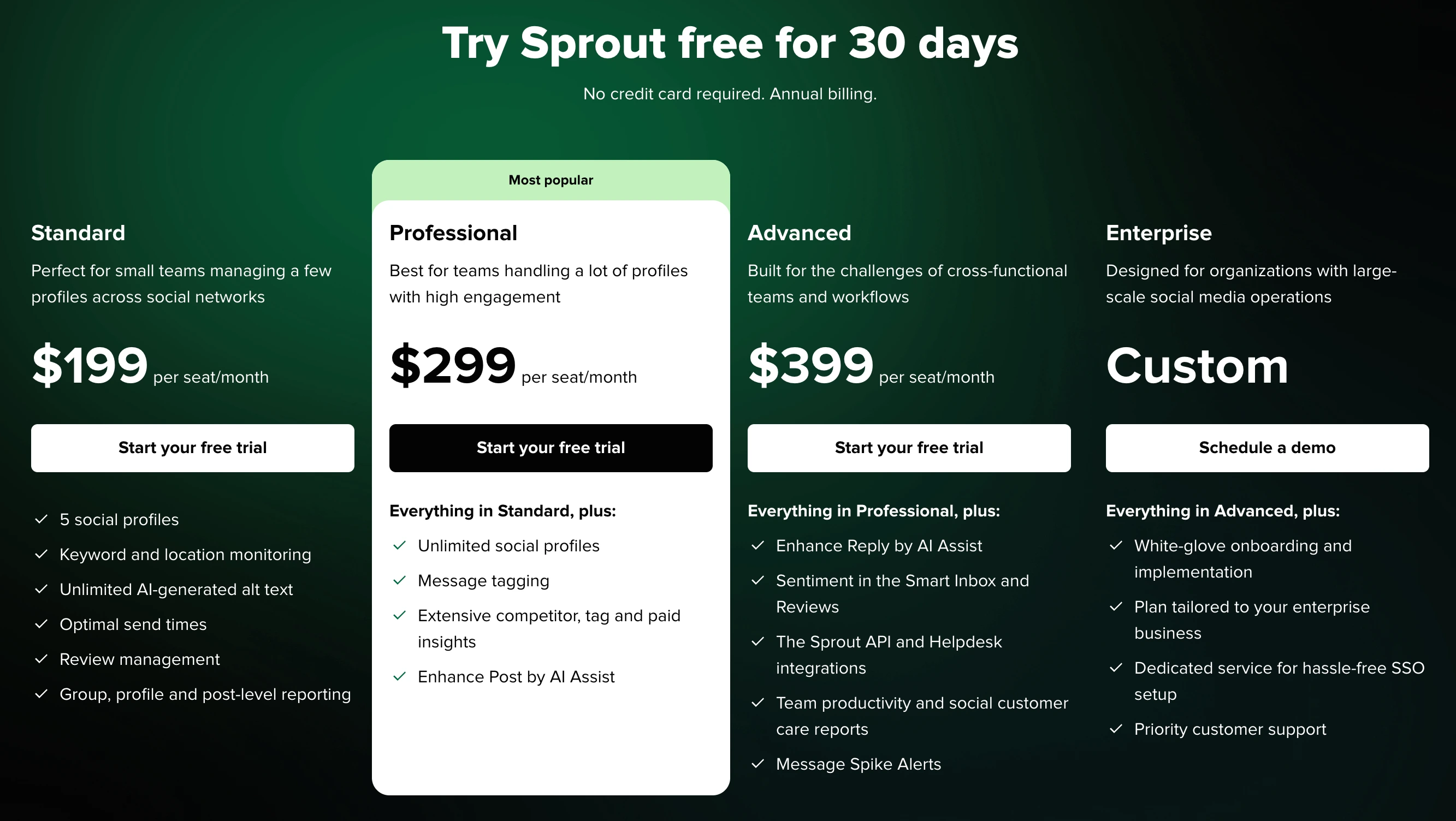
| Plan | Price | Social Profiles | Key Features |
|---|---|---|---|
| Standard | $199/mo per seat | 5 | Scheduling, Smart Inbox, basic analytics, review management |
| Professional | $299/mo per seat | Unlimited | Approval workflows, competitive reports, scheduling for optimal times |
| Advanced | $399/mo per seat | Unlimited | Chatbot, automated link tracking, message spike alerts |
| Enterprise | Custom | Unlimited | Social listening, premium analytics, Salesforce integration |
Example costs:
- 1 seat on Standard = $199/month
- 3 seats on Professional = $897/month
- 5 seats on Standard = $995/month
Loomly Pricing
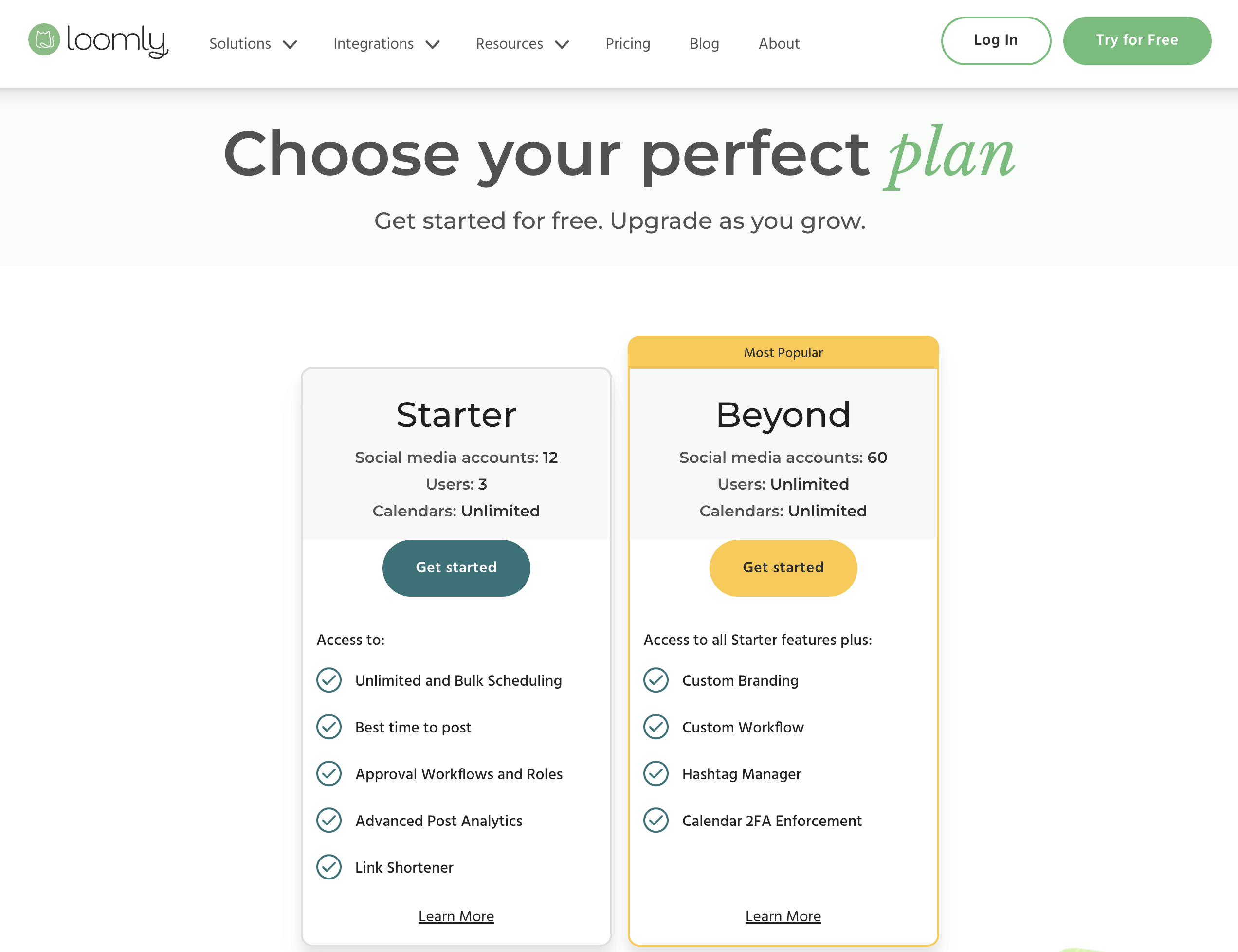
Loomly uses tiered flat pricing that bundles accounts and users together. Annual billing saves roughly 25%.
| Plan | Price (Monthly) | Social Accounts | Users | Key Features |
|---|---|---|---|---|
| Free | $0/mo | 3 | 1 | 5 posts/month |
| Starter | $65/mo | 12 | 3 | Unlimited posts, approval workflows, AI captions |
| Beyond | $332/mo | 60 | Unlimited | Advanced features, custom roles, branded reports |
| Enterprise | Custom | Custom | Custom | Dedicated support, SSO, custom integrations |
Example costs:
- Small team (12 accounts, 3 users) = $65/month
- Growing team (60 accounts, unlimited users) = $332/month
- $267 gap between Starter and Beyond with no middle tier
Price Verdict
Loomly is dramatically cheaper for small and mid-size teams. A 3-person team pays $65/month on Loomly Starter vs $597/month for 3 Sprout Social Standard seats. Even Loomly's Beyond plan at $332/month is less than two Sprout Social Standard seats ($398/month). However, Loomly's $267 jump between Starter and Beyond is frustrating for teams that outgrow 12 accounts or 3 users. Sprout Social's pricing only makes sense for enterprise organizations with dedicated budgets for social media management.
 PostPlanify
Manage All Your Social Accounts Without the Chaos
Schedule posts, track performance, and collaborate with your team.


Feature Comparison
Scheduling & Publishing
| Feature | Sprout Social | Loomly |
|---|---|---|
| Unlimited scheduling | Yes (all plans) | Yes (paid plans) |
| Bulk scheduling | Yes | Yes |
| Best time to post | Yes (Professional+) | Yes |
| First comment scheduling | Yes | No |
| Content calendar | Yes | Yes (visual, drag-and-drop) |
| Post ideas/trends | No | Yes |
| Draft saving | Yes | Yes |
| Link shortener | Yes (Advanced+) | Yes (with analytics) |
| Content library | Yes (all plans) | No |
Winner: Sprout Social. Sprout Social offers a more complete publishing toolkit with first comment scheduling, a content library, and robust draft management. Loomly counters with post ideas and trending content suggestions, but Sprout's scheduling infrastructure is deeper overall.
AI Tools
| Feature | Sprout Social | Loomly |
|---|---|---|
| AI caption generation | Yes (AI Assist) | Yes (AI suggestions) |
| AI image generation | No | No |
| AI analytics insights | Yes (AI Assist) | No |
| AI content rewriting | Yes | No |
Winner: Sprout Social. AI Assist covers captions, analytics insights, and content optimization. Loomly's AI is limited to caption suggestions. Neither offers AI image generation.
Analytics & Reporting
| Feature | Sprout Social | Loomly |
|---|---|---|
| Basic analytics | All plans | All paid plans |
| Advanced analytics | Professional+ | Beyond only |
| Custom reports | Professional+ | No |
| Competitor benchmarking | Professional+ | No |
| Export reports | All plans | Beyond only |
| Scheduled reports | Yes | No |
| Premium analytics | Enterprise add-on | No |
Winner: Sprout Social. This is one of Sprout's strongest areas. Deep analytics, competitor benchmarking, custom and premium reports, and AI-powered insights set it apart. Loomly's analytics are basic across all tiers — a clear limitation for data-driven teams.
Team Collaboration
| Feature | Sprout Social | Loomly |
|---|---|---|
| Multiple users | All plans | Starter+ (3 users) |
| Approval workflows | Professional+ ($299/seat) | Starter+ ($65/mo) |
| Custom roles | Advanced+ | Beyond only |
| User permissions | All plans | Starter+ |
| Task assignment | Yes | No |
| Saved replies | Yes (all plans) | No |
Winner: Loomly for value, Sprout Social for depth. Loomly includes approval workflows on the $65/month Starter plan — Sprout Social charges $299/seat/month for the same feature. But Sprout offers task assignment, saved replies, and more granular permission controls. For teams on a budget, Loomly delivers the essentials at a fraction of the cost.
Content & Creative Tools
| Feature | Sprout Social | Loomly |
|---|---|---|
| Canva integration | Yes | Yes |
| Google Drive import | No | Yes |
| Unsplash integration | No | Yes |
| Link shortener | Yes (Advanced+) | Yes (with analytics) |
| Hashtag manager | No | Yes |
| Asset library | Yes (all plans) | No |
Winner: Loomly. Loomly integrates with Google Drive, Unsplash, and Canva, and includes a hashtag manager. Sprout Social has a built-in asset library but lacks the broader creative integrations that make content creation faster.
Platform Support
| Platform | Sprout Social | Loomly |
|---|---|---|
| Yes | Yes | |
| Yes | Yes | |
| X/Twitter | Yes | Yes |
| Yes | Yes | |
| TikTok | Yes | Yes |
| YouTube | Yes | Yes |
| Yes | Yes | |
| Threads | Yes | Yes |
| Google Business | Yes | Yes |
| Bluesky | No | Yes |
| Snapchat | No | Yes |
Winner: Loomly — supports 11 platforms vs Sprout Social's 9. Loomly includes Bluesky and Snapchat, which Sprout Social does not currently support.
What Real Users Say
Sprout Social Reviews
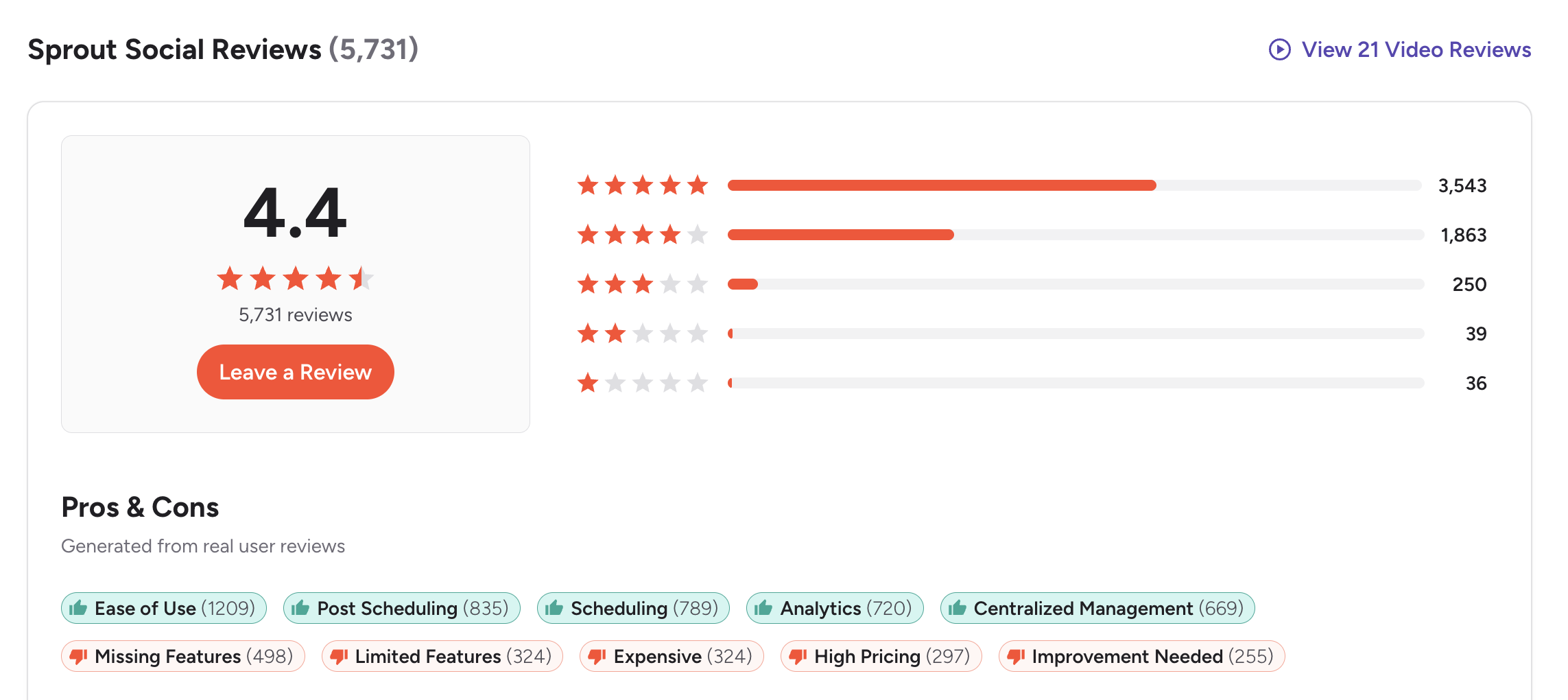
G2: 4.4/5 (3,822 reviews) — Users praise Sprout Social's unified inbox, analytics depth, and polished interface. Common complaints include expensive per-seat pricing, features locked behind higher tiers, and a steep learning curve.
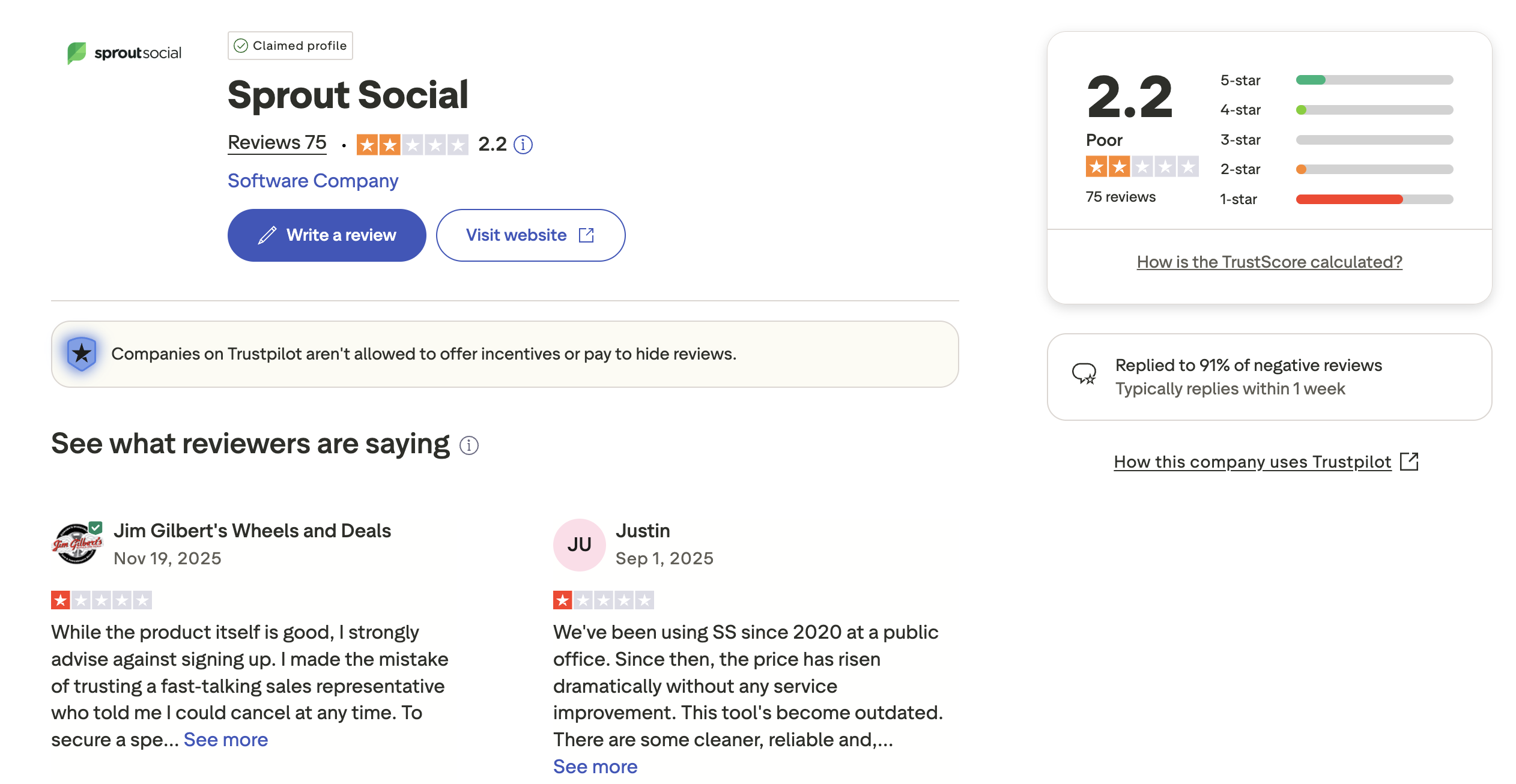
Trustpilot: 2.0/5 (339 reviews) — Lower rating driven by complaints about aggressive billing practices, difficult cancellation, auto-renewal surprises, and unresponsive support.
Loomly Reviews
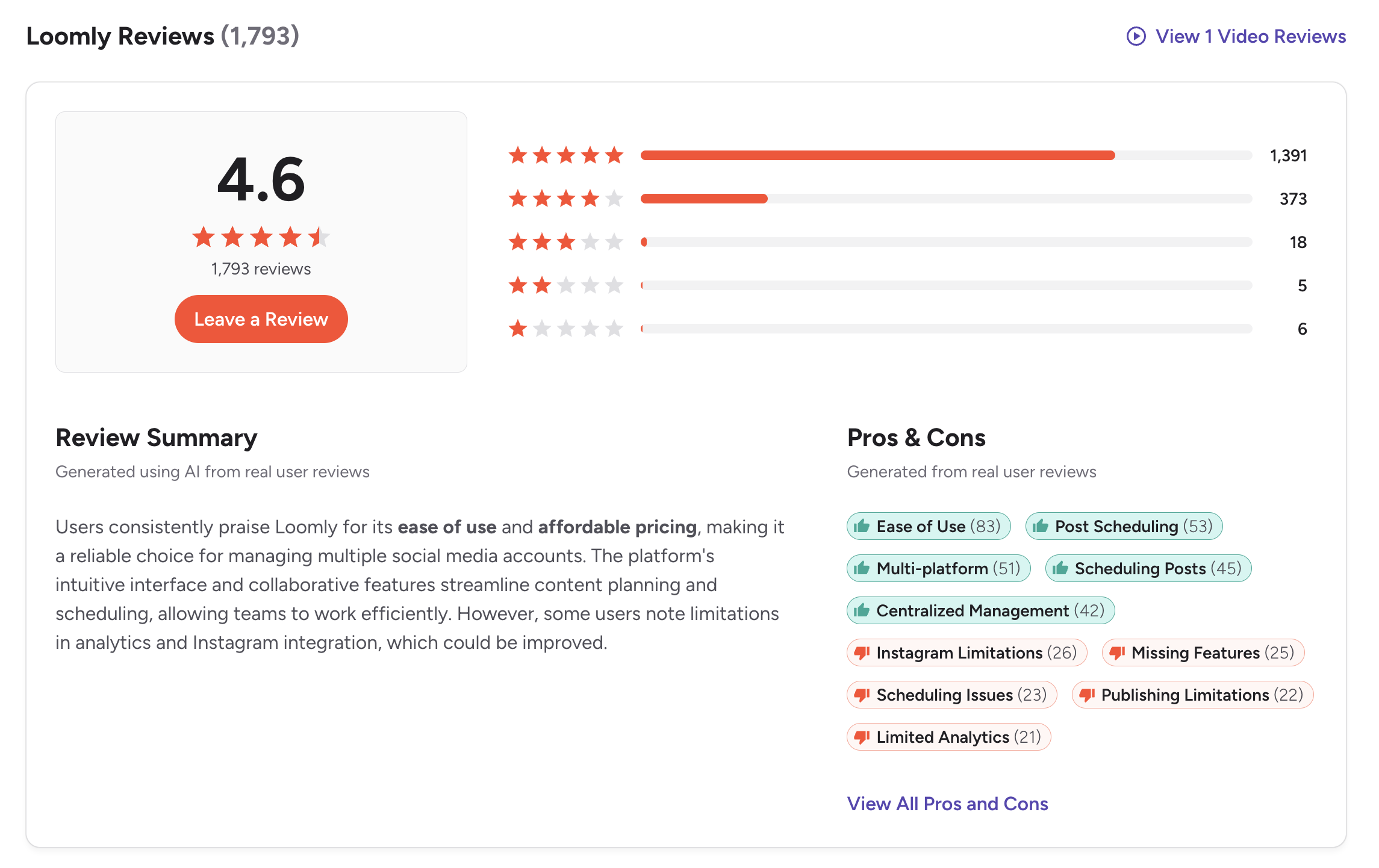
G2: 4.6/5 (1,793 reviews) — Users consistently praise the visual calendar, approval workflows, and intuitive interface. Common complaints include limited analytics, the pricing gap between Starter and Beyond, and basic reporting.
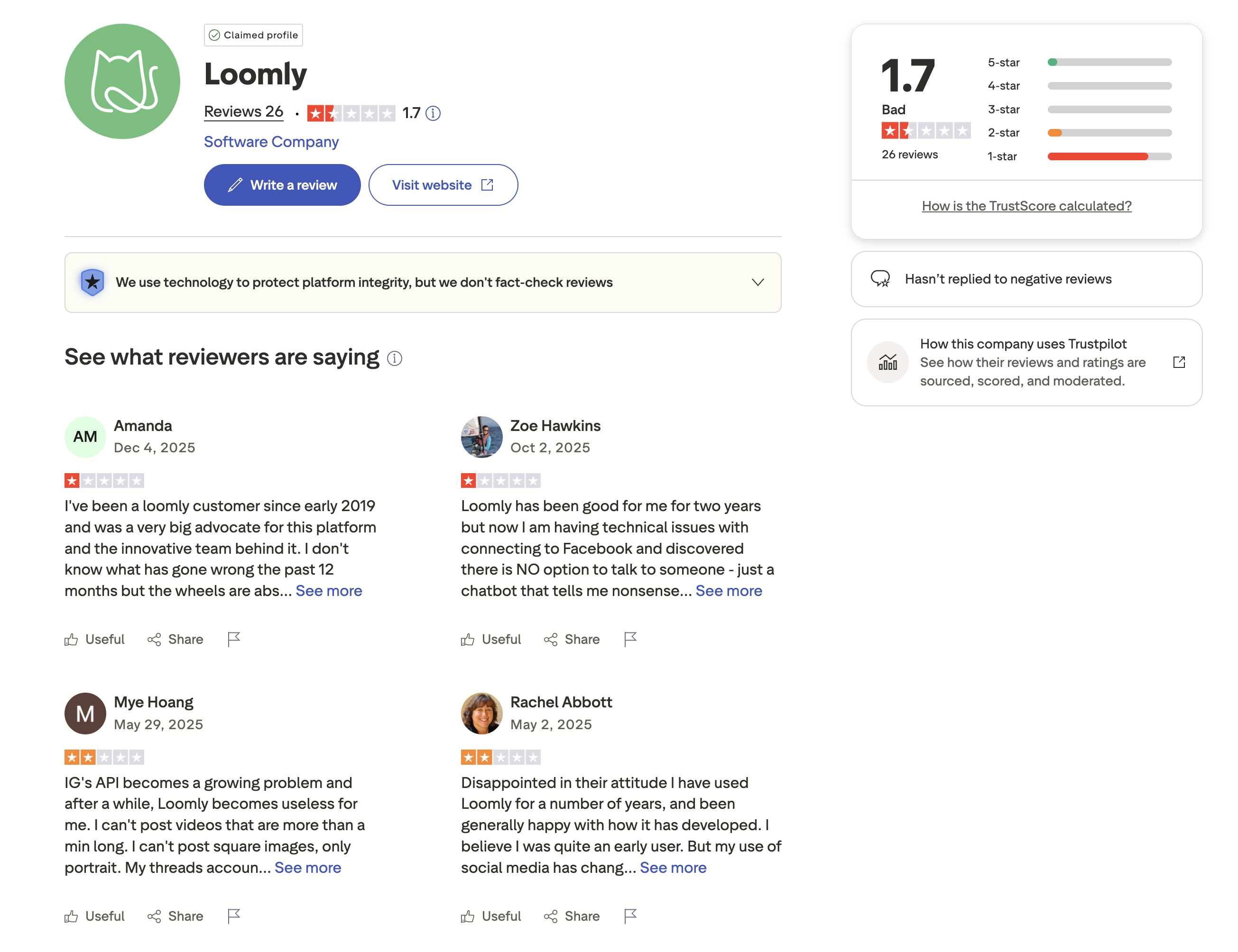
Trustpilot: 1.7/5 (26 reviews) — Very negative, driven by complaints about Loomly's 2025 pricing restructure. Users report significant price increases and reduced feature access on existing plans.
Review Verdict
Loomly leads on G2 with a 4.6/5 rating compared to Sprout Social's 4.4/5, though Sprout has a larger review base (3,822 vs 1,793). On Trustpilot, both score poorly — Sprout Social at 2.0/5 (339 reviews) and Loomly at 1.7/5 (26 reviews). Sprout's Trustpilot complaints focus on billing practices and auto-renewals. Loomly's are driven by 2025 pricing restructure backlash. Both platforms earn higher marks on G2 than Trustpilot, but neither inspires full confidence on the billing and support front.
PostPlanifyManage All Your Social Accounts Without the Chaos
Schedule posts, track performance, and collaborate with your team.
Who Should Use Sprout Social?
If Sprout Social is on your shortlist, you may also want to see our top alternatives to Sprout Social before committing. Also compare Sprout Social with Hootsuite, Buffer, and Agorapulse.
Sprout Social is the better choice if you:
- Are an enterprise team or large agency with a dedicated social media budget
- Need a unified Smart Inbox with CRM integration for customer engagement
- Require social listening and sentiment analysis for brand monitoring
- Want deep analytics with competitor benchmarking and custom reports
- Need task assignment and saved replies for structured team workflows
- Have the budget for $199-$399+/month per seat
- Require Salesforce integration or employee advocacy tools
Who Should Use Loomly?
If Loomly is on your shortlist, you may also want to see our top alternatives to Loomly before committing. Also compare Loomly with Hootsuite, Buffer, and Agorapulse.
Loomly is the better choice if you:
- Are a small to mid-size marketing team on a limited budget
- Want a visual content calendar with drag-and-drop scheduling
- Need approval workflows at $65/month instead of $299/seat/month
- Value Canva, Google Drive, and Unsplash integrations for content creation
- Want 11-platform support including Bluesky and Snapchat
- Don't need social listening, CRM integration, or advanced analytics
- Can work within the Starter plan's limits (12 accounts, 3 users)
The Team Tool That Won't Blow Your Budget
Sprout Social's $199/seat pricing makes it prohibitive for most teams. Loomly offers a friendlier entry point at $65/month, but the $332/month jump for advanced features is steep. PostPlanify gives growing teams what they need — AI content creation, approval workflows, unlimited scheduling, and analytics — at $29-99/month flat. No seat-based scaling.

| Feature | Sprout Social | Loomly | PostPlanify |
|---|---|---|---|
| Starting Price | $199/mo/seat | $65/mo | $29/mo flat |
| Unlimited Accounts | $299/mo/seat | $332/mo (Beyond) | $99/mo (Premium, 25 accounts) |
| AI Caption Generation | Yes | Yes | Yes |
| AI Image Generation | No | No | Yes |
| Canva Integration | Yes | Yes | Yes |
| Google Drive Import | No | Yes | Yes |
| Approval Workflows | $299/mo/seat | $65/mo (Starter) | $99/mo (Premium) |
| Analytics | Standard to Premium | Basic | All paid plans |
| Social Inbox | Yes (Smart Inbox) | Yes | Yes |
| Platforms Supported | 9 | 11 | 10 |
PostPlanify starts at $29/month for 5 accounts with unlimited scheduling and AI tools included. Analytics are included from the Growth plan ($49/month). The Premium plan at $99/month adds 25 accounts, 5 team members, approval workflows, and white-label reports. See all plans on the PostPlanify pricing page.
Build your team's workflow — try PostPlanify free

Related Guides
- Best Social Media Management Platforms
- Manage Multiple Social Media Accounts
- How to Automate Social Media Posts
- Best Sprout Social Alternatives
- Best Loomly Alternatives
FAQ
Is Loomly cheaper than Sprout Social?
Yes, significantly. Loomly's Starter plan costs $65/month for 12 accounts and 3 users. A single Sprout Social Standard seat costs $199/month for 5 profiles. A 3-person team pays $65/month on Loomly vs $597/month on Sprout Social — nearly a 10x difference.
Does Sprout Social have a free plan?
No. Sprout Social offers a 30-day free trial but no permanent free plan. Loomly offers a free plan with 3 accounts, 1 user, and 5 posts per month — limited but available for testing the platform.
Which has better analytics — Sprout Social or Loomly?
Sprout Social has significantly better analytics. It offers custom reports, competitor benchmarking, premium analytics, and AI-powered insights. Loomly's analytics are basic across all tiers. If data-driven decision-making is central to your workflow, Sprout Social is the clear winner — at a premium price.
Does Loomly have social listening?
No. Loomly does not offer social listening or brand monitoring. Sprout Social includes social listening as an Enterprise add-on, with sentiment analysis and keyword tracking. If social listening is essential, Loomly is not the right fit.
Which supports more social media platforms?
Loomly supports 11 platforms (including Bluesky and Snapchat). Sprout Social supports 9 platforms. Both cover the major networks — Instagram, Facebook, X/Twitter, LinkedIn, TikTok, YouTube, Pinterest, Threads, and Google Business. Loomly has the wider platform coverage.
Can I switch from Sprout Social to Loomly?
Yes. You can reconnect your social accounts to Loomly and begin scheduling. The main adjustment is losing Sprout Social's unified inbox, CRM, and social listening — features Loomly does not offer. If you primarily use Sprout for scheduling and approvals, the transition is straightforward.
Is Sprout Social worth the price for small businesses?
For most small businesses, Sprout Social is too expensive. At $199/month per seat, even a single user pays more than many teams' entire social media tool budget. Loomly's $65/month Starter plan or PostPlanify at $29/month provide better value for small teams that don't need enterprise features.
Why is Loomly's Trustpilot score so low?
Loomly's 1.7/5 Trustpilot rating (from 26 reviews) is largely driven by backlash from a 2025 pricing restructure. Long-time users reported significant price increases and reduced features on existing plans. The small review count means this may not represent the full user base, but it signals concerns about Loomly's pricing direction. Sprout Social's Trustpilot score (2.0/5 from 339 reviews) reflects similar billing and support frustrations across the industry.







