
Choosing between SocialBee and Loomly comes down to what matters most: content automation or team-based visual planning. SocialBee is built around category-based scheduling and evergreen content recycling at a flat monthly rate. Loomly is built around a visual content calendar, approval workflows, and post idea inspiration at a tiered team price.
Content recycling versus content calendar — SocialBee automates your evergreen posts while Loomly organizes your team's workflow. Both are solid mid-market tools, but they solve different problems. We compare them on pricing, features, and what real users report. Exploring more? Browse all social media scheduling alternatives.
SocialBee vs Loomly at a Glance
Here's a quick side-by-side overview before we dive deeper:
| Category | SocialBee | Loomly |
|---|---|---|
| Starting Price | $29/mo (flat) | $0/mo (Free) / $65/mo (Starter) |
| Free Plan | No (14-day trial) | Yes (3 accounts, 1 user, 5 posts/mo) |
| Platforms Supported | 9 | 11 |
| Unlimited Scheduling | Yes (all plans) | Yes (paid plans) |
| AI Tools | AI Copilot + DALL-E 3 image gen | AI caption suggestions only |
| AI Image Generation | Yes (DALL-E 3) | No |
| Bulk Scheduling | CSV import | Yes |
| Team Collaboration | Pro plan ($99/mo, 3 users) | Starter plan ($65/mo, 3 users) |
| Approval Workflows | No | Yes (all paid plans) |
| Social Inbox | No | Yes |
| Content Recycling | Yes (category queues) | No |
| G2 Rating | 4.8/5 (399 reviews) | 4.6/5 (1,793 reviews) |
| Trustpilot Rating | 3.3/5 (25 reviews) | 1.7/5 (26 reviews) |
| Best For | Solo creators, content-heavy workflows | Small-mid size teams, approval workflows |
SocialBee Overview

SocialBee is a social media scheduling tool focused on category-based content organization and evergreen post recycling. It's designed for creators, solopreneurs, and small teams who want to build a structured posting system once and let it run on autopilot.
SocialBee supports 9 platforms: Facebook, Instagram, X/Twitter, LinkedIn, Pinterest, Google Business, TikTok, YouTube, and Bluesky.
Key features:
- Category-based scheduling with content queues
- Evergreen content recycling (automatically repost top content)
- AI Copilot for caption generation and content ideas
- DALL-E 3 AI image generation
- Canva and Unsplash integration for in-app design
- RSS feed auto-posting
- Bulk CSV import for scheduling
- Multi-workspace organization (Pro plan)
SocialBee is popular among solo creators and small businesses who prioritize publishing volume and automation over engagement management. For a deeper look, see what users say about SocialBee on G2 and Trustpilot.
Loomly Overview

Loomly is a social media management platform designed around a visual content calendar and team approval workflows. It helps marketing teams plan, create, approve, and publish content with built-in collaboration tools and post inspiration features.
Loomly supports 11 platforms: Facebook, Instagram, X/Twitter, LinkedIn, Pinterest, Google Business, YouTube, TikTok, Snapchat, Threads, and Bluesky.
Key features:
- Visual content calendar with drag-and-drop scheduling
- Approval workflows with custom roles
- AI caption suggestions
- Post ideas and trending content suggestions
- Hashtag manager
- Social inbox for engagement management
- Canva, Google Drive, and Unsplash integration
- Link shortener with analytics
- Best time to post suggestions
- Bulk scheduling
Loomly is popular among small-to-mid size marketing teams that need structured approval processes and a visual way to plan content. For more details, see what users say about Loomly on G2 and Trustpilot.
Pricing Comparison
Pricing is where SocialBee and Loomly take different approaches. SocialBee uses flat monthly pricing based on profile count, while Loomly uses tiered plans based on accounts and users.
SocialBee Pricing
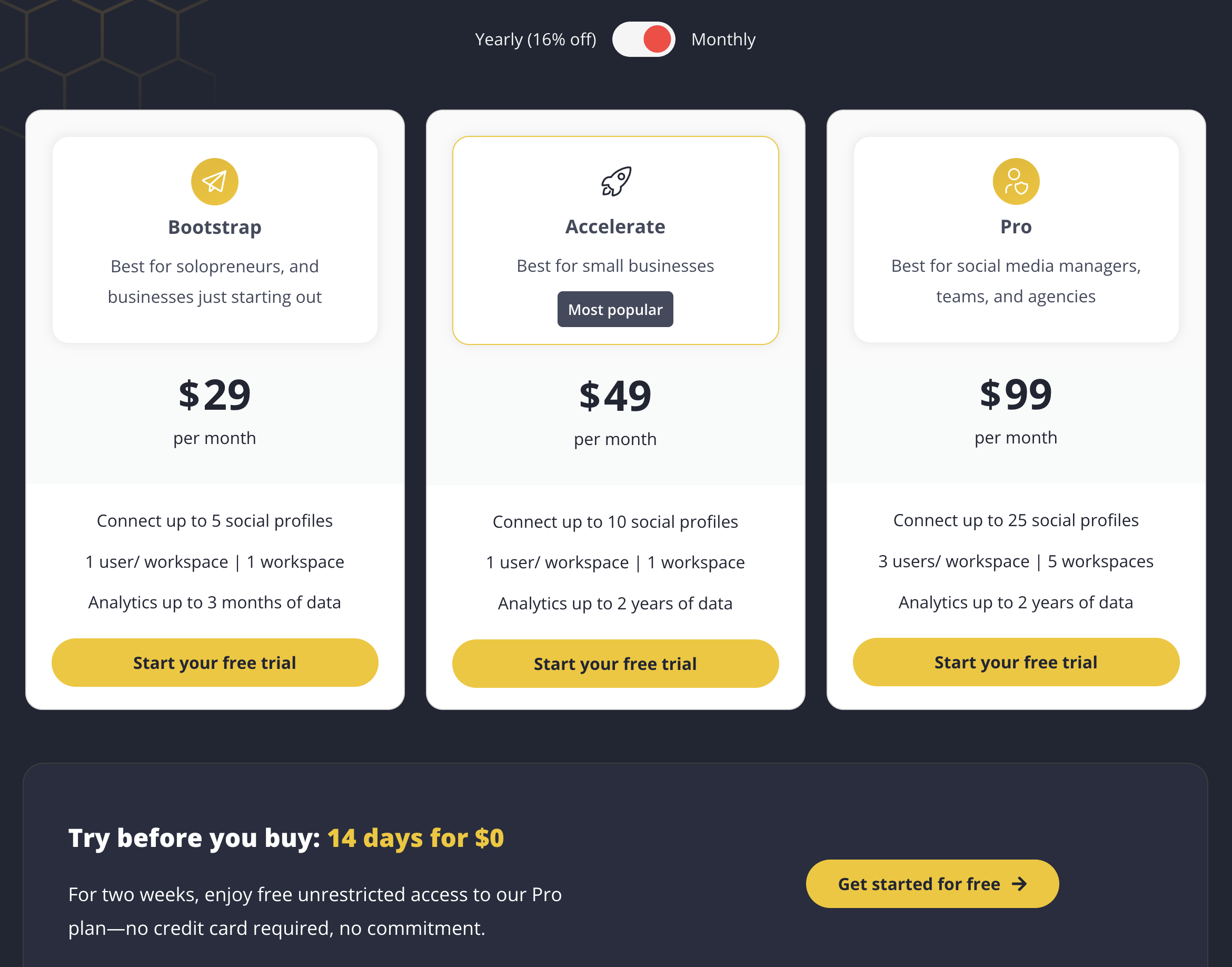
SocialBee uses flat monthly pricing based on the number of social profiles you need. No per-user fees on lower plans. We break this down further in our SocialBee pricing guide.
| Plan | Price | Profiles | Users | Key Features |
|---|---|---|---|---|
| Bootstrap | $29/mo | 5 | 1 | Category scheduling, AI Copilot, RSS import |
| Accelerate | $49/mo | 10 | 1 | Everything in Bootstrap, extended analytics |
| Pro | $99/mo | 25 | 3 (5 workspaces) | Everything in Accelerate, team collaboration |
Example costs:
- Solo creator with 5 profiles = $29/month
- Small business with 10 profiles = $49/month
- Agency with 25 profiles and 3 users = $99/month
Loomly Pricing
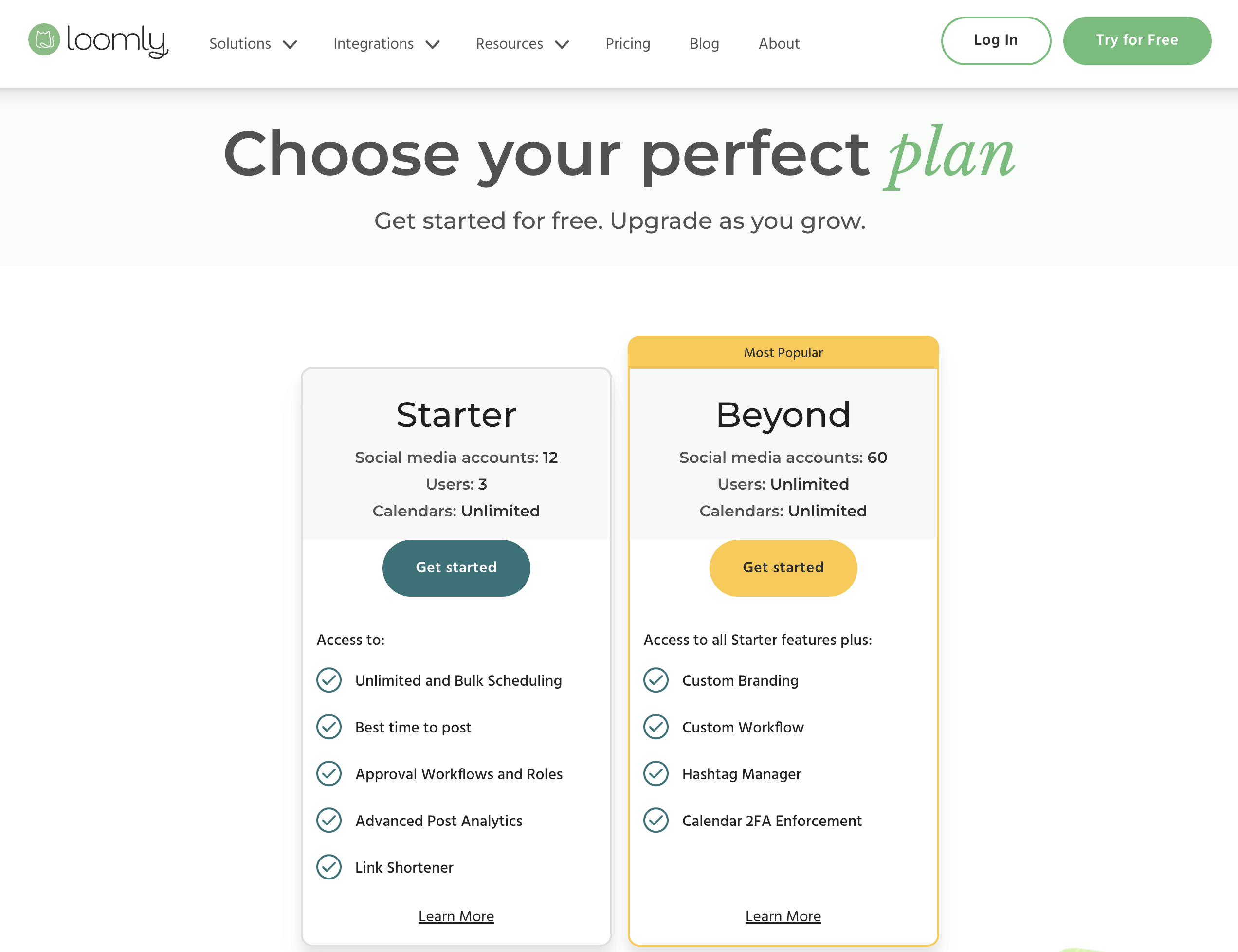
Loomly uses tiered pricing based on social accounts and team size. Annual billing saves approximately 25%.
| Plan | Price | Accounts | Users | Key Features |
|---|---|---|---|---|
| Free | $0/mo | 3 | 1 | 5 posts/month, basic calendar |
| Starter | $65/mo | 12 | 3 | Unlimited posts, approval workflows, social inbox |
| Beyond | $332/mo | 60 | Unlimited | Advanced features, custom roles, priority support |
| Enterprise | Custom | Custom | Custom | Custom integrations, dedicated support |
Example costs:
- Solo user testing the platform = $0/month (Free)
- Small team with 12 accounts = $65/month
- Large team with 60 accounts = $332/month
Price Verdict
SocialBee is cheaper for solo users and small teams who need publishing automation. A solo creator pays $29/month for 5 profiles on SocialBee, while Loomly's free plan only allows 5 posts per month — essentially unusable for real scheduling. The first real Loomly plan (Starter) costs $65/month.
However, Loomly's Starter plan includes 3 users and approval workflows at $65/month, while SocialBee requires the $99/month Pro plan for team collaboration. The biggest concern with Loomly is the massive $267 gap between Starter ($65/month) and Beyond ($332/month) — there's no mid-tier option for growing teams.
 PostPlanify
Manage All Your Social Accounts Without the Chaos
Schedule posts, track performance, and collaborate with your team.


Feature Comparison
Scheduling & Publishing
SocialBee's category-based scheduling and evergreen recycling are its standout features. Loomly offers a visual calendar with bulk scheduling and post ideas.
| Feature | SocialBee | Loomly |
|---|---|---|
| Unlimited scheduling | Yes (all plans) | Yes (paid plans) |
| Category-based queues | Yes (all plans) | No |
| Evergreen content recycling | Yes | No |
| Visual content calendar | Basic | Yes (drag-and-drop) |
| Bulk scheduling | CSV import | Yes |
| RSS feed auto-posting | Yes | No |
| Best time to post | Yes | Yes |
| Post ideas/trends | No | Yes |
| Hashtag manager | No | Yes |
Winner: Depends on your priority. SocialBee wins for publishing automation with category queues, evergreen recycling, and RSS feeds. Loomly wins for visual planning with its content calendar, post idea suggestions, and hashtag manager.
AI Tools
| Feature | SocialBee | Loomly |
|---|---|---|
| AI caption generation | Yes (AI Copilot) | Yes (AI caption suggestions) |
| AI image generation | Yes (DALL-E 3) | No |
| AI content ideas | Yes | Yes (post ideas/trends) |
| AI hashtag suggestions | No | Yes (hashtag manager) |
Winner: SocialBee. Both offer AI caption generation, but SocialBee includes DALL-E 3 image generation — a feature Loomly lacks entirely. Loomly's post idea engine and hashtag manager are useful for inspiration, but they don't compensate for the lack of AI image creation.
Analytics & Reporting
| Feature | SocialBee | Loomly |
|---|---|---|
| Basic analytics | All plans | Paid plans |
| Link tracking | No | Yes (link shortener with analytics) |
| Custom reports | No | No |
| Competitor benchmarking | No | No |
| ROI analysis | No | No |
| Export reports | Yes | Yes |
Winner: Tie. Both offer basic analytics without advanced reporting. Loomly has an edge with its built-in link shortener and click tracking. Neither tool is strong in the analytics department — teams needing deep reporting will need a dedicated analytics tool.
Team Collaboration
| Feature | SocialBee | Loomly |
|---|---|---|
| Multiple users | Pro plan (3 users) | Starter plan (3 users) |
| Approval workflows | No | Yes (all paid plans) |
| Custom roles | No | Yes |
| User permissions | Pro plan | Yes |
| Post comments/feedback | No | Yes |
| Unlimited users | No | Beyond plan ($332/mo) |
Winner: Loomly. Approval workflows, custom roles, and post-level commenting make Loomly significantly stronger for team collaboration. SocialBee's collaboration is limited to the Pro plan with a maximum of 3 users and no approval workflows.
Content & Creative Tools
| Feature | SocialBee | Loomly |
|---|---|---|
| Canva integration | Yes | Yes |
| Unsplash integration | Yes | Yes |
| Google Drive integration | No | Yes |
| AI image generation | Yes (DALL-E 3) | No |
| Link shortener | No | Yes (with analytics) |
| Post templates | No | Yes (post ideas) |
Winner: Tie with different strengths. SocialBee wins on AI image generation with DALL-E 3. Loomly wins on integrations with Google Drive support, a built-in link shortener, and post idea templates. Both include Canva and Unsplash.
Platform Support
| Platform | SocialBee | Loomly |
|---|---|---|
| Yes | Yes | |
| Yes | Yes | |
| X/Twitter | Yes | Yes |
| Yes | Yes | |
| TikTok | Yes | Yes |
| YouTube | Yes | Yes |
| Yes | Yes | |
| Google Business | Yes | Yes |
| Bluesky | Yes | Yes |
| Threads | No | Yes |
| Snapchat | No | Yes |
Winner: Loomly. Loomly supports 11 platforms vs SocialBee's 9. Loomly includes Threads and Snapchat, which SocialBee does not support.
What Real Users Say
SocialBee Reviews
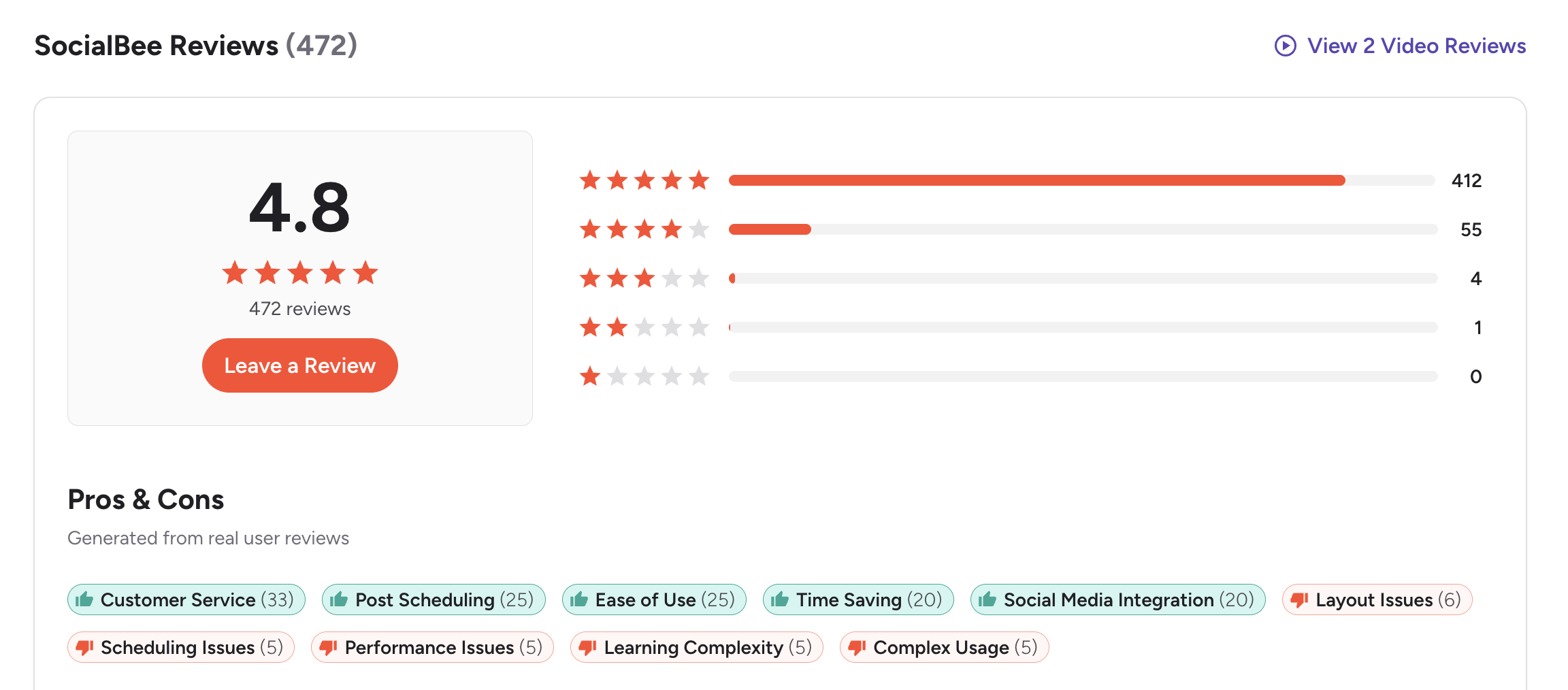
G2: 4.8/5 (399 reviews) — An overwhelmingly positive rating. Users praise customer service, post scheduling, ease of use, and time savings. Common complaints include layout issues, occasional scheduling bugs, and a learning curve for category-based posting.
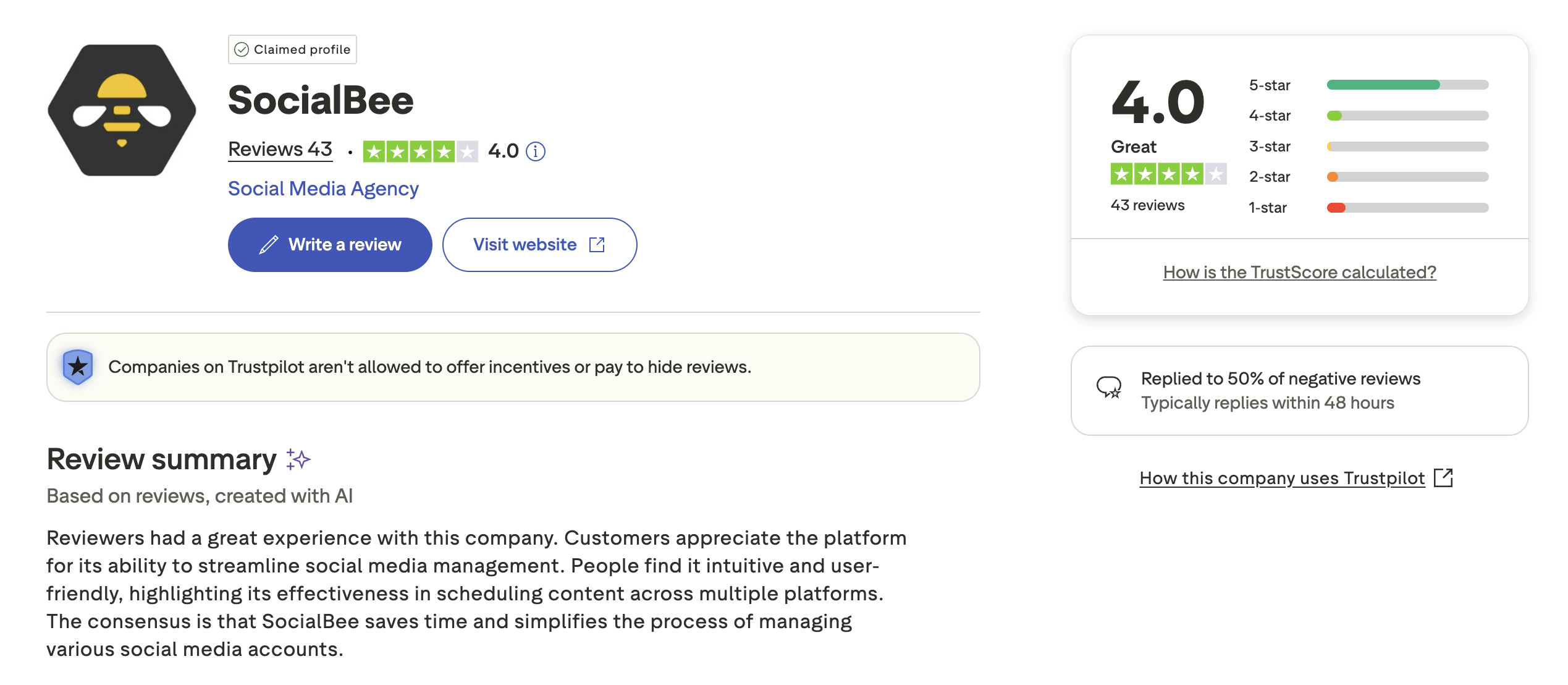
Trustpilot: 3.3/5 (25 reviews) — A mixed rating. Positive reviewers highlight helpful customer support and easy setup. Negative reviewers mention occasional technical issues and limited analytics.
Loomly Reviews
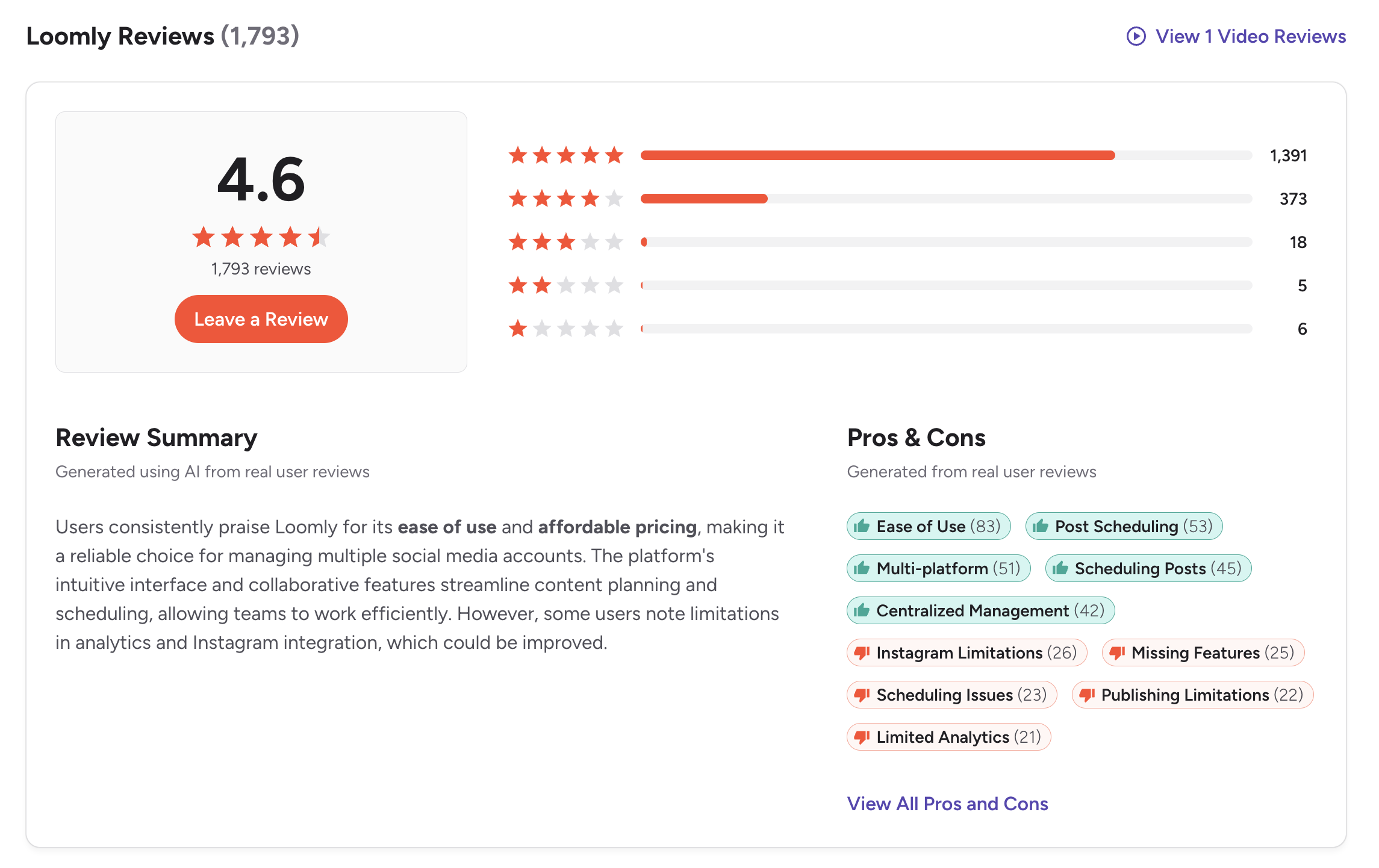
G2: 4.6/5 (1,793 reviews) — A strong G2 rating with a very large review base. Users praise the visual calendar, approval workflows, ease of use, and content organization. Common complaints include the pricing gap between plans, basic analytics, and limited automation features.
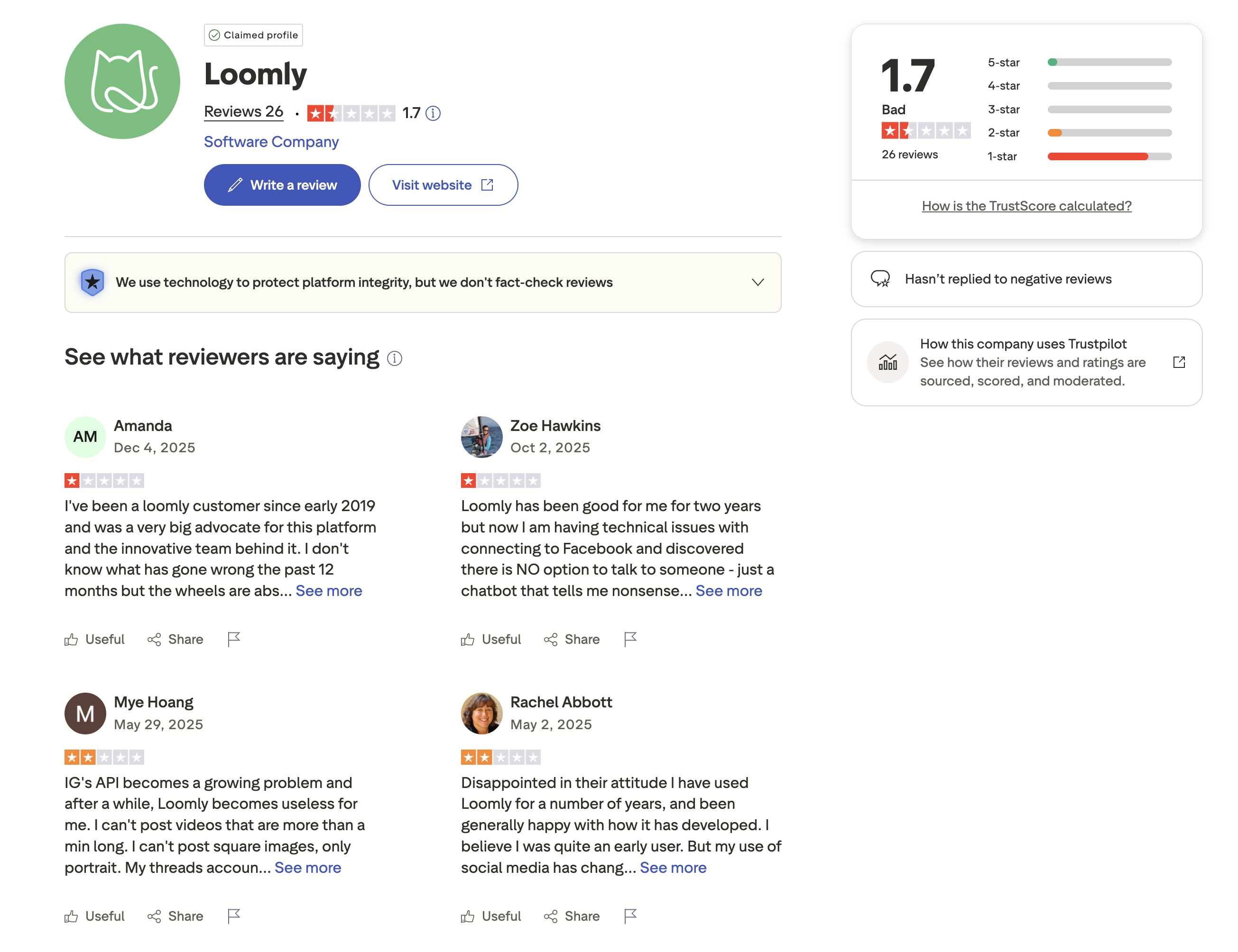
Trustpilot: 1.7/5 (26 reviews) — A concerning Trustpilot score. Negative reviewers report billing issues, difficult cancellation processes, and unresponsive customer support. The gap between G2 and Trustpilot ratings is significant and worth noting.
Review Verdict
SocialBee has a higher G2 rating (4.8/5 vs 4.6/5) but from a much smaller review base (399 vs 1,793). Loomly's larger G2 review count gives its 4.6/5 rating more statistical weight. On Trustpilot, SocialBee scores 3.3/5 vs Loomly's troubling 1.7/5 — though both have small sample sizes. The pattern suggests SocialBee has stronger user satisfaction overall, while Loomly's Trustpilot reviews raise concerns about billing and customer support.
PostPlanifyManage All Your Social Accounts Without the Chaos
Schedule posts, track performance, and collaborate with your team.
Who Should Use SocialBee?
If SocialBee sounds right for you but you want to explore other options first, check out our best alternatives to SocialBee. You can also see how SocialBee stacks up against Buffer, Hootsuite, Later, and Agorapulse.
SocialBee is the better choice if you:
- Need category-based scheduling to organize content by topic or type
- Want evergreen content recycling to automatically repost top-performing content
- Are a solo creator or small business looking for flat-rate pricing ($29-$99/mo)
- Need AI image generation (DALL-E 3) alongside AI captions
- Prefer RSS feed auto-posting and bulk CSV import for high-volume publishing
- Don't need approval workflows or a visual content calendar
Who Should Use Loomly?
If Loomly is on your shortlist, you may also want to see our top alternatives to Loomly before committing. Also compare Loomly with Buffer, Hootsuite, Sprout Social, and Later.
Loomly is the better choice if you:
- Need approval workflows and custom roles for team-based content publishing
- Want a visual content calendar for planning and organizing posts
- Need post idea suggestions and a hashtag manager for content inspiration
- Support 11 platforms including Snapchat and Threads
- Want a social inbox for basic engagement management
- Are a small-to-mid size marketing team that values structured collaboration
Automation and Collaboration in One Place
SocialBee nails content recycling but lacks a visual calendar and advanced approval workflows. Loomly has the calendar and approvals but charges $65-332/month with no content recycling. PostPlanify gives you both: AI-powered content creation, team approvals, and unlimited scheduling in a clean visual interface — starting at $29/month.

| Feature | SocialBee | Loomly | PostPlanify |
|---|---|---|---|
| Starting Price | $29/mo | $65/mo (Starter) | $29/mo flat |
| Max Accounts | $99/mo (25 profiles) | $332/mo (60 accounts) | 25 accounts ($99/mo Premium) |
| AI Caption Generation | Yes | Yes | Yes |
| AI Image Generation | Yes (DALL-E 3) | No | Yes |
| Canva Integration | Yes | Yes | Yes |
| Google Drive Import | No | Yes | Yes |
| Approval Workflows | No | Yes (Starter+) | $99/mo (Premium) |
| Content Recycling | Yes (category queues) | No | Yes |
| Visual Calendar | Basic | Yes | Yes |
| Social Inbox | No | Yes | Yes |
| Platforms Supported | 9 | 11 | 10 |
| Unlimited Scheduling | All plans | Paid plans | All paid plans |
PostPlanify starts at $29/month for 5 accounts with unlimited scheduling and AI tools included. Analytics are included from the Growth plan ($49/month). The Premium plan at $99/month adds 25 accounts, 5 team members, and approval workflows — features that cost $332/month on Loomly's Beyond plan or are missing entirely from SocialBee. See all plans on the PostPlanify pricing page.
Get the best of both worlds — try PostPlanify free

Related Guides
- Best Social Media Management Platforms
- How to Schedule Social Media Posts
- How to Automate Social Media Posts
- Best SocialBee Alternatives
- Best Loomly Alternatives
FAQ
Is SocialBee cheaper than Loomly?
Yes, for solo users. SocialBee starts at $29/month for 5 profiles. Loomly's free plan only allows 5 posts per month, making it impractical for real scheduling. Loomly's first usable plan (Starter) costs $65/month. However, Loomly's Starter includes 3 users and approval workflows, while SocialBee requires the $99/month Pro plan for team features.
Does Loomly have content recycling?
No. Loomly does not offer evergreen content recycling or category-based queues. If automated content reposting is important to your workflow, SocialBee or PostPlanify are better options.
Does SocialBee have approval workflows?
No. SocialBee does not offer built-in approval workflows. If your team requires content approvals before publishing, Loomly includes this on all paid plans. PostPlanify also offers approval workflows on its Premium plan.
Which supports more social media platforms?
Loomly supports 11 platforms (including Snapchat and Threads). SocialBee supports 9 platforms. Both cover the major networks — the main difference is Loomly's Snapchat and Threads support.
Why is Loomly's Trustpilot rating so low?
Loomly has a 1.7/5 Trustpilot rating from 26 reviews, with complaints centered on billing issues, difficult cancellations, and unresponsive customer support. Its G2 rating (4.6/5 from 1,793 reviews) is much stronger, suggesting the Trustpilot complaints may reflect specific pain points rather than the overall product experience.
Can I switch from Loomly to SocialBee?
Yes. You can reconnect your social accounts to SocialBee and use the bulk CSV import feature to migrate scheduled content. SocialBee's 14-day free trial gives you time to set up and evaluate the platform before fully switching.
Which has better AI tools — SocialBee or Loomly?
SocialBee has stronger AI capabilities. It includes an AI Copilot for caption generation plus DALL-E 3 for AI image creation. Loomly offers AI caption suggestions but has no AI image generation. If AI-powered content creation matters to you, SocialBee is the better choice.
Is Loomly worth it for small businesses?
It depends on your team size. Loomly's Starter plan at $65/month is reasonable for teams of 2-3 that need approval workflows and a visual calendar. But the jump to Beyond ($332/month) for unlimited users is steep. Small businesses with tight budgets should consider SocialBee ($29/month) or PostPlanify ($29/month) for better value.







